Transcend StoreJet 25A3 1TB External Hard Drive
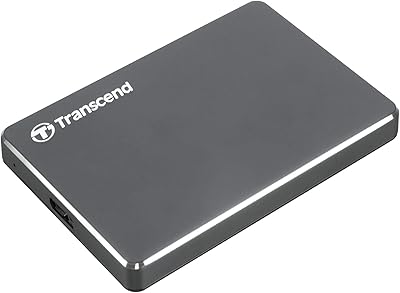
Transcend StoreJet 25A3 1TB External Hard Drive — image 1
76%
24%

Overview

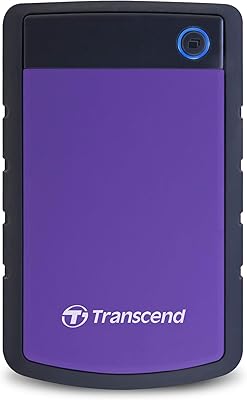
The Transcend StoreJet 25A3 1TB External Hard Drive has been quietly holding its ground in the portable storage market since 2011 — and in consumer tech, that kind of staying power means something. People keep buying it because it works. What immediately stands out is the rubberized outer shell, a thick, grippy casing that feels far more substantial than the thin plastic housings found on cheaper rivals. Bundled with Transcend Elite software and a one-touch backup button, this portable hard drive offers a bit more out of the box than a bare drive with a cable and nothing else.

Features & Benefits

Plug it into a USB 3.0 port and the StoreJet 25A3 handles large file transfers at a reasonable clip — not fast by modern SSD standards, but honest performance for a mechanical drive. The three-stage shock absorption system is the headline protection feature: an internal suspension cradle paired with that rubberized shell gives the drive a fighting chance when it slips off a desk or takes a knock inside a bag. Everyday bumps, yes — a fall down a flight of stairs, probably not. The Quick Reconnect button is a small but genuinely useful addition, letting you bring a safely ejected drive back online without fussing with cables.

Best For

This Transcend drive makes the most sense for students and remote workers who carry storage every single day and cannot afford to babysit a fragile device. If you are still running an older laptop with USB 2.0, the backward compatibility means the drive will keep working after a hardware upgrade. Home users who simply want to press one button and have their files backed up — no manual required — will find the auto-backup feature refreshingly straightforward. Anyone needing to protect sensitive documents will also appreciate that 256-bit AES encryption is included through Transcend Elite, without paying a premium for a dedicated encrypted model.

User Feedback

Across more than 200 owner ratings, the StoreJet 25A3 sits at a 4.2-star average, with positive comments clustering reliably around build quality and durability. Multiple owners report the drive surviving bag drops and desk falls that would have finished off a cheaper plastic unit. The criticism that surfaces most consistently involves the Transcend Elite software, which works but can feel dated and clunky on newer operating systems — functional rather than polished. A number of reviewers also noted that real-world transfer speeds occasionally trail competing USB 3.0 drives. That said, long-term owners repeatedly mention years of trouble-free use, which suggests the core drive reliability genuinely holds up.

Pros

  • The rubberized outer shell provides real everyday drop and knock protection that bare plastic drives simply cannot match.
  • USB 3.0 connectivity with full USB 2.0 backward compatibility means this drive works across a wide range of older and newer hardware.
  • The one-touch auto-backup button lets you trigger a full backup instantly without opening a single application.
  • At 7.3 ounces and a slim 2.5-inch form factor, the StoreJet 25A3 slips easily into a laptop bag without adding noticeable weight.
  • 256-bit AES encryption via Transcend Elite adds meaningful file security for sensitive documents without requiring a separate paid tool.
  • The Quick Reconnect button is a small but practical feature that saves time when you safely eject the drive but need it again immediately.
  • A 4.2-star average across hundreds of real-world owners points to consistent satisfaction and long-term reliability.
  • Multiple reviewers report years of continuous daily use without hardware failures, which speaks well of the drive’s build longevity.
  • Broad OS compatibility covering Windows, Mac, and Linux makes it versatile across different computing environments.

Cons

  • As a mechanical hard drive, transfer speeds lag noticeably behind portable SSDs, which matters during large or frequent file moves.
  • The Transcend Elite software feels dated and can behave inconsistently on the latest versions of macOS and Windows 11.
  • 1TB of storage fills up faster than most buyers expect, especially with modern media files and system backups competing for space.
  • The three-stage shock system handles incidental bumps well but offers no meaningful protection against serious drops onto hard floors.
  • No USB-C connection means this portable hard drive will eventually require an adapter as USB-A ports disappear from newer laptops.
  • The encryption feature is software-based through Transcend Elite rather than hardware-level, which some security-conscious users may find less reassuring.
  • The drive produces audible mechanical noise during heavy read and write operations, which can be noticeable in quiet environments.
  • Buyers who need more than basic data management will find the bundled software too limited compared to third-party backup solutions.

Ratings

The scores below were generated by our AI review engine after analyzing verified owner feedback for the Transcend StoreJet 25A3 1TB External Hard Drive from buyers worldwide, with spam, incentivized, and bot-flagged submissions actively filtered out before scoring. Each category reflects the full picture — where real users praised the drive and where they genuinely struggled — so you can make an informed decision rather than a hopeful one. Both the strengths and the frustrations are represented here exactly as the data tells them.

Build Quality
88%
The rubberized outer shell consistently draws praise from owners who carry this portable hard drive daily. Multiple reviewers specifically mention the casing feeling premium and purposeful compared to smooth plastic competitors that scuff and crack after a few months of bag life.
A small number of long-term users report the rubber coating starting to peel or feel slightly tacky after a couple of years of heavy use. It is not a widespread complaint, but it is enough to keep the score short of outstanding.
Shock Resistance
82%
18%
Owners who accidentally knocked the StoreJet 25A3 off desks or dropped it from bag height frequently report the drive survived without data loss or mechanical noise. For commuters and students who cannot always treat their gear gently, this reliability against everyday impacts is a meaningful real-world advantage.
The protection is calibrated for incidental drops, not punishment. Users who dropped the drive from a significant height onto hard flooring occasionally reported failure, and a few noted the internal suspension does not fully eliminate clicking sounds after particularly hard impacts.
Transfer Speed
63%
37%
On a USB 3.0 connection, the drive performs adequately for routine document backups, photo libraries, and general file transfers. Users copying modest volumes of data — a few gigabytes at a time — rarely found the speed a problem in day-to-day use.
This is where the mechanical drive nature catches up with the StoreJet 25A3. Reviewers transferring large video files or running back-to-back comparisons with SSD-based competitors note a clear speed gap that becomes genuinely tedious over time. Several users flagged this as their primary disappointment after purchase.
Portability
91%
At 7.3 ounces and roughly the footprint of a small paperback, this Transcend drive disappears into a laptop bag without adding meaningful weight. Owners who travel frequently or carry it between multiple work locations consistently highlight how easy it is to forget it is even in the bag.
There is little to criticize here. The only minor gripe from a handful of users is that the rubberized coating can cause the drive to stick slightly to smooth bag linings rather than sliding out cleanly — a very minor inconvenience at worst.
Backup Functionality
78%
22%
The one-touch backup button is one of the most appreciated features among non-technical users. Home users and students in particular praise how pressing a single physical button handles the entire backup process without navigating any menus, which removes a genuine barrier to regular backup habits.
The button only works as well as the Transcend Elite software behind it, and that software has its own reliability issues on newer operating systems. A subset of users found the one-touch feature inconsistent or unresponsive until they updated or reinstalled the software, which undermines its simplicity promise.
Software Quality
54%
46%
Transcend Elite covers the functional basics — scheduled backups, folder syncing, and AES encryption — without requiring any technical knowledge to configure initially. For users running Windows 10 and keeping the software updated, it generally performs its core jobs without major incidents.
This is the most consistently criticized aspect of the drive. Reviewers on newer operating systems, particularly macOS users and those on Windows 11, report the interface feeling visually outdated and occasionally unresponsive. Several buyers simply stopped using Transcend Elite entirely and relied on the drive as plain storage, which works fine but sidesteps the advertised features.
Encryption Security
73%
27%
256-bit AES encryption covers a real need for users storing tax documents, business files, or personal records on a drive that moves between locations. The fact that it is included at no extra cost makes this Transcend drive competitive against bare drives that offer no encryption option at all.
The software-based implementation means encryption depends entirely on Transcend Elite being installed and functional on the host machine, which limits portability of the security layer. Users who want hardware-enforced encryption that works independently of software will need to look at a different product category.
Ease of Setup
86%
Plug-and-play functionality works exactly as expected for basic storage use — connect the cable and the drive appears in your file manager within seconds. Non-technical users repeatedly mention this as a reason they recommended the drive to family members who are not comfortable with complex setup procedures.
Setup complexity increases notably once Transcend Elite enters the picture. Installing the software, configuring backup folders, and enabling encryption requires more steps than the box implies, and a few users found the software installation process confusing on Mac systems due to formatting and permission prompts.
Long-Term Reliability
79%
21%
Multi-year ownership reports appear with notable frequency in the review base, with several users citing three to five years of daily use without mechanical failure. For a mid-range mechanical drive at this price, that kind of ownership longevity is genuinely reassuring and reflects well on Transcend’s internal component choices.
Not every experience is positive over the long haul. A portion of reviewers report the drive failing around the two-year mark, which aligns with typical mechanical HDD wear patterns under heavy use. As with any spinning drive, the failure risk is real and regular backups of the backup drive itself are advisable.
Value for Money
76%
24%
The combination of physical durability, 1TB capacity, a backup button, and encryption features bundled into one device at its price point represents reasonable value for buyers who want more than a bare drive. Users who factored in the cost of a separate rugged case for a cheaper drive often concluded this was the smarter purchase.
The value calculation has shifted as portable SSDs have dropped in price. Buyers comparing this Transcend drive against current SSD alternatives at similar or slightly higher prices are now getting meaningfully faster performance, which makes the HDD’s value proposition harder to defend than it was a few years ago.
Compatibility
84%
Windows, Mac, and Linux support covers the vast majority of buyers, and the USB 2.0 backward compatibility makes this drive genuinely useful across a wide range of older hardware that many users have not yet replaced. This broad compatibility earns consistent praise from users in mixed-device households.
The drive ships pre-formatted as NTFS, which creates a minor hurdle for Mac users who discover they cannot write to it without reformatting or installing third-party software. This is a known and solvable issue, but it catches enough first-time Mac buyers off guard to be worth noting prominently.
Cable & Connectivity
67%
33%
The USB-A connection works reliably without power adapters or drivers, and the Quick Reconnect button addresses a real irritation that users of other drives frequently complain about — having to physically unplug and replug just to remount an ejected drive.
The USB-A only connection is an increasingly visible limitation as newer laptops ship with USB-C ports exclusively. Users on modern MacBooks or recent ultrabooks already need a hub or adapter, which adds friction and cost. There is no USB-C variant of this drive available.
Noise Level
66%
34%
During light read operations and when the drive is idle, noise levels are minimal and unlikely to distract in normal working environments. Casual users copying documents or photos rarely notice the drive is even spinning.
Under sustained heavy write operations — like a full system backup or copying a large video library — the mechanical spinning and read-write head movement becomes audible in quiet rooms. A few reviewers working in shared office or library settings mentioned the noise was noticeable enough to draw attention.

Suitable for:

The Transcend StoreJet 25A3 1TB External Hard Drive is a strong fit for anyone who needs dependable portable storage without treating it with museum-level care. Students carrying laptops between classes and coffee shops will appreciate the rubberized shell that absorbs the inevitable knocks of daily bag life. Remote workers who back up project files regularly will find the one-touch backup button a genuinely time-saving feature — no software windows to open, no multi-step process to remember. If you are still using an older machine with USB 2.0 ports, this drive works now and will continue to work after you upgrade, so you are not buying yourself into a dead end. Home users who simply want a set-it-and-forget-it backup solution with optional file encryption will also find this Transcend drive hits a practical sweet spot between price, capacity, and everyday usability.

Not suitable for:

Anyone who moves large volumes of data frequently and values raw transfer speed should probably look elsewhere, because the Transcend StoreJet 25A3 1TB External Hard Drive is a mechanical hard drive — and mechanical drives cannot match the throughput of portable SSDs, which have come down considerably in price. Creative professionals transferring large video files, photographers batch-importing RAW shoots, or anyone doing regular multi-gigabyte transfers will find the speed ceiling frustrating over time. The bundled Transcend Elite software, while functional, feels like a product of an earlier era and may require some patience on the latest versions of Windows or macOS. Users who need a truly rugged drive for outdoor fieldwork, construction sites, or adventure travel should look at purpose-built ruggedized options with MIL-STD drop ratings, since this drive handles everyday bumps but was never designed for extreme punishment. Finally, if 1TB is already too small for your current storage needs, this is not the right starting point.

Specifications

  • Storage Capacity: The drive offers 1TB (approximately 1,000GB) of usable storage for files, backups, photos, and documents.
  • Drive Type: This is a mechanical hard disk drive (HDD) with a traditional spinning platter design, not a solid-state drive.
  • Interface: It connects via USB 3.0 for faster data transfers and is fully backward compatible with USB 2.0 ports.
  • Form Factor: The drive uses a 2.5-inch internal HDD form factor, which requires no external power adapter — bus-powered via USB.
  • Dimensions: Physical dimensions measure 3.15 inches long by 5.14 inches wide by 0.59 inches thick, making it genuinely pocketable.
  • Weight: The unit weighs 7.3 ounces, light enough to carry daily in a bag without adding noticeable bulk.
  • Shock Protection: An advanced three-stage internal suspension system cushions the mechanical drive against accidental everyday drops and vibrations.
  • Outer Shell: The exterior features a rubberized anti-slip coating that provides grip and an additional physical barrier against impact damage.
  • Encryption: 256-bit AES file and folder encryption is available at the software level through the bundled Transcend Elite application.
  • Backup Button: A dedicated one-touch auto-backup button on the drive body triggers an instant backup without launching any software manually.
  • Quick Reconnect: A secondary Quick Reconnect button re-enables a safely ejected drive without requiring the USB cable to be unplugged and reinserted.
  • OS Compatibility: The drive is compatible with Windows 7, 8, and 10, Mac OS X 10.7 or later, and Linux Kernel 2.6.31 or later.
  • Bundled Software: Transcend Elite data management software is included and handles backup scheduling, encryption, and cloud sync features.
  • Color & Finish: The drive is available in black with a matte rubberized texture that resists fingerprints and minor surface scratches.
  • Market Standing: The drive holds an average rating of 4.2 out of 5 stars across 234 user ratings and ranks #363 in External Hard Drives.

Related Reviews
Transcend StoreJet 25H3 1TB Portable External Hard Drive
88%
89%
Value for Money
91%
Build Quality / Durability
86%
Performance (Transfer Speed)
94%
Portability / Size / Weight
90%
Compatibility (Mac & PC)
More
Transcend StoreJet 25C3N 2TB Portable External Hard Drive
84%
94%
Portability & Size
88%
Build Quality & Durability
90%
Transfer Speed
87%
Compatibility & Connectivity
86%
Design & Aesthetics
More
HWAYO HWSTARS1TB 1TB Portable External Hard Drive
75%
83%
Value for Money
91%
Ease of Setup
88%
Portability
62%
Transfer Speed
58%
Build Quality
More
Transcend StoreJet 25M3C 2TB
79%
91%
Build Quality & Durability
62%
Transfer Speed
88%
Shock & Drop Resistance
89%
Plug-and-Play Compatibility
93%
Portability & Form Factor
More
ModusTech MT1TB-PEHD 1TB Portable External Hard Drive
77%
93%
Ease of Setup
61%
Transfer Speed
74%
Build Quality & Durability
89%
Portability & Form Factor
86%
Value for Money
More
ADATA HV620S 1TB External Hard Drive
80%
93%
Portability & Form Factor
88%
Value for Money
61%
Transfer Speed
77%
Build Quality
94%
Plug-and-Play Ease
More
Caraele 1TB Portable External Hard Drive
73%
88%
Value for Money
91%
Ease of Setup
93%
Portability
61%
Transfer Speed
74%
Build Quality
More
Aiolo Innovation A4 1TB
78%
91%
Value for Money
88%
Portability
93%
Plug-and-Play Setup
67%
Transfer Speed
72%
Build Quality
More
ySky 1TB Portable External Hard Drive
86%
93%
Portability
88%
Ease of Use
85%
Battery Life
90%
Compatibility
82%
Backup Speed
More
BIPRA S3 1TB Portable External Hard Drive
73%
91%
Ease of Setup
88%
Cross-Platform Compatibility
86%
Portability & Form Factor
62%
Transfer Speed
83%
Value for Money
More

FAQ

Yes, the StoreJet 25A3 is fully backward compatible with USB 2.0, so it will connect and function normally on older hardware. You will just see slower transfer speeds than you would on a USB 3.0 port, which is a limitation of the older standard rather than the drive itself. When you eventually upgrade to a newer machine, the drive will automatically take advantage of the faster USB 3.0 connection.

No, for basic file storage and transfers you can simply plug it in and use it without installing anything. The bundled Transcend Elite software is only needed if you want to use the one-touch backup feature, set up scheduled backups, or enable AES file encryption. Most people can skip it entirely for day-to-day drag-and-drop file management.

Once you have configured Transcend Elite and pointed it at the folders you want to protect, pressing the physical button on the drive body triggers an immediate backup of those folders. It is designed so you do not have to open any application — one press and it runs in the background. Initial setup takes a few minutes, but after that the button genuinely works as advertised.

It handles the kind of drops that happen in real life reasonably well — sliding off a desk, bouncing inside a bag, or being knocked off a table. The combination of the internal three-stage suspension system and the rubberized outer shell provides meaningful protection against everyday impacts. That said, it is not a certified ruggedized drive, so a hard fall onto concrete from a significant height is still a risk you should not test.

Yes, it is compatible with Mac OS X 10.7 (Lion) and all later versions. Keep in mind that the drive ships formatted as NTFS by default, which Macs can read but cannot write to natively. You will likely want to reformat it to exFAT for full read-write access on both Mac and Windows, which takes only a few minutes using Disk Utility.

As a mechanical hard drive, it moves data noticeably slower than a portable SSD would at a similar price point. In practice, expect real-world speeds in the range of 80 to 120 MB/s on a USB 3.0 connection, which is typical for a 2.5-inch HDD. For occasional backups and document storage this is perfectly acceptable, but if you regularly transfer large video files, an SSD would be a more efficient choice.

No external power is required. This Transcend drive draws all the power it needs directly from the USB connection, so a single cable is all you need. This makes it much more portable and convenient than older 3.5-inch desktop drives that require a wall adapter.

When you safely eject a drive through your operating system, normally you would have to physically unplug and reinsert the cable to use it again. The Quick Reconnect button skips that step — press it and the drive remounts without touching the cable. It sounds minor, but if you safely eject the drive regularly as good practice, you will find yourself using this button more than you expect.

Encryption is handled through the Transcend Elite software using 256-bit AES, which is a widely trusted standard used in banking and government applications. You select the specific files or folders you want to protect, set a password, and the software handles the rest. It is software-based rather than hardware-based encryption, which is worth noting if you have very high security requirements, but for protecting personal documents, financial records, or private photos it is more than adequate.

For the average user backing up documents, photos, music, and general files, 1TB goes a surprisingly long way — it can comfortably hold hundreds of thousands of photos or tens of thousands of songs. Where it fills up faster is with 4K video, large game libraries, or full system image backups, which can eat through storage quickly. If you are unsure, think about what you currently have stored on your computer and compare; most everyday users will find 1TB gives them room to grow.

Where to Buy