Overview

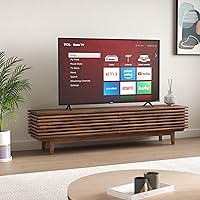
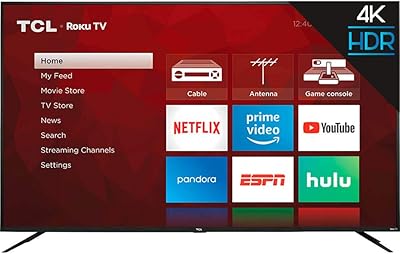
The TCL 55S425 55-inch 4K Roku Smart TV arrived in 2019 as one of the more compelling budget 55-inch options in TCL's S-series lineup — a solid choice for buyers who want a big screen without spending premium dollars. It uses a direct-lit LED panel, which means the backlighting sits behind the entire screen rather than along the edges, producing fairly consistent brightness across the image. That said, this is not a flagship display. Think of it as a practical upgrade path — strong enough for everyday watching, but not engineered for the calibrated picture performance that enthusiasts chase.
Features & Benefits

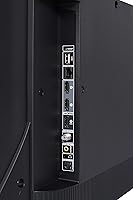
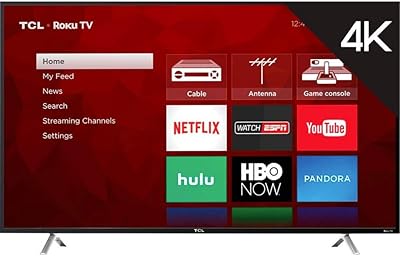
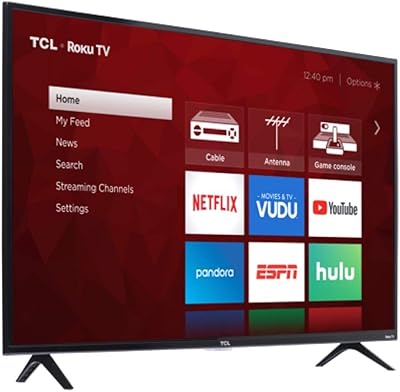
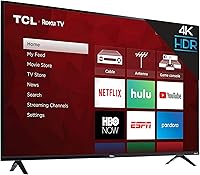
At its core, this TCL Roku TV delivers 4K UHD resolution alongside HDR support, so colors look richer and highlights pop more than they would on a standard HD panel. The built-in Roku platform is genuinely one of the better smart TV operating systems around — fast, clean, and easy to navigate even for less tech-savvy users. Connectivity is practical: three HDMI ports, a USB input, optical audio out, and both dual-band Wi-Fi and Ethernet. One spec worth clarifying: the 120 Hz CMI figure is a motion-enhancement rating, not a true native refresh rate — the panel itself runs at 60 Hz, so manage expectations for fast-motion content accordingly.

Best For

The 55S425 makes the most sense for people upgrading from an older 1080p TV who want a noticeable jump in picture size and sharpness without a significant investment. Cord-cutters will particularly appreciate the built-in Roku interface — everything from Netflix to niche streaming channels is accessible right out of the box, no extra hardware needed. It also works well as a secondary room TV: a bedroom, guest room, or finished basement where reference-grade picture quality is not a priority. If your household already uses Alexa or Google Assistant, the voice control integration adds a layer of convenience that casual viewers tend to enjoy.

User Feedback

Owners of this budget 4K set tend to be genuinely pleased with how much picture they get for the money — bright, colorful daytime viewing earns consistent praise. The Roku setup experience is another highlight; first-time smart TV buyers in particular find it far less confusing than rival platforms. On the downside, dark scene performance draws frequent criticism: the direct-lit backlight can produce visible blooming or grayish blacks in dimly lit content. Built-in audio is thin, and most reviewers recommend pairing it with a soundbar. A smaller but notable group of long-term owners has raised durability concerns — worth keeping in mind if longevity is a priority.

Pros

  • Sharp, detailed 4K picture that represents a visible and immediate upgrade from older 1080p sets.
  • The built-in Roku platform is one of the most intuitive smart TV interfaces available, especially for streaming-first households.
  • Three HDMI ports handle a cable box, console, and streaming device simultaneously without needing an external switcher.
  • HDR support adds genuine color and contrast improvement for streaming content on services like Netflix and Prime Video.
  • Dual-band Wi-Fi and an Ethernet port give flexible network options for stable 4K streaming in most home setups.
  • Optical audio output and a headphone jack add connectivity flexibility that many competing budget sets skip entirely.
  • Compatible with both Alexa and Google Assistant, making smart home integration straightforward for existing ecosystem users.
  • Lightweight at 27 pounds and VESA-compatible, making wall mounting a manageable solo project for most buyers.
  • The 55S425 is widely regarded as delivering an outsized amount of screen and smart functionality for its price tier.

Cons

  • Dark scene performance is noticeably poor — backlight blooming and elevated black levels are persistent issues without local dimming.
  • The 120 Hz CMI figure is a motion-processing spec, not a true native refresh rate; the panel is 60 Hz, which affects fast-motion clarity.
  • Built-in speakers lack bass and depth, making a soundbar an almost necessary added expense for movie and music use.
  • Only one USB port limits simultaneous device connections and media playback flexibility.
  • The Roku home screen displays ads and sponsored content, which some users find intrusive over time.
  • A notable share of long-term owners have flagged backlight and software reliability issues emerging after two to three years.
  • Plastic chassis construction feels light and less premium compared to mid-range rivals, with some reports of flex near ports.
  • No built-in microphone means voice control requires an external Alexa or Google device — there is no standalone voice remote option.
  • Picture calibration options in the settings menu are limited, leaving enthusiasts with few tools to fine-tune the image beyond basic presets.

Ratings

The TCL 55S425 55-inch 4K Roku Smart TV has been rated by our AI system after analyzing thousands of verified global user reviews, with spam, bot-submitted, and incentivized feedback actively filtered out. The scores below reflect an honest, balanced picture of where this budget 4K set genuinely delivers and where real buyers have run into frustration. Strengths and pain points are weighted equally so you can make a fully informed decision.
Picture Quality
74%
26%
For a direct-lit LED at this price tier, daytime and well-lit room viewing looks genuinely impressive — 4K content appears sharp and detailed, and HDR adds visible punch to colors in streaming titles. Most users upgrading from 1080p sets report being immediately struck by the clarity improvement.
Dark scene performance is the persistent weak spot. Without local dimming, the backlight bleeds noticeably during nighttime movie watching, producing grayish blacks and a halo effect around bright objects on dark backgrounds — a real issue for dedicated home theater use.
Value for Money
89%
This is where the 55S425 earns its reputation. Buyers consistently describe it as one of the smartest budget decisions they made, getting a large 4K screen with a capable smart platform at a price well below what comparable sizes cost from premium brands. The perceived dollar-to-screen-size ratio is a recurring highlight.
As newer budget competitors have emerged since 2019, the value argument has softened slightly. Buyers comparing it to current-generation rivals at similar price points may find the competition has caught up in areas like contrast and local dimming support.
Smart Platform (Roku)
91%
Roku remains one of the most user-friendly TV operating systems available, and it shines here. First-time smart TV owners in particular consistently praise how little setup effort is required — within minutes of unboxing, most users were streaming their favorite services without consulting a manual.
The Roku interface does display sponsored content and ads on the home screen, which some users find intrusive. A small number of reviewers also noted occasional sluggishness when switching between apps after extended use, though this was not a universal complaint.
Ease of Setup
93%
Unboxing to first stream typically takes under fifteen minutes according to most buyers. The on-screen Roku setup wizard walks users through Wi-Fi connection and account linking clearly, and the included remote covers the basics without feeling overcomplicated.
Users who wanted to fine-tune picture settings beyond the basic presets found the menu options somewhat limited compared to higher-end panels. Advanced calibration enthusiasts will hit a ceiling fairly quickly.
Audio Performance
51%
49%
For casual background TV watching or news, the built-in speakers handle dialogue clearly enough. Volume output is adequate for smaller rooms, and users in bedrooms or kitchens rarely complained about not being able to hear the TV.
Anyone watching movies or music-heavy content will feel the limitation fast. The speakers lack depth and bass almost entirely, and a large portion of reviewers explicitly recommend budgeting for a soundbar alongside this TV. It is widely considered the weakest aspect of the overall package.
Connectivity & Ports
82%
18%
Three HDMI inputs is a practical count for most households — users report comfortably connecting a cable box, gaming console, and streaming stick simultaneously without needing a switcher. The addition of optical audio output and a headphone jack adds flexibility that many budget sets skip.
Only one USB port limits simultaneous device connections, and there is no USB 3.0 support for faster media playback. A handful of users also noted the port placement on the TV's rear panel can make cable management awkward when wall-mounted.
Refresh Rate & Motion Handling
61%
39%
For standard TV shows, sports at moderate pace, and most streaming content, motion handling is acceptable. Casual viewers switching from older sets rarely raised motion blur as a concern during everyday programming.
The 120 Hz CMI rating is a processed interpolation figure — the panel is natively 60 Hz. Fast-action sports and gaming content can exhibit noticeable blur, and users expecting true smooth motion from that spec were frequently disappointed after purchase.
Build Quality & Design
67%
33%
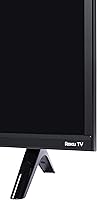
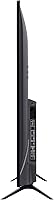
The slim profile and clean matte black finish look presentable in most living spaces. At 27 pounds, it is manageable to mount solo, and the stand provides stable support on flat surfaces without wobble during normal use.
The plastic construction feels noticeably lightweight compared to mid-range competitors. Some long-term owners have flagged concerns about chassis flex and port durability after a year or two of regular use, suggesting build longevity may not match the initial impression.
Remote Control
71%
29%
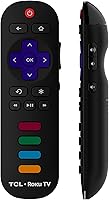
The Roku remote is compact, well-laid-out, and includes dedicated shortcut buttons for popular streaming services, which regular streamers find genuinely convenient. It pairs quickly and maintains a reliable connection without pointing directly at the TV.
The remote requires two AAA batteries and offers no rechargeable option. Some users also found the button travel and tactile feedback a bit shallow, making it easy to accidentally press the wrong key in low-light conditions.
Voice Assistant Integration
76%
24%
Compatibility with both Alexa and Google Assistant is a practical inclusion for smart home users. Households already running either ecosystem can control basic TV functions — volume, input switching, power — through their existing smart speaker setup without any complicated configuration.
Native voice control relies on external devices rather than a built-in microphone, so users without a smart speaker get no voice functionality at all. The range of supported voice commands is also somewhat limited compared to TVs with dedicated voice remotes.
Gaming Performance
54%
46%
For casual or older-generation console gaming, the 55S425 gets the job done. Users playing slower-paced games like RPGs or strategy titles reported no meaningful issues with the display interfering with their experience.
There is no dedicated game mode with a meaningfully low input lag figure, and the native 60 Hz panel combined with limited motion processing makes it a poor fit for competitive gaming or fast-paced titles. Serious gamers should look at purpose-built gaming displays instead.
HDR Performance
66%
34%
HDR support does add a visible improvement over non-HDR content — colors appear more saturated and highlights in daylight scenes have more pop when watching HDR-enabled streaming titles on services like Netflix or Prime Video.
Without a high-brightness panel or local dimming, the HDR effect is noticeably more muted than on premium displays. The TV meets the baseline HDR specification but cannot fully exploit the format, which is a common limitation across direct-lit budget panels in this class.
Durability & Longevity
62%
38%
The majority of buyers who purchased shortly after launch and use the TV as a primary set report it is still functioning normally with no major hardware failures. For a budget-tier television, that baseline reliability is worth acknowledging.
A consistent minority of long-term owners have reported backlight issues and intermittent software freezing emerging after two or three years of heavy use. TCL support experiences are mixed in user reports, which adds some risk for buyers expecting five-plus years of trouble-free operation.
Wi-Fi & Network Stability
78%
22%
Dual-band Wi-Fi means the TV can connect to a 5 GHz network for faster, more consistent streaming, and the Ethernet port gives wired users a reliable fallback. Most reviewers had no trouble maintaining stable 4K streams in normal home network conditions.
A subset of users in larger homes or with older routers reported intermittent Wi-Fi drops that required reconnecting manually. The wireless performance is adequate but not exceptional, and distance from the router noticeably affects streaming consistency for some households.

Suitable for:

The TCL 55S425 55-inch 4K Roku Smart TV is a strong fit for anyone who wants a significant screen and picture upgrade without stretching their budget into premium territory. It particularly shines as a primary TV for casual household viewers — the kind of household that watches a mix of streaming shows, news, and occasional sports in a well-lit living room or bedroom. Cord-cutters will find the built-in Roku platform ready to go straight out of the box, with no streaming stick or external device required. It also works really well as a secondary set for a guest room, home office, or basement space where reference-grade picture accuracy simply is not a priority. Families already embedded in a Google Assistant or Alexa smart home ecosystem will appreciate being able to fold the TV into their existing voice control setup with minimal hassle. First-time smart TV buyers, in particular, tend to have a genuinely positive experience here — the Roku interface is approachable enough that even less tech-savvy users rarely feel lost.
Not suitable for:

The TCL 55S425 55-inch 4K Roku Smart TV is not the right choice for buyers who plan to do a lot of dark-room movie watching or who care deeply about black levels and contrast performance. The direct-lit LED panel has no local dimming, which means backlight blooming in dark scenes is a real and consistent issue — not an edge case. Serious home theater enthusiasts should look at OLED or QLED options instead. Competitive gamers will also want to look elsewhere: the panel runs at a native 60 Hz, and input lag is not optimized in a way that supports fast-reaction gaming at a high level. The built-in audio is genuinely weak, so buyers who do not want to budget for a separate soundbar may end up disappointed in everyday use. Finally, anyone prioritizing long-term durability should be aware that a segment of owners have reported hardware reliability concerns after two to three years of heavy use, which is worth factoring in if you expect this to be a decade-long purchase.
Specifications

  • Screen Size: The panel measures 55 inches diagonally, providing a large viewing area well suited to living rooms and medium-sized spaces.
  • Resolution: Native panel resolution is 4K UHD at 3840 x 2160 pixels, delivering four times the pixel density of a standard 1080p display.
  • Display Type: Uses a direct-lit LED panel, where the backlight array sits behind the full screen surface rather than along the edges.
  • HDR Support: Compatible with HDR content, allowing supported streaming titles and UHD Blu-ray sources to display a wider range of brightness and color.
  • Refresh Rate: The panel runs at a native 60 Hz; the advertised 120 Hz CMI figure refers to a motion-enhancement processing feature, not the physical refresh rate.
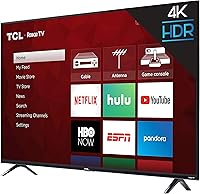
  • Smart Platform: Runs Roku TV natively, giving access to thousands of streaming channels and a straightforward on-screen interface without any external device required.
  • Voice Assistants: Works with Amazon Alexa and Google Assistant through compatible external smart speakers or displays for hands-free TV control.
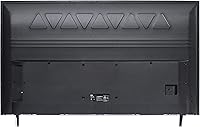
  • HDMI Ports: Equipped with three full-size HDMI inputs for connecting devices such as consoles, set-top boxes, and Blu-ray players simultaneously.
  • USB Port: Includes one USB port for media playback from external drives or flash storage devices.
  • Audio Outputs: Offers one optical digital audio output and one 3.5mm headphone jack for connecting external audio equipment or personal listening.
  • Network Connectivity: Supports dual-band Wi-Fi (2.4 GHz and 5 GHz) and includes a dedicated Ethernet port for a wired network connection.
  • VESA Mount: Wall-mount pattern is 200mm x 200mm, compatible with a wide range of standard third-party TV wall brackets.
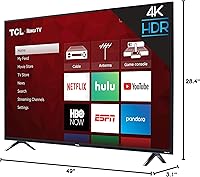
  • Dimensions (no stand): Without the stand attached, the TV measures 49″ wide, 28.4″ tall, and 3.1″ deep.
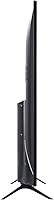
  • Dimensions (with stand): With the stand attached, overall height increases to 30.6″ and depth extends to 8″; stand feet are spaced 42.3″ apart.
  • Weight: The TV weighs 27.1 pounds with the stand, making solo wall mounting manageable for most users.
  • Remote & Batteries: Includes a Roku TV remote control powered by two AAA batteries, which are required but not included in all retail packages.
  • RF & Legacy Inputs: Features one RF coaxial input for over-the-air or cable antenna connection, plus a composite AV input for older analog devices.
  • Model & Release: Carries the model number 55S425 and was first made available in early 2019 as part of TCL's S-series budget lineup.

Related Reviews
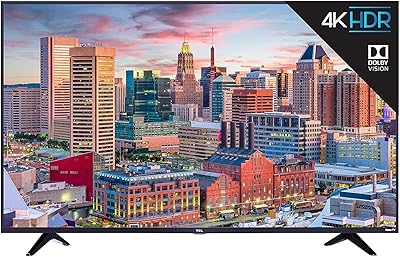
TCL 55S517 55-Inch 4K Roku Smart TV
73%
91%
Value for Money
77%
Picture Quality
89%
Smart TV Platform
82%
Gaming Performance
54%
Viewing Angles
More
TCL 55R617 55-Inch Roku Smart LED TV
73%
78%
Picture Quality
71%
Local Dimming
91%
Smart Platform
84%
Value for Money
67%
Motion Handling
More
Roku Select Series 55-Inch 4K Smart TV
79%
93%
Smart TV Interface
91%
Setup Experience
74%
Picture Quality
88%
Remote Control
86%
Value for Money
More
TCL 55QM751G 55-Inch QLED 4K Smart TV
88%
93%
Display Quality
88%
Gaming Performance
91%
Picture Brightness
83%
Sound Quality
86%
User Interface
More
TCL 55S403 55-inch 4K Roku TV
72%
74%
Picture Quality
91%
Smart TV Platform
88%
Value for Money
41%
Audio Performance
89%
Streaming & Content Access
More
TCL 55-Inch Q6 QLED 4K TV
73%
78%
Picture Quality
83%
Gaming Performance
74%
Smart TV Experience
69%
Motion Handling
81%
Value for Money
More
TCL 75S425 75-inch 4K UHD HDR Smart Roku TV
83%
90%
Picture Quality
88%
Ease of Setup
91%
Streaming Experience
65%
Sound Quality
84%
Build Quality
More
TCL 50S455 50-Inch 4K UHD HDR Smart Roku TV
85%
88%
Picture Quality
92%
Value for Money
90%
Smart Features & Streaming
65%
Audio Quality
91%
Ease of Setup
More
TCL 43S425 43-Inch 4K UHD Smart Roku LED TV
83%
91%
Value for Money
88%
Picture Quality
94%
Ease of Setup
85%
Voice Control Functionality
82%
Connectivity
More
TCL 75-inch Class 4-Series 4K UHD HDR Smart Roku TV 75S435
82%
91%
Value for Money
88%
Display Quality
92%
Ease of Setup
85%
Smart Features and Connectivity
60%
Sound Quality
More

FAQ

It genuinely displays 4K resolution — the panel is natively 3840 x 2160 pixels. You will need a 4K source to see the benefit, such as a 4K streaming service like Netflix or a UHD Blu-ray player. Regular HD content gets upscaled, which looks decent but is not the same as true 4K.

Not in the traditional sense. The panel itself refreshes at 60 Hz — that is its native rate. The 120 Hz CMI is a motion-enhancement figure, meaning the TV uses processing techniques to reduce blur between frames. It is a common marketing convention in budget TVs, so do not expect the same smoothness you would get from a true 120 Hz panel.

Honestly, Roku is one of the best starting points for first-time smart TV owners. The home screen is clean and well-organized, finding and installing streaming apps takes just a few clicks, and the remote does not overwhelm you with unnecessary buttons. Most people are up and streaming within fifteen minutes of plugging the TV in.

This is the TCL 55S425 55-inch 4K Roku Smart TV's most notable limitation. The direct-lit LED backlight has no local dimming, so dark scenes tend to look grayish rather than truly black, and you may notice a halo effect around bright objects on dark backgrounds. For casual nighttime TV watching it is acceptable, but dedicated dark-room movie viewing will reveal the panel's constraints pretty clearly.

Yes, both work. You will need an Alexa or Google Assistant-compatible smart speaker or display already in your home — the TV itself does not have a built-in microphone. Once linked through the respective app, you can control basic functions like power, volume, and input switching by voice.

The built-in speakers are fine for background TV and casual news watching, but they fall short for anything more demanding. Dialogue is clear, but there is very little bass and the overall sound feels thin for movies or music. Most owners who have had the set for a while end up adding a soundbar — it makes a noticeable difference.

The TV uses a 200mm x 200mm VESA pattern, which is a common standard. Any wall bracket labeled as VESA 200x200 compatible will fit. Just double-check the bracket's weight rating — the TV comes in at about 27 pounds — and verify that the mounting hardware included with your bracket fits the VESA holes.

Yes, you can connect a laptop or desktop via HDMI and use the TV as an external display. At 55 inches, text can look a bit soft unless you are sitting at a reasonable distance, but for casual productivity, streaming from a browser, or extended desktop use, it works well enough. Input lag is not optimized for tight cursor work, so graphic design tasks may feel slightly sluggish.

Results vary. Most owners who use it as a secondary or moderate-use TV report it holding up fine. However, a noticeable segment of buyers who use it heavily as a primary set have flagged backlight issues and software freezing appearing after two to three years. It is a budget-tier product, and the build quality reflects that — it is not designed to last a decade of daily heavy use the way a premium set might.

Yes, there is an RF coaxial input on the back. Connect a standard indoor or outdoor TV antenna and run a channel scan through the Roku menu, and you will get access to local over-the-air broadcast channels in your area. Combined with the built-in streaming apps, this makes it a genuinely capable cord-cutting setup with no monthly fees for local content.

Where to Buy