Overview

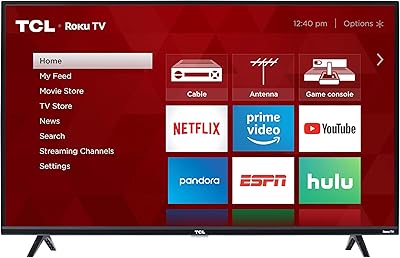
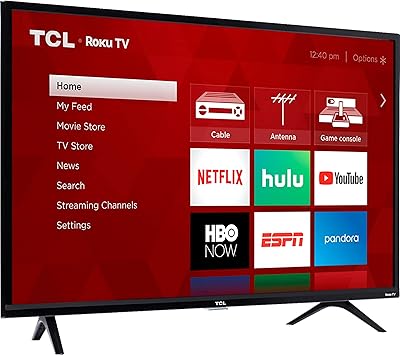
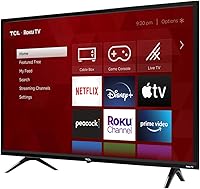
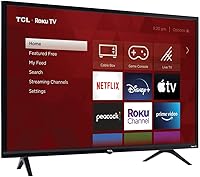
The TCL 32S325 32-inch Roku Smart TV is a no-frills budget set built for secondary spaces — guest rooms, dorm setups, or kitchen counters where a dependable screen matters more than cutting-edge specs. It runs Roku OS natively, so no streaming stick is required. Picture quality is 720p HD, which holds up well on a 32-inch panel viewed from under six feet; you don't lose much by skipping 4K at this screen size. The direct-lit LED panel keeps costs down but sacrifices local dimming, so dark scenes can look a bit flat. It launched in 2019, and while the hardware isn't new, Roku's ongoing software updates keep the experience reasonably fresh.

Features & Benefits

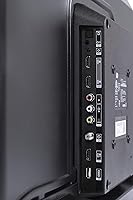
The built-in Roku platform is honestly one of the strongest arguments for this TCL Roku set. The interface is clean, channel installation is quick, and the remote is straightforward enough that anyone can start streaming in minutes. Connectivity is solid for the price: three HDMI 2.0 ports — one with ARC for soundbar pairing — plus an optical output that works with older receivers. The single USB port handles local media files including MKV and FLAC, which is a nice touch. At 8.6 lbs, it's easy to reposition or wall-mount. The 60 Hz refresh rate is fine for most streaming, though fast-paced sports can show mild blur. Budget for a soundbar — the 5W built-in speakers are genuinely thin.

Best For

This small-room smart TV makes the most sense where simplicity and value outweigh the need for top-tier picture quality. It's a natural fit for a college dorm or studio apartment where both counter space and budget are tight. Guest bedrooms and kitchens are ideal placements — somewhere you want a reliable screen for casual viewing without overthinking it. Parents setting up a first TV for a younger child will find the Roku interface easy to navigate and manage. It also works well for cord-cutters who want streaming built right in without spending extra on a separate device. If you need a bright, 4K living-room anchor, though, look elsewhere.

User Feedback

Buyers consistently praise the straightforward setup — most report getting the 32-inch TCL running in under ten minutes, and the remote rarely draws complaints. Where opinions split is brightness: the direct-lit panel struggles against ambient light, and several reviewers describe a washed-out look in sunlit rooms. Audio disappointment is common, though somewhat expected at this price tier; the consensus is to plan for a soundbar from day one. A smaller number of buyers mention software sluggishness after months of use, and a few flag minor input-switching quirks. None of these are deal-breakers for a secondary-room screen, but they're consistent enough across reviews to take seriously before buying.

Pros

  • Built-in Roku OS means no streaming stick needed — just plug in and start watching.
  • The Roku interface is one of the most user-friendly smart TV platforms available, even for first-timers.
  • Three HDMI 2.0 ports give you room for a console, a cable box, and a soundbar simultaneously.
  • HDMI ARC support makes connecting a soundbar simple, with no extra cables required.
  • At 8.6 lbs, the 32-inch TCL is light enough to wall-mount solo or reposition without help.
  • Optical audio output lets you pair it with older home theater receivers that lack HDMI ARC.
  • USB media playback covers a wide range of formats including MKV, FLAC, and MOV files.
  • 720p resolution looks clean and appropriately sharp for a 32-inch screen at typical viewing distances.
  • Roku's ongoing software updates help keep this small-room smart TV current despite its 2019 hardware.
  • Setup is fast — most buyers report getting up and running in well under fifteen minutes.

Cons

  • The direct-lit LED panel produces noticeably flat blacks, making dark or cinematic content look underwhelming.
  • Screen brightness struggles in well-lit or sunlit rooms, leading to a washed-out image.
  • Built-in speakers top out at 5W, which is thin even for background TV in a small room.
  • Some users report the interface becomes sluggish after several months of regular use.
  • A small but consistent number of buyers mention input-switching delays and occasional remote pairing hiccups.
  • The 60 Hz refresh rate can show motion blur during fast-paced sports or action scenes.
  • No local dimming means the panel cannot selectively darken portions of the screen for better contrast.
  • As a 2019 model, it lacks newer display or processing features found in current budget competitors.

Ratings

The scores below for the TCL 32S325 32-inch Roku Smart TV were generated by our AI review engine after analyzing thousands of verified global purchase reviews, with spam, bot-submitted, and incentivized feedback actively filtered out. Each category reflects the real distribution of buyer sentiment — strengths are credited where earned, and recurring pain points are scored honestly. This small-room smart TV lands in clear territory: strong on usability and value, weaker on picture and audio performance.

Value for Money
88%
For a secondary-room screen, buyers consistently feel they got more than they paid for. The combination of built-in Roku, three HDMI ports, and a reliable panel at this price point is hard to fault, and most users in dorms or guest rooms report satisfaction well past the one-year mark.
Value perception drops for buyers who need a primary living-room TV. When you factor in the near-certain need for a soundbar purchase, the all-in cost starts to feel less exceptional, and newer budget competitors have closed the gap since this model launched in 2019.
Smart TV Platform
91%
Roku OS is widely regarded as one of the most intuitive smart TV platforms available, and this set benefits fully from it. Channel discovery, app loading, and remote navigation all draw consistent praise — even from users who describe themselves as not particularly tech-savvy.
A subset of long-term users report that the Roku interface begins to feel sluggish after a year or more of use, likely due to limited onboard processing power. While software updates do arrive regularly, they cannot fully compensate for the hardware constraints of a 2019 budget chipset.
Picture Quality
61%
39%
For casual streaming of sitcoms, news, or kids content in a bedroom setting, the 720p direct-lit panel produces a watchable, adequately sharp image. At typical viewing distances under 6 feet, most users do not find the resolution a meaningful limitation for everyday content.
Dark scenes reveal the panel's biggest weakness: without local dimming, blacks appear grayish and flat rather than deep, which hurts cinematic content noticeably. Brightness is also limited, and in rooms with significant ambient light from windows, the picture can look washed out and dull.
Audio Performance
44%
56%
The built-in speakers are functional enough for low-volume background viewing in a quiet room, and the inclusion of both optical out and HDMI ARC makes it straightforward to pair with external audio hardware. Buyers who already own a soundbar report a significant upgrade in overall experience.
At 5W total output, the built-in speakers are genuinely underpowered — thin, lacking bass, and easily overwhelmed in any room with ambient noise. This is one of the most consistently flagged pain points across reviews, and buyers should budget for a soundbar from the outset rather than treating audio as an optional upgrade.
Connectivity & Ports
83%
Three HDMI 2.0 ports is a generous count for a 32-inch budget TV, giving users room for a game console, a cable box, and a soundbar all at once without swapping cables. The addition of optical out, a USB media port, and a headphone jack rounds out a surprisingly complete input panel.
Some users report occasional input-switching delays, where the TV takes a few seconds to recognize a device change — a minor but mildly frustrating experience when toggling between a console and a cable box. There is no Ethernet port, so wired network connections are not an option for those in locations with unreliable Wi-Fi.
Ease of Setup
93%
Setup is one of the clearest strengths of this small-room smart TV — unbox, plug in, follow the on-screen Roku prompts, and you are streaming in under fifteen minutes. The remote is included with batteries pre-packaged, and the guided Wi-Fi connection process works reliably even for first-time smart TV owners.
A small number of users report Wi-Fi pairing hiccups during initial setup, requiring a router restart or a second attempt to connect. These cases appear to be edge situations rather than a widespread issue, but they do surface with enough regularity to mention.
Build Quality & Design
69%
31%
The slim, lightweight design at 8.6 lbs makes the 32-inch TCL easy to wall-mount solo or reposition without assistance. The matte black finish is understated and blends into most room setups without drawing attention to itself in a distracting way.
The plastic chassis feels noticeably budget-grade up close, and the stand wobbles slightly on uneven surfaces. This is not a major functional concern, but buyers accustomed to mid-range or premium builds may find the materials underwhelming given modern alternatives at a similar price.
Remote Control
77%
23%
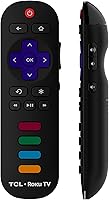
The Roku remote is well-regarded for its simplicity — dedicated shortcut buttons for popular streaming services, a responsive directional pad, and an intuitive layout that most users can navigate without consulting a manual. Physical button feel is solid for the price tier.
A handful of reviewers report intermittent Bluetooth or IR pairing issues after extended use, where the remote stops responding momentarily and requires a battery re-seat or re-pairing. It is not a widespread complaint, but it appears frequently enough across reviews to be a real if occasional nuisance.
Motion Handling
55%
45%
For standard streaming content — dramas, comedies, news, or slower-paced programming — the 60 Hz panel performs without obvious issues, and most casual viewers never notice a problem with motion clarity during day-to-day use.
Fast-motion content such as live sports, action sequences, or gaming at higher frame rates reveals clear blur and trailing artifacts. The TV has no motion enhancement processing to compensate, which makes it a poor fit for sports fans or anyone who games frequently on the connected screen.
App Selection & Streaming
89%
The Roku channel store is one of the most comprehensive in the smart TV market, and this set gives you full access to it — Netflix, Disney+, HBO Max, Peacock, Tubi, Pluto TV, and thousands of niche channels are all available. Free ad-supported options are particularly abundant for budget-conscious users.
A few niche or newer streaming apps occasionally lag in availability on Roku compared to Android TV or Google TV ecosystems. App update delivery can also be slower on older Roku hardware, meaning occasional delays before new features roll out to this specific model.
Brightness & Contrast
53%
47%
In a controlled lighting environment — a bedroom with curtains drawn or a dim kitchen — the panel provides adequate brightness for comfortable viewing, and contrast is passable for non-cinematic content like daytime TV or news programming.
Maximum brightness is clearly limited, and contrast ratio suffers significantly from the absence of local dimming. Viewers in sun-facing rooms or open-plan spaces frequently describe the picture as washed out, and the gap between bright and dark areas on screen looks compressed compared to even modestly priced alternatives with better panel specs.
Software Longevity
66%
34%
Roku has a strong track record of delivering OS updates to older hardware, which helps keep this 2019 model functionally current. Core features, channel support, and interface improvements continue to arrive via automatic updates, extending the useful life of the platform beyond what the hardware age might suggest.
The underlying processor shows its age over time, with some users noting slowdowns in menu navigation and app loading after a year or two of regular use. There is also no guarantee of indefinitely continued support, and as Roku advances to newer interface generations, older chipsets may eventually be left behind.
USB Media Playback
74%
26%
The USB media player covers a genuinely useful range of formats — MKV, MP4, FLAC, and WAV among them — which makes it practical for users who keep a movie library on a thumb drive or external hard disk. Format compatibility is broader than many competing budget TVs offer at this size.
Playback performance can be inconsistent with larger or higher-bitrate files, and some users report choppy playback on certain MKV encodes. The media player interface itself is basic, with limited sorting and browsing options compared to dedicated media players or streaming sticks.

Suitable for:

The TCL 32S325 32-inch Roku Smart TV was clearly designed with a specific kind of buyer in mind, and for that buyer it genuinely delivers. College students furnishing a dorm room, renters setting up a small bedroom, or anyone who needs a reliable second screen in a guest room or kitchen will find it fits the bill without demanding a big budget. The built-in Roku OS means cord-cutters can start streaming immediately — no extra hardware required — and the clean interface is approachable enough for less tech-savvy users like older relatives or young children. Parents looking for a first TV for a kid's room will appreciate that 720p resolution looks perfectly sharp at typical close-range viewing distances on a 32-inch panel. If your priority is low-maintenance streaming in a small, low-light space, this TCL Roku set punches well above its price.

Not suitable for:

The TCL 32S325 32-inch Roku Smart TV is not the right choice for buyers who care deeply about picture quality or who plan to use it as a primary living-room display. The direct-lit LED panel lacks local dimming, which means dark scenes look grayish rather than deep black — a real limitation if you watch a lot of movies or TV dramas in a dim room and are accustomed to better contrast. Bright, sunlit rooms are also a problem, as the screen can look washed out against strong ambient light. The 5W speakers are genuinely underpowered, so anyone who doesn't already own a soundbar or external audio solution should budget for one upfront. Sports fans and gamers who care about motion handling may find the 60 Hz panel and occasional software lag frustrating. Finally, given the 2019 release date, buyers who want the latest display technology or future-proof smart TV features should look at more recent alternatives.

Specifications

  • Screen Size: The panel measures 32 inches diagonally, making it well-suited for rooms where viewing distance is typically under 6 feet.
  • Resolution: Native resolution is 720p HD (1280×720), which delivers a clean, appropriately sharp image at this screen size.
  • Panel Type: Direct-lit LED backlighting is used, which keeps the unit affordable but does not support local dimming for improved contrast.
  • Refresh Rate: The native refresh rate is 60 Hz, adequate for standard streaming and casual viewing but not optimized for high-motion sports content.
  • Smart Platform: Roku OS is built in natively, providing access to thousands of streaming channels without any external device required.
  • HDMI Ports: Three HDMI 2.0 ports are included, one of which supports ARC and HDCP 2.2 for soundbar connectivity and protected content playback.
  • USB Port: One USB 2.0 port supports local media playback including video formats MKV, MP4, and MOV, as well as audio formats AAC, MP3, FLAC, and WAV.
  • Audio Output: An optical audio output and a 3.5mm headphone jack are both included, offering flexibility for connecting external audio equipment.
  • Speaker Output: Built-in stereo speakers deliver 5W of total output, which is functional for quiet rooms but limited for open or noisy spaces.
  • Dimensions: With the stand attached, the TV measures 28.8″ wide, 19″ tall, and 6.8″ deep; without the stand it is 28.8″ × 17.1″ × 3.1″.
  • Weight: The unit weighs 8.6 lbs with the stand, making solo wall-mounting or repositioning straightforward for most users.
  • Aspect Ratio: The display uses a standard 16:9 widescreen aspect ratio (1.78:1), compatible with the vast majority of modern streaming content.
  • Connectivity: Built-in Wi-Fi allows wireless network connection, while RF and composite inputs support legacy antenna and older device hookups.
  • Power: The TV operates on standard 120V AC power and draws modest wattage, making it energy-efficient for an always-on secondary room screen.
  • Included Items: The package includes the TV, a Roku remote, and two AAA batteries, so the unit is ready to set up right out of the box.
  • VESA Mount: The TV is wall-mount compatible; buyers should verify VESA pattern specifications before purchasing a third-party bracket.
  • Release Year: This model was first made available in October 2018 and represents the 2019 product lineup from TCL's entry-level Roku TV series.
  • Stand Spread: The two stand feet are spaced 21.3 inches apart, which is an important measurement for buyers using a narrow media console or shelf.

Related Reviews
TCL 32S327 32-inch Roku Smart LED TV
72%
88%
Value for Money
91%
Smart TV Platform
67%
Picture Quality
93%
Setup & Ease of Use
54%
Audio Performance
More
TCL 32-Inch S3 Roku Smart TV
78%
91%
Value for Money
74%
Picture Quality
88%
Smart TV Experience
93%
Setup & Ease of Use
79%
Build & Design
More
TCL 43S325 43-Inch 1080p Smart LED Roku TV
85%
91%
Value for Money
80%
Picture Quality
88%
Ease of Setup
85%
Voice Control Functionality
87%
Connectivity Options
More
TCL 55S517 55-Inch 4K Roku Smart TV
73%
91%
Value for Money
77%
Picture Quality
89%
Smart TV Platform
82%
Gaming Performance
54%
Viewing Angles
More
TCL 55S425 55-inch 4K Roku Smart TV
73%
74%
Picture Quality
89%
Value for Money
91%
Smart Platform (Roku)
93%
Ease of Setup
51%
Audio Performance
More
TCL 40S325 40-inch 1080p Smart LED Roku TV
83%
91%
Value for Money
85%
Picture Quality
94%
Ease of Setup
88%
Smart Platform Performance
70%
Sound Quality
More
Roku Select Series 32-inch 720p Smart TV
80%
88%
Value for Money
67%
Picture Quality
93%
Smart Platform & Interface
94%
Setup & Ease of Use
79%
Remote Control
More
TCL 75S425 75-inch 4K UHD HDR Smart Roku TV
83%
90%
Picture Quality
88%
Ease of Setup
91%
Streaming Experience
65%
Sound Quality
84%
Build Quality
More
TCL 43S425 43-Inch 4K UHD Smart Roku LED TV
83%
91%
Value for Money
88%
Picture Quality
94%
Ease of Setup
85%
Voice Control Functionality
82%
Connectivity
More
TCL 50S455 50-Inch 4K UHD HDR Smart Roku TV
85%
88%
Picture Quality
92%
Value for Money
90%
Smart Features & Streaming
65%
Audio Quality
91%
Ease of Setup
More

FAQ

No, Roku is built directly into the TV itself. You just connect to your Wi-Fi during setup and you have immediate access to all the major streaming apps — Netflix, Hulu, Disney+, and thousands more. There is nothing extra to buy.

At 32 inches and from a normal sitting distance of 5 to 7 feet, 720p honestly looks fine for most people. The human eye has a hard time distinguishing 720p from 1080p at that size and distance, so you are unlikely to notice a meaningful difference in everyday streaming. If you are sitting very close or pixel-peeping, you might prefer 1080p, but it is rarely a practical concern on a screen this small.

Yes, and given the thin 5W built-in speakers, it is worth doing. One of the three HDMI ports supports ARC, which lets you connect a compatible soundbar with a single cable and control volume through the Roku remote. There is also an optical audio output if you have an older soundbar or receiver that does not support HDMI ARC.

This is a fair concern. The direct-lit LED panel is not particularly bright, and in a room with strong natural light coming from windows, the picture can look dim or faded. It performs best in a bedroom or a room where you have some control over ambient lighting. For a sun-drenched living room, you would likely want a brighter panel.

Setup is genuinely one of the strengths of the TCL 32S325 32-inch Roku Smart TV. You plug it in, turn it on, follow the on-screen prompts, connect to your Wi-Fi, and you are done. Most people finish in under fifteen minutes, and the Roku interface is designed to be approachable for users of all experience levels. The included remote is straightforward, with no confusing extra buttons.

Roku regularly pushes software updates to its devices, which helps keep the interface and app library current even on older hardware. That said, some users do report that the software feels a bit sluggish after extended use — likely due to limited internal processing power. For casual streaming in a secondary room, most people find it performs acceptably for several years.

Yes. The USB port on the 32-inch TCL supports a solid range of formats, including MKV, MP4, and MOV for video, and AAC, MP3, FLAC, and WAV for audio. It is a convenient feature for anyone who stores movies or home videos locally rather than relying purely on streaming services.

It works fine for casual gaming on older consoles or mobile gaming through streaming services. However, the 60 Hz refresh rate and the absence of any low-latency game mode mean it is not well-suited for fast-paced competitive gaming. If gaming is a priority, you would benefit from a TV with a dedicated game mode and a lower input lag spec.

The two feet sit 21.3 inches apart, which is a detail worth checking before you set it on a media console or nightstand. If your surface is narrower than that, you will either need to wall-mount the TV or find a wider stand. Wall-mounting is straightforward given how light the unit is at 8.6 lbs.

It comes with the Roku remote and two AAA batteries, so you can start using it right away. The main add-on most buyers end up purchasing separately is a soundbar, since the built-in speakers are quite limited. You will also want to make sure you have an HDMI cable on hand if you plan to connect a game console or cable box, as cables are not included.

Where to Buy