Overview

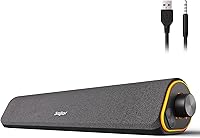
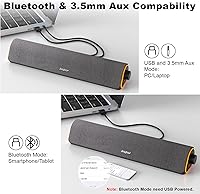
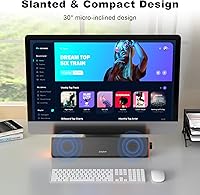
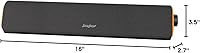
The SOULION R50 is a slim, USB-powered soundbar built to slide right under your monitor and disappear into your desk setup without any fuss. It launched in late 2023 and has already climbed to #23 in Amazon's Computer Speakers category, which says something for a budget-friendly option. The bar measures 16 inches across with a 30-degree tilt that angles sound upward toward your ears rather than straight into the desk surface. Dual connectivity covers both Bluetooth 5.0 and a 3.5mm aux input, and either way it draws power from a single USB cable. No wall adapters, no extra cables.

Features & Benefits

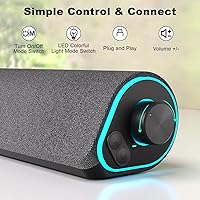
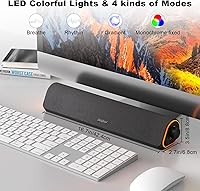
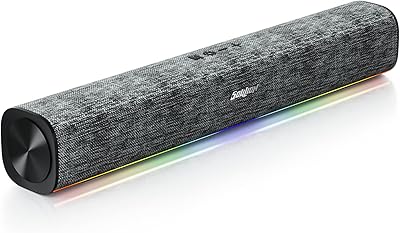
The R50 speaker bar packs in more than you would expect at this price. Four LED lighting modes — gradient, breathing, rhythm, and a static single color — are toggled with a dedicated button, no software required. Switching between Bluetooth and aux is done by pressing the M key on the unit; it takes a moment to learn but works consistently once you do. The built-in noise-cancellation circuit cuts the PC static hum that plagues many budget speakers, though it works best when you keep the volume above 10%, since the auto-mute kicks in below that threshold. A stepless volume knob rounds things out nicely.

Best For

This desktop soundbar is a natural fit for remote workers or students who want something better than laptop speakers without committing to a full stereo system. Gamers will appreciate the ambient LED lighting, which adds visual flair to a desk without requiring a separate RGB controller. The slim 16-inch footprint makes it practical for tighter setups — it tucks cleanly under most monitors up to about 27 inches. It also works well as a Bluetooth workstation speaker for anyone who switches between a PC and a phone during the day. If you are still living with built-in monitor audio, this is a sensible and affordable step up.

User Feedback

With over 2,100 ratings and a 4.1-star average, this Soulion speaker has earned broadly positive marks across a wide range of buyers. The LED lighting gets called out repeatedly as a highlight — people feel it punches well above its price. Audio-wise, the consensus is solid for casual music and video calls, but do not expect thumping bass from a single-bar design at this size. A fair number of reviewers mention the M-key mode switching took a glance at the instructions to figure out. The auto-mute quirk below 10% volume also catches people off guard initially, though most adapt quickly once they know it is there.

Pros

  • Single USB cable powers the unit and keeps the desk free of adapter clutter.
  • Dual connectivity — Bluetooth 5.0 and 3.5mm aux — works with virtually any device you own.
  • Four LED lighting modes add real visual personality without requiring any software or app.
  • The built-in noise-cancellation circuit effectively eliminates PC static hum during normal use.
  • Bluetooth memory reconnects your last paired device automatically, saving time every session.
  • The stepless volume knob allows precise, smooth adjustments rather than jumping between fixed levels.
  • At 16 inches wide and under 3.5 inches tall, this desktop soundbar tucks cleanly under most monitors.
  • Audio clarity for voices, video calls, and casual music is noticeably better than built-in laptop speakers.
  • Over 2,100 buyer ratings with a 4.1-star average reflects genuinely broad satisfaction at this price.
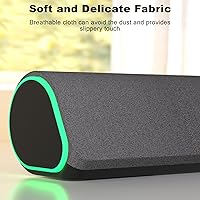
  • The breathable fabric grille resists dust buildup and gives the bar a more considered look than bare plastic.

Cons

  • No stereo separation whatsoever — it is a single-channel mono bar, full stop.
  • Bass response is thin; the hardware simply cannot deliver low-end punch at this size and power level.
  • The M-key mode switching between Bluetooth and aux is not intuitive and lacks clear on-unit labeling.
  • Auto-mute below 10% volume removes the ability to use very quiet background listening levels.
  • Bluetooth range degrades significantly through walls, despite the 10-meter open-air specification.
  • The included documentation is too sparse to properly guide first-time Bluetooth setup and device clearing.
  • LED lighting mode preference does not persist after power cycling — it resets each time.
  • The plastic chassis feels functional rather than solid, with inconsistent seam tolerances on some units.

Ratings

The SOULION R50 has accumulated over 2,100 verified ratings worldwide, and the scores below were generated by AI after analyzing that full pool of buyer feedback — actively filtering out incentivized, bot, and duplicate reviews to reflect genuine user experience. The analysis covers everything from daily audio performance to setup frustrations, and both the strengths and the real pain points are represented transparently in each category score.

Sound Clarity
74%
26%
For casual listening — background music during work calls, YouTube videos, or light gaming — buyers consistently describe the audio as clean and surprisingly full for a single-bar form factor. The 30-degree tilt helps project sound forward rather than losing it across a flat desk surface.
Bass response is noticeably limited, which is expected from a compact 10W soundbar with no dedicated subwoofer. Buyers who tried using it for bass-heavy music or cinematic audio found it falls short, and the 30 dB signal-to-noise ratio is modest even by budget standards.
LED Lighting Quality
91%
The four lighting modes — gradient, breathing, rhythm, and fixed monochrome — are consistently called out as a highlight even among buyers who primarily care about audio. The rhythm mode, which pulses to sound, adds a lively visual element that works well on gaming desks without requiring any software installation.
Users who prefer a completely clean desk aesthetic cannot fully disable the LEDs without using the dedicated toggle button each session — there is no persistent off-memory for the lights. A small number of buyers also noted the lighting is slightly uneven toward the ends of the bar at close range.
Connectivity & Compatibility
83%
The dual-mode setup — Bluetooth 5.0 and 3.5mm aux, both drawing power from a single USB cable — covers nearly every device scenario a desk user would encounter. The Bluetooth memory function reconnects to the last paired device quickly, which is genuinely convenient when switching back to a laptop after using a phone.
Mode switching requires pressing the M key and cycling through options, which a notable share of buyers found unclear without reading the manual first. There is no visual indicator beyond a voice prompt to confirm which mode is active, making the initial learning curve mildly frustrating.
Noise Cancellation
69%
31%
The built-in noise-cancellation circuit does a real job of cutting the low-level electrical hum that many PC setups generate — something that genuinely plagues cheaper desktop speakers. Buyers who had previously dealt with constant static buzz appreciated this feature as a practical, day-to-day improvement.
The auto-mute behavior below 10% volume catches many users off guard, as the speaker goes silent at low volume rather than simply outputting quiet audio. It is a deliberate design choice to suppress static, but it effectively removes the ability to use very low background volumes, which some find limiting during late-night use.
Build Quality & Materials
72%
28%
The breathable fabric grille gives the bar a more considered look than bare plastic grilles common at this price, and it does its job keeping dust out of the drivers. The rectangular chassis feels reasonably solid in hand, and the tilt stand does not wobble during normal desk use.
The overall construction is still plastic-dominant, and the seam tolerances are inconsistent enough that some buyers noticed minor alignment gaps on the end caps. It does not feel fragile, but it does not feel premium either — which is honest for the price bracket.
Volume & Output Power
71%
29%
At 10W peak, this desktop soundbar gets loud enough to fill a standard home office or bedroom without any distortion at mid-range volumes. For a single person at a desk, it rarely needs to be pushed past 60-70%, which leaves comfortable headroom for most daily use cases.
In open-plan spaces or rooms with hard walls, the volume ceiling becomes apparent fairly quickly. Users who sit further than about six feet from the bar, or who share a room with ambient noise, reported needing to push the volume in ways that introduced some harshness in the high-mids.
Setup & Ease of Use
78%
22%
Plug-and-play for the aux mode is genuinely simple — one USB cable for power, one 3.5mm jack for audio, and it works immediately. Most buyers had audio running within two minutes of opening the box, which is about as friction-free as desktop speaker setup gets.
Bluetooth mode adds a few extra steps that are not immediately obvious, including holding the light key for three seconds to clear Bluetooth memory when reconnecting a different device. The lack of a printed quick-start guide in some packaging batches left a handful of reviewers hunting for instructions online.
Value for Money
88%
Relative to what this Soulion speaker costs, the combination of dual connectivity, four LED modes, noise cancellation, and decent audio clarity represents a strong package. Buyers upgrading from built-in laptop or monitor speakers almost universally felt the improvement was immediately noticeable and well worth the spend.
At a slightly higher budget, buyers can find stereo 2.0 speaker pairs that offer meaningfully better stereo separation and bass. The value proposition is strong specifically at this price point but starts to look less compelling the moment the comparison shifts to slightly more expensive alternatives.
Desk Footprint & Design
84%
At 16 inches wide and under 3 inches tall, the R50 speaker bar was clearly designed with monitor placement in mind, and it fits cleanly under most 24- to 27-inch displays without blocking airflow or obstructing the screen. The dark grey fabric finish blends into most desk setups without drawing attention.
The 2.7-inch depth is slightly more than some buyers anticipated, which can be a real issue on shallow desk shelves or keyboard trays. Users with very compact setups occasionally noted it pushed their keyboard further forward than they wanted.
Bluetooth Range & Stability
73%
27%
Within a normal room — roughly 15 to 20 feet with no walls in between — the connection held steady in most reported use cases. Buyers who wanted to connect a phone from across a small apartment found it worked reliably for that purpose.
Range degrades noticeably through walls, and the stated 10-meter figure applies to open-air conditions. Several buyers reported dropouts when the connected phone was in an adjacent room, which limits its usefulness as a whole-apartment Bluetooth speaker.
Volume Knob & Physical Controls
81%
19%
The stepless volume knob is a small but meaningful quality-of-life detail — it allows genuinely smooth volume adjustment rather than the noticeable jumps you get from stepped encoders on cheaper speakers. Day-to-day, this makes fine-tuning during calls or focused work sessions noticeably easier.
The knob itself is small in diameter relative to the bar length, which some users with larger hands found fiddly to turn precisely. There are no dedicated controls for LED brightness, meaning lighting and volume adjustments use separate buttons that take a moment to learn.
Unboxing & Packaging
67%
33%
The unit arrives with the necessary cables included, and the packaging keeps the bar adequately protected during shipping. Most buyers reported no damage on arrival, which is the basic standard that matters most.
The included documentation is minimal to the point of being unhelpful, with several buyers noting the instruction sheet lacks detail on the M-key mode switching and Bluetooth clearing process. For a product with a slightly involved setup, better documentation would reduce the initial friction considerably.
Audio Driver Performance
70%
30%
The 3.5-inch dynamic driver handles midrange frequencies — voices, acoustic instruments, podcast speech — with reasonable accuracy for a budget soundbar. Dialogue clarity in movies and video calls came up positively in multiple buyer comments, which is a practical win for the target audience.
The single driver configuration means there is no stereo separation whatsoever, which becomes noticeable during music with detailed left-right panning. The 50-ohm impedance and modest SNR of 30 dB also mean the driver is working at the edge of its capability at higher volumes, occasionally showing as slight distortion.

Suitable for:

The SOULION R50 is a practical pick for anyone who wants a meaningful audio upgrade without spending serious money or cluttering their desk with multiple cables and adapters. Remote workers and students who spend long hours at a computer will find the single-USB setup genuinely convenient — one cable handles both power and connectivity, and the aux input covers virtually any device they might plug in. Gamers on a budget will particularly appreciate the LED lighting modes, which add ambient visual character to a desk setup without requiring a separate RGB controller or companion app. It also makes a solid workstation Bluetooth speaker for people who switch between a PC and a smartphone throughout the day, since the memory function reconnects the last paired device without having to dig through Bluetooth menus. If your current audio situation is built-in laptop speakers or the bare-minimum speakers on a budget monitor, this desktop soundbar is a clear and worthwhile step forward.

Not suitable for:

Buyers who care seriously about audio fidelity should look elsewhere before committing to this Soulion speaker. A single 10W mono bar with a 30 dB signal-to-noise ratio is not designed for critical listening — there is no stereo separation, bass is limited by physics, and the driver will show its limits at higher volumes with bass-heavy content. Music producers, audiophiles, or anyone who routinely listens to orchestral, jazz, or bass-forward genres will likely find the sound thin and ultimately frustrating. The R50 speaker bar is also not the right tool for larger shared spaces — its output is calibrated for a single person at a desk, not a room. Users who want to maintain very low background volumes overnight will run into the auto-mute behavior below 10% volume, which cuts audio entirely rather than playing quietly. And if clean, documentation-light setup is a priority, be aware the Bluetooth mode switching requires a bit of learning that the included manual does not fully walk through.

Specifications

  • Dimensions: The bar measures 16″ deep, 2.7″ wide, and 3.5″ tall, making it sized to sit neatly under most standard desktop monitors.
  • Weight: The unit weighs 0.8 kg (1.76 lbs), light enough to reposition on a desk without any effort.
  • Output Power: Peak output is rated at 10W, suitable for personal desk listening at close range.
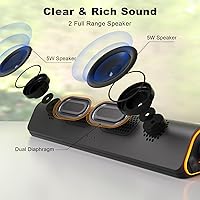
  • Driver Type: A single 3.5-inch dynamic driver handles full-range audio reproduction across the frequency spectrum.
  • Frequency Response: The driver covers up to 20 kHz, capturing the upper range of human hearing for treble detail.
  • Signal-to-Noise Ratio: The SNR is rated at 30 dB, which is modest and reflects the budget positioning of this speaker bar.
  • Impedance: Driver impedance is 50 Ohm, a standard value for this category of compact desktop speaker.
  • Connectivity: The bar supports Bluetooth 5.0 wireless and 3.5mm aux wired input, with USB providing power in both modes.
  • Bluetooth Range: Stable Bluetooth connection is maintained up to 10 meters (33 feet) in open-air, line-of-sight conditions.
  • Power Source: Power is supplied via a USB 5V corded connection, eliminating the need for a separate wall adapter.
  • LED Modes: Four lighting modes are available: gradient cycle, breathing pulse, rhythm-reactive, and monochrome fixed color.
  • Tilt Angle: The base is designed with a built-in 30-degree upward tilt to direct sound toward the listener rather than flat across the desk.
  • Grille Material: The front face is covered with a breathable fabric grille that reduces dust ingress and softens the visual profile.
  • Surround Config: The speaker uses a 1.0 single-channel mono configuration — there is no stereo separation or secondary driver.
  • Compatible Devices: The bar is compatible with desktop PCs, laptops, smartphones, and tablets via its Bluetooth or 3.5mm aux input.
  • Mounting Type: Designed exclusively for tabletop placement; no wall-mount hardware or VESA compatibility is included.
  • Water Resistance: The unit has no water resistance rating and is intended strictly for indoor, dry-environment use only.
  • Input Voltage: The USB power input operates at 5V DC, which is standard for any USB-A port or USB charger.
  • Cable Included: The package includes a combined 3.5mm audio and USB power cable with approximately 1.5 meters of exposed length.
  • Noise Cancellation: An automatic noise-cancellation circuit is built in to suppress PC electrical hum, activating when volume is set above 10%.

Related Reviews
DoHonest R50 Wireless Backup Camera Kit
80%
93%
Ease of Installation
88%
Image Quality (Daytime)
71%
Night Vision Performance
74%
Battery Life
67%
Wireless Signal Reliability
More
SOULION R100 Plus Bluetooth Computer Speakers
83%
84%
Sound Quality
90%
RGB Lighting
72%
Battery Life
88%
Bluetooth Connectivity
91%
Ease of Use
More
SOULION 2.0 Computer Speakers C40BK
83%
82%
Audio Quality
88%
LED Lighting
91%
Ease of Setup
80%
Sound Clarity
67%
Bass Performance
More
Canon EOS R50
Canon EOS R50
79%
93%
Autofocus Performance
88%
Image Quality
86%
4K Video Quality
57%
Battery Life
91%
Portability & Build
More

FAQ

No, there is nothing to install. For aux mode, it is fully plug-and-play — connect the USB for power and the 3.5mm jack for audio and it works immediately. Bluetooth mode requires a one-time pairing step, but no software or app is involved at any point.

You press the M key on the unit to cycle through available modes. It steps through the options in sequence, and a voice prompt confirms which mode is active. It takes a few presses to get used to, but once you know the pattern it becomes second nature.

Nothing is broken; that is intentional behavior. The SOULION R50 includes an auto-mute circuit that cuts audio below roughly 10% volume to eliminate the electrical hum that desktop PCs generate at very low output levels. If you need audio at very quiet levels, keep the volume knob just above that threshold and adjust your system volume instead.

Yes, that is exactly how Bluetooth mode works — the USB connection only supplies power, so you can pair your phone wirelessly while the bar is physically connected to your computer via USB. Your PC audio will not play through it in this configuration unless you also connect the 3.5mm cable.

Press and hold the light button for three seconds to clear the Bluetooth memory. The speaker will then enter pairing mode and be discoverable as R50 on your new device. This reset step trips up a few buyers initially, but it works reliably once you know about it.

Unfortunately the lighting preference does not persist between power cycles — the LEDs will default back on when the unit is powered up again. You will need to press the light button to toggle them off each session if you prefer a cleaner look.

Realistically, no. This Soulion speaker is calibrated for a single person at a desk, and at 10W with a mono driver it starts to sound strained in larger or noisier spaces. For personal listening within about two to three feet, it is more than adequate, but it is not designed to fill a room.

The grille is fixed and not designed to be removed. For routine dust removal, a soft brush or a quick pass with a lint roller works well. Avoid pressing directly on the fabric with wet cloths since moisture could reach the driver underneath.

If your TV or console has a 3.5mm audio output, yes — connect the aux cable and it will work. Most modern TVs route analog audio through a headphone output, so that connection is usually straightforward. Bluetooth pairing with smart TVs is also possible if the TV supports standard Bluetooth audio output.

The included cable exposes approximately 1.5 meters of usable length, which covers most standard desk setups where the PC tower or USB hub is within reach of the monitor. If your tower sits on the floor or further away, a USB extension cable is a simple fix for the power side.