Overview

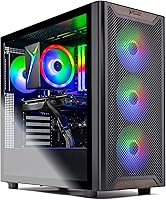
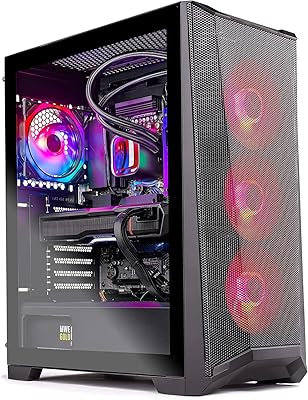
The Skytech Gaming Chronos 3 Gaming Desktop PC arrived in March 2025 as one of the first pre-built towers to ship with AMD's brand-new RX 9070 XT — and that timing matters. This is an all-AMD build, pairing the Ryzen 7 7700 with AMD's latest GPU, which is not accidental; it is a deliberate platform choice that opens the door to FidelityFX and FSR 4 upscaling. Skytech assembles these in the USA and backs each unit with a one-year parts-and-labor warranty, which counts for something when you are spending serious money. Fair warning, though: the Ryzen 7 7700 is a solid but mid-tier CPU by 2025 standards, so this is fundamentally a GPU-forward build aimed at gamers who prioritize frame rates over all-around horsepower.
Features & Benefits

The RX 9070 XT 16GB is the real headline here. At 1440p ultra settings, it handles demanding titles like Black Myth: Wukong and Cyberpunk 2077 with headroom to spare, and at 4K it stays competitive in less GPU-punishing genres — though open-world games with ray tracing will need some settings tuned to maintain smooth frame rates. The 32GB of DDR5-6000 RAM is genuinely future-proof and noticeably quicker than DDR4 systems in memory-intensive workloads. The 2TB Gen4 NVMe SSD loads games fast and holds a large library without constant juggling. The 850W Gold ATX 3.0 PSU handles power spikes cleanly and leaves real room for future upgrades. Built-in Wi-Fi is convenient out of the box, though it is 802.11ac rather than Wi-Fi 6, which is worth noting.

Best For

This Skytech build makes the most sense for gamers who want to skip the part-picking process entirely and start playing the same week. If you are coming from a mid-range PC or a console, the performance jump will feel dramatic. AMD ecosystem enthusiasts will appreciate FSR 4 support and FidelityFX integration across a growing list of titles. It also works well for streamers and light content creators — 32GB of RAM and a fast SSD handle OBS alongside gameplay without complaint. That said, if you are comfortable building your own rig, you could hit similar specs for less. The value here is the warranty, support, and convenience, and for many buyers those things are genuinely worth the premium over a DIY approach.

User Feedback

Buyers consistently praise the out-of-box experience — it ships ready to plug in and play, the front-mesh case looks clean, and the SSD speed genuinely impresses first-time NVMe users. On the critical side, the 802.11ac Wi-Fi is a recurring complaint from buyers who expected Wi-Fi 6 at this price point, and the rear USB port selection is thinner than some would like. A few owners have flagged that the GPU brand varies by unit, which can feel like a bait-and-switch when the card that arrives differs from promotional images. Thermal performance under extended gaming sessions is generally acceptable, though fan noise at full throttle is noticeable. Skytech's support team gets mixed marks — most warranty interactions resolve without drama, but response times are inconsistent.

Pros

  • The RX 9070 XT 16GB delivers genuine 1440p ultra performance and holds its own at 4K in less GPU-intensive titles.
  • 32GB of DDR5-6000 RAM is a meaningful advantage over DDR4 pre-builts and leaves plenty of headroom for multitasking.
  • The 2TB Gen4 NVMe SSD is fast and spacious enough to hold a large game library without constant management.
  • The 850W Gold ATX 3.0 PSU is a smart choice — it handles GPU power spikes cleanly and supports future upgrade paths.
  • Windows 11 Home ships without bloatware, so the out-of-box experience is clean and ready to use immediately.
  • US assembly and a one-year parts-and-labor warranty provide real accountability, not just a generic support email.
  • The bundled keyboard and mouse are a practical bonus for buyers who do not already own peripherals.
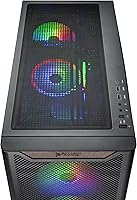
  • The front-mesh Chronos case has a clean, understated aesthetic that does not look out of place in a living room or office setup.
  • The all-AMD platform means FSR 4 upscaling works natively, recovering frames in supported titles at higher resolutions.
  • Setup is genuinely plug-and-play — no driver hunting, no BIOS tuning required to get into a game on day one.

Cons

  • The Wi-Fi card is 802.11ac, not Wi-Fi 6 — a notable omission at this price point in 2025.
  • Rear USB port selection is limited, and power users will likely need a USB hub for comfortable day-to-day use.
  • The specific GPU brand inside the case is not guaranteed, which has frustrated buyers who expected a particular manufacturer.
  • The Ryzen 7 7700 is a capable but aging CPU — not the right choice if raw multi-threaded workloads are a priority.
  • Fan noise under sustained gaming load is noticeable and may bother users in quiet environments.
  • Skytech customer support response times are inconsistent, which matters when the warranty is part of the value proposition.
  • The convenience premium over a self-build is real — budget-conscious buyers with DIY skills can match these specs for less.
  • Only one HDMI and one DisplayPort output limits multi-monitor flexibility without adding a hub or adapter.

Ratings

Our AI rating system analyzed verified global buyer reviews for the Skytech Gaming Chronos 3 Gaming Desktop PC, actively filtering out incentivized, bot-generated, and spam feedback to surface what real owners actually experience. The scores below reflect both what this pre-built gaming tower does exceptionally well and where it falls short — no category has been softened to protect the overall impression.

GPU Performance
91%
The RX 9070 XT handles 1440p ultra settings with clear authority, and in competitive or well-optimized titles it pushes 4K above 60fps without needing FSR assistance. Buyers upgrading from last-gen cards consistently describe the jump as immediately noticeable in both frame rates and texture quality.
Heavily ray-traced open-world titles at native 4K can expose the GPU's limits, pushing buyers to enable FSR 4 to maintain smooth gameplay. A small number of reviewers were also frustrated that the GPU brand inside their unit differed from product images, even though the core chip was identical.
Value for Money
78%
22%
For buyers who factor in the warranty, bloatware-free Windows install, bundled peripherals, and US assembly, the overall package holds up reasonably well against the component cost. Console upgraders in particular tend to rate value highly because the performance gap relative to their previous setup is dramatic.
Experienced builders consistently point out that sourcing the same components independently costs meaningfully less, making the convenience premium a real and documented trade-off. At this price tier, some buyers also expected Wi-Fi 6 and a more generous USB layout as standard inclusions.
Out-of-Box Experience
93%
The setup process is about as frictionless as pre-built PCs get — connect monitor, plug in peripherals, power on, and you are in Windows within minutes. The no-bloatware Windows 11 Home install is consistently praised; buyers do not have to spend time removing unwanted software before installing their games.
A minority of buyers reported minor cosmetic shipping issues such as a loosened side panel or slightly dislodged RAM stick — problems that are easy to fix but jarring when unboxing an expensive system. Skytech's packaging is generally solid, but inconsistency has been noted across a subset of reviews.
CPU Performance
72%
28%
The Ryzen 7 7700 handles gaming workloads comfortably, and for the majority of titles it is not the limiting factor — the GPU takes center stage as intended. Streamers running OBS alongside a game session report that the 8-core chip manages the dual workload without significant frame drops.
By 2025 standards the Ryzen 7 7700 reads as a mid-tier choice, and buyers who do heavy video rendering, 3D work, or simulation tasks will feel its ceiling. In CPU-bound game scenarios or large open-world titles with heavy NPC simulation, it does occasionally become a bottleneck.
RAM & Memory Speed
88%
32GB of DDR5-6000 is a generous and forward-thinking allocation — no current game requires anywhere near this amount, and the high clock speed gives a tangible edge in memory-sensitive workloads compared to DDR4 pre-builts at similar prices. Multitaskers running browsers, Discord, and OBS simultaneously report zero memory pressure.
The RGB heat spreader is a nice aesthetic touch but irrelevant to performance, and some buyers would have preferred the cost redirected toward a faster CPU or Wi-Fi 6. A small number of users reported needing to enable XMP or EXPO in the BIOS to actually hit the 6000MHz rated speed.
Storage Speed & Capacity
89%
The 2TB Gen4 NVMe SSD is one of the most praised aspects of the Chronos 3 — game load times are dramatically shorter than SATA or HDD-based systems, and 2TB holds a substantial library without forcing buyers to immediately invest in additional storage. Day-one impressions of boot and load speeds are consistently positive.
There is no secondary storage bay pre-populated, and buyers with large existing game libraries may find themselves planning an expansion sooner than expected as modern titles continue to grow in install size. The specific SSD brand and model can also vary by production run.
Thermal Management
74%
26%
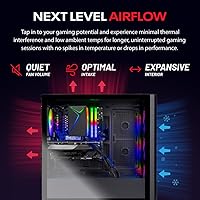
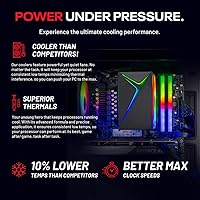
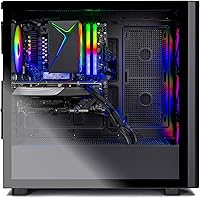
Under typical gaming loads the system maintains stable temperatures and does not throttle, which is the baseline expectation for a pre-built at this level. The front mesh panel on the Chronos case supports reasonable airflow and helps keep GPU temps in an acceptable range during extended sessions.
Under sustained heavy load — long gaming sessions at high resolution with the GPU running near capacity — fan noise increases to a level that some buyers find distracting. A few reviewers noted that the stock thermal solution for the CPU feels conservative and that aftermarket cooler options were explored shortly after purchase.
Noise Level
67%
33%
At idle and during light use, the system is quiet enough to fade into the background, and casual gaming sessions in less demanding titles keep fan speeds low. Buyers using the system for browsing, streaming, or productivity work report no noise concerns at all.
Under sustained GPU load the fans become audibly prominent — not unusually loud for a gaming tower, but noticeable enough that buyers sensitive to ambient noise or those in shared spaces have flagged it. This is a recurring theme in longer-term ownership reviews rather than initial impressions.
Connectivity & Ports
61%
39%
The combination of HDMI and DisplayPort outputs covers the most common monitor setups, and the inclusion of USB 2.0, 3.0, and 3.2 Gen1 ports handles basic peripheral needs without requiring an immediate hub purchase for most users.
The overall USB port count on the rear panel is thin by the standards of a premium gaming desktop, and buyers with multiple peripherals — headset, controller, external drive, and a USB hub — quickly run out of real estate. The 802.11ac Wi-Fi is also a persistent complaint; at this price point, Wi-Fi 6 is a reasonable expectation that the Chronos 3 does not meet.
Build Quality & Aesthetics
83%
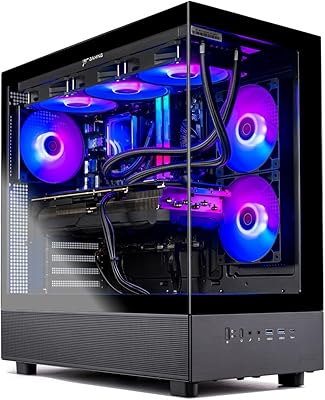
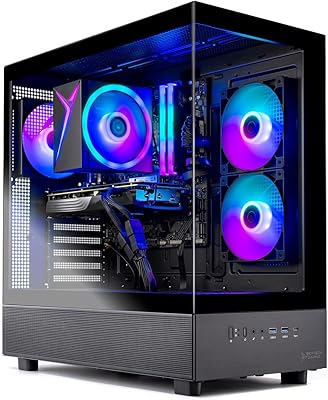
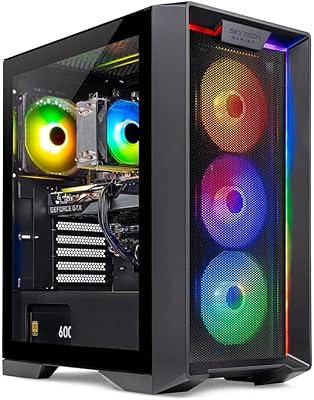
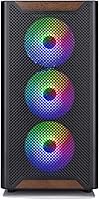
The Chronos Black Edition case has a clean, understated look that works in living rooms and desk setups alike without the excessive RGB showmanship of cheaper gaming builds. The front mesh panel is a functional and attractive design choice, and build rigidity gets positive comments from buyers who have moved or transported the unit.
Panel fitment and interior cable management quality varies slightly between units, with some buyers noting that cables were not routed as neatly as expected from a premium pre-built. The case itself is solid but not class-leading in airflow design compared to some competing towers at this price.
Upgrade Potential
81%
19%
The AM5 platform is one of the most forward-compatible consumer sockets AMD has committed to, meaning future Ryzen processor upgrades are a realistic option without a full system replacement. The 850W PSU also provides genuine headroom for a more power-hungry GPU down the line.
Depending on the specific motherboard Skytech installs — which can vary — expansion slot availability and BIOS upgrade support may differ, making it worth confirming the exact board before planning upgrades. Some buyers have also found that the case's internal clearances limit the physical size of replacement GPU options.
Warranty & Support
69%
31%
The one-year parts-and-labor warranty with free technical support is a legitimate commitment from a US-based assembler, and the majority of warranty interactions that buyers describe in reviews were resolved without requiring the unit to be shipped back. Having a real company behind the product matters when something goes wrong.
Skytech's support response times are inconsistent, with some buyers waiting several days for a reply during peak periods — which is frustrating when you have a non-functional gaming PC sitting idle. A subset of reviewers felt that the support team leaned toward generic troubleshooting scripts rather than direct, knowledgeable assistance.
GPU Brand Transparency
53%
47%
The core GPU — the RX 9070 XT — performs identically regardless of which board partner's card is installed, and technically-savvy buyers understand that the chip is what matters, not the shroud design.
The brand-may-vary disclosure is buried and not prominently communicated at the point of purchase, which leads to genuine disappointment when buyers receive a card that looks different from the marketing images. This is a trust issue more than a performance issue, and it is one of the most consistently negative talking points in verified reviews of this pre-built gaming tower.

Suitable for:

The Skytech Gaming Chronos 3 Gaming Desktop PC is purpose-built for gamers who want strong 1440p and capable 4K performance without spending weekends researching compatible parts and troubleshooting a DIY build. If you are upgrading from a console or a several-year-old mid-range PC, the jump in performance will be immediately obvious — faster load times, smoother frame rates, and a system that is ready to go the moment it arrives. Streamers and light content creators will also find it comfortable, since 32GB of DDR5 RAM and a 2TB Gen4 SSD give enough breathing room to run OBS or a light editing timeline alongside a game session. AMD ecosystem users benefit specifically here, as FSR 4 and FidelityFX Super Resolution support is baked into a growing library of titles and works natively with the RX 9070 XT. Anyone who values having a real warranty and US-based technical support behind their purchase — rather than sorting out a component failure alone — will find genuine peace of mind in Skytech's one-year parts-and-labor coverage.
Not suitable for:

Experienced builders who are comfortable sourcing and assembling their own components will likely find the Skytech Gaming Chronos 3 Gaming Desktop PC hard to justify on value grounds alone, since the convenience premium is real and the same GPU and CPU combination can be built for less with patience and time. Competitive esports players who prioritize the highest possible CPU throughput for fast-paced titles — and who would rather pair a stronger processor with their GPU — may find the Ryzen 7 7700 underwhelming compared to higher-end 2025 chips. Buyers who need a robust USB hub on the back panel, or who require Wi-Fi 6 for a congested household network, should know upfront that this pre-built gaming tower does not deliver on either front without adding external adapters. Anyone sensitive to fan noise during long gaming sessions should also factor that in, as the thermals under sustained load are functional but not whisper-quiet. Finally, if you are hoping for a specific GPU brand on the card inside the case, be aware that Skytech does not guarantee a particular manufacturer, which some buyers find frustrating.
Specifications

  • CPU: AMD Ryzen 7 7700 8-core processor with a 3.8GHz base clock and a 5.3GHz boost clock handles gaming and multitasking workloads competently for most use cases.
  • GPU: AMD Radeon RX 9070 XT with 16GB of GDDR6 VRAM delivers strong performance at 1440p ultra settings and capable output at 4K in moderately demanding titles.
  • RAM: 32GB of DDR5-6000 MHz memory with RGB heat spreaders provides a meaningful speed advantage over DDR4 systems and leaves substantial headroom for future software demands.
  • Storage: A 2TB PCIe Gen4 NVMe M.2 SSD offers fast sequential read and write speeds, significantly reducing game load times compared to SATA SSDs or traditional hard drives.
  • Power Supply: An 850W 80+ Gold ATX 3.0-compliant PSU provides efficient power delivery, handles the RX 9070 XT's transient power spikes cleanly, and leaves room for component upgrades.
  • Operating System: Windows 11 Home 64-bit comes pre-installed without third-party bloatware, so the system is ready for immediate use after initial Windows setup.
  • Wireless: Built-in 802.11ac (Wi-Fi 5) wireless connectivity is included for out-of-box network access without requiring a separate adapter or Ethernet cable.
  • Display Output: The system provides one HDMI port and one DisplayPort output for monitor connectivity, with additional port availability subject to the GPU brand installed.
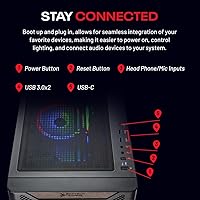
  • USB Ports: Rear panel USB connectivity includes USB 2.0, USB 3.0, and USB 3.2 Gen1 ports, though the total port count is limited compared to some competing pre-built towers.
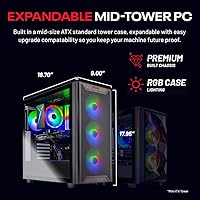
  • Case: The Skytech Chronos Black Edition tower features a front mesh panel for airflow and a clean, understated black aesthetic measuring 18.7 x 9.06 x 18 inches.
  • Weight: The assembled unit weighs approximately 34.1 pounds, which is typical for a full-size gaming tower with a large GPU and ATX motherboard.
  • Warranty: Skytech provides a one-year warranty covering both parts and labor, with free technical support included for the duration of the coverage period.
  • Included Accessories: A gaming keyboard and mouse bundle is included in the box, providing a usable input set for buyers who do not already own PC peripherals.
  • Assembly Origin: Each unit is assembled in the USA, which supports Skytech's quality control process and facilitates domestic warranty service and support.
  • GPU VRAM: The 16GB GDDR6 VRAM buffer is well-sized for 4K texture workloads and provides future resilience as VRAM requirements in modern titles continue to climb.
  • Memory Slots: The platform uses DDR5 memory, and available expansion depends on the specific motherboard installed, which may vary by production run.
  • Chipset: The system is built on the AMD AM5 platform, supporting the Ryzen 7000 series CPU and offering a forward-compatible socket for future processor upgrades.
  • Dimensions: The tower measures 18.7 inches in length, 9.06 inches in width, and 18 inches in height, requiring adequate desk or floor clearance for proper ventilation.

Related Reviews
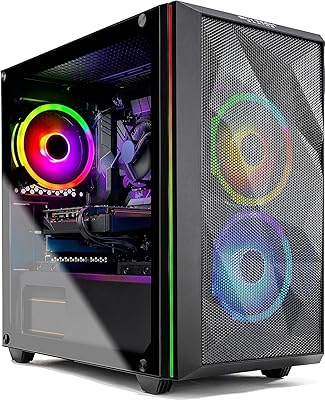
Skytech Gaming Chronos Mini Gaming Desktop PC
72%
73%
Gaming Performance
91%
Out-of-Box Setup
69%
Value for Money
48%
Storage Adequacy
57%
RAM Performance
More
Skytech Gaming Azure Gaming PC Desktop
83%
89%
Value for Money
85%
Gaming Performance
92%
Setup and Ease of Use
84%
Build Quality
80%
Cooling and Thermals
More
Skytech Gaming Azure 3 Desktop PC, Ryzen 7 7700X, NVIDIA RTX 5070 12GB, 32GB DDR5 RAM, 1TB SSD
86%
94%
Gaming Performance
88%
Build Quality
91%
Cooling Efficiency
85%
Value for Money
89%
Ease of Setup
More
Skytech Azure 3 Gaming PC (Ryzen 7 7800X3D, RTX 5060 Ti, 1TB SSD, 32GB RAM)
89%
98%
CPU Performance
94%
Thermal Management
97%
1080p Gaming Capability
91%
Build Aesthetics & Quality
93%
System Responsiveness
More
Skytech Gaming Chronos Gaming PC – Intel Core i5 12600K, RTX 3070, 1TB SSD
86%
92%
Performance in Gaming
85%
Setup and Installation
88%
Build Quality
87%
Cooling and Thermals
93%
Graphics Quality
More
Skytech Gaming Azure 3 Gaming PC, AMD Ryzen 7 5700, NVIDIA RTX 5060, 32GB RAM, 1TB SSD
87%
92%
Performance
94%
Graphics Quality
89%
Multitasking Performance
91%
Ease of Setup
88%
Cooling System
More
Skytech Nebula GTX 1650 Gaming Desktop PC
76%
72%
Gaming Performance
74%
Value for Money
91%
Out-of-Box Readiness
78%
Build Quality
76%
Thermal Management
More
Skytech Gaming Chronos Gaming PC – Intel Core i7 13700K, NVIDIA RTX 4070, 32GB DDR5 RAM, 1TB SSD
88%
94%
Gaming Performance
90%
Build Quality
88%
Cooling System
91%
Design & Aesthetics
85%
Setup & Installation
More
Skytech Gaming Shadow Gaming PC Desktop – Intel Core i7 13700F, NVIDIA RTX 4060, 1TB SSD, 16GB RAM
88%
94%
Performance
91%
Graphics Quality
89%
Storage Speed
87%
Multitasking Ability
85%
Build Quality
More
Skytech Gaming Azure 3 Gaming PC, AMD Ryzen 7 9700X, NVIDIA RTX 5060, 32GB DDR5, 2TB SSD
87%
94%
Performance
91%
Gaming Experience
92%
Value for Money
86%
Thermal Management
88%
Setup and Installation
More

FAQ

It depends on the game. In esports titles and older or well-optimized games — think Rocket League, Valorant, or even Elden Ring — you will hit 60-plus frames at 4K without much trouble. In extremely demanding open-world games with ray tracing cranked up, you may need to dial back a setting or two to stay above 60fps consistently. The RX 9070 XT is a genuinely capable 4K card, but no single GPU handles every modern game at maximum settings without some compromise.

Skytech does not guarantee a specific GPU manufacturer for the Chronos 3. You might receive a card from Sapphire, PowerColor, XFX, or another AMD board partner. The core GPU — the RX 9070 XT — is the same regardless, but the cooler design and aesthetics will differ. If a specific brand matters to you, this is worth factoring into your decision before purchasing.

The included 802.11ac adapter works fine for general browsing, streaming, and even casual online gaming. That said, if you are in a home with a crowded 5GHz band or you want the best possible latency for competitive multiplayer, running an Ethernet cable is always the better option. Wi-Fi 6 would have been a more future-proof inclusion at this price point, so it is a fair criticism of the build.

Yes, with some planning. The AM5 socket is forward-compatible with future AMD Ryzen processors, so a CPU upgrade is straightforward. The 850W PSU also gives you solid headroom for a more powerful GPU in the future. Just confirm that any new GPU physically fits the case before purchasing, as large triple-fan cards can be tight in some tower configurations.

Under moderate load the system is reasonably quiet. Once you are pushing the GPU hard — extended gaming at 4K, for instance — the fans spin up and the noise becomes noticeable. It is not unusually loud for a gaming tower, but if you are sensitive to fan noise or record audio in the same room, it is worth being aware of.

Pretty much, yes. You connect your monitor via HDMI or DisplayPort, plug in the keyboard and mouse from the included bundle, connect power, and boot into Windows 11. Skytech ships without bloatware, so you are not spending the first hour uninstalling unwanted software. From unboxing to your first game is typically under 30 minutes.

If you have the time, confidence, and patience to source parts and assemble a PC, you can likely replicate these specs for less money. The premium you pay here buys you a warranty, US-based support, and the guarantee that everything is already tested and working. For a lot of buyers — especially those new to PC gaming — that trade-off is genuinely worth it.

32GB of DDR5 is comfortably above what any current game requires, and it should remain more than adequate for gaming through the mid-2020s. It also gives you room to run a browser, Discord, and streaming software simultaneously without any performance hit. You are not going to feel RAM-limited with this Skytech build for the foreseeable future.

For a basic setup — keyboard, mouse, headset, and a controller — you will be fine. Where it gets tight is if you also want to connect a USB hub, an external drive, and a few other peripherals simultaneously. The rear port selection is functional but not generous, so a powered USB hub is a practical addition if you have a lot of devices.

Skytech offers a one-year parts-and-labor warranty with free technical support. Most buyers report that claims are resolved without major friction, but response times from the support team can vary. It is a legitimate warranty backed by a real company, not a third-party reseller agreement, which is meaningful. Keeping your order confirmation and any correspondence organized will make the process smoother if you ever need to use it.