Overview

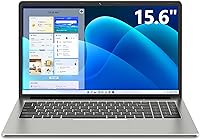
The SGIN M15 15.6-inch Laptop is a no-frills Windows 11 machine built squarely for people who need reliable everyday computing without spending a lot. SGIN occupies the entry-level end of the market, and that context matters — this is not a device chasing performance benchmarks or premium build quality. What it offers instead is a practical screen size, a functional feature set, and a price that makes it accessible to students, seniors, and anyone who just needs a machine that works. Go in with calibrated expectations and this budget laptop can genuinely deliver. Push it beyond its intended purpose and you will hit walls quickly.

Features & Benefits

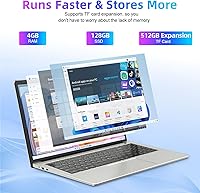
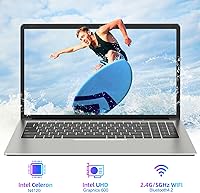
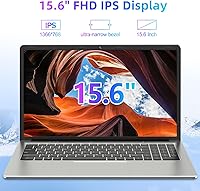
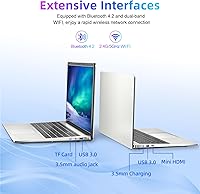
At the heart of this entry-level machine is an Intel Celeron N5095 quad-core processor that handles web browsing, document editing, and video streaming without complaint. The 128GB SSD is a real advantage at this price point — boot times are quick, and apps open without the sluggishness you would expect from a spinning hard drive. The 15.6-inch IPS panel renders colors clearly enough for everyday use, with wide viewing angles that hold up even when sharing the screen. Connectivity is solid: dual-band WiFi, Bluetooth 4.2, two USB 3.2 ports, and a Mini HDMI output cover most real-world needs. The 4GB of RAM, however, is a genuine ceiling — keep your tabs and open applications in check, or you will feel it.

Best For

This budget laptop makes most sense for users whose computing needs are genuinely modest. Students drafting papers, joining video calls, or bouncing between a few browser tabs will find it capable enough. Seniors or first-time buyers who want something straightforward to set up and easy to use day-to-day get real value from the large 15.6-inch screen and familiar Windows 11 environment. It also works well as a secondary household device — something to leave on the counter or hand to a family member without worry. Frequent travelers who prioritize light weight over raw power will appreciate the 3.5-pound frame and the reasonable battery endurance it offers on the go.

User Feedback

Buyers who pick up the SGIN M15 generally come away satisfied when expectations are appropriately set. Consistent praise centers on easy out-of-box setup, the generous screen size for the price, and how light it is to carry around. Where people run into friction is the RAM — users who keep a dozen browser tabs open alongside a video call will notice slowdowns, which is a predictable constraint rather than a defect. Build quality draws mixed reactions: the plastic chassis feels functional rather than solid, which most buyers accept at this tier. Battery life tends to fall short of the 8-hour claim, landing closer to five or six hours in real use. The keyboard and trackpad earn generally positive marks for comfortable daily typing.

Pros

  • The SSD storage means noticeably faster boot times compared to older budget laptops running spinning hard drives.
  • Dual-band WiFi keeps connectivity stable whether you are on a congested 2.4GHz network or a faster 5GHz band.
  • At 3.5 pounds and under an inch thick, this budget laptop is genuinely easy to carry through a full day.
  • The 15.6-inch IPS panel offers wide viewing angles that hold up when more than one person is looking at the screen.
  • A full port lineup — including two USB 3.2 ports, Mini HDMI, and a microSD slot — handles most everyday connection needs.
  • Windows 11 comes pre-installed, so setup is straightforward with no extra OS cost or configuration required.
  • MicroSD expansion up to 512GB gives users a low-cost way to extend storage beyond the built-in 128GB.
  • The keyboard receives generally positive feedback for comfortable, responsive typing during long writing sessions.
  • At this price tier, the included feature set represents honest value for light, everyday computing tasks.

Cons

  • 4GB of RAM creates a real ceiling — slowdowns appear quickly when multitasking with several browser tabs open.
  • Real-world battery life tends to land between five and six hours, falling noticeably short of the marketed 8-hour claim.
  • The plastic chassis feels lightweight in a cost-cutting way rather than a premium portability way, and flex is noticeable.
  • The 1366x768 display resolution looks soft compared to even modest mid-range laptops shipping with 1080p screens today.
  • The Intel Celeron processor handles light tasks adequately but struggles under any sustained workload or performance demand.
  • Mini HDMI rather than full-size HDMI means most users will need an adapter to connect to an external monitor or TV.
  • The SGIN brand has limited support infrastructure, which can be a concern if something goes wrong after purchase.
  • 128GB of internal storage fills up faster than expected once Windows updates and a few applications are installed.
  • The trackpad, while usable, lacks the precision and gesture support buyers accustomed to mid-range hardware will expect.

Ratings

Our AI rating engine analyzed thousands of verified global purchases of the SGIN M15 15.6-inch Laptop, actively filtering out incentivized reviews, bot activity, and duplicate submissions to surface what real buyers actually experience. The scores below reflect an honest cross-section of feedback — both where this budget laptop genuinely delivers and where it falls short — so you can make a fully informed decision before buying.

Value for Money
81%
19%
Buyers consistently feel they are getting a fair deal for the price, particularly when they need a no-fuss machine for basic daily tasks. The inclusion of Windows 11, an SSD, and dual-band WiFi at this tier gives it a feature set that budget shoppers find hard to match elsewhere.
A small but vocal group of reviewers feel the value equation tips negative once RAM limitations start affecting real-world usability, especially for students or remote workers who push it harder than intended. For buyers who later wish they had spent a bit more, the satisfaction fades quickly.
Performance
58%
42%
For straightforward tasks — typing up documents, browsing a handful of tabs, or streaming a show — the Intel Celeron processor keeps things moving without obvious lag. First-time laptop owners and seniors using it primarily for email and light web use rarely feel limited.
The moment multitasking gets serious, performance deteriorates noticeably. Opening several browser tabs alongside a video call or a spreadsheet pushes the 4GB RAM to its ceiling, resulting in slowdowns that frustrate users who expected a more capable everyday experience.
RAM & Multitasking
44%
56%
For genuinely minimal use — a single browser window, a document editor, or a video stream in isolation — the 4GB of DDR4 RAM moves data efficiently enough that daily tasks feel reasonably responsive.
This is the most consistently criticized aspect across buyer feedback worldwide. Users report that background Windows processes alone consume a significant portion of available memory, leaving little headroom for real work. Those who use it for school or remote work quickly hit frustrating walls.
Storage & Speed
76%
24%
The 128GB SSD makes a meaningful difference compared to older budget laptops that used spinning hard drives. Boot times are snappy, apps open quickly, and the system feels more responsive than the processor spec alone would suggest.
128GB fills up faster than many buyers anticipate once Windows updates, browser caches, and a few applications settle in. Users who store photos, downloaded videos, or work files locally find themselves managing space constantly or investing in a microSD card soon after purchase.
Display Quality
67%
33%
The 15.6-inch IPS panel earns consistent praise for its wide viewing angles, which make it comfortable to use in various positions or share the screen with someone beside you. Colors are accurate enough for everyday media consumption and document work.
The 1366x768 resolution is the panel's biggest drawback — text and images look noticeably softer than on even modestly priced competitors that ship with 1080p screens. Users coming from a modern phone or tablet often find the display underwhelming by comparison.
Battery Life
61%
39%
Under genuinely light use — document editing with WiFi connected and modest screen brightness — this entry-level machine can stretch close to six hours, which is enough for a school day or a short trip without hunting for an outlet.
The advertised 8-hour battery life is a stretch that very few buyers report achieving in practice. Real-world results consistently land in the 5 to 6-hour range, and users who stream video or keep multiple apps open see that drop further. Bringing the charger along remains a practical necessity.
Build Quality
55%
45%
The slim, lightweight construction does what it promises — the machine is easy to slip into a bag and carry without fatigue. For buyers primarily concerned with portability over durability, the slim profile feels like a reasonable trade-off.
The all-plastic chassis reveals its cost-cutting origins quickly. Buyers notice flex in the lid and the keyboard deck when handled firmly, and the overall feel lacks the confidence of even modest mid-range competitors. It is functional, but it does not feel built to last under daily stress.
Keyboard & Typing Experience
72%
28%
The full-size keyboard layout with a numeric keypad is a genuine plus for users who do data entry or extended writing. Key spacing is comfortable, and buyers who primarily use this machine for typing up notes or emails generally find the experience adequate and fatigue-free.
Key travel is shallow compared to mid-range alternatives, which can feel unsatisfying during long typing sessions for users accustomed to better keyboards. A few reviewers note that key feedback is inconsistent across the board, with some keys feeling slightly mushier than others.
Trackpad Responsiveness
63%
37%
Basic cursor navigation and single-finger scrolling work reliably enough for everyday use. Buyers using this machine for simple browsing or document navigation rarely find the trackpad a major obstacle in their workflow.
Multi-finger gestures are inconsistent and gesture recognition occasionally misfires, which becomes noticeable during longer work sessions. Several users mention that the trackpad surface feels slightly rough, reducing the smooth glide expected from even budget-tier competitors.
Connectivity & Ports
78%
22%
The port selection is genuinely well-rounded for this price tier — two USB 3.2 ports, a microSD slot, a headphone jack, and a Mini HDMI output cover the most common real-world connection needs without requiring a hub for typical daily tasks.
The Mini HDMI rather than full-size HDMI is an inconvenience that catches buyers off guard, requiring a separately purchased adapter to connect to most monitors or TVs. Bluetooth 4.2 is also starting to show its age compared to the newer standards shipping on current competitors.
WiFi Performance
74%
26%
Dual-band WiFi handles everyday connectivity tasks — streaming, video calls, web browsing — without notable drops or instability on a standard home or office network. Switching between 2.4GHz and 5GHz bands works reliably for buyers whose routers support both.
A subset of users reports inconsistent WiFi behavior in environments with network congestion, with occasional speed drops that are hard to attribute specifically to the hardware. Range at the edges of a home network also draws occasional criticism compared to newer WiFi standard implementations.
Setup & Out-of-Box Experience
83%
Buyers — particularly seniors and first-time laptop owners — repeatedly praise how simple the initial setup experience is. Windows 11 guides users through the process clearly, and the machine is genuinely ready to use within minutes of unboxing without technical knowledge.
Like most Windows machines, some pre-installed trial software and Microsoft defaults require manual removal, which can confuse less experienced users. A handful of reviewers note that initial Windows updates consume a noticeable chunk of storage before the machine is fully ready to use.
Portability
82%
18%
At 3.5 pounds and under an inch thick, this machine genuinely earns its lightweight reputation. Students and commuters who carry it daily in a backpack or tote consistently highlight how little they notice its weight compared to bulkier laptops.
The 15.6-inch footprint, while offering a generous screen, does mean the machine takes up meaningful bag real estate. Buyers expecting something compact alongside lightweight may find the physical size larger than anticipated, particularly in smaller bags or tight spaces.
Audio Quality
59%
41%
Built-in speakers are adequate for casual video calls and background music at low to moderate volumes. The 3.5mm headphone jack performs reliably, and pairing wired headphones delivers a noticeably better listening experience than the built-in speakers alone.
The internal speakers lack bass and volume ceiling, making them feel thin during media playback. Buyers who plan to stream shows or listen to music without headphones regularly will find the audio output a persistent disappointment compared to what most modern laptops at similar price points deliver.
Webcam Quality
54%
46%
The built-in webcam covers the minimum requirement for video calls on Zoom, Google Meet, or Teams under decent lighting conditions. For occasional check-ins or online classes, it gets the job done without requiring an external camera.
In anything less than bright, direct lighting, image quality degrades quickly — video appears grainy and colors look washed out. Buyers who regularly participate in professional video calls or online presentations will likely feel the need to invest in an external webcam sooner rather than later.

Suitable for:

The SGIN M15 15.6-inch Laptop is a strong fit for anyone whose daily computing revolves around browsing, email, streaming, and light document work. Students heading into a first semester who need something dependable for note-taking, research, and the occasional Zoom class will find it covers those bases without straining a tight budget. Seniors or first-time laptop owners benefit from the full-size 15.6-inch screen that is easy on the eyes, plus the familiarity of Windows 11 without any complicated setup. It also makes practical sense as a secondary device in a household — something parked in the kitchen, handed to a younger child for schoolwork, or kept as a travel backup. Commuters who want a lightweight machine for working on the go rather than a powerhouse for heavy lifting will appreciate the slim profile and manageable carry weight.

Not suitable for:

Anyone with serious productivity demands should look elsewhere before considering this entry-level machine. The 4GB of RAM is a hard constraint that becomes obvious the moment you open multiple applications simultaneously — video editing, coding environments, or running virtual machines are simply not realistic on this hardware. The SGIN M15 15.6-inch Laptop also falls short for users who rely on cloud-based workflows requiring many browser tabs open at once, since that alone can push memory to its limit. Gamers will find nothing here to work with; the integrated Intel UHD Graphics 600 is designed for basic display output, not rendering. Creative professionals who need accurate color reproduction will also want a higher-resolution, color-calibrated display rather than the 1366x768 IPS panel here. If your use case is intensive or growing, the modest specs will feel restrictive faster than you might expect.

Specifications

  • Processor: Powered by an Intel Celeron N5095 quad-core processor with a maximum turbo frequency of 2.5GHz, suitable for everyday computing tasks.
  • RAM: Equipped with 4GB of DDR4 SDRAM, which handles light multitasking but limits performance when many applications run simultaneously.
  • Storage: Includes a 128GB solid-state drive that provides faster boot times and application launches compared to traditional spinning hard drives.
  • Display: Features a 15.6-inch IPS panel with a 1366x768 pixel resolution, a 16:9 aspect ratio, and wide viewing angles for comfortable everyday use.
  • Operating System: Ships with Windows 11 pre-installed, requiring no additional operating system purchase or setup from the buyer.
  • Graphics: Uses integrated Intel UHD Graphics 600, which handles standard video playback and display output but is not suited for gaming or GPU-intensive work.
  • WiFi: Supports dual-band wireless connectivity across both 2.4GHz and 5GHz frequencies for flexibility on different network types.
  • Bluetooth: Bluetooth 4.2 is built in, allowing wireless pairing with peripherals such as headphones, mice, and keyboards.
  • Ports: Includes two USB 3.2 ports, one Mini HDMI output, a 3.5mm headphone jack, and a microSD card slot for expanded storage.
  • MicroSD Support: The microSD slot supports cards up to 512GB, offering a practical and low-cost way to expand storage beyond the internal SSD.
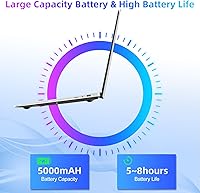
  • Battery: Houses a 38000mWh lithium-ion battery with a manufacturer-claimed life of up to 8 hours, though real-world use typically yields 5 to 6 hours.
  • Weight: The laptop weighs 3.5 pounds, making it light enough to carry comfortably in a backpack or tote bag throughout the day.
  • Dimensions: Measures 14.6 x 9.4 x 0.8 inches, offering a slim profile that fits easily into most standard laptop sleeves and bags.
  • Chassis Material: Built with a plastic outer shell finished in silver, which keeps the overall weight low but offers less rigidity than metal-bodied alternatives.
  • Webcam: Includes a built-in webcam positioned above the display, sufficient for video calls and online meetings at standard quality.
  • Audio: Equipped with HD audio output and a 3.5mm headphone jack, supporting both speakers and wired headphones for everyday media consumption.
  • Power Input: Operates on 12 volts DC and comes with a bundled charger, with no additional power adapter required out of the box.
  • Keyboard: Features a full-size keyboard layout with a numeric keypad, providing a comfortable typing experience for document work and data entry.

Related Reviews

HP 15.6-inch Laptop 15-ef0021nr, Ryzen 3 3200U, 8GB RAM, 256GB SSD

82%
92%
Value for Money
85%
Performance
83%
Build Quality
89%
Portability
81%
Battery Life
More
Dell Inspiron 3593 15.6-inch Laptop
68%
74%
Everyday Performance
81%
SSD Speed & Storage
52%
Display Quality
63%
Battery Life
57%
Build Quality
More
Vonxury 16L Water-Resistant Laptop Backpack
79%
93%
Value for Money
91%
Organization Layout
88%
Laptop Protection
89%
Weight & Portability
74%
Water Resistance
More
Bluboon 15.6 Inch Laptop Backpack
84%
89%
Organization & Storage
84%
Comfort & Ergonomics
90%
Portability & Weight
78%
USB Charging Port Convenience
85%
Laptop Protection
More
Liokesa 15.6-Inch Laptop Backpack
86%
89%
Value for Money
87%
Comfort and Ergonomics
84%
Durability and Build Quality
92%
Storage and Organization
90%
Water Resistance
More
VANKEAN 15.6 Inch Laptop Backpack V8001
86%
88%
Build Quality
91%
Comfort & Ergonomics
85%
Storage Capacity
75%
USB Charging Functionality
90%
Portability
More
MATEIN Rolling Laptop Bag with Lunch Box
77%
86%
Rolling Mobility
91%
Storage & Organization
88%
Laptop Protection
78%
Lunch Box Utility
74%
Handle System
More
Caoroky Laptop Backpack 15.6 Inch Grey
86%
89%
Durability
91%
Water Resistance
85%
Comfort & Ergonomics
84%
Design & Aesthetics
78%
Capacity & Organization
More
SUNNY BIRD Laptop Backpack 15.6 Inch
88%
91%
Build Quality
88%
Ergonomics & Comfort
94%
Durability & Material
89%
Organization & Storage
90%
Water Resistance
More
Kuosdaz S6 Laptop Backpack 15.6″
81%
88%
Overall Design & Aesthetics
79%
Build Quality & Durability
84%
Laptop Protection
86%
Storage & Organization
81%
USB Charging Port
More

FAQ

Yes, the SGIN M15 15.6-inch Laptop handles both Microsoft Office applications and Google Docs without trouble under normal use. Word processing, spreadsheets, and presentations all run acceptably well as long as you are not simultaneously running a heavy load of other programs in the background.

It depends on how you use it. Windows 11 itself takes up a significant chunk of that 128GB, so after system files and a few installed apps, you may have around 80 to 90GB of usable space. If you store a lot of photos, videos, or large files locally, you will want to use an external drive or take advantage of the microSD slot, which supports cards up to 512GB.

For one-on-one or small group video calls, the built-in webcam and dual-band WiFi keep things running smoothly. Where you might notice strain is if you have other applications or multiple browser tabs open at the same time, since the 4GB of RAM gets divided quickly during active calls.

Unfortunately, the RAM in this machine is soldered to the motherboard, which means it cannot be upgraded after purchase. The 4GB is what you get for the lifetime of the device, so factor that in before buying if you anticipate needing more headroom in the future.

In practice, most users find battery life lands closer to 5 or 6 hours with typical use — browsing, documents, and occasional streaming. The 8-hour figure appears to be measured under very light, controlled conditions. If you plan to use it away from an outlet for a full workday, bringing the charger along is a safe habit.

It is actually a reasonable choice for that use case. Windows 11 is familiar enough for anyone who has used a PC before, and the large 15.6-inch screen is easier to read than smaller alternatives. Setup is straightforward out of the box, and the machine handles the basics — email, video calls, web browsing — without requiring any complicated configuration.

Yes, through the Mini HDMI port. The important thing to note is that it uses Mini HDMI rather than a standard full-size HDMI connector, so most people will need a Mini HDMI to HDMI adapter or cable, which does not come in the box. Those adapters are inexpensive and easy to find.

For streaming video, this budget laptop performs well enough. HD streaming on Netflix, YouTube, or similar platforms runs without significant buffering on a solid WiFi connection, and the IPS display's wide viewing angle makes it comfortable to watch from different positions. Just do not expect cinematic picture quality given the 1366x768 resolution.

The keyboard gets reasonably positive marks from users who use it for regular writing. The full-size layout with a numeric keypad gives you plenty of room, and key travel feels adequate for a laptop at this price point. It is not going to feel like a premium mechanical keyboard, but for typing emails, reports, or assignments, it holds up well enough.

Like most Windows laptops, this entry-level machine ships with a standard Windows 11 installation that includes Microsoft's default apps, a few trial subscriptions, and some pre-loaded utilities. It is not excessively loaded, but a quick cleanup of apps you do not plan to use is always a good first step and will free up a bit of storage and memory as well.