Overview
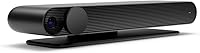
The Facebook Portal TV Smart Video Calling Device arrived in late 2019 with a clear aim: bring video calling to the TV screen rather than keeping it confined to a phone or tablet. Unlike Facebook's tablet-based Portal models, this TV calling device connects via HDMI, so it works with any television you already own. Getting it running takes minutes — sign into your Facebook account, pair it with your network, and you are ready. It is important to be clear about what this is not, though: there is no Netflix, no YouTube, no general-purpose streaming. Video calling is the point, full stop.
Features & Benefits
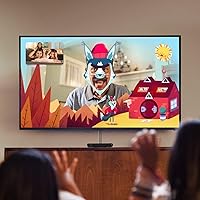
The Smart Camera is the headline feature, and it earns that billing. It tracks movement automatically — panning, zooming, and widening its field of view so whoever is on the call does not need to stay planted in one spot. The accompanying Smart Sound processing does a solid job of pulling voices forward and pushing room noise back, which makes a real difference if you are calling from a busy kitchen. Group calls go up to seven people on Messenger and four on WhatsApp. Alexa handles voice commands well enough for smart home tasks and quick queries, though it is not the reason to buy this. The Story Time AR feature — with animated characters and sound effects layered over calls — lands especially well with children.
Best For
The Portal TV is a strong fit for families spread across distances who rely on Messenger or WhatsApp to stay in touch — particularly when grandparents are on one end of the call and kids are on the other. Parents who read bedtime stories remotely will get genuine value out of the AR features; they are not a gimmick in that context. If your household is already running Alexa-connected devices, Facebook's living room camera slots in without friction. But if the people you want to call are not on Facebook or WhatsApp, this device has no path to reach them, and that is a hard wall, not a workaround.
User Feedback
With more than 5,400 ratings and a 4.2-star average, the reception is broadly positive, and the feedback patterns are telling. Buyers consistently call out the auto-framing camera as the standout — many expected it to feel gimmicky and came away surprised by how naturally it works. Setup gets praise too. Where things get complicated is the platform dependency: multiple reviewers point out that if your contacts are not on Facebook or WhatsApp, you have an expensive HDMI dongle. Data privacy concerns come up regularly, and they are worth taking seriously rather than dismissing. Finally, this is a UK import — double-check the power adapter before you plug it in, and do not assume standard manufacturer warranty coverage applies.
Pros
- The auto-framing Smart Camera tracks movement naturally, keeping everyone in view without any manual adjustments.
- Smart Sound processing noticeably improves voice clarity, even when calling from noisy rooms like kitchens.
- Setup is genuinely quick — HDMI in, account login, and you are making calls within minutes.
- Large-screen video calls feel far more social and natural than huddling around a phone or tablet.
- Supports group calls with up to seven participants on Messenger, which works well for family gatherings.
- Story Time AR overlays make remote storytime with kids engaging and fun rather than flat and awkward.
- Alexa integration covers smart home controls and quick voice queries without needing a separate device.
- A physical camera and microphone disable switch offers a tangible privacy control that many users appreciate.
- Over 5,400 ratings with a 4.2-star average reflects consistently positive real-world ownership experience.
- Calls are end-to-end encrypted on both Messenger and WhatsApp, adding a baseline layer of security.
Cons
- Locked entirely to Messenger and WhatsApp — anyone not on those platforms simply cannot be called.
- No streaming apps whatsoever, so it adds no general entertainment value to your TV setup.
- Sold as a UK import, meaning the power adapter and warranty coverage may require extra attention before purchase.
- Strong dependency on the Facebook ecosystem raises legitimate data privacy concerns that the company has not fully resolved.
- Third-party app support is essentially non-existent beyond calling functions and basic Alexa skills.
- The Alexa integration is functional but limited compared to a dedicated Echo device in the same price range.
- No compatibility with FaceTime, Zoom, Google Meet, or any business or Apple video calling tools.
- Long-term software support is uncertain given that Facebook discontinued the Portal product line after launch.
- Requires an active Facebook account to use, which is a barrier for people who have left or avoid the platform.
- At its original price point, the value proposition is narrow given how single-purpose the device is.
Ratings
Our AI-generated scores for the Facebook Portal TV Smart Video Calling Device are based on a systematic analysis of thousands of verified global buyer reviews, with spam, incentivized, and bot-flagged submissions actively filtered out before scoring. The ratings below reflect the full picture — where this TV calling device genuinely excels, where it falls short, and what real owners say after weeks or months of daily use. No category has been softened or inflated; the numbers reflect consensus, not marketing.
Camera Performance
Audio Quality
Ease of Setup
Platform Compatibility
Value for Money
Privacy Controls
Alexa Integration
AR & Story Time
Build Quality
Group Call Experience
UK Import Considerations
Long-Term Software Support
Display Output Quality
Suitable for:
The Facebook Portal TV Smart Video Calling Device is a well-targeted purchase for families who stay connected primarily through Facebook Messenger or WhatsApp and want to move those conversations off a small phone screen and onto the living room TV. Grandparents who struggle with small devices will find the large-screen format much easier to navigate, and the automatic camera tracking means nobody has to huddle in front of a webcam to stay visible. Parents who read stories remotely with children will find genuine, practical value in the Story Time AR feature — it makes long-distance interaction feel more like an event than a chore. If your household is already using Alexa to manage lights, thermostats, or speakers, the Portal TV fits that setup without adding friction. Essentially, if video calling is a regular, meaningful part of your week and everyone you call is already on those two platforms, this TV calling device delivers a noticeably better experience than improvising with a laptop or tablet propped against a cushion.
Not suitable for:
Buyers expecting a general-purpose smart TV upgrade will be disappointed quickly — the Facebook Portal TV Smart Video Calling Device does not stream Netflix, YouTube, or any third-party entertainment apps, and that is a deliberate design boundary, not a software gap that will eventually be filled. If the people you want to call use FaceTime, Google Meet, Zoom, or any platform outside of Messenger and WhatsApp, this device simply cannot reach them, and there is no workaround. Privacy-conscious buyers should go in with clear eyes: this is a Facebook-manufactured camera and microphone sitting in your living room, and while hardware mute and encryption are present, the data relationship with Facebook is real and worth researching before purchasing. This is also sold as a UK import, which introduces practical concerns around power adapter compatibility, and warranty support may not be straightforward if something goes wrong. Anyone looking for a versatile smart display with broad app support would be better served by alternatives like an Amazon Echo Show or a Google Nest Hub.
Specifications
- Brand: Manufactured and sold by Facebook (now Meta).
- Model Number: The official model number is 899-00081-13.
- ASIN: The Amazon product identifier is B07XY7C7C1.
- Release Date: The device was first made available on November 5, 2019.
- Dimensions: The unit measures 1.3 × 2.24 × 7.48 inches when mounted or positioned for use.
- Weight: The device weighs 1.74 pounds, making it lightweight and easy to position near a TV.
- Connection Type: Connects to any television using a standard HDMI port — no special TV features required.
- Supported Apps: Video calling is supported exclusively through Facebook Messenger and WhatsApp.
- Group Call Size: Group calls support up to 7 participants via Messenger, or up to 4 participants via WhatsApp.
- Camera: Features a wide-angle Smart Camera with automatic pan, zoom, and framing adjustment to track movement.
- Audio: Smart Sound technology enhances voice clarity and actively reduces background and ambient noise during calls.
- Voice Assistant: Alexa is built in, enabling hands-free voice commands for smart home control, music, news, and general queries.
- AR Features: Includes Story Time with animated overlays and music, plus AR masks usable during live video calls.
- Privacy Controls: A physical switch disables both the camera and microphone simultaneously, and all video calls are end-to-end encrypted.
- Origin: This listing is a UK import, which may affect power adapter compatibility and available warranty or customer support.
- User Rating: Holds a 4.2 out of 5 star average based on over 5,400 customer ratings on Amazon.
- Item Category: Listed under Personal Computers in Amazon's Electronics category.
- Language: Device interface and setup are in English.
Related Reviews
Bahouloer Indoor Outdoor TV Antenna
GE 48732 Indoor HD TV Antenna
FREE SIGNAL TV Transit Platinum 22″ TV
Roku Select Series 55-Inch 4K Smart TV
Facebook Portal Mini 8-inch Smart Display

Westinghouse 32-inch Xumo Smart TV
SYLVOX 27-Inch 12V RV Smart TV
SYLVOX 32-Inch 12V Smart RV TV
SYLVOX Pool Pro 2.0+ 55-inch Outdoor TV