Overview

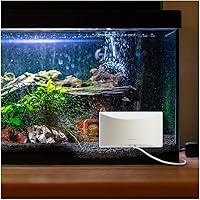
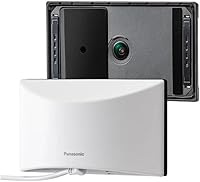
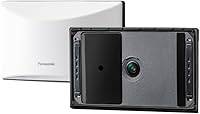
The Panasonic HomeHawk Window Indoor Security Camera takes a genuinely different approach to outdoor monitoring — instead of drilling into exterior walls or soffits, it sticks to the inside of your window with a suction cup or double-sided tape. Setup is quick and reversible, which matters a lot to renters. Panasonic brings decades of consumer electronics experience to the table, and that shows in the build quality. That said, this is a mid-range camera with no subscription fees, not a professional surveillance system. Go in with realistic expectations and it tends to deliver; expect it to compete with high-end outdoor cameras and you may be underwhelmed.
Features & Benefits

The 150-degree wide-angle lens gives you a legitimately broad field of view — enough to cover a full driveway or front porch in a single frame. Video records in 1080p full HD and holds up well in daylight. The color night vision is a real differentiator; instead of flat gray imagery typical of infrared cameras, you get actual color detail after dark. Person detection cuts down on unnecessary alerts by filtering out passing cars and rustling branches, and custom detection zones let you zero in on exactly the area you care about. Local microSDXC storage keeps footage off the cloud entirely, though you will need to budget for the card separately.

Best For

This window-mounted camera is an obvious pick for renters who cannot touch exterior walls — no landlord conversation required, no patching holes on move-out day. It is also a solid fit for anyone frustrated with the cycle of recharging wireless cameras; being plugged in and always on is a genuine advantage. Privacy-conscious buyers will appreciate that footage stays on a local card rather than a company server. Realistically, you need a window with a clear sightline to your target area — tinted, frosted, or awkwardly angled glass will hurt results. Smart home users running Alexa or Google Assistant will find the voice integration useful day to day.

User Feedback

Most buyers come away impressed by how straightforward setup is — stick it to the window, plug it in, connect to the app, and you are running. The clean window-mount design draws consistent praise. Where things get mixed is night vision through glass: reflections and interior glare can noticeably degrade image quality after dark. The companion app earns decent marks for live viewing, but some users flag occasional notification lag. Worth noting: the microSD card is not included, so factor that extra cost into the overall value equation. Person detection performs reliably in quiet residential settings but generates more misses in busy street-facing environments.

Pros

  • No drilling required — the suction cup or tape mount makes installation genuinely renter-friendly.
  • Always-on wired power means you never miss an event because of a dead battery.
  • Color night vision produces far more useful footage than standard grayscale infrared cameras.
  • Local microSDXC storage keeps your footage private with zero monthly subscription fees.
  • The 150-degree wide-angle lens covers a broad outdoor area from a single camera placement.
  • Person detection noticeably cuts down on unnecessary alerts in typical suburban environments.
  • Customizable detection zones let you focus alerts on exactly the area that matters to you.
  • Alexa and Google Assistant support makes pulling up a live feed on a smart display quick and easy.
  • The compact, low-profile design sits neatly on a windowsill without dominating the space.
  • Setup is fast enough that most users are watching a live feed within fifteen minutes of unboxing.

Cons

  • Night-vision footage through glass can be badly degraded by reflections and interior light glare.
  • The microSD card is not included, adding an unannounced cost on top of the purchase price.
  • Notification alerts can lag significantly, sometimes arriving over a minute after the triggering event.
  • Person detection accuracy drops in busy, street-facing locations with dense pedestrian traffic.
  • The six-foot power cable may not reach the nearest outlet depending on window and room layout.
  • The mobile app has a track record of occasional connectivity issues following software updates.
  • The suction cup can lose grip over time, particularly in rooms with significant temperature swings.
  • There is no way to monitor areas outside your window sightline, limiting placement flexibility.
  • Deep smart home automations beyond basic voice commands are not well supported.
  • The built-in fan that activates during thermal regulation is audible and unexpected in quiet rooms.

Ratings

The scores below reflect an AI-driven analysis of verified global buyer reviews for the Panasonic HomeHawk Window Indoor Security Camera, with spam, incentivized posts, and bot activity actively filtered out before scoring. Each category captures both the genuine strengths users repeatedly praised and the recurring frustrations that real owners encountered after weeks or months of use. Nothing here is cherry-picked — the numbers reflect the full picture.

Ease of Installation
93%
Buyers consistently describe setup as genuinely fast — most report going from unboxing to live feed in under fifteen minutes. The suction cup holds firmly on clean glass, and the six-foot USB cable gives enough reach to a nearby outlet without looking messy.
A handful of users found the suction cup lost grip over time on textured or slightly curved window surfaces. Double-sided tape works as a backup, but removal can leave residue, which matters to renters trying to keep their deposit.
Daytime Video Quality
86%
In good lighting, the 1080p footage is sharp enough to read license plates parked at moderate distances and clearly identify faces at the door. The 150-degree field of view covers a surprisingly wide area without the heavy fisheye distortion some wide-angle cameras produce.
Color accuracy drifts slightly in very bright midday sun, with occasional overexposed patches in high-contrast scenes. Users monitoring south-facing driveways in summer report some detail loss in the brightest parts of the frame.
Night Vision Performance
61%
39%
Color night vision is a legitimate step up from the flat grayscale imagery of standard infrared cameras. In a well-lit street environment, the HomeHawk Window captures recognizable color detail on clothing and vehicles that most competing cameras in this range simply cannot.
Shooting through glass at night introduces reflections and glare that can significantly degrade image quality — this is the single most common complaint in user reviews. Interior lights left on behind the camera make the problem considerably worse, and there is no fully reliable workaround short of blacking out the room.
Person Detection Accuracy
68%
32%
In low-traffic suburban settings, person detection performs well — users monitoring a quiet front porch or side gate report that false alerts from wind-blown trees and passing cars drop noticeably compared to standard motion detection cameras.
Busy street-facing windows are where the system struggles. Multiple reviewers in urban environments note missed detections and occasional false positives when foot traffic is dense. Customizable zones help, but they do not fully compensate in high-activity scenes.
App Experience
67%
33%
The mobile app handles live viewing reliably for most users, and the interface is straightforward enough that non-technical buyers rarely need to consult the manual beyond initial setup. Remote access from outside the home generally works without fuss.
Notification lag is a recurring complaint — some users report alerts arriving anywhere from fifteen seconds to over a minute after the triggering event. A subset of Android users have flagged connectivity drops after app updates, requiring a camera restart to restore the live feed.
Local Storage & Privacy
88%
Keeping all footage on a local microSDXC card rather than a company server resonates strongly with privacy-conscious buyers. There are no subscription tiers to navigate, no data leaving your home network, and no risk of losing access to recordings if a cloud service changes its pricing.
The microSD card is not included in the box, which catches some buyers off guard — especially those comparing the total cost against competitors that bundle storage. Cards can also fill up quickly if 24/7 recording is enabled at full resolution.
Value for Money
74%
26%
For users who specifically need an indoor-mounted window solution with no ongoing fees, the HomeHawk Window occupies a fairly unique niche and delivers reasonable capability at its price point. Eliminating subscription costs makes the long-term math work well for budget-conscious buyers.
Once you factor in the cost of a quality microSDXC card, the entry price climbs noticeably. Buyers who do not need the window-mount concept can find cameras with comparable or better image quality for less money.
Build Quality & Design
81%
19%
The camera feels solid for its size, with a compact footprint that does not dominate a windowsill. Panasonic's fit and finish is noticeably better than cheaper no-name alternatives, and the discreet form factor blends into most home interiors without drawing attention.
The white color option shows dust and smudges quickly, and some users wish a darker colorway were available for less visible placement. The fan that activates during thermal regulation is audible in quiet rooms, which a few users found unexpected.
Wired Power Reliability
91%
Always-on wired power is one of this camera's clearest practical advantages over battery cameras. Owners who previously dealt with dead batteries during critical moments — a package delivery, an attempted break-in — appreciate never having to think about charge levels again.
The six-foot cable length is adequate for most window placements but occasionally too short when the nearest outlet is across the room. Some users had to use an extension cord, which adds a small measure of clutter.
Smart Home Integration
77%
23%
Alexa and Google Assistant compatibility works as advertised for basic voice commands — pulling up the live feed on an Echo Show or Nest Hub is smooth and reliable for most users. It fits naturally into existing smart home routines without requiring a separate hub.
Integration depth is limited compared to cameras built natively around a smart home ecosystem. Advanced automations and cross-device triggers are not well supported, which may disappoint users with elaborate smart home setups expecting tighter control.
Field of View Coverage
84%
The 150-degree diagonal lens captures a wide outdoor sweep that works particularly well for monitoring entry points like front doors and single-car driveways in one uninterrupted frame. Most users find they do not need a second camera to cover the same zone.
Extreme wide-angle shots compress distance, making objects at the far edges of the frame appear smaller and harder to identify precisely. Users trying to read details at the outer edges of the view — like a street address or distant face — may find the edges too distorted.
Alert Customization
79%
21%
The ability to draw custom detection zones directly in the app gives users meaningful control over where alerts trigger. Buyers monitoring busy intersections use this to narrow alerts to just their walkway, dramatically cutting down on noise.
Zone drawing via touchscreen is fiddly on smaller phone screens, and the system does not support different sensitivity levels per zone. A few users wanted time-based scheduling for detection zones but found the feature absent.
Setup for Non-Tech Users
82%
18%
The guided in-app setup process is clear enough that less tech-savvy buyers consistently report completing installation without help. Panasonic keeps the onboarding steps minimal, which reduces friction for older users or first-time camera buyers.
Initial Bluetooth pairing to transition to Wi-Fi occasionally fails on first attempt, requiring a restart of the setup flow. Users with mesh Wi-Fi networks or less common router configurations reported slightly more setup friction than average.
Durability Over Time
72%
28%
Most users who have owned the HomeHawk Window for over a year report no hardware failures. The suction cup maintains a reliable hold when properly applied to clean glass, and the camera handles the temperature swings of being near an exterior window reasonably well.
The suction cup mechanism on some units showed weakening grip after six to twelve months of continuous use, particularly in rooms with significant temperature variation. Long-term app support and firmware update frequency remain a mild concern for buyers thinking ahead.

Suitable for:

The Panasonic HomeHawk Window Indoor Security Camera was clearly built with a specific buyer in mind, and for that buyer it is a genuinely strong fit. Renters are the most obvious match — if your lease prohibits drilling into exterior walls or soffits, this camera lets you monitor the outside of your home without ever touching the building's structure. It also makes a lot of sense for homeowners who want a no-fuss setup: stick it to the glass, plug it into a nearby outlet, and you are done in minutes with no electrician required. Privacy-focused buyers will appreciate that all footage stays on a local microSDXC card inside your home rather than syncing to a third-party cloud server. If you are tired of managing battery-powered cameras — checking charge levels, pulling the camera down to recharge, missing events during downtime — the always-on wired connection is a genuine relief. Anyone with a large, clear window facing a driveway, front walkway, or porch will get solid mileage out of the 150-degree field of view in daylight conditions.
Not suitable for:

The Panasonic HomeHawk Window Indoor Security Camera has real limitations that make it the wrong choice for certain buyers, and it is worth being direct about them. If reliable nighttime monitoring is your primary reason for buying a security camera, think carefully before committing — shooting through glass at night creates reflections and glare that can seriously degrade footage quality, especially if any interior lights are on behind the camera. Buyers in urban environments with high foot traffic may also find that person detection struggles to keep up, generating more missed alerts or false positives than users in quieter residential settings. Anyone expecting a complete out-of-the-box solution should know that a microSDXC card is required and sold separately, which adds to the real cost of ownership. If you need to monitor an area that is not visible through an existing window — a side gate, backyard, or detached garage — this camera simply cannot help you without a direct line of sight through glass. Finally, buyers who rely heavily on deep smart home automations or want tight integration beyond basic voice commands may find the platform too limited for their setup.
Specifications

  • Video Resolution: Records in 1080p Full HD at 1920x1080 pixels, with lower resolution options of 1280x720 (HD) and 640x480 (VGA) also selectable in the app.
  • Field of View: Captures a 150-degree diagonal wide-angle view, covering a broad outdoor area from a single indoor window placement.
  • Night Vision: Uses color night vision technology rather than standard infrared, producing recognizable color detail in low-light conditions instead of grayscale imagery.
  • Power Source: Powered via a wired connection to a standard indoor outlet using a 5V/1A power adapter with a 6-foot USB cable included in the box.
  • Storage: Relies exclusively on a local microSDXC card (sold separately) for saving recordings; no cloud storage option is available.
  • Video Format: Footage is saved in MP4 format, which is broadly compatible with most media players and editing software without conversion.
  • Connectivity: Connects to your home network over Wi-Fi, with Bluetooth 5.0 used during the initial setup and pairing process.
  • Smart Assistants: Compatible with both Amazon Alexa and Google Assistant for voice-activated live feed viewing and basic camera controls.
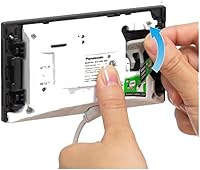
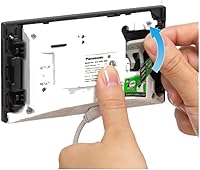
  • Mounting Method: Attaches to the interior surface of a window using either a suction cup or double-sided tape, requiring no drilling or exterior wall access.
  • Person Detection: Includes built-in person detection technology that filters out non-human motion triggers such as passing cars, animals, and moving foliage.
  • Detection Zones: Supports user-defined custom detection zones set within the mobile app to focus alerts on specific areas within the camera's field of view.
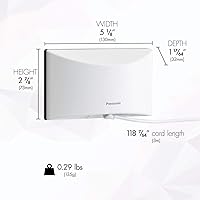
  • Dimensions: Measures 5.1 x 2.9 x 1.3 inches, making it a compact unit that sits discreetly on most windowsills without obstructing the view significantly.
  • Weight: Weighs 13.76 ounces, light enough for the suction cup mount to hold reliably on clean, flat glass surfaces.
  • Weather Rating: Carries an IP65 rating, though this applies to the unit's construction tolerances rather than outdoor exposure, as the camera is designed to remain indoors.
  • Pre-Recording Buffer: Saves approximately 2 seconds of footage captured before a detected alert event, providing useful context for reviewing what triggered a recording.
  • Power Consumption: Draws 6 watts during normal operation, making it an energy-efficient option for a camera running continuously around the clock.
  • Thermal Management: Includes an internal fan that activates automatically when the unit reaches elevated operating temperatures to prevent overheating.
  • Warranty: Backed by a 1-year manufacturer warranty covering defects in materials and workmanship from the date of original purchase.

Related Reviews
aosu 4MP 360° Indoor Security Camera
76%
83%
Image Quality
78%
Motion Tracking
71%
Night Vision
88%
Setup & Connectivity
74%
One-Touch Call Feature
More
Owltron 5MP Indoor Security Camera
85%
91%
Night Vision Performance
89%
Motion Detection Accuracy
75%
Wi-Fi Connectivity
92%
Ease of Setup
80%
Audio Quality
More
Geeni Glimpse Indoor Security Camera

81%
91%
Value for Money
96%
Ease of Installation
88%
Wi-Fi Connectivity
85%
Motion Detection
65%
Two-Way Audio Quality
More
kelucimy H1 Indoor Security Camera
85%
91%
Value for Money
88%
Ease of Setup
93%
Video Quality
84%
Motion Detection Accuracy
86%
Night Vision Performance
More
Canary Pro Indoor Home Security Camera
73%
91%
Ease of Setup
78%
Video Quality
63%
Motion Detection
61%
App Experience
87%
Siren Effectiveness
More
Gaiexce 2K Security Camera Indoor
83%
91%
Video Quality
88%
Motion Detection Accuracy
90%
Night Vision Performance
85%
Ease of Setup
80%
App Functionality
More
AKINGUAR Indoor 2K Security Camera 518E
84%
92%
Value for Money
87%
Ease of Setup
91%
Night Vision Quality
85%
Motion Detection Accuracy
76%
App Control/Interface
More
ZOSI C680 2K Window Security Camera
82%
91%
Ease of Installation
87%
Video Quality (Day/Night)
88%
Motion Detection Accuracy
73%
Wi-Fi Connectivity
80%
Storage Options
More
Mysight K09 2K Indoor Security Camera
70%
83%
Image Clarity
71%
Night Vision
78%
Motion Detection
81%
Wi-Fi Connectivity
58%
App Experience
More
IMILAB C22 3K Security Indoor Camera
83%
91%
Image Quality
88%
Ease of Installation
89%
Night Vision Performance
85%
360° Coverage
84%
Audio Functionality
More

FAQ

No, there are no subscription fees or contracts of any kind. All footage is stored locally on a microSDXC card that you insert directly into the camera. Just keep in mind that the card is not included in the box, so you will need to purchase one separately before the camera can record anything.

The camera supports microSDXC cards, and most users find that a 64GB or 128GB card strikes a good balance between cost and storage capacity. If you plan to run 24/7 recording at full 1080p resolution, a larger card will fill up faster than you might expect, so erring toward 128GB is a practical choice.

If your internet connection drops, remote viewing and push notifications will stop working since those depend on a live connection. However, local recording to the microSD card continues uninterrupted as long as the camera has power, so you will not lose footage during a brief outage.

In daylight, the impact on video quality is minimal for most users. The bigger concern is nighttime — when shooting through glass after dark, interior lights and reflections can create glare that noticeably degrades the footage. Turning off lights behind the camera and positioning it flush against the glass helps, but it does not fully eliminate the issue in all setups.

On clean, flat window glass it holds well for the majority of users. The key is making sure the glass surface is completely clean and dry before applying the suction cup. A few long-term owners have reported the grip weakening after six months or more, particularly in rooms with large temperature swings, so checking the mount periodically is a good habit.

Initial setup does require the HomeHawk app on a smartphone or tablet, and ongoing access to live footage and recordings is primarily app-based. Once configured, voice commands via Alexa or Google Assistant can pull up a live feed on a compatible smart display, but there is no standalone web browser interface for viewing footage without a mobile device.

The camera uses onboard processing to distinguish the shape and movement patterns of people from other motion sources like cars or tree branches. You can also draw custom detection zones in the app to focus the system on a specific area, which helps reduce false alerts further. Detection can be adjusted or turned off entirely if you prefer standard motion-based alerts instead.

No, this camera is not compatible with Apple HomeKit. It supports Amazon Alexa and Google Assistant for voice control, but HomeKit integration is not available. If your smart home is built around Apple devices, you would need to look at a different camera platform.

The USB cable included in the box is 6 feet long, which is adequate for most window placements near a standard wall outlet. If your closest outlet is farther away, you can use a USB extension cable or a longer USB cable of the same specification, though Panasonic recommends using quality cables to avoid any power delivery issues.

Both are available remotely. Through the app, you can view the live feed and also browse through recorded clips stored on the microSD card from anywhere with an internet connection. Keep in mind that alert notifications can sometimes arrive with a delay, so for time-sensitive monitoring, the live feed is the more reliable option.

Where to Buy