Overview

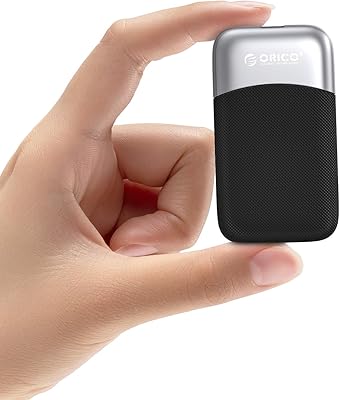
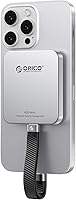
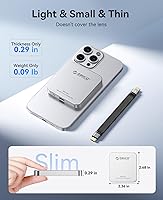
The ORICO K20MINI 512GB Magnetic External SSD arrived at just the right time for iPhone 16 Pro users — those shooting ProRes 4K footage and quickly hitting the ceiling on internal storage. Launched in late 2024, this pocket-sized drive snaps magnetically onto the back of your phone, keeping it within reach rather than buried in a bag. At under 0.1 lbs and barely a quarter-inch thick, it's genuinely pocketable. The aluminum alloy shell gives it a solid, premium feel, and passive heat dissipation is built directly into the design. It occupies a practical middle ground in the storage accessory market — capable without being overkill.
Features & Benefits

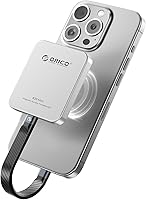
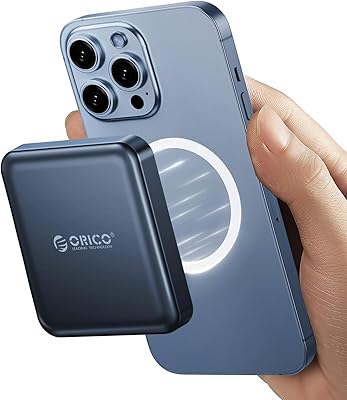
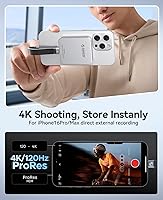
The magnetic attachment is the K20MINI's most distinctive feature — worth clarifying upfront that it isn't Apple-certified MagSafe. ORICO includes a magnetic ring you apply to your device, and the hold is firm enough for everyday use. On speed, the drive is rated at up to 2000MB/s, but the USB 3.0 interface caps real-world throughput well below that, so treat the headline number with some skepticism. The more compelling feature is direct ProRes recording on iPhone 16 Pro and Pro Max — 4K 120fps HDR captured straight to the drive, with no intermediate transfer required. It's also fully plug-and-play on iPhone, iPad, and computers alike.

Best For

This magnetic SSD is squarely aimed at iPhone 16 Pro and Pro Max shooters who've maxed out internal storage and prefer a local solution over cloud dependency while traveling. It's a natural pick for videographers and photographers who want their storage physically tethered to their phone rather than loose in a bag. If you regularly move large files between devices, the fast transfer speeds keep that process from becoming a bottleneck. One thing to flag: iPhone 14 and earlier models require ORICO's own LC10 Lightning adapter — an added purchase that's easy to overlook but worth factoring in before you buy.

User Feedback

Sitting at 4.4 stars across 224 ratings, the K20MINI has earned a solid reception. Recurring praise centers on build quality and how reliably the magnetic hold performs during everyday shooting sessions. The most common criticism involves heat — extended 4K recording can warm the aluminum body noticeably, though most buyers say it stays manageable. A few users reported that magnetic grip weakens with thicker or rugged cases, which is worth knowing before committing. Older iPhone compatibility via the Lightning adapter also draws occasional grumbling. On balance, buyers are satisfied, though those expecting the advertised top-end speed may come away with slightly tempered impressions from real-world results.

Pros

  • Snaps magnetically to the back of your iPhone, keeping it accessible during active shooting sessions.
  • Direct ProRes 4K 120fps HDR recording on iPhone 16 Pro and Pro Max removes the need for any secondary transfer step.
  • Genuinely pocketable — under 0.1 lbs and barely a quarter-inch thick in real-world carry.
  • Aluminum alloy construction feels premium and handles daily wear without visible degradation.
  • Plug-and-play across iPhone, iPad, and computers — no app, no driver, no setup friction whatsoever.
  • The included magnetic ring extends compatibility to non-native devices without an extra purchase.
  • A practical local storage solution for creators who want independence from cloud subscriptions.
  • File transfers are noticeably faster than budget-tier USB drives for large media batches.
  • 512GB of capacity covers thousands of photos or hours of compressed video in a single pocket-sized unit.

Cons

  • The advertised 2000MB/s speed is unachievable through USB 3.0 — real throughput falls well short of the headline figure.
  • Magnetic hold weakens significantly with thick or rugged cases, undermining the core attachment concept.
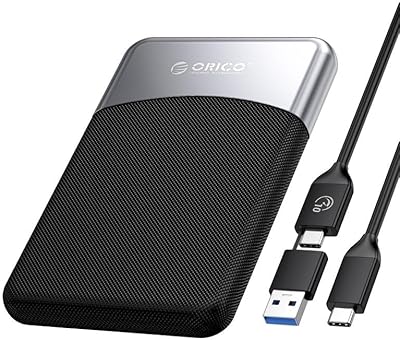
  • No USB-C cable is included in the box, which feels like an oversight at this price point.
  • Heat builds noticeably during extended 4K recording sessions, with some users finding it uncomfortable to hold.
  • iPhone 14 and earlier require a separately purchased adapter that is not bundled and easy to overlook before buying.
  • Occasional connection drops during long recording takes have been reported by a subset of users.
  • No companion app means zero diagnostic tools, formatting options, or backup automation for power users.
  • The connector area shows early wear signs in some units with heavy daily plug-and-unplug routines.
  • Long-term reliability data is still limited given the drive only launched in late 2024.

Ratings

The ORICO K20MINI 512GB Magnetic External SSD scores below are generated by AI after analyzing verified buyer reviews worldwide, with spam, bot-submitted, and incentivized feedback actively filtered out. The result is an honest cross-section of real user experiences — the genuine strengths and the friction points that show up repeatedly across different use cases and device types.

Build Quality
88%
The aluminum alloy shell consistently earns praise for feeling solid and premium given the drive's compact size. Buyers who carry it daily appreciate that it doesn't show scratches or flex under normal handling, and the overall fit and finish reads closer to something you'd expect at a higher price point.
A handful of users noted the drive can feel slightly warm after extended 4K recording sessions, which raises longer-term durability questions for heavy shooters. The connector end has attracted a few comments about fit loosening after repeated plugging and unplugging cycles over weeks of use.
Magnetic Attachment
82%
18%
For users with slim or no cases, the magnetic hold is genuinely practical — the drive sits flat and stays put during handheld shooting. The included magnetic ring makes it usable beyond MagSafe-native devices, which buyers found more versatile than expected.
The grip noticeably weakens with thicker or rugged cases, which is a real issue for users who prioritize phone protection. It's also worth being clear that this is not Apple-certified MagSafe — a distinction that matters to buyers expecting that level of precision alignment.
Transfer Speed
71%
29%
For large photo dumps and video file transfers from phone to laptop, most buyers found the speed meaningfully faster than older USB drives they had used before. Moving several gigabytes in one session is noticeably quicker than working with a budget alternative.
The advertised 2000MB/s figure is not achievable through a USB 3.0 interface under any real-world condition, and tech-savvy buyers picked up on this quickly. Actual throughput sits considerably lower, which is not a dealbreaker but does create a credibility gap between spec sheet and experience.
ProRes 4K Recording
86%
iPhone 16 Pro and Pro Max users shooting ProRes 4K footage rated this as the K20MINI's standout capability — recording directly to the drive without needing a secondary transfer is a real workflow improvement. Several videographers noted they could shoot longer takes than internal storage previously allowed.
The feature is exclusive to iPhone 16 Pro and Pro Max, so buyers with slightly older models are locked out entirely. A few users also reported occasional dropped frames or brief stutters during sustained 4K 120fps HDR takes, suggesting the connection is not always perfectly stable under peak load.
Portability & Form Factor
93%
Buyers repeatedly highlighted how small and light this drive actually is in everyday carry — it disappears into a pocket alongside a phone and adds essentially no noticeable bulk to a travel kit. The card-style profile also means it fits flat in a wallet slot or slim pouch without issue.
The ultra-thin design means there is not much surface area to grip when plugging in or removing, which some users found fiddly, especially with one hand. A small protective pouch or case is not included, so scratch-prone buyers need to source their own storage solution.
Plug-and-Play Compatibility
84%
The no-setup experience across iPhone, iPad, and computers was a frequently mentioned positive — buyers appreciated that no app download or driver installation was needed to get started. It works cleanly across ecosystems, which matters to users who share files between an iPhone and a Windows laptop.
Older iPhones — iPhone 14 and earlier — require ORICO's separate LC10 Lightning adapter, which is easy to miss when purchasing. Users who bought expecting full out-of-the-box compatibility with their older device expressed clear frustration at the additional step and cost.
Heat Management
67%
33%
The aluminum body handles light to moderate use well, staying cool during standard file transfers or short recording bursts. Users who shoot clips under five minutes at a time rarely mentioned heat as a noticeable concern.
Under sustained 4K recording, particularly 4K 120fps, the drive gets warm enough to notice in the hand — several buyers described it as uncomfortable after twenty or more minutes of continuous use. Passive cooling alone has its limits when the drive is sandwiched against the back of a phone.
Value for Money
79%
21%
At its price point, buyers generally felt the combination of magnetic attachment, direct ProRes recording support, and solid build quality justified the spend compared to generic drives that lack these features. For iPhone 16 Pro shooters specifically, the functional fit feels proportionate to the cost.
Some buyers shopping for pure storage at this capacity found competing drives offering higher sustained speeds for less. The value proposition is tied closely to the iPhone-specific features — without them, the price feels harder to defend against alternatives with better-documented performance specs.
Connection Stability
68%
32%
For the majority of users in standard file management tasks, the connection holds reliably with no disconnects. Short recording sessions and photo transfers proceed without issue for most buyers across hundreds of reported uses.
A recurring thread in critical reviews involves intermittent disconnections during long recording sessions or when the phone is repositioned. The USB-C connector fit is sometimes described as slightly loose, which adds to concerns about stability when the phone is being held or moved.
Software & Setup Experience
91%
There is genuinely nothing to set up — plug in and the device mounts immediately. Buyers new to external iPhone storage appreciated that the experience mirrors plugging in any USB drive on a computer, with no friction or app dependency to manage.
Because there is no companion app, advanced features like scheduled backups or storage diagnostics are completely absent. Power users who wanted more control over how the drive behaves — formatting options, health monitoring — found the bare-bones approach limiting.
Package Contents
74%
26%
Including the magnetic ring in the box is a thoughtful touch that extends compatibility to non-MagSafe devices without making buyers hunt for accessories separately. Most users felt the package covered the essentials for getting started immediately.
No cable is included in the box, which caught some buyers off guard — particularly those who assumed a USB-C cable would be bundled at this price. A protective sleeve or even a basic carrying pouch would also have been a welcome addition given the premium aesthetic the drive projects.
Older Device Compatibility
51%
49%
When the separately sold Lightning adapter is on hand, the drive does function with iPhone 14 and earlier models for basic file storage and transfer. The plug-and-play behavior still applies once the adapter chain is connected.
The ProRes direct-recording feature is entirely unavailable on older iPhones regardless of adapter, reducing the K20MINI to a standard external drive for those users. Buyers who purchased primarily for the recording workflow and didn't read compatibility notes carefully came away genuinely disappointed.
Durability Over Time
72%
28%
Short-term impressions of durability are consistently positive — the aluminum construction resists everyday dings and the drive shows no sign of performance degradation over the first few months of use based on buyer reports. The form factor also means there are no exposed moving parts to worry about.
Long-term reliability data is limited given the product only launched in late 2024, so sustained performance over a year or more remains an open question. A small number of buyers reported connector wear appearing sooner than expected with daily plug-and-unplug routines.

Suitable for:

The ORICO K20MINI 512GB Magnetic External SSD is built with a very specific buyer in mind, and it delivers best when that buyer is an iPhone 16 Pro or Pro Max owner who shoots ProRes video and regularly bumps against internal storage limits. If you're a travel videographer or run-and-gun content creator who wants your storage physically attached to your phone rather than loose in a bag, the magnetic form factor solves a real problem. Photographers offloading large RAW and video files between a phone and laptop will also appreciate the faster-than-average transfer speeds for a drive this compact. It suits anyone who has grown frustrated with cloud storage subscriptions — whether due to cost, unreliable connectivity while traveling, or simply preferring local control over their media. Editors who want to work directly off an external drive without copying files back and forth will find the plug-and-play behavior refreshingly friction-free across iPhone, iPad, and computers alike.

Not suitable for:

The ORICO K20MINI 512GB Magnetic External SSD is a poor fit for anyone expecting the 2000MB/s headline speed to reflect real-world performance — the USB 3.0 interface physically cannot sustain those figures, and buyers who prioritize verified throughput should look at drives with USB 3.2 Gen 2 or Thunderbolt connections instead. If you own an iPhone 14 or earlier, the direct ProRes recording feature — arguably the drive's strongest selling point — is completely unavailable, and you will also need to purchase ORICO's separate Lightning adapter just to achieve basic compatibility, which adds cost and inconvenience. Users with thick or rugged phone cases may find the magnetic attachment unreliable enough to defeat the purpose of the magnetic design entirely. Anyone planning sustained 4K 120fps recording sessions longer than fifteen to twenty minutes should be aware that heat buildup is a documented concern, and the passive aluminum cooling has clear limits under that kind of continuous load. Finally, buyers looking for a general-purpose external drive at this capacity who do not need iPhone-specific features will likely find better value elsewhere.
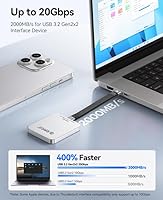
Specifications

  • Storage Capacity: The drive provides 512GB of usable solid-state storage for photos, videos, and general file management.
  • Interface: Connectivity is handled via USB 3.0, which sets the practical ceiling for real-world transfer throughput.
  • Max Read Speed: ORICO rates sequential read speeds at up to 2000MB/s, though actual throughput is constrained by the USB 3.0 interface in practice.
  • Dimensions: The drive measures 2.36 x 2.68 x 0.29 inches, making it roughly the footprint of a large postage stamp at under a third of an inch thick.
  • Weight: The drive itself weighs 0.09 lbs, adding negligible bulk when carried alongside a phone or in a travel kit.
  • Body Material: The outer shell is machined aluminum alloy, which contributes to passive heat dissipation and gives the drive a solid, scratch-resistant feel.
  • Cooling Method: Heat is managed entirely through passive conduction via the aluminum body — there are no fans or active cooling components.
  • Magnetic Attachment: The drive uses magnetic attraction to adhere to the back of a phone; it is not Apple-certified MagSafe but is compatible with MagSafe-native devices.
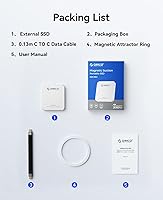
  • Included Accessories: The package includes a magnetic attraction ring that can be applied to non-MagSafe devices to enable the magnetic attachment feature.
  • ProRes Recording: Direct 4K 120fps ProRes HDR video recording to the drive is supported on iPhone 16 Pro and iPhone 16 Pro Max without requiring any intermediate file transfer.
  • Compatible Devices: The drive works with iPhone, iPad, and computers that support USB connectivity, covering both macOS and Windows platforms.
  • Setup Requirement: No driver installation or companion app is required — the drive mounts automatically as external storage on all supported devices.
  • Older iPhone Support: iPhones running a Lightning connector (iPhone 14 and earlier) require the separately sold ORICO LC10 Lightning adapter for basic compatibility.
  • Form Factor: The ultra-slim card-style profile is designed to sit flush against the back of a phone when magnetically attached during shooting or transfer.
  • Manufacturer: The K20MINI is designed and manufactured by Shenzhen ORICO Technologies Co., Ltd., a Chinese peripheral and storage accessories company.
  • Launch Date: The product was first made available in November 2024, making long-term reliability data still limited at the time of this review.
  • ASIN: The Amazon Standard Identification Number for this product is B0DNMSZTPH.

Related Reviews

ORICO M25PRO 512GB External SSD
85%
89%
Performance
94%
Portability
80%
Build Quality/Durability
88%
Speed (Read/Write)
91%
Compatibility (Devices)
More
ORICO A20PLUS 1TB Magnetic External SSD
88%
94%
Performance
96%
Data Transfer Speed
89%
Durability & Build Quality
90%
Magnetic Attachment Design
88%
Compatibility with USB-C Devices
More
Yottamaster YK20MINI 512GB Magnetic External SSD
84%
94%
Data Transfer Speed
89%
Magnetic Attachment Design
91%
4K ProRes Recording Performance
76%
Device Compatibility
88%
Portability/Size
More
ORICO Taiji M20 512GB External SSD
85%
94%
Transfer Speed
91%
Portability
88%
Durability
95%
Setup & Installation
86%
Build Quality
More
MMOMENT MU P100 512GB Magnetic External Portable SSD
87%
92%
Performance
89%
Portability
91%
Compatibility
86%
Durability
88%
Ease of Use
More
KEXIN 512GB External SSD
87%
91%
Performance
88%
Build Quality
94%
Portability/Size
89%
Compatibility
87%
Value for Money
More
Fikwot FU389 512GB External SSD
86%
94%
Performance
89%
Build Quality
91%
Portability
92%
Speed (Read/Write)
88%
Compatibility
More
Transcend ESD300 512GB External SSD
84%
91%
Performance (Speed)
94%
Portability
90%
Ease of Use
89%
Compatibility
85%
Value for Money
More
ORICO C10 2TB External SSD
88%
91%
Performance
89%
Build Quality
92%
Portability
90%
Compatibility
80%
Value for Money
More
fanxiang FF520 512GB External SSD
87%
88%
Performance (Read/Write Speeds)
93%
Durability (Build Quality)
90%
Compatibility
85%
Ease of Use
91%
Portability (Size & Weight)
More

FAQ

It uses magnetic attraction rather than Apple-certified MagSafe, so it will align and stick to the back of MagSafe-compatible iPhones, but you won't get the precision click or the accessory authentication that Apple's own ecosystem provides. For most shooting scenarios it holds reliably, but thicker or rugged cases can weaken the grip to the point where it feels insecure.

It will work for basic file storage and transfer, but you will need to purchase ORICO's LC10 Lightning adapter separately since iPhone 13 uses a Lightning port. Keep in mind that the ProRes direct-recording feature is exclusive to iPhone 16 Pro and Pro Max, so your use case would be limited to file management rather than live capture.

Practically speaking, no — not over USB 3.0. The USB 3.0 standard tops out well below that figure under any real condition, so treat the advertised speed as a theoretical maximum that does not reflect what you will experience day to day. Real-world transfers are still faster than most budget drives, but the headline number is misleading for informed buyers.

Yes, that is one of the more useful aspects of this drive — you can record directly to it and edit from it without a second copy step, which saves time and avoids eating into your phone's internal storage at all. Just keep in mind that editing performance will depend on your app and connection stability.

During short clips it stays cool, but extended 4K 120fps sessions — think twenty minutes or more of continuous recording — do generate noticeable warmth through the aluminum body. It is unlikely to cause any safety concern, but some users describe it as uncomfortable to hold against the back of a phone for long takes. Taking short breaks between recording bursts helps.

No software, no account, no app. You plug it in and it mounts as external storage immediately on iPhone, iPad, and computers alike. That simplicity is one of the things buyers mention most positively.

The ring is a thin adhesive disc and should not damage the phone itself, but applying it directly to certain cases — especially leather — could leave a mark or affect the surface over time. If you are concerned, applying it to a spare case rather than your primary one is a sensible workaround.

No, and this catches some buyers off guard. The package includes the drive and the magnetic ring, but no cable. You will need to supply your own USB-C cable, which most iPhone 15 and 16 users already have on hand.

Absolutely — it mounts like any standard USB drive on both macOS and Windows without any special configuration. Transfer speeds for desktop use will be governed by the USB 3.0 interface, but it is perfectly functional as a compact portable drive for moving files between machines.

With a slim or no case, most users report the hold is firm enough for handheld movement and casual walking. That said, it is not designed to survive being dropped or knocked, and relying on the magnet alone for vigorous physical activity would be risky. For run-and-gun shooting, keeping a hand near the drive as a backup is sensible practice.