Overview

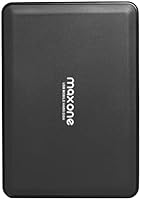
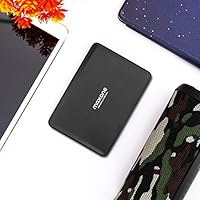
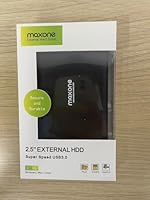
The Maxone 2526 500GB Portable HDD sits firmly in the value end of the external storage market, and that's exactly where it belongs. Maxone isn't a household name like WD or Seagate, but this budget external drive fills a practical gap for anyone who just needs reliable backup storage without overspending. Plug it into any Windows PC or laptop via USB 3.0 and it's ready to go — no driver installation, no formatting ritual. The compact 2.5-inch body makes it easy to toss in a bag, and at roughly 7 ounces, you won't notice the extra weight.

Features & Benefits

The USB 3.0 connection is the headline spec here, offering noticeably quicker file transfers than older USB 2.0 drives — helpful when you're moving large folders of photos or video files. The drive spins at 5400 RPM, which is standard for mechanical HDDs at this price point. Don't expect SSD-level speed; this portable hard drive handles everyday transfers just fine, but large media libraries will take some patience. One genuinely useful detail: it's bus-powered via USB, so there's no wall adapter to lose or carry. The clean enclosure has no protruding ports or buttons to catch on things.

Best For

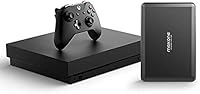
This budget external drive is a natural fit for students who need to back up coursework and keep files accessible between home and campus. Remote workers who want a simple offsite copy of important documents will appreciate how little setup it demands. It also works well for anyone looking to expand console storage on a budget — plug it into a PlayStation or Xbox and it handles game saves and media without complaint. If you're after raw speed, an SSD is a better choice. But if plug-and-play simplicity and a modest price tag matter more than performance, this Maxone HDD hits its brief.

User Feedback

With over 1,300 ratings and a 4.5-star average, this portable hard drive has clearly earned consistent buyer approval. The most common praise centers on ease of setup and quiet operation — people plug it in and it just works, which apparently still counts for a lot. Value for money comes up repeatedly too. On the downside, a handful of reviewers flag the slower transfer speeds compared to SSDs, which is fair and expected for a mechanical drive. A few also note that it's not built for rough handling; dropping it from desk height is the kind of thing that can end any HDD's life. Long-term reliability feedback is mixed but largely positive.

Pros

  • Plug-and-play setup on Windows — no drivers, no formatting, no wasted time.
  • Bus-powered via USB means zero need for a wall adapter or extra cables.
  • At 7 ounces, this portable hard drive disappears into any bag without adding bulk.
  • Strong value proposition for buyers who need basic backup storage on a tight budget.
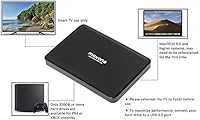
  • Works across PCs, laptops, gaming consoles, and smart TVs right out of the box.
  • USB 3.0 connection delivers noticeably faster transfers than older USB 2.0 drives.
  • Quiet operation during everyday use — won't distract you in a shared workspace.
  • Over 1,300 reviews with a 4.5-star average signals broad, consistent buyer satisfaction.
  • No reformatting required for Windows users — ready to store files within seconds of unboxing.

Cons

  • Transfer speeds lag well behind budget SSDs, making large file moves a slow experience.
  • No shock resistance — a single drop can damage the mechanical internals and risk data loss.
  • Mac users must reformat the drive before use, which the packaging fails to mention.
  • 500GB fills up faster than expected for anyone storing video, RAW photos, or game installs.
  • The bare plastic enclosure shows scratches and wear without any included protective sleeve.
  • Some users report drives becoming unrecognized after 18 to 24 months of moderate use.
  • Weaker or older USB ports may cause intermittent disconnections, especially via a hub.
  • Brand recognition is limited, which makes warranty support harder to evaluate upfront.

Ratings

The Maxone 2526 500GB Portable HDD earned its scores through AI-driven analysis of verified global buyer reviews, with spam, incentivized, and bot-generated feedback actively filtered out before any scoring was applied. Across more than a thousand real-world accounts — from students backing up coursework to casual users archiving home photos — both the genuine strengths and the honest frustrations shaped every number you see below. Nothing has been rounded up to look good; where buyers struggled, the scores reflect it.

Value for Money
91%
Buyers consistently flag this as one of the better budget storage deals available. For the price, getting 500GB of functional backup space with no extra cables or adapters to buy strikes most users as a fair trade, especially compared to pricier name-brand alternatives with similar mechanical specs.
A handful of users point out that slightly stretching the budget opens the door to SSD options with dramatically better speeds. For pure cost-per-gigabyte, it holds up well, but the value argument weakens for anyone who transfers files regularly and values their time.
Ease of Setup
94%
Plug-and-play really does mean plug-and-play here. Users across all technical skill levels — including those who openly admitted dreading hardware setup — reported the drive showing up on their Windows systems within seconds of connecting. No disc, no download, no frustration.
A small number of users on non-Windows platforms hit snags, particularly those expecting Mac compatibility out of the box. The drive ships formatted for Windows, which means Mac users need to reformat before use — something the packaging doesn't make obvious.
Transfer Speed
58%
42%
For moving documents, spreadsheets, and smaller photo collections, the USB 3.0 connection delivers acceptable speeds that beat older USB 2.0 drives noticeably. Users doing light, occasional backups rarely reported speed as a dealbreaker.
Transferring large video files or full system backups exposes the 5400 RPM mechanical limitation fast. Multiple reviewers compared the experience unfavorably to budget SSDs, noting waits that felt disproportionately long. This is not a drive for anyone regularly moving gigabytes at a time.
Portability & Form Factor
88%
At 7 ounces and roughly the size of a passport, this budget external drive disappears into a laptop bag without adding noticeable bulk. Students and commuters particularly appreciate not needing a separate pouch or case just to carry it safely from place to place.
The plastic enclosure, while slim, doesn't inspire confidence when tossed loosely into a crowded bag. There's no rubber bumper or protective ridge, so users who aren't careful about how they pack it do report some cosmetic wear over time.
Build Quality & Durability
61%
39%
For everyday desk use — plugged in, used, unplugged, and stored — the enclosure holds up without issue. Users who treat it gently and keep it in a stable environment report no physical problems even after extended ownership.
This is a mechanical hard drive in a bare plastic shell, and buyers who've accidentally knocked it off a desk have documented the consequences. It offers no shock resistance, and the drive internals are inherently more vulnerable than an SSD. Rough handling is a real risk factor here.
Noise Level
84%
Most users describe the operational noise as barely noticeable — a faint hum during active read and write cycles that disappears into normal room ambience. Working in a quiet office or library, it doesn't draw attention the way some older mechanical drives did.
During intensive file transfers, a small number of users noticed slightly louder clicking or spinning sounds than they expected. It's within normal HDD range, but anyone sensitive to desk noise might find it mildly distracting during long backup sessions.
Compatibility
79%
21%
The range of compatible devices goes well beyond basic laptop use. Buyers have successfully used this Maxone HDD with PlayStation and Xbox consoles for game storage, and with smart TVs for media playback — adding genuine versatility for the price.
The out-of-box experience is optimized for Windows. Mac users, Chromebook users, and Linux users may need to reformat or troubleshoot before the drive functions correctly, which isn't always communicated clearly at the point of purchase.
Storage Capacity
73%
27%
Five hundred gigabytes covers the practical needs of most casual users comfortably — years of documents, a solid photo library, and a meaningful chunk of video files. For a backup-focused use case, it handles the job without feeling cramped immediately.
In an era where budget phones ship with 256GB and a single 4K movie can top 50GB, 500GB starts to feel modest. Power users, photographers shooting RAW files, or anyone with a large media collection will outgrow this capacity faster than they might expect.
Power & Connectivity
89%
Being fully bus-powered through the USB cable is a genuine quality-of-life feature. Users consistently appreciate not having to locate a free outlet or carry a wall adapter — it's one less thing to manage when working from a coffee shop or a client's office.
On older laptops with weaker USB ports, a small number of users reported intermittent connection issues, likely due to insufficient power delivery from the port rather than a drive defect. Using a direct port rather than a hub largely resolves this.
Long-Term Reliability
66%
34%
A solid portion of reviewers who purchased the drive in 2020 and 2021 report it still functioning normally for routine backup tasks. For light, infrequent use, the failure rate appears consistent with what you'd expect from a value-tier mechanical drive.
Longer-term feedback is more mixed than the overall star rating suggests. A recurring thread involves drives failing or becoming unrecognized after 18 to 24 months of moderate use. Mechanical HDDs have inherent longevity limits, and this one doesn't appear to exceed them.
Packaging & Unboxing
76%
24%
The drive arrives well-protected and ready to use, which buyers appreciate. The inclusion of a USB cable in the box means there's nothing extra to source before getting started — a detail that sounds minor but genuinely matters for less tech-savvy buyers.
The packaging itself is minimal and offers little in the way of documentation or guidance, particularly for users who aren't already familiar with external drives. Mac users or those needing to reformat get no heads-up about compatibility requirements.
Size & Weight for Travel
86%
Reviewers who travel frequently for work single out the weight as a practical advantage. Slipping a 7-ounce drive into a carry-on or jacket pocket is an afterthought, and the slim profile means it doesn't compete for space with other gear.
Without a bundled sleeve or any soft case, the drive is essentially naked in transit. Users who've scratched the surface or scuffed the casing note that Maxone doesn't include any protective accessory, which feels like a missed detail at this price point.
Gaming Console Compatibility
71%
29%
Several reviewers specifically bought this portable hard drive for console use, and the majority report it working correctly for storing games and saves on PlayStation and Xbox systems after a quick format. It's a functional, low-cost way to add storage to an aging console.
Performance limitations show up more noticeably in console gaming than in basic file backup. Game load times from a 5400 RPM HDD are slower than from an internal SSD or even a faster external drive, which can be a friction point for users who weren't expecting the difference.

Suitable for:

The Maxone 2526 500GB Portable HDD is a practical pick for anyone who needs basic backup storage without the complexity or cost of a premium drive. Students carrying projects between home and campus will find it fits easily into any bag and connects instantly to a Windows laptop without any setup fuss. Remote workers who want a simple offsite copy of important documents — kept in a desk drawer or a go-bag — get exactly what they need here. It also works well for casual gamers looking to free up internal console storage on a budget, and for households that want a dedicated spot to archive family photos and home videos without paying for cloud subscriptions. If your priority is straightforward, affordable storage for everyday files rather than raw performance, this drive covers the brief honestly.

Not suitable for:

The Maxone 2526 500GB Portable HDD is the wrong tool for buyers who need speed, capacity, or ruggedness above all else. Videographers, content creators, or anyone regularly moving large batches of high-resolution files will find the 5400 RPM mechanical drive a source of real frustration — the wait times during big transfers are not trivial. Mac users should also approach with caution, since the drive ships formatted for Windows and requires reformatting before it works correctly on macOS, which isn't clearly flagged anywhere on the box. Anyone planning to carry this drive in a crowded backpack, toss it in a car glovebox, or use it in physically demanding environments should know it has no shock protection — dropping it is a genuine risk to your data. Finally, buyers with storage-heavy habits will outgrow 500GB faster than they expect, making a higher-capacity option a smarter long-term investment.

Specifications

  • Storage Capacity: The drive offers 500GB of usable mechanical storage, suitable for documents, photos, and moderate video collections.
  • Drive Type: This is a traditional mechanical hard disk drive (HDD), not a solid-state drive, which affects both speed and shock resistance.
  • Interface: Connects via USB 3.0, which supports transfer speeds significantly faster than USB 2.0 while remaining backward compatible with USB 2.0 ports.
  • Form Factor: The 2.5-inch form factor is the standard compact size used in portable external drives, keeping the enclosure slim and travel-friendly.
  • Rotational Speed: The internal disk spins at 5400 RPM, which is typical for portable mechanical drives and sets a realistic ceiling on sequential read and write performance.
  • Weight: The drive weighs 7 ounces, making it light enough to carry daily in a laptop bag or backpack without noticeable added bulk.
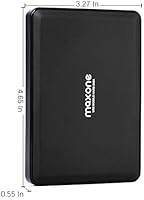
  • Dimensions: Physical dimensions measure 6.65 x 4.21 x 1.1 inches, comparable in footprint to a small paperback book.
  • Power Source: Fully bus-powered through the USB connection, requiring no external power adapter or separate power cable.
  • Operating Systems: Ships pre-formatted for Microsoft Windows and works without reformatting on Windows PCs and laptops; Mac and Linux users will need to reformat before use.
  • Device Compatibility: Designed to work with Windows PCs, laptops, gaming consoles (including PlayStation and Xbox), and USB-equipped smart televisions.
  • Installation: No software installation or driver download is required on Windows; the drive is recognized automatically upon connection.
  • Enclosure Material: The outer shell is a smooth plastic enclosure with no rubberized edges, bumpers, or integrated shock-absorption features.
  • Color: Available in black, with a clean matte-style finish that shows fingerprints minimally under normal handling conditions.
  • Cable Included: A USB 3.0 cable is included in the box, so no additional accessories are required to begin using the drive immediately.
  • Model Series: This drive belongs to Maxone's 2526 series, with the specific model identifier 2526-500GB Black.
  • Manufacturer: Produced by Maxone, a value-focused storage brand without the same retail presence as established names such as WD or Seagate.
  • Release Date: This model was first made available in November 2019 and remains an active, non-discontinued product as of the latest available information.
  • Shock Resistance: No official shock or drop rating is provided; as a mechanical drive, it is vulnerable to physical impact and should be handled with care during use and transport.

Related Reviews
Vansuny 500GB Portable External SSD
86%
88%
Performance
92%
Build Quality
94%
Portability & Size
87%
Data Transfer Speed
90%
Compatibility
More
SSK SD500 500GB Portable SSD
87%
90%
Performance
93%
Portability
88%
Compatibility
85%
Build Quality
92%
Value for Money
More
Netac Zslim 500GB Portable SSD
86%
88%
Performance
90%
Build Quality/Durability
94%
Portability/Size/Weight
85%
Speed (Transfer Rates)
89%
Compatibility/Connectivity
More
Fikwot FP80 500GB Portable SSD
88%
94%
Performance
88%
Build Quality
92%
Portability/Size
91%
Speed (Read/Write)
89%
Compatibility
More
fanxiang PS1002 Portable SSD 500GB
89%
91%
Performance
94%
Speed
89%
Portability
87%
Build Quality
90%
Durability
More
SanDisk 500GB Extreme Portable SSD
86%
94%
Performance
91%
Build Quality & Durability
89%
Portability & Size
96%
Speed (Data Transfer)
87%
Ease of Use
More
fanxiang PS2200 500GB Portable SSD
84%
91%
Performance (Transfer Speeds)
89%
Ease of Use (Plug-and-Play)
87%
Build Quality & Durability
83%
Compatibility (Device Support)
93%
Portability (Size & Weight)
More
SAMSUNG T5 Portable SSD 500GB
87%
94%
Performance & Speed
89%
Build Quality & Durability
92%
Portability & Size
88%
Data Security
91%
Ease of Use & Setup
More
JOIOT Mini Portable SSD 500GB
85%
89%
Performance
94%
Build Quality & Durability
90%
Portability & Size
91%
Read/Write Speed
88%
Compatibility
More
Samsung T1 Portable 500GB SSD
85%
91%
Performance
89%
Data Transfer Speed
88%
Build Quality & Durability
94%
Portability & Size
84%
Setup & Installation
More

FAQ

On a Windows PC or laptop, yes — just plug it in and it shows up as a new drive within seconds. No software, no drivers, nothing to download. It ships already formatted for Windows, so there is genuinely nothing to set up.

Not immediately without some extra steps. The Maxone 2526 500GB Portable HDD ships formatted as NTFS, which Macs can read but not write to natively. To use it fully on macOS, you will need to reformat it to exFAT or APFS first — a straightforward process, but worth knowing before you buy.

Fast enough for everyday tasks, but don't expect SSD-level performance. Moving a folder of documents or a batch of photos feels snappy. Large video files or full system backups will take noticeably longer because the mechanical disk spins at 5400 RPM, which has a real speed ceiling that USB 3.0 alone can't overcome.

Yes, and it works well for that use case. You will need to format the drive through the console's settings menu first, which takes just a few minutes. After that it functions as expanded game and media storage without issues on both current and previous-generation systems.

This is a mechanical hard drive with spinning internal platters, so dropping it is a real risk — especially while it is actively reading or writing data. There is no built-in shock protection on this drive. If you regularly work in environments where drops are likely, a rugged or SSD-based alternative would be a safer choice for your data.

Neither. This portable hard drive draws all the power it needs directly from the USB port on your computer or device. There is no wall adapter, no extra cable, and nothing else to carry. One USB cable handles both data and power.

For most casual users, yes — it comfortably holds years of documents, a large photo library, and a decent amount of video. Where it starts to feel tight is if you shoot RAW photos, store 4K video, or download large game files. In those cases, you may want to consider a 1TB option from the start.

Quieter than you might expect for a mechanical drive. During normal file transfers you can hear a faint hum, but it is subtle enough that most people stop noticing it after a few seconds. It is not the kind of grinding, noticeable noise associated with older or larger desktop hard drives.

With gentle, routine use — periodic backups, occasional file transfers, kept on a desk — buyers report it holding up well over a year or two. That said, mechanical drives do have a finite lifespan, and this is a value-tier product. It is not a substitute for redundant backups; treat it as one layer of a backup strategy, not the only one.

Usually, but occasionally not reliably. Some USB hubs — particularly unpowered ones — don't supply enough current to run a mechanical hard drive consistently, which can cause the drive to disconnect unexpectedly. If you experience any connection issues, try plugging directly into a port on your laptop or desktop first to rule out the hub as the cause.