




Overview

The KLIM Turbofrost MAX Laptop Cooling Pad is built for one type of user: someone who actually needs serious, sustained thermal management — not just a stand to prop up their laptop. KLIM invested an extra year of R&D beyond their already well-received Turbofrost model, which signals this isn't a cosmetic refresh. Early reception is encouraging, with a 4.6-star average from 146 ratings since its May 2025 launch, though that pool is still growing. Worth flagging immediately: at nearly 5 pounds and over 16 inches across, this is desk-bound hardware. The dual power input — wall plug or USB-C — is a genuinely thoughtful touch for a product in this category.

Features & Benefits

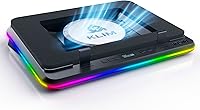
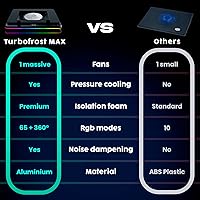
The cooling engine here is the TurboFan XL, paired with a smart inlay system that uses adaptive foam to create a seal around the base of your laptop. Rather than blowing air in the general direction of your machine, it forces airflow directly beneath the chassis — a meaningful engineering distinction that cheaper pads skip entirely. The fan speed is fully adjustable, letting you trade some noise for maximum cooling or dial it back during lighter tasks. Three USB-A passthrough ports keep your peripherals connected without touching the laptop's own ports. The RGB lighting covers 360 degrees with 64 effect options, and the auto-save for settings means you're not reconfiguring after every session. The LCD readout adds a minor but appreciated monitoring detail.

Best For

This cooling pad earns its place on the desk of gamers running demanding, GPU-heavy titles across long sessions — the kind where thermal throttling starts quietly killing frame rates after the first hour. It's equally well-suited for video editors or 3D artists working on large-format laptops who need consistent CPU and GPU headroom during lengthy renders. The RGB setup makes it a natural match for users building out a cohesive gaming desk aesthetic. That said, if you frequently travel with your laptop or need something portable, look elsewhere — the size and weight make this a stay-at-home solution. It's a solid step up for anyone who has outgrown an entry-level cooler.

User Feedback

Early buyers have been vocal about one thing above all: noticeable, measurable temperature drops during heavy use. Build quality at this tier also draws consistent praise — it doesn't feel like a budget unit. The noise level at maximum fan speed is a recurring point of friction, as you'd expect from a high-output turbofan; most users find a middle setting hits the right balance. Feedback on the foam inlay fit is mostly positive across different chassis shapes, though a handful note it works better on flat-bottomed designs. The 5-year warranty comes up repeatedly as a confidence factor. The LCD and RGB are treated as secondary perks rather than primary reasons to buy.

Pros

  • Forced airflow directly beneath the laptop chassis produces noticeably real temperature drops during heavy use.
  • The smart inlay foam adapts to different laptop base shapes, keeping the seal effective across most mainstream designs.
  • Dual power input — wall plug or USB-C — gives genuine flexibility without tying up a precious laptop port.
  • Three USB-A passthrough ports mean you keep all your peripherals connected without losing any native ports.
  • Auto-saving fan speed and lighting settings eliminates the hassle of reconfiguring after every session.
  • Adjustable fan speed lets you tune the balance between cooling output and noise to your preference.
  • A five-year warranty is unusually strong for this product category and adds real long-term confidence.
  • Compatible with laptops up to 17.3 inches, covering the full range of mainstream gaming and workstation machines.
  • Early buyers consistently highlight build quality that feels appropriate for a premium-tier product.
  • The LCD readout provides at-a-glance fan status without needing to open any software.

Cons

  • At maximum fan speed, noise levels are high enough to be distracting in quiet environments.
  • Weighing nearly 5 pounds, this gaming cooler is genuinely impractical to move around or travel with.
  • The review pool is still relatively small for a product launched in May 2025, making long-term reliability harder to assess.
  • The size and footprint demand a reasonably large desk surface, which can be limiting in tighter setups.
  • RGB lighting, while extensive, is largely secondary to performance and adds cost that not all buyers need.
  • Laptops with raised or irregular bottom surfaces may not form a consistent seal with the foam inlay.
  • The LCD screen offers limited information and may feel underwhelming relative to the overall price point.
  • Plastic construction, while lightweight in a relative sense, may not satisfy buyers expecting a premium material finish.
  • No dedicated software app for controlling lighting or fan profiles from the operating system is a gap for power users.
  • The price positions this well above budget options, which may be hard to justify if your workloads are only occasionally demanding.

Ratings

Our AI scoring system analyzed verified global buyer reviews for the KLIM Turbofrost MAX Laptop Cooling Pad, actively filtering out incentivized, bot-generated, and unverified feedback to surface what real users consistently experience. The scores below reflect both the genuine strengths that make this gaming cooler stand out and the friction points that prospective buyers should weigh carefully. Nothing has been softened — where early users found trade-offs, the scores show it.

Cooling Performance
91%
This is where the Turbofrost MAX earns its reputation. Gamers report measurable temperature drops during extended sessions running demanding titles, with the directed turbofan airflow making a tangible difference compared to passive or basic multi-fan alternatives. Users upgrading from entry-level pads frequently describe it as a step-change in thermal stability.
Results vary depending on how well the foam inlay seals against a specific laptop's underside — irregular or raised chassis designs can reduce the concentrated airflow effect. A small number of users on thinner ultrabook-style gaming machines note more modest gains than expected.
Build Quality
86%
At this price tier, buyers expect solidity, and most report that the Turbofrost MAX delivers it. The overall construction feels deliberate and study, with very few complaints about flex, rattling, or components feeling cheap. Early reviewers frequently contrast it favorably against plastic-heavy competitors that feel hollow under the hands.
The primary material is still plastic throughout, which draws mild criticism from buyers who associate premium pricing with metal or hybrid construction. Nothing feels fragile, but users expecting a metal chassis at this price point may come away slightly underwhelmed by the tactile experience.
Fan Noise Level
61%
39%
At mid-range fan speeds, the noise output is manageable and broadly acceptable for a gaming environment where headsets are typically in use. Users who dial the fan back from maximum find a workable balance that still provides meaningful cooling without the turbofan becoming a constant presence in the room.
At full speed, this cooler is genuinely loud — multiple early reviewers flag it as the primary pain point of ownership. For anyone working in a shared office, a bedroom late at night, or any context requiring relative quiet, the maximum fan setting is not a realistic option and the noise floor is harder to ignore than expected.
Smart Inlay System
83%
The adaptive foam sealing concept is a real engineering differentiator, and for laptops with flat or near-flat bottom surfaces it delivers on its promise by channeling airflow directly beneath the chassis rather than letting it dissipate around the sides. Users with compatible laptop designs consistently rate this as the feature that sets the pad apart.
The inlay system performs best on conventionally designed laptop bases — machines with prominent rubber feet, significant bottom curvature, or off-center venting cutouts can break the seal partially. It is not a universal fit, and buyers with less common chassis geometries should verify compatibility before committing.
Connectivity & Ports
88%
Three USB-A passthrough ports combined with dual power input — wall plug or USB-C — is a well-thought-out setup that expands a gaming laptop's connectivity without cannibalizing its existing ports. Users who run a keyboard, mouse, and headset dongle simultaneously appreciate not having to choose which peripheral gets dropped.
There are no USB-C passthrough ports included, which is a limitation for users whose peripheral ecosystem has shifted toward newer connector types. The USB-A-only expansion feels slightly dated given where laptop accessory design is heading in 2025.
RGB Lighting
74%
26%
With 64 customizable effects and full 360-degree coverage, the RGB implementation is comprehensive enough to satisfy most gaming desk setups. The auto-save feature means lighting preferences persist across restarts without any fiddling, which reviewers consistently appreciate as a small but genuine quality-of-life detail.
The RGB is clearly a secondary feature in practice — buyers focused on thermal performance treat it as a bonus rather than a reason to purchase. A handful of users also note that the lighting controls feel less intuitive than expected and that without a companion app, fine-tuning specific zones or effects is more limited than competitors offer.
LCD Screen Utility
67%
33%
The LCD panel provides basic real-time fan speed readout that lets users confirm the cooler is operating at their chosen setting without guessing. For users who like having a physical status indicator rather than relying on system software, it serves its purpose cleanly.
The display is narrow in scope — it shows fan status and little else, leaving users who hoped for temperature readouts or system metrics disappointed. At the overall price point of this cooling pad, buyers reasonably expect slightly more functional depth from a screen that takes up visible real estate on the unit.
Adjustable Fan Control
84%
The ability to step fan speed up or down gives users meaningful control over the noise-versus-cooling trade-off, which matters when switching between a late-night casual session and a high-intensity competitive gaming block. Settings save automatically, so the preferred speed is ready to go at next use.
Fan speed control is straightforward but lacks granularity — there is no software-based fine-tuning or profile scheduling, so users cannot set automatic ramp-up behavior tied to system temperature. Power users who expect intelligent or dynamic fan management will need to handle adjustments manually.
Compatibility Range
82%
18%
Coverage up to 17.3-inch laptops means this cooling pad comfortably accommodates the full spectrum of mainstream gaming and workstation machines without buyers needing to verify an oddly specific size cutoff. Most users find their laptop sits squarely within the supported range.
The physical size of the pad itself — over 16 inches wide — means it assumes a large desk surface, and laptops on the smaller end of the compatibility range may not engage the inlay foam as effectively since the seal is optimized for larger chassis footprints.
Setup & Ease of Use
89%
No software installation, no driver setup, no pairing process — plug it in and it works. Reviewers consistently mention this as a relief compared to cooling solutions that require companion apps to unlock basic functionality. The auto-saving settings reinforce a genuinely low-friction ownership experience.
First-time placement of the laptop on the inlay foam requires a moment of deliberate positioning to ensure the seal seats correctly — it is not always immediately obvious whether the laptop is optimally placed. A visual alignment guide or marker would reduce the guesswork during initial setup.
Value for Money
72%
28%
For buyers who genuinely need sustained high-performance cooling at a fixed desk station, the combination of the turbofan, smart inlay, passthrough ports, and a five-year warranty represents a defensible investment. Users upgrading from basic pads note the performance gap is real enough to justify the price difference.
At this price point, the plastic construction and the absence of software control or a more informative display make it harder to justify for buyers who are only occasionally pushing their laptops hard. Casual users may find the value proposition thin compared to simpler, cheaper alternatives that cover lighter workloads adequately.
Warranty & Support
93%
A five-year assurance backed by 24/7 customer support is genuinely exceptional for this product category, where one or two years is the norm. Early buyers specifically highlight this as a trust signal that influenced their decision to choose KLIM over similarly priced alternatives with weaker post-purchase backing.
The warranty terms and claims process are not always clearly detailed upfront, and a small number of users report needing to dig through support channels to understand exactly what is and is not covered. Clarity on the claims process at point of purchase would strengthen an otherwise standout warranty offer.
Portability
29%
71%
There is essentially no portability case to make here — and KLIM does not pretend otherwise. For the specific use-case this cooler is built for, a fixed desk presence is assumed and the size and weight are direct consequences of the engineering priorities.
At nearly 5 pounds and over 16 inches wide, this gaming cooler is simply not designed to travel. Users who assumed they could bring it along to a LAN event or use it on the go have consistently flagged size and weight as a significant practical problem. If portability is any part of your consideration, this is the wrong product.
Long-Term Reliability
76%
24%
Early ownership reports are broadly positive regarding durability — no widespread reports of fan failure, foam degradation, or USB port issues within the initial months of use. The five-year warranty provides a meaningful safety net if problems do emerge beyond the early adoption window.
The product launched in May 2025 and has a relatively small review pool, which makes it genuinely difficult to assess long-term reliability with confidence. Buyers purchasing early are inherently taking on some uncertainty about how the turbofan and foam inlay hold up after one to two years of daily use.

Suitable for:

The KLIM Turbofrost MAX Laptop Cooling Pad is purpose-built for gamers and power users who spend long hours pushing their machines hard — think competitive players running GPU-intensive titles where thermal throttling quietly degrades performance over time. It also makes a strong case for content creators and video editors working on large-format laptops, where sustained CPU and GPU headroom during lengthy renders genuinely matters. The smart inlay system and high-output turbofan deliver active airflow management that passive stands simply cannot match, making this a practical tool rather than an accessory. Users building out a cohesive gaming desk setup will appreciate the RGB integration, though that should be treated as a bonus rather than the reason to buy. If you already own a basic cooling pad and are starting to feel its limitations during demanding workloads, this gaming cooler represents a meaningful and well-engineered step up.

Not suitable for:

The KLIM Turbofrost MAX Laptop Cooling Pad is a poor fit for anyone who moves their laptop frequently or needs a solution that travels well — at nearly 5 pounds and over 16 inches wide, it simply is not built for portability. Students who work across multiple locations, remote workers who hot-desk, or frequent travelers should look at lighter, more compact options instead. The noise level at maximum fan speed is also worth considering if you work in a quiet shared environment or are sensitive to fan noise, since a high-output turbofan at full power is never silent. Buyers with ultra-slim laptops that have elevated or non-flat bottom surfaces may also find the foam inlay seal less effective, reducing the core airflow benefit. Finally, if your laptop is under 15 inches and runs relatively cool under normal workloads, the performance gains here may not justify the investment.

Specifications

  • Brand: Manufactured by KLIM, a brand with roughly a decade of experience focused on laptop cooling solutions.
  • Model: The Turbofrost MAX is the upgraded successor to KLIM's previous Turbofrost model, reflecting an additional year of engineering development.
  • Dimensions: The unit measures 16.14 x 12.36 x 2.68 inches, making it sized for a permanent desk setup rather than a bag or travel kit.
  • Weight: At 4.97 pounds, this cooling pad is substantially heavier than passive stands or basic multi-fan pads in the same category.
  • Fan Type: Equipped with a patented TurboFan XL, a single high-output turbofan designed to generate concentrated, directed airflow beneath the laptop.
  • Airflow System: The smart inlay system uses an adaptive sealing foam that forms a channel directly under the laptop base to focus airflow rather than dispersing it outward.
  • Compatibility: Supports laptops with screen sizes up to 17.3 inches, covering the majority of gaming laptops and mobile workstations currently on the market.
  • Fan Speed: Fan speed is fully adjustable, allowing users to set a preferred balance between maximum cooling output and acceptable ambient noise levels.
  • RGB Lighting: Features 360-degree RGB illumination with 64 distinct customizable lighting effects that can be configured and saved directly on the device.
  • Settings Memory: Both fan speed preferences and lighting configurations are stored automatically on the device, persisting across power cycles without requiring manual reconfiguration.
  • LCD Screen: An integrated LCD panel displays real-time fan speed and operational status, providing basic at-a-glance monitoring without requiring a companion app.
  • Power Input: Accepts power via either a wall plug adapter or a USB-C connection from the laptop itself, giving users two independent power options.
  • USB Ports: Provides three USB-A passthrough ports, allowing users to connect peripherals without occupying any of the laptop's own USB outputs.
  • Cooling Method: Uses active air cooling driven by the motorized TurboFan XL, as opposed to passive thermal dissipation or gel-based solutions.
  • Material: The primary construction material is plastic, which keeps the overall design relatively lightweight given the size of the unit.
  • Warranty: KLIM backs this cooling pad with a 5-year assurance, which is notably longer than the 1- to 2-year coverage typical in this product category.
  • Availability: First listed on Amazon in May 2025, making this a recently launched product with an early but growing customer review base.
  • Market Rank: Holds a Best Sellers Rank of approximately #130 in the Laptop Cooling Pads category on Amazon as of its early listing period.

Related Reviews
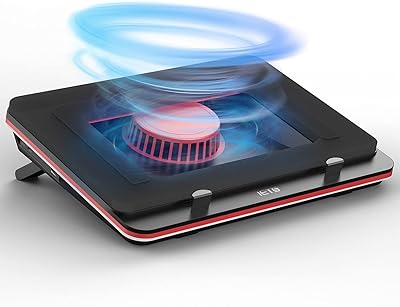
IETS GT500 V1 Laptop Cooling Pad
74%
93%
Cooling Performance
91%
Build Quality
47%
Noise Level
88%
Speed Control
86%
Foam Seal Design
More
Zippace 420×260mm Adjustable Laptop Lap Desk

74%
74%
Build Quality
71%
Cooling Performance
78%
Adjustability
82%
Portability
53%
Fan Noise Level
More
JanSport Cool Laptop Backpack
85%
93%
Strap Comfort
88%
Build Quality
91%
Laptop Protection
84%
Storage Organization
86%
Capacity & Size
More
Damero Teacher Utility Tote Bag
80%
93%
Organization & Pocket Layout
88%
Laptop Protection
79%
Build & Material Quality
76%
Carrying Comfort
84%
Zipper & Closure Reliability
More
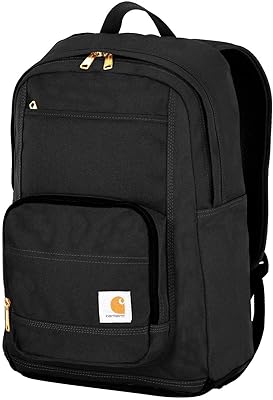
Carhartt Legacy Classic Work Backpack

78%
93%
Build Quality
91%
Durability Over Time
74%
Water Resistance
88%
Laptop & Tech Protection
67%
Carrying Comfort
More
Peter Thomas Roth Max Complexion Correction Pads

77%
83%
Effectiveness on Blemishes
86%
Skin Texture Improvement
91%
Ease of Use
71%
Value for Money
58%
Sensitivity & Irritation Risk
More
Mobile Pixels Trio Max 14.1″ Portable Monitor

73%
83%
Build Quality & Durability
81%
Screen Quality
57%
Brightness & Visibility
61%
Portability & Weight
87%
Setup & Ease of Use
More
NEEDLY Mild Cleansing Pad Makeup Remover 60-Pack
84%
93%
Gentle Formula
74%
Makeup Removal Power
96%
Pad Texture & Softness
91%
Post-Cleanse Skin Feel
83%
Value for Money
More
Murad Retexturizing Body Pads – 45 Pads
87%
88%
Effectiveness in Reducing Breakouts
91%
Gentle on Sensitive Skin
85%
Skin Texture Improvement
89%
Ease of Use
84%
Long-Term Results
More
ARCONA Raspberry Clarifying Pads - 45 Pads
87%
88%
Effectiveness in Clearing Blemishes
90%
Gentleness on Sensitive Skin
92%
Ease of Use
85%
Exfoliation and Skin Texture Improvement
91%
Packaging and Convenience
More

FAQ

For gaming laptops and workstations that run hot under load, yes — the directed airflow from the turbofan tends to produce real, measurable temperature reductions during sustained heavy use. Passive stands and basic multi-fan pads spread airflow broadly; the sealed inlay here pushes it exactly where it is needed. That said, how much improvement you see depends on your laptop's existing thermal design and how hard you push it.

Yes, it supports laptops up to 17.3 inches, so a 15.6-inch machine sits well within the compatible range. The adaptive foam inlay is designed to accommodate different chassis widths, though flat-bottomed laptops tend to get the best seal and therefore the most benefit from the directed airflow.

At maximum speed, the turbofan is audibly noticeable — this is not a silent cooler. Most users find a mid-range fan setting hits a comfortable balance between effective cooling and tolerable noise. If you work in a quiet shared space or are sensitive to fan noise, it is worth factoring that in before buying.

Yes, dual power is one of the more practical features here — you can run it from either a wall adapter or your laptop's USB-C port. This gives you flexibility if you do not always have a free outlet nearby, though running it off the laptop does draw from your machine's power budget.

No software installation is required. Fan speed and RGB lighting are both controlled directly on the unit, and your settings save automatically so you do not have to reconfigure each time you power it on. There is currently no dedicated desktop app for more advanced profile management.

The adaptive foam is designed to work with most laptop base shapes, and the majority of users report a good fit. Laptops with very tall rubber feet or unusually raised bottom edges may get a less consistent seal, which can reduce the effectiveness of the directed airflow. It is worth checking whether your laptop's underside is relatively flat before assuming a perfect fit.

Based on the product listing, the unit supports wall plug power input, but it is worth confirming what is included in the box at the time of purchase since accessories can vary by region or bundle. When in doubt, check the packaging contents listed on the product page before ordering.

The display shows fan speed and basic operational status — it is a practical monitoring readout rather than a full dashboard. Do not expect detailed thermal data or system metrics; for that you would need dedicated software on your laptop. Most users treat it as a convenient at-a-glance check rather than a primary feature.

Honestly, no. At nearly 5 pounds and over 16 inches wide, this gaming cooler is built for a permanent desk position. It is not something you would comfortably slip into a laptop bag alongside your machine. If portability matters to you, a lighter and more compact cooling pad would serve you better.

KLIM offers 5-year assurance along with 24/7 customer support, which is a meaningfully longer coverage period than most competitors offer in this space. For specific claims processes — whether that is a replacement, repair, or refund — you would need to contact KLIM directly through their official support channels. The warranty is a genuine differentiator, but make sure to register your purchase if required to activate it.