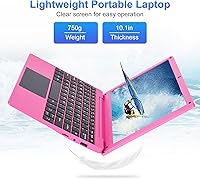
Overview

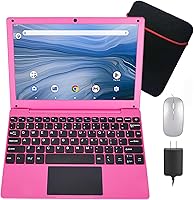
The HBESTORE A133 10.1-inch Android Laptop is a compact, no-frills netbook aimed at users who need basic functionality without a big spend. Running Android 12, it gives you access to Google Play, Google Docs, and Drive right out of the box — a familiar ecosystem that lowers the learning curve considerably. The Allwinner quad-core processor paired with 2GB of RAM handles light tasks well enough for everyday casual use. At under a kilogram, it has a traditional clamshell design that feels more laptop-like than a tablet, and the included accessories — mouse, bag, charger, and manual — make it genuinely ready to use from day one.

Features & Benefits

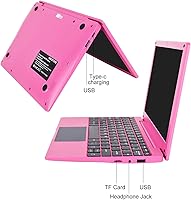
The 10.1-inch IPS screen handles casual video watching and reading without complaint — don't expect it to shine for photo editing or color-accurate work, but for YouTube or Google Classroom it does the job. Type-C charging is a welcome touch at this price point, and having two USB ports plus a TF card slot means you can expand storage or plug in peripherals without much hassle. The physical keyboard and trackpad give it a genuine laptop feel, and battery life holds up reasonably well through a school day under light use, though heavy streaming will push it toward the lower end of the estimated range.

Best For

This mini Android laptop makes the most sense for a child who needs a dedicated learning device, or for someone who simply wants a compact machine to browse the web, watch videos, and run a few apps without dealing with the complexity of a Windows setup. It also suits older adults already comfortable with Android on their phones, since the transition to this budget netbook is fairly natural. Light travelers who want something truly portable and don't need heavy computing power will find it slips easily into a bag, and basic tasks like email and Google Docs are squarely in its comfort zone.

User Feedback

Buyers tend to praise the out-of-the-box experience — the bundled accessories mean you're not hunting for missing parts, and most people report getting up and running quickly. The screen earns positive comments for its clarity at this size, particularly for reading and casual video use. On the flip side, the limited RAM becomes a noticeable constraint when multiple tabs or apps are open at once, occasionally causing sluggishness. Some users note the trackpad takes getting used to, and real-world battery life often lands closer to the lower end of the advertised window during active sessions. Keyboard comfort draws mixed reactions given the compact layout.

Pros

  • Comes bundled with a charger, mouse, carrying bag, and manual — genuinely ready to use out of the box.
  • Android 12 gives access to the full Google ecosystem including Play Store, Docs, and Drive.
  • Weighs under a kilogram, making this budget netbook one of the easier devices to carry around daily.
  • Type-C charging is a convenient modern touch that many budget devices in this category skip.
  • The IPS display offers clear, comfortable viewing for reading, streaming, and basic schoolwork.
  • Two USB ports plus a TF card slot provide enough connectivity for most casual users.
  • The clamshell form factor with a physical keyboard feels more practical than a tablet for typing tasks.
  • Storage can be expanded via TF card, which helps offset the modest built-in capacity.
  • Battery holds up well enough for a school session or a long commute under light usage conditions.
  • Setup is straightforward and approachable even for users with limited technical confidence.

Cons

  • Only 2GB of RAM creates real performance bottlenecks once more than a handful of apps are running.
  • Real-world battery life under active use tends to fall toward the lower end of the advertised estimate.
  • The trackpad responsiveness has drawn mixed reactions and may frustrate users accustomed to better hardware.
  • The compact keyboard layout takes adjustment and may feel cramped for adults with larger hands.
  • Wi-Fi is limited to older 802.11 b/g/n standards, which can affect wireless speeds on modern networks.
  • No mention of Bluetooth support, which limits wireless accessory options beyond what is included.
  • The processor, while quad-core, is an entry-level chip that will show its limits under sustained workloads.
  • App compatibility can be inconsistent since some Play Store titles are optimized for phones, not laptop form factors.
  • The screen resolution, while adequate, will feel noticeably soft to anyone coming from a higher-res display.
  • Customer support and warranty coverage from a lesser-known brand can be harder to navigate if issues arise.

Ratings

The scores below for the HBESTORE A133 10.1-inch Android Laptop were generated by our AI system after analyzing verified purchase reviews from buyers worldwide, with spam, bot activity, and incentivized feedback actively filtered out. Each category reflects the honest range of experiences real users reported — both what works well and where this budget netbook falls short. Nothing has been smoothed over; the numbers represent the full picture.

Value for Money
78%
22%
For buyers who genuinely need a light, portable Android device for basic tasks, the price-to-functionality ratio holds up reasonably well. The fact that it ships with a mouse, bag, and charger adds tangible value that buyers notice immediately when unboxing.
Users who expected Windows-level capability for the price were consistently disappointed. A few buyers felt that the RAM limitation made the device feel underpowered even for basic use, which undercut the value perception over time.
Performance
52%
48%
For a single focused task — watching a video, drafting a short document, or browsing a few pages — this mini Android laptop handles itself without major complaints. Casual users and younger children are less likely to push it hard enough to notice the ceiling.
Once two or more demanding apps run simultaneously, slowdowns become noticeable and frustrating. Users doing anything beyond light use reported lag, app crashes, and a general sense that the hardware struggles to keep up with even modest multitasking demands.
Display Quality
71%
29%
The IPS panel drew positive feedback for its viewing angles and decent color reproduction for casual video watching and reading. Several buyers specifically mentioned it was comfortable enough for a child to use for YouTube and educational content during school hours.
The resolution is acceptable but not sharp by modern standards, and some adult users found text and images looked noticeably soft compared to higher-end screens they were used to. Outdoor visibility under bright light was also flagged as a weak point.
Battery Life
63%
37%
Under genuinely light conditions — a bit of browsing, some document work, maybe a short video — the battery holds up adequately for a school session or a train commute. Buyers with modest expectations reported it got through a half-day without needing a charge.
Real-world battery life consistently fell shorter than the advertised estimate when streaming video or keeping multiple apps active. Several users noted they needed to charge mid-day more often than expected, which was a point of frustration for on-the-go use.
Portability
86%
At under a kilogram, this budget netbook is genuinely easy to toss into a backpack without thinking twice about the weight. Parents and students appreciated that it did not feel like a burden to carry between classrooms or on day trips.
The compact size is a strength for carrying but a trade-off in usability — a few adults found the small footprint meant a cramped typing experience. The carry bag included is basic and does not offer much protective padding for drops or bumps.
Build Quality
58%
42%
The clamshell design feels reasonably solid for the price tier, and the overall construction does not feel as flimsy as some competing products at this level. Buyers who handled it gently reported no structural issues over short-term use.
The plastic chassis flex and hinge stiffness drew skepticism from buyers looking for durability. Several users expressed concern about long-term resilience, particularly for children who are less careful with their belongings day-to-day.
Keyboard & Trackpad
61%
39%
For younger students with smaller hands, the keyboard size is workable and appropriate, and a handful of buyers mentioned their kids adapted to it quickly. Basic typing tasks like short notes or search queries present no real obstacle for the target age group.
Adult users frequently described the keyboard as cramped and the trackpad as inconsistent in responsiveness. The trackpad in particular required deliberate, slow movements to register accurately, which annoyed users accustomed to smoother input devices.
Software & App Ecosystem
74%
26%
Android 12 with Google Play access is a genuine advantage — familiar apps like YouTube, Google Classroom, and Docs install and run without friction. For users already in the Google ecosystem, the setup felt intuitive from the start.
Some Play Store apps designed for phone form factors displayed awkwardly on the wider screen layout. A small number of users also encountered compatibility quirks with specific apps that either crashed or behaved unexpectedly on the Allwinner hardware.
Connectivity & Ports
81%
19%
Having two USB ports, a TF card slot, and Type-C charging in one compact device at this price point surprised buyers positively. The ability to plug in a USB drive, expand storage with a microSD card, and charge with a widely available cable added real everyday convenience.
The Wi-Fi radio is limited to older wireless standards, and a handful of users in environments with congested 2.4GHz networks reported slower-than-expected connection speeds. The absence of confirmed Bluetooth support was also a notable gap for those wanting wireless peripherals.
Setup & Ease of Use
83%
The out-of-the-box experience was one of the most consistently praised aspects — the device came charged, the accessories were all present, and setup required minimal technical knowledge. Even less tech-confident buyers reported being up and running within minutes.
A small group of users ran into confusion around language settings and Google account setup without clear guidance from the manual. The user manual itself was described as thin and not particularly helpful for troubleshooting early hiccups.
Screen Size & Ergonomics
72%
28%
The 10.1-inch display strikes a reasonable balance between portability and usability for its target audience. Children and casual users found the screen size comfortable for media consumption and schoolwork without feeling too constrained.
For adults who need to work for longer stretches, the screen real estate felt limiting, especially when trying to use productivity apps side by side. A few buyers wished for even a slightly larger display given the overall laptop form factor.
Camera Quality
44%
56%
The front-facing camera does enough to make a basic video call functional, which is all most buyers in this category realistically need. For occasional family calls or a classroom check-in, it gets the job done without requiring any extras.
Image quality is noticeably low even by budget standards, with users reporting blurry, washed-out video in anything less than bright lighting. It is not suitable for any purpose beyond brief casual calls, and several buyers expressed disappointment with how poor the output looked.
Included Accessories
84%
The bundle is one of the stronger selling points of the A133 device — arriving with a wired mouse, carry bag, charger, and manual made buyers feel they were getting tangible extra value without needing to immediately spend more. For a first-time device for a child, it was seen as a complete starter kit.
The quality of the bundled accessories is basic rather than durable — the carry bag in particular offered minimal protection, and the mouse felt cheap to some users. These are usable items, but buyers should not expect them to last as long as the device itself.

Suitable for:

The HBESTORE A133 10.1-inch Android Laptop is a solid pick for parents who want an affordable, dedicated device for a young child to use for schoolwork, educational apps, and basic entertainment without handing over a primary family computer. Its Android 12 foundation means kids and less tech-savvy users can navigate it confidently, especially if they already use an Android phone or tablet. Students who need a lightweight machine to take notes, access Google Classroom, or watch instructional videos will find it practical and easy to carry around. Older adults looking for a simple device to browse the web, check email, or video call family members will appreciate the familiar Android interface and the fact that it arrives ready to use with accessories already included. If your needs are genuinely light and your budget is tight, this mini Android laptop punches reasonably well within its lane.

Not suitable for:

The HBESTORE A133 10.1-inch Android Laptop is not the right tool for anyone who needs to run desktop software, handle serious multitasking, or work with demanding applications. The limited RAM means that keeping several browser tabs open simultaneously or switching between multiple apps will likely result in noticeable slowdowns and occasional frustration. Professionals, college students with heavy coursework, or anyone relying on Windows or macOS software should look elsewhere entirely. Creative tasks like photo editing, video production, or even running heavier Android games are realistically out of scope for this budget netbook. If you need a primary work or study machine that handles pressure without breaking a sweat, the A133 device will disappoint — it is built for light lifting, not sustained heavy use.

Specifications

  • Operating System: Runs Android 12, providing access to the Google Play Store, Google Docs, Google Drive, and the broader Google app ecosystem.
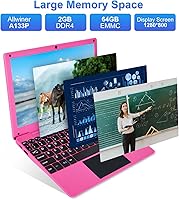
  • Processor: Powered by an Allwinner A133 Plus quad-core 64-bit processor clocked at 1.8GHz, suitable for light computing tasks.
  • RAM: Equipped with 2GB of DDR3 SDRAM, which supports basic single-task usage but shows limitations under heavier multitasking.
  • Storage: Includes 64GB of eMMC internal flash storage for apps, documents, and media files.
  • Display: Features a 10.1″ IPS panel with a 1280x800 pixel resolution, offering reasonable color and clarity for everyday content consumption.
  • Battery Life: Rated for an estimated 5 to 7 hours of use, with real-world duration varying based on screen brightness and active workload.
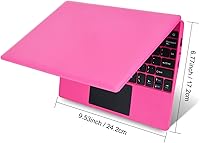
  • Dimensions: Measures 9.53 x 6.89 x 0.75 inches, keeping it compact enough to fit in most backpacks and travel bags without difficulty.
  • Weight: Weighs approximately 0.75kg without accessories, making it one of the lighter options in the budget netbook category.
  • Ports: Includes two standard USB ports, one Type-C port used for charging, and one TF card slot for expandable storage.
  • Wireless: Supports Wi-Fi connectivity via 802.11 b/g/n standards, compatible with standard home and school wireless networks.
  • Input: Comes with a built-in physical keyboard and integrated trackpad, providing a traditional laptop-style input experience.
  • Camera: Features a built-in front-facing camera suitable for video calls and basic photo capture.
  • Charging: Charges via a Type-C port, which allows for a degree of cable compatibility with other modern devices.
  • Included Accessories: Package contains the laptop, a charger, a wired mouse, a carrying bag, and a printed user manual.
  • Color Options: Available in a Pink finish as the primary listed color variant for this configuration.
  • Memory Type: Uses DDR3 SDRAM, which is standard for entry-level ARM-based devices in this performance tier.
  • Expandable Storage: Accepts TF (microSD) cards for additional storage capacity beyond the built-in 64GB eMMC.

Related Reviews
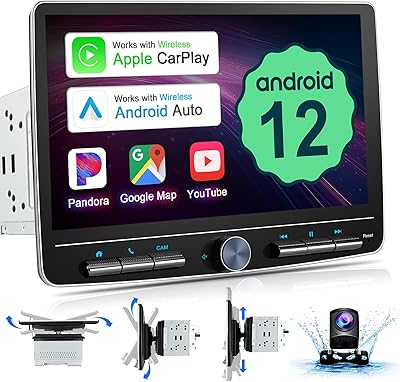
Fuluku 10.1-inch Double Din Android Car Stereo

71%
83%
Wireless Connectivity
76%
Screen Quality
79%
System Performance
67%
GPS Navigation
84%
Backup Camera
More
ITMEIPC T-10 10.1-inch Android Tablet
69%
83%
Value for Money
67%
Display Quality
62%
Performance
71%
Battery Life
58%
Build Quality
More
FEONAL K118 10.1-inch Android Tablet
68%
83%
Display Quality
67%
Performance & Speed
78%
Battery Life
44%
Camera Quality
81%
Value for Money
More
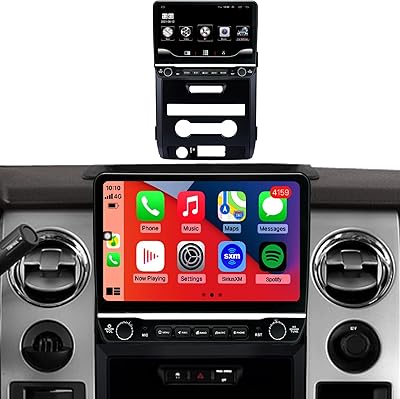
incifum Ford F150 10-Inch Touchscreen Car Stereo
69%
83%
Display Quality
79%
Wireless CarPlay & Android Auto
67%
Installation Experience
61%
Compatibility Accuracy
72%
Performance & Responsiveness
More
OiLiehu 10.1-inch Android Double Din Car Stereo
71%
88%
Value for Money
79%
Screen Quality
74%
GPS Navigation
83%
Bluetooth Performance
86%
Backup Camera
More
XINHENGTAI M10 Android 13 Tablet, 128GB, 10.1-inch
83%
92%
Value for Money
88%
Performance
91%
Battery Life
84%
Camera Quality
72%
Display Quality
More
Xiskt A5505 Android 13 Tablet 10.1-inch 128GB Storage
80%
83%
Performance
88%
Value for Money
72%
Battery Life
80%
Display Quality
65%
Camera Quality
More
YACXBTK J10 10.1-inch Kids Tablet
70%
84%
Battery Life
81%
Value for Money
78%
Parental Controls
62%
Performance
67%
Display Quality
More
ANTEMPER D116 10-Inch Android Tablet
71%
84%
Value for Money
88%
Accessories Bundle
83%
Battery Life
57%
Performance
62%
Display Quality
More
CONSUNG N101B 10-inch Android Tablet
71%
84%
Value for Money
81%
Battery Life
83%
Streaming Performance
79%
Build Quality
67%
Display Quality
More

FAQ

Not natively — it runs Android 12, not Windows, so traditional desktop Office software won't install. That said, you can use Microsoft Word and Excel through their free Android apps available on the Google Play Store, which cover most basic document and spreadsheet needs well enough for students and casual users.

Yes, Android 12 includes access to the Google Play Store, so you can download apps just like you would on an Android phone or tablet. Keep in mind that some apps are optimized for phone screen sizes and may look a little stretched on a 10.1″ display, but most productivity and educational apps work fine.

It manages platforms like YouTube reasonably well for everyday casual viewing at its native resolution. Just don't expect smooth 4K playback — the hardware is tuned for standard-definition to HD content, and keeping streaming as the primary task rather than running it alongside other apps will give you the best experience.

Yes, the TF card slot lets you add a microSD card to extend your available storage. This is a practical option if you plan to store a lot of offline content, downloaded apps, or media files directly on the device.

Under light use — browsing, Google Docs, and occasional video — most users get through a school session without needing to charge. If you're streaming video for extended periods or keeping a lot of apps running simultaneously, expect the battery to run closer to the lower end of the estimated range, so bringing the charger to school wouldn't hurt.

For a child or younger student, the keyboard size is fairly appropriate and manageable. Adults with larger hands may find the compact layout a bit cramped for extended typing sessions, though it works fine for short notes, searches, and occasional messages.

Bluetooth support is not officially listed in the product specifications, so it would be safer to assume it is not available. The two USB ports and the included wired mouse are the primary input options for accessories.

Yes, the built-in front-facing camera and microphone make it suitable for video calls through apps like Google Meet, Zoom, or WhatsApp, all of which are available on the Play Store. It works well enough for casual family calls, though the camera quality is basic rather than sharp.

It supports standard 802.11 b/g/n Wi-Fi, which is compatible with virtually all home routers. If your router only broadcasts on the 5GHz band, you may want to confirm it also has a 2.4GHz option active, as this budget netbook's wireless chip is most reliably compatible with 2.4GHz networks.

It can be a reasonable choice depending on your expectations. The Android interface is intuitive for kids already familiar with tablets or phones, and the physical keyboard adds educational value for learning to type. The main thing to keep in mind is that it is not designed for heavy use — one or two apps running at a time is its comfort zone, which is usually more than enough for younger children doing schoolwork or watching videos.