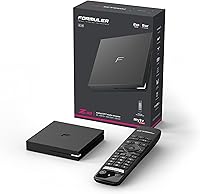
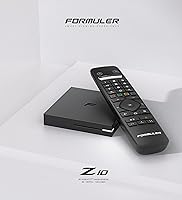
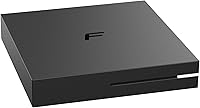
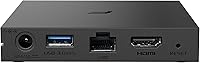
Overview

The Formuler Z10 is a compact Android 10 streaming box built with IPTV enthusiasts and cord-cutters firmly in mind. Formuler isn't some anonymous white-label operation — the brand has earned real credibility in the IPTV community over the years. At just 3.7 x 3.7 x 0.65 inches, this Android TV box practically disappears behind a television, which is exactly how most people want it. It arrives ready to use, remote and batteries included, so there's no hunting for accessories before you can get started. For a mid-range device, the hardware spec list is respectable rather than padded with empty promises.

Features & Benefits

The hardware inside this streaming device is tuned for smooth, high-quality playback rather than just ticking spec sheet boxes. 4K 60fps output paired with HDR10 support means content looks genuinely sharp on a modern display, provided your source material is up to it. The dual-band 5GHz Wi-Fi handles most living rooms comfortably, and if your router is across the house, the Gigabit Ethernet port gives you a wired alternative with far greater stability. With 2GB of RAM, IPTV apps run without the stuttering that plagues cheaper boxes. Android 10 also opens the door to sideloading the third-party apps many IPTV subscriptions depend on.

Best For

This Android TV box hits its stride for a specific type of buyer. If you're an IPTV subscriber who wants a dedicated Android environment to run your service of choice, this box was essentially designed with you in mind. Cord-cutters chasing 4K HDR content without replacing a perfectly good non-smart TV will also find it a practical pick. That said, you'll get the most out of it on a strong 5GHz Wi-Fi network or with Ethernet connected. Buyers who prefer a plug-in-and-forget experience using only certified apps may find the setup requires more hands-on patience than they'd like.

User Feedback

Among buyers, IPTV stability draws the most consistent praise — channels load reliably, streams hold steady, and the remote feels genuinely responsive. The 5GHz Wi-Fi reception earns solid marks in most setups too. Where things get more mixed is storage: 8GB fills fast once you install a handful of apps, so managing space becomes an ongoing task rather than a one-time concern. Netflix and other DRM-dependent services are a gray area — regional compatibility is not guaranteed, so verify this before buying if those platforms are non-negotiable for you. General streaming audiences with no IPTV needs tend to rate this device more moderately than its core audience does.

Pros

  • Formuler Z10 delivers rock-solid IPTV performance that holds up under real daily use.
  • 4K 60fps output with HDR10 makes a visible difference on any modern 4K display.
  • Gigabit Ethernet port eliminates network variability for users who can run a wired connection.
  • The open Android 10 environment supports sideloading, giving IPTV users the flexibility they need.
  • Dual-band 5GHz Wi-Fi handles most living room setups without meaningful buffering.
  • Compact enough to tuck behind a TV and genuinely forget it is there.
  • Ships with remote and batteries included — ready to use straight out of the box.
  • Formuler is an established brand in the IPTV space, not an anonymous generic reseller.
  • 2GB of RAM keeps IPTV apps running smoothly without the stuttering common on budget boxes.

Cons

  • 8GB of internal storage fills up fast once you have more than a couple of apps installed.
  • Netflix and DRM-dependent app availability is inconsistent across regions — do not assume it will work.
  • No voice control on the remote, which feels like a missing feature at this price point.
  • The fanless design causes the chassis to run noticeably warm during extended 4K streaming sessions.
  • Android firmware updates arrive infrequently, with no clear upgrade path beyond Android 10.
  • Wi-Fi range is average at best — buyers with large homes or distant routers may struggle wirelessly.
  • Sideloading apps requires a comfort level with Android that not every buyer will have.
  • General streaming audiences without an IPTV subscription get a weaker value proposition than the core audience.

Ratings

The Formuler Z10 earns a well-deserved spot on the radar of IPTV enthusiasts and cord-cutters hunting for a capable mid-range Android box. These scores were generated by AI after analyzing verified global user reviews, with spam, bot submissions, and incentivized feedback actively filtered out — so what you see here reflects honest, real-world experience. Both where this streaming device shines and where it genuinely frustrates buyers are reflected transparently below.

IPTV Performance
91%
This is the category where the box earns its keep. Users running dedicated IPTV subscriptions consistently report stable channel loading, minimal buffering mid-stream, and reliable app behavior even during peak hours. For its primary intended audience, it simply works.
Performance can dip when running demanding IPTV middleware alongside background apps simultaneously, particularly if storage is nearly full. A small number of users on congested 2.4GHz networks reported occasional drop-outs before switching to 5GHz or Ethernet.
Video & Picture Quality
88%
4K 60fps output with HDR10 support translates to noticeably crisp, well-saturated images on compatible displays. Users upgrading from older 1080p boxes frequently comment that the visual difference on a 4K TV is immediately obvious with high-bitrate streams.
The quality ceiling is only as high as your source content allows — compressed IPTV streams won't suddenly look cinematic. A few buyers also noted that HDR tone mapping felt slightly aggressive on certain TV pairings, requiring display-side calibration.
Wi-Fi Reliability
83%
On a 5GHz network with reasonable signal strength, the dual-band AC adapter performs solidly. Most users in average-sized homes report clean, stable connections with no meaningful buffering during 4K streams, which is the real test for any wireless streaming box.
Range is average rather than impressive — walls and distance do affect signal more than some competitors. Buyers in larger homes or with routers positioned far from the TV are better off using the Ethernet port rather than relying on wireless alone.
Wired Connectivity
89%
The Gigabit Ethernet port is a genuine asset for users who prioritize stream stability above all else. Plugging in removes network variability from the equation entirely, and buyers who made the switch from Wi-Fi to wired consistently reported a smoother, more consistent experience.
The Ethernet port requires a cable run to your TV setup, which is not always practical depending on room layout. There is no included Ethernet cable in the box, so buyers relying on wired connection need to factor that in separately.
Storage Capacity
54%
46%
8GB is enough to get started with one or two core IPTV apps and a lightweight media player without immediately hitting a wall. Out of the box, the device functions fine for buyers with a focused, minimal app setup who are disciplined about what they install.
8GB is a real constraint in everyday use. Once you add an IPTV app, a player, a VPN, and a browser, free space evaporates quickly, and Android starts throttling background processes. Users regularly flag storage management as an ongoing frustration rather than a one-time setup concern.
RAM & Multitasking
77%
23%
2GB of RAM handles the core IPTV use case without obvious stuttering or app crashes under normal conditions. Switching between a player and a settings menu or browser feels adequately responsive for a box in this price bracket.
Heavy multitaskers will notice the ceiling. Running multiple apps simultaneously, especially with a VPN active in the background, can cause occasional slowdowns or force the system to kill background processes. It is functional, not fast.
App Compatibility & Sideloading
79%
21%
Android 10 gives buyers the ability to sideload APKs, which is exactly what a large portion of IPTV users need. The open ecosystem means you are not locked into a curated app store, and most popular third-party media and IPTV applications install without friction.
Not every app behaves perfectly on this Android build, and some sideloaded applications require tinkering to run correctly. Users unfamiliar with Android sideloading may find the initial setup curve steeper than expected compared to a locked-down streaming stick.
Netflix & DRM App Support
58%
42%
Netflix is listed as a supported service, and a portion of buyers have used it without issue. For users in regions where the certification aligns, having access to both IPTV and Netflix on one device is a practical convenience.
DRM certification is inconsistent across regions and firmware versions, and a meaningful number of buyers report that Netflix either does not appear in the store or runs at limited resolution. This is not a reliable Netflix box — buyers for whom that platform is a priority should confirm compatibility before purchasing.
Build Quality & Design
82%
18%
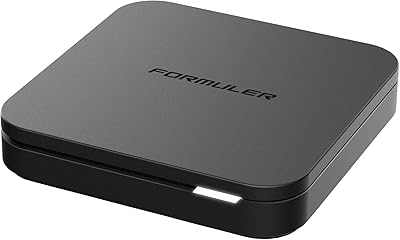
The all-black enclosure feels solid for its size and weight, not flimsy or hollow like budget alternatives. At under an inch thick, it genuinely disappears behind or beneath a TV, which matters to buyers who want a tidy home theater setup.
The plastic finish attracts fingerprints and dust more than matte alternatives. The device also has no ventilation slots to speak of, and a small number of users report it running noticeably warm during extended 4K streaming sessions.
Remote Control
81%
19%
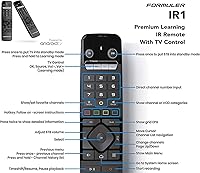
The included remote is consistently described as responsive and logically laid out. Buttons have decent tactile feedback, and the range is sufficient for normal living room use without needing to point it precisely at the box.
The remote lacks voice control or backlit buttons, which limits usability in dim environments. A few users also noted it feels slightly lightweight, raising durability questions over long-term use, though failures appear uncommon in reported feedback.
Setup & Ease of Use
74%
26%
For Android-familiar users, initial setup is quick and intuitive — connect, sign in, install your apps, and you are watching within minutes. Batteries are included, which removes one small but appreciated friction point from the unboxing experience.
Users coming from plug-and-play devices like Roku or Fire TV Stick may find the Android environment less guided. Sideloading apps, managing storage, and configuring IPTV middleware all require a baseline of comfort with Android that not every buyer has.
Value for Money
84%
For IPTV-focused buyers, the combination of 4K HDR output, Gigabit Ethernet, and a reputable brand at this price point represents strong value. You are not paying for features you do not need, and the core capability is priced fairly against comparable hardware.
General streaming audiences not invested in IPTV may find better value in mainstream alternatives that offer more certified app support and less DIY setup. The value proposition is real but audience-specific — it is excellent for the right buyer and merely adequate for others.
Thermal Management
66%
34%
Under light to moderate use — browsing, standard definition IPTV, casual streaming — the device runs cool and quiet with no perceptible heat buildup. This is the normal use pattern for a large portion of buyers who run one app at a time.
Extended 4K HDR playback sessions cause the chassis to become noticeably warm to the touch. The fanless design means heat has nowhere to go efficiently, and while outright thermal throttling is rarely reported, it is a factor worth considering for heavy-use environments.
Software & Firmware Updates
63%
37%
Formuler does push firmware updates, and users who have received them generally note improvements in stability and app compatibility. The brand being an established player rather than a generic reseller means there is at least some accountability for post-purchase support.
Update frequency is inconsistent, and some users report waiting extended periods between meaningful patches. Android 10 is not the latest available version, and there is no clear public roadmap for further OS upgrades, which is a legitimate long-term concern for buyers planning to use the device for several years.

Suitable for:

The Formuler Z10 is built with a clear audience in mind, and if you fall into that group, it genuinely delivers. IPTV subscribers who want a stable, Android-based environment to run their service of choice will find this box fits the job better than most alternatives at a similar price point. Cord-cutters who own a solid 4K TV but want to avoid paying a premium for a new smart TV will appreciate the 4K HDR output without the hardware upgrade cost. If your home network runs on a strong 5GHz Wi-Fi signal, or better yet you can hardwire the box via Ethernet, you are set up for a reliable, low-frustration experience. Buyers who are comfortable navigating Android, sideloading apps, and doing a bit of initial configuration will feel at home here — the open ecosystem is a genuine advantage, not an obstacle, for this crowd. The slim, unobtrusive form factor is also a practical bonus for anyone who wants the box to disappear into a clean AV setup rather than dominate the shelf.

Not suitable for:

If your primary goal is a simple, certified, plug-and-play streaming experience for mainstream services, the Formuler Z10 is probably not the right call. Buyers who rely heavily on Netflix, Disney+, or other DRM-dependent platforms should be cautious — certification varies by region and firmware version, and this is not a guaranteed Netflix box in the way a Fire TV Stick or Roku device is. The 8GB of internal storage is a real constraint for anyone planning to install a broad library of apps; it is not a minor inconvenience but an ongoing management burden that some users find genuinely frustrating. Users who are unfamiliar with Android or uncomfortable with sideloading applications will likely find the setup experience more work than expected compared to more guided streaming platforms. Anyone hoping to use this device as a general-purpose Android media center for gaming, heavy app use, or offline media storage will run into the limits of both storage and RAM faster than they would like. If you are not an IPTV user and just want a straightforward box for Netflix and YouTube, there are better-suited options at comparable or lower prices.

Specifications

  • Operating System: Runs Android 10, providing access to the Google Play Store and support for sideloaded third-party applications.
  • RAM: Equipped with 2GB of RAM, sufficient for running IPTV applications and light multitasking without significant slowdowns.
  • Storage: Includes 8GB of internal ROM; available user storage is lower once the OS and pre-installed apps are accounted for.
  • Video Output: Supports 4K resolution at 60 frames per second via HDMI, delivering smooth, high-detail playback on compatible displays.
  • HDR Support: HDR10 compatible, enabling enhanced contrast and color depth on televisions that support the HDR10 standard.
  • Wi-Fi: Dual-band 2x2 AC Wi-Fi supporting both 2.4GHz and 5GHz bands for flexible wireless connectivity options.
  • Ethernet: Features a Gigabit Ethernet port for wired network connections, offering maximum stability for uninterrupted streaming.
  • Connectivity Ports: Includes HDMI output, Gigabit Ethernet, and a Micro USB port for power or peripheral use.
  • Dimensions: Measures 3.7 x 3.7 x 0.65 inches, making it one of the more compact TV boxes in its category.
  • Weight: Weighs 1.25 pounds, light enough to mount or position behind most televisions without issue.
  • Form Factor: Designed as a standalone TV box in a flat, square enclosure rather than a dongle or stick format.
  • Color: Available in black with a smooth plastic finish that blends into most home theater setups.
  • Remote Control: Ships with an infrared remote control; two AAA batteries are included in the box.
  • Battery Type: Remote control requires 2 AAA batteries, which are included with the device at purchase.
  • Supported Services: Compatible with Netflix, Hulu, and Amazon Prime Video, though regional DRM certification may affect availability and resolution.
  • Brand: Manufactured by Formuler, a company with an established reputation specifically within the IPTV hardware market.
  • Model: Model designation is Z10, positioned as a mid-range offering within the Formuler Android box lineup.

Related Reviews
Formuler Z10 SE Android 10 2GB RAM 4GB ROM 4K Streaming Media Player
81%
88%
Value for Money
91%
4K Streaming Quality
89%
Ease of Setup
84%
Connectivity Options
78%
User Interface
More
Losfom Z10 4K Action Camera, 128GB
84%
89%
Video Quality
93%
Ease of Use
82%
Build Quality
88%
Waterproof Performance
85%
Mounting Flexibility
More
Formuler Z11 Pro Max
79%
93%
IPTV Streaming Performance
91%
Network Connectivity
88%
Hardware Specifications
86%
4K & Video Quality
83%
Build Quality & Design
More
Formulation Factory Crown of Glory 10-in-1 Hair Growth Maximizer, 2 Month Supply
83%
84%
Effectiveness in Promoting Hair Growth
79%
Gradual Results Timeline
92%
Gentle on Scalp & Skin
81%
DHT Blocking Capability
88%
Ease of Use
More

FAQ

It is genuinely built with IPTV in mind. The Formuler Z10 runs Android 10, which means you can install virtually any IPTV middleware or player app you need, either from the Play Store or by sideloading. If IPTV is your primary use case, this box is well-suited for it. General streaming is possible, but that is not where this device stands out most.

Yes, and honestly for 4K IPTV streaming, wired is the way to go if you can manage the cable run. The box has a Gigabit Ethernet port built in, so you just plug in a standard RJ45 cable and you are set. Many users who switched from Wi-Fi to Ethernet reported a noticeably more stable experience.

Netflix is listed as a supported service, and some users do run it without issues. However, DRM certification varies by region and firmware version, which means Netflix may not appear in the Play Store for all buyers, or it may be limited to lower resolutions. If Netflix is a must-have for you, verify compatibility for your specific region before committing to this purchase.

Out of the 8GB total, the Android OS and system apps consume a meaningful chunk, so expect somewhere in the range of 5 to 6GB of free space to work with initially. That fills up faster than you might expect once you add an IPTV app, a media player, a VPN, and a browser. Storage management becomes an ongoing task rather than a one-time setup step.

Yes, this Android TV box outputs up to 4K at 60fps with HDR10 support. Any standard HDMI cable will carry the signal, but if you want to ensure full 4K HDR bandwidth, use an HDMI cable rated for 4K or labeled as High Speed — most modern cables qualify. The cable is not included in the box, so you will need to supply your own.

For someone comfortable with Android smartphones, setup is fairly intuitive — connect the HDMI and power, follow the on-screen prompts, sign into a Google account, and install your apps. If you need to sideload an app that is not on the Play Store, that requires a few extra steps involving downloading an APK file, which can feel unfamiliar if you have never done it before. Users coming from Roku or Fire TV Stick may find it requires more hands-on effort initially.

On a 5GHz network with a reasonably positioned router, the dual-band Wi-Fi performs well for most users. It handles 4K streaming without chronic buffering in average-sized homes. Where it falls short is range — if your router is far away or separated by multiple walls, signal strength can degrade. In that situation, using the Ethernet port is a more reliable solution.

The box ships with the remote control and two AAA batteries, so you are ready to plug in and power up without an extra trip to the store. You will need to provide your own HDMI cable and Ethernet cable if you plan to use a wired connection. A power adapter is included as well.

Under light use it stays cool, but extended 4K HDR playback does cause the chassis to warm up noticeably. The device has no fan, so heat dissipates passively through the casing. It is not hot enough to cause concern in typical use, but if you are planning marathon streaming sessions in an enclosed media cabinet, make sure there is adequate airflow around the unit.

For casual, certified-app streaming, a Fire TV Stick or Roku is actually easier to live with — they are more polished for mainstream services and require less configuration. This streaming device wins when your priority is IPTV flexibility, sideloading freedom, and a wired Ethernet connection. It is a more capable but more involved device, and the value really depends on whether you need what it specifically offers.