Overview

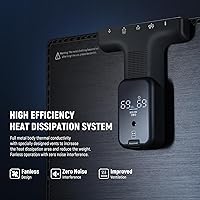
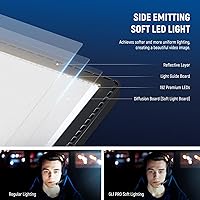
The NEEWER GL1 Pro LED Streaming Key Light sits in a sweet spot for content creators who want genuinely good lighting without overhauling their entire desk setup. Unlike ring lights that cast unflattering circular catchlights, or bare-bulb panels that leave harsh shadows, this streaming panel light relies on edge-lit diffusion to spread light softly and evenly across your face. The aluminum casing acts as a passive heat sink — no fan noise, ever. Layer in a multi-platform control ecosystem covering phone apps, PC software, and Stream Deck integration, and you have a thoughtful package built for streamers, remote workers, and solo video creators who want less clutter, not more.
Features & Benefits

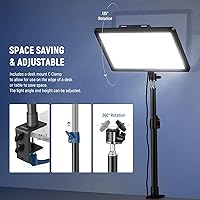
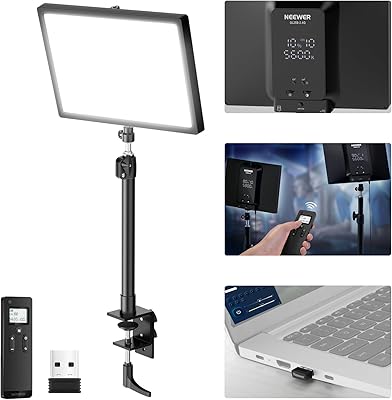
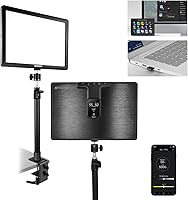
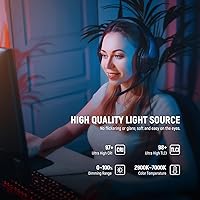
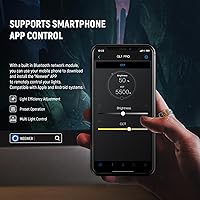
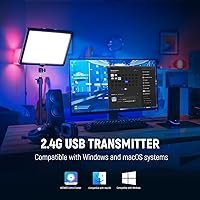
The 15.5-inch panel pushes up to 4300 lux at half a meter — enough to properly illuminate a face at typical desk distances without cranking the brightness to maximum. Color temperature runs from a warm 2900K to a crisp 7000K daylight equivalent, and you can dim the output anywhere from full power down to nearly nothing. What the CRI97+ and TLCI98+ ratings actually mean in practice: colors reproduce accurately on camera, so your skin tone looks natural rather than washed out. Control is handled three ways — a 2.4G USB dongle for PC/Mac, Bluetooth through the Neewer app on iOS or Android, or direct integration with an Elgato Stream Deck via a downloadable plugin. The clamp fits desk edges from 0.4″ to 3″ thick, and the arm adjusts between 13.8″ and 23.6″.

Best For

This desk key light hits differently for people whose work lives on camera. Live streamers benefit most from the Stream Deck integration — once the plugin is installed, switching between a warm gaming tone and a crisp daylight balance takes a single button press, no alt-tabbing required. Remote workers sitting through back-to-back video calls will appreciate how the soft, diffused output avoids the harsh, shadowy look that most laptop setups produce. Home studio YouTubers and podcasters get a particular win: the fanless design means the light adds zero noise to recordings. It's also a practical choice for anyone with a cramped desk, since the clamp keeps it entirely off the surface.

User Feedback

The GL1 Pro sits at a 4.5-star average across roughly 197 ratings — solid, but the full picture has some wrinkles. Consistent praise centers on skin-tone accuracy: users report their camera feed looks noticeably more polished without extra editing effort. The main complaint involves the 2.4G USB dongle, which has shown inconsistent connectivity for some buyers, requiring troubleshooting before it worked reliably. The clamp and arm assembly feels sturdy to most users, though those coming from heavier studio rigs may find the construction lighter than expected. One recurring frustration: a 3-second button hold is required to power on, which consistently surprises new owners in early sessions.

Pros

  • Soft, edge-lit diffusion removes harsh shadows, producing flattering on-camera results straight out of the box.
  • Color accuracy is genuinely strong — the high CRI and TLCI ratings translate to natural skin tones without heavy color grading.
  • The full 2900K–7000K color temperature range covers everything from warm evening ambiance to bright daylight matching.
  • Fanless aluminum construction means zero noise interference during audio recording sessions.
  • The clamp mount keeps your desk surface completely clear and adjusts to a wide range of desk thicknesses.
  • Stream Deck integration lets streamers swap lighting presets mid-broadcast without touching any other device.
  • Dimming is smooth and flicker-free across the full range, making long recording sessions comfortable on the eyes.
  • Three distinct control methods — USB dongle, Bluetooth app, and Stream Deck — give genuine flexibility depending on your setup.
  • At its price tier, the GL1 Pro offers a professional-grade light quality that competes well against pricier alternatives.
  • The adjustable arm height accommodates a variety of seating positions and monitor configurations without extra accessories.

Cons

  • The 2.4G USB dongle has produced inconsistent pairing results for a subset of buyers, requiring troubleshooting before reliable use.
  • Powering on requires a deliberate three-second button hold, which can feel awkward during live or time-sensitive sessions.
  • The clamp arm may feel lightweight compared to third-party heavy-duty mounting solutions, particularly on desks with vibration.
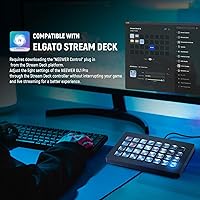
  • Stream Deck control requires downloading and configuring a separate plugin — it is not plug-and-play out of the box.
  • At 6.27 pounds, the light is not particularly heavy, but the arm-and-clamp system may not feel as rigid as standalone floor stand alternatives.
  • The 15.5-inch panel size limits its usefulness for full-body photography or larger shooting distances beyond close-desk scenarios.
  • Mobile app connectivity via Bluetooth requires keeping a paired phone nearby, which adds a step for purely PC-based workflows.
  • No onboard physical controls beyond the power button — users without a dongle, phone, or Stream Deck have limited manual adjustment options.

Ratings

The NEEWER GL1 Pro LED Streaming Key Light earns an overall strong reception from content creators worldwide, and the scores below reflect what real buyers actually experienced — not marketing claims. Our AI analyzed verified purchase reviews globally, actively filtering out incentivized, repeated, and bot-flagged submissions, so both the strengths and the friction points are represented honestly. Where this desk key light genuinely impresses, the scores reflect it; where real users ran into frustration, that shows up too.
Light Quality
93%
Across hundreds of verified reviews, the soft, diffused output is the most consistently praised attribute. Streamers and YouTubers specifically noted that skin tones looked accurate and natural on camera without any additional color grading — a meaningful time saver for solo creators publishing frequently.
A small number of users shooting in larger rooms found the effective coverage area limiting at distances beyond one meter, where brightness dropped noticeably. For close-desk use it excels, but it was not designed as a room-filling solution.
Color Accuracy
91%
The high CRI and TLCI ratings translate into real-world benefits that reviewers noticed without knowing the technical numbers — clothing colors looked true, and background elements stayed neutral under the light. Remote workers on video calls reported noticeably fewer complaints from colleagues about their on-screen appearance.
Color accuracy is only relevant if your camera and monitor are properly calibrated to match — a few users noted that without those adjustments, the benefit was harder to perceive. This is a user setup issue rather than a flaw in the GL1 Pro itself, but it came up often enough to mention.
Noise & Fan Performance
96%
The fanless passive cooling system drew consistent praise from podcasters and voiceover artists who described it as one of the few lights they could run at full power without any mechanical noise appearing in their recordings. This is a genuinely rare feature at this price point.
Passive cooling means the aluminum casing does get warm after extended high-brightness sessions. No reviewer reported it as a safety concern, but those who touched the housing during a long stream noticed the heat and occasionally found it unexpected.
App & Software Control
71%
29%
Having three distinct control pathways — USB dongle, Bluetooth app, and Stream Deck plugin — gives the GL1 Pro real flexibility that most competitors do not match. Mobile app users on both iOS and Android found the Neewer app responsive and straightforward once the initial pairing was complete.
The software experience is not fully polished. Several reviewers noted that the Neewer Control Center app felt less refined than the hardware itself, and a portion of users on Windows reported occasional disconnections or lag. The experience varies enough across setups that it feels inconsistent rather than reliable.
Stream Deck Integration
78%
22%
For Elgato Stream Deck owners, the ability to change brightness or color temperature with a dedicated hardware button mid-stream is genuinely useful — reviewers who set it up correctly described it as one of their most-used Stream Deck functions. The integration covers the two most commonly adjusted parameters effectively.
The plugin is not pre-installed and does not configure itself; buyers need to locate it in the Stream Deck marketplace and work through a setup process that confused several less technical users. Clearer in-box instructions or a QR code pointing to a setup guide would reduce the friction significantly.
2.4G USB Dongle Reliability
58%
42%
When the dongle works well, the connection is fast and the latency is low enough that brightness adjustments feel immediate from the PC app. Users who got it running without issues appreciated not needing to keep a phone nearby for control.
Dongle reliability is the single most contested aspect of this streaming panel light. A meaningful subset of reviewers reported needing to switch USB ports, reinstall drivers, or reboot before the dongle connected consistently — and some never fully resolved the issue. For a device positioned as a professional tool, this inconsistency stands out.
Build Quality
82%
18%
The aluminum casing gives the GL1 Pro a noticeably more premium feel than plastic-bodied lights at similar price points, and most everyday desk creators described the overall construction as solid and confidence-inspiring right out of the box.
Users transitioning from heavy professional rigs flagged the mounting arm and clamp as feeling lighter than expected. It holds position reliably under normal use, but those who regularly reposition or work on vibrating standing desks noticed some subtle loosening over time.
Clamp & Mount System
79%
21%
The clamp fits a wide range of desk thicknesses and the height adjustment range covers most typical seated and semi-standing positions well. Setup takes only a few minutes, and the lack of a floor stand means the desk stays completely clear.
The arm's range of motion, while adequate for straight-on positioning, limits more creative angles. A few photographers who tried using it as an overhead fill light found the arm did not extend or articulate quite far enough without supplementary accessories.
Power Button Usability
54%
46%
Once users learned about the three-second hold requirement, most adapted quickly and stopped thinking about it. A handful of reviewers mentioned it actually prevented accidental shutoffs during sessions, which they came to appreciate.
The three-second power-on hold caused genuine confusion for a surprising number of first-time users who assumed the light was defective before discovering the requirement in forums rather than the manual. This is a straightforward documentation and onboarding problem that meaningfully affects first impressions.
Setup & Out-of-Box Experience
73%
27%
Physical setup — clamping the mount, attaching the panel, adjusting the height — is fast and intuitive. Most users had the light physically installed and powered on within ten minutes of opening the box, with no tools required.
The software side of setup is where first-time users lose time. Choosing between three connection methods without clear guidance caused decision fatigue, and the dongle setup in particular lacked the step-by-step clarity that would prevent most of the reported connection problems.
Value for Money
84%
Reviewers consistently framed this desk key light as hitting above its price class on light quality and color accuracy — two attributes that directly affect the final video output. For creators who monetize their content, the reduction in post-production time alone was cited as justifying the cost.
The software inconsistencies and dongle reliability issues push the value calculation in a less favorable direction for buyers who need the wireless control to work flawlessly from day one. Those who end up using only Bluetooth or Stream Deck control tend to feel better about the overall value than dongle-dependent users.
Eye Comfort & Flicker
89%
Multiple reviewers who spend six or more hours daily in front of cameras specifically called out the flicker-free output as noticeably easier on their eyes than previous lights they had used. This matters more than most buyers anticipate before they experience it.
At maximum brightness in a small or dark room, a few users found the output intensity a bit much for prolonged direct exposure, though this is a common characteristic of high-output panel lights rather than a specific flaw in this unit.
Compatibility Range
76%
24%
Supporting PC, Mac, iOS, and Android across multiple connection types makes this streaming panel light accessible to a genuinely broad range of creator setups. The Stream Deck support adds a layer of ecosystem integration that goes beyond what most lighting competitors offer.
Stream Deck compatibility is limited to Elgato hardware only — a point that frustrated users of competing macro pad controllers who assumed broader support. The listing language around compatibility could be clearer to prevent disappointed purchases.

Suitable for:

The NEEWER GL1 Pro LED Streaming Key Light was clearly designed with a specific kind of creator in mind, and it delivers well for that audience. If you spend meaningful time on camera — whether streaming games, recording YouTube videos, hosting podcasts, or sitting through a full day of video calls — the soft, diffused panel output will make a noticeable difference in how you look on screen without requiring any lighting expertise. Elgato Stream Deck users get a particularly smooth experience once the Neewer Control plugin is installed, since brightness and color temperature can be adjusted mid-stream with a single button tap. Home office professionals who record in tight spaces will appreciate the clamp-mount design, which keeps the desk surface clear while still positioning the light at a useful, adjustable height. The fanless build also matters here: anyone recording audio alongside video — podcasters, interviewers, voiceover artists — can run this desk key light at full brightness without picking up any mechanical noise in the microphone.
Not suitable for:

The NEEWER GL1 Pro LED Streaming Key Light is a less convincing choice for buyers whose needs fall outside the desk-based creator workflow. Photographers working in a traditional studio environment will likely find the 15.5-inch panel too small in output area for full-body or product shots at distance, where larger panel lights or softboxes are a better fit. If you rely heavily on the 2.4G USB dongle for wireless PC control, be aware that user reports around dongle reliability are inconsistent — it works well for most, but enough people have encountered pairing issues that it warrants caution if wireless control is critical to your workflow. Those who already own heavy-duty mounting arms and clamps may find the included hardware feels lighter than what they are used to, which could be a concern for high-vibration desk setups or standing desks that shift frequently. Finally, buyers expecting to walk up and power it on instantly should know the three-second button hold to activate the light is a real adjustment period, and can feel awkward in live situations.
Specifications

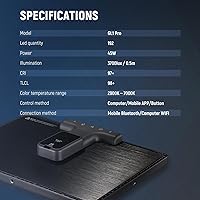
  • Panel Size: The light panel measures 15.5 inches diagonally, providing a broad diffusion area suited for close-desk illumination.
  • Dimensions: The unit measures 9.09″ in length, 1.42″ in width, and 13.07″ in height when assembled.
  • Weight: The complete light assembly weighs 6.27 pounds, making it stable when clamped to a standard desk edge.
  • Max Illuminance: At a distance of 0.5 meters, the panel delivers up to 4300 lux of output at full brightness.
  • Color Temperature: Color temperature is adjustable across a continuous range from 2900K (warm white) to 7000K (cool daylight).
  • Dimming Range: Brightness can be adjusted from 0% to 100% in smooth, flicker-free increments suitable for prolonged on-camera use.
  • Color Rendering: The panel carries a CRI rating of 97+ and a TLCI rating of 98+, indicating highly accurate color reproduction under its light.
  • Connectivity: The light supports three connection types: 2.4G USB dongle for PC and Mac, Bluetooth for mobile devices, and Wi-Fi for app-based control.
  • Stream Deck Support: Integration with the Elgato Stream Deck is available through the Neewer Control plugin, which must be downloaded and installed separately.
  • Control Apps: The Neewer Control Center app is compatible with Windows, Mac, iOS, and Android for remote brightness and color temperature adjustment.
  • Clamp Thickness: The included desk clamp accommodates surfaces between 0.4″ and 3″ thick, covering most standard desks and monitor risers.
  • Height Adjustment: The mounting arm adjusts between 13.8″ and 23.6″ in height, allowing the panel to be positioned to suit different seating configurations.
  • Casing Material: The outer casing is constructed from aluminum alloy, which conducts heat away from internal components without requiring active cooling.
  • Cooling System: Thermal management is entirely passive — there is no internal fan, eliminating mechanical noise during operation.
  • Light Technology: The panel uses edge-lit LED technology, which distributes light across a diffusion surface to produce soft, shadow-minimizing output.
  • ASIN: The product is listed on Amazon under ASIN B0BR4XX1HB with the model designation GL1 Pro in Black.

Related Reviews

NEEWER RGB660 PRO II
80%
91%
Brightness Output
93%
Color Accuracy
88%
Dimming Performance
67%
App & Bluetooth Control
84%
RGB Color Range
More
NEEWER 25W 12.9″ Streaming Key Light GL25B
86%
91%
Lighting Quality
88%
Ease of Setup
93%
Adjustability and Flexibility
84%
Wireless Control Experience
96%
Color Accuracy (CRI Rating)
More
NEEWER HS60C Pro 60W RGB LED Video Light
83%
92%
Brightness Output
89%
Color Accuracy (CRI)
94%
Portability & Form Factor
67%
App Control & Connectivity
86%
Build Quality
More
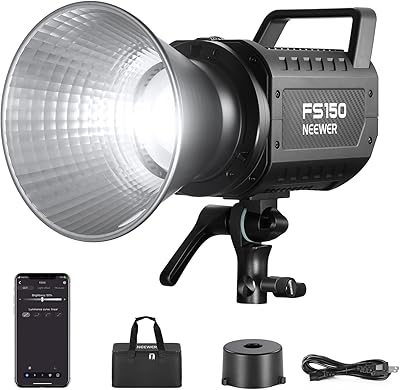
NEEWER FS150 LED Video Light
84%
94%
Brightness Output
92%
Color Accuracy
88%
Build Quality
81%
App & Wireless Control
89%
Dimming Precision
More
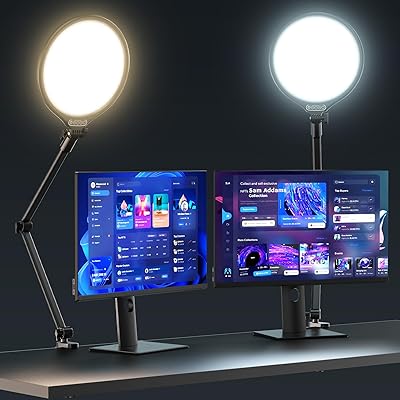
ULANZI Bi-Color LED Desktop Key Light
79%
88%
Light Output Quality
91%
Color Temperature Range
93%
Color Accuracy (CRI)
94%
Ease of Setup
86%
LCD Display & Controls
More
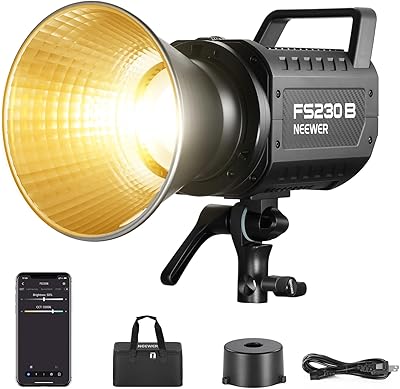
NEEWER FS230B 230W Bi-Color LED Video Light
84%
93%
Brightness Output
91%
Color Accuracy
67%
App & Wireless Control
88%
Build Quality & Portability
89%
Dimming Precision
More
UBeesize 10″ Key Light with Adjustable Arm
75%
91%
Ease of Setup
88%
Arm Stability
74%
Light Quality
78%
Clamp Grip & Desk Compatibility
67%
Bluetooth Reliability
More
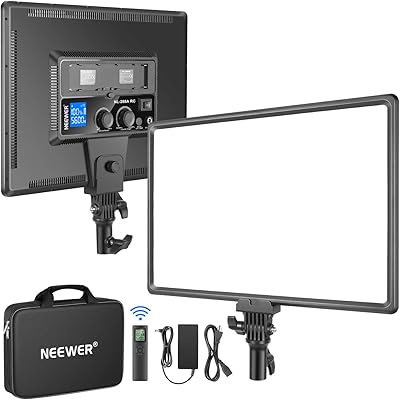
Neewer NL288 18-inch Bi-Color LED Panel
86%
92%
Light Quality & Softness
94%
Color Accuracy (CRI)
89%
Color Temperature Adjustability
91%
Remote Control Functionality
93%
Value for Money
More
NEEWER NL-192AI
NEEWER NL-192AI
87%
94%
Portability and Form Factor
89%
Light Quality and Softness
86%
Battery Endurance
92%
Color Accuracy (CRI)
91%
Ease of Use and Controls
More
NEEWER CB200 210W LED Video Light
80%
93%
Brightness & Output
91%
Color Accuracy
87%
Build Quality
73%
App & Wireless Control
88%
Dimming Performance
More

FAQ

You have options here. The light can be controlled without any Wi-Fi at all by plugging the included 2.4G USB dongle into your PC or Mac and using the Neewer Control Center desktop app. Wi-Fi is only required if you prefer that specific connection method. Bluetooth through the mobile app also works independently of any network.

It is not automatic — you need to download and install the Neewer Control plugin from the Stream Deck plugin marketplace before any integration is possible. Once that is done, brightness and color temperature adjustments can be assigned to Stream Deck keys directly. Budget a few minutes for the initial setup, and read through the plugin instructions before going live for the first time.

This trips up a lot of new owners. The power button requires a deliberate hold of about three seconds before the NEEWER GL1 Pro LED Streaming Key Light will turn on — a quick press will not do anything. Once you know to hold it, it becomes second nature, but it is worth knowing before your first session.
The desk clamp is designed to grip surfaces anywhere from 0.4″ to 3″ thick, so it should handle most standard desks, risers, and even some monitor stands without issue. If your surface is thicker than 3 inches, you may need a third-party clamp with a wider jaw.

Yes. The GL1 Pro connects to iOS and Android devices via Bluetooth through the Neewer app, so phone control works independently of any computer or dongle. Just pair the light to your phone and you can adjust brightness and color temperature remotely from your device.

Honestly, it is a mixed picture. Many users have no issues at all, but a meaningful number of reviewers report needing to troubleshoot the dongle before it connected consistently — things like switching USB ports, reinstalling the software, or moving closer to reduce interference. If rock-solid wireless control is critical to your workflow, it is worth being aware of this before purchasing.

There is no fan at all — the aluminum casing handles heat dissipation entirely on its own. In practice, this streaming panel light is completely silent during operation, which makes it a solid choice for anyone capturing audio at the same time as video.

CRI, or Color Rendering Index, measures how accurately a light source reproduces colors compared to natural daylight, on a scale of 0 to 100. A rating of 97+ means colors lit by this panel — including your skin tone, clothing, and background — will look very close to how they appear in real life. In practical terms, that typically means less time correcting color in post-production and a more natural look straight from the camera.

Yes, the adjustable arm and clamp design allow the panel to be angled in multiple directions, so positioning it overhead as a fill or top light is achievable. The height adjustment range of 13.8″ to 23.6″ gives you some flexibility in exactly how high it sits, though very high overhead mounting may require a more extended arm than what is included.

Most users describe the this desk key light as feeling solid and well-put-together for its price range, with the aluminum casing contributing to a more premium feel than plastic-bodied alternatives. A minority of reviewers — particularly those used to heavy professional rigs — feel the clamp arm is on the lighter side. For typical desk creator use, it holds up well in daily operation.

Where to Buy