Overview

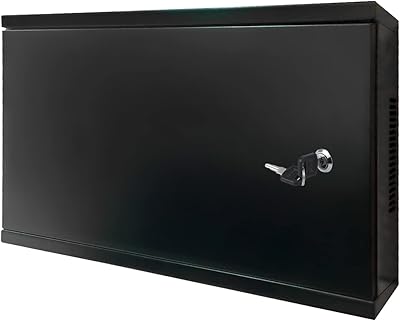
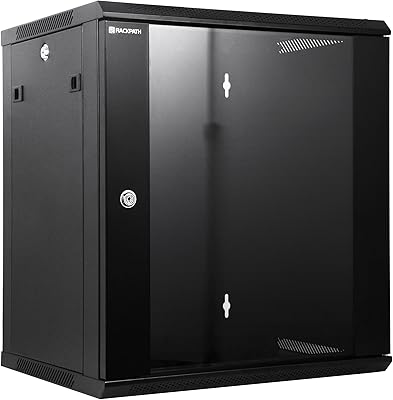
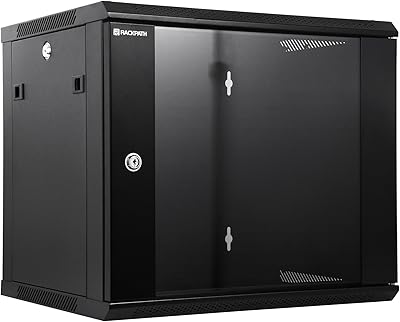
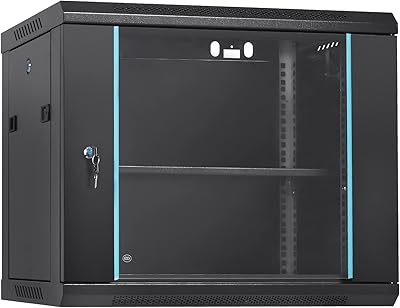
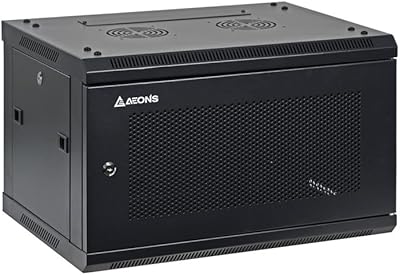
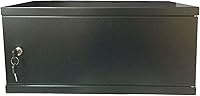
The Electriduct 4U Wall Mount Network Cabinet is a no-nonsense enclosure built for home labs, small offices, and network closets that need organized gear without a big budget. If you've outgrown the 2U version and need a bit more breathing room for your rack equipment, the extra space here makes a real difference. The powder-coated steel construction gives it a utilitarian look that fits quietly into a utility room or server closet without drawing attention. This is a practical, functional cabinet — don't expect flashy features or premium finishing touches, but do expect it to do its job reliably.
Features & Benefits

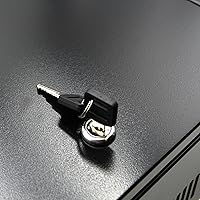
The solid steel door with a key lock is one of this wall-mount cabinet's most practical touches — it's not enterprise-grade security, but it keeps curious hands off your patch panel and switches. Vented side panels help dissipate heat passively, which matters when your gear runs around the clock. The adjustable mounting rails are compatible with standard 19-inch rack equipment and come with screws included, so you're not hunting for hardware. Cable routing is handled through punch-outs on the rear solid panel, keeping runs tidy without leaving open gaps. Just keep in mind the 40-pound load limit — light networking gear only.

Best For

This rack cabinet is a strong pick for home lab enthusiasts who want to tidy up a wall in the garage or utility room without spending a fortune on a full-size floor unit. It also suits small businesses that need a lockable home for a patch panel and a managed switch — two or three units of gear fit comfortably in 4U of space. That said, the interior depth of 13 inches does rule out deeper equipment, so if you're planning to rack a full-size UPS or a deep server chassis, this isn't the right fit. Think lightweight networking, not heavy iron.

User Feedback

Across 94 ratings, the Electriduct enclosure holds a 4.3-star average, which is a solid signal for a niche product like this. Buyers consistently praise the straightforward assembly process and the sturdy feel once it's mounted — the steel construction doesn't feel flimsy for the price. The key lock earns frequent mentions as a welcome added touch. On the downside, a noticeable number of reviewers flag the 40-pound capacity as a surprise constraint, especially those who didn't inventory their gear beforehand. A few also note that the shallow interior can't accommodate deeper hardware like a full-size UPS. Those who went in with accurate expectations largely came away satisfied.

Pros

  • Solid ST12 steel construction feels genuinely sturdy once wall-mounted, not flimsy or provisional.
  • The keyed door lock is a practical deterrent for shared offices and multi-staff environments.
  • Wall-mount design completely eliminates the floor footprint — a real advantage in tight utility spaces.
  • Assembly is straightforward enough for a solo installer with basic tools and no prior rack experience.
  • Vented side panels handle passive cooling well for lightweight, low-power networking gear.
  • Adjustable rails accommodate standard 19-inch equipment from multiple manufacturers without adapters.
  • Rear punch-outs keep cable routing tidy without leaving large open gaps in the back panel.
  • The powder-coat finish is durable and unobtrusive — blends into utility rooms without drawing attention.
  • At this price point, an enclosed, lockable steel rack enclosure offers genuine value for the use case.

Cons

  • The 40-pound load limit is easy to underestimate — buyers should weigh their planned gear before ordering.
  • No fan mount or active cooling option exists, which is a hard limitation in warmer enclosed spaces.
  • Interior depth of 13 inches excludes a wide range of common rackmount hardware like UPS units.
  • The cam lock provides only basic deterrence and should not be relied on for real security needs.
  • No cable management accessories — rings, D-rings, or horizontal managers — are included in the box.
  • Solid door blocks LED status indicators, requiring the cabinet to be unlocked just to check link lights.
  • Mounting instructions are minimal and don't address non-stud or masonry wall scenarios.
  • The door hinges feel lighter than the rest of the chassis and may need alignment adjustment on arrival.
  • No depth markings on the rails makes precise front-to-back equipment positioning more trial-and-error than it should be.

Ratings

The scores below for the Electriduct 4U Wall Mount Network Cabinet were generated by our AI review engine after analyzing verified buyer feedback from multiple global marketplaces, with spam, bot-submitted, and incentivized reviews actively filtered out. Each category reflects what real users experienced after installation — not marketing claims. Both the genuine strengths and the recurring frustrations are weighted transparently into every score.
Build Quality
83%
Buyers consistently describe the ST12 steel chassis as surprisingly solid for the price point. Once wall-mounted, the cabinet feels rigid and doesn't flex when gear is loaded in. The powder-coat finish holds up well in garage and utility room environments where humidity and dust are factors.
A handful of users noted minor sharp edges along the interior panel cutouts, requiring care during installation. The door hinges, while functional, feel slightly lighter than the overall chassis quality suggests, and a few reviewers mentioned the door alignment needed adjustment out of the box.
Ease of Assembly
88%
Most buyers report getting the cabinet wall-mounted and rails adjusted within an hour, even without prior rack installation experience. The included mounting screws and clear rail adjustment system make the process straightforward, and the weight of the unit is manageable for a solo installer.
Wall-mounting does require locating studs or using appropriate anchors for the wall type, which a few buyers underestimated. The instructions included are minimal, and users working with masonry walls flagged that additional hardware is needed beyond what comes in the box.
Load Capacity
61%
39%
For its intended use — a patch panel, a small unmanaged or managed switch, and a cable manager or two — the 40-pound limit is perfectly adequate. Home lab users running lightweight gear rarely come close to that ceiling in a 4U space.
This is the most common source of buyer regret. Users who planned to add a small UPS, a heavier PoE switch, or multiple dense devices often hit the limit faster than expected. The 40-pound cap is noticeably lower than competing cabinets in the same size class, and it's easy to overlook before purchasing.
Interior Depth & Compatibility
63%
37%
The 13-inch interior depth works well for patch panels, keystone panels, and slim managed switches — exactly the gear this cabinet is designed around. For users with a clean, purpose-built home network setup, nothing feels cramped.
Deeper equipment is simply off the table. Full-size UPS units, rackmount NAS devices with extended depth, and some prosumer routers won't fit without protruding past the door. Buyers coming from floor-standing racks often find the depth restriction the single biggest adjustment they have to make.
Security & Locking Mechanism
74%
26%
The keyed steel door lock is a practical deterrent for shared spaces — a server closet in a small office, a network cabinet in a back room accessed by multiple staff. It keeps the door closed and discourages casual tampering without requiring any additional hardware.
This is a basic cam lock, not a high-security mechanism. Anyone with a determined effort and basic tools could defeat it. Buyers expecting anything approaching enterprise-grade access control will be disappointed — frame this as a convenience lock, not a security layer.
Airflow & Thermal Management
71%
29%
The vented side panels provide meaningful passive airflow for lightweight, low-power networking gear. Users running a small switch and a patch panel report no heat-related issues even in enclosed utility rooms, which speaks to adequate basic ventilation.
There is no provision for active cooling — no fan mounts, no top vent cutouts. In warmer climates or enclosed spaces with poor ambient airflow, gear that runs warm under load may hit uncomfortable temperatures. Users with power-hungry equipment should budget for external cooling.
Cable Management
69%
31%
The rear punch-outs give enough flexibility to route patch cables, power cords, and data runs cleanly without leaving gaping holes in the back panel. For a basic home lab or small office setup, the routing options are adequate and keep the rear looking tidy.
There are no built-in cable management rings, D-rings, or horizontal managers included. Users with dense cabling quickly find they need aftermarket accessories to keep runs organized inside the cabinet. A few buyers noted the punch-out placement doesn't align ideally with all equipment configurations.
Value for Money
82%
18%
At its price point, this wall-mount cabinet delivers a steel-constructed, lockable, rack-compatible enclosure that would cost significantly more from networking-focused brands. For home lab users and small offices that don't need enterprise features, the value proposition is hard to argue with.
As buyer requirements grow — deeper gear, heavier loads, active cooling — the value equation shifts. Users who need a more capable cabinet often end up spending more on a different unit anyway, making the initial savings feel less compelling in retrospect.
Wall-Mount Stability
81%
19%
When properly anchored into studs, buyers report excellent stability with no noticeable sway or vibration even when accessing gear inside. The mounting footprint is well-distributed across the back panel, which helps with load transfer to the wall.
Installation on drywall without stud access is risky at this weight and load capacity, yet the product documentation doesn't address this clearly. A few buyers who used drywall anchors alone reported concerns about long-term stability as the loaded weight increased.
Door Design & Access
76%
24%
The solid steel door swings fully open and stays out of the way during rack adjustments or cable work. The door handle is ergonomic enough for routine access, and the solid panel design gives the front a clean, professional appearance compared to mesh or perforated alternatives.
The solid door blocks any visual inspection of indicator lights or status LEDs on equipment inside without opening it first. Users who like to glance at link lights or power indicators without unlocking the cabinet will find this a minor but recurring nuisance.
Footprint & Space Efficiency
86%
Keeping gear off the floor is the single biggest advantage of wall-mount enclosures, and this cabinet delivers on that completely. In small offices and utility rooms where floor space is measured carefully, reclaiming that footprint makes a tangible difference in day-to-day usability.
The cabinet's exterior height of just under 9 inches means it fits most wall spaces comfortably, but users in low-ceiling utility rooms or tight mechanical spaces should measure clearance above and below before committing to a mounting location.
Finish & Appearance
78%
22%
The black powder-coat finish is consistent and durable, holding up well against the light scuffs and contact typical of an active utility space. The traditional styling doesn't attract attention, which is exactly what most buyers in this category are looking for.
The finish is purely functional — there's no brushed metal, vented mesh aesthetic, or modern styling. Buyers setting up a visible home lab or a client-facing server room may find the utilitarian look underwhelming compared to pricier alternatives.
Rail Adjustability
80%
20%
The adjustable mounting rails give genuine flexibility for positioning equipment at different depths, which is useful when mixing gear from different manufacturers with varying depth profiles. The included screws are the right size and thread without stripping under normal torque.
The rail adjustment range is limited at the shallow end of the depth spectrum, which matters less here given the 13-inch interior, but users hoping to front-mount very shallow panels sometimes find positioning options constrained. The rail markings are minimal and don't include depth indicators.
Packaging & Shipping Integrity
77%
23%
The majority of buyers report the unit arriving well-packaged with no transit damage to the steel frame or door. For a product shipped at this weight, that consistency reflects reasonable packaging investment from the manufacturer.
A small but notable share of reviews mention dented corners or scratched finish on arrival, suggesting the packaging isn't entirely robust against rougher handling during transit. Buyers ordering for a client installation should inspect the unit thoroughly before the delivery driver leaves.

Suitable for:

The Electriduct 4U Wall Mount Network Cabinet is a strong fit for home lab enthusiasts who want to bring order to a wall full of networking gear without committing to a floor-standing rack. If your setup consists of a patch panel, a managed switch, and maybe a cable manager or two, four rack units of enclosed space is genuinely enough to work with. Small businesses and offices where a back room or server closet doubles as the IT hub will appreciate having a lockable, enclosed cabinet that keeps unauthorized hands away from critical infrastructure without requiring an expensive dedicated rack room. IT generalists and network hobbyists who are graduating from shelf-mounting their gear — or who have been zip-tying equipment to pegboards — will find this rack cabinet a meaningful step up in organization and professionalism. The wall-mount form factor is also ideal anywhere floor space is genuinely scarce, like a garage utility corner or a cramped telecom closet, where even a compact floor unit would be an obstacle.
Not suitable for:

The Electriduct 4U Wall Mount Network Cabinet is not the right tool if your gear inventory is heavy, deep, or growing fast. The 40-pound load limit sounds reasonable until you start adding a PoE switch, a small UPS, a patch panel, and a cable tray — that ceiling arrives quickly, and exceeding it is a real risk to both the equipment and the wall mount. The 13-inch interior depth also rules out a wide range of rackmount hardware: full-size UPS units, deeper NAS enclosures, and many prosumer routers simply will not fit behind a closed door. Anyone running gear that generates significant heat should also think twice — passive ventilation through the side panels has limits, and there is no provision for mounting a cooling fan inside. If you need active thermal management, remote monitoring, or serious physical security beyond a basic cam lock, this rack cabinet will leave you wanting more. Finally, buyers planning to expand their rack over the next year or two may outgrow four units faster than expected and find themselves shopping for a replacement sooner than the price savings justified.

Specifications

  • Rack Units: This enclosure provides 4U of usable rack space, compatible with standard 19-inch rack-mount equipment.
  • Exterior Dims: Overall exterior dimensions measure 13-7/8″ (L) x 21-1/4″ (W) x 8-3/4″ (H).
  • Interior Dims: Usable interior space measures 13″ (D) x 19-1/4″ (W) x 8″ (H), accommodating standard shallow-depth rack gear.
  • Load Capacity: Maximum supported load is 40 lbs, intended for lightweight networking hardware such as patch panels and small switches.
  • Material: The chassis, door, and rear panel are constructed from ST12 cold-rolled steel for rigidity and durability.
  • Finish: All exterior surfaces are finished in black powder coat, providing corrosion resistance and a clean utilitarian appearance.
  • Door Type: A solid steel swing door with a keyed cam lock secures the front of the enclosure against casual access.
  • Rear Panel: The solid rear panel includes pre-punched cable entry points to allow organized routing of power and data cables.
  • Side Panels: Both side panels are vented to facilitate passive airflow across installed equipment without requiring active cooling hardware.
  • Mounting Rails: Adjustable mounting rails are included and support standard 19-inch rack equipment at variable depth positions inside the cabinet.
  • Rail Standard: The internal mounting rails conform to the EIA-310 19-inch rack standard used by networking, audio, and server equipment globally.
  • Installation Type: This cabinet is designed exclusively for wall-mount installation using the integrated rear mounting points.
  • Item Weight: The unit weighs approximately 16 lbs unloaded, with a shipping weight of roughly 18 lbs including packaging.
  • Model Number: The manufacturer model number for this specific 4U variant is QWM-ED-4U-N.
  • Brand: Manufactured and sold by Electriduct, a brand specializing in cable management and network infrastructure accessories.
  • Availability: This product has been available for purchase since December 2015 and is not discontinued as of the latest manufacturer data.

Related Reviews

Electriduct 2U Wall Mount Rack Enclosure Network Cabinet
86%
89%
Build Quality
91%
Ease of Installation
85%
Security Features
82%
Airflow Efficiency
88%
Weight & Load Capacity
More
AEONS 4U Professional Wall Mount Network Server Cabinet 19-Inch Rack
86%
91%
Build Quality & Durability
88%
Ease of Installation
85%
Access & Usability
74%
Cable Management
90%
Space-Saving Features
More
NavePoint 12U Wall Mount Network Cabinet
85%
87%
Build Quality
92%
Security Features
85%
Ease of Installation
80%
Ventilation & Cooling
70%
Weight & Portability
More
StarTech RK1820WALHM 18U Wall Mount Network Cabinet
82%
92%
Build Quality
74%
Ease of Installation
94%
Rear Access & Swing-Out Design
78%
Mounting Depth Flexibility
81%
Security & Lock Quality
More
RackPath 12U Wall Mount Network Rack Cabinet
77%
83%
Build Quality
88%
Value for Money
79%
Ease of Assembly
76%
Cooling Performance
86%
Noise Level
More
Tecmojo 18U Wall Mount Network Cabinet
75%
83%
Build Quality
86%
Assembly Experience
61%
Cooling Performance
58%
Usable Depth
88%
Door Design & Security
More
RackPath 9U Wall Mount Network Rack Cabinet
87%
88%
Build Quality
84%
Cooling Performance
91%
Ease of Installation
93%
Space Efficiency
85%
Customization Options
More
VEVOR 9U Wall Mount Server Cabinet 15.5″
77%
83%
Build Quality
91%
Value for Money
74%
Ease of Installation
61%
Usable Internal Depth
72%
Ventilation & Thermal Management
More
AEONS 6U Wall Mount Network Cabinet
75%
83%
Build Quality
78%
Ease of Installation
61%
Cooling Performance
54%
Fan Noise
63%
Usable Interior Depth
More
RIVECO 4U Wall Mount Rack
85%
93%
Build Quality
88%
Installation Ease
89%
Space Efficiency
91%
Load Capacity
90%
Durability
More

FAQ

In most cases, yes. A 1U patch panel and a 1U or 2U slim managed switch will occupy two to three rack units, leaving you one or two units of free space. Just confirm your switch depth does not exceed 13 inches, as that is the hard interior limit.

You really want to hit studs. Even unloaded, the cabinet weighs 16 lbs, and once you add gear you can approach 40 lbs or more — that is too much for standard drywall anchors over the long term. If studs are not where you need them, use a proper wall plate or backing board anchored into the structure behind the drywall.

It is somewhere in between. The keyed cam lock on the Electriduct 4U Wall Mount Network Cabinet is a deterrent-level mechanism — it will stop casual tampering and keep the door closed in a shared office or back room. It is not designed to resist a determined person with tools, so do not rely on it as your primary security layer for sensitive equipment.
There are no dedicated fan mount points built into this cabinet. If airflow becomes a concern, some users install a small USB or 12V fan directed at the vented side panels, but this is a workaround rather than a designed feature. For gear that runs consistently warm, you may want to consider an enclosure with active cooling built in.

The interior depth is 13 inches, so any rackmount device deeper than that will not fit with the door closed — and some will not fit at all. Full-size UPS units and deeper NAS enclosures are common casualties. Always check the depth spec of your equipment before assuming it will work here.

The cabinet includes the mounting hardware for the rack rails and the door lock with keys, but wall anchors and lag bolts for the wall itself are not included. You will need to supply your own fasteners appropriate for your wall type, whether that is lag screws for wood studs or masonry anchors for a concrete wall.

Most buyers handle it solo without much trouble. The rail adjustment is straightforward, and the unit is light enough to hold in place while marking the wall — though having a second person to hold it level while you drive the first screws does make life easier. Budget about an hour if you are comfortable with basic tools.

For typical home lab or small office networking gear — a switch, a patch panel, maybe a small router — passive ventilation through the side panels is generally adequate. If you are running a PoE switch under heavy load or stacking power-hungry devices, monitor temperatures and consider leaving the door slightly open or adding external airflow.

Essentially, yes. The 2U sibling from the same line is shorter and holds less gear, but the core construction, depth, and design are very similar. If you only need one or two units of rack space, the 2U is a more compact choice. The 4U version is the better pick if you want room to grow or need to fit both a patch panel and a switch without things feeling cramped.

Yes — the top and bottom panels include punch-outs specifically for this purpose. They are sized for standard cable runs and allow you to route power cords or data cables cleanly in or out of the cabinet without leaving exposed gaps in the enclosure.