Overview

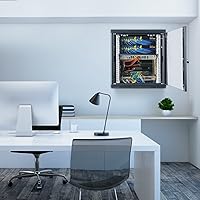
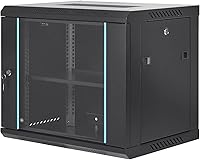
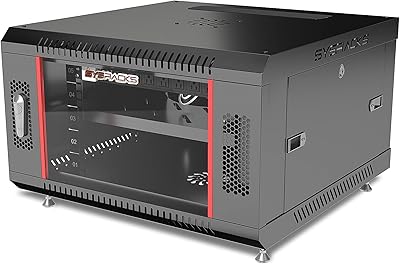
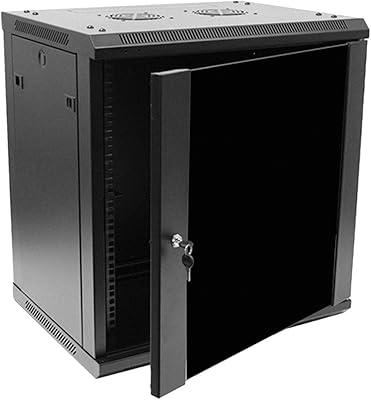
The VEVOR 9U Wall Mount Server Cabinet 15.5″ lands in a sweet spot for anyone who needs to organize network gear without dedicating a full room to it. Aimed at small offices, classrooms, and retail back rooms, this wall-mount cabinet arrives with adjustable rails and mounting hardware included, so getting started does not require a separate shopping trip. The welded alloy steel frame feels solid for the price tier, and the black finish looks professional enough to display in a visible spot. It can also stand on the floor if wall mounting is not practical, which adds flexibility most comparable enclosures at this price point simply skip.
Features & Benefits

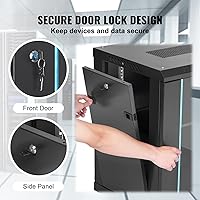
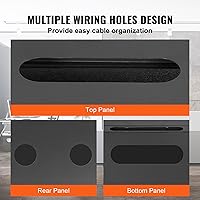
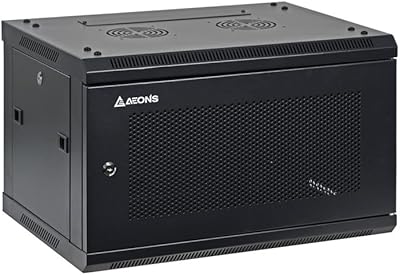
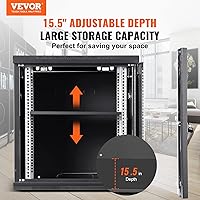
At just 15.5 inches deep, this 9U enclosure fits comfortably on most walls without jutting awkwardly into walkways. The perforated panels on the top, bottom, and rear promote passive airflow, which matters when you are running a switch and a NAS around the clock. A key-locking tempered glass door keeps curious hands away from the gear while still letting you check indicator lights at a glance. The square-hole rails are fully adjustable, so fitting standard 19-inch rackmount equipment takes minutes rather than an afternoon. Cable cutouts on multiple panels mean you are not hunting for somewhere to run patch cables, and the 200 lb ground-mount capacity is generous for what most small installs will ever demand.

Best For

This wall-mount cabinet makes the most sense for people who need a tidy, secure home for a modest set of networking devices. Home lab builders can fit a patch panel, a small managed switch, and a compact NAS without issue. Small businesses and coworking spaces benefit from the locking glass door, especially when the rack sits in a hallway or shared area where not everyone needs access. Schools and retail locations get similar security without needing a dedicated IT closet. A/V integrators working with shallow wall chases will appreciate the compact depth. Where it falls short is in environments requiring deep servers or heavy UPS units — this is a light-duty enclosure by design.

User Feedback

The VEVOR rack holds a top-20 ranking in its Amazon category, which signals consistent demand, and the overall rating reflects a mostly satisfied buyer base. Assembly and rigidity draw the most praise — people are often pleasantly surprised by how sturdy the frame feels out of the box. That said, a few recurring concerns are worth knowing: the usable internal depth feels noticeably shorter than the spec once rails and hardware are installed, so measure your gear carefully before committing. Solo wall mounting can be awkward; a second pair of hands makes stud alignment far less frustrating. The glass door earns style points, though some buyers would prefer a vented metal alternative. Included hardware is adequate, but experienced installers occasionally swap in cage nuts for a more standard fit.

Pros

  • Welded steel frame feels noticeably rigid and sturdy for its budget price tier.
  • Dual-use design works both wall-mounted and floor-standing, adding real installation flexibility.
  • Locking tempered glass door provides genuine equipment security in shared or public spaces.
  • Adjustable square-hole rails fit standard 19-inch gear and reposition without special tools.
  • Cable routing cutouts on three panels keep wiring organized from day one.
  • Compact 15.5-inch depth fits on most walls without jutting awkwardly into walkways.
  • The VEVOR rack ships with mounting hardware included, avoiding an extra parts run.
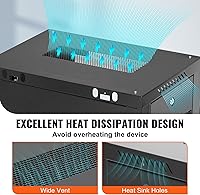
  • Passive venting on top, bottom, and rear handles light-to-moderate thermal loads adequately.
  • Matte black finish looks professional enough for visible office or classroom installations.
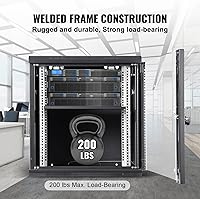
  • Ground-mount capacity of 200 lbs comfortably covers typical small-network equipment loads.

Cons

  • Effective usable depth after rail and hardware installation is noticeably shorter than the advertised external measurement.
  • Solo wall mounting is genuinely awkward—stud alignment almost requires a second person on site.
  • No vented metal door option means buyers must choose between airflow and equipment visibility.
  • Included fasteners and hardware are functional but not the quality level experienced installers expect.
  • Some production units show minor paint inconsistencies and thin-feeling side panels.
  • No integrated cable management bars or grommets inside the enclosure require buyers to add their own.
  • Wall-mount load limit of 100 lbs leaves limited headroom for builds that grow over time.
  • The 9U size offers no upgrade path if your equipment inventory expands beyond a few devices.
  • No provision for an active fan tray makes the enclosure reliant entirely on passive airflow.
  • Documentation does not address common challenges like stud spacing misalignment or safe loading procedures.

Ratings

The VEVOR 9U Wall Mount Server Cabinet 15.5″ has earned a strong foothold among home-lab builders and small-business IT buyers, and these scores reflect what real purchasers actually experienced—analyzed by AI across verified global reviews with spam, bot-generated, and incentivized submissions actively filtered out. Ratings span everything from frame rigidity to installation practicality, capturing both where this 9U enclosure genuinely delivers and where it leaves some buyers wanting more. Nothing is glossed over: the strengths and the friction points are weighted equally.
Build Quality
83%
Most buyers are genuinely impressed by how solid the welded steel frame feels when it arrives. For a budget-tier enclosure, there is very little flex in the chassis, and the panels align cleanly without gaps that would suggest flimsy manufacturing. Home-lab users frequently note it holds up well after months of being loaded with switches and patch panels.
A handful of reviewers report minor paint inconsistencies on edges and corners, suggesting finishing quality control is not perfectly uniform across production batches. The side panels, while functional, feel slightly thinner than the main frame and can rattle faintly if the cabinet is mounted on a wall with vibration from nearby HVAC equipment.
Value for Money
91%
At its price point, this wall-mount cabinet is difficult to beat for what it includes out of the box—adjustable rails, mounting hardware, a locking door, and a ventilated enclosure all in one package. Small offices and home labs that would otherwise improvise with open shelving see immediate, tangible organization gains. Buyers repeatedly describe it as punching well above its cost.
The value equation shifts slightly for anyone who needs to supplement it with better cage nuts, additional mounting screws, or a fan tray for active cooling. Those add-on costs are modest but worth factoring in, especially for buyers who assumed the included hardware would cover every install scenario without any upgrades.
Ease of Installation
74%
26%
The adjustable square-hole rails are straightforward to reposition, and the instructions are clear enough that most buyers with basic DIY confidence complete the wall mount in under two hours. Cable cutouts are well-placed, so routing patch cables and power cords does not require improvising extra holes or fighting the enclosure layout.
Wall mounting solo is the most consistently cited frustration: holding the cabinet flush against studs while simultaneously driving screws is genuinely awkward without a second person. Stud spacing does not always align with the mounting bracket holes, which forces some buyers to use anchors rather than studs and raises questions about long-term stability under load.
Usable Internal Depth
61%
39%
For 1U switches, patch panels, and compact NAS units, the internal space works well and the 15.5-inch external depth keeps the cabinet from jutting too far off the wall. Buyers running standard shallow-depth networking gear rarely run into problems fitting what they need.
Once the adjustable rails are positioned and cables are routed, the effective usable depth feels noticeably less than the advertised external figure. Buyers attempting to install even moderately deep 1U appliances or small UPS units have reported tight fits or outright incompatibility, making it critical to measure actual equipment depth before purchasing.
Ventilation & Thermal Management
72%
28%
The perforated panels on the top, bottom, and rear create a reasonable passive airflow path for gear that does not generate extreme heat. Buyers running a managed switch and a small NAS report no thermal issues during normal operation, and the open rail design allows some ambient air circulation around equipment.
There is no provision for an active fan tray, and the front glass door, while attractive, does restrict airflow more than a vented metal door would. Buyers in warm rooms or those stacking several actively-running devices have noted that temperatures inside the enclosure run higher than expected during peak usage periods.
Door & Locking Mechanism
78%
22%
The tempered glass front door is one of the more appreciated touches on this enclosure—it looks professional in visible office and classroom installations and lets you check LED status lights without unlocking anything. The key lock is firm and gives genuine peace of mind in shared spaces where equipment security is a real concern.
A vocal subset of buyers would strongly prefer a vented metal door option, arguing that the glass sacrifices airflow for aesthetics. The lock mechanism, while functional, feels slightly lightweight compared to the overall cabinet build, and a few users have noted the key cylinder has moderate play that might concern buyers prioritizing high-security deployments.
Cable Management
76%
24%
Cutouts on the top, bottom, and rear panels cover most standard cabling scenarios without requiring any modifications to the enclosure. Buyers setting up small patch networks appreciate being able to route power and data cables separately, which keeps the interior looking tidy and makes future changes straightforward.
The cutouts lack any rubber grommets or edge protection in the base model, which means sharp metal edges can contact cables under tension. There are no integrated cable management bars or D-rings inside the enclosure, so buyers who want a fully organized interior will likely need to add their own velcro straps or lacing bars.
Mounting Hardware & Included Accessories
67%
33%
The package includes enough hardware to complete a basic wall mount and rail setup without an immediate trip to the hardware store. For first-time rack builders, having everything bundled together removes the guesswork from getting started, and the rail adjustment hardware is sensibly sized for the job.
Experienced installers frequently swap out the included fasteners for standard cage nuts and proper rack screws, suggesting the provided hardware is serviceable but not the quality level seasoned IT professionals expect. Some buyers received packages with missing screws or mismatched components, pointing to occasional quality control lapses in the accessory kits.
Footprint & Space Efficiency
88%
The compact footprint is genuinely one of the strongest arguments for this enclosure in space-constrained environments. Retail back rooms, small coworking spaces, and classroom network closets all benefit from a cabinet that keeps equipment organized and protected without demanding floor space or deep wall recesses.
The 9U height, while compact, does limit scalability. Buyers who start with a switch and a patch panel and later want to add a firewall appliance and a small server can find themselves outgrowing the enclosure faster than anticipated, making the space savings a double-edged advantage in fast-growing small-office environments.
Aesthetics & Finish
81%
19%
The matte black finish and tempered glass door give the cabinet a cleaner, more intentional look than most budget enclosures in this category. In offices where the rack is visible to clients or coworkers, buyers consistently comment that it looks like it belongs rather than looking like a makeshift solution.
The finish is susceptible to fingerprints and light scratches, particularly around the door frame and handle area where contact is frequent. A few buyers noticed minor overspray or uneven coating near panel seams, which is unlikely to affect function but does undercut the premium aesthetic impression slightly upon close inspection.
Structural Load Reliability
79%
21%
For the typical home-lab or small-office load—a switch, patch panel, maybe a small NAS—the 100 lb wall-mount and 200 lb ground-mount capacities are more than adequate. Buyers report no sagging, warping, or concerning flexing after extended periods of normal use within these weight bounds.
The wall-mount capacity drops to 100 lbs, which is adequate for networking gear but leaves little headroom if a buyer wants to add a small UPS or multiple heavier appliances over time. The load ratings are also contingent on proper installation into structural studs; anchor-only installs are likely to fall well short of the rated capacity in practice.
Documentation & Setup Guide
63%
37%
The included instructions are functional and cover the basic steps clearly enough for a first-time rack builder to follow along without needing to search for supplementary videos. Labeled diagrams help buyers identify hardware components quickly, reducing the guesswork that plagues some competing budget enclosures.
The documentation does not address common installation challenges like stud spacing misalignment or how to safely load the cabinet while it is being wall-mounted. More experienced buyers find the manual underwhelming, and there is no digital version or QR code linking to video support for buyers who get stuck mid-install.
Rail Adjustability
84%
The fully adjustable square-hole rails are a genuine practical advantage, accommodating standard 19-inch equipment across a range of depths without requiring specialized tools or replacement hardware. Buyers switching between differently-sized 1U and 2U devices appreciate being able to reposition the rails in minutes rather than hours.
The adjustment range, while useful, has limits at the shallow end of the depth spectrum. Buyers trying to mount very thin or unusually proportioned equipment occasionally find the rail positioning options do not quite align with the unit, requiring minor improvisation that a more granular adjustment mechanism would eliminate.

Suitable for:

The VEVOR 9U Wall Mount Server Cabinet 15.5″ is a practical fit for anyone who needs to organize a modest set of networking gear without dedicating a full room or a large footprint to the task. Home-lab enthusiasts who want to consolidate a managed switch, patch panel, and compact NAS into one locked enclosure will find it hits exactly the right balance of size and functionality. Small businesses with a back office or hallway network closet benefit from the locking door, which keeps equipment secure without requiring a dedicated IT room. Schools and coworking spaces share a similar profile—anywhere that non-technical staff or visitors might wander near active network hardware, having a keyed enclosure is a real practical advantage. A/V integrators working with shallow wall spaces will appreciate that the 15.5-inch external depth does not demand a deep chase or significant wall modification. IT admins overseeing a handful of 1U or 2U devices who want everything tidy and protected, without the overhead of a full-sized server rack, will get good mileage from this 9U enclosure.
Not suitable for:

The VEVOR 9U Wall Mount Server Cabinet 15.5″ is not the right tool for environments with serious computing infrastructure or growing equipment inventories. Anyone planning to rack even a mid-depth 1U server, a full-sized UPS, or multiple power-hungry appliances should measure carefully—the usable internal depth after rails and hardware are installed is noticeably less than the external spec suggests, and some deeper devices simply will not fit. The 100 lb wall-mount capacity, while fine for switches and patch panels, leaves little headroom for heavier builds, and relying on wall anchors instead of structural studs reduces that ceiling further. Buyers who need active thermal management will find the passive ventilation insufficient once the glass door is closed and multiple devices are running at load simultaneously. If your rack needs to scale beyond 9U in the near term, this enclosure will become a bottleneck quickly—it is a fixed-size solution with no expansion path. Professional data center or enterprise environments expecting consistent finishing quality, premium included hardware, and documented load-testing certification should look at purpose-built commercial enclosures instead.
Specifications

  • Form Factor: Designed as a 9U enclosure that can be installed wall-mounted or used free-standing on the floor, depending on load and space requirements.
  • External Depth: The cabinet measures 15.5″ deep externally, making it suitable for shallow wall spaces where a full-depth rack would be impractical.
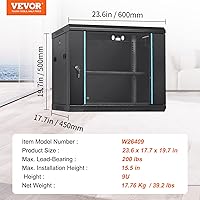
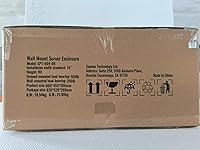
  • Overall Dimensions: Fully assembled footprint is approximately 19.7″ wide by 17.7″ deep by 23.6″ tall, inclusive of door and panel hardware.
  • Frame Material: Constructed from alloy steel with a welded frame design for structural rigidity and long-term durability under continuous load.
  • Unit Weight: The cabinet itself weighs approximately 14.45 lbs, which is relevant for calculating total wall anchor or stud load requirements.
  • Wall-Mount Capacity: Rated to support up to 100 lbs of installed equipment when properly mounted into structural wall studs.
  • Floor-Mount Capacity: When used as a ground-standing unit, the cabinet supports up to 200 lbs of rackmounted equipment.
  • Rail Type: Fully adjustable square-hole rails accommodate standard 19-inch rackmount equipment and can be repositioned without specialized tools.
  • Rail Standard: Compatible with EIA-310 standard 19-inch rackmount equipment, covering the vast majority of switches, patch panels, and 1U or 2U appliances.
  • Front Door: Tempered glass front door with a key lock mechanism provides visual access to status LEDs while physically securing installed equipment.
  • Ventilation: Perforated panels on the top, bottom, and rear of the enclosure enable passive convective airflow to help dissipate heat from active equipment.
  • Cable Routing: Pre-cut cable management openings are located on the top, bottom, and rear panels to support organized, clean cabling without enclosure modification.
  • Finish & Color: Powder-coated matte black finish on all steel surfaces provides a professional appearance suitable for visible office or classroom installations.
  • Model Number: VEVOR model W26409 is the specific variant identifier for this 9U, 15.5″-depth wall-mount configuration.
  • Manufacturer: Produced by VEVOR, a manufacturer known for offering a wide range of budget-to-mid-range tools and equipment globally.
  • Side Panels: Removable side panels are included and can be detached to simplify installation or provide additional lateral airflow access during setup.
  • Rack Height: The 9U internal rack height accommodates up to nine standard 1U devices or an equivalent combination of 2U and larger units.
  • Door Lock Type: The front door uses a keyed cylinder lock; two keys are typically included in the packaging for immediate use upon installation.

Related Reviews
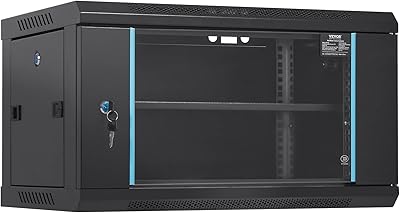
VEVOR 6U Wall Mount Server Rack Cabinet
85%
85%
Build Quality
91%
Ease of Installation
88%
Security Features
80%
Heat Dissipation
70%
Weight Capacity (Wall-Mounted)
More
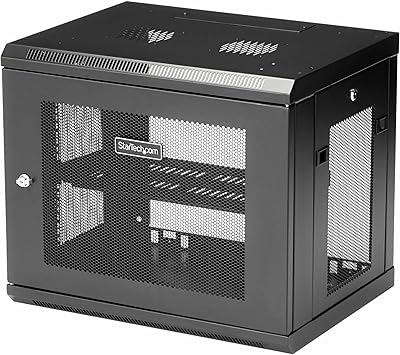
StarTech 9U Wall-Mount Server Rack Cabinet
84%
94%
Build Quality & Durability
91%
Ease of Installation
88%
Space Efficiency
87%
Security Features
75%
Cooling Capabilities
More
Sysracks 9U 18″ Depth Wall Mount Server Cabinet
74%
78%
Build Quality
83%
Ease of Assembly
86%
Included Accessories Value
63%
Cooling Performance
67%
Internal Depth Usability
More
StarTech 12U Wall-Mount Server Rack Cabinet
86%
91%
Build Quality
88%
Ease of Installation
80%
Cooling Efficiency
95%
Space-Saving Design
85%
Security Features
More
RackPath 9U Wall Mount Network Rack Cabinet
87%
88%
Build Quality
84%
Cooling Performance
91%
Ease of Installation
93%
Space Efficiency
85%
Customization Options
More
AEONS 6U Professional Wall Mount Network Server Cabinet Enclosure
85%
88%
Build Quality
90%
Ease of Installation
85%
Weight Capacity
91%
Cable Management
80%
Cooling Performance
More
Sysracks 6U 24″x24″x14.5″ Wall Mount Server Rack
85%
91%
Value for Money
88%
Build Quality
89%
Ease of Installation
92%
Space-Saving Design
85%
Security Features
More
AEONS 4U Professional Wall Mount Network Server Cabinet 19-Inch Rack
86%
91%
Build Quality & Durability
88%
Ease of Installation
85%
Access & Usability
74%
Cable Management
90%
Space-Saving Features
More
Tecmojo 9U Wall Mount Rack
85%
87%
Build Quality
91%
Ease of Installation
88%
Cable Management
85%
Weight Capacity
90%
Material Durability
More
VEVOR 9U Open Frame Server Rack
83%
91%
Build Quality & Durability
89%
Assembly Ease
88%
Weight Capacity
87%
Flexibility & Versatility
85%
Portability & Mobility
More

FAQ

This is one of the most important things to check before you buy. The external depth is 15.5″, but once the adjustable rails are positioned and you account for the door hardware and rear panel, the effective usable depth for equipment is closer to 12 to 13 inches depending on rail placement. Always measure your deepest device and compare it to that figure, not the advertised external number.

Technically you can do it solo, but it is genuinely difficult. The cabinet is not particularly heavy at around 14.5 lbs, but holding it flush against the wall while marking stud positions and driving screws at the same time is awkward. Most buyers who have tried it alone recommend having a second person stabilize the cabinet during installation—it will save you a lot of frustration.

Standard 16-inch stud spacing aligns reasonably well with the bracket layout, but 24-inch spacing can be problematic depending on the bracket hole pattern. If your studs do not line up cleanly, you have the option of using a mounting board or heavy-duty wall anchors, though anchors will reduce the effective safe load below the rated 100 lbs. Check the bracket dimensions against your specific wall layout before committing.

It ships with mounting hardware, but the included fasteners are basic and not standard cage nuts. If you are installing enterprise-grade gear that expects proper M6 cage nuts and rack screws, most experienced installers pick up a separate cage nut kit. The included hardware works fine for lighter home-lab setups, but it is worth budgeting a few dollars for proper cage nuts if you care about a clean, secure install.

For light loads—a switch, a patch panel, maybe a small NAS—the passive ventilation through the top, bottom, and rear perforations is generally adequate even with the glass door closed. Where it gets concerning is if you are running multiple actively-spinning drives or any device that already runs warm. In that scenario, cracking the door or adding a small exhaust fan to the rear panel area is worth considering.

Yes, that is a fully supported option. The ground-mount load capacity is actually higher at 200 lbs versus 100 lbs for wall mounting, so if you are loading it up with heavier equipment or are not confident in your wall structure, floor placement is the safer and more capable choice. Just note that it does not come with leveling feet, so on uneven floors you may want to add some.

As a general guideline, plan for equipment up to about 12 inches deep to fit comfortably with room for cable connections at the rear. Anything approaching 14 or 15 inches will be a very tight fit and may not close the door properly. Shallow-depth devices like patch panels, small managed switches, and compact NAS units are ideal candidates for this enclosure.

The door is hinged and can be removed, though it requires some disassembly of the hinge hardware rather than simply lifting it off. It is doable if you decide the glass is too restrictive for your thermal situation, but it is not a quick swap. Some buyers permanently remove the door and treat this 9U enclosure as an open-frame rack for maximum airflow in warm environments.

The wall drilling is the noisiest part, and that is true of any wall-mount installation. Once the cabinet is up, the enclosure itself adds no noise—it is a passive steel box. Any fan noise or drive noise you hear afterward is coming from the equipment inside, not the cabinet itself.

The key lock is solid enough to deter casual access, which covers most office, classroom, and coworking scenarios effectively. It is not a high-security lock by any stretch—a determined person with a pry bar would not be stopped by it—but it handles the realistic threat of curious or unauthorized hands reliably. For truly sensitive equipment in high-security environments, consider supplementing with physical access controls to the room itself.