
Overview

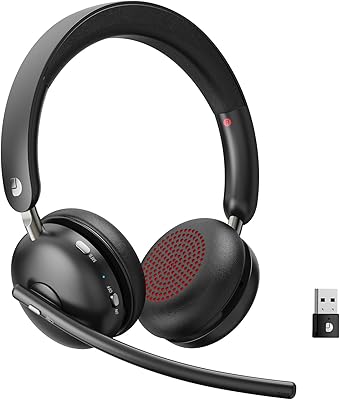
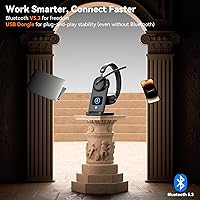
The Dytole DY107 launched in April 2025 and has already gathered over 370 ratings averaging 4.5 stars — a solid early showing for a brand most buyers won't recognize from a shelf. What makes this wireless work headset worth a look is the combination of dual connectivity and a genuinely thoughtful charging dock, features that typically show up at higher price points. Bluetooth 5.3 handles mobile and Bluetooth-enabled devices, while the included 2.4GHz USB dongle lets you plug into any laptop without fussing over pairing. Realistic expectations apply — this is a newer brand, and the long-term support track record is still being established.

Features & Benefits

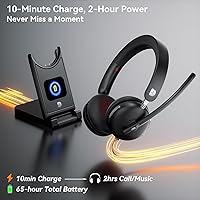
The battery situation is where this office headset genuinely impresses. Charge it fully on a Sunday night and you could get through an entire week of heavy meeting days without reaching for the cable again. If you do run low mid-morning, ten minutes plugged in buys a couple more hours of calls — useful in practice, not just on paper. The 40mm dynamic driver is tuned for voice, making conversations sound warm and natural rather than tinny. The noise-cancelling microphone does a respectable job filtering out background noise, and with a 15-meter range, you can step away from your desk without the call dropping.

Best For

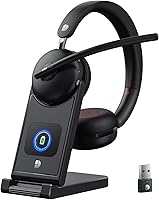
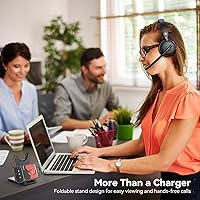
This wireless work headset makes the most sense for people who live on calls. If your day is a rotation of Zoom standups, Teams check-ins, and customer phone calls, the long battery life and mic quality do real work. It is also a strong pick for call center agents who deal with ambient noise constantly and need a microphone that can keep up. The multi-function dock is a thoughtful touch for anyone trying to keep a tidy desk — it holds the headset, props up your phone, and tucks away the USB dongle neatly. Less ideal if you plan to use these for music; the sound profile prioritizes voice over everything else.

User Feedback

Early buyers are largely positive, with mic clarity and comfort during extended wear coming up most often in reviews. Several users noted that the battery life holds up in real-world use, which is not always the case when manufacturers publish headline numbers. The dock's power display gets mentioned as a practical detail rather than a flashy extra. On the downside, a few reviewers found the on-ear fit less comfortable over very long sessions compared to over-ear alternatives. Some noted the sound lacks depth for anything beyond calls. Pairing was generally described as straightforward, though a handful mentioned needing to check the manual for initial Teams setup.

Pros

  • Battery endurance is exceptional — most users never think about charging it during a standard workweek.
  • The noise-cancelling mic keeps voice audio clean even with kids, pets, or office chatter in the background.
  • Dual connectivity via Bluetooth and USB dongle covers virtually every device without complicated setup.
  • The smart dock keeps the desk organized and shows remaining charge at a glance — no guessing required.
  • Fast charging means a short top-up before a morning meeting translates to hours of usable talk time.
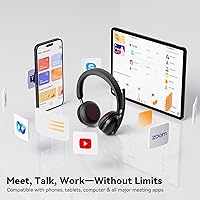
  • Works out of the box with Zoom, Microsoft Teams, and Google Meet on both Windows and Mac.
  • The 15-meter wireless range gives genuine freedom of movement during long calls without audio cutting out.
  • Call audio sounds warm and natural, reducing listening fatigue across back-to-back meeting days.
  • The stainless steel headband gives this office headset a more solid feel than all-plastic rivals at the same price.
  • Foldable design makes it easy to pack for hybrid workers who split time between home and office.

Cons

  • Music playback sounds flat and bass-light — this is a calls-only headset in practical terms.
  • On-ear fit becomes uncomfortable for some users during sessions longer than four to five hours.
  • No active noise cancellation for the listener means loud environments can still bleed into your audio.
  • Faux leather ear cushions show early signs of peeling or creasing after months of daily use.
  • Mute button status does not always sync reliably with Teams or Zoom mute indicators on screen.
  • Brand has a limited track record, making long-term durability and warranty support harder to predict.
  • Bluetooth multi-device switching requires manual intervention rather than automatic handoff between devices.
  • No carrying pouch included, which is a small but recurring annoyance for daily commuters or hybrid workers.
  • Some Mac users must manually reset the headset as the default audio device after each reconnection.
  • The charging dock feels noticeably lighter and less sturdy than the headset itself.

Ratings

The Dytole DY107 scores below are generated by AI after systematically analyzing verified global user reviews, actively filtering out incentivized, spam, and bot-driven feedback to surface what real buyers actually experienced. This wireless work headset arrives with a strong feature list for its price tier, and the scores reflect both where it genuinely delivers and where it falls short of expectations. Strengths and frustrations are weighted equally — nothing is glossed over.

Battery Life
93%
Buyers consistently report the battery outlasting their entire workweek on a single charge, even with heavy meeting schedules. The fast-charge feature earns specific praise from users who forgot to charge overnight — a quick top-up before a morning standup gets them through hours of calls without anxiety.
A small number of users noticed battery performance dipping noticeably after several months of daily use, suggesting long-term capacity retention may not match the initial headline figure. This is worth monitoring given the brand's limited long-term track record.
Microphone Quality
88%
Call clarity is the most frequently praised aspect across reviews. Remote workers report that colleagues stopped asking them to repeat themselves after switching to this office headset, and background filtering handles keyboard clicks and household noise better than many expect at this price point.
In very loud environments — open-plan offices with multiple simultaneous conversations — the noise filtering occasionally lets through low-frequency rumble. A few reviewers on Zoom calls flagged that their mic audio sounded slightly processed or compressed to listeners on the other end.
Comfort & Fit
74%
26%
For sessions up to three or four hours, most users find the on-ear cushions comfortable enough, with the adjustable stainless steel headband accommodating a wide range of head sizes without pressure points. The weight is kept low enough that it rarely becomes the reason someone takes the headset off.
On-ear designs have an inherent limitation for extended wear, and several reviewers noted fatigue and ear warmth kicking in around the four-to-five hour mark. Users who regularly wear headsets for six-plus hour shifts tend to prefer over-ear alternatives and found this headset less suitable for marathon days.
Sound Quality for Calls
91%
The 40mm driver tuned for voice reproduction genuinely pays off during calls — voices sound warm and natural rather than harsh or flat, which reduces listening fatigue across a long day of meetings. Teams and Zoom audio comes through with enough detail to follow conversations without straining.
This is a voice-optimized headset first and foremost. Users who also wanted decent music playback during breaks were frequently disappointed by the narrow soundstage and limited bass response, so treat any music performance as a secondary bonus rather than a real capability.
Connectivity & Range
86%
The combination of Bluetooth 5.3 and a plug-and-play USB dongle is a practical advantage that many buyers only fully appreciate after setup. Users who switch between a work laptop via dongle and a personal phone via Bluetooth during the day find the flexibility genuinely useful without complicated re-pairing steps.
A handful of users reported occasional micro-dropouts at the far edge of the stated 15-meter range, particularly through walls. Bluetooth device switching, while functional, requires manual intervention rather than automatic handoff, which a few multi-device users found slightly tedious.
Charging Dock & Display
82%
18%
The dock's digital power display gets more positive mentions than expected — buyers appreciate being able to glance at remaining charge without picking up the headset or checking a phone app. The dock's secondary role as a phone stand and dongle storage spot genuinely reduces desk clutter for home office setups.
The dock feels slightly plasticky relative to the headset itself, and a few users questioned its long-term durability under daily docking and undocking. The display, while useful, shows only a basic percentage readout without any estimated time-remaining calculation.
Build Quality
71%
29%
The stainless steel headband gives the Dytole headset a more substantial feel than all-plastic competitors in the same price range, and the faux leather ear cushions look and feel reasonable out of the box. First impressions on unboxing are generally positive for buyers expecting budget-tier construction.
After weeks of daily use, some reviewers noticed the faux leather beginning to peel or show creasing at the fold points. The plastic components on the ear cups feel noticeably thinner than the headband, creating a slight inconsistency in perceived quality that becomes more apparent over time.
Ease of Setup
89%
USB dongle users report a genuine plug-and-play experience — no driver installation, no configuration menus. Bluetooth pairing is straightforward for most devices, and the headset is recognized automatically by Teams and Zoom on Windows without any manual audio source selection in most cases.
A small number of users on Mac systems reported needing to manually set the headset as the default input and output device after each reconnection, which added minor friction to the daily startup routine. The included manual is functional but brief on troubleshooting guidance.
Noise Cancellation (Listening)
67%
33%
Passive isolation from the on-ear cushions reduces ambient noise enough for most office environments, and users working in moderately noisy home settings report being able to focus on call audio without distraction during typical workday conditions.
This headset does not feature active noise cancellation for the listener — only microphone-side noise filtering. Users expecting ANC-style isolation from environmental sound will be disappointed, and those in genuinely loud environments like cafes or open offices may find audio bleed distracting.
Platform Compatibility
88%
Out-of-the-box compatibility with Teams, Zoom, and Google Meet is confirmed by the majority of reviewers across Windows and Mac. The call-control button works correctly for answering and ending calls on most tested platforms without requiring third-party software.
Mute button synchronization with Teams and Zoom mute status is inconsistent for some users — muting on the headset does not always reflect in the platform UI, which can cause accidental unmuting during sensitive calls. This is a known limitation across many headsets in this category.
Portability & Storage
78%
22%
The foldable design makes the Dytole headset compact enough to slip into a laptop bag without taking up significant space, and the dock folds down neatly for travel. Remote workers who split time between home and an office appreciate not needing a dedicated carrying case.
At 0.55 kg, this office headset is not particularly light compared to some travel-focused competitors, and no carrying pouch is included in the box. Users who pack and unpack daily may find the lack of protective storage a minor but recurring irritation.
Value for Money
84%
Given the battery performance, dual connectivity, and dock inclusion, most buyers feel the price is fair and represent good value relative to single-function headsets at the same cost. The feature-to-price ratio is the most commonly cited reason buyers would recommend it to a colleague.
A few reviewers who compared directly against established brands felt the long-term durability question marks slightly undermined the value proposition. Paying a mid-range price for a lesser-known brand requires a degree of trust that not all buyers are comfortable extending.
Controls & Usability
81%
19%
The button layout is simple enough to operate without looking — answer, hang up, and mute are all accessible with one hand, which matters when you are mid-task during a call. New users report learning the controls within a day of normal use without referencing the manual repeatedly.
The single MFB button handles multiple functions depending on press duration, and a few users reported accidental call answering or disconnection while adjusting the headset position. More clearly differentiated physical buttons would reduce these errors during busy call sessions.

Suitable for:

The Dytole DY107 is built for people whose workday revolves around calls, meetings, and staying connected across multiple devices. Remote workers who cycle through Zoom standups, client calls, and Teams check-ins will appreciate a headset that can last through a full week of heavy use without a mid-week charge scramble. Customer service agents and call center professionals benefit directly from the noise-cancelling microphone, which keeps voice audio clean even when the surrounding environment is not. If you regularly switch between a work laptop and a personal phone throughout the day, the dual connectivity — USB dongle for the laptop, Bluetooth for the phone — handles that workflow without complicated re-pairing rituals. Home office workers who value a tidy desk will find the multi-function charging dock genuinely practical: it holds the headset, props up a phone, and keeps the USB dongle from disappearing into a drawer. This wireless work headset sits at a price point where the feature set feels punchy relative to what established brands offer for the same outlay, making it a smart pick for professionals who want capable gear without flagship spending.

Not suitable for:

The Dytole DY107 is not the right choice for buyers whose headset doubles as their primary music listening device. The 40mm driver is tuned firmly for voice reproduction, and users expecting rich bass, wide soundstage, or audiophile-grade audio for playlists and podcasts will find the sound profile noticeably narrow and flat. People who wear headsets for six or more consecutive hours should also approach with caution — the on-ear design, while comfortable for moderate sessions, tends to cause ear fatigue and warmth during very long stretches in a way that over-ear alternatives handle better. Buyers who require active noise cancellation on the listening side — for example, those working in loud open-plan offices or busy cafes — will not find that here, as the noise cancellation applies only to the outgoing microphone signal. If brand longevity and established after-sales support are deciding factors for you, this office headset carries some inherent uncertainty as a relatively new product from a lesser-known manufacturer. Finally, Mac users who switch audio inputs frequently may encounter minor but recurring friction, as the headset does not always hold its default device status between reconnections on macOS.

Specifications

  • Connectivity: The headset supports both Bluetooth 5.3 and a 2.4GHz USB dongle for plug-and-play connection to non-Bluetooth devices.
  • Audio Driver: A 40mm dynamic driver with a composite diaphragm delivers voice-optimized audio with warmer reproduction of human speech frequencies.
  • Impedance: The headset operates at 32 Ohms, making it easy to drive from standard laptop, PC, and mobile audio outputs without amplification.
  • Battery Life: A full charge provides up to 65 hours of continuous use under normal operating conditions.
  • Fast Charge: A 10-minute fast charge via USB-C delivers approximately 2 hours of additional talk time for urgent situations.
  • Charging Time: A full charge from empty takes approximately 2 hours using the included USB-C cable.
  • Wireless Range: The headset maintains a stable wireless connection at distances of up to 15 meters from the connected device.
  • Audio Latency: The headset produces approximately 100 milliseconds of audio latency, which is acceptable for calls but noticeable for video editing or gaming.
  • Microphone: An integrated noise-cancelling microphone filters environmental sounds including keyboard noise, office chatter, and household ambient noise.
  • Ear Form Factor: The headset uses an on-ear design with faux leather cushions that rest against rather than fully enclose the ear.
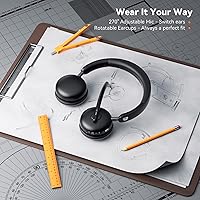
  • Headband: The adjustable headband is constructed from stainless steel for structural durability and flexibility across different head sizes.
  • Weight: The headset weighs 0.55 kg, which is moderate for an on-ear work headset in this category.
  • Charging Dock: The included smart dock features a digital power display and doubles as a phone or tablet stand with integrated USB dongle storage.
  • Compatibility: The headset is compatible with Zoom, Microsoft Teams, Google Meet, and most other mainstream communication platforms on Windows and Mac.
  • Included Items: The package includes the wireless headset, smart dock with digital display, USB dongle, USB-C charging cable, and a user manual.
  • Foldable Design: The headset folds into a compact form for storage or travel, reducing bulk when packed into a laptop bag.
  • Water Resistance: The headset carries no official water resistance rating and should be kept away from liquids and rain.
  • Control Type: All functions including call answering, hanging up, and muting are managed via physical push buttons on the ear cup.
  • Bluetooth Version: Bluetooth 5.3 provides a stable, low-energy wireless connection with improved range and interference resistance over earlier Bluetooth standards.
  • Device Support: The headset is compatible with PCs, laptops, MacBooks, tablets, and Bluetooth-enabled smartphones across both major operating systems.

Related Reviews
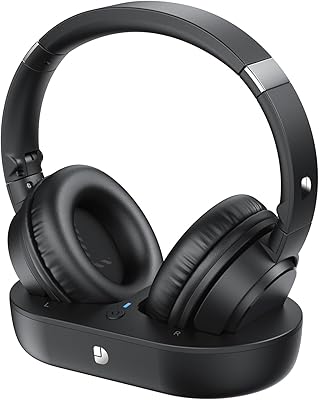
Dytole TV001 Wireless Headphones for TV
86%
88%
Sound Quality
90%
Comfort & Fit
94%
Battery Life
85%
Ease of Setup
76%
Bluetooth Range
More
Dytole DY106
Dytole DY106
77%
83%
Microphone Clarity
88%
Battery Life
71%
Comfort Over Long Sessions
86%
Wireless Connectivity
81%
Value for Money
More

FAQ

No, you do not. Plug the USB dongle into any available USB port and Windows will recognize it automatically within a few seconds. There are no drivers to download, and you should be ready for a call almost immediately.

Yes, but the two connections use different methods simultaneously. You connect to your laptop via the USB dongle and to your phone via Bluetooth at the same time, which effectively gives you dual-device access. Switching audio between them requires manually toggling on the device you want active rather than automatic handoff.

The noise cancellation in this office headset applies to the outgoing microphone signal, meaning it filters out background noise that your callers hear. It does not offer active noise cancellation for what you hear — that relies solely on the passive isolation of the on-ear cushions. If you need sound blocked from reaching your own ears, you would need an ANC-equipped headset.

It is listed as compatible with Microsoft Teams and works well for standard call functions including answering, ending, and muting calls. However, it does not carry an official Microsoft certification, so advanced Teams button integrations may not all function as expected. For basic daily Teams use, the experience is reliable for the majority of users.

The USB dongle works best with Windows and Mac systems. For a Chromebook or iPad, Bluetooth is the more practical connection method, and pairing is straightforward on both platforms. Keep in mind that call button functionality may vary depending on the specific app and operating system version you are using.

From a fully depleted battery, expect around 2 hours to reach a full charge using the included USB-C cable and the smart dock. The dock display shows the current charge level so you can track progress without picking up the headset.

Unfortunately, this is a known inconsistency that affects several headsets in this category, not just this one. The physical mute button silences your microphone at the hardware level, but the software mute indicator in Zoom or Teams may not always reflect that change visually. As a habit, it is worth double-checking the on-screen indicator during sensitive calls to avoid accidental unmuting.

You can use this wireless work headset for music, but manage your expectations accordingly. The driver is tuned for voice clarity, so while audio is listenable, bass is limited and the overall soundstage is narrow compared to headphones built for media consumption. It works fine for background music during work hours but is not a satisfying music-first experience.

Yes, faux leather cushions typically soften and conform slightly with regular use over the first few weeks. If they feel firm initially, that is normal and should improve with daily wear. If you experience discomfort during long sessions even after a break-in period, consider adding third-party cushion covers for extra padding.

Yes, you can still use the Dytole headset via Bluetooth without the dongle, so you are not completely stranded. However, replacing the specific USB dongle may require contacting Dytole support directly, as it is paired to the headset during manufacturing and a generic dongle will not work as a substitute.