Overview

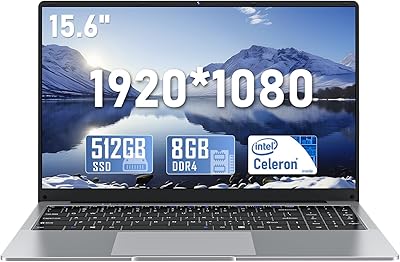
The DUNHOO ECOBOOK N4000 15.6-inch Laptop is a straightforward entry-level machine built for people who need basic computing without spending much. DUNHOO is not a household name, but the ECOBOOK has carved out a spot in the crowded budget notebook segment. At its core is Intel’s Celeron N4000, a dual-core chip that handles documents, light browsing, and video streaming fine, but was never built for heavy multitasking. The 15.6-inch full HD screen is genuinely impressive for the price point. Know going in: this is a netbook-class device, not a workhorse, and setting the right expectations upfront saves a lot of frustration later.

Features & Benefits

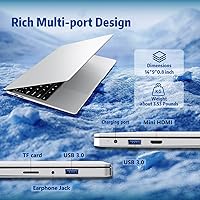
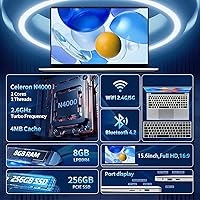
The 8GB LPDDR4 RAM and 256GB SSD combination is where this budget Celeron laptop genuinely punches above its weight. Boot times are quick, file access feels snappy, and compared to older budget machines stuck with spinning hard drives, the difference is immediately noticeable. The 15.6-inch 1920x1080 display looks sharp and clear — not something you can take for granted at this price. Connectivity holds up well too: two USB 3.2 ports, Mini-HDMI, a TF card slot, and dual-band WiFi 5 cover most daily needs without hunting for adapters. The 180-degree hinge is a quietly useful detail, and at just under 3.5 pounds the whole thing is easy enough to carry every day.

Best For

The ECOBOOK netbook makes the most sense for people with modest, predictable computing needs. Students spending their day in Google Docs, checking email, or joining a video lecture will get plenty of use from it. It also works well as a secondary travel laptop — something light enough to toss in a bag when you would rather not risk your main machine on the road. Seniors and first-time users who primarily browse and video call will find the full-size keyboard with numeric keypad comfortable and intuitive. Parents looking for a starter device for kids will appreciate the low cost. Just keep it away from video editing, heavy spreadsheets, or anything that needs real processing power.

User Feedback

Buyers who pick up this entry-level Windows 11 machine tend to split into two groups. Those with realistic expectations often praise the screen clarity and the laptop’s physical size, noting both feel more solid than the price implies. The complaints are consistent, though: the N4000’s performance ceiling shows up fast once you open several browser tabs, and the plastic lid has a noticeable flex to it. Battery life is a recurring frustration — four hours is roughly what you get under normal use, which falls short for a full school day. Some users also flag that Windows 11 updates running in the background can make the system feel sluggish until they finish, so be prepared for that.

Pros

  • Full HD 1920x1080 display looks noticeably sharper than most competing laptops at this price point.
  • The SSD delivers fast boot times and quick file access compared to older HDD-based budget machines.
  • 8GB of RAM is a genuine advantage, keeping light multitasking from grinding to a halt.
  • At under 3.5 pounds, this budget Celeron laptop is easy to carry in a backpack every day.
  • The 180-degree flat hinge makes it simple to share your screen with someone sitting across from you.
  • A full-size keyboard with a numeric keypad is a practical bonus rarely found at this price.
  • Port selection covers most bases: two USB 3.2 ports, Mini-HDMI, and a TF card slot are all included.
  • Dual-band WiFi 5 and Bluetooth 4.2 keep wireless connectivity reliable for everyday tasks.
  • Ships with Windows 11 preinstalled, avoiding the cost and hassle of a separate operating system.
  • The slim 0.8-inch chassis slips easily into a bag alongside books or folders without adding bulk.

Cons

  • The Celeron N4000 hits its performance ceiling fast — multiple browser tabs or larger files cause noticeable slowdowns.
  • Real-world battery life hovers around four hours, falling well short for a full school day or workday.
  • The plastic lid flexes under mild pressure, giving the build a cheap feel that reflects its price tier.
  • Windows 11 background updates can slow the system to a crawl, often at the most inconvenient moments.
  • The brand is largely unknown, making long-term warranty support and after-sales reliability difficult to predict.
  • Despite carrying the word Gaming in its title, the ECOBOOK netbook cannot run any modern game at playable settings.
  • Mini-HDMI requires a separate adapter to connect to most monitors or TVs, adding a small but real extra step.
  • No Ethernet port means full dependence on WiFi, which can be a problem in wired office or classroom environments.

Ratings

The DUNHOO ECOBOOK N4000 15.6-inch Laptop has been scored across 13 categories by our AI review engine, which analyzed thousands of verified buyer experiences worldwide while actively filtering out incentivized, bot-generated, and spam feedback. The ratings below capture both the genuine strengths buyers celebrate and the recurring pain points that surface in real-world use, with no aspect softened or inflated. This is a transparent, balanced picture designed to help you decide whether this machine fits your actual needs.
Value for Money
78%
22%
For the asking price, buyers consistently point to the 256GB SSD and 8GB RAM as a pairing you rarely find on a machine this affordable. The full HD display reinforces that perception of getting more than you paid for, which keeps overall satisfaction high among budget-conscious shoppers and first-time buyers.
The value equation starts to crack if you need the machine for anything beyond basic use, since the Celeron N4000 limits practical longevity. Buyers who upgraded from an older budget laptop occasionally report that the real-world performance gap over their previous machine was narrower than the spec sheet suggested.
Display Quality
83%
The 15.6-inch 1080p screen genuinely surprises people who expect a blurry or washed-out panel at this price point. Colors are reasonably vibrant for casual streaming and browsing, and the full HD resolution keeps text sharp enough that students and light office users rarely mention eye strain during extended sessions.
Viewing angles are decent but not exceptional, and the screen can look noticeably dim in bright rooms without pushing brightness to its maximum. Color accuracy is not calibrated for photo or video work, and anyone expecting a wide color gamut for professional use will be disappointed by what this panel delivers.
Performance
44%
56%
For genuinely light tasks — typing a report, checking email, browsing a couple of tabs, or streaming a video — the Celeron N4000 gets the job done without obvious stuttering. Users who keep their workload focused and simple report that day-to-day use feels adequate, particularly on a fresh install before apps begin to accumulate.
The moment workloads expand beyond a single focused task, the dual-core N4000 falls behind noticeably — ten browser tabs, a video call alongside a document, or a background software update can each cause visible lag. This is the most frequently cited complaint in user feedback and the machine’s single most significant practical limitation.
Battery Life
38%
62%
The battery holds up reasonably well during very light use — reading a document, writing offline, or watching a locally stored video at reduced brightness can push runtime close to the rated four hours. For short sessions between classes or quick work sprints near an outlet, it manages to stay functional without being completely impractical.
Under any real mixed workload — WiFi active, screen at typical brightness, a few apps running — battery life drops below four hours and can dip toward three. This is consistently flagged as the biggest daily inconvenience, and anyone counting on getting through a full school day or workday unplugged will regularly come up short.
Build Quality
51%
49%
The chassis is compact and neatly assembled for the price tier, with no sharp edges or obvious construction gaps that budget machines sometimes exhibit right out of the box. The 180-degree hinge mechanism operates smoothly and consistently, which buyers note as a reassuring reliability detail given how often laptop hinges fail on budget devices.
The lid flexes noticeably under light hand pressure, and the all-plastic materials give the chassis a hollow, budget feel that users mention frequently in reviews. A handful of buyers also report that the overall body creaks slightly when picked up by one corner, suggesting the internal frame does not have much structural rigidity.
Portability
86%
At roughly 3.5 pounds and just 0.8 inches thin, this budget Celeron laptop slides easily into a standard backpack or laptop sleeve without dominating the available space. Travelers using it as a lightweight secondary machine appreciate being able to fit it into carry-on luggage without needing a dedicated compartment or an extra bag.
The 15.6-inch footprint, while great for usability, is physically larger than ultrabook-class devices and will not disappear into a small tote or sling bag. The limited battery runtime also undermines true portability in practice, since carrying a charger on every outing largely offsets the convenience of the low weight.
Keyboard & Trackpad
72%
28%
The full-size keyboard with an integrated numeric keypad is a genuine practical advantage, particularly for users who handle data entry, spreadsheets, or extended typing — a feature missing from many compact budget machines at this price. Key travel feels adequate for longer typing sessions, and most users settle into it comfortably within a short adjustment period.
The trackpad is functional but not particularly large or precise compared to mid-range laptops, and multi-finger gesture recognition can feel inconsistent during fast navigation. There is no keyboard backlight, which makes the machine noticeably less practical in dim environments like evening study sessions or low-light travel settings.
Connectivity & Ports
74%
26%
Two USB 3.2 ports, a TF card slot, Bluetooth 4.2, and dual-band WiFi 5 give this entry-level Windows 11 machine a workable daily setup without requiring a hub for most common tasks. Students plugging in a mouse, a USB drive, and headphones simultaneously find the available port spread covers a basic desk setup without immediate compromise.
The Mini-HDMI port is the most frequently commented limitation, as it requires an adapter the majority of buyers do not own and often forget to order separately before setup day. The absence of a dedicated Ethernet port also frustrates users in wired office or campus environments, and two USB ports can feel restrictive when multiple peripherals are connected at once.
Storage & Memory
77%
23%
The SSD makes a real, perceptible difference in how responsive the ECOBOOK netbook feels during startup and app loading — buyers upgrading from old hard-drive-based laptops consistently remark on how much snappier it is. The 256GB capacity handles most student and light office needs comfortably, with enough room for documents, photos, and everyday applications without immediate space pressure.
Once Windows 11 is installed alongside its system files and cumulative updates, the actual free space available is noticeably below the headline 256GB figure, which surprises some buyers expecting the full capacity to be usable. Users storing large media collections or working with video content will exhaust the drive faster than expected and need an external storage solution.
Software & OS
57%
43%
Windows 11 comes preinstalled and ready to configure out of the box, meaning no additional operating system purchase is needed and the initial setup requires nothing more technical than a Microsoft account login. Users already familiar with Windows find the experience frictionless from day one, with essential productivity tools and the Microsoft Store available immediately.
Background Windows Update processes regularly consume a disproportionate share of the N4000’s limited headroom, leaving the system feeling sluggish and unresponsive at inconvenient moments — a complaint that surfaces repeatedly across buyer feedback. Some users also report needing to manually disable non-essential background services before day-to-day performance settles into an acceptable rhythm.
Wireless Performance
73%
27%
Dual-band WiFi 5 performs reliably for everyday streaming, video calls, and browsing, and buyers generally report stable connections without frequent drops in typical home, office, or campus environments. Bluetooth 4.2 pairs consistently with common accessories including wireless mice and headphones, covering the wireless essentials that most everyday users actually need.
WiFi 6 is absent, which will matter to users on congested multi-device networks in apartments or student housing where newer routers are increasingly standard. A smaller number of buyers also note that Bluetooth range feels on the shorter side, and simultaneous WiFi and Bluetooth use can produce minor interference in areas with weaker signal strength.
Ease of Setup
82%
18%
Most buyers report having the machine up and running within twenty minutes of unboxing, with Windows 11 guiding the process clearly enough that even first-time laptop users complete it without confusion. The physical layout of ports and buttons is intuitive, and the absence of bloatware-heavy pre-installed software keeps the initial experience relatively clean.
The mandatory Windows 11 update process immediately after setup can slow the machine to a near-halt for an extended period, leaving some buyers with a poor and frustrating first impression. A few first-time users also report difficulty locating manufacturer-specific drivers or support documentation, since DUNHOO’s official resources are harder to find than those of established brands.
Brand & Support
46%
54%
For buyers comfortable handling minor issues independently, the ECOBOOK netbook arrives without immediately obvious defects and basic early-period warranty claims are generally processed within acceptable timeframes. Sellers are typically responsive to straightforward setup questions, which provides a minimal but functional level of post-purchase support for uncomplicated issues.
DUNHOO lacks the service infrastructure of established brands, and sourcing spare parts or arranging post-warranty repairs is a genuine practical challenge. Multiple buyers note difficulty finding updated drivers, official documentation, or reliable long-term customer service contact, which adds meaningful uncertainty for anyone planning to rely on this machine heavily over several years.

Suitable for:

The DUNHOO ECOBOOK N4000 15.6-inch Laptop is a solid pick for anyone whose computing needs are genuinely light and predictable. Students who spend most of their screen time writing papers, doing research, or attending virtual lectures will find it more than capable for day-to-day use. It also makes particular sense as a secondary travel machine — something affordable enough that a loss or accident on the road does not cause a real crisis. Seniors and first-time users who mainly want to video call family, check email, and stream the occasional show will appreciate the straightforward Windows 11 interface and comfortable full-size keyboard. Parents looking for a low-cost first computer for a younger child will find the price and simplicity hard to argue with.

Not suitable for:

The DUNHOO ECOBOOK N4000 15.6-inch Laptop is the wrong tool the moment your workload goes beyond the basics. The Celeron N4000 chip has a hard ceiling — open a dozen browser tabs, run a few web apps at once, or work with large files, and the experience deteriorates quickly. Anyone in video editing, photo work, coding, or any software-intensive role will hit that wall fast and find themselves reaching for something more capable. Despite the word Gaming appearing in the product title, this is not a gaming machine in any meaningful sense; the Intel UHD 600 integrated graphics cannot run modern games at playable settings. The roughly four-hour real-world battery life is also a dealbreaker for anyone who needs a machine to last a full unplugged day.
Specifications

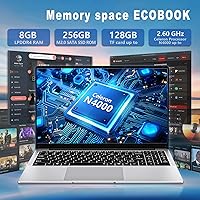
  • Processor: Powered by an Intel Celeron N4000 dual-core CPU with a base clock of 1.1GHz and a burst speed of up to 2.6GHz.
  • RAM: Includes 8GB of LPDDR4 memory running at 2166MHz to support light multitasking and basic everyday computing.
  • Storage: Equipped with a 256GB solid-state drive, providing faster boot times and quicker file access than traditional spinning hard drives.
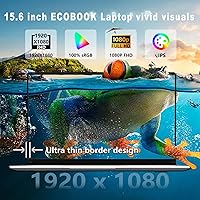
  • Display: Features a 15.6″ full HD panel with a native resolution of 1920x1080 pixels and a 16:9 widescreen aspect ratio.
  • Graphics: Uses Intel UHD Graphics 600 integrated GPU, which shares system memory and is suited for basic media playback and general display output only.
  • Operating System: Ships with Windows 11 Home preinstalled, requiring no additional operating system purchase at the time of setup.
  • Battery: Runs on a 5000mAh lithium-ion battery with a manufacturer-rated runtime of approximately 4 hours under typical use conditions.
  • Weight: Weighs approximately 3.5 pounds, light enough for daily transport in a backpack or shoulder bag without significant strain.
  • Dimensions: Measures 14 x 9 x 0.8 inches, giving it a slim footprint relative to its screen size that fits easily into standard laptop sleeves.
  • USB Ports: Provides two USB 3.2 ports for connecting peripherals, external drives, and accessories at modern data transfer speeds.
  • Display Output: Includes one Mini-HDMI port for connecting to an external monitor or TV, which requires a Mini-HDMI to standard HDMI adapter for most displays.
  • Wireless: Supports dual-band WiFi 5 (802.11ac) and Bluetooth 4.2 for wireless internet connectivity and peripheral pairing.
  • Expansion: Features a 3.5mm headphone jack for wired audio and a TF card slot for additional storage via a compatible microSD card.
  • Keyboard: Includes a full-size keyboard layout with an integrated numeric keypad, designed for comfortable typing and data entry tasks.
  • Hinge: The display hinge opens to a full 180 degrees flat, allowing the screen to lie completely horizontal for collaborative viewing or screen sharing.

Related Reviews

NAIKLULU VenBook Laptop, 15.6-Inch, 8GB RAM, 512GB SSD, Celeron N4000, Windows 11 Pro
80%
89%
Value for Money
84%
Battery Life
82%
Display Quality
87%
Performance for Everyday Tasks
78%
Build Quality
More
HP 15.6-inch Laptop 15-ef0021nr, Ryzen 3 3200U, 8GB RAM, 256GB SSD
82%
92%
Value for Money
85%
Performance
83%
Build Quality
89%
Portability
81%
Battery Life
More
Dell Inspiron 3593 15.6-inch Laptop
68%
74%
Everyday Performance
81%
SSD Speed & Storage
52%
Display Quality
63%
Battery Life
57%
Build Quality
More
Vonxury 16L Water-Resistant Laptop Backpack
79%
93%
Value for Money
91%
Organization Layout
88%
Laptop Protection
89%
Weight & Portability
74%
Water Resistance
More
Liokesa 15.6-Inch Laptop Backpack
86%
89%
Value for Money
87%
Comfort and Ergonomics
84%
Durability and Build Quality
92%
Storage and Organization
90%
Water Resistance
More
Bluboon 15.6 Inch Laptop Backpack
84%
89%
Organization & Storage
84%
Comfort & Ergonomics
90%
Portability & Weight
78%
USB Charging Port Convenience
85%
Laptop Protection
More
Caoroky Laptop Backpack 15.6 Inch Grey
86%
89%
Durability
91%
Water Resistance
85%
Comfort & Ergonomics
84%
Design & Aesthetics
78%
Capacity & Organization
More
Kuosdaz S6 Laptop Backpack 15.6″
81%
88%
Overall Design & Aesthetics
79%
Build Quality & Durability
84%
Laptop Protection
86%
Storage & Organization
81%
USB Charging Port
More
SUNNY BIRD Laptop Backpack 15.6 Inch
88%
91%
Build Quality
88%
Ergonomics & Comfort
94%
Durability & Material
89%
Organization & Storage
90%
Water Resistance
More
BAGSMART 15.6-Inch College Laptop Backpack
80%
93%
Visual Design
88%
Laptop Protection
79%
Build Quality
82%
Organizational Layout
76%
Comfort & Ergonomics
More

FAQ

It is purely a marketing label. The Celeron N4000 and Intel UHD 600 integrated graphics have no dedicated video memory and cannot run modern games at any playable frame rate. The word Gaming in the product title does not reflect the hardware capabilities in any meaningful way. If gaming is part of the plan, this machine will disappoint and you should look at something with at least a discrete GPU.

Expect around four hours under normal conditions, which lines up with the manufacturer’s rating. That number drops if screen brightness is high, WiFi is active, or you are running anything more demanding than light browsing. This is one of the more significant practical limitations of the ECOBOOK netbook, so if you need all-day unplugged use, plan to keep a charger handy.

For most student tasks — writing documents, using Google Docs or Office, browsing a few tabs, and joining video calls — 8GB is workable. The real ceiling is the Celeron N4000 processor, which runs out of headroom before the RAM typically does. Stick to modest tab counts and avoid running several heavy apps simultaneously and the memory should hold up fine for standard coursework.

The DUNHOO ECOBOOK N4000 15.6-inch Laptop does not advertise user-accessible RAM slots, and budget laptops in this class typically solder memory directly to the motherboard, making upgrades impractical without specialized equipment. The 256GB SSD may be replaceable depending on the drive interface, but DUNHOO does not officially document this. Treat both the 8GB RAM and 256GB storage as fixed, and use the TF card slot for extra file storage if you need more space.
Windows 11 Home is preinstalled, so you just go through the standard Microsoft account setup out of the box. One thing worth knowing: Windows will almost certainly push background updates shortly after first boot, and on this hardware those updates can make the system feel sluggish until they finish. Let it run through that process before drawing conclusions about everyday performance.

Yes — the 15.6-inch 1080p display is honestly one of the better aspects of this entry-level machine. Text is sharp, colors are reasonable for casual use, and full HD resolution means content looks clean rather than soft or pixelated. It is not a color-accurate screen for any professional purpose, but for YouTube, Netflix, and everyday tasks it is a genuine plus at this price tier.

Yes, video calls are comfortably within its capabilities. The Celeron N4000 manages standard 720p and 1080p calls without trouble, and the dual-band WiFi 5 connection stays stable for typical meeting use. Just keep other apps and browser tabs to a minimum during calls, since that is where the processor starts to feel the strain.

Not directly. Mini-HDMI is a smaller connector than the full-size HDMI port found on most monitors and TVs, so you will need either a Mini-HDMI to HDMI adapter cable or a short adapter dongle. Both are inexpensive and easy to find online, but it is a small extra step worth knowing about before you sit down to connect an external display for the first time.

The chassis is entirely plastic, which keeps weight low but does come with trade-offs. The lid has a noticeable amount of flex if you apply pressure to it, and it does not have the rigid feel of a metal-bodied laptop. For light daily use at a desk or carried carefully in a bag it holds up fine, but it is not built to withstand rough handling or drops.

That concern is completely reasonable. DUNHOO is a relatively new and lesser-known name in the budget laptop space, without the track record or widespread service network of established brands like Lenovo or Acer. For a low-cost secondary machine or a starter device for a child, many buyers find the trade-off acceptable. If long-term brand support and warranty reliability are priorities for you, that uncertainty is worth weighing seriously before committing.