Overview

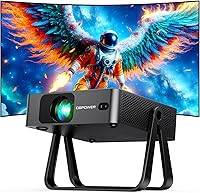
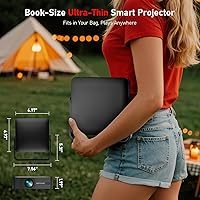
The DBPOWER N5 Smart Mini Projector is a slim, smart option aimed squarely at bedroom streamers and casual home theater fans who are tired of juggling external dongles. What separates it from the crowded Android projector pile is its Linux-based operating system — a leaner, more stable platform that boots faster and crashes less. At roughly the size of a hardcover book and just 1.97″ thick, the physical design is genuinely compact. The built-in 360° stand means you can point it at a ceiling or wall without digging out a tripod. Fair warning, though: this projector is built for dark rooms, not sunlit living rooms.

Features & Benefits

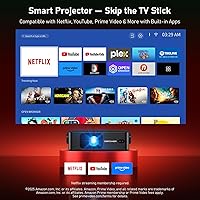
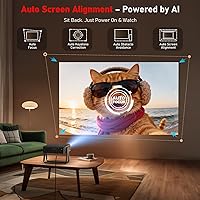
Power on the N5 and it locks into sharp focus within about three seconds — no fiddling, no manual lens ring. The AI auto-focus and keystone correction system adjusts up to ±30° on its own, so an off-angle placement on a nightstand still produces a clean rectangular image. The Linux OS connects to a native app store where you can pull down Hulu, Disney+, and others without the instability common in sideloaded Android setups. WiFi 6 connectivity helps when your home network is busy with multiple devices — buffering becomes noticeably less of an issue. The 1080p LCD panel covers 98% of the color gamut and throws a 40″ to 180″ image from just a few feet away.

Best For

This mini projector is a natural fit for bedroom and dorm room setups where ceiling projection is the goal and floor space is tight. The short throw ratio means you can place it on a nightstand or desk without pushing it halfway across the room. Travelers and RV users will appreciate the 2.83-pound weight and backpack-friendly profile. Late-night viewers get a practical bonus with two-way Bluetooth 5.2 — connect wireless headphones and nobody else in the room hears a thing. It also suits apartment dwellers who want a big screen without a permanent wall mount. If you need something for bright outdoor use, though, look elsewhere — dark room performance is where it shines.

User Feedback

Buyers tend to praise the hands-free setup experience most — having focus and alignment handled automatically is a genuine convenience that casual users really appreciate. The built-in app ecosystem also earns positive mentions for being stable and straightforward. On the flip side, some users find brightness underwhelming in anything other than a fully darkened room — official lumen output is not published, which is worth noting before you buy. The app selection, while solid for casual streaming, may feel narrow compared to a full Android TV platform. Built-in speaker quality is fine for personal viewing but will not fill a room. A handful of users also report variable WiFi stability depending on router distance and network load.

Pros

  • Auto-focus locks in a sharp image within about three seconds — no manual ring adjustments needed.
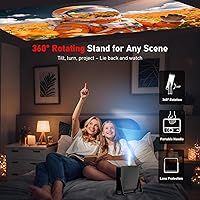
  • The built-in 360° stand handles ceiling, wall, and tabletop projection without any extra accessories.
  • Linux OS keeps the interface stable and responsive, with far fewer crashes than typical Android projectors.
  • WiFi 6 support reduces buffering noticeably on busy home networks with multiple connected devices.
  • At 1.97″ thick and 2.83 pounds, the N5 slips into a backpack as easily as a notebook.
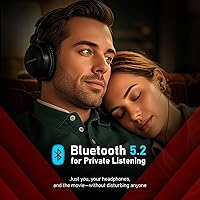
  • Two-way Bluetooth 5.2 lets you use it as a standalone speaker when the screen is off.
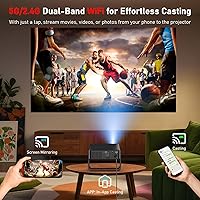
  • AirPlay, Miracast, and DLNA support covers most phone and laptop screen-sharing scenarios out of the box.
  • The 1.19:1 short throw ratio makes it practical for small rooms where projector placement options are limited.
  • Built-in app store gives access to major streaming platforms without needing a Fire Stick or Roku.

Cons

  • Brightness is insufficient for well-lit rooms — usable only in genuinely dark environments.
  • No official lumen rating is published, making pre-purchase brightness comparisons nearly impossible.
  • The app library is narrower than Android TV or Roku platforms, leaving some niche services unsupported.
  • Built-in speakers lack bass and volume depth, making external audio almost necessary for group viewing.
  • Screen mirroring introduces noticeable input lag, ruling it out for gaming or interactive presentations.
  • The stand can wobble at steep angles, occasionally requiring repositioning during long ceiling-projection sessions.
  • Auto-keystone correction sometimes struggles on textured walls or non-standard projection surfaces.
  • WiFi stability can drop when the projector is used far from the router or through thick walls.
  • Switching audio output between Bluetooth and built-in speakers requires navigating settings rather than a quick toggle.

Ratings

The DBPOWER N5 Smart Mini Projector earned its scores below after our AI system processed verified buyer reviews from global markets, actively filtering out incentivized, bot-generated, and unverified submissions to surface what real owners genuinely experience. Ratings reflect a balanced picture — where this smart projector genuinely delivers and where it falls short — so you can make a confident decision without surprises after unboxing.

Ease of Setup
91%
Users consistently describe the first-time setup as refreshingly quick — place it on a nightstand, power on, and the AI handles focus and alignment automatically within seconds. For people who have wrestled with manual keystone dials on older projectors, this hands-free calibration feels like a real step forward.
A small portion of users report that auto-keystone occasionally needs a manual nudge when the projector is placed at an extreme angle or on an uneven surface. The automatic obstacle avoidance, while clever, sometimes repositions the image in ways that require a minor manual override.
Image Quality
78%
22%
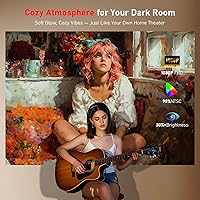
In a properly darkened bedroom or home theater setup, the 1080p output looks genuinely sharp and colorful — the 98% color gamut shows up noticeably in vivid movie content and animated titles. Reviewers watching streaming content in low light frequently mention that the picture exceeds their expectations for the price tier.
Step outside a dark room and the image washes out considerably — brightness is a real limitation, and since the manufacturer does not publish an official lumen rating, buyers are going in somewhat blind. Bright ambient light, even from a small lamp, visibly degrades contrast and color depth.
Built-in App Experience
74%
26%
The Linux OS keeps the interface snappy and stable — apps open without the lag or random crashes that plague many Android-based projectors in this category. Access to Hulu, Disney+, and other popular platforms through a native app store means most casual streamers get what they need without side-loading anything.
Power users accustomed to the breadth of Google Play or the Roku channel store will find the app library comparatively thin. A handful of popular regional or niche streaming services are absent, and there is no obvious path to installing unsupported apps outside the built-in store.
Portability & Design
88%
At 2.83 pounds and just 1.97″ thick, the N5 slides into a backpack without drama — RV travelers and dorm students in particular highlight how little space it occupies compared to traditional projectors. The rotating stand folding into a carry handle is a practical detail that makes transport genuinely convenient.
The all-black plastic chassis, while compact, feels slightly hollow to some users who expect a more premium material at this price point. A few reviewers note that the stand, though functional, wobbles slightly on uneven surfaces when tilted to steep ceiling-projection angles.
WiFi Performance
71%
29%
On a WiFi 6 router in a typical household, streaming is noticeably more stable than on older WiFi 5 projectors — users in apartments with crowded networks report fewer mid-movie dropouts. The connection holds well at moderate distances from the router during standard HD streaming sessions.
Performance drops off when the projector is used far from the router or in buildings with thick concrete walls. A subset of users report inconsistent reconnection behavior after the projector wakes from standby, requiring a manual reconnect before streaming resumes.
Audio Quality
63%
37%
For solo late-night viewing in a bedroom, the built-in speakers are adequate — dialogue is clear enough and the volume ceiling handles a small room without distortion at moderate levels. The Bluetooth audio output to external speakers or headphones works reliably and is a frequently used workaround.
Anyone expecting the speakers to fill even a medium-sized room will be disappointed — bass is thin and the sound stage is narrow. The built-in audio is best treated as a convenience fallback rather than a primary listening experience; most enthusiasts will pair external speakers fairly quickly.
Bluetooth Connectivity
76%
24%
Two-way Bluetooth 5.2 is a genuinely useful feature — users appreciate being able to pipe audio to wireless headphones for private late-night viewing, or to receive music from a phone when using the projector as a standalone speaker with the screen off. Pairing is fast and connection dropout complaints are rare.
Bluetooth handles audio only, which is a limitation some buyers miss in the product description and find disappointing afterward. A few users also note that switching between Bluetooth audio and the built-in speakers requires navigating into settings rather than a quick toggle.
Short Throw Performance
83%
The 1.19:1 throw ratio is well-suited to small bedrooms and studio apartments — a usable 80-inch image from roughly six feet is a real advantage when you cannot push a projector to the back of a large room. Nightstand and desk placements that would be impractical with standard throw projectors work naturally here.
Users in larger rooms who want to push the image toward the 180-inch maximum will need to experiment with placement, and at that size, brightness limitations become more pronounced. The 50% digital zoom option is convenient but introduces a slight softness at extreme reduction settings.
Auto Focus Accuracy
82%
18%
The three-second auto-focus lock is one of the most praised features among verified buyers — particularly those coming from manual-focus projectors who remember spending minutes twisting a ring just to get a sharp image. It performs reliably in typical bedroom setups where the projection distance is consistent.
In rooms with reflective or textured projection surfaces, the AI focus occasionally struggles to settle on a clean lock and requires a few extra seconds or a manual correction pass. Some users also note it recalibrates when the projector is bumped slightly, which can interrupt viewing briefly.
Screen Compatibility
69%
31%
The auto screen-fit function, which detects black-bordered projection screens and resizes accordingly, works well with most standard white projection screens and blank walls. Users who project onto a dedicated screen report a noticeably cleaner edge alignment than with manual sizing.
The feature is less reliable on off-white walls, textured surfaces, or screens with non-standard borders — in those cases, manual adjustment is still needed. A few users report the detection feature failing entirely in rooms with complex backgrounds, reverting to a default image size.
Ceiling Projection
79%
21%
The 360° adjustable stand makes genuine ceiling projection from a bed or couch genuinely practical — buyers who specifically purchased this for in-bed ceiling watching are among the most satisfied users overall. No external tripod or accessory is required for typical bedroom use cases.
At steeper upward angles, the stand loses some stability and the projector can drift slightly over time, requiring occasional repositioning during a long movie. Users lying at different positions relative to the projected image may also notice more keystone distortion than the specs suggest.
Screen Mirroring
72%
28%
AirPlay from iPhone and iPad works reliably in most tested environments, which is a meaningful convenience for Apple device users who want to cast photos, YouTube, or apps not available natively on the projector. Miracast support for Android devices also functions without major complaints from most users.
Latency during screen mirroring is noticeable — it is fine for video content but makes interactive tasks like gaming or slideshow presentations feel slightly sluggish. DLNA streaming via HomeShare has a steeper setup curve that less technical users find frustrating without clear in-app guidance.
Value for Money
77%
23%
For buyers targeting bedroom and dorm room use in dark environments, the combination of 1080p output, built-in streaming apps, WiFi 6, and a self-contained stand represents solid value at this mid-range price point — most comparable smart projectors either lack built-in apps or cost noticeably more.
Buyers who discover the brightness limitations post-purchase often feel the value equation shifts — if you need a projector for versatile lighting conditions, the price feels less justified. The absence of a published lumen spec makes it harder to assess value accurately before buying.

Suitable for:

The DBPOWER N5 Smart Mini Projector is a strong match for anyone who wants a no-fuss, self-contained streaming setup in a small, dark space — think bedrooms, dorm rooms, studio apartments, or a blacked-out basement den. Students who want to turn a blank dorm ceiling into a movie screen without hauling a tripod will find the built-in stand and compact footprint genuinely practical. Cord-cutters who are tired of managing external streaming sticks will appreciate having Hulu, Disney+, and other popular services accessible directly without extra hardware. Travelers, van-lifers, and RV enthusiasts also fit this device well — at under three pounds and the thickness of a hardcover book, it packs without pain and sets up in minutes wherever you land. Late-night viewers who share a bedroom will get real mileage from the two-way Bluetooth, letting them route audio privately to wireless headphones without disturbing anyone else. If your primary use case is cozy, low-light personal viewing with minimal setup friction, this smart projector is built for exactly that lifestyle.

Not suitable for:

Buyers expecting to use the DBPOWER N5 Smart Mini Projector in well-lit rooms, outdoor daytime settings, or bright living spaces will likely be disappointed — this is a dark-room device, and the image noticeably loses punch the moment ambient light enters the equation. The manufacturer does not publish an official lumen rating, which makes it difficult to compare objectively, but real-world feedback is clear: do not plan on using it in anything other than a controlled, dimmed environment. Power users who rely on a broad app ecosystem — niche streaming services, regional platforms, or apps outside the built-in store — may find the Linux-based library too limiting for daily use. Gamers should also look elsewhere, as input lag during screen mirroring and the absence of a low-latency gaming mode make it a poor fit for anything interactive. Those expecting room-filling audio from the built-in speakers without connecting external hardware will be underwhelmed. And if you need a projector that pulls double duty in a conference room or bright classroom setting, this one simply is not engineered for that environment.

Specifications

  • Brand & Model: Manufactured by DBPOWER under the model designation N5.
  • Dimensions: The unit measures 6.97 × 1.97 × 6.97 inches, making it roughly the footprint of a standard hardcover book.
  • Weight: The projector weighs 2.83 pounds, light enough to carry in a backpack without noticeable bulk.
  • Operating System: Runs on a streamlined Linux OS designed for faster boot times and reduced app instability compared to typical Android-based projectors.
  • Display Resolution: Native resolution is 1920 × 1080 (Full HD 1080p) via a premium LCD optical engine.
  • Color Gamut: Covers 98% of the standard color gamut, enabling vibrant, lifelike color reproduction in dark viewing environments.
  • Throw Ratio: A 1.19:1 short throw ratio allows large image projection from close distances, practical for nightstands and small rooms.
  • Screen Size Range: Projects images ranging from 40″ to 180″ depending on distance and placement.
  • Brightness: Official lumen output has not been published by the manufacturer; the projector is optimized for dark or low-light environments.
  • WiFi Standard: Supports WiFi 6 with theoretical speeds up to 9.6 Gbps, offering improved stability on busy home networks versus WiFi 5.
  • Bluetooth: Features two-way Bluetooth 5.2, allowing audio transmission to headphones or speakers and reception from a paired phone.
  • Auto Correction: AI-driven auto-focus locks a sharp image in approximately 3 seconds, with automatic keystone correction adjusting up to ±30°.
  • Obstacle Avoidance: An integrated obstacle avoidance system detects objects in the projection path and automatically repositions the image to remain unobstructed.
  • Built-in Stand: A 360° adjustable stand is integrated into the body, enabling ceiling, wall, and tabletop projection without any external tripod.
  • Screen Mirroring: Supports AirPlay for iPhone and iPad, Miracast for Android and Windows devices, and DLNA-compatible apps via HomeShare.
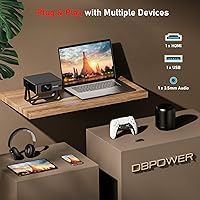
  • Connectivity Ports: Physical connections include HDMI, USB, and a 3.5mm audio jack for wired audio output or headphone use.
  • App Ecosystem: Includes a native built-in app store compatible with Hulu, Disney+, Peacock, TikTok, IMDb, and additional regional streaming services.
  • Digital Zoom: Supports up to 50% digital zoom, allowing image downsizing without physically moving the projector.
  • Color: Available in black with a matte-finish housing.
  • Recommended Use: Best suited for home cinema, bedroom streaming, dorm rooms, RV travel, and other controlled, low-ambient-light environments.

Related Reviews
DBPOWER E2 Smart Projector
77%
78%
Picture Clarity
54%
Brightness & Ambient Light Performance
91%
Built-in App Selection
88%
Ease of Setup
83%
Streaming & Wi-Fi Performance
More
iWIMIUS S29 Smart Projector
78%
88%
Streaming App Integration
83%
Image Clarity & Sharpness
61%
Brightness & Ambient Light Performance
91%
Setup & Ease of Use
79%
Audio Quality
More
Magcubic HY310 Mini Smart Projector
74%
74%
Image Quality
56%
Brightness
88%
Ease of Setup
81%
Smart Features & OS
58%
Streaming Compatibility
More
LUXVYN V1 Mini Smart Projector
84%
94%
Portability
88%
Image Quality
90%
WiFi & Bluetooth Connectivity
72%
Brightness
85%
Ease of Setup
More
Xgody Gimbal 3 Smart Mini Projector
85%
91%
Portability & Size
86%
Display Brightness
89%
Streaming & App Access
82%
Build Quality
95%
Ease of Setup
More
WiMiUS P61 Pro Native 1080P Mini Projector
79%
83%
Image Clarity
61%
Brightness Performance
88%
Streaming & Smart OS
86%
Setup & Ease of Use
74%
Audio Quality
More
Alwtniet HY320 NTV 1080p Mini Projector
75%
83%
Image Clarity
61%
Brightness
67%
Smart OS & Apps
86%
Setup & Ease of Use
88%
Portability
More
HIPPUS 1080P Portable Mini Projector
70%
54%
Image Brightness
58%
Native Resolution
88%
Portability
81%
Smart Platform & Apps
83%
Wireless Connectivity
More
Limimart LMT-30 Smart Mini Projector
84%
90%
Portability & Size
80%
Display Quality
85%
Ease of Setup
75%
Battery Life & Power Efficiency
78%
Audio Quality
More
Aurzen BOOM Mini Portable Projector
81%
88%
Image Clarity
63%
Brightness & Ambient Light Performance
93%
Smart TV Platform (Google TV)
91%
Autofocus & Setup Speed
76%
Audio Quality
More

FAQ

Yes, the DBPOWER N5 Smart Mini Projector has streaming built right in. It runs its own Linux-based OS with a native app store, so you can access Hulu, Disney+, Peacock, and others without plugging in any external dongle. For most casual streamers, it is entirely self-sufficient out of the box.

That is actually one of its strongest use cases. The built-in 360° adjustable stand lets you tilt the projector straight up for ceiling projection without needing a separate mount or tripod. Just place it on a nightstand, tilt the stand, and it locks into position.

Quite dark, honestly. The N5 performs well in bedrooms, home theaters, or rooms where you can block out most ambient light. In a room with lamps on or daylight coming through curtains, the image will wash out noticeably. This is not a projector designed for bright or mixed-light environments.

DBPOWER has not published an official lumen rating for this model, which makes it hard to give you a precise number. Based on user feedback, it performs adequately in dark rooms but should not be compared against projectors with verified high-lumen specs if brightness is a priority for your use case.

Yes. The N5 supports AirPlay via its ScreenShare feature, so iPhone and iPad users can mirror their screens wirelessly. Just make sure both your iPhone and the projector are on the same WiFi network, then select it from your AirPlay menu.

For most standard setups — projector on a flat surface, projecting onto a flat wall or screen — the auto-focus works well and locks in within a few seconds. Where it can occasionally struggle is on very textured surfaces or at extreme angles, in which case you may need a quick manual override. Day-to-day use in a typical bedroom setup should be largely hands-free.

Yes, and this is one of the more practical features for late-night viewers. The two-way Bluetooth 5.2 lets you pair wireless headphones directly to the projector so you can watch without disturbing anyone else in the room. Note that Bluetooth handles audio only — video cannot be transmitted wirelessly via Bluetooth.

Thanks to the 1.19:1 short throw ratio, you can get a solid 80-inch image from roughly six to seven feet away. At closer distances of three to four feet, you are still looking at a very watchable 40- to 60-inch image. It is genuinely well-suited for small rooms where you cannot push the projector far back.

For personal viewing in a quiet bedroom, the built-in speaker is adequate — dialogue is intelligible and it gets loud enough for one person. If you are watching with a group or want fuller sound, connecting Bluetooth speakers or wired headphones via the 3.5mm jack will make a meaningful difference. Most users end up using external audio for anything beyond solo viewing.

Netflix is not currently listed among the officially supported apps in the built-in store, which is a common limitation across Linux-based projectors due to Netflix's DRM certification requirements. You can, however, mirror Netflix from your phone or laptop using AirPlay or Miracast as a practical workaround. It is worth checking the app store at the time of purchase, as available apps can be updated by the manufacturer.

Where to Buy