Overview

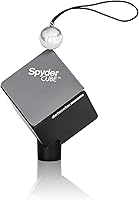
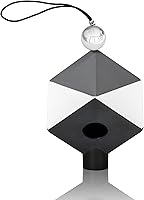
The Datacolor SpyderCube 3D Color Calibration Tool is a compact, three-dimensional reference target photographers drop into a scene before shooting, giving them a reliable anchor for color, exposure, and contrast corrections in post. Unlike a flat gray card or color checker, this calibration cube presents multiple reference surfaces at once — white, gray, black, and a deep black trap — so you can address several calibration needs from a single frame. It has been around since 2012 and works with both Mac and Windows, integrating with Adobe Lightroom, Photoshop, and Premiere Pro. That said, it is a calibration aid, not a standalone fix; it works best as part of a disciplined color-managed workflow.
Features & Benefits

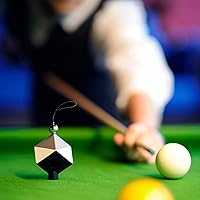
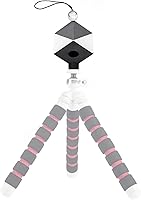
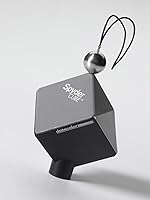
What sets this reference tool apart from flat alternatives is its three-dimensional geometry. Because the cube sits in your scene as a physical object, it catches light from multiple angles simultaneously, exposing both primary and secondary sources that a flat card simply hides. The chrome ball is particularly useful for reading specular highlights and determining the direction of your light — handy during product or portrait setups. The black trap cavity gives you a true absolute black to anchor your shadow detail without second-guessing. Shoot one calibration frame per lighting setup, then sync those corrections to your entire batch in Lightroom. At just over two ounces, it travels easily.

Best For

This calibration cube earns its place most clearly in the bag of photographers who shoot in volume — event, studio, and commercial work where color consistency across hundreds of images is non-negotiable. RAW shooters who spend serious time in Lightroom will see the biggest return, since one calibration frame per setup can replace a lot of manual slider adjustments. Videographers using Premiere Pro will also find it useful as a reliable on-set reference. If you have been getting by with a gray card and keep running into trouble with tricky mixed lighting, switching to a 3D reference can genuinely cut down the trial and error in your post-processing sessions.

User Feedback

Photographers who have put the SpyderCube to regular use tend to praise how much time it cuts from their editing sessions, particularly in studio and event work where batch consistency matters most. The chrome ball gets specific mentions from users evaluating lighting setups — appreciated well beyond basic color reference work. The honest criticism worth noting: this reference tool has a real learning curve. First-timers sometimes find the initial workflow unintuitive, and several reviewers have mentioned wishing the package included more thorough documentation. A few users have also flagged the mount quality as underwhelming. At a 4.3-star average, satisfaction runs high, but this is a niche tool whose value scales directly with how seriously you approach color management.

Pros

  • Covers white balance, black point, exposure, and highlight evaluation from a single frame in one compact tool.
  • The 3D geometry reveals secondary light sources that flat gray cards routinely miss.
  • Chrome ball surface adds practical value for lighting setup evaluations beyond standard color calibration.
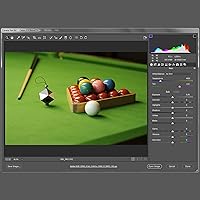
  • Batch syncing in Lightroom turns one calibration shot into corrections for an entire session.
  • Compatible with both Mac and Windows, integrating cleanly with Adobe Lightroom, Photoshop, and Premiere Pro.
  • Weighs just over two ounces, so it adds almost nothing to a location kit.
  • Has been a reliable, actively sold product since 2012 with no discontinuation in sight.
  • Solid 4.3-star rating across real user reviews reflects consistent satisfaction among serious photographers.
  • Biodegradable materials show a degree of thoughtful construction beyond purely functional choices.

Cons

  • The learning curve can be steep for users new to color-managed RAW workflows.
  • Included documentation is thin, and first-timers often need to seek out third-party tutorials to get started.
  • The mount and lanyard used to hang the cube in-frame have drawn criticism for feeling underbuilt.
  • Value is highly dependent on software skill; users without a solid Lightroom or Photoshop foundation will underuse it.
  • Offers no built-in software or app of its own, so it relies entirely on your existing editing tools.
  • Not ideal for occasional shooters who cannot justify the cost against infrequent use.
  • The cube must be physically placed in the scene, which can disrupt certain shooting setups or client environments.
  • Casual photographers shooting JPEG or using auto white balance will find little practical use for it.

Ratings

The scores below reflect an AI-driven analysis of verified global user reviews for the Datacolor SpyderCube 3D Color Calibration Tool, with spam, bot-generated, and incentivized feedback actively filtered out before scoring. Each category captures the genuine consensus of working photographers and videographers who rely on this calibration cube in real production environments. Both the strengths that keep professionals coming back and the friction points that give newcomers pause are transparently represented in every score.

Color Accuracy
88%
Photographers consistently report that using the SpyderCube as a white balance reference produces noticeably more neutral, accurate color out of their RAW files compared to eyeballing adjustments or using a flat gray card. Studio and product shooters in particular praise how reliably the white and gray faces anchor their corrections even under artificial lighting.
A small number of users note that in extremely mixed or rapidly changing light — outdoor events with shifting cloud cover, for example — a single reference frame does not always cover the full range of lighting variations in a session, requiring additional calibration shots.
Batch Editing Efficiency
91%
Event and commercial photographers frequently cite the batch-sync workflow as the most impactful benefit in day-to-day use. Shooting one calibration frame per lighting setup and applying those settings across hundreds of images in Lightroom can cut correction time dramatically for high-volume shooters.
The efficiency gain depends entirely on disciplined shooting habits — if you forget to shoot a calibration frame at the start of a setup, or if your lighting shifts mid-session without a new reference shot, the time-saving benefit disappears and you are back to manual corrections.
Ease of Use
63%
37%
Once photographers internalize the workflow, using the SpyderCube becomes a fairly quick step — drop it in the scene, shoot one frame, and move on. Experienced RAW editors who already understand color management concepts tend to find the process intuitive after a short adjustment period.
The learning curve is the most common complaint across verified reviews. New users frequently find the initial setup and calibration process confusing, and the included documentation offers little guidance. Many users report having to rely on third-party video tutorials before the workflow clicked for them.
Build Quality
67%
33%
The cube body itself feels solid and has held up well for most users through regular travel and studio use over extended periods. Its compact, lightweight construction makes it easy to tuck into a camera bag without worrying about it taking up space or adding bulk.
The lanyard and mounting hardware included for suspending the cube in-frame draw consistent criticism for feeling underbuilt relative to the cube itself. Several reviewers mention the mount feels like an afterthought, and a few report it showing wear faster than expected with regular use.
White Balance Reference
87%
The combination of white, grey, and black faces on a single 3D object gives photographers a more complete set of reference points than any flat card alternative. Shooters working under mixed tungsten and daylight sources particularly appreciate how the cube reveals the interplay of different light temperatures simultaneously.
In very low-contrast lighting situations or when the cube is placed too far from the main subject, the reference faces can be harder to read accurately. A few users also note that the physical size of the cube can make it awkward to place in tight product photography setups.
Black Point Reference
84%
The black trap cavity — a recessed cavity that absorbs nearly all light — is singled out by experienced users as genuinely useful for setting an absolute shadow reference without guessing. It removes one of the more tedious manual adjustments from the RAW editing process.
Less experienced photographers sometimes overlook or misunderstand the black trap entirely, treating the cube purely as a white balance tool and missing out on one of its more distinctive calibration advantages.
Highlight & Exposure Evaluation
79%
21%
The chrome ball is a frequently praised feature that goes beyond basic color calibration — lighting evaluators and product photographers use it to identify the direction and character of specular highlights, which informs both exposure decisions and lighting setup adjustments on set.
The chrome ball is a fairly niche benefit that casual users may never fully exploit, and some reviewers note that interpreting the highlight reflections requires a certain level of photographic knowledge that beginners simply may not have yet.
Portability
93%
At just over two ounces and compact enough to fit in a jacket pocket, this calibration cube genuinely disappears into a kit. Location photographers and travel shooters mention it frequently as one of the few calibration tools they actually remember to bring because it adds so little friction.
There is no dedicated protective case included, so users transporting it regularly in a packed camera bag need to improvise a pouch or protective wrap to keep the reference surfaces from getting scuffed or dirty over time.
Software Compatibility
82%
18%
The SpyderCube works cleanly within Adobe Lightroom, Photoshop, and Premiere Pro, which covers the workflow of most professional photographers and videographers. Users in these environments report no friction getting the tool to fit into their existing editing process.
Users working in Capture One, DaVinci Resolve, or other non-Adobe platforms are not officially supported, which is a meaningful limitation given how widely adopted some of these alternatives have become in professional post-production circles.
Value for Money
71%
29%
For working photographers who shoot in volume and already understand color-managed workflows, the time saved per session adds up quickly enough to make the cost feel very reasonable. Studio and commercial photographers in particular tend to view it as one of the better-value tools in their kit.
For occasional shooters or hobbyists who do not batch-process large volumes of images, the cost can be hard to justify — particularly given that a basic gray card accomplishes a simplified version of the same task at a fraction of the price.
Documentation & Learning Resources
44%
56%
The physical product itself is well-designed enough that experienced photographers can usually figure out the basics of the workflow by experimenting, and Datacolor does provide some online resources for users who seek them out proactively.
This is one of the weakest areas of the overall package. Multiple verified reviewers express frustration with the minimal printed guide included in the box, noting that a tool with this kind of learning curve deserves significantly better onboarding support than is currently provided.
Versatility Across Shooting Scenarios
76%
24%
The SpyderCube handles a wide range of shooting environments — studio strobes, continuous LED lighting, natural window light, and mixed sources — without requiring any physical adjustment to the tool itself. That consistency across scenarios is a genuine strength for photographers who work across multiple environments.
The tool is inherently less useful in fast-moving, unpredictable shooting situations like live events or street photography, where pausing to shoot a calibration frame is impractical and the lighting changes too frequently for a single reference shot to cover the session.
Longevity & Durability
74%
26%
The cube body has proven durable for most users over multi-year periods of regular studio and location use. Photographers who store it carefully and handle the mounting hardware gently report no meaningful degradation in the reference surfaces or overall performance.
The biodegradable material construction, while environmentally intentioned, leaves some users uncertain about how the reference surfaces will hold up over very long periods, particularly if the cube is exposed to humidity, direct sunlight, or rough handling during transport.
Video Production Suitability
72%
28%
Videographers using Premiere Pro can apply the same calibration-frame workflow used in still photography to their video projects, making it a reasonably versatile tool for hybrid shooters who move between stills and video on the same job.
Dedicated video colorists working in DaVinci Resolve or other professional color grading environments will find the lack of official integration limiting, and the cube does not replace purpose-built video reference tools like color chips or dedicated gray cards designed for broadcast standards.

Suitable for:

The Datacolor SpyderCube 3D Color Calibration Tool is best suited for photographers and videographers who treat color accuracy as a professional requirement, not an afterthought. Studio and commercial shooters who regularly deliver large batches of images will get the most tangible return, since a single calibration frame per lighting setup can dramatically reduce per-image editing time in Lightroom. Product photographers working under controlled lighting will appreciate how the cube's multiple reference surfaces handle complex light interactions that a flat card cannot resolve. RAW shooters who already understand the basics of white balance, exposure, and black point correction will find it slots naturally into their existing workflow. Videographers using Premiere Pro on set can also benefit from having a reliable, three-dimensional reference in frame before a shoot begins. If color consistency across sessions is something you genuinely lose sleep over, this calibration cube is a practical, well-proven tool worth considering.
Not suitable for:

The Datacolor SpyderCube 3D Color Calibration Tool is not a strong fit for casual shooters or JPEG-first photographers who do minimal post-processing. If your editing workflow is limited to basic phone apps or entry-level software without robust white balance and tone tools, the cube's reference data simply has nowhere useful to go. Hobbyists shooting in auto white balance who are happy with in-camera results will see little practical benefit from adding this tool. The learning curve is also real: without a commitment to understanding color-managed workflows, new users often find the cube confusing rather than helpful, and the included documentation does not do much to bridge that gap. Budget-conscious buyers who only shoot occasionally may also find it hard to justify the price relative to how rarely they would reach for it. Finally, anyone expecting an all-in-one color solution should look elsewhere — this reference tool is one component of a larger, disciplined process, not a replacement for that process.
Specifications

  • Brand: Manufactured by Datacolor, a company specializing in color management tools for photography and professional imaging.
  • Model Number: The product carries the model designation SC200, part of Datacolor's SpyderCube line.
  • Dimensions: The cube measures 9.84″ x 2.76″ x 9.84″, making it compact enough to fit in most camera bags or accessory pouches.
  • Weight: At 2.11 ounces, this calibration cube adds negligible weight to a location or studio kit.
  • Material: Constructed from biodegradable materials, reflecting a degree of environmental consideration in its design.
  • Color: The cube is finished in grey, which is appropriate for a neutral-reference calibration tool.
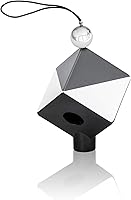
  • Reference Surfaces: Includes five distinct reference zones: a white face, a grey face, a black face, a black trap cavity, and a chrome ball.
  • Primary Use: Designed for RAW white balance calibration, exposure setting, and black point reference during photo or video post-processing.
  • OS Compatibility: Compatible with both Mac and Windows operating systems, covering the vast majority of professional editing environments.
  • Software Support: Integrates with Adobe Lightroom, Photoshop, and Premiere Pro for color correction and batch-processing workflows.
  • Workflow Method: Intended to be photographed in-scene at the start of a shoot, with the resulting calibration frame used to sync corrections across an entire batch.
  • Market Ranking: Ranked #21 in the Photographic Light Meter Color Calibration Charts category on Amazon at the time of review.
  • Average Rating: Holds a 4.3 out of 5 star average based on 136 customer ratings.
  • Availability: First listed in January 2012 and confirmed as not discontinued by the manufacturer.
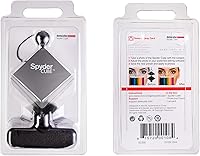
  • Mounting: Includes a lanyard or mount for suspending the cube within the frame during a reference shot, though build quality of this accessory has received mixed feedback.

Related Reviews
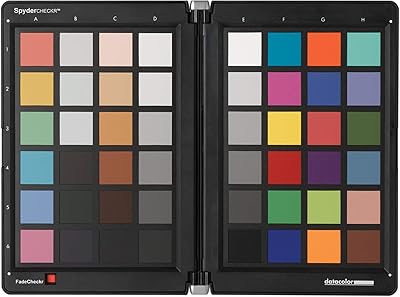
Datacolor Spyder Checkr Color Calibration Tool
86%
93%
Color Accuracy
88%
Ease of Use
90%
Build Quality
85%
Software Integration
92%
Durability
More
Datacolor Spyder 2024 Monitor Calibrator
77%
84%
Calibration Accuracy
91%
Ease of Setup
88%
Display Compatibility
83%
Ambient Light Sensor
77%
Software Experience
More
Dynamic Color Circa 1oz Tattoo Ink Set
82%
91%
Color Vibrancy
88%
Pigment Consistency
86%
Flow Rate & Workability
83%
Healing & Color Retention
84%
Packaging & Authenticity
More
BAIYIYI 12-Color 3D Carving Nail Gel Kit
77%
91%
Value for Money
86%
Color Payoff & Pigmentation
82%
Gel Consistency & Workability
83%
Color Range & Variety
73%
Beginner Suitability
More
Clairol Vidal Sassoon Pro Series Hair Coloring Tools 1 Deep Black
87%
90%
Color Longevity
85%
Ease of Application
89%
Fade Resistance
91%
Color Depth and Richness
87%
Conditioner Effectiveness
More
COS Color Out System Hair Color Remover
85%
88%
Effectiveness in Color Removal
92%
Ease of Use
91%
Speed of Results (20-Minute Process)
85%
Hair Health After Use
86%
Gentleness on Hair
More
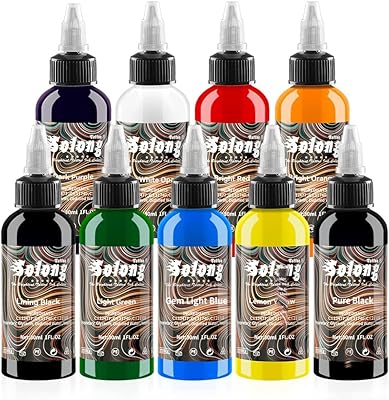
Solong Tattoo 9-Color 1oz Tattoo Ink Set
74%
88%
Value for Money
79%
Color Vibrancy
83%
Ink Flow & Consistency
61%
Color Longevity
76%
Color Range & Selection
More
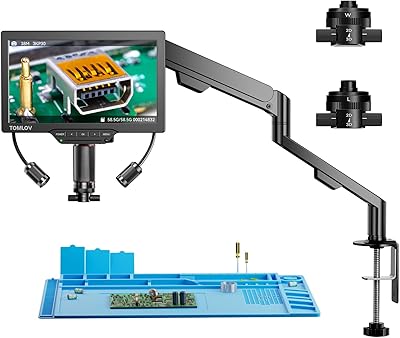
TOMLOV TM3K-3D Digital Microscope
80%
88%
Image Clarity
79%
3D Viewing Mode
91%
Lens Swap System
86%
Display Quality
83%
Build Quality
More
Goldwell Dualsenses Color Revive Color Conditioner 7.1oz
85%
91%
Effectiveness in Toning Blonde Hair
87%
Shine Enhancement
90%
Brassiness Reduction
83%
Ease of Use
80%
Texture and Feel on Hair
More
Color Nymph 54-Color Face Eyeshadow Palette
76%
63%
Pigmentation
91%
Shade Variety
84%
Value for Money
71%
Blendability
67%
Longevity & Wear
More

FAQ

No special proprietary software is required. The SpyderCube is designed to work inside your existing editing tools — specifically Adobe Lightroom, Photoshop, and Premiere Pro. You photograph the cube in your scene, then use that reference image within your normal editing workflow to set white balance, exposure, and black point before syncing those corrections across your batch.

A flat gray card gives you a single reference plane, which works fine in simple, even lighting. The SpyderCube's three-dimensional shape means it simultaneously shows you how light is hitting from multiple directions, including secondary and fill sources. It also adds a black trap for absolute black reference and a chrome ball for highlight evaluation — none of which a gray card provides.

Honestly, probably not. This tool is built around RAW workflows where you have full control over white balance and tone adjustments in post. If your camera is doing most of the processing in-camera and you are not doing much editing afterward, you would not be able to act on the reference data the cube provides.

No, you only need one reference frame per lighting setup. You place the SpyderCube in your scene, shoot a single calibration shot, then remove it and continue shooting. Later in Lightroom or Photoshop, you use that one calibration image to dial in your corrections and sync them to the rest of the series taken under the same light.

Datacolor officially supports Adobe Lightroom, Photoshop, and Premiere Pro. Capture One and other editors are not listed as supported integrations. That said, the cube itself is just a physical reference target — as long as your software lets you manually set white balance using a neutral reference point and adjust exposure and black point from a reference image, the cube can still be useful even in unsupported software.

The cube is a solid little tool for everyday use, but some photographers have noted that the included lanyard and mounting hardware feel a bit flimsy relative to the cube itself. The cube body tends to hold up fine to normal handling and travel, but it is worth being careful with the mount if you plan to hang it in-frame regularly.

Yes, and it is worth being upfront about that. If you are just starting out with RAW editing and color management concepts, the cube can feel unintuitive at first. The included documentation is fairly minimal, so many new users end up relying on third-party video tutorials or community forums to get comfortable with the workflow. Once it clicks, the process becomes quick — but budget some learning time upfront.

Videographers can absolutely use this reference tool. It integrates with Adobe Premiere Pro, and the workflow principle is the same: shoot a calibration frame at the start of a scene under a given lighting setup, then use that reference to correct and match your footage in post. It is particularly useful on set when you are cutting between multiple cameras and need consistent color across all of them.

Datacolor does not prominently advertise a dedicated protective case in the standard package. Most photographers store the SpyderCube in a small accessory pouch or camera bag pocket given its compact size. If you want dedicated protection for travel, a small padded pouch purchased separately would be a practical addition.

The core time-saving benefit is this: instead of manually adjusting white balance, exposure, and black point on every single image from a session, you get those settings right once using your calibration frame, then apply them as a preset or sync them across every image shot under the same light. For event photographers or commercial shooters delivering hundreds of images from a single session, that can cut editing time substantially.

Where to Buy