Overview

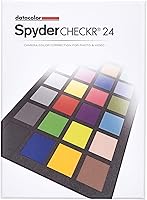
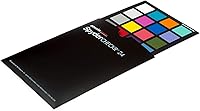
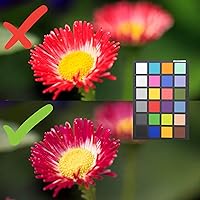
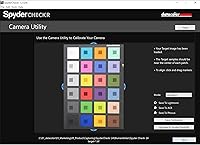
The Datacolor SpyderCHECKR 24 Color Calibration Chart is a practical, mid-range tool for photographers who regularly juggle multiple cameras, lenses, or lighting environments and need reliable color consistency across all of them. This color chart sits in a sweet spot — accessible enough for serious enthusiasts but capable enough for working professionals who can't afford color drift between shots. The workflow is straightforward: photograph the chart on location, pull the image into Spyder's software, and generate HSL presets you can apply in batch during post-processing. It ships with a rigid protective case and a tripod mount, which says a lot about how it's actually intended to be used — out in the field, not sitting on a shelf.
Features & Benefits

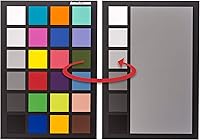
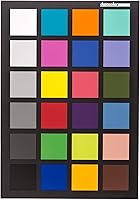
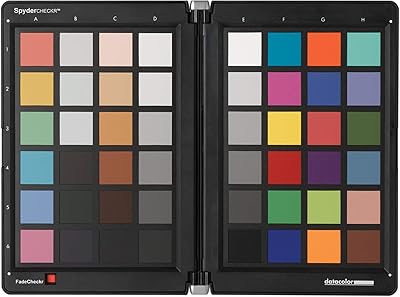
What separates this calibration tool from a basic grey card is the depth of its target set. You get 24 color patches spanning saturated tones, low-saturation hues, and eight skintone references — enough variety to catch how your camera actually renders different kinds of color, not just neutrals. The large grey face target is particularly handy for white balance work when skin accuracy matters. There's also a feature called FadeCHECKR worth knowing about: over time, color patches on any chart can drift, and this tool lets you check whether yours still reads accurately — a practical safeguard competitors often skip. The 1/4-inch tripod mount and slim, 5.3-ounce build round out a well-thought-out field kit.

Best For

This color chart earns its place in a few specific kits. Wedding and event photographers shooting across multiple camera bodies will get the most obvious value — one reference shot at the start of a reception can anchor your entire batch edit. Content creators and videographers who blend footage from a drone or action cam with their primary camera will also appreciate having a shared calibration reference. It's a natural fit for anyone shooting outdoors in shifting light who wants a quick, on-site solution rather than guessing corrections in post. If you're currently relying on a plain grey card and want more control without committing to high-end colorimetry gear, this is the right step up.

User Feedback

Most buyers are satisfied with the SpyderCHECKR 24, and the feedback patterns are consistent. Build quality and portability come up repeatedly — the rigid case in particular gets credit for surviving real-world use. Color matching improvements across different lenses and bodies are also commonly noted. The friction point for many is the Spyder software itself: some users find the HSL preset workflow intuitive, but others hit a learning curve and wish the software felt more polished. A smaller group of reviewers draw comparisons to X-Rite's ColorChecker Passport, noting that X-Rite offers a larger patch count at a similar price. Still, for the intended use case, the consensus is that this calibration tool delivers reliable results without overcomplicating the process.

Pros

  • Rigid protective case is genuinely durable and practical for location and field work.
  • Covers saturated, low-saturation, and skintone patches — far more useful than a basic grey card.
  • The FadeCHECKR feature lets you verify patch accuracy over time, something most competing charts skip entirely.
  • Works across DSLRs, mirrorless cameras, smartphones, drones, and action cams with no extra hardware.
  • At just 5.3 ounces, this calibration tool is light enough to slip into any camera bag without a second thought.
  • Tripod mount allows repeatable, hands-free positioning in the field — a small detail that matters in practice.
  • Generates HSL presets that can be applied across an entire batch, cutting post-production time significantly.
  • Most users report a clear, measurable improvement in color consistency across different lenses and bodies.
  • Build quality is consistently praised by long-term users who put it through regular real-world use.

Cons

  • Spyder software dependency is a real limitation — the chart's full value is locked behind one proprietary application.
  • Some users find the Spyder software interface clunky and less polished than competing post-processing tools.
  • Competing options at a similar price point offer a larger total patch count for more exhaustive color profiling.
  • First-time users often face a noticeable learning curve before the calibration workflow feels natural.
  • Not useful as a standalone tool — without the software, it functions only as a basic visual reference card.
  • The sRGB-focused gamut coverage may feel restrictive for professionals working in wide-gamut or print color spaces.
  • No thin or flexible case option, which can be awkward for photographers with tightly packed bags.

Ratings

The scores below reflect an AI-driven analysis of verified global buyer reviews for the Datacolor SpyderCHECKR 24 Color Calibration Chart, with spam, bot-generated, and incentivized feedback actively filtered out before scoring. Each category was weighted against real-world usage patterns — from wedding shooters calibrating across two camera bodies to drone operators trying to match footage color with a primary mirrorless rig. Both what users love and where frustration surfaces are represented transparently in every score.

Color Calibration Accuracy
88%
Photographers who tested this color chart across mixed lighting scenarios — indoor receptions, outdoor mid-day shoots, golden hour — consistently noted tighter color matching between different lenses and bodies after calibration. The 24-patch layout provides enough tonal range to catch color biases that a basic grey card would miss entirely.
A portion of users working in wide-gamut or print-focused workflows found the sRGB-centric patch set limiting for their specific needs. Those requiring the most exacting scientific-grade profiling may find the coverage insufficient compared to professional spectrophotometer-driven solutions.
Software Experience
61%
39%
The HSL preset generation workflow has a logical structure once you understand it — shoot the chart, import the image, let the software build the correction, and batch-apply it in Lightroom. Users who invested time upfront reported that the process becomes quite fast in practice.
The Spyder software is the single most divisive aspect of this tool. Many buyers find the interface dated and less intuitive than competing platforms, and the hard dependency on proprietary software frustrates users who prefer software-agnostic solutions or already have established third-party editing pipelines.
Build Quality
91%
The rigid protective case is consistently singled out in buyer reviews as a standout feature — it protects the chart surface during bag travel and repeated field use without adding meaningful bulk. Long-term users report the physical chart holds up well even after years of regular shoots.
A small number of users noted the case latch or hinge feels slightly less premium than the chart itself. There is no flexible sleeve option for photographers who prioritize ultra-minimal packing and find the rigid case slightly oversized for their kit.
Portability
89%
At 5.3 ounces with a slim 0.59-inch profile, this calibration tool genuinely disappears into a camera bag. Location photographers — particularly those moving between multiple venues or shooting conditions in a single day — frequently mention that its size never becomes a consideration.
The rigid case, while protective, does add a fixed footprint that can feel inflexible when packing minimally. Photographers who carry ultralight kits or shoot exclusively from a small backpack may find themselves wishing for a thinner, sleeve-based form factor.
Multi-Camera Alignment
86%
For event photographers running two camera bodies simultaneously, or hybrid shooters merging drone footage with mirrorless stills, the cross-device alignment capability is the core reason to buy this tool. Reviewers specifically noted how much post-processing time it saves when camera systems actually start from the same color baseline.
The alignment process still requires a separate reference shot per device per lighting condition, which adds setup time in fast-moving environments. Users shooting live events where lighting shifts unpredictably noted that consistent chart use during a shoot requires discipline and planning.
Value for Money
78%
22%
Positioned clearly in the mid-range, this color chart offers a meaningful step up from basic grey cards at a price that most semi-professional photographers can justify without a long internal debate. The inclusion of a rigid case and tripod mount at this price point is noted positively by many buyers.
Some buyers who compared it directly to the X-Rite ColorChecker Passport felt the pricing overlap made the decision harder to justify, particularly when software preference or patch count became the deciding factor. For casual shooters, the cost may be difficult to rationalize given how infrequently they would use it.
Skintone Rendering
83%
The eight skintone patches and large grey face target are genuinely useful for portrait and wedding photographers who need their skin tones to look natural and consistent across a full gallery. Several portrait photographers cited this as the specific feature that distinguishes it from simpler calibration tools.
With only eight skintone patches, the coverage is adequate but not exhaustive — photographers specializing in diverse skin tone representation or fashion work may want a wider reference range. Dedicated portrait colorists sometimes supplement this chart with additional reference materials for critical skin work.
Workflow Speed
81%
19%
Once the initial setup hurdle is cleared, the batch-processing workflow does what it promises. Photographers who shoot events regularly noted that a single reference shot at the start of each lighting environment can anchor an entire batch edit, cutting correction time noticeably in post.
The software dependency introduces an extra step that purely camera-based white balance tools avoid. Users who shoot JPEG-heavy workflows or prefer in-camera corrections rather than software-generated presets will find the workflow less efficient than it is for RAW shooters.
FadeCHECKR Longevity Check
84%
The ability to verify whether your color patches have drifted over time is a practical, underappreciated feature that most competing charts simply don't offer. Long-term users who've owned the tool for several years mention this as a genuine confidence booster — knowing the reference is still trustworthy before a critical shoot.
The FadeCHECKR feature is useful but not a substitute for replacing the chart when significant drift occurs. Some users felt clearer guidance on when replacement is warranted — rather than just detection — would make the feature more actionable.
Tripod Mount Utility
79%
21%
The standard 1/4-inch x 20 tripod mount is a small feature with real practical value for solo photographers who need both hands free while setting up a calibration shot. It allows consistent chart positioning relative to the subject, which improves the repeatability of the reference image.
Users who don't own a compatible light stand or tripod adapter can't take advantage of this feature without additional equipment. It's also not useful in fast-paced environments where stopping to mount the chart on a stand simply isn't feasible.
Compatibility Breadth
87%
Working across DSLRs, mirrorless systems, smartphones, drones, and action cameras without any hardware modification is a legitimate strength. Content creators who blend footage from multiple device types — particularly GoPro or DJI alongside a Sony or Canon primary — find this cross-device compatibility directly relevant.
Smartphone and action cam integration is functional but relies on the user's ability to shoot a usable reference image in those environments, which can be tricky. Results with highly automated camera systems that resist manual white balance control may be less consistent.
Learning Curve
63%
37%
For photographers already familiar with color calibration concepts and HSL-based corrections, the workflow clicks relatively quickly. Users with Lightroom experience in particular tend to adapt faster since the preset format maps directly onto tools they already use.
First-time users without a background in color management frequently report feeling lost during initial setup, especially when navigating the Spyder software. The documentation and onboarding experience has been criticized as insufficient for buyers who are new to calibration workflows.
Patch Count & Coverage
74%
26%
The 24-patch set strikes a reasonable balance between coverage and usability — enough targets to identify real color biases across saturated, neutral, and skin tone ranges without overwhelming the calibration process. For most event and portrait workflows, the coverage is adequate.
When compared directly to alternatives that offer 48 or more patches, the 24-patch layout shows its limits for highly specialized applications. Users who regularly shoot product photography or work in demanding color-critical industries may find the coverage just short of what they need.

Suitable for:

The Datacolor SpyderCHECKR 24 Color Calibration Chart is built for photographers and content creators who regularly work across multiple cameras or unpredictable lighting conditions and need their images to match without spending hours in post-production. Wedding and event photographers are the clearest fit — if you're running two bodies with different lenses through a candlelit reception and a bright outdoor ceremony in the same day, having a shared color reference at the start of each environment genuinely tightens your batch editing workflow. Videographers and hybrid shooters blending footage from a drone or action cam with a primary mirrorless or DSLR will also find real value here, since aligning color between fundamentally different sensors is otherwise a time-consuming guessing game. Semi-professional photographers who have outgrown a plain grey card but aren't ready to invest in high-end spectrophotometry equipment will find this color chart hits the right balance of capability and approachability. The tripod mount and rigid case make it practical for location work, not just controlled studio setups.
Not suitable for:

The Datacolor SpyderCHECKR 24 Color Calibration Chart is not the right tool for everyone, and a few specific buyer profiles should look elsewhere before committing. If you work exclusively in a single, consistent studio environment with fixed lighting and a single camera body, the multi-device alignment value largely disappears — a simpler, lower-cost grey card or white balance target may be all you actually need. The tool's workflow is also tied directly to Datacolor's Spyder software, so if you're committed to a third-party editing ecosystem and prefer software-agnostic tools, the integration may feel limiting or awkward. Photographers comparing this to the X-Rite ColorChecker Passport should know that competing options offer a larger patch library at a comparable price point, which matters if your work demands the most exhaustive color profiling possible. Casual hobbyists who rarely shoot in mixed lighting or edit in batch will likely find the calibration workflow adds complexity that doesn't justify the cost for their needs.
Specifications

  • Dimensions: The chart measures 8.6 x 6.3 x 0.59 inches, making it compact enough to carry in a standard camera bag.
  • Weight: The complete unit weighs 5.3 ounces, light enough to be a permanent fixture in a field kit without adding meaningful bulk.
  • Color Targets: Includes 24 spectrally engineered color patches covering saturated colors, low-saturation tones, and skintone references.
  • Skintone Patches: Eight dedicated skintone patches are included to support accurate skin color rendering and white balance verification.
  • Gray Ramp Patches: Thirteen gray ramp patches provide a tonal reference ladder from near-black to near-white for luminance calibration.
  • Near White Tints: Three near-white tint patches help identify subtle color casts in the brightest tonal range of an image.
  • Near Black Tones: Three near-black tone patches allow precise shadow calibration and detection of color contamination in dark areas.
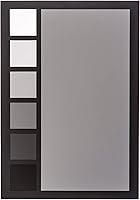
  • Grey Face Target: A large-format grey face target is included for custom white balance setting and visual skin tone comparison in the field.
  • Gamut Coverage: All color targets fall near or within the sRGB color gamut, ensuring broad compatibility with standard digital cameras and displays.
  • FadeCHECKR: The integrated FadeCHECKR reference allows users to check whether color patches have degraded over time and still meet calibration standards.
  • Tripod Mount: A standard 1/4-inch x 20 threaded tripod mount is built into the chart for hands-free, repeatable positioning during reference shots.
  • Case Type: Ships with a rigid protective case designed to shield the chart surface from scratches, bending, and environmental exposure.
  • Compatible Devices: Compatible with DSLRs, mirrorless cameras, smartphones, drones, and action cameras across all major brands.
  • Software Output: The accompanying Spyder software generates HSL-based presets from a reference photo, which can be applied across a full image batch in post-production.
  • Manufacturer: Designed and manufactured by Datacolor, a company specializing in color management solutions for photography and professional imaging.
  • Model Number: The official model number is SCK200, which can be used to verify compatibility with Datacolor software and accessories.
  • Availability: This product has been commercially available since August 2014 and is not discontinued, indicating active manufacturer support.
  • Language Support: Product documentation and software interface support multiple languages, making it suitable for international users.

Related Reviews
Datacolor Spyder Checkr Color Calibration Tool
86%
93%
Color Accuracy
88%
Ease of Use
90%
Build Quality
85%
Software Integration
92%
Durability
More
Schwarzkopf Color Ultime Permanent Hair Color Cream, 5.24 Cinnamon Brown
85%
92%
Color Intensity & Vibrancy
89%
Shine & Gloss
90%
Fade Resistance & Longevity
85%
Ease of Application
80%
Hair Condition After Use
More
Anself Nail Display Chart, 216 Colors Nail Gel Polish Color Card with 240 Tips
86%
88%
Ease of Use
92%
Organization and Display
90%
Design and Portability
85%
Value for Money
70%
Durability of Nail Tips
More
Datacolor Spyder 2024 Monitor Calibrator
77%
84%
Calibration Accuracy
91%
Ease of Setup
88%
Display Compatibility
83%
Ambient Light Sensor
77%
Software Experience
More
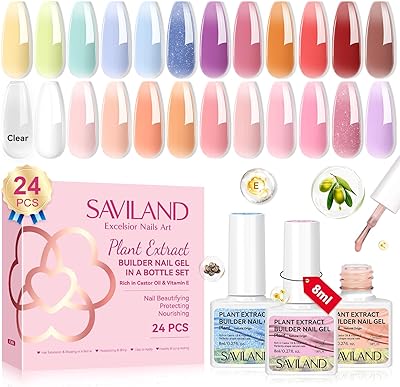
SAVILAND Builder Nail Gel 24 Colors
86%
88%
Ease of Use
91%
Durability (Wear Time)
85%
Application Smoothness
94%
Color Variety
86%
Nail Health (Ingredients)
More
SAVILAND Essentials Nail Art Pens Set 24 Colors
87%
89%
Ease of Use
91%
Precision and Control
96%
Drying Time
88%
Color Variety
84%
Durability on Natural Nails
More
SHANY Cosmopolitan DIY Nail Polish Set - 24 Colors
87%
94%
Color Variety
88%
Pigmentation
85%
Ease of Application
90%
Drying Time
91%
Finish Durability
More
Saviland Glows in The Dark Nail Polish Set 24 Colors
86%
91%
Glow-in-the-Dark Effect
88%
Application Ease
86%
Longevity and Durability
92%
Color Vibrancy
89%
Quick-Drying Formula
More
Dynamic Color Co Circa Color Tattoo Ink Set 1oz - 12 Colors
90%
91%
Color Vibrancy
88%
Blendability
94%
Application Smoothness
89%
Longevity of Results
92%
Pigment Intensity
More
Born Pretty Nail Art Stamping Polish Set (24 Colors)
87%
96%
Color Pigmentation
91%
Ease of Stamping
88%
Drying Time
93%
Smoothness of Application
87%
Long-Lasting Wear
More

FAQ

You do need Datacolor's Spyder software to get the full benefit — that's where you import your reference photo and generate the HSL presets. Those presets can then be applied inside Lightroom or similar editors, but the chart alone won't hand you a ready-made profile without that software step in the middle. It's worth factoring that into your workflow before buying.

Both sit in the same market tier and both offer 24-patch layouts, so the core patch count is actually comparable. The main differences come down to software ecosystem and workflow: X-Rite integrates tightly with its own DNG profile creation pipeline, while the SpyderCHECKR 24 generates HSL presets via Spyder software. Which one suits you better depends largely on which software environment you already work in and whether you prefer DNG profiles or HSL-based corrections.

It works with smartphones, drones, and action cameras as well as DSLRs and mirrorless bodies. The idea is that you shoot the chart with each device you want to align, then use the software to bring them into a consistent color space. This is particularly useful for hybrid shoots where you're mixing footage or stills from very different sensors.

That's exactly what the FadeCHECKR feature is for. The chart includes a reference area that lets you visually and digitally compare the current state of your patches against a known baseline. If there's meaningful drift, you'll catch it before it compromises a real shoot rather than discovering it in post-production.

It ships with a rigid protective case included in the box, so you don't need to source anything separately. The case does a solid job of protecting the chart surface during travel and storage, which is important since surface damage to any color patch would affect calibration accuracy.

It's genuinely useful. Being able to mount the chart on a tripod or light stand means you can set it at a consistent angle and distance relative to your subject without needing an extra pair of hands. For solo shooters on location, that kind of repeatability matters a lot more than it might sound.

You don't need a new chart for each recalibration — the same chart works indefinitely as long as the patches remain accurate. As a general rule, it makes sense to shoot a fresh reference frame any time your lighting environment changes significantly, such as moving between indoor and outdoor locations or changing your light source type. The FadeCHECKR feature will tell you if the chart itself eventually needs replacing.

The presets are designed for batch application, which is a core part of the value here. You shoot one reference frame at the start of a session or whenever the light changes, generate the preset from that frame, and then sync it across all the images shot under the same conditions. It significantly reduces the manual correction work in post.

Probably not the most cost-effective choice for that scenario. If you're shooting in a single, fixed environment with the same camera and lens every time, the problem this tool solves — color drift across changing conditions and multiple devices — simply isn't a problem you're dealing with. A basic grey card would likely cover your needs at a fraction of the cost.

It works for video as well, and hybrid shooters regularly use it to match color between a primary camera and secondary devices like drones or action cams. The workflow is the same: shoot the chart at the start of a scene, use the reference to build a correction in your editing software, and apply it to your footage. It's not a dedicated video tool, but it handles the job effectively for anyone blending footage from different sources.

Where to Buy