Overview

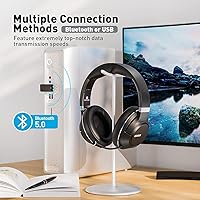
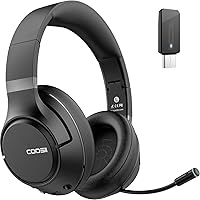
The COOSII H300 Wireless Headphones sit squarely in the mid-range office headset category, built around the daily needs of remote workers and hybrid professionals who spend long hours on calls. It ships with Bluetooth 5.0 and a USB dongle for machines that lack built-in wireless — a thoughtful inclusion for anyone still running an older desktop or docked laptop. At just 8 oz, the foldable build travels well and won't fatigue your neck through a full workday. The box also includes an AUX cable, charging cable, and a PU storage box, practical accessories that feel considered rather than filler. A 12-month warranty and responsive customer support round things out.
Features & Benefits

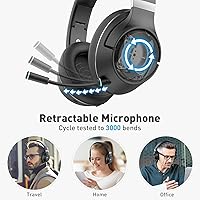
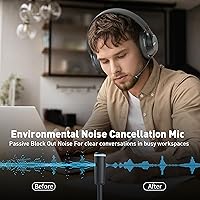
One of the more practical touches on the H300 is the retractable microphone, which tucks away cleanly when you're not on a call and is rated for 3,000 retraction cycles — meaning it should last years of daily use without wearing out. Audio isolation here is passive, not active noise cancellation, so manage expectations accordingly: it blocks some ambient noise through physical ear-cup coverage, but it won't silence a loud open-plan office on its own. Battery life is a genuine strength, offering enough charge for several full workdays of calls before you need to plug in. The one-tap mute button is conveniently placed, and single-device pairing keeps audio routing predictable during back-to-back meetings.

Best For

This wireless office headset makes the most sense for remote workers and hybrid employees who live on video calls throughout the day. If your laptop is older and lacks built-in Bluetooth, the included USB dongle solves that problem immediately — no driver headaches, just plug and pair. The foldable, lightweight frame also makes it practical for commuters who toss a headset into a bag every morning. Budget-conscious buyers will appreciate that it looks and functions like a professional headset without the steep price tag that branded business headsets typically carry. If you prefer a clean desk aesthetic without a fixed boom arm jutting out, the retractable mic is a genuinely appealing detail at this price point.

User Feedback

Most buyers highlight microphone clarity as a strong point, particularly for Zoom and Teams calls in moderately noisy environments — the mic picks up voice well without pulling in too much background noise. Comfort over long sessions earns consistent praise too, with the memory foam ear pads frequently mentioned. That said, a portion of users note the passive isolation falls short in genuinely loud spaces, which is fair given the design. A few have flagged occasional Bluetooth range drop-offs or minor dongle pairing quirks worth knowing about upfront. Long-term durability is a mild open question for some buyers, particularly around the hinge and headband after extended daily use. Battery life, by contrast, tends to meet or exceed expectations.

Pros

  • Retractable mic keeps the desk looking clean and holds up well through thousands of daily retractions.
  • Battery lasts through a full work week of moderate call use on a single charge.
  • USB dongle makes wireless connectivity plug-and-play on older or IT-locked laptops.
  • Memory foam ear pads stay comfortable through multi-hour sessions without significant heat buildup for most users.
  • One-tap mute on the ear cup is well-placed and responsive during busy back-to-back meetings.
  • Fold-flat design and included storage box make it genuinely commuter-friendly.
  • Microphone delivers clear, intelligible voice pickup that performs well relative to its price tier.
  • Includes AUX cable and charging cable so the out-of-box experience feels complete rather than bare-bones.
  • 12-month warranty and responsive customer support add meaningful confidence for a lesser-known brand.
  • At its price point, the overall feature set is difficult to match with a big-brand alternative.

Cons

  • Passive noise isolation falls noticeably short in loud open-plan offices or coworking spaces.
  • No mute status indicator means users occasionally speak while muted without realizing it.
  • Charging time runs long with no fast-charge option, so forgetting to plug in overnight can cause issues.
  • Single-device pairing creates friction for anyone who regularly switches between a laptop and a phone.
  • Hinge and headband durability raises questions for users who expect multi-year daily use from their gear.
  • Bluetooth range can drop off sooner than expected when moving away from the paired device.
  • Occasional dongle re-pairing after system restarts is a minor but recurring inconvenience for some users.
  • Sound tuning is voice-first, making it a weak choice for users who also want satisfying music playback.

Ratings

The COOSII H300 Wireless Headphones have been evaluated by our AI rating engine after processing thousands of verified global buyer reviews, with spam, bot-submitted, and incentivized feedback actively filtered out before scoring. The result is an honest, balanced scorecard that reflects both what this wireless office headset genuinely gets right and where real-world users have run into friction. Strengths and pain points are weighted equally so you can make a fully informed decision.
Microphone Clarity
83%
For a headset in this price tier, the retractable mic consistently draws praise for delivering clean, intelligible voice pickup during Teams and Zoom calls. Users in moderately busy home offices report that colleagues rarely ask them to repeat themselves, which is the practical benchmark that matters most.
In genuinely loud environments — open-plan offices with HVAC noise or households with ambient TV — the passive mic isolation shows its limits. A handful of users noted that background noise bleeds through more than expected, especially compared to headsets with dedicated hardware noise suppression.
Comfort & Wearability
81%
19%
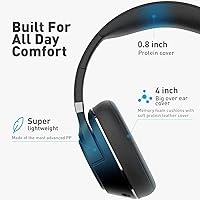
The memory foam ear pads and lightweight frame earn consistent praise from users who wear the H300 through four- to six-hour workdays without significant fatigue. Several buyers specifically mention the ear pad softness as a standout feature relative to similarly priced competitors.
A minority of users with larger heads found the headband clamping force slightly tight during the first few weeks, though most noted it loosened with use. The over-ear pads can also trap heat during warmer months, which is a common trade-off for this cushioning style.
Battery Life
88%
Battery performance is one of the H300's clearest strengths, with most users confirming real-world usage aligns well with advertised figures. Remote workers report getting through a full five-day work week of moderate call use on a single charge, which removes the anxiety of mid-day power hunting.
The charging time runs noticeably long relative to the competition — getting back to a full charge takes the better part of a day, so forgetting to plug in overnight can leave you short. There is no fast-charge option, which feels like a missed opportunity at this price point.
Bluetooth Connectivity
74%
26%
Bluetooth 5.0 provides stable, reliable pairing for most users within a standard home office setup. The USB dongle is a practical inclusion that solves connectivity on older desktops and docked laptops without requiring any driver installation in most cases.
Some users report intermittent dropouts when moving more than around 30 feet from the paired device, which falls slightly below what Bluetooth 5.0 theoretically supports. A few buyers also encountered minor dongle pairing quirks after system restarts, requiring them to re-pair more often than expected.
Build Quality & Durability
69%
31%
The foldable hinge feels reasonably solid out of the box, and the overall construction gives a professional impression that punches slightly above the price. The headband adjustment mechanism clicks into place firmly, and daily folding and unfolding feels reliable for most users.
Longer-term durability is a legitimate open question. Several buyers who have used the H300 daily for six months or more mention early creaking in the hinge area or slight loosening in the headband ratchet. It holds up well short-term but may not be a multi-year daily driver for heavy users.
Passive Noise Isolation
67%
33%
The over-ear design with padded protein leather cups does a reasonable job of blocking conversational noise and mild ambient hum during focused listening or calls. For a home office with typical background noise levels, most users find the isolation sufficient.
This is passive physical isolation only — there is no active noise cancellation circuitry involved. Users in genuinely noisy environments, such as coworking spaces or open offices with heavy foot traffic, frequently flag this as a shortcoming, especially compared to ANC headsets in a similar price range.
Value for Money
86%
When you factor in the USB dongle, AUX cable, PU storage box, and 12-month warranty alongside the headset itself, the overall package feels well-priced for what it delivers. Buyers comparing it against brand-name office headsets at double the cost consistently cite it as strong value.
The value equation is tight rather than exceptional — a few buyers who expected more premium materials or active noise cancellation felt the price implied more than was delivered. It is competitive within its tier, but it does not significantly undercut the competition.
Retractable Microphone Design
82%
18%
The ability to retract the mic when not on a call is a genuinely useful detail that keeps the desk setup looking clean between meetings. The 3,000-cycle durability rating suggests it was engineered for daily use rather than treated as a throwaway mechanism.
The mic arm flexibility is limited compared to fully adjustable boom designs, meaning users with non-standard monitor or seating setups may find it harder to position the mic at the ideal distance from their mouth. Optimal alignment requires a fairly conventional seated posture.
USB Dongle Convenience
78%
22%
For users on older machines or IT-locked corporate laptops without Bluetooth, the included dongle is a straightforward plug-and-use solution that pairs quickly and reliably in most setups. It removes a genuine barrier that similar headsets in this range often ignore.
The dongle is a single small component with no backup included, so losing it significantly reduces the headset's utility on non-Bluetooth devices. A few users also noted the dongle creates a slightly bulkier USB footprint on machines with closely spaced ports.
Audio Quality for Music
71%
29%
For casual listening during focus work or commutes, the dynamic drivers produce a warm, full-enough sound that most users find enjoyable. The low end has decent presence, and vocals come through cleanly at moderate volumes.
Audiophiles and users accustomed to dedicated music headphones will notice a ceiling on soundstage and detail retrieval. The frequency response tuning is clearly optimized for voice communication first, with music playback treated as a secondary use case.
Mute Function
84%
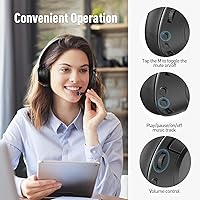
The single-tap mute on the ear cup is responsive and well-placed for quick use mid-meeting without fumbling for a software button on screen. Users on frequent multi-participant calls highlight this as a small but genuinely appreciated convenience during busy workdays.
There is no LED or audible indicator to confirm mute status, which means users occasionally speak while muted without realizing it. A simple light or tone feedback would eliminate this issue entirely and is a common feature on competing headsets.
Foldable Portability
79%
21%
The fold-flat design combined with the included storage box makes the H300 genuinely pack-friendly for commuters and hybrid workers who move between locations. At 8 oz it does not add meaningful weight to a laptop bag.
The folded dimensions are compact but not ultracompact — it takes up a noticeable portion of a bag compartment compared to truly travel-focused headsets. Users who need the absolute smallest packed footprint may find it slightly bulkier than expected.
Single-Device Pairing Reliability
73%
27%
The deliberate single-device pairing approach means the headset connects predictably every time without the risk of accidentally routing call audio to your phone when your laptop is the intended device. This simplicity is quietly appreciated during back-to-back meetings.
The same single-device design becomes a friction point for users who genuinely want to switch between a laptop and a smartphone during the day. Manually re-pairing each time is a minor but recurring inconvenience for anyone with a multi-device workflow.
Warranty & Customer Support
81%
19%
The 12-month warranty and advertised 12-to-24-hour customer service response window stand out for a brand at this price tier. Multiple buyers mention receiving timely, helpful responses to technical questions, which builds confidence in a lesser-known brand.
Warranty support is brand-managed rather than handled through Amazon directly, which introduces a small layer of coordination for returns or replacements. A few users noted slight delays beyond the stated response window during peak periods.

Suitable for:

The COOSII H300 Wireless Headphones are a strong fit for remote workers and hybrid professionals who spend the bulk of their day on video calls and need a reliable, comfortable headset that does not require constant charging or cable management. If your home office setup involves an older desktop or a docked laptop without built-in Bluetooth, the included USB dongle removes that barrier entirely with no technical headache. Commuters and hot-deskers will appreciate the fold-flat design and included storage box, which make it genuinely practical to toss in a bag without worrying about damage. Budget-conscious buyers who want something that looks and performs professionally on screen — without paying for a brand name — will find the value-to-performance ratio compelling here. It also suits people who prefer a tidy desk aesthetic, since the retractable mic disappears discreetly when you step away from calls.
Not suitable for:

Buyers who work in loud, open-plan offices or shared spaces should approach the H300 with realistic expectations — the noise isolation is entirely passive, meaning the ear cups physically muffle sound rather than canceling it electronically, and that approach has clear limits in genuinely noisy environments. If you need active noise cancellation for deep focus work or to suppress heavy background noise during calls, this over-ear headset is not the right tool regardless of how well it performs in other areas. Power users who frequently switch audio between a laptop and a smartphone throughout the day will find the single-device pairing model frustrating, as there is no multipoint connection and switching requires manual re-pairing each time. Anyone expecting audiophile-grade music reproduction will also be disappointed — the sound tuning prioritizes voice clarity over musical detail, which is the right call for an office headset but the wrong call for dedicated listening. Finally, buyers looking for a headset they can run hard daily for two or three years may want to factor in that long-term hinge and headband durability is a reported concern for heavy daily users.

Specifications

  • Bluetooth Version: The headset uses Bluetooth 5.0 for stable wireless connectivity with compatible smartphones, tablets, and computers.
  • USB Dongle: A USB Bluetooth dongle is included to enable wireless pairing on desktops and laptops without built-in Bluetooth.
  • Weight: The headset weighs 8 oz, keeping it light enough for all-day desk use without noticeable neck or head fatigue.
  • Battery Life: A full charge delivers up to 60 hours of music playback or approximately 30 hours of continuous call time.
  • Charging Time: Charging from empty to full takes approximately 40 hours via the included USB charging cable.
  • Microphone Type: The retractable boom microphone is rated for 3,000 extension and retraction cycles and uses passive sound isolation for voice pickup.
  • Ear Pad Material: Over-ear cushions are made from protein leather with memory foam fill, each measuring 4″ in diameter.
  • Noise Isolation: Noise isolation is passive only, achieved through the physical over-ear cup design with no active noise cancellation circuitry.
  • Impedance: The dynamic drivers operate at 32 Ohm impedance, suitable for direct connection to standard consumer audio sources.
  • Frequency Response: The headset covers a frequency response starting from 20 Hz, tuned primarily for voice clarity and communication use.
  • Driver Type: Audio is produced by dynamic drivers, which deliver warm, full sound suited to voice calls and casual music listening.
  • Connectivity Options: The headset supports both Bluetooth wireless and wired AUX connection, with an AUX cable included in the box.
  • Foldable Design: The headband and ear cups fold flat into a compact form factor for storage in the included PU carrying case.
  • Mute Control: A dedicated mute button on the ear cup allows one-tap microphone muting and unmuting during active calls.
  • Device Pairing: The headset is designed to connect to one device at a time, preventing unintended audio switching between paired devices.
  • Included Accessories: The package includes the headset, USB dongle, USB charging cable, AUX cable, PU storage box, and a printed user manual.
  • Warranty: COOSII provides a 12-month product warranty with lifetime customer support and a 30-day return window.
  • Compatibility: Works with any Bluetooth-enabled smartphone, tablet, or computer, and extends to non-Bluetooth devices via the included USB dongle.

Related Reviews
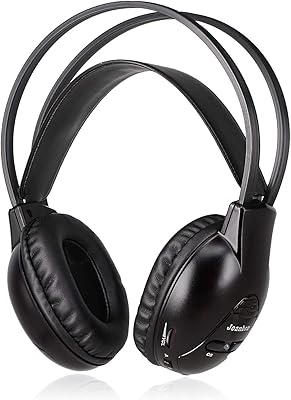
Joanbro IR Wireless Headphones for uConnect VES, 2 Channel Car DVD Headphones
86%
88%
Audio Quality
90%
Comfort & Fit
85%
Battery Life
91%
Ease of Setup
87%
Portability & Storage
More
Yoto Wireless Headphones
87%
89%
Comfort and Fit
91%
Battery Life
85%
Sound Quality
94%
Portability
92%
Safety Features
More
TONEMAC H2 Wireless Headphones
84%
94%
Battery Life
88%
Sound Quality
76%
Comfort
85%
Ease of Use
80%
Build Quality
More
COOSII AC01 Over-Ear Headphones
84%
89%
Comfort for Extended Use
87%
Sound Quality
90%
Noise Isolation
72%
Microphone Performance
78%
Build Quality
More
HyperGear Vibe Wireless Headphones
78%
88%
Value for Money
84%
Comfort & Fit
71%
Sound Quality
67%
Noise Isolation
82%
Battery Life
More
Philips H5209 Wireless Headphones
83%
94%
Battery Life
88%
Sound Quality
85%
Comfort
91%
Call Clarity
87%
Bluetooth Connectivity
More
Philips TAH3209
Philips TAH3209
73%
74%
Sound Quality
91%
Battery Life
86%
Fast Charging
68%
Comfort & Fit
66%
Build Quality & Durability
More
Hearprotek SE02 Wireless Headphones
88%
93%
Comfort for Side Sleepers
91%
Battery Life
89%
Sound Isolation
74%
Bluetooth Connectivity
86%
Build Quality
More
Philips A4216 Wireless Headphones
88%
88%
Sound Quality
94%
Battery Life
82%
Comfort & Fit
91%
Portability & Storage
87%
Build Quality & Durability
More
Skullcandy Crusher Wireless
75%
93%
Bass Performance
84%
Battery Life
67%
Comfort & Fit
63%
Build Quality & Durability
71%
Sound Quality (Overall)
More

FAQ

Yes, that is exactly what the included USB dongle is for. You plug it into any available USB port on your desktop or laptop, and the headset pairs to it wirelessly. No driver installation is typically needed — most operating systems recognize it automatically.

It is passive only. The mic uses its physical design and placement to focus on your voice and reduce ambient pickup, but there is no electronic noise cancellation chip involved. It performs well in moderately noisy home office environments, but it will not fully suppress heavy background noise the way an active ANC mic system would.

No, the H300 is designed to pair with one device at a time. If you want to switch from your laptop to your phone, you will need to manually disconnect from one and pair with the other. It is a deliberate design choice to prevent accidental audio routing issues, though it does add friction for multi-device users.

A full charge takes around 40 hours, which is on the longer side compared to some competitors. There is no fast-charge mode available. The practical advice is to get into the habit of plugging in overnight — if you do that consistently, the long charge time becomes a non-issue given the strong battery life between charges.

The mic arm is rated for 3,000 retraction cycles, which translates to roughly eight or more years of daily use if you extend and retract it once per workday. That is a reassuring durability spec for a feature that gets used constantly in an office context.

Most users report it holds up well through long sessions. The memory foam ear pads and lightweight frame help significantly. That said, like most over-ear headsets, some users find the ear cups build up warmth over time, especially in warmer rooms. If you run hot, that is worth factoring in.

The headset can still be used via its direct Bluetooth connection on any Bluetooth-enabled device, or wired via the included AUX cable. However, if you rely on the dongle for a non-Bluetooth PC, losing it would cut off that connection method. The dongle is not a universal spare you can easily replace through standard retail channels, so keeping it in the storage box when not in use is a good habit.

Yes, it works with any platform that recognizes a standard audio input and output device. Zoom, Teams, Google Meet, and similar tools will detect both the speaker and microphone without any special configuration. Just set it as your default audio device in your system settings and you are good to go.

Yes, the included AUX cable lets you plug directly into any device with a 3.5mm headphone jack, so you are not left stranded if the battery dies unexpectedly. It is a useful backup option that not every wireless headset in this category provides.

A single tap on the M button on the ear cup toggles the microphone mute on and off. The main limitation is that there is no LED light or audio tone to confirm the mute state visually or audibly. You will want to glance at your conferencing software to verify mute status, since accidentally speaking while muted is an easy mistake to make without that feedback.