Overview

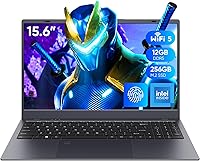
The Coolby RiaBook 15.6-inch Laptop enters a crowded budget market with one notable advantage over most entry-level Windows machines: it runs an Intel N95 processor rather than the aging Celeron chips still haunting this price tier. That matters in everyday use — the N95 delivers meaningfully snappier tab switching, faster app loading, and smoother multitasking. Coolby is not a household name, and that absence of brand history is something buyers should weigh honestly. That said, the dual Type-C ports with PD3.0 support stand out as a practical, thoughtful touch. Just keep expectations grounded — this is a light-productivity machine, not a creative or gaming powerhouse.
Features & Benefits

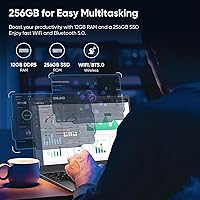
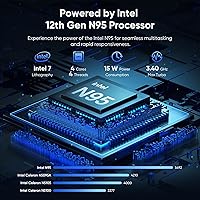
The N95 quad-core chip runs at up to 3.4GHz and handles web browsing, Office documents, video calls, and even light photo editing without breaking a sweat — a genuine step up from the Celeron chips it typically competes against. The 15.6-inch IPS display delivers a 1920x1080 image with respectable viewing angles and solid color consistency, making it comfortable for long work or study sessions. With 12GB of DDR4 RAM and a 256GB NVMe SSD, multitasking feels responsive for the category. One important note: product listings show inconsistent RAM figures between 12GB and 16GB, so confirm your unit's actual spec before buying. Storage is expandable via MicroSD, and Windows 11 Pro comes genuinely licensed out of the box.

Best For

The RiaBook is a natural fit for students who need a dependable machine for writing papers, joining video lectures, and managing coursework without spending a fortune. Remote workers handling email and spreadsheets will find it capable, and seniors who prefer something straightforward to set up will appreciate the full-size numpad keyboard. It also makes practical sense as a secondary backup laptop for any household that needs an extra Windows machine without a major investment. Anyone who specifically requires Windows 11 Pro for work or school compliance will find real value here — that license alone typically costs extra elsewhere. Light streaming and casual browsing? Handled easily.

User Feedback

Across more than 260 verified ratings, the RiaBook holds a solid 4.5-star average — encouraging for a brand without a long track record. Buyers consistently praise the display quality and keyboard comfort as standout positives for the price. Build quality reads as sturdy rather than premium. On the critical side, a recurring theme involves thermal management under sustained workloads; this Coolby machine can run noticeably warm during extended sessions, which is worth considering if heavy multitasking is part of your routine. Battery life reports are genuinely mixed — some users are satisfied, others are not. Post-purchase customer support also draws inconsistent feedback, so factor in that uncertainty if after-sale service matters to you.

Pros

  • The Intel N95 chip delivers noticeably snappier everyday performance compared to older Celeron-based budget laptops.
  • A genuine, licensed Windows 11 Pro installation adds real value for students and professionals with compliance requirements.
  • Dual USB-C ports with PD3.0 support mean you are not relying on a single charging point — a smart, practical design choice.
  • The 15.6-inch IPS display offers solid color consistency and wide viewing angles, comfortable for long work sessions.
  • 12GB of DDR4 RAM keeps multitasking fluid; running several browser tabs alongside Office apps is handled without visible slowdown.
  • A full-size keyboard with a dedicated numpad is genuinely useful for anyone working with numbers daily.
  • The built-in fingerprint reader makes logging in quick and removes the friction of typed passwords.
  • MicroSD expansion gives you a straightforward path to more storage without replacing any internal components.
  • At under four pounds and less than an inch thick, the RiaBook is easy to carry between rooms or toss in a bag.
  • The manual webcam privacy shutter is a small but thoughtful feature that many pricier laptops still skip.

Cons

  • Coolby is a relatively unknown brand with limited customer support history — after-sale service is a genuine gamble.
  • Product listings show conflicting RAM figures between 12GB and 16GB, which undermines buyer confidence before purchase.
  • Thermal performance under sustained workloads is a recurring complaint; the machine runs warm during prolonged use.
  • Real-world battery life reports are inconsistent, making it unreliable for users who need all-day untethered use.
  • The 256GB SSD fills up quickly for anyone storing video files, large software installs, or sizable media collections.
  • WiFi 5 is functional but lags behind the WiFi 6 now appearing in competing machines at similar price points.
  • The 2.0MP webcam produces mediocre image quality — acceptable for quick calls but underwhelming for regular video meetings.
  • Intel UHD integrated graphics rule out any meaningful gaming or GPU-accelerated creative work.
  • Brand obscurity makes resale value and long-term parts or driver support genuinely uncertain.
  • No optical drive and limited port redundancy mean you may need adapters or a hub for more complex setups.

Ratings

Our AI rating system analyzed verified global buyer reviews of the Coolby RiaBook 15.6-inch Laptop, actively filtering out incentivized, repeated, and bot-flagged submissions to surface what real everyday users actually experience. The scores below reflect a balanced picture — genuine strengths alongside the friction points that show up consistently across independent feedback. No aspect has been glossed over.

Everyday Performance
78%
22%
The Intel N95 chip handles the daily grind — browser tabs, Office documents, video calls, and light media — without the sluggishness that plagues older Celeron-based machines at this price. Users switching from aging budget laptops consistently notice the difference in responsiveness during multitasking.
Sustained workloads expose the chip's limits quickly. Buyers who push the RiaBook beyond light productivity — running multiple apps with background processes — report noticeable slowdowns and thermal throttling that chips away at the experience.
Display Quality
81%
19%
The 15.6-inch IPS panel earns genuine praise for its wide viewing angles and consistent color reproduction, making it comfortable for long study or work sessions. Users streaming video or reviewing documents side-by-side find the 1080p resolution sharp and easy on the eyes.
Outdoor visibility is limited — brightness levels are average at best, making the screen hard to read in direct sunlight or bright ambient light. Color accuracy, while decent, does not satisfy buyers doing any kind of serious photo or creative work.
Build Quality
74%
26%
For a budget machine, the chassis feels more solid than many buyers expect, and the slim 0.78-inch profile gives it a reasonably professional appearance on a desk or in a meeting. The keyboard deck shows minimal flex under normal typing pressure.
The plastic construction becomes more apparent over time, and the lid feels lighter and less rigid than buyers accustomed to mid-range machines would prefer. A few users report minor creaking around the hinges after several weeks of regular use.
Keyboard & Typing Experience
83%
The full-size keyboard with a dedicated numpad is one of the RiaBook's most consistently praised features, especially among users who work with numbers daily or spend long hours writing. Key travel feels adequate, and the layout causes very little adjustment period for most typists.
Key feedback is on the softer side, which divides users — touch typists who prefer tactile resistance tend to find it slightly mushy. Backlighting is absent, which is a real inconvenience for anyone working in dim environments regularly.
Battery Life
57%
43%
Under genuinely light use — document editing, casual browsing, and occasional video calls — some buyers report getting through a reasonable portion of their workday on a single charge. The dual USB-C PD3.0 ports mean topping up is quick and flexible when you do need power.
Battery life is among the most polarizing aspects of this machine. A meaningful portion of buyers report the battery drains faster than the marketing implies, particularly under anything beyond minimal load. Relying on it for a full untethered workday is a risk most consistent users are unwilling to take.
Thermal Management
59%
41%
The built-in active cooling fan does its job during short-burst tasks, keeping temperatures manageable for the kind of light productivity the machine is designed around. Casual users who never push the laptop hard rarely report heat as a noticeable issue.
Under sustained load — even something as routine as a video call running alongside several browser tabs — the chassis warms up noticeably around the keyboard and bottom panel. Thermal throttling under prolonged stress is a recurring complaint that affects both comfort and output consistency.
Value for Money
82%
18%
When you factor in the N95 processor, 12GB of RAM, a licensed Windows 11 Pro installation, and dual USB-C charging ports, the package punches above its weight for buyers whose needs are genuinely limited to everyday tasks. The inclusion of a genuine OS license alone saves meaningful money compared to some competitors.
The value calculation shifts if you need reliable long-term support or plan to use the laptop heavily. Buyers who later encounter issues and struggle to get timely help from Coolby often feel the upfront savings come at a hidden cost.
Port Selection & Connectivity
86%
Having two USB-C ports — both supporting PD3.0 charging — alongside three USB-A ports, HDMI, and a headphone jack means most users never need to carry a hub. Reviewers who previously owned single-port budget laptops specifically call out this redundancy as a welcome relief.
WiFi 5 is functional but starting to show its age as more routers and environments push WiFi 6 speeds. There is no Ethernet port, which limits wired connection options in office or school environments without an adapter.
Webcam Quality
52%
48%
The 2.0MP camera covers basic video call needs adequately in well-lit rooms, and the manual privacy shutter is a practical feature that users appreciate for peace of mind — especially in shared living or working spaces.
Image quality is mediocre by any objective standard; low-light performance is particularly weak, producing grainy and washed-out video. Anyone who video conferences frequently, especially in varied lighting conditions, will likely want an external webcam upgrade.
Touchpad Usability
76%
24%
The enlarged 6.5-inch touchpad gives users significantly more room to work compared to the cramped pads found on many competing budget laptops. Multi-finger gestures register reliably, and general cursor tracking is smooth for everyday navigation.
The surface material shows fingerprint smudges quickly and can feel slightly sticky after prolonged use. A small number of users report occasional erratic cursor jumps, though this appears intermittent rather than systematic.
Storage Performance
79%
21%
The NVMe SSD delivers noticeably faster boot times and app launches than the eMMC or SATA drives common in this price bracket. Users migrating from older budget machines are often pleasantly surprised by how snappy the system feels from cold start to ready-to-work.
256GB fills up faster than most users anticipate once Windows updates, software installs, and personal files accumulate. While the MicroSD slot helps, it is not a substitute for internal storage speed, leaving power users feeling constrained.
Setup & Out-of-Box Experience
77%
23%
Windows 11 Pro arrives genuinely activated and ready to use with minimal setup friction, which buyers — especially less tech-savvy users — consistently mention as a positive first impression. The fingerprint reader works from the first login, adding to the polished initial experience.
Some buyers encounter pre-installed software beyond Windows itself that requires manual cleanup. The product documentation is minimal, and setup guidance for less experienced users is sparse enough to cause early confusion.
Portability
80%
20%
At under four pounds and less than an inch thick, the RiaBook is genuinely comfortable to carry between rooms, tuck into a backpack, or bring to a library or cafe. Students and light commuters mention the weight as a non-issue for daily transport.
It is not a compact ultrabook — the 15.6-inch footprint means it demands a reasonably sized bag and a bit of desk real estate. Users who want a truly pocketable or small form-factor machine will find it too large for that purpose.
Brand Trust & Support
46%
54%
The product itself has attracted a meaningful volume of positive reviews in a relatively short time since launch, suggesting that units arriving in working order tend to satisfy buyers. Purchasing through major retail channels provides some buyer protection independent of the brand.
Coolby lacks the established support infrastructure of mainstream laptop brands, and after-sale experiences are inconsistent enough to be a genuine concern. Buyers who have needed warranty service report slow or unresponsive communication, which is a significant risk for a long-term purchase.
Software & OS Legitimacy
88%
A properly licensed Windows 11 Pro installation is not something all budget laptops deliver, and the RiaBook does it correctly. Users can update freely, access all Pro features, and avoid the activation nag screens that appear on machines with unverified licenses.
There is a minor but real inconsistency between the RAM listed in different parts of the product page — 12GB in most marketing materials versus 16GB in some spec tables — and Coolby has not formally clarified this, which undermines confidence in the brand's transparency.

Suitable for:

The Coolby RiaBook 15.6-inch Laptop is a genuinely practical pick for anyone whose computing needs center on everyday tasks rather than heavy workloads. Students juggling research, writing assignments, and video calls will find it handles all three without complaint, and the licensed Windows 11 Pro installation means it meets school or workplace compliance requirements right out of the box. Seniors or first-time laptop buyers who want something uncomplicated will appreciate the large display, full-size keyboard with numpad, and fingerprint login that skips the hassle of typing passwords. Remote workers who live in spreadsheets, email clients, and browser tabs will get through a full workday without frustration. It also makes a smart, low-risk secondary machine for households that need an extra laptop for occasional use without committing serious money.
Not suitable for:

The Coolby RiaBook 15.6-inch Laptop is simply the wrong tool if your work involves video editing, 3D rendering, music production, or anything that pushes a processor hard for extended periods — the N95 chip and integrated graphics are not built for that kind of sustained demand. Gamers should look elsewhere entirely; even casual PC gaming beyond very light browser-based titles will hit a wall quickly. The 256GB SSD will also feel cramped fast if you store large media libraries, project files, or a lot of software locally. Buyers who prioritize long-term reliability from a well-established brand with responsive customer support may find the RiaBook a harder sell, given Coolby's limited track record and mixed after-sale service feedback. If battery life is a non-negotiable factor — say, for commuters or students in lecture halls without power access — the inconsistent real-world battery reports are a legitimate reason to hesitate.
Specifications

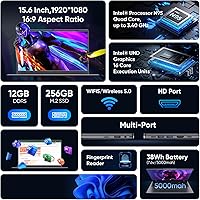
  • Processor: Intel N95 quad-core chip running at up to 3.4GHz, built on a 10nm architecture with 4 cores and 4 threads.
  • RAM: 12GB of DDR4 SDRAM operating at 4800MHz, soldered to the motherboard.
  • Storage: 256GB NVMe SSD provides fast read and write speeds for quick boot times and responsive app launches.
  • Display: 15.6-inch IPS panel with a 1920x1080 full HD resolution, offering wide viewing angles and consistent color reproduction.
  • Operating System: Windows 11 Pro comes pre-installed with a genuine, licensed activation included in the box.
  • Graphics: Intel UHD integrated GPU handles everyday video playback, light image work, and supports external displays up to 4K at 60Hz via compatible ports.
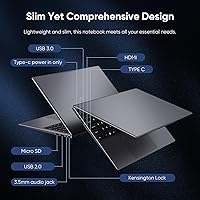
  • Ports: Connectivity includes 3x USB-A, 2x USB-C with PD3.0 charging support, 1x full-size HDMI, and a 3.5mm headphone/microphone combo jack.
  • Wireless: WiFi 5 (802.11a/b/g/n/ac) and Bluetooth are both built in, with no need for additional dongles or adapters.
  • Webcam: A 2.0MP front-facing camera includes a manual privacy shutter that physically blocks the lens when not in use.
  • Keyboard: Full-size QWERTY layout includes a dedicated numeric keypad on the right side, sized for comfortable extended typing sessions.
  • Touchpad: An enlarged 6.5-inch touchpad provides ample surface area for gestures and precise cursor control.
  • Security: A built-in fingerprint reader supports Windows Hello for fast, password-free login.
  • Storage Expansion: A MicroSD card slot accepts cards up to 256GB, allowing straightforward local storage expansion without opening the chassis.
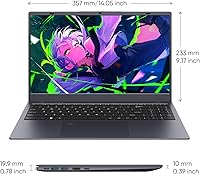
  • Dimensions: The unit measures 14.1 x 9.1 x 0.78 inches, keeping the profile slim for a 15.6-inch form factor.
  • Weight: Weighs approximately 3.53 to 3.7 lbs depending on configuration, making it manageable for daily transport.
  • Cooling: An active internal cooling fan helps regulate operating temperature under load, reducing heat buildup in the chassis.
  • Audio: Built-in stereo speakers support surround audio playback, and a built-in microphone is included for calls and voice input.
  • Charging: Both USB-C ports support PD3.0 charging, accepting 12V at 3A or higher, and 19V at 2A or higher input configurations.

Related Reviews

HP 15.6-inch Laptop 15-ef0021nr, Ryzen 3 3200U, 8GB RAM, 256GB SSD

82%
92%
Value for Money
85%
Performance
83%
Build Quality
89%
Portability
81%
Battery Life
More
Dell Inspiron 3593 15.6-inch Laptop
68%
74%
Everyday Performance
81%
SSD Speed & Storage
52%
Display Quality
63%
Battery Life
57%
Build Quality
More
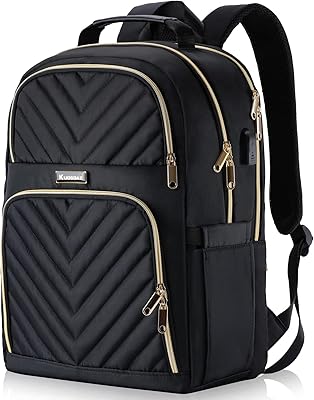
Liokesa 15.6-Inch Laptop Backpack
86%
89%
Value for Money
87%
Comfort and Ergonomics
84%
Durability and Build Quality
92%
Storage and Organization
90%
Water Resistance
More
Vonxury 15.6 Inch Laptop Backpack
87%
92%
Value for Money
89%
Comfort & Ergonomics
88%
Durability & Build Quality
85%
Water Resistance
90%
Storage Capacity & Organization
More
Bluboon 15.6 Inch Laptop Backpack
84%
89%
Organization & Storage
84%
Comfort & Ergonomics
90%
Portability & Weight
78%
USB Charging Port Convenience
85%
Laptop Protection
More
BAGSMART College Laptop Backpack 15.6 Inch
84%
88%
Organization
91%
Comfort & Ergonomics
85%
Durability & Build Quality
90%
Water Resistance
80%
Size & Capacity
More
MATEIN Rolling Laptop Bag with Lunch Box
77%
86%
Rolling Mobility
91%
Storage & Organization
88%
Laptop Protection
78%
Lunch Box Utility
74%
Handle System
More
Kuosdaz S6 Laptop Backpack 15.6″
81%
88%
Overall Design & Aesthetics
79%
Build Quality & Durability
84%
Laptop Protection
86%
Storage & Organization
81%
USB Charging Port
More
Caoroky Laptop Backpack 15.6 Inch Grey
86%
89%
Durability
91%
Water Resistance
85%
Comfort & Ergonomics
84%
Design & Aesthetics
78%
Capacity & Organization
More
VANKEAN 15.6 Inch Laptop Backpack V8001
86%
88%
Build Quality
91%
Comfort & Ergonomics
85%
Storage Capacity
75%
USB Charging Functionality
90%
Portability
More

FAQ

Unfortunately, no. The RAM in the RiaBook is soldered directly to the motherboard, which is common for budget laptops in this category. What you get out of the box is what you have long-term, so the 12GB configuration is worth factoring into your decision upfront.

This is a genuine inconsistency in the product listings that has caused real buyer confusion. The marketed configuration is 12GB DDR4, and that is the spec you should plan around. If this matters to you, it is worth confirming with the seller before purchasing and checking your unit immediately after receiving it.

This depends on whether the NVMe SSD is mounted on a removable M.2 slot or soldered — and Coolby has not made that clearly public. Your safest bet for expanding storage without opening the machine is the MicroSD slot, which supports cards up to 256GB and works well for documents, media, and backup files.

Yes, comfortably. Video calling is one of the things the RiaBook handles well. The N95 chip has no trouble running a video call alongside a browser and a few documents simultaneously. The built-in microphone and 2.0MP webcam are adequate for regular calls, though the video quality is not going to impress anyone on the other end of a high-stakes meeting.

Battery life is one of the weaker points based on user feedback. Real-world reports vary quite a bit — some buyers get through a comfortable workday on a charge, while others find it falls short of expectations, especially under heavier use. If you plan to use this away from an outlet for long stretches, it is wise to keep a charger nearby.

Very light gaming only. The Intel UHD integrated graphics can handle older or less demanding titles at reduced settings, but modern games will struggle. Minecraft is generally playable at lower render distances and modest settings. Anything more graphically demanding than that is outside what this machine is designed for.

Most budget laptops from smaller brands ship with some pre-installed software beyond Windows itself, and the RiaBook is unlikely to be an exception. That said, Windows 11 Pro is genuinely licensed and activated, so a clean reinstall is always an option if you want a fresh start.

Coolby offers a manufacturer warranty, but the brand's support infrastructure is not as established as Dell or Lenovo, and some buyers have reported uneven experiences. Purchasing through Amazon gives you some protection via Amazon's own return and dispute policies, which is worth keeping in mind as a safety net.

Yes. The RiaBook includes a full-size HDMI port and one of the USB-C ports also supports video output, so connecting an external monitor is straightforward. The Intel N95 GPU is capable of driving displays up to 4K at 60Hz, though actual output quality will depend on the monitor and cable you use.

It is a reasonable option if budget is the primary concern and the workload stays within the typical range of college tasks — writing papers, doing research, attending virtual lectures, and managing files. The fingerprint reader is a handy bonus for quick logins in a busy dorm setting. Just make sure the 256GB storage is enough, as it can fill up faster than expected once software and files accumulate.