Overview

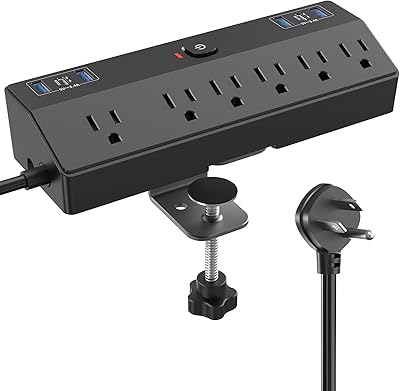
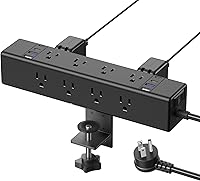
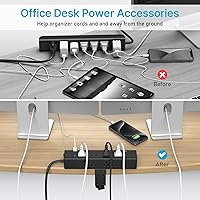
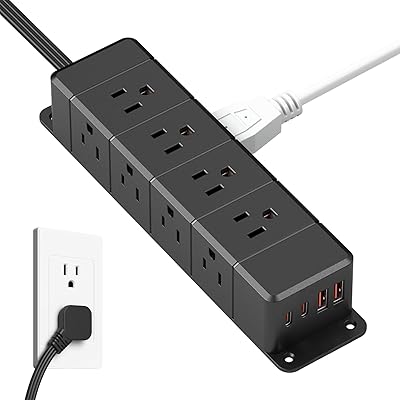
The CCCEI AC02K Desk Clamp Power Strip tackles one of the most persistent frustrations in modern workspaces: the wall outlet that is just out of reach. Rather than routing cables across the floor or stacking adapters at a baseboard, this desk clamp power strip mounts vertically at your desk edge, keeping power exactly where you use it. The footprint is compact — it hugs the desk instead of consuming surface space. A dual mounting system — clamp or screw — sets it apart from ordinary flat strips. It sits comfortably in the mid-range tier: more capable than a bare-bones surge tap, but not industrial-grade hardware.

Features & Benefits

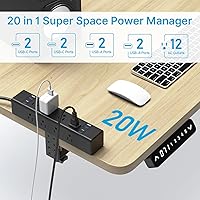
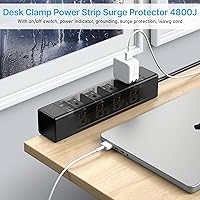
Twelve AC outlets is genuinely useful here — the wide spacing means even bulky wall adapters rarely crowd their neighbors. On the USB side, four USB-C ports run PD 3.0 at up to 20W each and four USB-A ports deliver QC 3.0 at up to 18W, covering fast charging for most modern phones and tablets. Worth knowing: when several USB ports load up simultaneously, they share available power per side, so peak speeds favor solo charging. The 4800J surge protection handles voltage spikes — not sustained overvoltage, but spikes — and indicator lights confirm proper grounding. A master on/off switch cuts power to everything at once without unplugging a single cable.

Best For

This desktop power hub suits anyone who works or studies at a dedicated desk and gets tired of crawling under furniture to find an open outlet. Standing desk users benefit particularly — the clamp keeps outlets at desk height regardless of room layout. Nightstand setups are another natural fit: one unit handles a phone charger, bedside lamp, and white noise machine with ports left over. Where it falls short is heavy workshop use or any setup demanding sustained draws above 1875W. Space-conscious home office setups, remote workers, and students upgrading from a basic flat strip are exactly who this clamp-on outlet station was designed for.

User Feedback

Buyers consistently praise clamp installation as straightforward — most report being up and running within minutes of unboxing. The grounding and surge indicator lights get repeated mentions as a small but genuinely reassuring detail. On the critical side, the 6-foot cord draws occasional complaints from users whose desks sit farther from the wall. A handful of buyers with thicker or irregular desk edges found the clamp a snug fit and switched to the screw-mount option instead. Build quality reads as sturdy plastic rather than premium, which feels appropriate for the price tier. The overall sentiment leans positive, with practical convenience outweighing the minor limitations for most buyers.

Pros

  • Twelve AC outlets provide enough room for multiple bulky wall adapters without blocking neighboring sockets.
  • Clamp installation takes only a few minutes and requires no tools beyond hand-tightening.
  • PD 3.0 USB-C and QC 3.0 USB-A ports cover fast charging for most modern phones, tablets, and earbuds.
  • The 4800J surge rating offers solid spike protection for laptops, monitors, and other sensitive electronics.
  • Grounding and surge indicator lights give an immediate visual confirmation that everything is wired correctly.
  • The flat plug and 14AWG cord route neatly behind furniture without creating pressure on the wall outlet.
  • A master on/off switch cuts power to all connected devices at once, which is handy for overnight or away-from-desk shutdowns.
  • The vertical, desk-edge form factor keeps power accessible without consuming any actual desk surface.
  • Both clamp and screw mounting options are included, giving flexibility across different desk types and setups.

Cons

  • USB charging speeds drop when several high-draw devices run simultaneously on the same side.
  • The 6-foot cord can fall short in larger rooms or desks positioned away from the wall.
  • Plastic build quality, while adequate, lacks the premium feel some buyers expect at this price point.
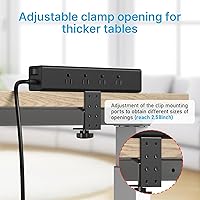
  • Desks with edges thicker than 2.58 inches are incompatible with the clamp, limiting options for some buyers.
  • Screw mounting is not practical for renters or anyone who reconfigures their setup regularly.
  • No individual outlet switches — the single master switch controls everything or nothing.
  • The unit is moderately bulky, so it may feel visually prominent on minimalist or very tidy desk setups.
  • Surge protection covers voltage spikes only; it does not protect against sustained overvoltage or power outages.

Ratings

The scores below for the CCCEI AC02K Desk Clamp Power Strip were generated by our AI rating engine after analyzing verified buyer reviews from multiple global markets, with spam, incentivized, and bot-flagged submissions actively filtered out before scoring. Each category reflects the honest distribution of real user experiences — the strengths are credited where they are earned, and the friction points are not softened. Whether this clamp-on outlet station fits your setup or falls short depends on the specifics, and that nuance is exactly what these scores are built to capture.

Ease of Installation
93%
Buyers consistently describe the clamp setup as one of the fastest installations they have experienced with any desk accessory — most report being fully mounted and plugged in within two to three minutes, no tools required. The hand-tightening mechanism is intuitive even for people who rarely set up hardware.
The screw-mount option, while appreciated when needed, requires drilling and more planning, which catches some buyers off guard who expected the same tool-free simplicity. A small number of users found the clamp instructions unclear for irregular desk profiles.
Port Count & Layout
91%
Twelve AC outlets with thoughtful spacing means real-world use rarely results in one large adapter blocking another, which is a persistent problem with cheaper strips. Having eight USB ports alongside the AC outlets covers virtually every device on a modern desk in a single unit.
The physical arrangement places all outlets on one face of the unit, which can make cable routing awkward depending on which side of the desk the strip is clamped to. A few buyers noted that the grouping of USB ports makes it harder to use very wide USB-A bricks simultaneously.
USB Charging Performance
74%
26%
Under light use — say, charging a phone on one USB-C port and earbuds on a USB-A — the fast charging protocols work as advertised and deliver noticeably quicker top-ups compared to standard 5V chargers. Users running single high-draw devices on a blue port have been consistently satisfied.
When three or four USB ports are active at the same time, the shared power architecture means speeds drop for all connected devices, which frustrates buyers who expected per-port peak rates regardless of load. This limitation is a recurring theme in critical reviews and is worth understanding before purchasing.
Surge Protection
83%
A 4800J rating is competitive for a desk-mounted strip at this price tier, and buyers who have experienced minor electrical events — flickering power, brief spikes during storms — report that connected laptops and monitors came through without issues. The surge indicator light adds a layer of ongoing reassurance.
Several technically informed buyers point out that surge protection ratings can be misleading without knowing clamping voltage and response time, and this unit does not publish those figures. It is also worth repeating that this is spike protection only — it offers no help during outages or sustained overvoltage conditions.
Build Quality
71%
29%
The ABS fireproof plastic feels solid enough for daily desk use, and the unit does not flex or creak when cables are plugged and unplugged repeatedly. At this price point, the construction is better than most budget alternatives and holds up well under normal home office conditions.
Buyers who have handled premium metal-bodied power strips notice the difference immediately — the plastic housing can feel hollow, and the clamp mechanism, while functional, lacks the reassuring rigidity of machined metal components. A handful of long-term users have reported minor wear on the clamp screw threading after repeated adjustments.
Cable Management
87%
The vertical desk-edge form factor does a genuine job of removing floor-level cable clutter, and the flat plug design means the cord sits flush against the wall without creating a pressure bend at the outlet. Standing desk users in particular praise how cleanly it integrates with their setup.
The 6-foot cord, while flat and well-built, limits placement flexibility for desks situated farther from wall outlets. There is no integrated cable clip or tie-down system on the unit itself, so the cords from connected devices still require separate management.
Cord Length
66%
34%
For the majority of home office setups where the desk sits within a few feet of a wall outlet, 6 feet is adequate and the flat plug design makes the most of that length by routing tightly along baseboards or desk legs.
Buyers with larger rooms, open-plan offices, or desks placed away from walls frequently cite the 6-foot cord as a dealbreaker that forces them to use an extension cable, which partially undermines the clean cable management the product promises. A 10-foot variant option would resolve this complaint for most affected users.
Indicator Lights
88%
The three-light system — grounding, surge status, and USB activity — is small but genuinely useful, and multiple buyers mention checking the ground indicator first thing after installation as a quick sanity check on their outlet wiring. It is a simple feature that provides real confidence.
In dark bedroom environments the lights are persistently visible and bright enough to disturb light sleepers who position the clamp-on outlet station on a nightstand. There is no brightness control or option to dim them, which is a minor but recurring complaint in nightstand use cases.
Clamp Compatibility
76%
24%
The 2.58-inch maximum clamp width covers the vast majority of standard desks, including most IKEA tabletops, typical office desks, and standard nightstands, making compatibility a non-issue for the core target audience. The clamp grip is firm enough that the unit stays put even when cables are tugged.
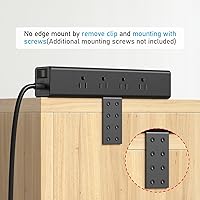
Buyers with thicker solid-wood desks, butcher block tops, or desks with beveled or rounded edges report that the clamp either does not fit or sits at an angle that feels unstable. Those users are pushed to the screw-mount option, which is not always practical in rented spaces.
Master Switch
84%
Having a single switch to cut power to every connected device is a feature that buyers genuinely use — particularly for overnight shutdowns, reducing standby draw, and giving a quick power cycle to a full desk setup without touching individual plugs.
The all-or-nothing design means there is no way to keep some outlets live while cutting others, which is occasionally frustrating when one device needs to stay powered — like a network switch or a charging hub — while the rest of the desk powers down.
Value for Money
82%
18%
The combination of 12 AC outlets, 8 USB ports with fast charging, 4800J surge protection, and dual mounting options at this price tier is genuinely difficult to match without spending noticeably more. For home office and nightstand buyers, the per-feature cost is hard to argue with.
Buyers who push the USB ports hard or who need premium build quality may find that paying more for a metal-bodied strip with per-port USB control delivers a meaningfully better experience. At the price point, the trade-offs in USB performance and plastic construction are real, even if acceptable for most users.
Space Efficiency
89%
Mounting to the desk edge rather than sitting on the surface is the core value proposition here, and it delivers — users with crowded desks consistently praise how much surface area they recovered simply by moving their power source to the desk perimeter.
The unit is not small, and on very narrow desks or compact setups it can feel visually bulky when viewed from the front. Some buyers also find that the depth of the unit protrudes enough to occasionally catch sleeves or bump into items placed near the desk edge.
Compatibility with Desk Types
73%
27%
This desktop power hub works without issue on the most common desk formats — standard rectangular office desks, gaming desks, and basic nightstands — and the included screw-mount hardware covers permanent installations where the clamp falls short.
L-shaped desks, corner units, and desks with complex edge profiles present real compatibility challenges, and the clamp was clearly designed with straight, uniform edges in mind. Buyers with non-standard furniture should measure carefully before ordering and plan for the screw-mount option as a fallback.

Suitable for:

The CCCEI AC02K Desk Clamp Power Strip is a strong fit for anyone whose daily routine revolves around a dedicated desk — remote workers, students, and home office setups where wall outlets are either too few or too far away. Standing desk users get particular value here, since the clamp anchors power right at desk level rather than leaving cables stretched across the floor as the desk moves. It also works well as a nightstand solution, where a single unit can replace the tangle of individual adapters competing for one or two wall sockets. Anyone running a laptop, monitor, desk lamp, phone, and a tablet simultaneously will appreciate having twelve AC outlets plus eight USB ports within arm's reach. If cable clutter is a recurring frustration and desk surface space is limited, this clamp-on outlet station addresses both problems at once.

Not suitable for:

The CCCEI AC02K Desk Clamp Power Strip is not the right tool for high-draw environments like workshops, garages, or any setup running power-hungry equipment close to the 1875W ceiling — the math gets tight fast when large appliances are involved. Users with desks thicker than 2.58 inches will find the clamp unusable and must commit to the screw-mount option, which is not ideal for renters or those who move their setups frequently. The plastic construction, while fire-rated and functional, will feel underwhelming to buyers expecting metal-grade build quality. Those who need to fast-charge multiple high-draw USB-C devices at the same time should know that power is shared across ports on each side, meaning real-world charging speeds can drop well below the rated peak. If your desk sits more than six feet from the nearest outlet, the cord length may also become a genuine constraint.

Specifications

  • Model Number: This unit is manufactured under model number AC02K by CCCEI.
  • AC Outlets: Twelve AC outlets are arranged along the unit to accommodate standard and oversized wall adapters without blocking adjacent sockets.
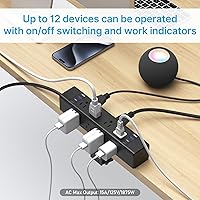
  • AC Output: The power strip operates at 125V / 60Hz with a maximum output of 15A and 1875W total load capacity.
  • USB-C Ports: Four USB-C ports support PD 3.0 fast charging with a maximum output of 20W per port under single-port use.
  • USB-A Ports: Four USB-A ports support QC 3.0 fast charging with a maximum output of 18W per port under single-port use.
  • USB Power Sharing: When multiple USB ports on the same side are in use simultaneously, available wattage is shared across active ports rather than delivered at peak per-port rates.
  • Surge Protection: The unit provides 4800 joules of surge protection to absorb transient voltage spikes and help safeguard connected electronics.
  • Power Cord: A 6-foot flat plug power cord built with 14AWG wiring is included, allowing low-profile routing behind furniture and reduced outlet strain.
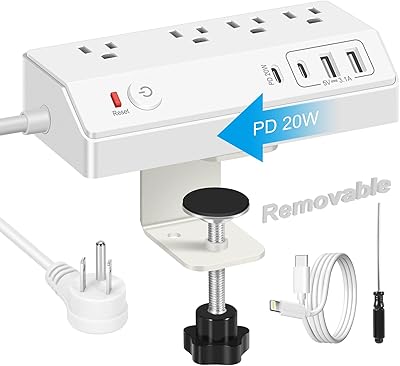
  • Mounting Options: Two mounting methods are included: a removable clamp for desk-edge attachment and a screw-mount option for permanent installation.
  • Max Clamp Width: The clamp mechanism accommodates desk edges up to 2.58 inches thick; edges beyond this measurement require the screw-mount option.
  • Dimensions: The unit measures 11.54 x 5.51 x 4.02 inches, designed for vertical desk-edge placement with a minimal footprint.
  • Weight: The unit weighs 1.92 pounds, making it stable when clamped but light enough to reposition without difficulty.
  • Material: The housing is constructed from ABS plastic rated as fireproof material to meet basic electrical safety standards.
  • Indicator Lights: Three indicator lights are present on the unit to display grounding status, surge protection status, and USB port activity.
  • Master Switch: A single on/off master switch allows all connected devices to be powered down simultaneously without unplugging individual cables.
  • Color: The unit is available in black, which suits most desk and nightstand environments without visual intrusion.
  • Voltage Compatibility: This power strip is rated for 125V North American electrical systems only and is not designed for international voltages without a converter.

Related Reviews
Acozvin Desk Clamp Power Strip 15FT
87%
89%
Charging Performance
88%
Build Quality
91%
Ease of Installation
85%
Surge Protection Effectiveness
94%
Cord Length and Flexibility
More
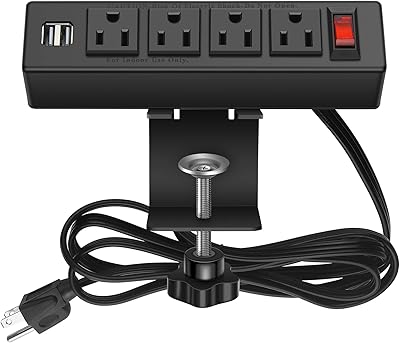
HOPOW QT1360-CU Dual-Layer Desk Clamp Power Strip
82%
93%
Outlet Count & Layout
91%
Installation & Setup
74%
Clamp Stability
88%
Surge Protection
61%
USB Charging Performance
More
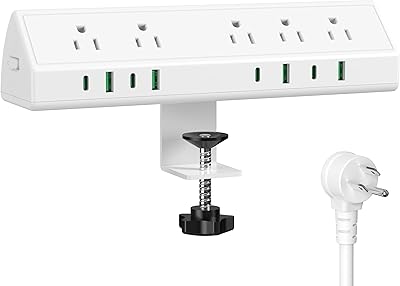
HHSOET Desk Clamp Power Strip with USB Ports
84%
88%
Ease of Installation
91%
Build Quality
65%
Cord Length
72%
USB Charging Performance
89%
Mounting Stability
More
JXGUCAT Desk Clamp Power Strip 10FT
78%
91%
Ease of Installation
78%
Clamp Stability & Fit
71%
USB-C Charging Speed
88%
Outlet Spacing & Usability
86%
Cord Length & Routing
More
Jgstkcity 45W Desk Clamp Power Strip
87%
91%
Build Quality
87%
USB-C Charging Speed
68%
Installation Versatility
84%
Outlet Layout
92%
Cable Management
More
GLCONN Desk Clamp Power Strip with USB C (20W PD)
85%
91%
Fast Charging Performance
87%
Ease of Setup and Installation
83%
Build Quality and Durability
89%
Surge Protection Effectiveness
93%
Space Efficiency
More
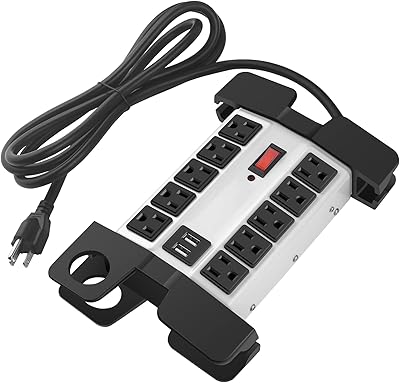
HOPOW Dual Layer Desk Clamp Power Strip with 13 Outlets and 4 USB Ports
88%
89%
Surge Protection
93%
Ease of Installation
88%
USB Charging Speed
85%
Build Quality
91%
Cord Length Flexibility
More
One Beat OB3LDC2B Power Strip Desk Lamp
77%
93%
Space-Saving Design
96%
Ease of Setup
88%
Touch Control Usability
81%
Lighting Quality
83%
Color Temperature Range
More
CCCEI Heavy Duty Power Strip with USB Ports
87%
89%
Overall Build Quality
91%
Surge Protection Effectiveness
87%
Ease of Installation
85%
Port Availability and Charging Speed
88%
Cord Length and Flexibility
More
CCCEI BY213-P16 16-Outlet Power Strip
79%
91%
Build Quality
93%
Outlet Count & Spacing
78%
Overload Protection
71%
Cord Length & Quality
83%
Wall Mounting & Installation
More
ANNQUAN 12-Outlet Under Desk Power Strip
80%
93%
Plug Design
88%
Outlet Count & Layout
86%
USB-C Charging Speed
79%
Mountability
67%
Surge Protection
More

FAQ

The clamp is designed to fit desk edges up to 2.58 inches thick. If your desk edge is thicker than that, or has an unusual profile like a rounded or beveled edge, you will want to use the included screw-mount option instead for a secure fit.

Yes, it works well on sit-stand desks. Because the clamp attaches directly to the desk surface rather than the wall, the power strip moves with the desk. Just make sure your power cord has enough slack to accommodate the full height range of your desk travel.

It depends on your laptop. The USB-C ports on this desktop power hub top out at 20W, which is enough for phones, tablets, earbuds, and some ultra-low-power laptops. Most full-size laptops require 45W or more to charge at a reasonable speed, so you would likely get very slow charging or just enough to maintain battery level rather than actively charge.

No. The CCCEI AC02K Desk Clamp Power Strip handles transient voltage spikes, not sustained power issues. For protection against outages or brownouts, you would need a UPS (uninterruptible power supply) in addition to or instead of a surge strip.

Not necessarily. The USB ports share available power per side, so if you have multiple high-draw devices charging at the same time on the same side, each one gets a portion of the total output rather than the full rated wattage. For fastest charging, it is best to limit simultaneous high-draw connections.

The clamp is designed to grip without gouging, but if your desk has a delicate finish, it is worth placing a thin rubber pad or cloth between the clamp and the surface as a precaution. Most users report no damage on standard laminate or wood desks.

The clamp version requires no tools at all — you open the clamp, position it on the desk edge, and tighten it by hand. Most buyers report having it mounted and plugged in within a couple of minutes. The screw-mount option does require a screwdriver and a more permanent commitment to the location.

The indicator lights are always on when the unit is powered, and a few buyers have noted they are visible in a dark room. If you are sensitive to indicator lights while sleeping, placing the unit on the side of the nightstand facing away from the bed, or using a small piece of opaque tape over the lights, can reduce the glow.

The unit is rated for a maximum of 1875W total across all outlets. If connected devices collectively exceed that load, the internal protection should trip the circuit rather than allow dangerous overheating. That said, it is always a good practice to keep your total wattage well below the rated ceiling rather than testing the limit.

Six feet works fine for most desks that sit reasonably close to a wall outlet, and the flat plug helps it sit flush at the socket. Where it can feel short is in larger rooms or setups where the desk is positioned toward the center of the room rather than against a wall. In those cases, an extension cord rated for the appropriate amperage would be needed.