Overview

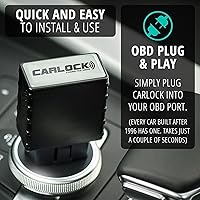
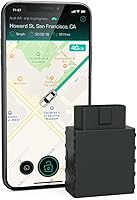
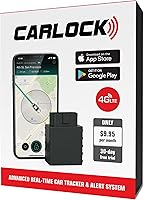
The CarLock OBD GPS Car Tracker plugs directly into your car's OBD-II port — the same diagnostic socket a mechanic uses — and transforms it into a round-the-clock monitoring system with zero wiring and zero charging required. It draws power straight from the port and runs quietly in the background. The whole system runs on 4G LTE connectivity and a cloud-based app available for both Android and iOS. One thing worth stating clearly upfront: this is a monitoring and alert tool, not a physical immobilizer. It will not stop a determined thief from driving your car away, but it will tell you immediately that something is wrong and show you exactly where your vehicle is heading. A recurring monthly subscription keeps the service active.
Features & Benefits

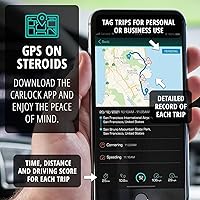
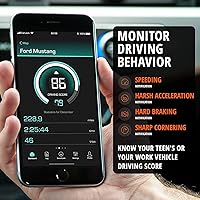
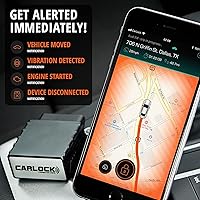
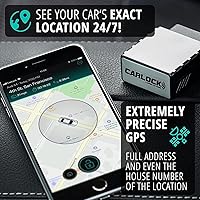
While your car is moving, GPS location refreshes every 7 to 30 seconds — precise enough to track a stolen vehicle across town in real time. When parked, the system checks in every 30 minutes to balance coverage and data usage. You get instant phone alerts the moment the engine starts, the vehicle moves, vibration is detected, or the device is physically unplugged from the port. Driving behavior monitoring flags harsh braking, aggressive acceleration, and sharp cornering, which matters whether you are coaching a teenager or keeping an eye on a work vehicle. Geozones let you set a virtual boundary around a neighborhood or city, and built-in trip history lets you label each journey as personal or business for mileage records.

Best For

This car monitoring plug is a strong fit for anyone in a high-theft area who wants passive, always-on protection without touching a single wire under the dash. Parents tend to get significant value from real-time driver alerts — knowing your teen hit 80 mph on a back road or crossed outside a set boundary during curfew hours is the kind of insight that is hard to put a price on. Small business owners managing one or two vehicles will appreciate the trip tagging and basic fleet visibility it provides. Buyers looking for a one-time purchase with no ongoing fees, however, should think carefully about the subscription commitment before adding this to their cart.

User Feedback

With over 5,000 ratings and a 4.2-star average, the CarLock device holds up well across a large sample of buyers. The most praised aspects are the quick, painless setup and the reliability of phone notifications — most users report being fully operational within minutes. The teen-monitoring angle gets frequent positive mentions in reviews. The sharpest divide in feedback centers on the monthly subscription: long-term owners sometimes feel the cost accumulates faster than expected, particularly when cheaper one-time trackers exist. A smaller but consistent group of users notes occasional app connectivity issues or a slightly unintuitive interface. Customer support responsiveness gets split reviews — some buyers report prompt help, while others describe slower or less satisfying experiences.

Pros

  • Plugs into the OBD-II port in seconds — no tools, no wiring, no installer needed.
  • GPS location updates every 7 to 30 seconds while moving, giving genuinely useful real-time tracking.
  • Phone alerts for engine start, motion, vibration, and device removal arrive quickly and reliably.
  • Driving behavior monitoring makes it one of the more practical tools for parents of new drivers.
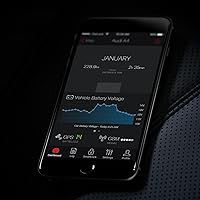
  • Battery health alerts can catch a dying car battery before you are stranded unexpectedly.
  • Geozone notifications are easy to configure and work well for curfew enforcement or fleet boundaries.
  • Trip history with personal and business tagging is a convenient bonus for anyone tracking mileage.
  • Over 5,000 Amazon ratings with a 4.2-star average signals consistent real-world performance across a large user base.
  • No separate charging or battery management required — the OBD port handles power automatically.

Cons

  • The monthly subscription is an ongoing cost that adds up significantly when calculated annually.
  • A thief who knows cars can simply unplug the device from the OBD port before driving away.
  • Coverage is limited to the USA and Canada, making it useless for international travel or relocation.
  • Some users report intermittent app connectivity issues that temporarily disrupt real-time tracking.
  • The app interface has drawn criticism for being less intuitive than expected from a modern connected device.
  • Customer support quality appears inconsistent based on user reviews — some report fast help, others do not.
  • The OBD port location under the dash is not hidden, reducing its effectiveness as a covert tracker.
  • Without an active subscription, the hardware itself provides no tracking or alert functionality whatsoever.

Ratings

The scores below were generated by AI after analyzing thousands of verified global user reviews for the CarLock OBD GPS Car Tracker, with spam, bot-submitted, and incentivized feedback actively filtered out before scoring. The result reflects where this car monitoring plug genuinely excels and where real buyers have run into frustration — nothing is glossed over.

Ease of Installation
94%
Buyers consistently describe setup as one of the fastest they have experienced with any car tech product. Plug it into the OBD port, download the app, and you are tracking within minutes — no appointment with an installer, no tools, no reading through a manual.
A small number of users with older or unusual vehicle models report the device fitting loosely or sitting at an awkward angle in the port. Nothing deal-breaking, but worth checking port orientation before assuming a perfect fit.
Real-Time Tracking Accuracy
88%
The 7 to 30 second GPS refresh rate while driving is fast enough to follow a moving vehicle street by street, and most users report location accuracy that holds up well in suburban and urban environments. For theft recovery or monitoring a teen on a road trip, the precision feels genuinely useful.
In rural areas or locations with weak cellular coverage, some users note gaps in the location trail or delayed updates. The tracker depends on both GPS signal and 4G LTE connectivity, so it is only as reliable as the network in your area.
Alert Reliability
86%
Push notifications for engine start, motion, and vibration arrive quickly in the majority of user reports, and many buyers specifically mention being impressed by how fast the alert lands on their phone after an event triggers. The disconnection alert in particular is praised as a useful last-resort warning.
A recurring minority of reviews mention occasional missed or delayed alerts, particularly during periods of app instability or poor cellular handoff. When alerts do lag, it undermines the core promise of the device, which frustrates users who are relying on it during high-stress situations.
App Experience
63%
37%
The app covers all the core functions — live map, trip history, alert settings, geozone setup — and for most users it works adequately day to day. Initial configuration is straightforward, and the interface is clean enough for non-technical users to navigate without much trial and error.
This is where the most consistent criticism lands. Users report connectivity drops, occasional freezing, and a UI that feels dated compared to other connected-device apps on the market. Customer reviews mention that updates sometimes introduce new bugs, and the overall polish is noticeably behind what buyers expect from a modern subscription product.
Value for Money
61%
39%
The upfront hardware cost is accessible for most budgets, and the feature set at that price point — real-time GPS, driving behavior monitoring, battery alerts, and geozone — is competitive with trackers that cost significantly more as a one-time purchase.
The mandatory monthly subscription is where the value equation gets complicated. Over the course of a full year, the total spend climbs considerably, and a meaningful portion of reviewers feel the ongoing fee is hard to justify, especially when one-time GPS tracker alternatives exist at similar or lower total cost.
Theft Deterrence Effectiveness
58%
42%
For users whose main goal is knowing immediately when their car is tampered with, the motion and vibration alerts provide a faster response window than most factory alarm systems. Several reviews mention successfully locating a moved vehicle or catching unauthorized use because of the instant notification.
The OBD port is located under the dashboard and is not hidden, meaning any car-savvy thief can find and remove this car monitoring plug in seconds. The device cannot disable the engine or slow a theft in progress — it only tells you it happened, which limits its real-world deterrence value significantly.
Driving Behavior Monitoring
83%
Parents of teen drivers rate this feature highly and consistently. Seeing a per-trip breakdown of harsh braking events, acceleration spikes, and cornering behavior gives caregivers a factual, conversation-starting record rather than just gut instinct about how their teenager drives.
The scoring system and threshold settings can feel opaque to new users — it is not always clear what exactly triggers a harsh acceleration flag versus a normal spirited merge onto a highway. Some users want more control over the sensitivity levels than the app currently allows.
Battery Health Monitoring
79%
21%
Several buyers specifically mention being saved from a dead battery situation because the CarLock device flagged abnormal drain days before the battery failed. For anyone who parks a car for extended periods or has an aging vehicle battery, this feature alone has real practical value.
The battery alerts are only as useful as the user's ability to act on them, and a few reviewers note the alert thresholds can feel overly sensitive, triggering warnings on a battery that was ultimately fine. There is no granular control over when the alert fires.
Geozone Functionality
77%
23%
Setting up a virtual boundary around a neighborhood, school zone, or job site is straightforward in the app, and the alert when the vehicle exits is timely in most reports. Small business owners tracking a work vehicle or parents enforcing geographic boundaries find this feature genuinely practical.
Users managing multiple geozones report that the interface for editing or stacking zones is less intuitive than expected. There have also been occasional false positives where a parked vehicle near a boundary edge triggers an exit alert, which erodes confidence in the feature over time.
Trip History & Logging
81%
19%
Automatic trip logging with personal or business tagging is a quietly useful feature that several small business owners and freelancers highlight in their reviews. Being able to pull up a month of driving history for mileage reimbursement or tax purposes without any manual input saves real time.
The trip log interface is functional but not feature-rich — users who want detailed export options, calendar filtering, or integration with expense apps will find the current toolset limiting. A few reviews note that occasional connectivity gaps create incomplete trip records.
Device Build Quality
74%
26%
The unit is compact and solid enough to sit in an OBD port without wobbling or feeling cheap. At its size — just under 3 inches long — it fits neatly under most dashboards without drawing attention or interfering with driver legroom.
It is a plastic device drawing continuous low-level power, and some longer-term users report that the unit runs noticeably warm after extended use. There are also occasional reports of the OBD connection loosening on ports that are angled downward rather than horizontal.
Customer Support
55%
45%
A portion of users report positive interactions with the support team, particularly for initial setup questions or subscription billing issues. For straightforward problems, the response is often described as helpful and reasonably fast.
The support experience is highly inconsistent based on reviews. A meaningful number of buyers describe slow response times, generic replies that did not address their specific issue, or difficulty reaching anyone for hardware-related problems. For a subscription product, this inconsistency is a more significant issue than it would be for a one-time purchase.
Coverage & Connectivity
72%
28%
For buyers in the continental United States and Canada, the 4G LTE coverage is adequate for everyday use and matches what most national cellular networks provide. Urban and suburban users rarely report coverage-related problems during normal commutes or local driving.
The hard geographic cap at the US and Canada border is a genuine dealbreaker for anyone who crosses into Mexico or travels internationally. Additionally, rural dead zones can interrupt tracking entirely, and there is no offline fallback mode when cellular signal is unavailable.
Subscription Flexibility
52%
48%
The first month free gives new buyers a genuine trial window to assess whether the feature set justifies the ongoing cost before committing financially. The subscription can be cancelled, and there are no reported issues with accessing and managing the plan through the app.
There is currently only one subscription tier, which means users who only want basic tracking without driving analytics or trip logging still pay the full rate. Buyers who expected a lower-cost basic plan or a one-time lifetime license option have expressed clear frustration in their reviews.

Suitable for:

The CarLock OBD GPS Car Tracker is a strong match for anyone who wants round-the-clock vehicle monitoring without the hassle of a professional installation or hardwired alarm. Car owners living in neighborhoods with rising theft rates will appreciate the passive, always-on protection that kicks in the moment something suspicious happens. Parents of teenage drivers are a particularly well-served group — the driving behavior alerts for speeding, hard braking, and sharp cornering give caregivers real visibility into habits that a teenager might not self-report. Small business owners or freelancers who run a single vehicle or a small fleet can also use the trip tagging and geozone features to keep tabs on routes and work mileage without investing in expensive fleet software. If you have ever walked out to an empty parking spot or simply want the reassurance of knowing your car's exact location at any given moment, this OBD tracker fills that role reliably and without demanding any technical skill to set up.
Not suitable for:

The CarLock OBD GPS Car Tracker is not the right choice for buyers who want a physical theft deterrent — it monitors and alerts, but it cannot remotely disable an engine or prevent a thief from driving the vehicle away. Anyone unwilling to commit to an ongoing monthly subscription should look elsewhere, since the device is essentially inert without an active plan, and the cumulative cost over a year or two is worth calculating before purchasing. Buyers outside the United States and Canada will also find the coverage limitations a dealbreaker, as the service does not extend beyond those two countries. There is also a practical security gap worth acknowledging: the OBD port is typically visible and accessible under the dashboard, meaning a knowledgeable thief could simply unplug this car monitoring plug before driving off. Finally, anyone who expects a polished, glitch-free app experience may encounter occasional frustrations, as some users report connectivity hiccups and interface quirks that require patience to work through.
Specifications

  • Connectivity: The device uses 4G LTE, GSM, GPS, Bluetooth, and cloud connectivity to transmit and receive data in real time.
  • Installation: Plugs directly into any standard OBD-II port with no wiring, drilling, or professional installation required.
  • Power Source: Draws power continuously from the vehicle's OBD-II port, so no internal battery charging or replacement is needed.
  • GPS Refresh Rate: Location updates every 7 to 30 seconds while the vehicle is in motion, and every 30 minutes when stationary.
  • App Compatibility: Fully supported on Android and iOS mobile devices, with additional access available through a web-based dashboard.
  • Coverage Area: Service coverage is limited to the United States and Canada; the device does not function outside these two countries.
  • Dimensions: The unit measures 2.75 x 1.96 x 0.98 inches, making it compact enough to sit flush near the OBD port without obstructing legroom.
  • Weight: The device weighs 3.84 ounces, light enough that it does not stress or loosen the OBD-II port over time.
  • Alert Types: Sends real-time push notifications for vehicle motion, engine start, vibration detection, and physical device disconnection.
  • Driver Monitoring: Tracks and reports harsh acceleration, hard braking, sharp cornering, and maximum speed events per trip.
  • Battery Alerts: Monitors the vehicle's 12V battery and sends alerts when charge drops dangerously low or abnormal drain is detected.
  • Geozone Feature: Users can define custom geographic boundaries and receive an immediate alert whenever the vehicle crosses outside them.
  • Trip History: All trips are logged automatically and can be labeled as personal or business for mileage reporting and expense tracking.
  • Fleet Support: The platform supports multiple vehicles under one account, making it suitable for small fleet oversight.
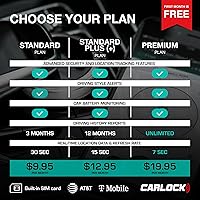
  • Subscription: An active monthly subscription is required for all tracking and alert features; the first month is included at no charge.
  • Amazon Rating: The product holds a 4.2 out of 5 star rating based on over 5,093 verified Amazon customer ratings.

Related Reviews

Moto Watchdog OBD GPS Tracker
86%
91%
Real-Time Tracking Accuracy
88%
Ease of Installation
85%
Geo-Fencing Features
94%
No Subscription Fees
65%
Mobile App Compatibility
More
Brickhouse Security Spark Nano 7
76%
88%
Battery Life
93%
Ease of Installation
74%
GPS Tracking Accuracy
57%
Subscription Value
68%
App Experience
More
Salind GPS 4G LTE OBD Vehicle Tracker
86%
91%
Performance & Accuracy
93%
Real-Time Tracking
89%
Ease of Installation
72%
Subscription Cost
88%
Battery Life
More
Amcrest GL300 4G LTE Portable GPS Tracker
77%
88%
Ease of Setup
74%
GPS Accuracy
69%
Battery Life
81%
App Experience
91%
Magnetic Mount Strength
More
Tack GPS Tracker
Tack GPS Tracker
89%
94%
Tracking Accuracy
91%
Battery Life
88%
Build Quality
90%
Ease of Setup
95%
Portability
More
Vyncs OBD GPS Vehicle Tracker
75%
93%
Ease of Setup
71%
GPS Accuracy
62%
GPS Update Speed
58%
App Experience
83%
Value for Money
More
VyncsPro 4G GPS Tracker
86%
88%
Real-Time Tracking Accuracy
92%
Value for Money
80%
Ease of Setup
72%
Connectivity Reliability
85%
App Experience
More
VITALGLOW GPS Tracker for Vehicles
78%
88%
Value for Money
91%
Ease of Setup
79%
Tracking Accuracy
63%
Battery Life
67%
App Experience
More
MYLOC8 Ultra GPS Tracker
85%
91%
Battery Life
88%
Ease of Setup
85%
Real-Time Tracking Accuracy
89%
Durability
78%
Subscription Flexibility
More
TKSTAR TK905 GPS Tracker
86%
94%
Tracking Accuracy
91%
Anti-Theft Alerts
88%
Installation Ease
85%
App Usability
82%
Battery Life
More

FAQ

Almost all cars and light trucks sold in the US after 1996 have an OBD-II port, so compatibility is rarely an issue for modern vehicles. It is typically located under the dashboard on the driver's side, often near the steering column. You can usually find it by crouching down and looking just below the instrument cluster — no tools needed.

No, and it is important to be honest about that. The CarLock OBD GPS Car Tracker is a monitoring and alert device, not a physical immobilizer. What it does is notify you immediately if your car moves, the engine starts, or someone tampers with the device, and then lets you track its location in real time. That information can be passed to police, but the device itself will not prevent a thief from driving away.
Yes, that is a real limitation worth knowing about. The OBD port sits under the dashboard and is visible to anyone who looks, so a thief who knows cars could disconnect it before driving off. The device does send a disconnection alert the moment it is unplugged, but if you are not watching your phone at that exact moment, it may not help in time.

Most users report being up and running in well under ten minutes. You plug the device into the OBD port, download the app, create an account, and the two pair together. There is no wiring, no configuration menu to navigate, and no installer to book.

Without an active subscription, the device goes essentially silent. You will not receive alerts, track location, or access trip history. The hardware itself has no standalone function; all the data processing and notifications run through the cloud-based service, which requires the monthly plan to stay active.

The GPS location refreshes every 7 to 30 seconds while the vehicle is in motion, which is precise enough to follow a route turn by turn in most cases. Accuracy can vary slightly depending on urban canyon interference or cellular signal strength in rural areas, but in normal driving conditions the tracking is reliable and timely.

This is one of the most consistently praised use cases across user reviews. The device logs harsh acceleration, hard braking, sharp cornering, and maximum speed on a per-trip basis, and you can review that data in the app after each drive. You will not get a live video feed, but you get a clear behavioral picture of how the car was driven.

It draws a very small amount of standby power from the OBD port when the vehicle is off, but it is generally considered negligible for a healthy battery. The device also monitors battery health itself, so it will alert you if it detects your battery running low or draining faster than expected, which actually makes it a useful early warning tool.

Yes, the platform supports multiple vehicles and is designed to accommodate small fleet use. Each vehicle needs its own device and its own subscription, but they can all be managed from a single app login, which is convenient if you are overseeing two or three cars for a small business or household.

It does come up in reviews with some regularity. A portion of users report occasional connectivity drops, delayed notifications, or an interface that feels less polished than they expected. It is not a universal experience — many users have no issues — but it is worth knowing that the app experience is not always perfect, and customer support responsiveness is somewhat inconsistent based on user accounts.