

Overview

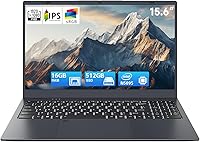
The BLUEING NC15-16+512 15.6-inch Laptop is a budget-oriented Windows 11 Pro machine that launched in February 2025, entering one of the most competitive price segments in consumer computing. BLUEING is a lesser-known Chinese OEM, so setting realistic expectations upfront matters — this isn't a household name with decades of reliability behind it. What the BLUEING NC15 offers is a practical, large-screen daily driver at a price that won't cause regret if your needs are modest. At around 1600g with a slim profile, it's manageable enough to carry between rooms or toss in a bag, though it sits most comfortably on a desk. The Celeron N5095 processor inside is competent for everyday tasks but shouldn't be confused with anything performance-oriented.

Features & Benefits

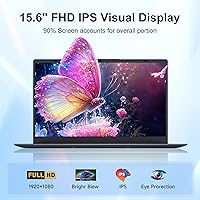
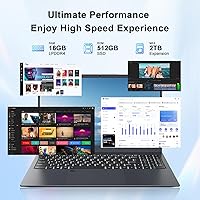
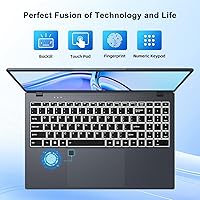
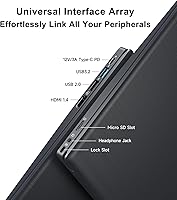
The 16GB LPDDR4 RAM and 512GB NVMe SSD combination is genuinely impressive for this price tier — you'd typically see 8GB paired with slower storage at comparable budget options, so the generous memory headroom makes a real difference for everyday multitasking. Boot times are quick, and switching between a browser, a spreadsheet, and a video call feels responsive. The 15.6-inch FHD IPS panel delivers a clean 1920x1080 picture with decent viewing angles, though don't expect color-accurate output for creative work. Small touches like the backlit keyboard and fingerprint reader add genuine day-to-day convenience that is often absent at this price level. The port selection is practical — USB 3.2, Mini HDMI, Type-C charging, a card slot — though having just one fast USB-A port can feel limiting if you regularly use multiple peripherals.

Best For

This budget 15.6-inch laptop makes most sense for people with straightforward computing needs. Students writing essays, doing online research, or joining video lectures will find it more than capable. Remote workers handling email, cloud-based documents, and the occasional Zoom call should get along fine — provided they aren't pushing it into demanding territory. It's also a strong pick for first-time laptop buyers or seniors who want a large, readable screen and a familiar Windows experience without a steep learning curve. As a secondary or backup travel machine for someone who already owns a more powerful device, this Windows 11 Pro laptop fits the role well. Freelancers with light administrative workloads or simple client presentations will appreciate the Pro OS license too.

User Feedback

Since the BLUEING NC15 only launched in early 2025, the pool of verified reviews is still relatively thin — worth keeping in mind as you weigh opinions. Early buyers tend to highlight value for the price as the standout factor, with the display quality and fingerprint reader drawing consistent praise. On the flip side, concerns crop up around the brand's long-term reliability and how accessible support actually is if something goes wrong. The 0.3MP webcam is a known weak point — video calls will look grainy, and buyers who rely heavily on conferencing should factor that in. Build quality feedback points to a lightweight plastic chassis that feels adequate but not particularly solid. Thermal management under sustained use also comes up, with a few users noting the bottom of the chassis can get warm during longer sessions.

Pros

  • 16GB of RAM is a standout spec for this price tier, making everyday multitasking genuinely smooth.
  • The 512GB NVMe SSD delivers quick boot times and snappy app launches you would not expect at this budget level.
  • Windows 11 Pro out of the box is a genuine perk — most budget laptops ship with the Home edition.
  • The 15.6-inch FHD IPS display offers decent viewing angles and a clear 1080p image for everyday media use.
  • A fingerprint reader at this price level is a practical convenience that speeds up logins and protects personal data.
  • The backlit keyboard lets you work comfortably in dim environments without fumbling around for the right key.
  • Port variety covers daily needs well — USB 3.2, Mini HDMI, Type-C charging, and a TF card slot are all present.
  • Storage is expandable up to 2TB, giving real room to grow without immediately reaching for external drives.
  • At roughly 1600g, the BLUEING NC15 is light enough to carry between rooms or pack for occasional travel.
  • The 1-year manufacturer warranty and 30-day return window provide at least a baseline of post-purchase protection.

Cons

  • The Celeron N5095 hits a performance wall quickly — video editing, heavy multitasking, and modern gaming are genuinely off the table.
  • The 0.3MP webcam produces grainy, washed-out video that will look poor in any professional or semi-professional video call setting.
  • BLUEING is an unfamiliar brand with a limited track record, making long-term reliability and warranty follow-through genuine unknowns.
  • Battery capacity is never disclosed in the product listing, making it impossible to gauge real-world endurance before buying.
  • Only one USB 3.2 Gen 1 port means anyone using multiple peripherals will likely need to purchase a hub right away.
  • The plastic chassis feels lightweight but not particularly sturdy and may not hold up well to daily wear or rough handling.
  • Display brightness and color accuracy have not been independently verified, which is a real concern for anything beyond basic browsing.
  • Wi-Fi 5 is adequate for most home setups but falls noticeably behind Wi-Fi 6 in busier or congested network environments.
  • As a product that launched in early 2025, there is very little long-term user data available to validate first impressions.
  • Thermal performance under sustained loads has raised concern, with some users reporting noticeable heat buildup on the underside during longer sessions.

Ratings

Our ratings for the BLUEING NC15-16+512 15.6-inch Laptop are generated by AI after analyzing verified buyer reviews from global marketplaces, with spam, bot-generated feedback, and incentivized reviews systematically filtered out before scoring. The result is a balanced scorecard that reflects real user experiences — both where this budget Windows machine genuinely delivers and where it falls short of buyer expectations. Every category score is benchmarked against comparable devices in the same price tier, so the assessment stays grounded in context rather than abstract ideals.

Value for Money
83%
For a Windows 11 Pro machine with 16GB of RAM and a 512GB NVMe SSD, the asking price is genuinely hard to argue with. Most buyers report feeling like they received more hardware than they paid for, particularly when comparing similar configurations from more established brands selling at notably higher price points.
The value proposition weakens significantly if anything goes wrong after the warranty period, since BLUEING's long-term support infrastructure remains largely untested. Buyers who factor in the added cost of a USB hub, Mini HDMI adapter, and potential early replacement may find the total spend creeping closer to mid-range territory than it first appeared.
Performance
62%
38%
For daily tasks like writing documents, browsing a handful of tabs, streaming video, or joining a Zoom call, the Celeron N5095 handles the load without noticeable lag. Users who stay within this workload range consistently report a smooth enough experience that does not feel as constrained as the chip's spec sheet might suggest going in.
Push the N5095 into anything heavier — video editing, large spreadsheets with complex formulas, or multiple demanding applications running simultaneously — and it slows down noticeably. The 15W thermal envelope also means sustained performance can drop off during longer intensive sessions, which is a hard ceiling for anyone expecting output beyond basic everyday productivity.
Display Quality
74%
26%
The 15.6-inch 1080p IPS panel earns consistent praise for its wide viewing angles and clear, readable image — users watching content or attending video calls from an angle do not get the color shift that cheaper TN panels produce. For a budget laptop screen, the visual experience is better than most buyers expect going in.
Peak brightness has not been independently measured, and some users report the screen looks washed out in well-lit rooms or near windows during daytime use. Color accuracy is not calibrated for any professional standard, so photo editors or designers working on color-sensitive projects will quickly find this display falls short of their actual requirements.
Build Quality
58%
42%
The slim 19.9mm profile and 1600g weight make the BLUEING NC15 feel manageable to carry, and the overall form factor is clean enough for shared workspaces or classroom environments. For buyers who handle their laptop carefully and keep it stored in a padded case, the chassis holds up adequately for everyday desk use.
The all-plastic chassis flexes noticeably when pressure is applied to the lid or palmrest, and several users report it does not inspire confidence when transported in a bag without protective padding. Buyers who have previously owned laptops with metal or premium-finish builds will find the construction quality here an immediate and clear step down.
RAM & Storage
86%
16GB of LPDDR4 RAM paired with a 512GB NVMe SSD is a configuration that punches well above the typical budget laptop spec sheet. Buyers consistently highlight how fast the machine boots and how responsive app switching feels compared to budget laptops they have previously owned — a direct result of the NVMe drive and generous memory headroom.
The RAM does not appear to be user-upgradeable, meaning 16GB is the fixed ceiling with no straightforward expansion path available. While 512GB is a generous starting point, users who store large video files, software installs, or extensive media libraries locally may find themselves pushing against that limit sooner than they anticipate.
Keyboard & Trackpad
67%
33%
The backlit keyboard is a well-received feature at this price — students working in library study rooms or dimly lit home setups genuinely appreciate being able to see the keys clearly without extra lighting. Key travel is adequate for casual typists handling everyday email, note-taking, and document work without building fatigue.
Heavier typists report the keyboard flexes under firm keystrokes, and the tactile feedback is described as softer and less defined than most would prefer for extended writing sessions. The trackpad is functional but draws mixed reactions — some users find it slightly sluggish and imprecise compared to what they experienced on previous machines.
Battery Life
51%
49%
Under genuinely light use — browsing a couple of tabs or writing in a word processor — the battery holds long enough to get through a few hours without immediately reaching for the charger. The Type-C PD charging port is a practical inclusion that makes topping up more flexible whenever an outlet is within reach.
Battery capacity is never disclosed anywhere in the product listing, making it impossible to plan around real-world endurance with any confidence. Users who need to work a full day away from a power outlet are taking a genuine risk, as there is no published benchmark data to indicate how long this machine actually lasts under normal conditions.
Webcam Quality
34%
66%
The webcam is positioned correctly above the display for natural eye contact during calls, which at least means framing and angle are not an additional problem to manage. For users who primarily rely on audio during meetings or only need a camera for occasional and very informal video check-ins, it fulfills that minimal requirement without extra equipment.
At 0.3MP, the webcam produces grainy, low-detail video that looks poor even in good lighting — making it one of the most consistently criticized weak points across early user reviews. Anyone using this laptop for regular client calls, job interviews, or any situation where video appearance carries weight will almost certainly need to purchase an external USB webcam.
Connectivity & Ports
71%
29%
The port lineup covers more ground than expected at this price — USB 3.2, USB 2.0, Mini HDMI, Type-C charging, a TF card slot, and a headphone jack all appear on one machine. For users plugging in a mouse, an external display, and headphones at the same time, the core daily connectivity needs are reasonably well served.
Having only one USB 3.2 Gen 1 port is a real constraint for anyone who regularly attaches multiple peripherals, as a mouse, external drive, and USB hub suddenly compete for the same high-speed slot. The Mini HDMI port also requires a specific cable or adapter that most buyers do not already own, adding a small but real hidden cost at initial setup.
Wireless Performance
69%
31%
Wi-Fi 5 and Bluetooth 5.0 are solid for most home and small office environments, with users reporting stable connections during video calls and general browsing without frustrating drops or interruptions. Bluetooth 5.0 pairs reliably with wireless headphones, mice, and keyboards, covering the typical wireless accessory setup for this category of buyer.
In busier network environments — apartment buildings, university campuses, or offices with many simultaneously connected devices — Wi-Fi 5 noticeably underperforms compared to Wi-Fi 6 capable laptops in the same space. There is also no Ethernet port on the chassis, removing the wired fallback option for users in situations where a cable connection would be far more stable.
Thermals & Noise
56%
44%
During light everyday tasks the machine runs quietly, with the fan either inactive or barely audible — a practical advantage for library use or open-plan office settings where background noise draws attention. The low 15W processor TDP contributes to keeping temperatures reasonable during short, casual usage sessions.
Under sustained workloads, several users report the bottom of the chassis gets noticeably warm and the fan ramps up in a way that becomes distracting in quiet environments. Extended demanding tasks can also cause the processor to throttle, reducing responsiveness at exactly the moments when consistent, reliable output is needed most.
Brand & Support
47%
53%
BLUEING includes a 1-year manufacturer warranty and a 30-day hassle-free support window, providing at least a short-term safety net for buyers who encounter defects straight out of the box. Contacting support through Amazon's seller messaging system is relatively accessible during the initial ownership period if issues surface quickly.
Beyond the initial warranty window, BLUEING's after-sales infrastructure is largely unknown — there are no established service centers and reliably reaching the brand outside of Amazon's platform is not guaranteed. As a newer OEM with limited Western market history, buyers should honestly factor in the real possibility that long-term support will be inconsistent or simply unavailable when it is needed most.
Software & OS
78%
22%
Shipping with Windows 11 Pro pre-installed is one of the more pleasant surprises this budget laptop offers — most machines at this price come with Home, so getting Pro without an extra licensing cost is a tangible win for small business users and freelancers who genuinely need BitLocker encryption or Remote Desktop access.
There is no clear information on whether the Windows license is a full retail version or an OEM license permanently tied to the hardware, which matters if reinstallation is ever needed down the line. Some buyers have also reported encountering unexpected pre-installed software out of the box, requiring a cleanup session before the system felt truly ready for personal use.
Portability
72%
28%
At 1600g and 19.9mm thin, the BLUEING NC15 slides comfortably into most laptop bags without adding significant bulk, making it a manageable daily carry for students moving between campus buildings or workers commuting to a co-working space. The overall form factor is practical for light travel without feeling cumbersome.
The 15.6-inch screen makes this a larger-than-average machine for daily carry, and the plastic chassis lacks the reinforcement that would make users feel safe transporting it without a dedicated protective case. Unresolved battery life uncertainty also means frequent travelers may feel compelled to carry the charger everywhere, adding meaningfully to the overall load.

Suitable for:

The BLUEING NC15-16+512 15.6-inch Laptop is best suited for buyers who need a capable, no-frills Windows machine for everyday tasks and have no intention of pushing it past those limits. College students drafting papers, managing schedules, and attending online lectures will find the generous 16GB RAM and fast SSD make the experience far less frustrating than cheaper machines typically offer. Remote workers who spend their days in email clients, browser tabs, and cloud-based tools like Google Docs or Microsoft 365 will get reliable daily performance without the machine becoming a bottleneck. Seniors and first-time laptop owners benefit particularly from the large 15.6-inch screen, the straightforward Windows 11 Pro setup, and the fingerprint reader that makes logging in quick and painless. It also works well as a secondary or travel machine for someone who already owns a more powerful primary laptop but needs something lightweight and affordable for occasional use elsewhere. Small business owners or freelancers handling basic invoicing, scheduling, or client communication tasks will also appreciate getting a Windows 11 Pro license at this price level.

Not suitable for:

Anyone expecting even moderate performance headroom beyond basic computing will find the BLUEING NC15-16+512 15.6-inch Laptop a frustrating experience fairly quickly. The Intel Celeron N5095 is a low-power efficiency chip — ask it to handle video editing software, a large number of simultaneous browser tabs, or any modern game and the machine will struggle noticeably. Creatives needing color-accurate displays for photo editing or graphic design should look at panels that have been independently verified for color gamut and brightness, since this one has not. The 0.3MP webcam is another hard ceiling: if sharp, professional-grade video call quality is a daily requirement, this laptop will let you down every time. Buyers who prioritize long-term brand support should be cautious, too — BLUEING is a relatively unfamiliar OEM and tracking down warranty service if something fails may be more complicated than with established brands. Power users who rely on a laptop as their sole work machine, running demanding applications under sustained load, will simply outgrow what this hardware can deliver.

Specifications

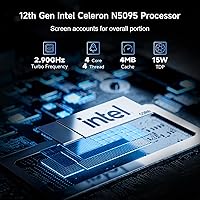
  • Processor: Powered by the Intel Celeron N5095 (Jasper Lake), a quad-core chip with a base frequency of 2.0 GHz, a boost frequency of up to 2.9 GHz, 4MB L3 cache, and a 15W TDP.
  • RAM: Comes equipped with 16GB of LPDDR4 system memory.
  • Storage: Ships with a 512GB M.2 NVMe SSD; the manufacturer states total storage can be expanded up to 2TB.
  • Display: Features a 15.6-inch IPS panel with a native resolution of 1920x1080 and wide viewing angles.
  • Graphics: Uses Intel UHD integrated graphics with a base frequency of 450 MHz and a maximum clock of 750 MHz.
  • Operating System: Ships with Windows 11 Pro pre-installed.
  • Battery: Includes an internal battery; the exact capacity is not disclosed in the manufacturer's product specifications.
  • Weight: The unit weighs approximately 1600g (around 3.5 lbs) without accessories.
  • Dimensions: Measures 357.4 x 233.8 x 19.9mm (approximately 14 x 9.2 x 0.78 inches).
  • Ports: Includes one USB 3.2 Gen 1 Type-A (5Gbps), one USB 2.0 Type-A, one Mini HDMI 1.4, one Type-C PD charging port, one TF card slot, and one 3.5mm CTIA audio jack.
  • Wireless: Supports Wi-Fi 5 (802.11ac) and Bluetooth 5.0.
  • Camera: Equipped with a 0.3MP front-facing webcam integrated above the display.
  • Keyboard: Full-size keyboard with backlit keys designed for comfortable typing in low-light conditions.
  • Security: Includes a fingerprint reader for biometric authentication, compatible with Windows Hello.
  • Warranty: Covered by a 1-year manufacturer protection plan with an additional 30-day hassle-free support window.

Related Reviews

HP 15.6-inch Laptop 15-ef0021nr, Ryzen 3 3200U, 8GB RAM, 256GB SSD

82%
92%
Value for Money
85%
Performance
83%
Build Quality
89%
Portability
81%
Battery Life
More
Dell Inspiron 3593 15.6-inch Laptop
68%
74%
Everyday Performance
81%
SSD Speed & Storage
52%
Display Quality
63%
Battery Life
57%
Build Quality
More
Vonxury 16L Water-Resistant Laptop Backpack
79%
93%
Value for Money
91%
Organization Layout
88%
Laptop Protection
89%
Weight & Portability
74%
Water Resistance
More
Bluboon 15.6 Inch Laptop Backpack
84%
89%
Organization & Storage
84%
Comfort & Ergonomics
90%
Portability & Weight
78%
USB Charging Port Convenience
85%
Laptop Protection
More
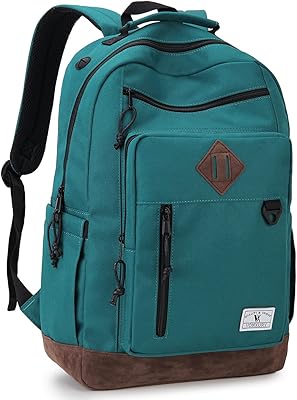
Liokesa 15.6-Inch Laptop Backpack
86%
89%
Value for Money
87%
Comfort and Ergonomics
84%
Durability and Build Quality
92%
Storage and Organization
90%
Water Resistance
More
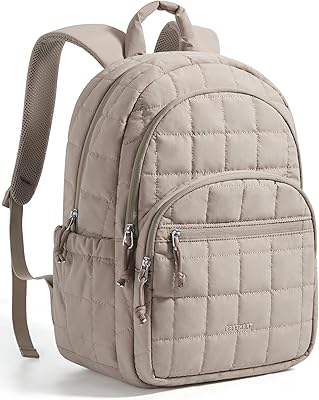
MATEIN Rolling Laptop Bag with Lunch Box
77%
86%
Rolling Mobility
91%
Storage & Organization
88%
Laptop Protection
78%
Lunch Box Utility
74%
Handle System
More
Kuosdaz S6 Laptop Backpack 15.6″
81%
88%
Overall Design & Aesthetics
79%
Build Quality & Durability
84%
Laptop Protection
86%
Storage & Organization
81%
USB Charging Port
More
VANKEAN 15.6 Inch Laptop Backpack V8001
86%
88%
Build Quality
91%
Comfort & Ergonomics
85%
Storage Capacity
75%
USB Charging Functionality
90%
Portability
More
Caoroky Laptop Backpack 15.6 Inch Grey
86%
89%
Durability
91%
Water Resistance
85%
Comfort & Ergonomics
84%
Design & Aesthetics
78%
Capacity & Organization
More
SUNNY BIRD Laptop Backpack 15.6 Inch
88%
91%
Build Quality
88%
Ergonomics & Comfort
94%
Durability & Material
89%
Organization & Storage
90%
Water Resistance
More

FAQ

Yes, streaming video is comfortably within what the BLUEING NC15 handles well. The Celeron N5095 paired with 16GB of RAM is more than sufficient for 1080p playback on services like Netflix, YouTube, or Disney+, and the IPS display makes watching content a reasonably pleasant experience.

The manufacturer states that storage can be expanded up to 2TB, which is a practical option for anyone accumulating larger files or media libraries. The RAM, however, does not appear to be user-upgradeable, so the 16GB configuration should be considered fixed — fortunately, 16GB is a generous amount for everyday tasks at this price tier.

The webcam is technically functional for Zoom or Teams, but the 0.3MP sensor is quite limited by modern standards. Expect grainy, low-detail video — it will get the job done for informal or casual calls, but it is not something you would want to rely on for client-facing meetings or presentations where your image quality actually matters.

It ships with Windows 11 Pro, which is a meaningful step up from the Home edition that most budget laptops include. Pro adds useful features like BitLocker drive encryption, Remote Desktop access, and better organizational management tools — genuinely worth having if you plan to use it for business, freelance, or administrative work.

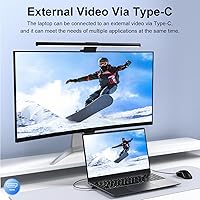
Yes — the laptop includes a Mini HDMI 1.4 port that supports external displays up to 3840x2160 at 30Hz. Just note that you will need a Mini HDMI cable or a Mini HDMI-to-HDMI adapter rather than a standard full-size HDMI cable, which is easy to overlook when setting up your desk.

The fingerprint reader integrates with Windows Hello — you register your fingerprint once in Windows Settings, and from that point on you can unlock the laptop with a quick touch. Early feedback suggests it is reasonably fast and accurate for a budget device, making it a genuinely practical daily convenience rather than a checkbox feature.

For most student workloads — writing papers, web research, Microsoft Office or Google Docs, and online classes — it holds up well. Where it shows its limits is with more demanding software like video editors, data analysis tools, or running several memory-intensive applications simultaneously. If your coursework stays on the lighter side, it is a capable and affordable choice.

BLUEING does not disclose the battery capacity anywhere in the official product listing, which makes it genuinely hard to set solid expectations. The Celeron N5095 is a power-efficient chip, which generally works in favor of longevity, but without a capacity figure or independent testing data, any specific hour estimate would be speculative. Until hands-on reviews become widely available, battery endurance is best treated as an open question for this model.

It is a fair concern and worth thinking through honestly. BLUEING is a relatively new OEM with limited presence in Western markets, meaning there is no deep track record of customer service quality or long-term durability data to draw from. The warranty exists on paper, but support is handled through Amazon's seller contact system, which can be inconsistent for lesser-known brands. If strong post-purchase support is a priority for you, that is a real trade-off worth factoring into the decision.

Under typical tasks like browsing, document work, or video calls, the chassis tends to stay reasonably cool. Some users have noted the bottom of the laptop gets noticeably warm during longer or more demanding sessions, which is not unusual for a slim 15W machine. To keep airflow clear and temperatures comfortable, avoid using it on soft surfaces like blankets or cushions that can block the vents underneath.