
Overview

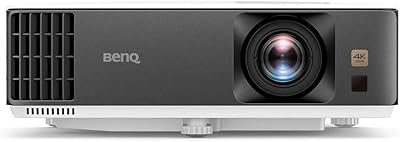
The BenQ TH575 1080p Gaming Projector is BenQ's 2023 refresh of the TH585P, aimed at gamers who want a massive screen without needing to black out every window in the room. What sets this projector apart at its price tier is the balance between genuine brightness and low input lag — two qualities that rarely coexist without a steep cost jump. The standard throw design and 1.1x zoom make placement predictable in most living rooms, though flexibility is limited if your space is not already close to ideal. BenQ backs it with a 3-year warranty, which is a meaningful reassurance at this level. Just know going in: this is a gaming-first machine, not a home-cinema purist's pick.

Features & Benefits

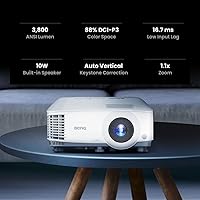
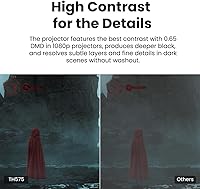
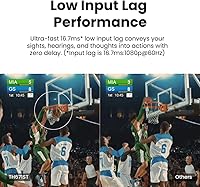
At its core, the TH575 produces enough light to hold its own in a living room with the curtains half-open — something many competing projectors in this range simply cannot claim. The input lag at 1080p/60Hz is quick enough to keep casual and mid-level gaming feeling responsive; it is not tuned for esports-level twitch play, but for open-world games, RPGs, and sports titles it feels genuinely comfortable. The contrast ratio looks impressive on paper, though in brighter rooms the practical difference is more subtle than the number suggests. Auto vertical keystone handles imperfect ceiling mounts well, and dual HDMI inputs mean you can leave a console and a PC connected at the same time without constant cable-swapping.

Best For

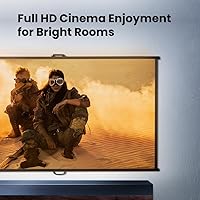
The TH575 is a natural fit for console and PC gamers who want a 100-inch screen experience in an everyday living room or den without committing to a full blackout setup. It also works well for households that split time between gaming sessions and casual movie nights, since the brightness holds up reasonably well in both scenarios. If you are stepping up from a dim entry-level projector, the jump in image quality will be noticeable. Placement matters though: the standard throw means you need roughly 10 to 11 feet of distance to get the most out of it. Those who prioritize long-term reliability over chasing the lowest possible price will likely appreciate what BenQ delivers here.

User Feedback

Buyers have settled on a strong consensus for this projector, with most praise centering on how quick and painless setup is and how immediately satisfying the image looks during gaming sessions. Owners frequently highlight how well it handles afternoons with blinds partially open, which is a real-world test many projectors fail. The recurring criticisms tend to cluster around fan noise at peak brightness and color accuracy that benefits from a manual calibration pass rather than trusting the default mode. A handful of users note the keystone correction hits its limits when the throw angle is steep. Those coming from the previous model generally feel the improvements are worthwhile, though a few describe the upgrade as solid rather than dramatic.

Pros

  • Bright enough to use in a partially lit room, which most projectors at this price level cannot honestly claim.
  • Input lag is low enough to keep gaming feeling responsive for RPGs, sports titles, and casual multiplayer.
  • Auto vertical keystone correction makes setup far less fiddly, especially for users who cannot mount perfectly level.
  • Dual HDMI ports let you keep a console and a PC connected simultaneously without swapping cables.
  • The three-year warranty provides real peace of mind that budget alternatives rarely offer.
  • Full HD resolution delivers a sharp, detailed image at screen sizes that would make a TV look small.
  • Built-in speakers mean you can get up and running without immediately needing an external audio setup.
  • Upgraders from older or dimmer projectors will notice a clear and immediate improvement in everyday image quality.
  • The 2023 model brings meaningful brightness and contrast improvements over its predecessor, making it a worthwhile current-generation pick.

Cons

  • Fan noise becomes noticeable at peak brightness settings, which can be distracting during quiet scenes or dialogue.
  • Color accuracy out of the box is inconsistent — manual calibration is almost always needed to get a pleasing picture.
  • The 1.1x zoom range is narrow, leaving little flexibility if your throw distance does not fall close to the recommended range.
  • Keystone correction has practical limits; steep angles can degrade image geometry in ways that are hard to fix in software.
  • On-screen contrast in bright ambient conditions is softer than the rated spec implies, so dark scenes can look washed out.
  • No 4K or HDR support means this projector will feel dated sooner for buyers planning to use it long-term.
  • The built-in speakers are adequate for casual use but lack the volume and clarity needed for an immersive audio experience.
  • Competitive or reflex-dependent gaming is not well served here; a gaming monitor remains the better tool for those use cases.

Ratings

The scores below for the BenQ TH575 1080p Gaming Projector were generated by our AI engine after processing verified global buyer reviews, actively filtering out incentivized, duplicate, and bot-generated submissions to ensure only authentic feedback shapes the results. Each category reflects real-world usage patterns drawn from console gamers, casual home cinema users, and hybrid setups alike. Both the genuine strengths and the honest frustrations are represented here without softening either side.

Brightness
88%
Owners repeatedly single out the brightness as the standout quality, noting that the TH575 stays watchable during daytime gaming sessions with blinds half-drawn — a scenario where most rival projectors at this price simply give up. Living room users find they rarely need to rearrange their routine around the projector.
A small but consistent group of buyers note that in very bright rooms with direct sunlight or strong overhead lighting, the image still washes out noticeably. The brightness advantage is real, but it is not a substitute for even moderate light control when image quality matters most.
Gaming Performance
83%
For the bulk of gaming use cases — open-world adventures, sports titles, racing games, and couch co-op — the responsiveness feels natural and free of the smearing or lag that plagued older projectors. Switching into Game Mode is quick, and most users describe the on-screen motion as clean and comfortable for long sessions.
Buyers who came in expecting esports-grade performance were occasionally disappointed; the lag is solid but not best-in-class, and fast-paced shooters revealed a perceptible gap compared to a dedicated gaming monitor. The TH575 is genuinely good for casual and mid-level play, but it is not a substitute for a high-refresh display in competitive scenarios.
Image Quality
76%
24%
At its native resolution, the picture is crisp and detailed enough to make gaming and film content look genuinely impressive at sizes that a TV simply cannot match. Users upgrading from older or dimmer projectors consistently describe the jump as immediately noticeable, particularly in well-controlled lighting conditions.
Color accuracy out of the box draws regular criticism, with many buyers noting a cool, slightly artificial look before calibration. Contrast performance in darker scenes is also somewhat inconsistent — the on-paper ratio sounds impressive, but ambient light quickly reduces the practical depth of blacks in real viewing conditions.
Setup & Ease of Use
84%
Auto vertical keystone correction is one of the most praised convenience features among owners, particularly for those placing the projector on a coffee table or shelf at an imperfect angle. Most users report being fully up and running — projector aimed, keystoned, and connected — within 15 to 20 minutes of unboxing.
The standard throw design restricts where you can physically place the unit, and a few buyers found that their room dimensions landed awkwardly between the minimum and maximum throw distances. Those expecting short-throw flexibility were caught off guard, and the limited 1.1x zoom left them with fewer correction options than they anticipated.
Value for Money
79%
21%
The combination of brightness, low input lag, dual HDMI, and a three-year warranty in a single package is hard to match at this price tier, and most buyers feel the feature set justifies the cost when compared point-by-point against alternatives. Those upgrading from budget projectors in particular feel the investment is clearly reflected in daily use.
Buyers with tighter budgets occasionally feel the price is a stretch given the calibration effort required to get good color, and a handful note that competing brands offer comparable brightness for less. For buyers who only plan light or occasional use, the value equation is less compelling than it is for daily gamers.
Fan Noise
61%
39%
During active gaming with audio playing, the fan noise blends into the background well enough that most users stop noticing it entirely. The cooling system does its job reliably, and there have been very few complaints about overheating or unexpected shutdowns during extended sessions.
In quiet movie scenes or during dialogue-heavy cutscenes, the fan hum becomes noticeably present, and a segment of buyers describe it as a persistent mild annoyance rather than something they fully tune out. Reducing brightness helps, but it comes at the cost of the image quality that many buyers purchased this projector specifically to get.
Color Accuracy
67%
33%
After a calibration pass — adjusting color temperature, reducing default saturation, and selecting the right picture preset — many users find the image reaches a pleasing, balanced look that works well for both games and films. The hardware is capable of producing accurate color; it just does not arrive that way by default.
Out of the box, the default modes lean toward an oversaturated, cool-toned presentation that feels artificial for movie watching and can misrepresent game environments. Users who are not comfortable adjusting picture settings manually may simply accept a suboptimal image without realizing how much better the projector can look with tuning.
Contrast Performance
71%
29%
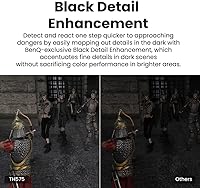
In a properly darkened room, the projector produces a noticeably better sense of depth and shadow detail than entry-level alternatives, making night-time gaming atmospheres and dark cinematic scenes feel more immersive than the price point might suggest.
The contrast specification is measured under ideal conditions that rarely reflect real-world use, and buyers who leave any ambient light on will see the perceived contrast drop meaningfully. Dark scenes in bright environments can look flat, and this is one area where the gap between spec sheet and reality is most obvious.
Build Quality
82%
18%
The chassis feels solid and well-assembled, and most long-term owners report no physical deterioration after months of regular use. The unit sits stable on flat surfaces, the lens cap and port covers feel durable, and nothing about the build suggests it will develop mechanical issues under normal household use.
The all-plastic exterior, while functional, does not feel particularly premium when handled, and a few buyers noted the surface attracts dust and fingerprints more than expected. For a projector that may live on a shelf or entertainment unit permanently, this is a minor cosmetic gripe rather than a functional concern.
Connectivity
81%
19%
Dual HDMI ports are the headline feature here and they deliver genuine everyday convenience — console gamers who also have a PC or a streaming stick connected report that switching between sources is quick and hassle-free. Having two live inputs reduces the cable management headache that single-port projectors impose.
Beyond the two HDMI ports, connectivity options are fairly basic; there is no USB-A port for media playback, no built-in Wi-Fi or Bluetooth, and no native streaming app support. Buyers who expected smart projector features were surprised to find a relatively stripped-back I/O arrangement.
Built-in Speakers
54%
46%
The integrated speakers are genuinely useful for getting up and running quickly without any additional hardware — for casual daytime gaming or a quick movie session, they provide adequate volume and clarity to follow dialogue and sound effects without strain.
Anyone with even modest audio expectations will find the built-in speakers thin and lacking any meaningful bass or spatial presence. Most users who plan to use the projector regularly end up pairing it with a soundbar or external speakers within a few weeks, making the built-in audio a convenience feature rather than a long-term audio solution.
Keystone & Alignment
73%
27%
The auto vertical keystone feature removes a lot of the frustration from initial setup, detecting and correcting moderate tilt angles automatically and saving users from manual menu adjustments. For typical living room placements where the projector sits on a table slightly below screen height, the correction works reliably.
The keystone correction has real limits, and buyers who need to correct steep angles — such as a projector placed high on a shelf aiming down sharply — often find the resulting image geometry still looks slightly off. Digital correction at extreme angles also softens edge sharpness in a way that careful physical placement would avoid.
Lamp & Longevity
69%
31%
The lamp-based design is a known and serviceable technology, and BenQ offers readily available replacements when the time comes. The three-year warranty provides meaningful coverage during the initial ownership period, and real-world reports of premature lamp failure are rare among current buyers.
Lamp brightness gradually dims over thousands of hours of use, and replacement costs are an ongoing expense that LED or laser alternatives avoid entirely. Buyers who run the projector daily for several hours should factor eventual lamp replacement into their total cost of ownership, as ignoring it leads to a progressively duller image over time.
Upgrade Value vs. TH585P
74%
26%
Buyers coming directly from the TH585P consistently notice the improved brightness and refined contrast as real, tangible differences rather than incremental paper upgrades — the TH575 handles the same room in better lighting conditions than its predecessor could manage.
A portion of TH585P owners feel the generational jump is meaningful but not dramatic enough to justify the full cost upgrade on its own, particularly if their original unit is still functioning well. Those on the fence about upgrading may find the improvement more satisfying if paired with a better screen or audio setup to maximize the gains.

Suitable for:

The BenQ TH575 1080p Gaming Projector is built for gamers who want a genuinely large screen without the need for a purpose-built dark room or elaborate home theater setup. If you play console or PC games in a living room or den where some daylight or ambient light is unavoidable, the brightness here holds up in ways that cheaper projectors simply do not. It also makes a practical choice for households that want one device to handle gaming in the evening and casual movie watching on weekends — the image quality is strong enough to serve both without demanding constant reconfiguration. Buyers stepping up from a budget or entry-level projector will notice a meaningful improvement in both image clarity and responsiveness. The standard throw design suits anyone with a relatively fixed room layout and a wall or screen roughly 10 to 11 feet from the lens, and the three-year warranty adds a layer of confidence that is genuinely uncommon at this price point.

Not suitable for:

If you are a competitive gamer whose performance depends on single-digit input lag, the TH575 is not the right tool — the latency is comfortable for story-driven and casual play but is not in the same league as a high-refresh gaming monitor for fast-paced competitive titles. Home cinema enthusiasts who prioritize accurate color reproduction and deep contrast straight out of the box will likely find the default picture modes require calibration, and even then a dedicated cinema projector at a similar price may serve them better. The standard throw setup is also a real constraint: if your room is small, oddly shaped, or requires a very short projection distance, the limited zoom range means you may struggle to fill your screen correctly without moving furniture. Those looking for a truly portable solution will find the size and weight less practical than compact short-throw alternatives. Finally, anyone expecting a cinematic 4K or HDR experience should look elsewhere, as this projector is firmly positioned around 1080p performance rather than next-generation image formats.

Specifications

  • Resolution: Native 1920x1080 Full HD resolution delivers a sharp, detailed image suitable for gaming, streaming, and presentations.
  • Brightness: Rated at 3800 ANSI lumens, providing enough output to maintain a watchable image in rooms with partial ambient light.
  • Contrast Ratio: Specified at 15,000:1 using Full On/Full Off measurement, which improves perceived depth in dark scenes under controlled lighting conditions.
  • Input Lag: Measured at 16ms at 1080p/60Hz in Game Mode, supported by a microsecond-response DMD chip for reduced motion blur.
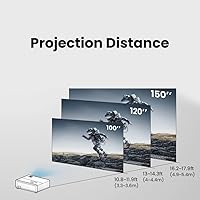
  • Throw Type: Standard throw design projects a 100-inch image from approximately 10.8 feet, making it suited to typical living room distances.
  • Zoom: 1.1x optical zoom offers a small but useful range of adjustment to fine-tune image size without physically repositioning the unit.
  • Keystone Correction: Auto vertical keystone correction automatically compensates for vertical projection angle, reducing the need for precise physical alignment.
  • Connectivity: Equipped with two HDMI ports, allowing two source devices such as a gaming console and a PC to remain connected simultaneously.
  • 3D Support: 3D-ready capability is included, compatible with active 3D glasses for supported 3D Blu-ray and broadcast content.
  • Built-in Audio: Integrated speakers are included for out-of-the-box audio without requiring an external sound system for basic use.
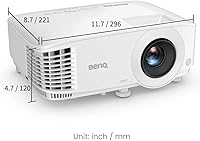
  • Dimensions: The unit measures 11.65 x 8.7 x 4.72 inches, compact enough to place on a shelf, table, or standard projector mount.
  • Weight: Weighing 7.65 pounds, the projector is light enough to reposition or transport between rooms without significant effort.
  • Warranty: BenQ provides a 3-year limited warranty, which is notably longer than the 1-to-2-year coverage common among competitors at this tier.
  • Lamp Technology: Uses a traditional lamp-based light source, meaning lamp replacement will eventually be required after extended hours of use.
  • Release Year: Introduced as a 2023 model, the TH575 is the updated successor to the TH585P with improved brightness and contrast specifications.
  • Recommended Use: Positioned primarily for gaming, with secondary suitability for home cinema, business presentations, and casual educational use.

Related Reviews
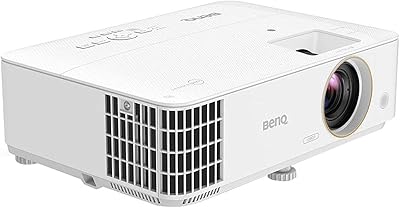
BenQ TH685 1080p Gaming Projector
77%
91%
Gaming Performance
83%
Image Brightness
86%
Color Accuracy
92%
Input Lag
88%
Setup & Installation
More
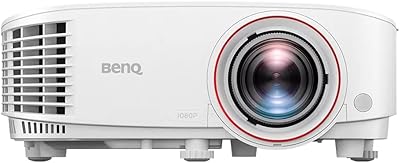
BenQ TH671ST 1080p Short Throw Gaming Projector
79%
88%
Image Quality
93%
Gaming Performance
91%
Short-Throw Capability
86%
Brightness & Ambient Light Performance
61%
Fan Noise
More
BenQ MH733 1080P Business Projector
86%
91%
Image Quality
94%
Brightness
85%
Setup Ease
88%
Portability
90%
Energy Efficiency
More
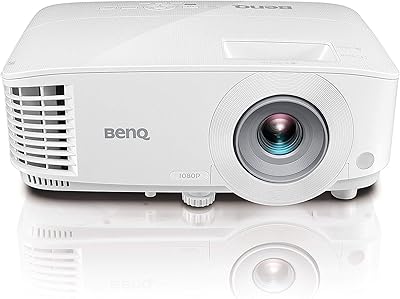
BenQ X3100i 4K Gaming Projector
86%
94%
Gaming Performance
91%
Image Quality
88%
Brightness in Well-Lit Rooms
95%
Input Lag and Responsiveness
73%
Sound Quality
More
BenQ TK700 4K Gaming Projector
76%
91%
Gaming Performance
88%
Image Sharpness
86%
Dark Scene Quality
62%
Brightness & Ambient Light
89%
Input Lag
More
BenQ GS50 1080p Wireless Outdoor Projector
87%
90%
Image Quality
95%
Portability
88%
Ease of Setup
87%
Streaming Experience
90%
Durability
More
BenQ HT2060 1080p Home Theater Projector
79%
93%
Color Accuracy
81%
Image Sharpness
76%
HDR Performance
89%
Gaming Performance
67%
Brightness & Room Versatility
More
GKLPO 1080P Projector
86%
88%
Image Quality
92%
Wi-Fi Connectivity
89%
Bluetooth Connectivity
90%
Portability
85%
Setup & Ease of Use
More
BenQ MS560 DLP Business Projector
76%
83%
Image Brightness
58%
Image Resolution & Clarity
74%
Brightness Consistency
91%
Ease of Setup
86%
Connectivity & Ports
More
NISOO Z1 Native 1080P Projector
71%
76%
Picture Quality
51%
Brightness
82%
Setup & Ease of Use
78%
Value for Money
57%
Audio Performance
More

FAQ

Yes, and that is one of the stronger points of the TH575. The high brightness output means it holds up reasonably well in rooms with curtains partially open or ambient lighting on. It is not immune to washout in very bright conditions, but compared to most projectors in this class, it handles everyday living room lighting better than most.

For most gaming scenarios, yes. The BenQ TH575 1080p Gaming Projector delivers a lag level in Game Mode that feels responsive for single-player games, RPGs, sports titles, and casual multiplayer. If you are playing fast-paced competitive shooters at a high level where every millisecond counts, a gaming monitor will still have the edge, but for everyday gaming this projector feels comfortable and fluid.

You will need roughly 10 to 11 feet of throw distance to achieve a 100-inch image. The 1.1x zoom gives you a small amount of flexibility, but the standard throw design means placement is fairly fixed. If your room is shorter than that, you may not be able to fill a large screen without repositioning furniture.

A smooth, flat, matte white wall will work reasonably well, especially for gaming where critical color accuracy is less of a priority. That said, a proper projection screen will noticeably improve contrast, color uniformity, and perceived sharpness, particularly in a darker viewing environment. It is a worthwhile upgrade if you plan to use the projector regularly for movies.

Fan noise is one of the more commonly mentioned concerns among owners. At full brightness, the fan is audible enough to be noticeable during quiet dialogue or cutscenes. It is not disruptive during action-heavy gameplay with audio playing, but if you are watching a slow-paced film in a quiet room you may become aware of it. Reducing the brightness level can help bring the noise down.

The default picture modes tend to lean cool and slightly oversaturated, which is common for projectors at this price point. Most users find that spending 15 to 20 minutes in the menu adjusting color temperature and reducing oversaturation makes a meaningful difference. If you are particular about accurate color for cinema content, a manual calibration pass is recommended before settling in.

Yes, the projector has two HDMI inputs so you can leave both devices plugged in and switch between them using the input selector. There is no need to unplug and reconnect each time you change what you are using, which is a genuinely convenient feature for mixed-use setups.

If you already own the TH585P and are broadly happy with it, the upgrade is solid but not transformative. The TH575 brings a real improvement in brightness and a better contrast specification, which you will notice in partially lit rooms and in darker scenes. Most owners who have made the switch describe it as a meaningful step forward rather than a dramatic overhaul.

Like all lamp-based projectors, the light source will eventually dim and need replacing after several thousand hours of use. BenQ sells replacement lamps directly, and third-party options are also available. Lamp costs vary but are generally in the range of 60 to 150 dollars depending on the source. It is worth factoring this into your long-term cost calculation, particularly if you plan to use the projector heavily every day.

Auto vertical keystone correction is convenient and handles moderate angles well, but it does process the image digitally to make the adjustment, which can slightly reduce sharpness at the edges if the correction amount is large. For small to moderate angle corrections, the impact is barely noticeable. If your projector is placed at a steep upward or downward angle, you may see geometric artifacts that the software cannot fully resolve, so getting the physical placement as level as possible is still the best approach.