Overview

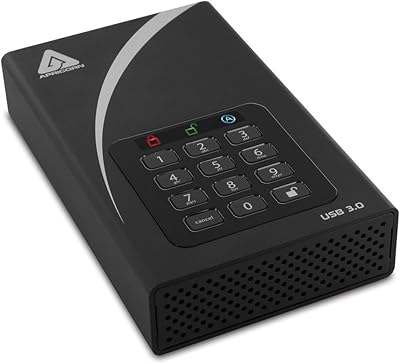
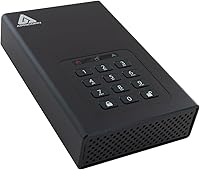
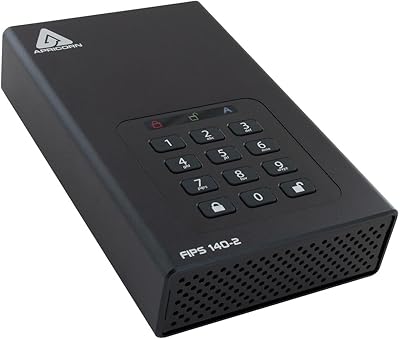
The Apricorn Aegis Padlock DT 2TB Encrypted External Hard Drive is built for one purpose: keeping sensitive data locked down, full stop. Apricorn has spent years focused on hardware-encrypted storage, and this drive reflects that specialization — it targets security-conscious professionals rather than everyday backup users. The 3.5-inch desktop form factor means it lives on your desk, powered by an external 12V adapter, not sliding into a bag. Plug it into any USB 3.0 port and it works — no software installation required, no OS dependencies, no driver headaches. If you need a general-purpose external drive, look elsewhere. This is a purpose-built security device, priced accordingly.
Features & Benefits

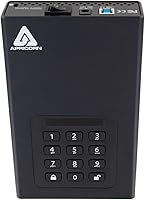
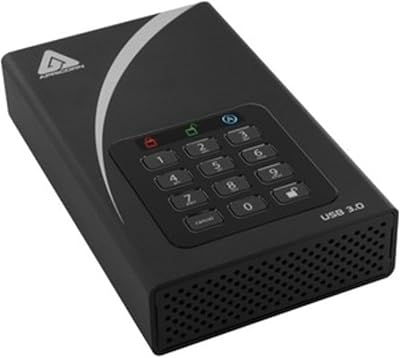
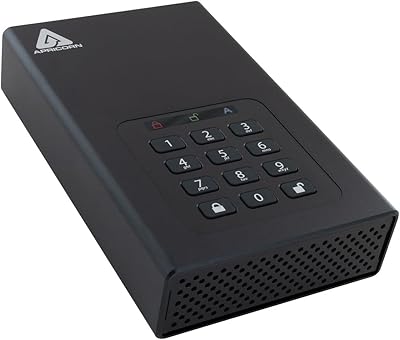
What separates the Aegis Padlock DT from software-encrypted alternatives is that all encryption happens on the drive itself — 256-bit AES-XTS hardware encryption that functions entirely independent of the host operating system. Access is controlled via a physical PIN keypad, with separate Admin and User modes that suit managed deployments or shared work environments well. The brute-force defense is a genuine standout: repeated wrong PIN attempts trigger an automatic lockdown, and the internal components are sealed in an epoxy compound that resists physical tampering. Organizations deploying multiple units can use the Aegis Configurator for bulk setup. Spinning at 7200 RPM over USB 3.0, transfer speeds hold up respectably for an encrypted desktop drive.

Best For

This encrypted desktop drive is squarely aimed at professionals and organizations where data security isn't optional. IT administrators managing fleets of drives will appreciate Aegis Configurator compatibility, which removes the need to configure each unit by hand. Legal practices, healthcare providers, and financial firms operating under HIPAA or similar compliance mandates are natural fits. Because encryption runs at the hardware level with no drivers needed, it works across Mac, PC, and Linux without modification — genuinely useful in mixed-OS environments. Be clear-eyed about one limitation though: the 3.5-inch form factor and external power brick make this a desk-bound device. It was never designed to travel with you.

User Feedback

Buyers who've used this hardware-encrypted drive in real environments consistently praise PIN reliability and build quality, with many noting the lockdown mechanism performs exactly as described after extended use. The epoxy-sealed casing earns particular respect from IT professionals assessing it against physical tampering risks. That said, first-time buyers frequently flag the Admin enrollment process as unexpectedly confusing — it is mandatory before any use, and the documentation leaves room for improvement. Some users report marginally slower transfer rates versus standard unencrypted USB 3.0 drives, which is predictable but worth factoring in. Most buyers consider the premium well justified by the security assurance, though a few have flagged occasional compatibility quirks with certain USB hubs.

Pros

  • Hardware-level 256-bit AES-XTS encryption requires no software and survives OS reinstalls completely intact.
  • Brute-force lockdown reliably protects data even if the drive falls into the wrong hands.
  • Separate Admin and User modes make it practical for managed, multi-user organizational deployments.
  • Aegis Configurator compatibility allows IT teams to provision multiple units quickly without manual configuration per drive.
  • Epoxy-sealed casing makes physical disassembly and tampering genuinely difficult — not just inconvenient.
  • Works across Windows, macOS, and Linux with no drivers, making cross-platform deployment straightforward.
  • The PIN keypad keeps authentication fully independent from the host machine, blocking keyloggers entirely.
  • Long-term owners report strong mechanical reliability consistent with enterprise-grade desktop hard drives.
  • Satisfies audit requirements for HIPAA and similar compliance frameworks that software encryption typically cannot meet.
  • Buyers with legitimate compliance needs consistently rate the security assurance as worth the premium.

Cons

  • The mandatory Admin enrollment step before first use is poorly documented and catches many first-time buyers completely off guard.
  • Transfer speeds fall noticeably behind standard unencrypted USB 3.0 drives, especially during sustained write operations.
  • The 12V external power adapter limits where the drive can be used and adds clutter to any desk setup.
  • Forgetting the Admin PIN without a recovery plan can result in permanent, unrecoverable data loss by design.
  • PIN button wear over time can reveal frequently pressed digits, creating a subtle but real physical security concern.
  • Intermittent recognition issues have been reported with certain USB hubs, requiring a direct port connection to resolve.
  • In-box documentation is thin for a device with a non-standard, mandatory setup sequence — video tutorials should not be required reading.
  • The price-per-gigabyte ratio is well above market average, making it hard to justify without a specific compliance or security mandate.
  • No biometric or secondary authentication option exists, leaving PIN management as the sole access control responsibility.
  • The spinning-disk mechanism makes it more vulnerable to mechanical failure from vibration than SSD-based encrypted alternatives.

Ratings

The Apricorn Aegis Padlock DT 2TB Encrypted External Hard Drive earns its reputation in a narrow but demanding market — one where data breaches carry real legal and financial consequences. These scores were generated by AI after analyzing verified buyer reviews from global sources, with spam, bot-submitted, and incentivized feedback actively filtered out. The results reflect an honest picture: where this hardware-encrypted drive genuinely excels for compliance-driven professionals, and where it falls short for buyers without a specific security mandate.
Hardware Encryption Strength
96%
Users working in regulated industries consistently describe the on-device 256-bit AES-XTS encryption as rock-solid, with no reported instances of the encryption layer being bypassed. IT professionals particularly appreciate that it operates independently of the host OS, eliminating the software vulnerabilities that plague software-based alternatives.
A small number of technically advanced users note that the encryption strength is only as good as the PIN protecting it — weak or reused PINs undermine the entire system. There is no biometric fallback, which some buyers find limiting in high-throughput managed environments.
Build Quality & Tamper Resistance
91%
The epoxy-sealed enclosure draws repeated praise from security professionals who have physically inspected competing drives. Buyers describe it as noticeably heavier and more substantial than typical desktop externals, which builds confidence in environments where physical security is part of the threat model.
The industrial build comes at the cost of aesthetics — several users note the drive looks purely utilitarian and runs slightly warm under sustained workloads. A handful of reviews mention the casing feels dated compared to newer encrypted competitors at similar price points.
PIN Access & Authentication
88%
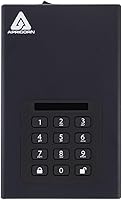
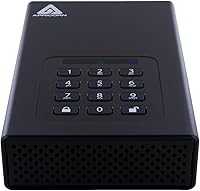
The physical PIN keypad is widely praised for being genuinely independent of the connected device — no keylogger or screen-capture malware on the host machine can intercept credentials. Users in legal and healthcare settings specifically call out this hardware-level separation as a key reason they chose it over software-encrypted options.
The keypad buttons show wear patterns over time with repeated use, which some security-aware users flag as a potential PIN-guessing vulnerability. A few buyers with larger hands also find the button spacing uncomfortably tight during daily entry.
Brute-Force Protection
93%
Reviewers who deliberately tested the brute-force lockdown confirm it triggers reliably after repeated failed PIN attempts, with the drive responding exactly as documented. IT administrators managing shared environments consider this one of the most practically valuable features, especially for drives that change hands between staff.
The lockdown behavior, while effective, has caused genuine data loss incidents for legitimate users who forgot their PIN or inherited a drive without Admin credentials. Recovery options are limited by design — which is the point, but it creates a high-stakes situation if enrollment steps are not documented carefully.
Admin & User Mode Flexibility
84%
Organizations deploying multiple drives across teams find the separate Admin and User mode structure genuinely useful — IT can configure drives centrally and hand them to staff without exposing Admin credentials. The Aegis Configurator compatibility extends this further, allowing bulk provisioning that saves meaningful time at scale.
For individual buyers or small teams setting up the drive for the first time, the Admin enrollment requirement catches many off guard — the documentation does not make it obvious that this step is mandatory before any data can be written. Several one-star reviews trace directly back to this setup confusion rather than any hardware defect.
Transfer Speed Performance
74%
26%
Under USB 3.0, the Aegis Padlock DT performs respectably for a secure desktop drive, with sequential read speeds that satisfy most office and archival workflows. Users transferring large encrypted datasets — backups, client files, archived case records — generally report wait times that feel reasonable given the encryption overhead.
Compared to standard unencrypted USB 3.0 drives, real-world speeds fall noticeably short, and several buyers who expected parity were disappointed. Sustained write performance in particular dips under heavy sequential loads, making it less suitable for continuous backup pipelines or video editing scratch use.
Setup & Initial Configuration
61%
39%
Once the Admin enrollment process is understood and completed, day-to-day use is straightforward — plug in, enter PIN, access files. Users who read the manual thoroughly or followed setup guides from Apricorn's support resources report a smooth experience with minimal friction afterward.
The initial setup remains a consistent pain point across reviews, with first-time users frequently needing to reset and restart because the Admin PIN enrollment was skipped or misunderstood. The printed quick-start guide is minimal, and buyers accustomed to plug-and-play drives often feel blindsided by the required configuration sequence.
OS Compatibility
89%
Because all encryption is handled in hardware with no drivers required, the drive works across Windows, macOS, and Linux without any software installation — a meaningful advantage in mixed-OS environments. IT teams supporting heterogeneous fleets cite this as one of the practical reasons they standardize on this drive.
A small subset of users report intermittent recognition issues when connecting through certain USB hubs or older USB 3.0 controllers, requiring a direct port connection to resolve. Linux users occasionally encounter filesystem formatting considerations that add a step to initial deployment.
Compliance & Regulatory Fit
92%
For organizations navigating HIPAA, government data-handling mandates, or internal security audits, this hardware-encrypted drive checks boxes that software alternatives simply cannot match. Reviewers in healthcare and legal fields specifically mention it satisfying auditor requirements that had previously been difficult to meet with standard encrypted drives.
Compliance documentation and certifications are not always prominently packaged with the retail unit, which has caused friction for buyers who need to present formal certification records to auditors. Some enterprise procurement teams note that obtaining official FIPS validation documentation required direct contact with Apricorn support.
Portability & Form Factor
47%
53%
The 3.5-inch desktop form factor is appropriate for its intended use case — a fixed, secured storage point at a workstation or server room. Users who specifically needed a desktop-bound encrypted drive appreciate that it does not compromise on capacity or speed to achieve miniaturization.
This is not a drive you take anywhere, and buyers who overlooked that detail before purchasing express clear regret. The 12V external power requirement means an additional adapter and a fixed power outlet, which limits deployment flexibility significantly compared to bus-powered encrypted portable alternatives.
Value for Money
77%
23%
Buyers with genuine compliance requirements almost universally consider the price justified — the cost of a data breach or failed audit dwarfs the premium over a standard external drive. IT managers framing it as infrastructure spending rather than consumer electronics tend to rate value highly.
Individual buyers without a specific regulatory need frequently feel the price is difficult to justify against less specialized alternatives. The price-per-gigabyte ratio is well above market average for desktop storage, which matters less for security professionals but stings for general users who wandered in without that context.
Longevity & Reliability
82%
18%
Long-term owners — some reporting several years of daily use — describe the drive as holding up well mechanically, with no unusual failure rates flagged in the review pool. The 7200 RPM hard disk has a track record consistent with enterprise-grade desktop drives.
As with any spinning hard disk, the drive is inherently more vulnerable to failure from drops or vibration than SSD alternatives, which some buyers note as a concern in less controlled environments. A few users also mention that long-term availability of replacement units requires monitoring, given the product's specialized market.
Documentation & Support
58%
42%
Apricorn's online knowledge base and customer support team receive positive mentions from users who reached out with setup questions, with response times described as reasonable for a specialized hardware vendor. Video tutorials available through Apricorn partially offset the thin printed documentation.
The in-box documentation is widely criticized as insufficient for a device with mandatory enrollment steps that differ fundamentally from standard external drives. Several reviewers specifically note that clearer first-run instructions would have prevented their initial negative experience and the low rating they assigned as a result.

Suitable for:

The Apricorn Aegis Padlock DT 2TB Encrypted External Hard Drive was built for a specific type of buyer — one where data security is a professional obligation, not a preference. IT administrators managing encrypted storage across teams will find genuine value in the Admin and User mode structure and Aegis Configurator compatibility, which make bulk deployment realistic rather than painful. Healthcare providers, legal firms, and financial practices operating under strict data-handling regulations — HIPAA being the most commonly cited — will find this drive satisfies auditor requirements that software-based encryption typically cannot meet. It also works cleanly across Mac, PC, and Linux without any driver installation, which is a practical advantage in organizations running mixed operating systems. Anyone whose threat model includes physical tampering — think shared offices, multi-tenant facilities, or sensitive government-adjacent work — will appreciate the epoxy-sealed casing and brute-force lockdown mechanism working together as a coherent physical and digital defense.
Not suitable for:

The Apricorn Aegis Padlock DT 2TB Encrypted External Hard Drive is a poor fit for buyers who simply want a large, affordable external drive to back up photos, movies, or general files at home. The price premium makes no sense unless encryption compliance is genuinely required, and the desktop form factor — tethered to a power adapter and a desk — rules it out for anyone who needs to move their storage between locations. Students, casual users, and small creative shops with no regulatory obligations will find the mandatory Admin enrollment process frustrating and the overall complexity unnecessary for their actual needs. If speed is a priority — say, for video editing workflows or large file transfers under time pressure — this hardware-encrypted drive will disappoint compared to faster unencrypted or SSD-based alternatives. And if portability is even a secondary concern, buyers should look at encrypted portable drives instead; this unit was never designed to leave the desk.
Specifications

  • Storage Capacity: The drive provides 2TB of usable storage space, suitable for large volumes of sensitive documents, databases, and archival files.
  • Encryption Standard: All data is protected by 256-bit AES-XTS hardware encryption, processed entirely on the drive controller independent of any host operating system.
  • Interface: The drive connects via USB 3.0, providing backward compatibility with USB 2.0 ports while delivering faster transfer speeds on USB 3.0-equipped systems.
  • Form Factor: Built around a 3.5-inch hard disk, this is a desktop-only unit designed for stationary use at a workstation or secured facility.
  • Rotational Speed: The internal hard disk spins at 7200 RPM, which contributes to competitive read and write performance for a hardware-encrypted mechanical drive.
  • Dimensions: The unit measures 7.25 x 4.5 x 1.5 inches, occupying a footprint comparable to a standard desktop external hard drive enclosure.
  • Weight: At 2.5 pounds, the drive is substantially built and not intended for transport — the weight reflects its tamper-resistant, epoxy-sealed construction.
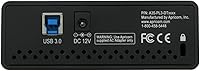
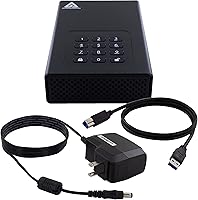
  • Power Requirement: The drive requires an external 12V power adapter for operation and cannot draw power from a USB connection alone, confirming its desktop-only use case.
  • Access Method: Users authenticate via a physical PIN keypad integrated into the drive body, with no software, driver, or host-side application required at any point.
  • Authentication Modes: The drive supports separate Admin and User PIN modes, allowing IT administrators to control drive policies independently of end-user access credentials.
  • Brute-Force Defense: After a configurable number of consecutive incorrect PIN attempts, the drive triggers an automatic lockdown, protecting data against systematic PIN-guessing attacks.
  • Enclosure Material: Internal components are sealed with a super-tough epoxy compound that hardens around the electronics, making physical disassembly and component extraction extremely difficult.
  • Platform Support: The drive is compatible with Windows, macOS, and Linux operating systems without requiring any drivers or software installation on the host machine.
  • Configurator Support: The drive is compatible with Apricorn's Aegis Configurator, a separate tool that allows IT teams to configure and enroll multiple drives simultaneously.
  • Flash Memory: A 2MB flash memory component is embedded in the drive controller to manage firmware and encryption key operations on-device.
  • Manufacturer: The drive is designed and manufactured by Apricorn, a California-based company specializing exclusively in hardware-encrypted storage solutions for professional and enterprise use.
  • Date Introduced: The product line was first made available in December 2011, reflecting more than a decade of iterative development in the hardware-encrypted storage market.
  • Voltage: The drive operates at 12 volts via its included external power supply, consistent with standard desktop hard drive enclosure power requirements.

Related Reviews
Apricorn Aegis Padlock DT 16TB Encrypted USB 3.0 Hard Drive
83%
88%
Performance
91%
Security Features
72%
Portability
89%
Ease of Setup
85%
Build Quality
More
Apricorn Aegis Padlock DT 10TB Encrypted USB 3.0 Hard Drive
87%
95%
Data Security & Encryption
88%
Ease of Use
90%
Build Quality & Durability
92%
Compatibility with Systems
87%
Data Transfer Speed
More
Apricorn Aegis Padlock Fortress 1TB Hard Drive
78%
96%
Hardware Encryption Strength
93%
FIPS Compliance Value
91%
Ease of Setup
89%
Physical Security Design
51%
Transfer Speed
More
Apricorn Aegis Padlock 500GB USB 3.0 Encrypted Portable Hard Drive
88%
94%
Security Features
89%
Portability and Design
91%
Ease of Use
88%
Durability
95%
Encryption Setup
More
Seagate Game Drive for PlayStation 2TB
79%
94%
Ease of Setup
91%
Storage Capacity
93%
PS4 Compatibility
72%
PS5 Compatibility
74%
Transfer Speed
More
G-Technology 2TB G-DRIVE Mobile USB-C Portable External Hard Drive
88%
91%
Portability
88%
Transfer Speed
89%
Build Quality
94%
Ease of Use (Plug-and-Play)
92%
Compatibility (Mac/Windows)
More
Apricorn 6TB Aegis Padlock DT
87%
95%
Security Features
88%
Performance under Load
91%
Ease of Setup
92%
Compatibility with Operating Systems
89%
Build Quality
More
Apricorn 8TB Aegis Padlock DT
86%
94%
Security Features
88%
Ease of Setup
87%
Data Transfer Speed
90%
Build Quality
75%
Portability
More
ADATA HD720 2TB External Hard Drive
86%
91%
Durability
94%
Water Resistance
89%
Shock Resistance
75%
Portability
88%
Data Transfer Speed
More
Transcend StoreJet 25M3C 2TB
79%
91%
Build Quality & Durability
62%
Transfer Speed
88%
Shock & Drop Resistance
89%
Plug-and-Play Compatibility
93%
Portability & Form Factor
More

FAQ

No, and that is one of its genuine practical advantages. The encryption and PIN authentication are handled entirely by the drive's own hardware controller, so you plug it in, enter your PIN, and it appears as a standard external drive on any compatible system — no drivers, no applications, no OS dependencies.

This is where things get serious. If the Admin PIN is lost and no Data Recovery PIN was configured during setup, there is no backdoor or manufacturer override — the drive is designed that way deliberately. You would need to perform a full cryptographic reset, which erases all data permanently. It cannot be stressed enough: document your Admin credentials and configure a recovery PIN during initial setup.

Yes, absolutely. The drive ships in a pre-enrollment state and will not function as a storage device until the Admin PIN has been set. This step is required before any data can be written or read, and it catches a surprising number of first-time buyers off guard. Set aside ten minutes, read the setup guide carefully, and complete enrollment before assuming the drive is ready to use.

Yes, it works on macOS without drivers or any additional software. Because authentication happens on the drive itself before the USB connection is established, the host operating system sees it as a plain external drive once the PIN is entered. You may need to format it for macOS if it arrives pre-formatted for Windows, but that is a one-time step.

Technically yes, but a direct connection to a USB port on your computer is strongly recommended. A small number of users have reported intermittent recognition issues when connecting through certain hubs, particularly older or unpowered ones. If you experience any detection problems, bypass the hub and connect directly first to rule it out.

After a set number of consecutive incorrect PIN entries — configurable by the Admin — the drive locks itself down automatically. Depending on how it has been configured, this can result in a full cryptographic wipe of the drive's contents. This is intentional behavior designed to make systematic PIN-guessing attacks futile, even if someone has extended physical access to the device.

It is widely used in healthcare environments for exactly that purpose. Hardware-based encryption that operates independently of the host OS satisfies a level of data-at-rest protection that many software-based alternatives cannot match under audit scrutiny. That said, HIPAA compliance is a broader organizational obligation — the drive is one component of a compliant data handling practice, not a complete solution on its own.

Yes, the separate Admin and User mode structure is designed for exactly this scenario. The Admin sets overall drive policy and can assign a User PIN independently, so staff can access stored data without ever knowing the Admin credentials. This makes it practical for shared workstations or situations where drives change hands between team members.

Not really, and it is worth being upfront about that. The 3.5-inch form factor and the requirement for an external 12V power adapter mean this drive belongs on a desk with access to a power outlet. If you need encrypted storage that travels with you, a bus-powered encrypted portable drive would be a far more practical choice.

The internal electronics are encased in a hardened epoxy compound that bonds to the circuit board and components. If someone attempts to pry open the enclosure to access the drive platters or controller directly, the epoxy makes clean disassembly essentially impossible without destroying the components in the process. It is a meaningful physical security layer on top of the cryptographic protection.