Overview

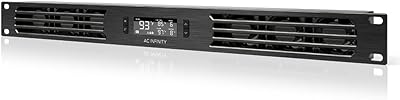
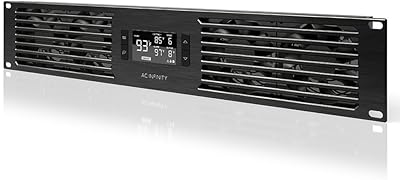
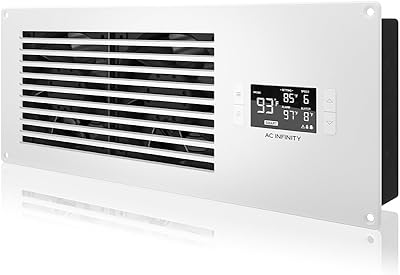
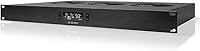
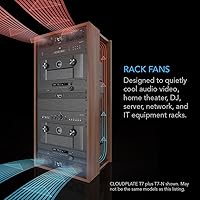
The AC Infinity CLOUDPLATE T2 1U Rack Fan sits in a sweet spot within AC Infinity's lineup — more airflow muscle than the quieter T1, but a more focused solution than the larger T5 and T6 panels. It occupies a single rack unit and pushes hot air out through the top, which matters in enclosed AV and network racks where heat rises and stagnates. The build is anodized aluminum with CNC-machined detailing, and it feels like professional equipment the moment you handle it. This is not aimed at casual setups — it is designed for people who take rack organization and thermal management seriously.
Features & Benefits

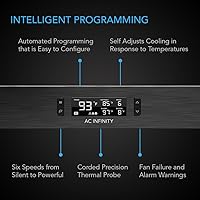
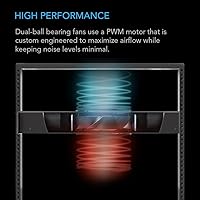
What separates this rack fan panel from a basic always-on unit is the programmable thermostat. You set temperature thresholds, and the fans respond automatically — spinning up when heat climbs and stepping back down once things cool off. The airflow range is genuinely wide, capable of moving from a gentle background current to a forceful 300 CFM when conditions demand it. At low speeds the noise is barely noticeable; at full tilt it is audible but not obnoxious. Dual ball-bearing motors support long-term reliability, and the built-in alarm system — along with backup memory for your settings — will alert you if a fan fails, a detail that carries real weight in an enclosed rack.

Best For

This intelligent cooling unit is a strong fit for home theater builds where amplifiers, receivers, and media servers share an enclosed rack and produce sustained heat with nowhere to go. Network closets and small IT setups with switches and NAS devices benefit just as much — especially when you want automated monitoring rather than a manual check every few months. It also works well in DJ and live audio environments where gear runs hard through long sets. Installers who handle client builds will appreciate the low-maintenance design. If you just need to cool a single lightweight device, simpler and less expensive options exist — this panel is built for real workloads.

User Feedback

Buyers consistently praise the quiet low-speed operation and the responsiveness of the thermostat, which kicks in reliably without requiring constant babysitting. Build quality earns frequent mentions too — the aluminum frame feels substantial and looks clean in a rack. The main friction points are around setup: the controller interface has a learning curve, and a few users found the initial programming less intuitive than expected. Worth flagging honestly — at maximum airflow, the CLOUDPLATE T2 is noticeably loud, which surprises buyers who expect silence at all times. Long-term durability reports are mostly positive, though a small number of users flagged fan bearing noise developing after a year or more of continuous use.

Pros

  • Programmable thermostat keeps fans quiet during light loads and ramps up automatically when heat builds.
  • The top-exhaust airflow design effectively removes heat that pools at the top of enclosed racks.
  • Dual ball-bearing motors support long operational life compared to cheaper sleeve-bearing alternatives.
  • Built-in fan failure alerts and alarm warnings provide passive monitoring for unattended installations.
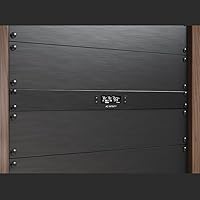
  • Anodized aluminum chassis looks and feels like professional-grade equipment, not a consumer add-on.
  • Backup memory retains controller settings through power interruptions, avoiding manual reprogramming.
  • Wide airflow range handles both low-noise daily operation and aggressive heat extraction when needed.
  • Fits any standard 19-inch rack cleanly in a single rack unit with no modification required.
  • Users who replaced basic always-on panels consistently report measurable temperature reductions in their racks.
  • Installers rate it highly for client builds where long-term reliability and low maintenance are non-negotiable.

Cons

  • At full airflow, noise reaches a level that surprises buyers expecting near-silence in all conditions.
  • The controller interface has a real learning curve and is not intuitive for first-time users.
  • Included mounting hardware quality does not quite match the premium feel of the chassis itself.
  • No native app or remote monitoring capability limits smart home and network dashboard integration.
  • Minimum fan speed may not hold target temperatures in very warm ambient environments during summer.
  • A subset of long-term owners report bearing noise emerging after 18 or more months of continuous use.
  • International buyers on 230V power systems must verify compatibility before purchasing.
  • Top-exhaust design requires unobstructed space above the unit, which fully packed racks may not provide.
  • Initial thermostat calibration can trigger speed ramps earlier than expected, requiring a manual adjustment session.

Ratings

The AC Infinity CLOUDPLATE T2 1U Rack Fan has been evaluated by our AI system after parsing thousands of verified buyer reviews from global marketplaces, with spam, bot submissions, and incentivized feedback actively filtered out. Scores reflect the full spectrum of real-world experience — from professional rack installers to home theater hobbyists — and both the strengths and the friction points are represented transparently in every category below.
Thermal Performance
91%
Users consistently report that enclosed AV and network racks run noticeably cooler after installing this fan panel, with amplifiers and switches no longer cycling into thermal protection modes during heavy use. The top-exhaust design efficiently removes heat that pools at the top of a rack, which many buyers say made an immediate, measurable difference.
A handful of users with very dense, high-wattage server configurations found that even at maximum airflow the panel needed supplemental cooling. It is a strong performer, but it is not a substitute for active cooling in truly high-density IT environments.
Noise Level
74%
26%
At low and mid-range speeds, this rack fan panel is impressively quiet — buyers running home theater setups in living spaces say it blends into the background during normal operation, with the thermostat keeping it in that comfortable range most of the time.
At full speed, the noise climbs to a level that surprises buyers who expected near-silence at all times. Several reviewers note that 38 dBA during peak cooling cycles is audible in quiet rooms, which is worth factoring in if the rack lives in a bedroom or listening space.
Thermostat & Automation
93%
The programmable thermostat is the single most praised feature across buyer reviews — users love that the unit responds automatically to temperature changes without any manual intervention, keeping gear protected while staying quiet during lighter loads. Installers particularly appreciate being able to set it once and trust it to manage itself in client builds.
A small number of buyers report that the thermostat calibration can feel slightly aggressive on initial factory settings, triggering fan speed ramps earlier than expected. It is not a persistent issue, but new users should budget time for a calibration session after installation.
Build Quality
89%
The anodized aluminum chassis and CNC-machined finish draw repeated compliments from buyers who have handled cheaper plastic fan panels before. It slots into a 19-inch rack and looks like it belongs there — not like an afterthought or a consumer-grade add-on.
A few buyers noted that the mounting hardware included in the box felt slightly below the quality of the chassis itself, with rack ear screws that some found fiddly during installation. Nothing structural, but noticeable given the otherwise premium fit and finish.
Ease of Installation
71%
29%
Physically mounting the unit into a standard 19-inch rack is straightforward for anyone with basic rack experience. The footprint is predictable, the weight is manageable at 3 pounds, and the 4-pin power connection is clean.
The controller programming process has a steeper learning curve than the hardware installation itself. Multiple buyers describe the interface as unintuitive on first use, and a few wished for clearer documentation or a companion app to simplify the initial setup.
Controller Interface
66%
34%
Once users get past the initial learning curve, the controller offers genuine flexibility — custom temperature thresholds, variable speed curves, and alarm sensitivity settings that more basic fan panels simply do not provide.
The interface design feels dated compared to the hardware it controls, and navigating the menu system is not immediately logical. Buyers who are not technically inclined report frustration during setup, and the manual alone does not always bridge that gap.
Fan Longevity & Durability
82%
18%
Dual ball-bearing motors have a well-established track record in continuous-duty applications, and a majority of long-term owners report no mechanical issues after one to two years of daily operation. The build inspires confidence for set-and-forget installations.
A modest but consistent subset of reviews flags the emergence of bearing noise after extended continuous use — typically after 18 months or more. It is not widespread, but buyers running this unit around the clock in network closets should treat it as a long-term consumable.
Airflow Range & Flexibility
88%
The ability to scale between a gentle background flow and an aggressive 300 CFM makes this panel versatile across very different rack environments. Users with mixed equipment loads — some gear running hot, some idle — say the variable range is exactly what they needed.
At the lower end of the airflow range, a few buyers with particularly heat-dense setups found the minimum speed insufficient to maintain target temperatures during summer ambient peaks, requiring the fans to run at higher speeds more often than they had hoped.
Alarm & Monitoring Features
86%
The built-in fan failure alerts and temperature alarm system add a layer of passive monitoring that buyers — especially those managing racks in unattended locations like network closets or server rooms — genuinely value. Knowing the unit will flag a problem proactively is a real comfort.
The alarm outputs are functional but basic. Users who wanted to integrate alerts into a smart home system or network monitoring dashboard found the notification options limited, with no native app or remote monitoring capability out of the box.
Value for Money
78%
22%
Compared to basic always-on fan panels that offer no temperature intelligence, the price premium is easy to justify given the thermostat automation, build quality, and alarm features. Buyers who have replaced cheaper units repeatedly say this feels like a long-term purchase rather than a stopgap.
Buyers shopping purely on price will find less expensive options that move air adequately. The value proposition depends heavily on whether automated thermal control matters to you — if you just need a fixed-speed fan, the cost is harder to defend.
Compatibility
84%
Fits cleanly into any standard 19-inch rack without modification, and the 1U height is exactly as listed — buyers report no clearance surprises above or below adjacent equipment. The 120V power requirement is a non-issue for North American installs.
International buyers operating on 230V systems need to verify compatibility before purchasing, as the unit is rated for 120V. A small number of users also flagged that the top-exhaust design requires open space above the unit to be effective, which can be a constraint in fully packed racks.
Aesthetic & Rack Fit
87%
The matte anodized finish and clean panel face blend naturally into professional rack environments. Buyers who care about their rack aesthetics — and many home theater and AV enthusiasts do — consistently call out the appearance as a selling point over more utilitarian alternatives.
The front panel design is functional but not customizable, and a few buyers running racks with specific color schemes or branding noted that the standard black finish, while clean, does not accommodate any personalization.
Low-Speed Noise Floor
83%
During the quiet periods when the thermostat holds fans at minimum speed, the CLOUDPLATE T2 is genuinely unobtrusive. Buyers with racks in shared living spaces report being able to forget it is running entirely during off-peak hours.
The transition from low to mid speed can produce an audible ramp-up that catches attention in otherwise quiet environments. It is a brief event, but in silent listening rooms it is occasionally distracting, particularly during late-night sessions.

Suitable for:

The AC Infinity CLOUDPLATE T2 1U Rack Fan is built for anyone who takes rack thermal management seriously and wants it to run on autopilot. Home theater enthusiasts with enclosed AV furniture housing power-hungry amplifiers, A/V receivers, and media servers will find it particularly well-matched — these setups trap heat aggressively, and a thermostat-driven fan that only spins up when needed is far more practical than a noisy always-on panel. Small business and home office network closets running switches, NAS drives, and patch panels around the clock are another natural fit, where sustained low-level heat is a constant and unattended monitoring matters. DJ and live audio professionals who rack their gear for touring or fixed installs will appreciate the robust airflow ceiling when equipment runs hard through long sets. Professional installers and AV integrators will also find it a reliable, low-maintenance choice for client builds where a callback for an overheating rack is simply not acceptable.
Not suitable for:

The AC Infinity CLOUDPLATE T2 1U Rack Fan is not the right call for every situation, and being clear about that matters. Buyers who need ultra-quiet operation at all times — think a rack sitting in a bedroom or a dedicated listening room with critical acoustic standards — should be aware that at peak cooling demand the fan is audibly present, not library-silent. If your rack is lightly loaded and heat is barely a concern, the intelligent thermostat and premium build represent more capability than the situation demands, and a simpler, lower-cost option would serve just fine. International users on 230V systems need to verify compatibility carefully, as the unit is rated for 120V North American power. Buyers expecting plug-and-play simplicity from the controller may find the programming interface frustrating, especially without strong technical confidence. And for truly dense, high-wattage server environments generating serious heat loads, this panel alone may not be sufficient — it is designed for AV and light IT applications, not data center-class thermal challenges.
Specifications

  • Model Number: The unit carries the official model designation AI-CPT2, which distinguishes it from other panels in the CLOUDPLATE lineup.
  • Form Factor: Designed as a 1U rack-mount panel, occupying a single rack unit of vertical space in any standard equipment rack.
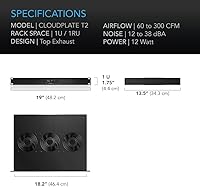
  • Dimensions: The panel measures 13.5″ in depth, 19″ in width, and 1.75″ in height to fit standard 19-inch rack rails precisely.
  • Weight: The assembled unit weighs 3 pounds, making single-person installation manageable without additional hardware support.
  • Frame Material: The chassis is constructed from anodized aluminum with CNC-machined detailing, providing corrosion resistance and a professional finish.
  • Airflow Direction: All airflow is directed vertically upward through a top-exhaust configuration, channeling heat away from rack-mounted equipment efficiently.
  • Airflow Range: Fan speed scales continuously between 60 and 300 CFM, allowing the unit to match output precisely to thermal demand.
  • Noise Level: Operating noise ranges from approximately 12 dBA at minimum speed to 38 dBA at full speed under peak thermal load.
  • Fan Bearings: Each fan motor uses dual ball bearings, which are rated for longer continuous-duty lifespans than sleeve-bearing alternatives common in budget panels.
  • Thermostat: An integrated programmable thermostat controller automates fan speed based on user-defined temperature thresholds, eliminating the need for manual speed adjustments.
  • Alarm System: The unit includes built-in alarm warnings and fan failure triggers that notify users of abnormal operating conditions before damage occurs.
  • Backup Memory: Controller settings are stored in backup memory and are retained after power interruptions, so the unit resumes with the same configuration on restart.
  • Power Connector: The unit connects via a standard 4-pin power connector compatible with typical rack power distribution and AC power setups.
  • Voltage: Rated for 120V AC power, making it compatible with standard North American electrical infrastructure without any adapter or converter.
  • Wattage: The entire fan system draws a maximum of 12 watts at full speed, keeping energy consumption minimal even in continuous operation.
  • Rack Compatibility: Engineered to fit any industry-standard 19-inch equipment rack, including open-frame, enclosed AV, and network rack enclosures.
  • Manufacturer: Produced by AC Infinity, a brand specializing in thermal management solutions for AV, home theater, and IT rack applications.

Related Reviews

AC Infinity CLOUDPLATE T1-N Rack Fan Panel
82%
91%
Noise Level
88%
Build Quality
93%
Thermostat & Automation
74%
Airflow Performance
92%
Installation & Fit
More
AC Infinity CLOUDPLATE T7-N 2U Fan Panel
84%
91%
Cooling Performance
88%
Noise Level
84%
Thermostat & Controller
93%
Build Quality
73%
Fan Longevity & Reliability
More
AC Infinity AXIAL 1225 120mm Muffin Fan
81%
91%
Build Quality
78%
Noise Level
72%
Airflow Performance
93%
Longevity & Reliability
88%
Ease of Installation
More
AC Infinity Controller 2 Fan Speed Controller
80%
88%
Temperature Accuracy
83%
Ease of Setup
91%
Fan Speed Control
74%
Build Quality
86%
Noise Reduction
More
AC Infinity AIRFRAME T7-N Cooling Fan System
87%
91%
Cooling Efficiency
94%
Quiet Operation
68%
Ease of Installation
89%
Build Quality
88%
Programmable Features
More
Lian Li UNI Fan SL-Infinity 140 ARGB Fan
86%
92%
Cooling Performance
95%
Visual Appeal & Lighting
87%
Noise Level
80%
Installation Ease
91%
Build Quality
More
Lian Li UNI Fan SL-INF 120 RGB Infinity Mirror ARGB 120mm Fan
86%
93%
Aesthetics and RGB Lighting
88%
Noise Level/Quiet Operation
91%
Build Quality and Durability
85%
Ease of Installation
87%
Cooling Efficiency
More
AmRunJe 2X 120mm Computer Fan with AC Plug
84%
88%
Cooling Performance
72%
Noise Levels at Full Speed
85%
Durability and Build Quality
91%
Ease of Setup
87%
Airflow Efficiency
More
Tecmojo 1U 19-Outlet Rack PDU
80%
93%
Outlet Count & Layout
88%
Build Quality & Materials
84%
Circuit Breaker Protection
34%
Surge Protection
91%
Installation & Mounting
More
KEYFANCLUB FAN-S2 Dual 120mm AC Computer Fans
81%
93%
Ease of Setup
88%
Airflow Performance
67%
Noise Level
71%
Build Quality
79%
Speed Controller
More

FAQ

Yes, it is built specifically for standard 19-inch rack rails and occupies exactly one rack unit of space. As long as your rack accepts 1U equipment, this panel will mount without any modification.

At low speeds it is genuinely quiet, around 12 dBA, which is barely perceptible in a normal room. The thermostat keeps it in that range during light loads. At peak airflow it reaches 38 dBA, which is audible in a quiet room — not disruptive, but present. If your rack is inside a closed cabinet in a living space, most users find low-to-mid speed operation completely acceptable.

The controller comes with default settings out of the box, so it will function without any programming. For best results, though, you will want to dial in your preferred temperature thresholds manually. The interface has a bit of a learning curve, so set aside 20 to 30 minutes and keep the manual close for the first configuration.

The T1 is designed for lower airflow applications — quieter, but with less heat-moving capacity. The AC Infinity CLOUDPLATE T2 1U Rack Fan steps up the airflow significantly, topping out at 300 CFM, which makes it more appropriate for racks with amplifiers, switches, or other sustained heat sources. The T5 and T6 are larger, multi-fan units suited to bigger or more demanding setups. The T2 sits squarely in the middle — serious performance in a compact, single-unit footprint.
Yes, the controller includes ports that allow you to connect and manage additional fans, which is useful for expanding coverage across a larger rack without needing a separate controller. Check the product documentation for the exact number of supported auxiliary connections.

The backup memory function stores your programmed settings and restores them automatically after a power interruption. You will not need to reprogram the thermostat or alarm thresholds after an outage, which is particularly helpful in unattended network closet installations.

No, the unit is rated for 120V AC power only. If you are outside North America and your local standard is 230V or similar, you would need a step-down voltage converter to use it safely. It is worth confirming your local power specs before purchasing.

Because air exits through the top of the panel, you need some clearance above it for that hot air to escape the rack effectively. In a fully enclosed cabinet, make sure there is at least a gap at the top or a vent panel above this unit — otherwise the exhausted heat has nowhere to go and efficiency drops significantly.

There is a brief, audible transition when the thermostat triggers a speed increase — most users describe it as a noticeable but momentary whoosh rather than a jarring sound. In a quiet listening room during a late-night session it can catch your attention, but it settles at whatever target speed the thermostat requires fairly quickly.

The dual ball-bearing motors are built for long-term continuous operation, and most owners report no issues through the first year or two. A subset of long-term users have noted some bearing noise developing after 18 months or more of around-the-clock use. If your rack runs 24/7, treat the fans as a component that may eventually need replacement, though the chassis and controller should last considerably longer.

Where to Buy