Overview

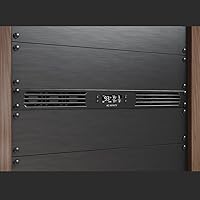
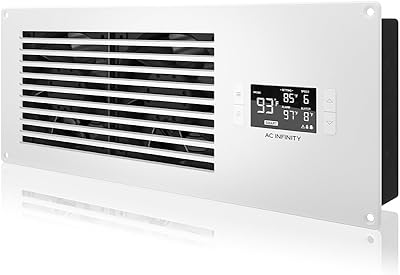
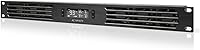
The AC Infinity CLOUDPLATE T1-N Rack Fan Panel is a 1U cooling solution built for the kind of gear that quietly runs hot in enclosed racks — AV receivers, amplifiers, network switches, and media servers. Unlike exhaust panels that pull hot air out, this rack cooling panel uses an intake airflow design to push cooler air in from the front, which works best when your rack has some rear ventilation path. It targets semi-pro and enthusiast builders who want real thermal management rather than a passive vent or a cheap blower strip. Don't expect it to handle a fully loaded data center rack — that's simply not what it was built for.
Features & Benefits

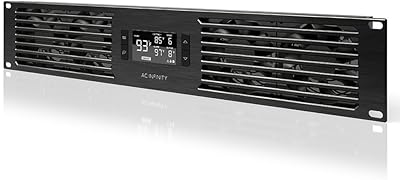
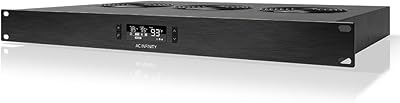
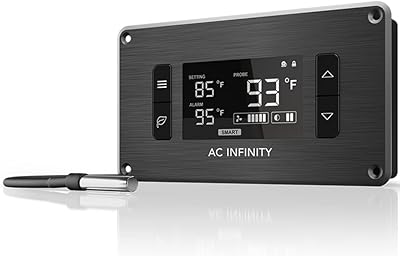
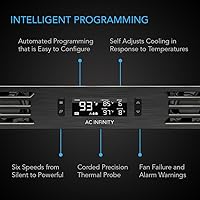
Six 40mm dual-ball-bearing fans sit behind the aluminum face of the CLOUDPLATE T1-N, collectively pushing between 20 and 60 CFM depending on how hot things get. That's the practical part: the programmable thermostat handles speed automatically, so the fans barely spin at idle and only ramp up when rack temperature actually climbs. If a fan fails, you get an alarm alert — not a silent failure that slowly cooks your gear. Settings survive a power cut thanks to backup memory, a small but genuinely useful detail. The anodized aluminum chassis feels solid and slots cleanly into any standard 19-inch rack, and there are ports to chain in additional fans if one unit isn't enough.

Best For

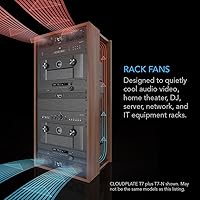
This rack cooling panel is a strong fit for home theater setups where a receiver, streaming device, and amplifier are all crammed into an enclosed AV cabinet that gets warm after a few hours. It works equally well in small recording studios or DJ booths where gear runs during long sessions and silence actually matters. Network closets with a NAS, a switch, and a patch panel will benefit too — that kind of equipment often gets ignored until something throttles or fails. The CLOUDPLATE T1-N is not the right tool for a dense blade server environment, but for the prosumer who wants automated thermal protection without a commercial IT budget, it hits the mark.

User Feedback

Owners consistently point to near-silent operation as the standout quality — at low rack temperatures this fan unit is practically inaudible, which matters a lot in living rooms or small offices. The build quality earns praise too, with the aluminum construction feeling noticeably more substantial than cheaper plastic alternatives. Programming the thermostat is described as straightforward by most users, even those without much technical background. The main complaint is airflow ceiling: six 40mm fans can only move so much air, and in high-wattage or tightly packed racks, this unit may not be sufficient on its own. Long-term durability looks promising given the dual-ball bearing design, though multi-year data points remain limited.

Pros

  • Automated thermostat ramps fans up only when needed, keeping the rack genuinely quiet during normal use.
  • Dual-ball-bearing fans are built for longevity — a real advantage over sleeve-bearing alternatives that degrade faster.
  • Fan failure alarms and temperature alerts protect expensive rack equipment running unattended for hours.
  • Backup memory retains programmed settings after power outages — no reprogramming after every interruption.
  • Anodized aluminum construction feels premium and looks professional inside a quality rack cabinet.
  • Slots cleanly into any standard 19-inch rack with minimal fuss, even for first-time rack builders.
  • Expansion ports allow chaining additional fans, so the panel can grow with your cooling needs.
  • Draws only 8 watts at full load — negligible impact on power consumption even running continuously.
  • Near-silent operation at low thermal loads makes this rack cooling panel genuinely viable in living rooms or offices.
  • The programmable thermostat covers a wide range of temperature thresholds, giving experienced users fine-grained control.

Cons

  • Six 40mm fans hit an airflow ceiling that dense or high-wattage racks can exceed fairly easily.
  • Programming the thermostat has a learning curve that the thin included documentation does not adequately support.
  • No app connectivity or remote alerts — alarm triggers are hardware-only with no smart home integration.
  • The physical controller display is small and can be difficult to read in a dimly lit rack closet.
  • Intake-only airflow requires a clear rear exhaust path — ineffective in fully sealed or poorly ventilated enclosures.
  • Third-party fan compatibility through the expansion ports is inconsistently documented and unreliable in practice.
  • The controller interface buttons are not particularly intuitive, and new users often rely on third-party tutorials to configure it properly.
  • No built-in power monitoring or energy reporting for users who track equipment efficiency over time.

Ratings

The AC Infinity CLOUDPLATE T1-N Rack Fan Panel earns consistently strong marks across thousands of verified buyer reviews worldwide — our AI scoring model filters out incentivized, bot-generated, and outlier feedback to surface what real users actually experience over time. Scores reflect both the genuine strengths this rack cooling panel delivers and the honest limitations that come up repeatedly in real installations. Nothing is glossed over.
Noise Level
91%
At low rack temperatures, this fan unit is remarkably quiet — users consistently report it blending into the background during TV viewing or casual listening sessions, which is a real win for anyone with a living room AV rack. The variable speed system means you rarely hear it at full blast during normal use.
At peak speed under heavy thermal load, 28 dBA is audible in a quiet room. Users in very noise-sensitive environments like recording studios have noted that sustained high-speed operation can become noticeable, even if it is not obnoxiously loud.
Build Quality
88%
The anodized aluminum chassis is frequently called out as feeling premium and substantially more solid than cheaper plastic blower panels at lower price points. The CNC-machined details give it a professional look that holds up well inside a rack over years of use.
A few users noted that the plastic controller interface feels slightly less refined than the metal faceplate itself. It is a minor inconsistency, but buyers who care about a fully premium build experience may notice it up close.
Thermostat & Automation
93%
The programmable thermostat is the feature buyers mention most positively — fans respond automatically to actual rack temperatures rather than running flat-out all the time, which reduces noise and extends fan life. For anyone who has dealt with a basic always-on blower strip, the difference in day-to-day experience is significant.
The initial programming interface has a small learning curve, and the instruction documentation is considered thin by some users. First-time rack builders occasionally report spending more time than expected figuring out the temperature threshold settings.
Airflow Performance
74%
26%
For typical home theater and network closet loads — a receiver, a NAS, a switch, maybe a media server — the 20 to 60 CFM range is genuinely adequate and keeps equipment temperatures in a comfortable range during extended operation.
This is where the most consistent criticism lands. Users with denser or higher-wattage rack setups note that six 40mm fans simply cannot move enough air to manage serious heat loads. If your rack is packed with power amplifiers or multiple servers, this unit alone will not be sufficient.
Installation & Fit
92%
Buyers almost universally describe the physical installation as painless — it slides into any standard 19-inch rack without modification and mounts cleanly. Even users doing their first rack build found the process straightforward and well within reach without special tools.
The power cable routing can feel a little awkward depending on how your rack is organized internally. A small number of users wished for a right-angle power connector option to keep cable management tidier in shallow racks.
Fan Reliability & Longevity
86%
Dual-ball bearings are a meaningful spec choice here — they are rated for significantly longer service life than sleeve-bearing alternatives, and early multi-year owners report no fan failures or audible bearing degradation, which builds confidence in the long-term investment.
The overall product has not been on the market long enough for a deep pool of five-plus-year reliability data to exist. Buyers looking for decade-long track record evidence will find limited information, as most reviews come from owners within a two to three year window.
Controller Interface
71%
29%
Once configured, the controller holds settings reliably thanks to backup memory, and users appreciate not having to reprogram after a power outage. The alarm and fan failure triggers give a real sense of protection that basic fan panels completely lack.
The physical interface is functional but not particularly intuitive, and the small display can be hard to read in a dimly lit rack closet. Several users described the setup process as trial-and-error until they got comfortable with the button logic.
Value for Money
78%
22%
For a buyer who wants automated temperature management, alarm protection, and a solid aluminum build in a single 1U panel, the price is defensible compared to cobbling together passive venting plus a separate controller and fan array.
Buyers comparing against basic fixed-speed fan strips at a fraction of the price do feel the premium acutely, especially if they only need simple airflow without automation. If the thermostat features go unused, the value equation weakens considerably.
Intake vs Exhaust Suitability
69%
31%
The intake design works very effectively when paired with rear rack ventilation or open-back cabinets, actively channeling cooler ambient air across hot components in a controlled path rather than simply hoping heat escapes passively.
Buyers who needed an exhaust solution — pulling hot air out from the top or rear — occasionally purchased this without fully understanding the intake-only orientation, leading to disappointment. The distinction is important and not always clearly communicated at the point of purchase.
Alarm & Protection Features
84%
Fan failure alerts and temperature alarms are features that most buyers in this category never think about until something goes wrong — having them built in is a meaningful safety net for expensive rack-mounted gear left running unattended for hours.
The alarm system, while functional, does not connect to any smart home platform or send remote notifications. Users who want app-based alerts or integration with monitoring software will need to look elsewhere or build their own workaround.
Fan Expansion Ports
77%
23%
The ability to chain additional fans through the expansion ports is a practical feature for users whose cooling needs grow over time — it avoids the need to buy a whole new controller and lets this fan unit serve as a hub for a slightly larger cooling setup.
The expansion capability is limited in total fan count, and documentation on exactly which third-party fans are compatible is sparse. Users who tried to push the expansion beyond basic same-brand fans ran into inconsistent results.
Aesthetics & Rack Appearance
89%
The matte anodized aluminum finish and clean front grille look genuinely professional inside a rack, which matters to home theater enthusiasts who invested in a good-looking open-frame or glass-door rack cabinet and do not want an eyesore in the mix.
The styling is clean but plain — there are no RGB accents or customization options for buyers who prefer a more modern or personalized look. In a visually themed gaming or entertainment setup, it can feel a touch utilitarian.
Power Efficiency
88%
Drawing only 8 watts at full load, this rack cooling panel adds almost nothing to a home power bill even when running continuously, which is a quiet but real advantage for gear that operates around the clock in a network closet or home server setup.
There is no power usage monitoring or reporting built in, so users who want granular energy data for efficiency tracking will not find it here. For most buyers this is a non-issue, but it is a gap for data-conscious users.
Documentation & Setup Support
62%
38%
The initial hardware setup — physically mounting and connecting power — is genuinely simple and needs little guidance. Most users with any rack experience had the unit physically installed within minutes without consulting any instructions.
The programming documentation is widely described as too brief and lacking real-world examples. New users trying to configure temperature thresholds and alarm settings often turn to third-party YouTube tutorials because the included guide does not cover enough practical scenarios.

Suitable for:

The AC Infinity CLOUDPLATE T1-N Rack Fan Panel is a well-matched solution for home theater enthusiasts who have a receiver, amplifier, streaming device, and media server all living inside an enclosed AV cabinet that turns into a heat trap after a couple of hours of use. It is equally at home in a small recording studio or DJ booth where gear runs hot during long sessions but noise discipline matters — the automated speed control keeps things quiet until the temperature actually demands more airflow. Network closets housing a NAS, a managed switch, and a few patch panels will benefit significantly, since that kind of equipment often runs unattended for days and any thermal protection is better than none. Prosumers and IT hobbyists who want real automation — fans that respond to conditions rather than just blasting at full speed constantly — will appreciate the programmable thermostat without needing enterprise-grade infrastructure to support it. It is also a strong upgrade path for anyone currently running a passive vent panel or a cheap fixed-speed blower strip and wondering why their gear still runs warm.
Not suitable for:

The AC Infinity CLOUDPLATE T1-N Rack Fan Panel is not the right tool for dense or high-wattage rack environments — if you are running multiple power amplifiers, blade servers, or heavily loaded compute nodes, six 40mm fans simply cannot move enough air to keep up, and you will need a more capable cooling strategy. Buyers looking for an exhaust solution — one that pulls hot air out from the top or rear of the rack — should look elsewhere, since this unit only pushes air inward and works correctly only when there is a proper exit path for that air. Anyone hoping for smart home integration or remote monitoring via an app will be disappointed, as the alarm system is hardware-only with no wireless connectivity or notification capability. Buyers on a tight budget who only need basic airflow without automation may find the investment hard to justify compared to simpler fixed-speed alternatives that cost significantly less. Finally, if your rack has very limited rear clearance or no rear ventilation at all, intake airflow alone will just push hot air around without meaningfully lowering temperatures.
Specifications

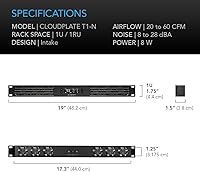
  • Form Factor: Occupies a single 1U rack space, making it one of the most space-efficient active cooling options available for 19-inch standard racks.
  • Dimensions: The panel measures 19″ in length, 1.5″ in width, and 1.75″ in height, conforming precisely to standard 1U rack unit dimensions.
  • Weight: At 2.5 pounds, the unit is light enough to mount without straining rack rails or requiring additional support hardware.
  • Material: The chassis is constructed from anodized aluminum with CNC-machined detailing, providing both structural rigidity and a clean professional finish.
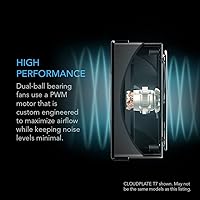
  • Fan Configuration: Six 40mm dual-ball-bearing fans are arranged across the panel to distribute airflow evenly rather than concentrating it in a single zone.
  • Airflow Range: Variable airflow output spans 20 to 60 CFM depending on fan speed, which is governed automatically by the onboard thermostat controller.
  • Noise Output: Acoustic output ranges from 8 dBA at minimum speed to 28 dBA at full load, staying below conversational noise levels in most operating conditions.
  • Max Fan Speed: Fans reach a maximum rotational speed of 1800 RPM under full thermal demand, balancing airflow performance against noise and bearing wear.
  • Airflow Direction: This is an intake-only panel, designed to draw cooler ambient air into the rack from the front rather than exhausting hot air outward.
  • Power Draw: The unit consumes 8 watts at full load when running on a standard 120V AC connection, adding negligible cost to continuous operation.
  • Power Connector: Uses a standard power cable connector compatible with typical rack power strips and PDUs, requiring no proprietary adapter or special wiring.
  • Thermostat Control: An onboard programmable thermostat automatically adjusts fan speed in response to detected rack temperatures, with user-configurable threshold and speed parameters.
  • Alert System: Built-in alarms trigger on fan failure events and temperature threshold breaches, providing hardware-level protection for unattended rack environments.
  • Backup Memory: The controller stores all user-programmed settings in non-volatile memory, so custom configurations are retained after power loss or interruption.
  • Fan Expansion: Dedicated expansion ports allow the panel to control additional external fans, extending its thermal management reach beyond the six onboard units.
  • Rack Compatibility: Designed for universal compatibility with standard 19-inch equipment racks used in AV, home theater, DJ, network, and IT installations.
  • Bearing Type: Dual-ball bearings in each fan are rated for longer service life and greater resistance to heat-related degradation compared to sleeve-bearing alternatives.
  • Voltage: Operates on 120V AC power, which is standard for North American residential and commercial electrical installations.

Related Reviews

AC Infinity CLOUDPLATE T7-N 2U Fan Panel
84%
91%
Cooling Performance
88%
Noise Level
84%
Thermostat & Controller
93%
Build Quality
73%
Fan Longevity & Reliability
More
AC Infinity CLOUDPLATE T2 1U Rack Fan
82%
91%
Thermal Performance
74%
Noise Level
93%
Thermostat & Automation
89%
Build Quality
71%
Ease of Installation
More
AC Infinity AIRFRAME T7-N Cooling Fan System
87%
91%
Cooling Efficiency
94%
Quiet Operation
68%
Ease of Installation
89%
Build Quality
88%
Programmable Features
More
AC Infinity AXIAL 1225 120mm Muffin Fan
81%
91%
Build Quality
78%
Noise Level
72%
Airflow Performance
93%
Longevity & Reliability
88%
Ease of Installation
More
AC Infinity Controller 2 Fan Speed Controller
80%
88%
Temperature Accuracy
83%
Ease of Setup
91%
Fan Speed Control
74%
Build Quality
86%
Noise Reduction
More
Lian Li UNI Fan SL-Infinity 140 ARGB Fan
86%
92%
Cooling Performance
95%
Visual Appeal & Lighting
87%
Noise Level
80%
Installation Ease
91%
Build Quality
More
Lian Li UNI Fan SL-INF 120 RGB Infinity Mirror ARGB 120mm Fan
86%
93%
Aesthetics and RGB Lighting
88%
Noise Level/Quiet Operation
91%
Build Quality and Durability
85%
Ease of Installation
87%
Cooling Efficiency
More
AmRunJe 2X 120mm Computer Fan with AC Plug
84%
88%
Cooling Performance
72%
Noise Levels at Full Speed
85%
Durability and Build Quality
91%
Ease of Setup
87%
Airflow Efficiency
More
NavePoint 4U Patch Panel Bracket Wall Mount Rack
87%
92%
Ease of Installation
88%
Build Quality
90%
Adjustability/Versatility
85%
Weight Capacity
89%
Space Optimization
More
Wathai AC15050B 150mm Exhaust Fan
74%
88%
Airflow Performance
52%
Noise Level
83%
Build Quality
86%
Bearing & Longevity
79%
Installation Ease
More

FAQ

This is an intake panel, meaning it pulls cooler air from outside the rack and pushes it inward across your equipment. If you need to exhaust hot air out of the top or rear of your rack, you would want to look at the exhaust-oriented version in the same product line. For most home theater and network closet setups, intake works well as long as there is some rear ventilation path for that air to escape.

Yes, it is designed specifically for standard 19-inch racks and will mount on any rail system that accepts 1U rack units. The physical installation is straightforward — it slides in and screws to the rails just like any other 1U piece of gear.

At low fan speeds, most users describe it as barely audible — genuinely quiet enough for a living room during TV watching or casual listening. At full speed under heavy thermal load it does produce some noise, around 28 dBA, which is roughly comparable to a quiet library. In practice, the thermostat keeps it at low speeds most of the time, so sustained full-speed operation is uncommon in typical home theater environments.

You can fully customize the temperature thresholds that trigger fan speed changes. The onboard controller lets you program the specific temperatures at which the fans ramp up or down, so you are not stuck with factory defaults. It takes a little time to figure out the interface initially, but once configured it runs automatically without further adjustment.

The AC Infinity CLOUDPLATE T1-N Rack Fan Panel stores your programmed settings in backup memory, so everything you configured is retained after a power outage. You will not need to reprogram thresholds or speed settings every time there is an interruption — the unit picks up exactly where it left off.
For a typical two or three-piece AV setup, yes — it handles that kind of load well and keeps temperatures in a comfortable range during extended listening sessions. Where it starts to struggle is in very dense or high-wattage configurations with multiple power amplifiers or heavily loaded equipment all running simultaneously. If your rack is really packed with heat-generating gear, you may want to pair this fan unit with an exhaust panel or consider a higher-CFM solution.

The panel has expansion ports that allow you to control additional fans through the same thermostat controller. Compatibility is most reliable with AC Infinity fans from the same product ecosystem — third-party fan compatibility is not well-documented and results have been inconsistent based on user reports. Sticking to the same brand for any add-on fans is the safer approach.

No, there is no wireless connectivity, app integration, or smart home compatibility of any kind. The alarm system is hardware-only — if a fan fails or temperatures exceed your set threshold, the controller triggers an audible or visible alert locally. If you need remote monitoring or notifications sent to your phone, this rack cooling panel does not currently support that.

The physical installation is genuinely easy — it mounts to standard rack rails without any special tools or modifications. Programming the thermostat is where first-timers tend to spend more time than expected, since the included documentation is fairly minimal. Most new users find a short YouTube tutorial more helpful than the printed guide for getting through the initial configuration.

Dual-ball bearings are meaningfully more durable than the sleeve bearings used in cheaper fan panels, and the design choice reflects a focus on longevity. Multi-year owners have reported no bearing degradation or audible wear in their reviews. That said, the product has not been on the market long enough for a deep pool of five-plus-year reliability data, so long-term projections are based on bearing specifications and early owner feedback rather than extensive field history.

Where to Buy