Overview

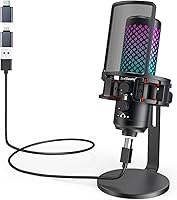
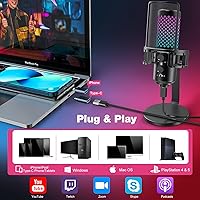
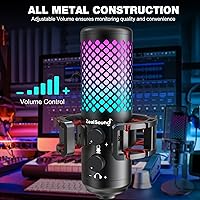
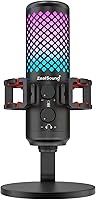
The ZealSound KM8 is a budget USB condenser microphone that punches noticeably above its price class, largely because of one thing most competitors skip at this range: an all-metal build. Where most sub-$40 mics feel hollow and plasticky the moment you pick them up, this USB microphone has a satisfying heft and rigidity that holds up to daily desk use. It connects directly to iPhone, iPad, USB-C phones, Mac, PC, and even PS4 and PS5 — no drivers, no setup menus, just plug in and start recording. That said, it is worth being clear: this is an entry-level microphone, not a studio tool. It covers the basics well, but experienced audio engineers should look elsewhere.

Features & Benefits

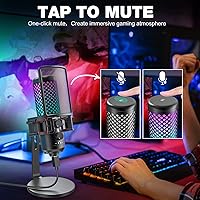
The unibody metal housing does more than look good — it dampens the vibration transfer that hollow plastic bodies amplify straight into your recording. The cardioid pickup pattern keeps focus on your voice and pushes away keyboard clatter, HVAC hum, and other ambient noise that plagues home setups. A physical gain knob lets you dial sensitivity in real time, which matters more than most buyers realize until they hear the difference between a quiet bedroom and a noisy apartment. There is also a 3.5mm headphone jack for monitoring your own voice without delay, plus a tap-to-mute button that cuts audio without any audible click — genuinely useful when you are mid-stream and need a quick break.

Best For

This streaming mic is a natural fit for first-time content creators — specifically anyone stepping up from a headset mic and wanting cleaner audio without a steep learning curve or a large investment. iPhone and iPad users will appreciate that it works immediately with the included Lightning adapter, no third-party dongle needed. Gamers running RGB setups will find it fits right in visually, and the lighting can be switched off entirely with a long press if you want a cleaner look on video calls. Remote workers and students who spend long hours on Zoom or Discord will notice the improved voice clarity, and ASMR hobbyists get a workable cardioid condenser without spending over fifty dollars.

User Feedback

Across more than 770 ratings, this USB microphone holds a 4.2-star average, and the pattern in reviews is fairly consistent. Buyers keep mentioning build quality as the biggest surprise — the metal body feels genuinely solid, not a cheap imitation of pricier mics. Setup gets high marks too, with iPhone users in particular reporting that the included adapter works reliably right out of the box. On the downside, the gain knob draws complaints at higher settings, where room noise bleeds in more than expected. The included stand also gets flagged as lightweight and prone to tipping. A handful of buyers compare it to the Blue Snowball iCE and feel it edges ahead on build, though opinions on raw audio quality remain more divided.

Pros

  • The all-metal unibody construction feels genuinely premium and resists the wobble common in plastic mics at this price.
  • Plug-and-play setup works immediately across iPhone, iPad, Mac, and PC with zero driver installation.
  • The included Lightning adapter makes this USB microphone one of the more reliable iPhone-compatible options under $40.
  • A physical gain knob lets you adjust mic sensitivity in real time during live sessions without touching software.
  • The silent tap-to-mute button cuts audio cleanly with no audible click, ideal for live streaming.
  • Real-time headphone monitoring via the 3.5mm jack lets you hear your voice instantly without software latency.
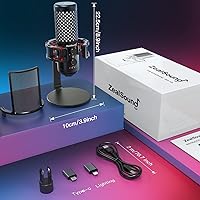
  • The accessory bundle — shock mount, pop filter, boom arm adapter, and both USB adapters — saves meaningful extra spend.
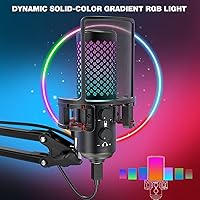
  • RGB lighting is vivid and camera-friendly, with the option to disable it entirely via long press for cleaner video setups.
  • Compatible with PS4 and PS5 out of the box, giving console streamers a straightforward USB mic option.
  • At its typical price point, the feature-to-cost ratio is hard to beat for a beginner's first dedicated microphone.

Cons

  • At higher gain settings, room noise and ambient hum bleed into recordings more than most users expect.
  • The included desk stand is undersized relative to the mic's weight and tips easily on smooth surfaces.
  • Android USB-C compatibility is inconsistent across device brands, making it unreliable for Android-first users.
  • The gain knob has no center detent or position indicator, making it easy to accidentally nudge mid-session.
  • RGB modes cannot be customized to specific colors, and the lighting resets to default every time the mic is powered on.
  • The mute indicator LED is subtle enough to miss in bright environments, leading to accidental live broadcasts.
  • Xbox is not supported at all, which is a notable gap for a mic actively marketed toward gamers.
  • Headphone monitoring output is too quiet for higher-impedance headphones, limiting its usefulness for studio headphone users.
  • The pop filter is a thin metal mesh rather than a fabric screen, offering only basic plosive protection.
  • The shock mount elastic bands show signs of wear with extended daily use and are not easily replaceable.

Ratings

The ZealSound KM8 has been evaluated by our AI system after analyzing hundreds of verified buyer reviews from global markets, with spam, incentivized, and bot-flagged submissions actively filtered out before scoring. The result is a transparent, balanced picture of where this USB microphone genuinely delivers and where it falls short for real users. Strengths and frustrations are both reflected in the scores below.

Build Quality
88%
The all-metal unibody construction is the single most praised aspect across reviews. Buyers who have owned plastic mics at similar prices consistently describe the KM8 as feeling noticeably more solid on the desk, with less wobble and no creaking when adjusting the angle.
While the mic body itself earns high marks, the included stand draws repeated criticism for feeling undersized relative to the mic's weight. A few users reported minor tipping on uneven desk surfaces, which is a real nuisance during a live stream.
Audio Clarity
74%
26%
For casual streaming, Discord calls, and YouTube voiceovers, the cardioid pickup pattern does a reasonable job isolating a voice and cutting ambient noise from the sides and rear. Most users upgrading from a headset mic notice a meaningful step up in vocal presence and warmth.
At higher gain settings, background noise bleeds in more than expected — HVAC hum, keyboard clicks, and room echo become audible. The 96kHz dynamic range spec sounds impressive on paper, but the real-world output does not match what a dedicated studio condenser would produce at a similar price point.
iPhone & iPad Compatibility
83%
The included Lightning adapter works reliably for the majority of iPhone and iPad users, which is a genuine differentiator at this price. Plug it in, open any recording or streaming app, and the mic is recognized immediately with no configuration needed — something buyers specifically shopping for an iPhone-compatible mic appreciate immediately.
A minority of users with older iPad models reported inconsistent recognition, requiring them to replug the adapter. The adapter itself feels slightly loose on some Lightning ports, which can cause brief audio dropouts if the cable is nudged during a recording session.
Ease of Setup
92%
Plug-and-play works exactly as advertised across PC, Mac, and iPhone. There are no drivers to hunt down, no software to configure, and no pairing process. For someone setting up their first dedicated microphone, this zero-friction experience is a meaningful time-saver.
The user manual is thin and provides limited guidance for optimizing gain settings in different room types. New users who push the gain too high and get noisy recordings often do not realize the fix is simply turning the knob back down, which a better quick-start guide would clarify.
Noise Rejection
67%
33%
The cardioid polar pattern handles moderate off-axis noise reduction competently, which helps in treated or quieter home environments. Buyers recording in dedicated home offices or rooms with soft furnishings generally report cleaner takes without needing additional acoustic treatment.
In louder or more reflective spaces — open-plan apartments, rooms with hard floors, or setups near mechanical keyboards — background noise creeps in more than competing mics with stronger internal noise reduction chipsets. This is one area where spending an extra $20 on a rival model can yield a noticeably cleaner result.
Gain Control
71%
29%
Having a physical gain knob rather than relying entirely on software volume adjustments is a genuine advantage for streamers and podcasters who need to react quickly during a live session. The control range is wide enough to accommodate both close-mic voiceover work and more distant positioning.
The knob lacks detents or a center-click, making it easy to accidentally nudge it during a session. Several users noted that finding the sweet spot between too-quiet and too-noisy takes trial and error, and the knob offers no visual indicator of its current position beyond physically looking at where it is turned.
Headphone Monitoring
78%
22%
The 3.5mm monitoring jack provides real-time playback of your voice without the latency that plagues software monitoring setups. For podcasters doing multi-track recordings or streamers checking their own audio mix, hearing yourself in the headphones instantly is a genuinely useful feature at this price tier.
The monitoring volume is controlled separately from the main gain knob, but the output level is slightly low for users with higher-impedance headphones. Those using standard earbuds will have no issues, but anyone plugging in a full-size studio headphone may find the monitoring signal too quiet to be practically useful.
Tap-to-Mute Function
86%
The silent mute button positioned on top of the mic is one of those small details that makes a real difference during live use. Streamers and podcasters who need to cough, take a sip, or step away briefly can cut audio instantly without the audible thunk that plague cheaper mute implementations.
The LED indicator light that signals mute status is subtle, and in a bright room or under strong desk lighting, it can be difficult to tell at a glance whether the mic is actually muted. A few users have accidentally broadcast themselves thinking they were muted because they missed the indicator.
RGB Lighting
81%
19%
The dynamic RGB effects are vivid and well-executed for a mic in this category. On camera during streams or recorded video, the lighting catches the eye and adds visual production value without requiring any external software. The ability to cycle through static color modes is also a nice touch.
RGB customization is limited — users cannot choose specific colors or build custom patterns outside of the preset modes. The long-press-to-disable feature works, but there is no memory function, so the lighting resets to the default mode every time the mic is powered on, which gets repetitive to reset.
USB-C & Android Compatibility
62%
38%
The included USB-C adapter means Android phone and tablet users can theoretically use the KM8 without buying anything extra. For simple recording apps and voice chat, it works acceptably on most modern Android devices and USB-C laptops.
Compatibility across Android devices is inconsistent — some users with certain Samsung and Pixel models reported that the mic was not recognized reliably, requiring a reboot or a specific USB audio routing app to function. This is a known limitation of the USB audio standard on Android rather than a flaw unique to this mic, but buyers should be aware before purchasing specifically for Android use.
Included Accessories
76%
24%
The package includes a shock mount, pop filter, both USB-C and Lightning adapters, a boom arm thread adapter, and a nearly 2-meter cable — a genuinely useful bundle that saves buyers from immediately needing to purchase accessories separately.
The shock mount, while functional, uses basic elastic bands that show signs of wear after extended use. The pop filter is a thin metal mesh rather than a fabric diffuser, which handles plosives adequately but not as effectively as a dedicated foam or double-layer pop screen.
Value for Money
84%
At its typical street price under $40, the KM8 delivers a feature set — metal build, gain control, monitoring jack, mute button, RGB, and multi-device adapters — that would cost meaningfully more if purchased across competing individual products. For a first dedicated microphone purchase, the value proposition is difficult to argue with.
Buyers who compare it directly to similarly priced options like the Blue Snowball iCE will find trade-offs rather than a clear winner. The KM8 wins on build feel and features, but the Snowball has a slight edge in raw audio consistency, which matters more to some users than the extras the KM8 bundles in.
Desk Stand Stability
54%
46%
The included stand keeps the mic upright for basic desk use and is adequately sized for smaller setups where space is limited. For users who plan to mount the mic on a boom arm — which the included thread adapter supports — the stand quality is largely irrelevant.
For users who rely on the stock stand rather than a boom arm, stability is a genuine weakness. The base diameter is modest relative to the mic's weight, and on slick desk surfaces it shifts easily. Multiple reviewers recommend swapping to a boom arm shortly after purchase, which means an additional cost the packaging does not acknowledge.
Platform Compatibility (Gaming)
73%
27%
PS4 and PS5 users report solid compatibility via the USB connection with no additional configuration required, making it a practical option for console streamers who want a dedicated mic without the complexity of a full audio interface setup.
Xbox compatibility is explicitly absent, which is a meaningful gap for a mic marketed partly at gamers. Buyers who game across both PlayStation and Xbox ecosystems will need a workaround or a different microphone entirely, and this limitation is not always prominent enough in the product listing to catch first-time buyers before purchase.

Suitable for:

The ZealSound KM8 is a strong pick for anyone taking their first real step into content creation — specifically streamers, podcasters, and YouTubers who have been relying on a headset mic and want noticeably cleaner audio without committing to a complex or expensive setup. iPhone and iPad users will find it particularly practical, since the included Lightning adapter means they can plug in and start recording in seconds with no additional purchases. Gamers who run RGB-heavy desk setups will appreciate that the lighting fits right in aesthetically, while also getting a functional cardioid mic that handles voice chat and stream audio well. Remote workers and students who spend hours on Zoom or Discord will hear a clear improvement over laptop built-ins and most webcam mics. ASMR hobbyists and voiceover beginners on a tight budget also land in the sweet spot here — the cardioid pickup pattern and gain control give them enough flexibility to produce decent recordings at home without acoustic treatment.

Not suitable for:

The ZealSound KM8 is not the right tool for anyone who needs professional-grade audio fidelity. Musicians recording instruments, voice actors submitting commercial work, or podcasters aiming for broadcast-quality production will run into the limits of its 14mm condenser capsule fairly quickly, especially in untreated rooms where background noise becomes a real problem at higher gain settings. Android users should also proceed cautiously — USB audio compatibility on Android is notoriously inconsistent, and while the included USB-C adapter works on many devices, there is no guarantee of reliable performance across all models. Xbox gamers are simply out of luck, as this mic does not support Xbox at all, which is a real gap for a product marketed partly at the gaming audience. Anyone who prefers not to deal with a physical cable connection — whether for ergonomic reasons or desk tidiness — will also find no wireless option here.

Specifications

  • Brand & Model: Manufactured by ZealSound under the KM8 Series product line.
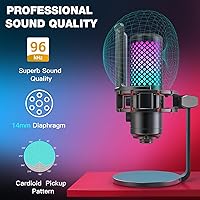
  • Polar Pattern: Cardioid (unidirectional) pickup pattern focused on sound from directly in front of the capsule while rejecting off-axis noise.
  • Diaphragm: 14mm large-diaphragm condenser capsule designed for detailed vocal capture in close-mic recording scenarios.
  • Dynamic Range: Supports up to 96kHz sample rate, providing a wide dynamic range suited to voice recording and streaming applications.
  • Signal-to-Noise Ratio: Rated at 95dB SNR, indicating low self-noise relative to the captured audio signal for a microphone in this price category.
  • Max SPL: Handles up to 125dB SPL before distortion, making it tolerant of louder voice sources at close distances.
  • Impedance: Output impedance rated at 2.2 Ohm, compatible with standard USB audio interfaces and direct USB host connections.
  • Connectivity: Primary USB-A connection with two included adapters: one USB-C for modern laptops and Android devices, one Lightning for iPhone 5 onwards and iPad 4 onwards.
  • Headphone Output: 3.5mm stereo headphone jack on the mic body for real-time zero-latency monitoring of the input signal.
  • Controls: Physical gain knob for input sensitivity adjustment, a top-mounted silent tap-to-mute button with LED indicator, and RGB toggle via long press of the mute button.
  • Build Material: Unibody solid metal construction throughout the microphone housing, providing vibration damping and structural rigidity over plastic alternatives.
  • Dimensions: Microphone body measures 3.9 x 3.9 x 8.9 inches including the integrated base mount attachment point.
  • Weight: Complete microphone unit weighs 1.41 pounds, which is heavier than most plastic mics in the same price range.
  • Cable Length: Includes one 78.7-inch (approximately 2-meter) USB audio cable, providing ample reach from desk to PC or console.
  • RGB Lighting: Dynamic and static RGB lighting modes are built into the mic body, with full light-off capability via long press of the mute button.
  • Platform Support: Compatible with iPhone, iPad, Mac, Windows PC, Android tablets, PS4, and PS5 via USB; explicitly not compatible with Xbox consoles.
  • Included Accessories: Box includes the microphone, desk stand base, anti-vibration shock mount, pop filter with metal mesh screen, USB cable, USB-C adapter, Lightning adapter, 3/8-to-5/8-inch boom arm adapter, and a user manual.
  • Power Source: Bus-powered via USB connection; requires no external power supply or batteries to operate.
  • Software Required: No drivers or dedicated software required; recognized natively by macOS, Windows, iOS, and iPadOS as a standard USB audio device.
  • Warranty: ZealSound offers complimentary technical support referenced in the packaging; buyers should confirm specific warranty terms directly with the seller at point of purchase.

Related Reviews
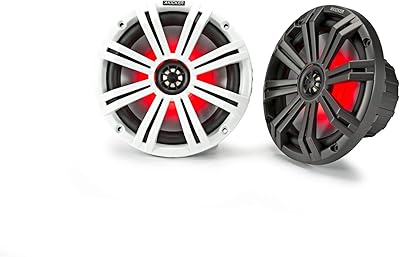
KICKER KM8 8-Inch Marine Coaxial Speakers
88%
94%
Sound Quality
91%
Durability
89%
LED Lighting Customization
88%
Installation Ease
90%
Build Quality
More

FAQ

Yes, and this is one of its genuine strengths. The box includes a Lightning adapter specifically for iPhone 5 onwards and iPad 4 onwards, so you plug the USB cable into the adapter, connect it to your iPhone, and it shows up immediately in any recording or streaming app. No additional purchases, no configuration menus. Most users report it working on the first try.

It will work on many Android devices, but not all. The included USB-C adapter handles the physical connection, but Android's USB audio support varies by manufacturer and even by firmware version. Most modern Samsung, Google Pixel, and OnePlus devices handle it fine, but if your Android phone has a history of being picky with USB audio accessories, there is a real chance you will run into recognition issues.

Yes, it is compatible with both PS4 and PS5 via USB with no setup required. Just plug it into the console's USB port and it will be recognized as an input device. Keep in mind it does not work with Xbox — that is a hard limitation of the mic, not a setup issue.

The most common cause is the gain knob being set too high. Try turning it down gradually until the background noise drops while your voice still comes through clearly. Recording in a smaller, softer room — even just sitting in a closet with clothes around you — also makes a significant difference. The cardioid pattern helps reject noise from the sides and back, but it cannot compensate for a very noisy or reflective space.

It is genuinely silent on the audio output — there is no audible click captured in the recording or stream when you tap it. The LED indicator on the mic changes to confirm the mute state. The only thing to watch for is that the indicator can be hard to see in a very bright room, so a quick glance might not always confirm your mute status reliably.

Yes. Hold down the mute button for a few seconds and the RGB lights will switch off entirely. The catch is that the mic does not remember this setting, so when you unplug and replug it, the lights come back on by default and you will need to long-press again to disable them.

The 3.5mm jack on the mic provides direct hardware monitoring, which means there is no perceptible delay — you hear yourself as you speak. This is different from software monitoring in apps like OBS or GarageBand, which adds latency. Just plug your headphones into the mic itself, not the computer, to get the zero-latency feed.

Honest answer: the included stand is functional but lightweight relative to the mic's weight. On a smooth desk surface it can tip or shift if the cable is nudged. If you are going to use this mic regularly, a basic boom arm — which the included 3/8-to-5/8-inch thread adapter supports — is a worthwhile investment. Many solid options are available for under $20 and will make the setup feel much more stable.

For clean voice capture, aim for roughly 6 to 12 inches from the front of the capsule. Closer than 6 inches can cause plosive pops on p and b sounds even with the pop filter in place. Further than 12 to 15 inches and you will start picking up more room ambience, especially if the gain is turned up to compensate for the distance.

It is a reasonable comparison and the honest answer is that it depends on what you prioritize. This streaming mic generally edges ahead on build quality and bundled features — the metal body, gain knob, headphone jack, and mute button are things the Snowball iCE does not offer at the same price. Raw audio consistency is closer to a draw, with some users preferring the Snowball iCE's slightly smoother output and others finding the KM8 more than adequate for casual streaming and calls.