Overview

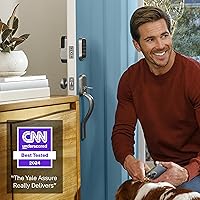
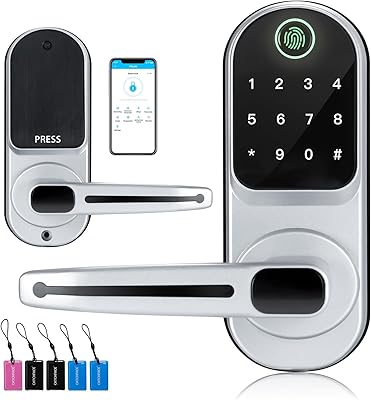
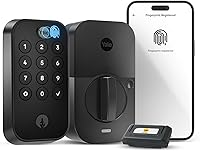
The Yale Assure Lock 2 Touch Smart Deadbolt represents a genuine step forward in residential entry, combining biometric recognition with keypad and app-based access in a single unit. Unlike standard keypad locks that rely solely on memorized codes, this biometric door lock adds fingerprint verification — a meaningful layer of both convenience and security. Yale has been a trusted name in locks for decades, and this model reflects that pedigree. Crucially, built-in Wi-Fi means no separate hub or bridge is needed for remote access — a practical advantage over many competitors. Worth flagging upfront: it only supports 2.4 GHz networks, which can be a real obstacle in homes running modern mesh routers set to 5 GHz.
Features & Benefits

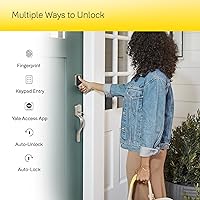
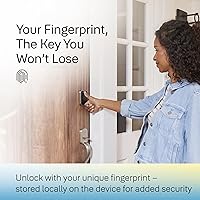
The fingerprint scanner largely delivers on its promise — sub-half-second recognition is fast enough that you barely notice it happening at the door. In practice, wet or cold fingers can occasionally cause a miss, so registering multiple fingers per household member is worth the extra minute. The geofencing-based auto-unlock is genuinely useful when your hands are full, though GPS accuracy means it can fire a touch early or late depending on your phone. Auto-Lock pairs with the DoorSense sensor, which confirms the door is actually closed before engaging — smarter than locking blindly. The matte keypad resists smudge buildup, and virtual key sharing through the app makes managing guest access straightforward without being physically present.

Best For

This smart deadbolt suits homeowners who want keyless convenience without fully abandoning a physical key — the backup cylinder is a reassuring safety net that many smart locks omit. It is a natural fit for households already running Alexa, Google Home, or Apple HomeKit, since it integrates without extra hardware. Families who frequently host guests or rely on recurring service providers will appreciate remote code management through the app. Anyone who regularly approaches the door carrying groceries, a stroller, or work gear will find auto-unlock worth configuring. Installation is DIY-friendly by design — most people report finishing in under 30 minutes with just a screwdriver, no professional help required.

User Feedback

Long-term owners consistently note that fingerprint reliability improves noticeably once prints are registered carefully at setup — rushing that step leads to most early complaints. The Yale Access app earns generally favorable marks, with many users finding it more refined than competing brand apps. On the downside, battery life is a recurring concern when both Wi-Fi and auto-unlock run simultaneously; some heavy users replace batteries more frequently than anticipated. A portion of buyers with thick or non-standard doors encountered installation friction the included hardware did not fully resolve. The 2.4 GHz limitation catches enough shoppers off guard that it is worth verifying your router settings before purchasing — this alone accounts for a meaningful slice of negative reviews.

Pros

  • Fingerprint recognition is fast and consistent in everyday conditions, with most users needing no second attempt.
  • Built-in Wi-Fi means no extra hub or bridge is required — remote access works straight out of the box.
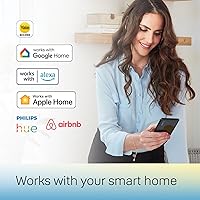
  • Compatible with Alexa, Google Assistant, and Apple HomeKit, covering nearly every major smart home ecosystem.
  • The Yale Assure Lock 2 Touch includes a physical backup key, a safety net many competing smart locks skip entirely.
  • DoorSense sensor confirms the door is actually closed before engaging auto-lock, preventing a false sense of security.
  • Matte keypad surface resists smudge buildup, reducing the risk of someone guessing your code from fingerprint patterns.
  • Virtual key sharing and temporary code creation make managing guest access fast and entirely remote.
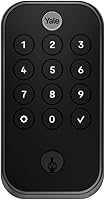
  • Clean, understated Black Suede finish looks noticeably more refined than bulkier smart lock alternatives.
  • Most standard door installations are completed in under 30 minutes using only a screwdriver.
  • The Yale Access app is widely regarded as one of the more polished smart lock apps currently available.

Cons

  • Only works on 2.4 GHz Wi-Fi — a genuine dealbreaker for homes with newer mesh routers set to 5 GHz.
  • Battery drain accelerates noticeably when auto-unlock and frequent Wi-Fi polling are both active.
  • Auto-unlock geofencing can trigger too early or too late depending on your phone's GPS accuracy.
  • Fingerprint scanner struggles with wet, cold, or very dry fingers, requiring a backup entry method in practice.
  • Enrolling guest fingerprints requires the person to be physically present at the lock — it cannot be done remotely.
  • Buyers with non-standard door thicknesses or unusual deadbolt spacing may need additional hardware not in the box.
  • Cloud dependency means remote features can be temporarily disrupted by Yale server issues or internet outages.
  • Auto-lock timing requires manual adjustment to suit different household routines, which takes trial and error.
  • Only available in one color configuration in this variant, limiting compatibility with existing door hardware finishes.
  • The premium price is hard to justify for users who will primarily rely on a single entry method like the keypad.

Ratings

The Yale Assure Lock 2 Touch Smart Deadbolt earns its place near the top of the biometric smart lock category, but not without a few real-world caveats worth knowing before you buy. These scores were generated by AI after analyzing thousands of verified global user reviews, with spam, bot activity, and incentivized feedback actively filtered out. Both the standout strengths and the recurring frustrations are reflected honestly in every category below.
Fingerprint Recognition
88%
Most users report that the scanner reads enrolled fingers quickly and consistently in everyday conditions — arriving home from work or stepping out to grab a package rarely requires a second attempt. Registering multiple fingers per person noticeably improves reliability over time.
Wet hands after washing dishes or coming in from rain are a genuine weak spot, and some users in colder climates note slower recognition when fingers are cold or dry. It is reliable, but not infallible, and backup access familiarity matters.
Auto-Unlock Reliability
71%
29%
When it works well, the hands-free auto-unlock is genuinely appreciated — especially for parents managing a stroller or anyone arriving with arms full of grocery bags. The geofencing concept is well-executed in favorable GPS conditions.
GPS accuracy on phones varies enough that some users find the lock disengages a half-block away or, conversely, not until they are already fumbling at the door. It is a feature that requires patience to dial in, and not everyone sticks with it long-term.
App Experience
82%
18%
The Yale Access app is generally regarded as one of the cleaner smart lock apps available — access logs are easy to read, adding guest codes takes under a minute, and the interface does not feel cluttered. Users switching from competing brands frequently mention it as a step up.
Occasional connectivity hiccups between the app and the lock have been reported, typically after a phone OS update or router change. A small but vocal portion of users cite delayed status refreshes as a persistent annoyance during daily use.
Wi-Fi Connectivity
63%
37%
Built-in Wi-Fi without requiring a separate hub is a real practical advantage — setup is straightforward for anyone on a traditional 2.4 GHz network, and remote access works reliably once the connection is established.
The 2.4 GHz-only limitation is the single most cited technical frustration among users. Households running modern mesh routers that default to or prioritize 5 GHz bands often hit a wall during setup, and not everyone knows how to manually split their network bands.
Installation Ease
84%
The vast majority of users with standard US door preparations report a clean, screwdriver-only install that takes under 30 minutes. The included hardware covers most common deadbolt configurations, and the instruction clarity earns consistent praise.
Doors that are thicker than standard, older frames with irregular deadbolt spacing, or doors with unusual backset measurements can complicate the process. A handful of users needed supplemental hardware not included in the box.
Build Quality
86%
The zinc construction with powder-coated finish feels appropriately solid for an exterior door application — it does not have the hollow, lightweight feel that undermines confidence in some competing smart locks. The Black Suede finish resists minor scratches well.
At 4.18 pounds, it is on the heavier side, which can feel like a lot of hardware on a lighter interior-style door. A few users noted very minor finish inconsistencies out of the box, though structural complaints are rare.
Battery Life
67%
33%
Running on four standard AA batteries means replacements are cheap and available anywhere, which is a practical advantage over proprietary battery packs. Users who disable auto-unlock and limit Wi-Fi polling frequency report respectable longevity.
Heavy feature users — particularly those running auto-unlock and frequent app checks — report needing to replace batteries significantly more often than the rated estimate. The battery indicator helps avoid lockouts, but the drain rate surprises buyers expecting months of carefree use.
Smart Home Integration
91%
Alexa, Google Assistant, and Apple HomeKit support in a single unit is not something every smart lock can claim, and the Yale Assure Lock 2 Touch delivers on all three without requiring ecosystem-specific add-ons. HomeKit users in particular note how smoothly it fits into existing automations.
A small number of users report that Google Assistant voice commands occasionally lag or fail to reflect the current lock state accurately. Integration quality is generally strong, but occasional cloud-dependency delays are a reality of any connected home device.
Keypad Usability
87%
The backlit matte keypad is easy to use in low-light conditions — arriving home after dark does not require squinting or fumbling. The matte surface also resists the smudge patterns that can reveal frequently used digits on glossy keypads.
In very bright direct sunlight, some users find the backlight washes out and digit visibility drops. The keypad buttons are responsive but require a deliberate press, which a small number of users with arthritis or limited dexterity found slightly taxing.
Security Features
89%
Two-factor authentication, biometric verification, and DoorSense door-position monitoring work together to create a layered access control setup that goes beyond what most locks in this space offer. The DoorSense feature in particular adds real peace of mind for users prone to second-guessing whether they locked up.
Like all connected locks, this biometric door lock introduces a cybersecurity surface area that purely mechanical locks do not have. Users with high security concerns should review Yale's data practices, and the reliance on cloud services means a Yale server outage can affect remote features.
Guest Access Management
83%
Virtual key sharing and temporary code creation via the app make managing access for housecleaners, dog walkers, or visiting family genuinely convenient — changes are instant and do not require the person to be physically present at the door.
Fingerprint enrollment for guests requires them to be physically present at the lock, which is a limitation when trying to set up access remotely ahead of a visit. Code-based guest access works fine remotely, but biometric guest setup is strictly in-person.
Auto-Lock & DoorSense
85%
The combination of auto-lock with a door position sensor is smarter than it sounds — the lock will not engage if the door is ajar, which prevents the frustrating and potentially damaging situation of a bolt firing against the strike plate. Users who previously forgot to lock consistently praise this pairing.
Auto-lock timing requires some trial and error to set at an interval that feels natural for a given household's routine. A few users living in apartment buildings found the delay too short when receiving deliveries at the door.
Value for Money
74%
26%
For buyers who will actively use biometric entry, built-in Wi-Fi, and smart home integrations, the feature density justifies the premium positioning relative to basic keypad deadbolts. The inclusion of batteries, a physical key, and the DoorSense sensor adds tangible out-of-box value.
Buyers who primarily want a keypad lock with occasional app access will likely feel the price exceeds what they are actually using. The 2.4 GHz limitation and battery drain at high feature usage levels are harder to swallow at this price point.
Aesthetic Design
88%
The Black Suede finish is understated and pairs well with both modern and traditional door hardware — it reads as premium without being showy. Users frequently mention that it looks noticeably more refined than the bulkier smart locks it replaced.
Only one color option is available in this configuration, which may not suit doors with brushed nickel, bronze, or chrome hardware already in place. The exterior footprint is compact, but the interior assembly is moderately sized and visible.
Setup & Onboarding
79%
21%
For most users on compatible networks, the initial setup from unboxing to first fingerprint unlock runs smoothly and the app walks through each step clearly. Yale has clearly invested in reducing friction for buyers without a technical background.
The 2.4 GHz network issue surfaces most acutely during setup, and users who hit it often describe an unexpectedly frustrating first hour. Fingerprint enrollment quality at setup also has an outsized impact on long-term scanner performance, but the app does not emphasize this strongly enough.

Suitable for:

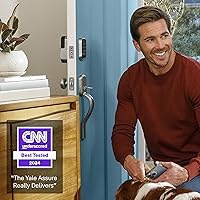
The Yale Assure Lock 2 Touch Smart Deadbolt is a strong match for homeowners who want a meaningful security upgrade without hiring a locksmith or gutting their door hardware. It is particularly well-suited to families who juggle multiple people coming and going — parents can set up separate fingerprints and codes for kids, housekeepers, or dog walkers and manage everything remotely through the app. Anyone already invested in an Alexa, Google Home, or Apple HomeKit ecosystem will find this biometric door lock integrates cleanly without requiring a bridge or hub, which removes a common setup headache. People who routinely approach their front door with hands full — whether carrying groceries, a baby, or work gear — will genuinely appreciate the auto-unlock feature once it is properly configured. The physical backup key is also a quiet but important selling point: unlike fully keyless alternatives, this lock does not leave you stranded if your phone dies or the app misbehaves.
Not suitable for:

The Yale Assure Lock 2 Touch Smart Deadbolt is not the right call for every buyer, and a few specific situations make that clear quickly. If your home router runs exclusively on a 5 GHz band — common with many newer mesh systems — you will hit a wall during setup that requires either splitting your network bands or returning the product entirely. Buyers looking for a pure budget upgrade who will rarely use fingerprint scanning, remote access, or smart home routines are paying a premium for features they will leave untouched. Renters in buildings with thick, non-standard, or fire-rated doors may find the included hardware insufficient and the installation unexpectedly complicated. Those in climates with extreme cold or high humidity should also be aware that the fingerprint scanner can underperform in those conditions, making a backup entry method essential rather than optional. Finally, this lock is only available for use in the US and Canada, so international buyers or those planning to relocate abroad should look elsewhere.
Specifications

  • Brand & Model: Manufactured by Yale under model number YRD410-F-WF1-BSP, part of the Assure Lock 2 product family.
  • Lock Type: Biometric deadbolt with integrated keypad, supporting both keyed and keyless entry configurations.
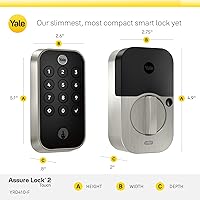
  • Dimensions: The exterior assembly measures 0.9″ x 2.5″ x 4.9″, offering a compact footprint suitable for most standard door preparations.
  • Weight: The complete lock unit weighs 4.18 pounds, reflecting its zinc construction and integrated electronics.
  • Material: Primary housing is constructed from zinc alloy with a powder-coated finish for durability and corrosion resistance.
  • Color & Finish: Available in Black Suede with a matte powder-coated surface that resists fingerprints and minor surface scratches.
  • Connectivity: Features built-in Wi-Fi (2.4 GHz band only) and Bluetooth, with no separate hub or bridge required for remote access.
  • Entry Methods: Supports five access methods: fingerprint scan, PIN code via keypad, Yale Access app, Apple Watch, and hands-free auto-unlock via geofencing.
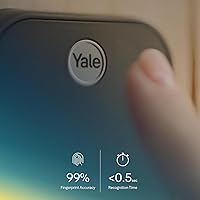
  • Fingerprint Accuracy: The biometric scanner is rated at 99% recognition accuracy with a response time under 0.5 seconds per attempt.
  • Smart Home Support: Compatible with Amazon Alexa, Google Assistant, and Apple HomeKit across both iOS and Android platforms.
  • Power Source: Powered by four AA alkaline batteries, which are included in the box at time of purchase.
  • Included Components: Package contains the lock unit, DoorSense door position sensor, Wi-Fi module, mounting hardware, four AA batteries, and one physical backup key.
  • Auto-Lock: Auto-Lock feature engages the deadbolt automatically after a user-configurable time delay, and only when DoorSense confirms the door is fully closed.
  • DoorSense: DoorSense is a magnetic door position sensor that monitors whether the door is open or closed and communicates status to the app in real time.
  • Security Features: Includes two-factor authentication, biometric verification, and virtual key sharing with activity logging through the Yale Access app.
  • Backup Access: A physical keyed cylinder is included, providing a mechanical override if batteries deplete or electronic access is unavailable.
  • Geographic Availability: This lock is designed and certified for use in the United States and Canada only, and will not function outside these regions.
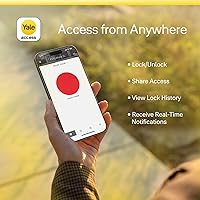
  • App Compatibility: The Yale Access app is available for iOS and Android devices, enabling remote locking, access history review, and guest code management.
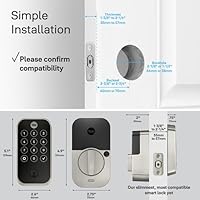
  • Installation: Designed to replace most standard US deadbolts using only a screwdriver, with no professional installation or door modification required in typical configurations.
  • Battery Type: Requires four AA alkaline batteries; rechargeable AA batteries can be used but may affect the accuracy of the battery level indicator.

Related Reviews

Level Smart Lock+ WiFi Deadbolt
83%
91%
Ease of Installation
88%
Integration with Smart Home Systems
85%
Build Quality & Durability
82%
Remote Access Functionality
93%
Design & Aesthetics
More
SMONET Y1-GBF-S Fingerprint Keypad Smart Deadbolt
74%
83%
Fingerprint Accuracy
88%
Ease of Installation
61%
App & Connectivity
43%
Remote Access Capability
86%
Passcode Management
More
Aeifond Smart Watch for Men Women 2.09″ Touch Screen Fitness Tracker
82%
88%
Value for Money
91%
Display Quality
85%
Bluetooth Calling
78%
Battery Life
82%
Health Tracking Accuracy
More
Yves Saint Laurent Touche Éclat Radiant Touch #2 Luminous Ivory
85%
88%
Hydration & Skin Feel
91%
Effectiveness for Dark Circles
85%
Blendability & Texture
87%
Buildable Coverage
92%
Radiance & Glow
More
Lockin Veno Smart Lock
81%
88%
Biometric Accuracy
76%
App Experience
93%
Installation Ease
91%
Battery Life
84%
Build & Durability
More
RingConn Gen 2 Smart Ring
84%
91%
Battery Life
88%
Comfort and Wearability
85%
Sleep Apnea Monitoring
78%
App Experience
90%
Water Resistance
More
Amazfit Balance 2 47mm Smartwatch
80%
88%
GPS Accuracy
84%
Battery Life
91%
Display Quality
89%
Build Quality
86%
HYROX Integration
More
Amazfit GTS 2 Mini Smart Watch
86%
93%
Battery Life
89%
Comfort & Fit
85%
Build Quality
87%
Health & Fitness Tracking
91%
Display Quality
More
HJX GS05 2-in-1 Bluetooth Smart Glasses
68%
83%
Value for Money
78%
Lens Swap System
57%
Audio Quality
44%
Sound Leakage
71%
Build Quality
More
EarlySincere 2.06″ AMOLED Bluetooth Calling Smartwatch
73%
88%
Display Quality
71%
Bluetooth Call Quality
67%
Health Tracking Accuracy
82%
Battery Life
58%
App Experience
More

FAQ

The Yale Assure Lock 2 Touch Smart Deadbolt only connects to 2.4 GHz Wi-Fi networks — it will not pair with a 5 GHz band. If your router broadcasts both frequencies under one network name, you may need to split them into separate SSIDs and connect the lock to the 2.4 GHz one specifically. This is the most common setup hurdle buyers run into, so it is worth checking your router settings before you start the install.
No, and that is one of the more practical advantages of this biometric door lock. Wi-Fi is built directly into the unit, so once it is connected to your network, remote access through the Yale Access app works without any additional hardware. Many competing locks at this price point still require a proprietary bridge, so this is a genuine differentiator.

The lock supports storing multiple fingerprints, so you can register several fingers per person and add entries for different household members. It is worth taking your time during enrollment — registering the same finger a few times at slightly different angles improves day-to-day recognition considerably. Keep in mind that enrolling a guest's fingerprint requires them to be physically present at the lock; it cannot be done remotely.

No, a physical backup key is included specifically for this scenario. The lock also has a low-battery indicator in the app so you get advance warning before it becomes a problem. That said, if you run heavy features like auto-unlock and frequent Wi-Fi polling simultaneously, battery drain will be faster than the rated estimate, so keeping spare AAs on hand is a good habit.

It works well when your phone has a strong GPS signal and you are approaching from a consistent direction — users who commute on foot find it particularly convenient. That said, GPS accuracy varies by phone and environment, so the lock can occasionally trigger a bit early or not until you are already at the door. It takes some adjustment to the timing settings to get it feeling natural, and not every user ends up sticking with it long-term.

Yes, the included physical key works the traditional keyed cylinder just like any standard deadbolt. This smart deadbolt is designed so you never have to rely solely on the electronic features, which is reassuring for anyone worried about connectivity issues or battery failures.

Yes, it supports Apple HomeKit natively, which means you can use Siri voice commands, incorporate it into Home app automations, and view its status alongside other HomeKit devices. HomeKit users tend to report one of the smoothest integration experiences of any smart home ecosystem this lock supports.

Cold or wet fingers are a known weak point for most biometric scanners, and this one is no exception. In below-freezing temperatures or if your hands are damp from rain, you may need a second attempt or need to fall back to the keypad or app. Registering multiple fingers per person, including a less-exposed finger, helps reduce the frequency of these misses.

Most users with a standard US door preparation complete the install in under 30 minutes using only a Phillips screwdriver. The included instructions are clear, and the Yale Access app walks you through the setup process step by step once the hardware is in. Where people run into trouble is with non-standard door thicknesses or backset measurements that the included hardware does not fully accommodate — if your door is unusually thick or the existing deadbolt spacing is off, budget extra time or hardware.

Yes, the Yale Access app lets you create and schedule temporary access codes that expire automatically, which works well for recurring service providers or short-term guests. You can also send virtual keys through the app for time-limited access. Changes take effect immediately, and you can revoke access at any time without needing to be at home.

Where to Buy