Overview

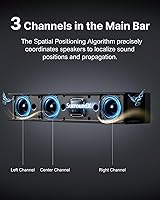
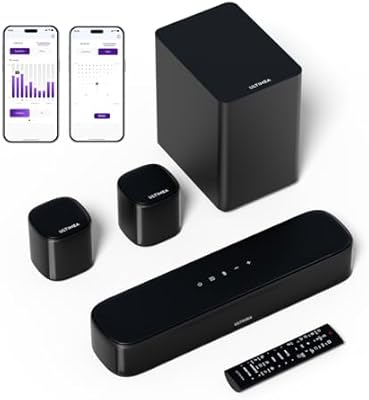
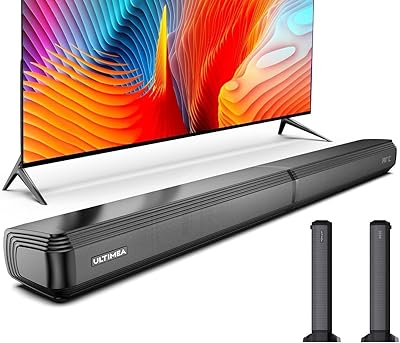
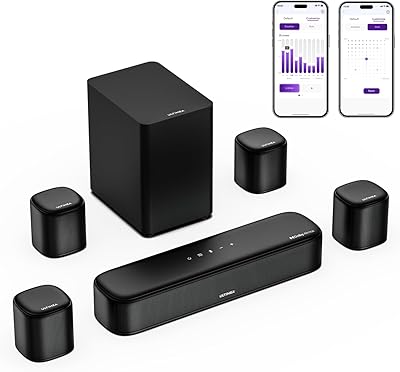
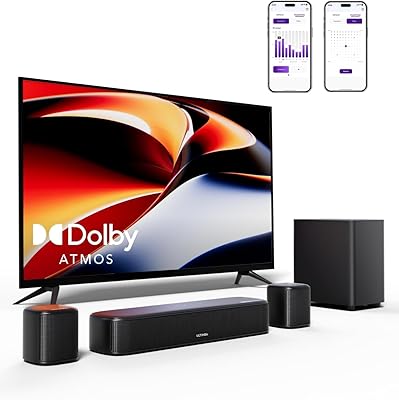
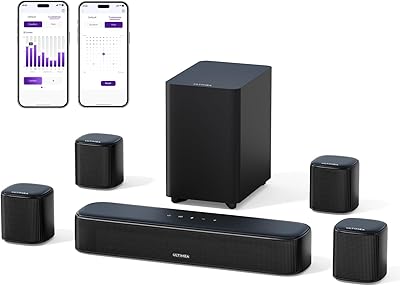
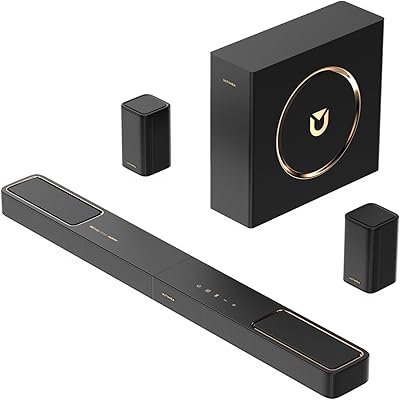
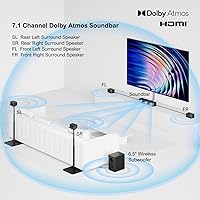
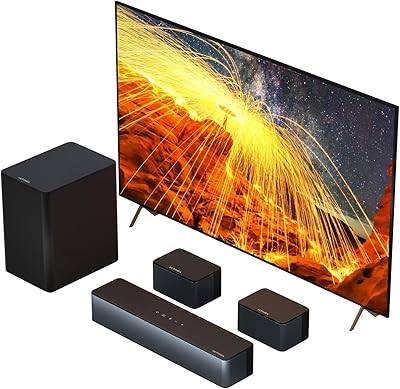
The ULTIMEA Poseidon D80 is a 2025 mid-range 7.1-channel soundbar system aimed at TV owners ready to leave basic built-in audio behind. It steps up from the earlier D60 by adding two front surround speakers, which meaningfully widens the soundstage rather than just inflating the channel count on paper. The full kit includes the soundbar, a wireless 6.5″ subwoofer, and four wired surround speakers. Dolby Atmos is supported, making it compatible with spatial audio from streaming services — but if your library leans heavily on DTS content, know upfront that there is no DTS decoding here. The ULTIMEA app adds real customization depth that stands out at this price tier.
Features & Benefits

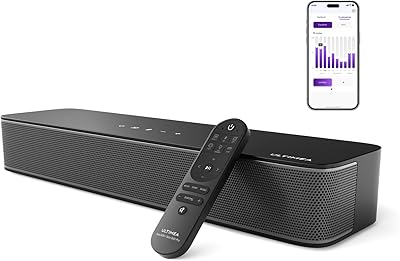
At its core, a 7.1-channel configuration means four physical speakers fill the rear and side positions — not just virtual processing tricks. The soundbar handles front-stage duties while the wireless subwoofer digs down to 35Hz, delivering the kind of low-end impact you actually feel during action sequences. Dolby Atmos processing adds height cues for overhead audio on supported content, though expectations should stay calibrated to entry-level Atmos rather than high-end separates. Connectivity covers HDMI eARC with 4K passthrough, optical, AUX, and Bluetooth, so switching between a console and a streaming stick is straightforward. The app unlocks 121 EQ presets plus a 10-band manual adjustment across six listening modes, giving serious tuning flexibility.

Best For

This soundbar system makes the most sense for anyone with a 60-inch-or-larger TV who wants genuine physical surround sound without building a full component system. Console gamers will appreciate the HDMI eARC connection and spatial audio positioning that a dedicated gaming mode helps sharpen. Households that primarily stream from services like Netflix or Apple TV+ will get the most out of the Dolby Atmos support, since that is where the spatial processing earns its keep. It also suits buyers who like to tinker — app-based EQ tuning is genuinely useful here, not just a checkbox feature. Where it is less ideal is for anyone whose collection is heavy on DTS-encoded discs.

User Feedback

Owners consistently praise the rear speaker immersion — having four actual speakers placed around the room rather than relying on reflective audio makes a noticeable difference that buyers at this price rarely expect. Subwoofer depth gets frequent compliments, particularly for action films where bass punch matters. On the critical side, a few users found dialogue clarity underwhelming on default settings, though switching to Voice mode or adjusting EQ typically resolved it. Cable management for the wired rear speakers drew mixed reactions; the included 20-foot RCA run works for many rooms but can feel tight in larger layouts. App reliability and Bluetooth pairing have been mostly positive, with occasional firmware update hiccups reported early on.

Pros

  • Four physical rear speakers deliver real directional surround sound, not just processed simulation.
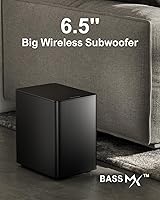
  • The wireless 6.5″ subwoofer hits down to 35Hz — bass-heavy movies feel it, not just hear it.
  • HDMI eARC with 4K passthrough keeps the signal chain clean for both gaming consoles and streaming devices.
  • 121 EQ presets plus a 10-band manual adjustment give genuine tuning flexibility rare at this price.
  • The full cable and mounting kit in the box means fewer separate accessories to source before setup.
  • OTA firmware updates have actively improved app stability and audio processing since launch.
  • Dolby Atmos support covers most modern streaming content on major platforms without extra hardware.
  • At 460W peak across a 7.1 layout, this surround sound setup fills medium to large rooms comfortably.
  • Bluetooth connectivity lets you use the system casually for music without switching inputs or reconfiguring anything.

Cons

  • Default EQ settings bury dialogue in busy scenes — Voice mode or manual EQ adjustment is almost mandatory.
  • The included 20-foot RCA cable runs short in larger rooms, requiring additional cable purchases.
  • Rear satellite speakers feel noticeably cheaper in hand compared to the solid main soundbar unit.
  • No DTS or DTS:X decoding makes this a poor fit for physical media collections on Blu-ray.
  • The remote ships without batteries and has no backlight, making dim home theater use awkward.
  • App connectivity can lag or drop on Android, particularly on older device firmware versions.
  • Wired surround speaker installation is time-consuming and cable management across a real room is genuinely fiddly.
  • Atmos height reproduction is processing-based with no upward-firing drivers, so overhead effects are subtle at best.

Ratings

Our scores for the ULTIMEA Poseidon D80 are generated by AI after analyzing thousands of verified buyer reviews from global markets, with spam, bot-submitted, and incentivized feedback actively filtered out. The ratings reflect where this surround sound setup genuinely delivers and where real owners ran into friction — no softening of the rough edges.

Surround Sound Immersion
88%
Owners repeatedly describe the physical rear speakers as a genuine revelation at this price tier. Having four discrete drivers placed around the room creates directional audio cues that virtual surround processing simply cannot replicate — noticeably effective during action sequences and open-world game environments.
The immersion does depend heavily on correct speaker placement, and apartments or rooms with irregular layouts can reduce the effect considerably. A handful of buyers noted that the soundstage, while wide, lacks the precise height layering you get from a true Atmos ceiling speaker configuration.
Dolby Atmos Performance
74%
26%
For a system at this price point, the Dolby Atmos processing does a credible job of adding depth and front-to-back movement on supported streaming content. Movies with active overhead audio mixes — helicopter flyovers, rainfall scenes — produced noticeably more dimensional results than a standard stereo soundbar.
Expectations need to stay grounded. This is entry-level Atmos, not a high-end Atmos experience, and the height dimension comes from processing rather than upward-firing drivers. Buyers who have heard premium Atmos setups may find the overhead effect modest rather than dramatic.
Subwoofer Depth & Impact
91%
The 6.5-inch wireless subwoofer is one of the most praised elements across user reviews. It hits low enough — down to 35Hz — that bass-heavy scenes in action films or hip-hop music feel genuinely physical, not just audible. The wireless connection also means placement is flexible without running cables across the floor.
At higher volume levels, a small number of users reported the sub sounding slightly boomy rather than tight, suggesting the default bass tuning leans on the aggressive side. Manually rolling back the low-end in the app typically resolved this, but it requires a bit of trial and error.
Dialogue Clarity
69%
31%
Switching to Voice mode or nudging the mid-range frequencies up in the 10-band EQ brought dialogue to a noticeably clearer position in the mix for most buyers. Once dialed in, vocals in drama series and news content came through with good presence against background music.
Out of the box on default settings, several buyers found speech getting buried behind bass or ambient effects, particularly in loud cinematic scenes. This is a recurring theme in critical reviews and suggests the default EQ tuning prioritizes spectacle over vocal definition.
Setup & Installation
63%
37%
The soundbar itself is quick to install and the wireless subwoofer pairs automatically, which keeps the initial setup relatively painless. The included accessory kit is thorough — HDMI cable, optical cable, RCA cables, and wall-mount hardware all ship in the box, reducing the number of add-ons to source separately.
The wired rear speakers are where setup gets genuinely fiddly. Running cables to four satellite speakers across a real living room is time-consuming, and the 20-foot RCA run felt short for larger rooms, with some owners needing extension cables. Cable management was the most common setup complaint across reviews.
App Control & EQ Flexibility
83%
The ULTIMEA app gives meaningful control over how the system actually sounds day to day. The 121 EQ presets cover a wide range of content types, and the 10-band manual EQ lets you make specific frequency adjustments that most competing systems at this price lock behind fixed modes.
App stability drew mixed reactions, with some Android users reporting occasional disconnections or lag between adjustments and audible changes. Early firmware versions had more issues, though OTA updates have addressed several of the most-reported bugs since launch.
Build Quality & Materials
77%
23%
The soundbar chassis feels solid for a mid-range system — the metal grille and firm plastic body don't flex or rattle, even at higher volumes. The subwoofer cabinet is well-damped and sits stably on most flooring surfaces without walking across the room under heavy bass.
The satellite speakers feel noticeably lighter and more budget in hand compared to the main soundbar unit. Connector points on the wired surround speakers are functional but not premium, and a couple of buyers mentioned slightly inconsistent fit on the RCA jacks.
Connectivity & Compatibility
86%
HDMI eARC with 4K passthrough means the system can sit cleanly between a TV and a 4K source without degrading video output. Optical and AUX inputs cover older TVs and legacy gear, and Bluetooth handles casual music playback without needing to reconfigure anything.
There is no HDMI ARC fallback selector in the app, which caused occasional handshake issues with certain smart TV brands during initial connection. Bluetooth range and stability were rated positively overall, but audio latency when using Bluetooth for video content was flagged by a few users.
Value for Money
89%
The combination of a wireless subwoofer, four physical surround speakers, Dolby Atmos, and a capable app ecosystem in a single package at this price is genuinely hard to match from established brands. Buyers who compared it against similarly priced two-piece soundbar-plus-sub combos consistently felt the Poseidon D80 offered more for the money.
The value equation tilts slightly if you factor in the time investment for a clean wired rear-speaker installation. Buyers who expected a plug-and-play experience closer to a simple soundbar occasionally felt the setup complexity was undersold in the product description.
Gaming Performance
81%
19%
Connected via HDMI eARC, the system responded well to gaming content with spatial cues — footsteps, ambient environmental sounds, and directional gunfire were all notably more positioned than flat TV audio. The dedicated Game mode tightened the audio processing noticeably for faster-paced titles.
Input lag was not a significant issue for most users, but a small subset of reviewers using older console models via optical connection reported slight audio-video sync drift that required manual offset adjustment in their TV settings.
Music Playback Quality
72%
28%
In Music mode, the soundstage opens up enough to make streaming playlists through Bluetooth a genuinely enjoyable experience rather than an afterthought. Bass-forward genres — R&B, electronic — translate particularly well thanks to the subwoofer's output.
For critical music listening, the system's tuning DNA is clearly optimized for cinematic content. Acoustic genres and classical music can sound slightly processed, and the spatial algorithms that work well for movies occasionally smear the stereo image on studio recordings.
Remote Control Usability
68%
32%
The physical remote handles the most common daily adjustments — volume, source switching, mode changes — without needing to open the app each time. Response time is consistent and the button layout is logical enough after a few days of use.
The remote is basic for a system with this level of audio customization. Batteries are not included, which is a minor but recurring irritant in user reviews. There is no backlight, making it awkward to use in a dim home theater environment without looking directly at the buttons.
Room Coverage
84%
For rooms between roughly 200 and 600 square feet, the 460W peak output and four-satellite layout filled the space consistently at moderate to high volumes. Users in dedicated media rooms and large open-plan living areas reported even coverage without the drop-off that single-unit soundbars produce.
In very large or acoustically difficult rooms — high ceilings, lots of hard surfaces — some users felt the system was working at its limit. The subwoofer, while powerful, is a single driver and cannot fully compensate for significant room acoustic challenges without EQ intervention.
OTA Updates & Long-Term Support
76%
24%
Over-the-air firmware updates delivered through the app have already resolved several early bugs, and buyers who purchased at launch noted tangible improvements in app stability and audio processing over the first months of ownership. The commitment to post-launch updates is a positive signal for a newer brand.
The update delivery is not always prompt, and there is no in-app changelog visible to users explaining what each firmware revision actually changed. A few buyers found updates applied automatically overnight, which is convenient but removes user control over the timing.

Suitable for:

The ULTIMEA Poseidon D80 is a strong fit for TV owners who are genuinely tired of flat, directionless audio and want physical surround sound without building a full AV receiver system from scratch. If your living room is mid-sized to large — think 200 to 600 square feet — and your TV is 60 inches or bigger, this surround sound setup was essentially designed around your space. Streaming households that watch a lot of Dolby Atmos content on Netflix, Disney+, or Apple TV+ will get the most out of the spatial processing, since that is where the system's audio engine shines brightest. Console gamers connecting via HDMI eARC will also find the dedicated Game mode and directional rear speakers meaningfully improve positional audio compared to anything a TV speaker can do. Buyers who enjoy tuning their audio — adjusting EQ profiles, experimenting with presets, customizing sound per content type — will find the app gives them more control than competing all-in-one systems typically offer at this price tier.
Not suitable for:

The ULTIMEA Poseidon D80 is not the right choice for buyers who own a significant library of Blu-ray discs or content encoded in DTS or DTS:X, since there is no DTS decoding of any kind — that is a hard limitation, not a software fix. Anyone expecting a true plug-and-play setup should also recalibrate: running wired cables to four satellite speakers across a real room takes patience, and a larger room may require purchasing longer RCA cables than what ships in the box. If you have already heard high-end Dolby Atmos separates with upward-firing drivers, the height reproduction here will feel modest by comparison — this is entry-level Atmos, and treating it as anything more will lead to disappointment. Renters or apartment dwellers with small rooms under 170 square feet may find the 460W system overpowering and difficult to balance at low volumes. Buyers who want completely hands-off audio with no app involvement and no EQ tweaking will likely struggle with dialogue clarity straight out of the box.

Specifications

  • Channel Config: The system operates in a 7.1-channel configuration, combining the soundbar, wireless subwoofer, and four wired surround satellite speakers.
  • Peak Power: Total peak output is rated at 460W across all drivers combined.
  • Frequency Response: The system reproduces audio down to 35Hz, covering the low-frequency range needed for cinematic bass and deep soundtrack rumble.
  • Subwoofer Size: The wireless subwoofer uses a 6.5″ driver and pairs automatically with the soundbar without requiring manual Bluetooth pairing steps.
  • Soundbar Dimensions: The main soundbar unit measures 15.75″ deep by 3.54″ wide by 2.76″ tall.
  • Total Weight: The complete system weighs approximately 20.2 lbs across all included components.
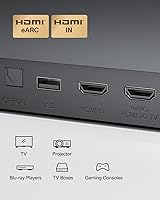
  • HDMI: One HDMI input and one HDMI output are provided, both supporting eARC and 4K passthrough for full-resolution video signal integrity.
  • Other Inputs: Additional connectivity includes a digital optical input and a 3.5mm AUX input for compatibility with legacy TVs and secondary audio sources.
  • Wireless Audio: Bluetooth is supported for wireless audio streaming from smartphones, tablets, and other paired devices.
  • EQ Presets: The ULTIMEA app provides 121 EQ presets alongside a 10-band manual equalizer for granular frequency adjustment.
  • Listening Modes: Six onboard listening modes are available: Movie, Music, Voice, Sport, Game, and Night.
  • App Control: The ULTIMEA companion app for iOS and Android supports full system control, EQ customization, and over-the-air firmware updates.
  • Surround Speakers: Four wired satellite speakers are included for rear and side surround placement, connected via RCA cables.
  • Included Cables: The box includes a 20-foot stereo RCA-to-RCA cable, an HDMI cable, a digital optical cable, and a 3.5mm-to-RCA stereo cable.
  • Wall Mounting: A metal wall-mount bracket and full mounting hardware kit are included in the box for both the soundbar and satellite speakers.
  • Room Coverage: The system is rated for rooms between 172 and 645 square feet, with 60″ or larger TVs as the recommended pairing.
  • Audio Decoding: Dolby Atmos and Dolby Digital are supported; DTS Digital Surround and DTS:X decoding are not available on this system.
  • Driver Type: All drivers across the soundbar and satellite speakers use dynamic driver technology.
  • Subwoofer Connection: The subwoofer connects to the soundbar wirelessly, eliminating the need for a dedicated subwoofer cable run across the room.
  • Remote Control: A physical remote control is included for basic system operation; batteries are not included in the package.

Related Reviews
ULTIMEA Poseidon D50 5.1 Virtual Surround Sound Bar
84%
89%
Sound Quality
84%
Bass Performance
91%
Ease of Setup
92%
Value for Money
87%
Design & Build Quality
More
ULTIMEA Apollo S70 5.0ch Sound Bar
82%
88%
Sound Quality
83%
Setup & Installation
75%
App Control Experience
90%
Design & Build Quality
85%
Connectivity & Compatibility
More
ULTIMEA Apollo S40 2.2ch Sound Bar
83%
88%
Sound Quality
82%
Bass Performance
90%
App Control & Customization
92%
Value for Money
85%
Ease of Setup
More
ULTIMEA Aura A30 5.1 Sound Bar
85%
88%
Sound Quality
91%
Bass Performance
85%
Ease of Setup
82%
App Control Functionality
87%
Surround Sound Effectiveness
More
ULTIMEA Aura A60 7.1ch Soundbar with Dolby Atmos
88%
94%
Immersive Sound Quality
88%
Ease of Setup
80%
App Control & Customization
85%
Wireless Rear Speakers
91%
Bass Performance
More
PORMIDO D80 2K Rear View Mirror Dash Cam
85%
88%
Video Quality
85%
Ease of Installation
91%
Night Vision Performance
89%
Parking Monitoring
87%
GPS Accuracy
More
ULTIMEA Solo B30 Pro 2.1ch Compact Sound Bar
83%
88%
Sound Quality
91%
Bass Performance
85%
Ease of Setup
74%
App Control Usability
90%
Connectivity Options
More
ULTIMEA Aura A40
ULTIMEA Aura A40
75%
78%
Surround Sound Performance
86%
Value for Money
81%
Setup & Installation
73%
Bass & Subwoofer Quality
67%
App Experience & EQ Control
More
Ultimea Aura A50 Pro 5.1ch Soundbar with Dolby Atmos
84%
92%
Sound Quality
90%
Bass Performance
85%
Ease of Setup
88%
App Control and Customization
83%
Build Quality
More
ULTIMEA Skywave F40 5.1.2ch Sound Bar with Dolby Atmos
87%
88%
Sound Quality
90%
Setup and Installation
80%
Bass Performance
85%
Surround Sound Immersion
92%
Bluetooth Connectivity
More

FAQ

It genuinely supports Dolby Atmos processing — when you stream Atmos-encoded content from Netflix, Disney+, or Apple TV+ via HDMI eARC, the system applies spatial audio algorithms to place sound around and above you. That said, there are no upward-firing drivers, so the height dimension comes from processing rather than physical speaker placement. It is real Atmos, but entry-level Atmos — manage expectations accordingly.

Yes, as long as your TV has an HDMI eARC port — which virtually all Samsung and LG TVs from 2019 onward do. Connect using the included HDMI cable, enable eARC in your TV settings, and the system should handshake automatically. If you hit any sync issues, switching to the optical input as a fallback is a reliable alternative.

Absolutely. Connect your console directly to the HDMI input on the soundbar, then run the HDMI output to your TV — that way the soundbar sits between the console and TV in the chain. You get 4K passthrough for video and full audio processing for the console output, and Game mode tightens up the audio response noticeably for faster-paced titles.

For a standard rectangular room where the TV is on one wall and the sofa is roughly centered, 20 feet is workable but can feel tight. If your seating is pushed toward the back wall or your room is larger, you may need to pick up extra RCA extension cables. It is worth measuring your intended cable run before setup so you are not stuck mid-installation.

No — there is no DTS decoding of any kind on this system. If you own Blu-ray discs with DTS-HD Master Audio or DTS:X tracks, or stream content that outputs DTS, the system will not be able to decode those formats. This is a firm hardware limitation and not something a firmware update will change.

For a room in the 300 to 600 square foot range, it gets genuinely loud — well past comfortable listening levels before it shows any strain. The 460W peak rating is across all channels, not a continuous RMS figure, but in practice the system has more than enough output for large living rooms without needing to push volume past the midpoint.

You can manage day-to-day use entirely with the remote — volume, input switching, and mode changes are all covered. The app becomes important if you want to do any EQ adjustments, access the full preset library, or apply firmware updates. If you never want to touch the app, the remote is sufficient, though dialogue clarity on default settings may prompt you to at least try Voice mode.

The soundbar and subwoofer are quick — maybe 15 minutes. The rear speakers are where the time goes. You need to route RCA cables from the soundbar to four satellite positions, which in a real furnished living room means dealing with baseboards, furniture, and potentially concealing cables under rugs or along walls. Budget an hour and have a plan for cable management before you start.

Yes, through the ULTIMEA app you can adjust subwoofer level independently from the main volume. This is useful because the default bass tuning leans fairly aggressive — quite a few users dial it back slightly to get a tighter low-end response, especially for music and dialogue-heavy content.

The physical remote handles all core functions, so the system works fully without the app. The app adds EQ depth and OTA update access, but losing it would not render the surround sound setup non-functional. Firmware already applied to the device would remain active, so any improvements delivered via past updates would be preserved even if app support ended.