STMicroelectronics NUCLEO-L476RG
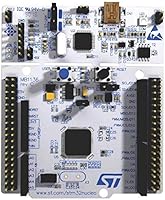
Overview
The STMicroelectronics NUCLEO-L476RG is an official Nucleo-64 development board built around the STM32L476RG microcontroller — an ARM Cortex-M4 core with a hardware floating-point unit running at up to 80 MHz. What sets this board apart from the crowded dev board market is how little friction stands between you and actual firmware running on hardware. It ships with an onboard ST-LINK/V2-1 debugger already included, so there is no separate programmer to buy or configure. For students, independent developers, and engineers evaluating the STM32L4 family, this combination of a capable MCU and a ready-to-use form factor at an accessible price is genuinely hard to beat.
Features & Benefits
The L476RG sits in the sweet spot of the STM32 lineup: the MCU is built for ultra-low-power operation, making it well-suited to battery-driven IoT sensors and wearables where every milliamp matters. On the memory side, 1 MB of Flash and 128 KB of SRAM give you enough headroom to run a real-time operating system alongside meaningful application code. USB OTG support means the board can act as a USB device or host without extra circuitry, and the DFSDM peripheral — a digital filter for sigma-delta modulators — adds native support for microphones and precision analog sensors. It works with IAR, Keil, and GCC-based toolchains, so most developers can drop it into their existing workflow without learning new tools.
Best For
This Nucleo board is a natural fit for engineering students who want to move beyond toy microcontrollers and start working with the kind of hardware found in commercial products. If you are prototyping a low-power IoT device — a wireless sensor node, a wearable, or a data logger — the L476RG's power management features give you a realistic preview of what a final design might look like. Hardware engineers evaluating the STM32L4 family before committing to a custom PCB will appreciate that this board mirrors real silicon behavior closely. And because the headers are Arduino Uno V3 compatible, makers from that ecosystem can reuse shields while gaining access to far richer peripheral options.
User Feedback
Across roughly 66 ratings, the L476RG development board holds a strong 4.5-star average, and the recurring theme in positive reviews is how much the onboard debugger simplifies setup compared to boards that require a separate probe. Build quality gets consistent praise — the headers are solid and the board handles daily bench use well. That said, some reviewers coming from Arduino or Raspberry Pi backgrounds note a steeper learning curve, particularly around configuring STM32CubeIDE or getting the correct device drivers running on Windows. A few users mention occasional hiccups with driver installation on first use. Overall, experienced embedded developers rate it highly; beginners should budget extra time to get comfortable with the broader STM32 ecosystem.
Pros
- Onboard ST-LINK/V2-1 debugger eliminates the need to buy a separate programmer, saving real money and setup hassle.
- The ultra-low-power L476RG MCU gives IoT prototypes an accurate preview of real-world battery life.
- 1 MB of Flash comfortably fits an RTOS, communication stack, and application code simultaneously.
- Arduino Uno V3 compatible headers let developers reuse shields they already own.
- Works with IAR, Keil, and GCC toolchains, so most teams can integrate it without changing their workflow.
- USB OTG support enables USB device and host prototyping without extra interface hardware.
- Solid PCB build quality holds up well to daily bench use and repeated breadboard connections.
- Full ST morpho connector exposes nearly every MCU pin for advanced peripheral access.
- Can be powered from USB or an external supply, adding flexibility in varied lab or field setups.
- Strong 4.5-star rating across verified buyers reflects consistent satisfaction among embedded professionals.
Cons
- ST morpho headers ship unpopulated, requiring soldering before those pins are usable on a breadboard.
- Driver installation on Linux and some macOS versions requires manual udev or libusb configuration.
- No onboard wireless module despite some listing details implying Bluetooth support.
- Getting started documentation is scattered across ST's ecosystem, making the first project harder than it should be.
- Power optimization requires deep knowledge of STM32CubeMX — out-of-the-box examples do not demonstrate best practices.
- DFSDM tutorials and working code examples are sparse, leaving audio-focused users largely on their own.
- USB OTG example projects are inconsistently maintained and difficult to locate for first-time USB implementers.
- No battery connector or LiPo charging circuit, which is a missed convenience for portable IoT prototype builds.
- The mini-USB connector feels dated compared to USB-C equipped boards now available at similar price points.
- Community tutorials vary widely in quality and STM32 family target, frequently causing confusion for newer users.
Ratings
The STMicroelectronics NUCLEO-L476RG earns a strong overall standing based on AI analysis of verified global user reviews, with spam, bot-generated, and incentivized submissions actively filtered out to ensure the scores reflect genuine hands-on experience. Across categories ranging from debugger quality to beginner accessibility, this Nucleo board shows clear strengths alongside a few friction points that potential buyers deserve to know about upfront. Both the praise and the frustrations are represented here without bias.
Onboard Debugger Quality
Value for Money
Low-Power Performance
IDE & Toolchain Compatibility
Build Quality & Durability
Flash & RAM Adequacy
USB OTG Functionality
DFSDM & Signal Processing Support
Arduino Header Compatibility
Getting Started Experience
ST Morpho Header Accessibility
Community & Documentation
Driver Installation Reliability
Power Input Flexibility
Suitable for:
The STMicroelectronics NUCLEO-L476RG is an excellent fit for anyone who needs to work seriously with ARM Cortex-M4 microcontrollers without spending a lot of money assembling a complete development setup from scratch. Engineering students tackling embedded C, FreeRTOS, or bare-metal programming for coursework or personal projects will find that this board matches the kind of hardware they will eventually encounter in industry. IoT developers prototyping low-power sensor nodes, wearables, or edge devices benefit directly from the L476RG MCU's deep sleep modes, which closely reflect what a production design would achieve. Hardware engineers evaluating the STM32L4 family before committing to a custom PCB can use this Nucleo board to validate firmware, peripheral configurations, and power budgets without spinning a single board of their own. Teams running automated firmware tests also find the consistent hardware and solid ST-LINK interface valuable for building reproducible CI/CD pipelines around embedded targets.
Not suitable for:
The STMicroelectronics NUCLEO-L476RG is not the right starting point for complete beginners who have never written a line of embedded C and expect a guided, beginner-friendly experience similar to Arduino or MicroPython. The STM32 toolchain — HAL libraries, CubeMX, and IDE configuration — requires patience and a willingness to read documentation that is thorough but not always beginner-accessible. Anyone expecting onboard wireless connectivity should look elsewhere; despite some listing ambiguity, this board carries no Bluetooth or Wi-Fi module — adding wireless capability requires an external shield or module. Developers who need more than 128 KB of RAM for data-heavy applications like on-device machine learning inference or large communication buffers will hit the MCU's ceiling and may need a higher-memory STM32 variant. Finally, users working exclusively on macOS or certain Linux distributions should factor in extra setup time, as driver and interface configuration is notably less smooth than on Windows.
Specifications
- MCU: The board is built around the STM32L476RG microcontroller, an ultra-low-power 32-bit ARM Cortex-M4 processor with a hardware floating-point unit.
- Clock Speed: The CPU runs at up to 80 MHz, providing substantial processing headroom for real-time control, signal processing, and communication tasks.
- Flash Memory: 1 MB of on-chip Flash storage is available for firmware, giving developers room to run an RTOS alongside a full application layer without external memory.
- RAM: 128 KB of SRAM is onboard, sufficient for most embedded workloads including task stacks, buffers, and HAL overhead under FreeRTOS.
- Debugger: An onboard ST-LINK/V2-1 programmer and debugger is integrated, supporting SWD (Serial Wire Debug) for full breakpoint and variable inspection without external hardware.
- USB Interface: Full-speed USB OTG is supported natively by the MCU, enabling the board to function as a USB device or host for custom peripheral development.
- Signal Processing: The DFSDM peripheral (Digital Filter for Sigma-Delta Modulators) is included, enabling direct interfacing with digital MEMS microphones and precision sigma-delta ADCs.
- Headers: The board provides Arduino Uno V3 compatible headers for shield reuse and full ST morpho connectors that expose nearly every MCU pin for advanced access.
- Power Input: The board can be powered via the USB connector or through an external voltage supply applied to the morpho or Arduino headers, with automatic source selection.
- Form Factor: The Nucleo-64 form factor measures 4 x 3 x 1 inches and follows the standard Nucleo footprint shared across the broader STM32 Nucleo product family.
- IDE Support: Compatible development environments include IAR Embedded Workbench, ARM Keil MDK, and any GCC-based toolchain such as STM32CubeIDE or PlatformIO.
- Indicators: Three onboard LEDs (including one user-programmable LED) and two push-buttons (one user, one reset) are included for basic I/O interaction during development.
- Debug Interface: Communication between the ST-LINK debugger and host PC uses the SWD protocol over a dedicated connector, also exposing JTAG-compatible signals on the morpho headers.
- Manufacturer: Designed and manufactured by STMicroelectronics, a semiconductor company headquartered in Geneva, Switzerland, with extensive global embedded ecosystem support.
- OS Compatibility: The board is compatible with Windows, Linux, and macOS host systems, though Linux and macOS may require manual driver or udev rule configuration for the ST-LINK interface.
- Board Weight: The board weighs approximately 0.01 ounces as listed, which reflects only the PCB and components without any packaging or accessories.
- Availability: The NUCLEO-L476RG has not been discontinued by the manufacturer and remains an actively supported product within the STM32 Nucleo development board lineup.
- First Available: This board was first made available for purchase in October 2016 and has maintained continuous availability since its introduction.