Overview

The Smart Strip ECG-7MVR 7-Outlet Surge Protector addresses a problem most people quietly ignore: the steady, invisible drain of devices that stay partially powered even when you think they're off. The concept is straightforward — plug your primary device into the control outlet, and the strip automatically cuts power to connected peripherals whenever that device shuts down or sleeps. At this price point, buyers expect something that works reliably without constant fiddling, and this auto-switching strip largely delivers on that expectation. The right-angle flat plug and four-foot cord are thoughtful touches that make installation behind a desk or entertainment unit far less frustrating than it sounds.
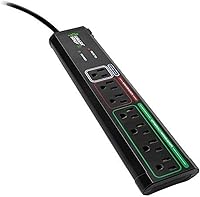
Features & Benefits

The layout across seven outlets is smarter than it first appears. One outlet acts as the master control, sensing how much power your primary device draws; when that draw drops — signaling shutdown or sleep — the four switched outlets cut power automatically. Two always-on outlets handle anything that should never lose power, like a router or a phone charger. A small sensitivity adjustment screw lets you dial in the detection threshold, which matters because different devices draw different amounts in standby. The built-in surge protection and reset button round things out, though this energy-saving power strip is clearly designed around its auto-switching function rather than serving as a heavy-duty surge suppressor.

Best For

This energy-saving power strip fits naturally into two types of setups: a home office where a desktop PC or monitor is the undisputed master device, or a living room entertainment center anchored by a TV or AV receiver. Plug the primary device into the control outlet, and the strip handles the rest — printer, speakers, external drive, gaming console — without any apps or timers involved. It also suits anyone wanting to cut phantom power draw without committing to a full smart-home system. That said, realistic expectations matter here. Actual energy savings depend heavily on what peripherals are connected and how frequently the master device fully powers down.

User Feedback

Most buyers who reviewed the Smart Strip came away satisfied, particularly praising how consistently it cuts power to peripherals and how the flat plug keeps things tidy behind furniture. Where feedback turns mixed is around the sensitivity screw — several users found the included instructions vague when it came to actually calibrating the threshold. The bigger sticking point involves modern low-draw laptops: because they consume so little power in standby, the strip sometimes struggles to distinguish on from off, causing either premature shutdowns or the switching never triggering at all. Build quality earns mostly positive remarks over long ownership, though a handful of buyers noted the housing feels lighter than expected.

Pros

  • Automatic peripheral shutdown requires zero manual effort once the master device is configured correctly.
  • The flat right-angle plug fits behind desks and entertainment furniture without eating extra wall clearance.
  • Two always-on outlets keep essential devices like routers and chargers running regardless of master state.
  • Seven outlets provide solid expansion for a full desk or media setup without excessive bulk.
  • The adjustable sensitivity screw offers real compatibility flexibility across different device types.
  • A built-in reset button makes recovery from a power surge or outage straightforward.
  • Long-term owners consistently report reliable switching behavior over years of daily use.
  • Works passively in the background — no app, no Wi-Fi, no subscription required.
  • At its price tier, it undercuts most smart-plug alternatives while handling multi-peripheral setups more elegantly.

Cons

  • Modern low-standby laptops often draw too little power for the sensor to reliably detect shutdown.
  • The instructions for calibrating the sensitivity screw are vague and leave many buyers guessing.
  • Surge protection is basic — not suitable for protecting high-value or professionally sensitive equipment.
  • The housing feels lighter and less substantial than some buyers expect at this price point.
  • A four-foot cord can feel short in larger entertainment setups where the outlet sits far from the strip.
  • The master-control logic is fixed by design, limiting flexibility if your setup changes over time.
  • No indicator light or clear feedback tells you whether the auto-switching has triggered correctly.
  • Phantom-load savings vary widely and may be minimal if connected peripherals already draw little power.

Ratings

The scores below reflect an AI-driven analysis of verified global buyer reviews for the Smart Strip ECG-7MVR 7-Outlet Surge Protector, with spam, bot activity, and incentivized feedback actively filtered out to ensure reliability. Ratings are drawn from real-world usage patterns across home offices, entertainment centers, and mixed desktop setups. Both the genuine strengths and the recurring frustrations buyers encountered are transparently represented in each category.

Auto-Switching Reliability
78%
22%
For desktop PC and traditional AV setups, the switching function works consistently once calibrated correctly — buyers regularly report that peripherals cut off promptly when the master device powers down, exactly as intended. Long-term owners frequently note this behavior remains stable over years of daily use without drift or failure.
Reliability drops sharply when the master device is a modern energy-efficient laptop or a very recent smart TV, both of which draw minimal standby power. In these cases, the strip either switches off peripherals prematurely or fails to detect shutdown altogether, which frustrates buyers who assumed any device would work as the master.
Sensitivity Calibration
61%
39%
The adjustable sensitivity screw is a genuinely useful feature that allows the strip to work across a wider range of master devices than a fixed-threshold competitor would manage. Buyers who took the time to dial it in — typically with a small flat-head screwdriver and a few test cycles — report that the calibration holds well afterward.
The instructions provided in the box are sparse to the point of being unhelpful for most users, and many buyers report spending significant time figuring out which direction to turn the screw and by how much. Without clearer guidance, this feature feels like a liability rather than an advantage during initial setup.
Outlet Layout & Flexibility
83%
The logical grouping of one control outlet, four switched outlets, and two always-on outlets covers the real-world needs of a typical desk or media setup without forcing users into awkward workarounds. Buyers consistently appreciate that routers and phone chargers can stay live on the always-on outlets while everything else shuts down automatically.
Seven outlets sounds generous until large wall-wart adapters enter the picture — bulky power bricks from external drives or chargers can block adjacent sockets, effectively reducing the usable count. A wider outlet spacing would have addressed this without meaningfully adding to the strip's footprint.
Plug & Cord Design
86%
The flat right-angle plug is one of the most consistently praised physical features across the review pool, particularly among buyers with furniture pushed close to the wall. It eliminates the few inches of wasted clearance that a standard straight plug demands, making installation behind desks and entertainment units noticeably cleaner.
At four feet, the cord is adequate for compact setups but can feel short in larger entertainment centers or rooms where the nearest outlet sits at a distance from the media console. A six-foot option would make this strip a stronger fit for a broader range of room configurations.
Build Quality
67%
33%
Most buyers describe the construction as competent and functional — the strip sits flat, the outlets grip plugs firmly, and the housing does not flex noticeably under normal use. Reports of mechanical failure or outlet degradation after extended ownership are relatively uncommon across the review pool.
The lightweight plastic housing draws repeated comments from buyers who expected something more substantial given the price. For a strip that spends its life stationary behind a desk, this rarely causes problems, but it does affect first impressions and gives some buyers pause about long-term durability.
Surge Protection Effectiveness
59%
41%
The built-in surge protection handles everyday voltage fluctuations and minor spikes, providing a reasonable safety baseline for typical home office or living room equipment. The reset button works as advertised after a trip, restoring the strip without needing to unplug and re-plug every connected device.
The surge protection specifications are not prominently published, and the joule rating is not clearly stated in product materials — a significant gap for buyers trying to protect high-value electronics. Users with expensive workstations or audio equipment would be taking a gamble relying on this strip as their primary line of surge defense.
Energy Savings Impact
64%
36%
Buyers who run setups with multiple high-draw peripherals — gaming rigs paired with monitors, speakers, and external storage — often notice a tangible reduction in idle consumption over time. The passive nature of the savings, requiring no scheduling or app management, makes it a low-effort win for the right setup.
Actual savings are highly dependent on what is plugged into the switched outlets and how often the master device fully powers off rather than just sleeping. Buyers with lean setups or mostly low-draw peripherals may find the energy savings underwhelming compared to what the product concept implies.
Ease of Initial Setup
74%
26%
For straightforward desktop setups, getting the strip operational is a matter of plugging in devices and identifying the control outlet — most buyers have it running in under ten minutes. The outlet labeling on the strip itself is clear enough for users who read it carefully before plugging anything in.
The sensitivity calibration step adds friction for buyers who were not expecting it, and the minimal documentation means a portion of users go through setup without realizing the screw exists or why it matters. First-time users of auto-switching strips frequently underestimate the importance of this step.
Compatibility Range
62%
38%
The strip performs reliably with a wide class of traditional desktops, monitors, and AV receivers as master devices, covering the majority of home office and entertainment center configurations that existed when this design was developed. The adjustable sensitivity screw extends compatibility meaningfully beyond what a fixed-threshold design would allow.
Compatibility with newer low-draw devices is the strip's most significant weakness, and it is increasingly relevant as modern hardware becomes more energy-efficient by default. Buyers with recent-generation laptops, ultra-low-power NUCs, or highly efficient smart TVs frequently find the auto-switching unreliable regardless of how the sensitivity is adjusted.
Value for Money
77%
23%
At its price point, the Smart Strip offers a function — automatic peripheral switching — that would otherwise require multiple individually purchased smart plugs plus an app to coordinate them. For buyers with a compatible master device, that simplicity translates into genuine perceived value, and many consider it well worth the investment.
Buyers who discover post-purchase that their master device is too energy-efficient to trigger reliable switching often feel the value proposition collapses entirely for their specific use case. The lack of a clear compatibility checklist in product materials means some buyers pay for a feature they cannot actually use.
Instruction Clarity
44%
56%
The basic outlet layout and plug-and-play installation are intuitive enough that many users get the strip working without reading the manual at all. For straightforward setups with a high-draw master device, the strip operates correctly from the moment it is plugged in.
The included documentation is widely cited as one of the strip's clearest weaknesses — particularly around the sensitivity screw, where many buyers do not realize an adjustment is even possible until they go looking for solutions online after experiencing switching problems. This is an avoidable issue that a one-page illustrated guide would largely solve.
Long-Term Durability
72%
28%
A meaningful share of the review pool reflects ownership spanning several years, with buyers reporting that the core switching function continues to operate without significant degradation over time. The outlet grips also tend to hold up well, maintaining a snug fit even after repeated plug insertions and removals.
A subset of long-term owners notes that the sensitivity calibration can drift slightly over time, occasionally requiring a minor readjustment to restore reliable switching behavior. The plastic housing also shows surface wear more readily than premium alternatives, though this is largely cosmetic for a device that lives behind furniture.

Suitable for:

The Smart Strip ECG-7MVR 7-Outlet Surge Protector is a strong fit for anyone running a traditional desktop setup where one dominant device — a tower PC, a monitor, or an AV receiver — clearly controls the workflow. When that master device powers down, the strip handles all the cleanup automatically, cutting power to peripherals like printers, external drives, speakers, and gaming accessories without any manual effort. It works equally well in living room entertainment centers where a TV or home theater receiver serves as the anchor, making it easy to ensure a soundbar, streaming box, or game console isn't quietly drawing power all night. Buyers who want real energy savings without installing smart plugs, downloading apps, or reconfiguring a home network will appreciate how low-maintenance this auto-switching strip actually is. Anyone working in a space where outlets sit behind bulky furniture will also find the flat right-angle plug a genuine practical advantage rather than a minor footnote.

Not suitable for:

The Smart Strip ECG-7MVR 7-Outlet Surge Protector is a poor match for anyone whose primary device is a modern ultrabook or energy-efficient laptop, since these machines draw so little power in standby that the strip's sensor frequently cannot distinguish between sleep and active use — leading to frustrating misfires. Users who need robust surge suppression for sensitive or expensive equipment should also look elsewhere, as the surge protection here is basic and not rated for high-value gear like professional audio equipment or medical devices. The sensitivity screw, while adjustable, comes with minimal guidance, and buyers who are not comfortable doing a bit of trial-and-error calibration may find setup more involved than expected. If your outlet situation changes frequently or you need to plug in and unplug devices regularly across all seven outlets, the fixed master-and-peripheral logic can feel more like a constraint than a convenience. Finally, those expecting dramatic reductions on their electricity bill should temper expectations — this energy-saving power strip helps, but real savings depend entirely on what peripherals are connected and how consistently the master device fully powers off.

Specifications

  • Brand: Manufactured by Bits Limited under the Smart Strip product line.
  • Model Number: This unit carries the model designation ECG-7MVR.
  • Total Outlets: Seven outlets are distributed across three functional groups: one control, two always-on, and four switched.
  • Voltage Rating: Rated for 125 volts, compatible with standard North American household outlets.
  • Cord Length: The power cord measures 4 feet in length.
  • Plug Type: Features a right-angle flat plug designed to sit flush against the wall, reducing clearance requirements.
  • Dimensions: The strip measures 14 x 4.5 x 2 inches overall.
  • Weight: Unit weighs 1.23 pounds, making it light enough to reposition without difficulty.
  • Switching Method: Auto-switching is handled passively through load sensing on the control outlet, with no software or network required.
  • Sensitivity Control: A user-adjustable screw on the unit allows manual tuning of the power-on and power-off detection threshold.
  • Surge Protection: Built-in surge protection guards connected devices against voltage spikes, with a reset button to restore function after a surge event.
  • Always-On Outlets: Two outlets remain continuously powered regardless of the control outlet state, suitable for routers, modems, or chargers.
  • Switched Outlets: Four outlets are controlled by the master device state and cut power automatically when the control outlet load drops below threshold.
  • Reset Button: A dedicated circuit reset button restores normal operation after a power outage or surge trips the internal protection circuit.
  • Seller Rank: Ranked #106 in the Surge Protectors category on Amazon at the time of this review.

Related Reviews

Belkin BV107200-12 7-Outlet Surge Protector
79%
93%
Cord Length & Reach
78%
Surge Protection Reliability
67%
Outlet Count & Layout
84%
Telephone Line Protection
81%
Build Quality & Durability
More
Maxpw 6 Ft Power Strip Surge Protector with 7 Outlets & 4 USB Ports
86%
91%
Surge Protection
89%
Space-Saving Design
87%
USB-C Charging Convenience
75%
Cord Length
88%
Ease of Use
More
Geeni Surge Ultra 8-Outlet Smart Surge Protector
80%
88%
Ease of Setup
71%
App Performance
91%
Smart Outlet Control
84%
Voice Control
78%
Surge Protection
More
PLUGTUL 20FT Flat Plug Surge Protector
82%
94%
Cord Length & Reach
91%
Flat Plug Design
73%
Surge Protection
86%
Outlet Count & Layout
78%
Build Quality
More
CFMASTER 10-Outlet Surge Protector Power Strip
86%
91%
Build Quality
88%
Surge Protection Effectiveness
87%
Value for Money
82%
Ease of Use
90%
Cord Length & Reach
More
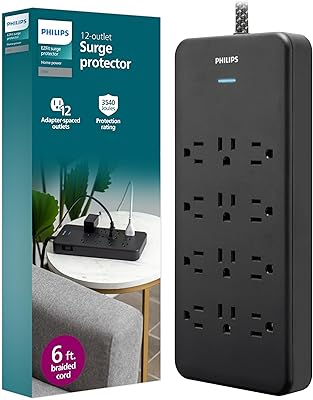
Philips 12-Outlet Surge Protector Power Strip
86%
94%
Surge Protection Performance
89%
Build Quality & Durability
84%
Ease of Use
88%
Cord Length & Flexibility
91%
Outlet Spacing for Larger Adapters
More
ZESEN 12 Outlet Surge Protector Power Strip
83%
90%
Surge Protection
88%
Build Quality
85%
Outlet Spacing
80%
Ease of Use
78%
Cord Length
More
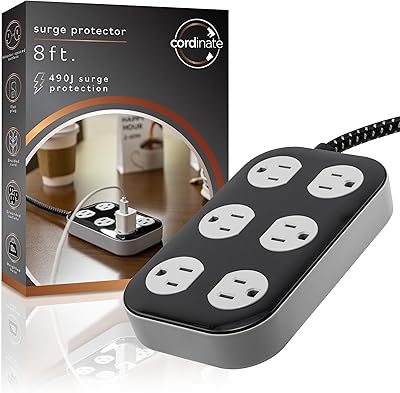
Cordinate Adapt 6-Outlet Power Strip Surge Protector
87%
92%
Value for Money
88%
Ease of Use
85%
Build Quality
94%
Surge Protection
90%
Cord Length & Flexibility
More
CFMASTER 8-Outlet Metal Surge Protector Power Strip
81%
92%
Build Quality
78%
Surge Protection Effectiveness
91%
Outlet Spacing & Usability
88%
Wall Mount Design
84%
Cord Quality & Length
More
Mifaso 9-Outlet Surge Protector Power Strip
76%
93%
Outlet Spacing & Layout
96%
Cord Length
74%
Surge Protection
88%
Flat Plug Design
89%
Safety Certifications
More

FAQ

You plug your main device — say, a desktop PC or a TV — into the single control outlet. The strip constantly monitors how much power that device is drawing. When it powers off or goes to sleep and the draw drops below a set threshold, the strip automatically cuts power to the four switched outlets, taking all your connected peripherals with it. It switches them back on when the master device draws full power again.

It can, but there is a real caveat worth knowing before you buy. Modern energy-efficient laptops draw very little power even when fully active, and in sleep mode the difference in draw is often negligible. The strip may struggle to tell the difference, which can cause it to cut power to your peripherals unexpectedly or never switch them off at all. Desktops and older laptops with higher baseline draw tend to work far more reliably with this setup.

The sensitivity screw sets the wattage threshold the strip uses to decide whether your master device is on or off. Turning it one way raises the threshold, the other lowers it. If your peripherals are cutting out while your computer is still running, lower the sensitivity. If they never switch off when the computer sleeps, raise it. The instructions that come in the box are minimal, so expect a short trial-and-error session — small turns, then test, then repeat.

Yes, that is exactly what the two always-on outlets are designed for. Devices plugged into those outlets stay powered no matter what the control outlet is doing, so your network connection stays live even when your computer is off.

The built-in protection handles typical household voltage spikes, which is fine for everyday use. That said, if you have a high-end workstation, a custom gaming rig, or any equipment where data loss or hardware damage would be a serious problem, you would be better served by a dedicated surge protector or UPS with a higher joule rating and clamping voltage specifications clearly listed. This auto-switching strip prioritizes energy management over heavy-duty surge suppression.

Seven outlets total, but the practical answer depends on plug size. The strip is 14 inches long, and most standard plugs fit without issue. Large wall-wart style adapters can block adjacent outlets, so if several of your devices use bulky power bricks, you may end up effectively losing a couple of outlets. Plan your layout before assuming all seven will be accessible simultaneously.

A smart TV can work as the master device in many cases, since it draws a meaningful amount of power when active and drops significantly in standby. Plug the TV into the control outlet and connect things like a soundbar or streaming stick to the switched outlets. Results vary by TV model, particularly with very new sets that are designed to minimize standby draw — so the same trial-and-error with the sensitivity screw may apply.

After a power outage or surge, the internal circuit protection may trip, which would stop the strip from supplying power even after electricity returns. In that case, press the reset button on the unit and it should restore normal function. It is a simple step, but easy to overlook if you are not aware it exists.

For a standard desk setup where the outlet is reasonably close, four feet is workable. For a large entertainment center where the wall outlet might be several feet from your media console, it can feel short. If your outlet sits directly behind your furniture, the flat right-angle plug helps recover some of that slack by sitting flush rather than jutting straight out.

Among buyers who have owned this energy-saving power strip for multiple years, reports of the switching function degrading are relatively uncommon. Build quality is competent rather than premium — the housing is lightweight plastic — but for a device that mostly sits stationary behind a desk, that tends not to matter much. The bigger long-term variable is whether the sensitivity calibration drifts, which a few long-term owners have noted occasionally requiring a minor screw readjustment.

Where to Buy