



Overview

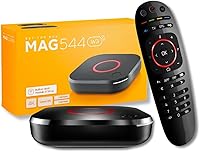
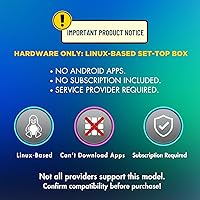
The Raxxio MAG544w3 is a Linux-based IPTV set-top box built for cord-cutters who already have an active service provider — not a standalone streaming device you can load apps onto. That distinction matters more than almost anything else here. It runs Linux, not Android, so there is no app store, no Netflix icon waiting on the home screen. What you get instead is a compact, well-built box that ships complete with an HDMI cable, a remote, and batteries included. If you are an existing MAG ecosystem user or an IPTV subscriber comfortable with portal-driven navigation, this set-top box speaks directly to your setup.

Features & Benefits

At the heart of this MAG box is the Amlogic S905Y4-B quad-core chip, which handles 4K HDR content without breaking a sweat. It supports both HEVC and AV1 codecs, so your provider can deliver high-resolution streams at lower bitrates — that translates to less buffering on average connections. The dual-band Wi-Fi reaches up to 550 Mbps on the 5 GHz band, and a 100 Mbps Ethernet port is available when you want a wired connection instead. Dolby Digital Plus passthrough covers up to 7.1 surround sound for more serious audio setups. Storage sits at a modest 4 GB, and 1 GB of RAM keeps the Linux portal running without issue for typical daily use.

Best For

This set-top box is squarely aimed at people upgrading from older MAG hardware — think MAG322 or MAG420 owners who want better 4K performance without switching ecosystems. It also suits IPTV subscribers whose provider has confirmed compatibility with this model, which is absolutely worth verifying before purchase, since not every service has updated its supported device list yet. Home theater users who want clean 4K output and proper audio passthrough will feel at home here. It performs best over Ethernet, though the dual-band Wi-Fi is a solid fallback. Buyers unfamiliar with Linux portal setup may face a short but real learning curve out of the box.

User Feedback

Users consistently highlight picture quality as the standout — 4K playback gets frequent praise for sharpness and color accuracy in real living room conditions. The remote is comfortable, with a reliable IR range for most setups. On the downside, a recurring concern is provider compatibility: some buyers found their IPTV service had not yet added support for this newer model, causing frustration that had little to do with the hardware itself. Wi-Fi reliability draws mixed comments — strong for some users, patchy for others depending on router proximity. Less tech-savvy buyers occasionally mention that configuring a portal for the first time feels less straightforward than they anticipated.

Pros

  • Smooth 4K HDR playback with HEVC and AV1 support keeps streams sharp even on modest internet connections.
  • Dolby Digital Plus passthrough brings genuine multi-channel audio to home theater setups with a compatible receiver.
  • Wired Ethernet connection delivers rock-solid IPTV streaming with virtually no dropout or buffering complaints.
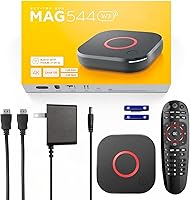
  • The Raxxio MAG544w3 ships with everything needed to get started — HDMI cable, remote, and batteries all included.
  • Compact form factor fits discreetly into any media setup without taking up meaningful shelf space.
  • A real step up from older MAG hardware — faster UI, better codec support, and noticeably improved overall responsiveness.
  • Dual-band Wi-Fi with 5 GHz support holds up well for 4K streaming when the router is in reasonable range.
  • The remote is comfortable to use daily, with responsive buttons and a layout MAG users will find instantly familiar.

Cons

  • Provider compatibility is not guaranteed — many IPTV services have not yet added this newer model to their supported device list.
  • Linux portal setup is unintuitive for first-time users, with no guided onboarding or helpful on-screen prompts.
  • Wi-Fi performance drops significantly in larger homes or through multiple walls, making Ethernet almost a necessity.
  • Only 1 GB of RAM means heavy portal UIs with large channel lists can feel sluggish under load.
  • The 100 Mbps Ethernet cap prevents users on gigabit home networks from using their full available bandwidth.
  • Four gigabytes of onboard storage fills up quickly if you manage multiple portal configurations or receive large firmware updates.
  • The IR remote struggles with line-of-sight issues when the box is stored inside a closed media cabinet.
  • No app store or sideloading capability means the device is entirely useless without an active, compatible IPTV subscription.

Ratings

The ratings below for the Raxxio MAG544w3 were generated by our AI engine after analyzing verified buyer reviews from multiple global markets, with spam, bot-submitted, and incentivized feedback actively filtered out. Scores reflect the honest consensus of real IPTV users — covering everything from 4K playback performance to setup friction — so both the strengths and the genuine pain points are represented without sugarcoating.

4K Playback Quality
88%
Users running supported IPTV services consistently report crisp, detailed 4K HDR output with natural color reproduction on modern TVs. The HEVC and AV1 codec support means streams load quickly and hold quality even on connections that are not particularly fast.
A handful of users noted occasional frame drops when portals serve very high-bitrate streams, though this appears tied to provider infrastructure rather than the hardware itself. Pure 4K performance is strong, but it is not immune to upstream service inconsistencies.
Provider Compatibility
61%
39%
For subscribers whose IPTV provider has already added this model to their supported device list, setup is largely painless and the portal loads reliably. MAG ecosystem veterans in particular tend to have a smoother onboarding experience than newcomers.
This is the single biggest friction point in buyer feedback. A meaningful portion of users discovered after purchase that their provider had not yet certified this newer model, leaving them with hardware they could not fully use. Always confirm compatibility before ordering.
Wi-Fi Performance
69%
31%
On the 5 GHz band in rooms close to the router, the dual-band Wi-Fi holds up well for 4K streaming without noticeable buffering. Users in smaller apartments or with the router in the same room generally report a stable wireless experience.
In larger homes or through multiple walls, signal consistency drops off noticeably. Several buyers who expected the same reliability as a wired connection were disappointed, and a few reported the 2.4 GHz band struggling during peak household usage hours.
Wired Ethernet Stability
91%
Users who plug directly into their router via the 100 Mbps Ethernet port report a rock-solid connection with virtually no buffering or dropout complaints. For home theater setups where the router is nearby, this is the clear preferred way to run the box.
The port is capped at 100 Mbps, which is sufficient for IPTV use but feels modest for the price tier. Users on gigabit home networks cannot take full advantage of their connection speed through this box.
Remote Control
74%
26%
The included IR remote has a comfortable layout and responsive buttons that most users found adequate for daily navigation. Button travel feels deliberate rather than mushy, and the batteries are included so setup is immediate.
IR range gets mixed marks — it works fine with direct line of sight but can be unreliable when the box is tucked inside a media cabinet. A small number of users also wished for a more modern RF or Bluetooth remote at this price point.
Audio Performance
83%
Dolby Digital Plus passthrough works well for users with AV receivers or soundbars that support multi-channel audio. Those with a proper home theater setup noticed a clear improvement in audio depth compared to older MAG devices.
The audio benefits are only realized if your receiver or soundbar supports the passthrough correctly — users plugging directly into a basic TV speaker setup will not hear a meaningful difference from cheaper devices.
Build Quality & Design
78%
22%
The compact black enclosure feels solid for its weight class, and the understated design fits into most entertainment setups without drawing attention. Users appreciate that it does not run hot even during extended streaming sessions.
At 170 grams, it feels light enough that some buyers questioned its durability out of the box. The plastic casing does the job but does not project the same premium feel that the price point might suggest.
Setup & Ease of Use
58%
42%
For MAG veterans or anyone who has configured a Stalker middleware portal before, the initial setup is familiar and takes only a few minutes. The interface is clean once a portal is loaded and works exactly as experienced MAG users expect.
First-time Linux set-top box users frequently describe the setup process as confusing and unintuitive. There is no guided onboarding, and without a clear understanding of how IPTV portals work, getting to a working screen takes real troubleshooting effort.
RAM & System Responsiveness
67%
33%
For the core task of loading and navigating an IPTV portal, 1 GB of DDR4 RAM is enough to keep menus responsive and channel switching reasonably quick. Users focused solely on watching content rarely report lag issues under normal conditions.
Heavy portal UIs with large channel lists or EPG grids can make the system feel sluggish. Users who frequently switch between portals or run more demanding middleware configurations noticed slowdowns that a bit more RAM would have avoided.
Storage Capacity
55%
45%
The 4 GB of onboard flash is sufficient for the Linux OS and a single portal configuration without any issues. Users with a single provider and a stable setup will never feel constrained by storage in typical use.
Four gigabytes leaves very little headroom if you want to store portal credentials for multiple providers or if firmware updates grow in size over time. It is a practical limitation that more power users will bump into sooner than expected.
In-Box Accessories
81%
19%
Shipping with an HDMI cable, remote, and pre-installed batteries is a small but genuinely appreciated touch that means you can plug in and start configuring without a trip to find a spare cable. Everything needed for a basic setup is present.
The HDMI cable included is functional but basic — users with longer cable runs or specific routing needs will likely swap it out quickly. It is a nice inclusion but not a cable worth keeping long-term in a tidy home theater setup.
Value for Money
71%
29%
For an IPTV subscriber who already has a compatible provider and is upgrading from aging MAG hardware, the hardware specs justify the cost relative to older models in the lineup. The 4K HDR and improved chipset represent a tangible generational step up.
For a buyer who discovers post-purchase that their provider is not yet compatible, the value proposition collapses entirely. The price also feels harder to justify against Android-based alternatives that offer far more flexibility for casual users.
Codec & Streaming Efficiency
86%
HEVC support genuinely reduces the bandwidth required for 4K content, which matters on household connections shared with multiple devices. AV1 compatibility adds useful future-proofing as more providers adopt the codec for high-efficiency delivery.
These codec benefits are only noticeable when the IPTV provider actively uses them in their stream delivery. Users on providers still defaulting to older H.264 streams will not see a practical difference in buffering or quality.
Form Factor & Portability
77%
23%
The small footprint means this set-top box fits discreetly on any shelf or behind a TV without demanding dedicated space. Users who travel between locations with their IPTV subscription found it easy to pack and set up in a hotel or second home.
The compact size means there is no room for expanded connectivity — a second USB port or an SD card slot would have made the device more versatile. What you see on the unit is exactly what you get, with no upgrade path.

Suitable for:

The Raxxio MAG544w3 is purpose-built for a specific kind of buyer, and when it lands in the right hands, it genuinely delivers. If you are already subscribed to an IPTV service that has confirmed support for this model, this set-top box is a meaningful hardware upgrade — particularly for anyone still running an older MAG322 or MAG420 that struggles with 4K content. MAG ecosystem veterans will feel at home immediately: the Linux-based portal interface is familiar, setup is quick, and the improved chipset makes channel switching and EPG loading noticeably snappier than on previous generations. Home theater enthusiasts who want proper Dolby Digital Plus audio passthrough to an AV receiver will also find this set-top box punches above its weight in the audio department. If your router is close enough to run an Ethernet cable, you get a rock-solid wired connection that handles 4K streams without complaint — and the dual-band Wi-Fi is a practical backup when cabling is not an option.

Not suitable for:

The Raxxio MAG544w3 is genuinely not the right purchase for a wide category of buyers, and being honest about that matters. If you do not already have an active IPTV subscription with a provider that explicitly supports this model, stop here — this box cannot stream anything on its own, and no subscription is included. Buyers expecting an Android-style experience with access to app stores, Netflix, YouTube, or any sideloaded application will be completely disappointed; this is a Linux device designed exclusively for portal-based IPTV access. Less tech-savvy users who have never configured a Stalker middleware portal or manually entered a portal URL should expect a frustrating initial experience with no guided setup assistance. Those living in larger homes where the router is far away should also temper expectations around Wi-Fi reliability, as the signal drops off in challenging environments. Finally, if you are looking for a flexible, multi-purpose media player that can grow with your needs, the 4 GB of storage and 1 GB of RAM impose real ceilings that will frustrate power users over time.

Specifications

  • Chipset: Powered by the Amlogic S905Y4-B quad-core ARM Cortex-A35 processor, designed for efficient 4K media decoding and responsive UI performance.
  • RAM: Equipped with 1 GB of DDR4 RAM, sufficient for standard Linux portal navigation and single-provider IPTV use.
  • Storage: Includes 4 GB of onboard flash memory for the OS, portal configuration data, and firmware updates.
  • Operating System: Runs Linux 4.9, a stable and lightweight OS optimized for IPTV portal access via Stalker middleware and similar frameworks.
  • Video Output: Outputs up to 4K HDR resolution via HDMI, supporting high dynamic range for compatible televisions.
  • Codec Support: Natively decodes AV1, HEVC (H.265), and H.264 video formats, enabling efficient high-resolution stream playback across common IPTV delivery formats.
  • Audio: Supports Dolby Digital Plus audio passthrough, compatible with multi-channel home theater setups of up to 7.1 surround sound configurations.
  • Wi-Fi: Dual-band wireless module supports up to 100 Mbps on the 2.4 GHz band and up to 550 Mbps on the 5 GHz band.
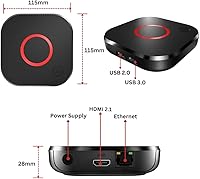
  • Ethernet: Features a 100 Mbps Fast Ethernet port for stable wired network connectivity, suitable for continuous 4K IPTV streaming.
  • HDMI: Includes one full-size HDMI output port for connecting to televisions or AV receivers; an HDMI cable is included in the box.
  • USB: Provides one USB 2.0 port for peripheral connectivity, firmware updates via flash drive, or external device support.
  • Dimensions: Measures 4.53 x 4.53 x 1.1 inches, making it a compact unit suitable for placement on a shelf or behind a television.
  • Weight: Weighs 6 ounces (170 grams), lightweight enough for easy repositioning or travel between locations.
  • Remote Control: Ships with an IR remote control that requires two AAA batteries, which are included in the retail package.
  • In-Box Contents: Retail packaging includes the set-top box unit, HDMI cable, IR remote control, and two AAA batteries — everything needed for a basic installation.
  • Color: Available in black, with a matte plastic enclosure designed to blend into standard home entertainment setups.
  • Power: Operates via an external power adapter; the unit does not contain an internal battery and requires a continuous power source during use.

Related Reviews
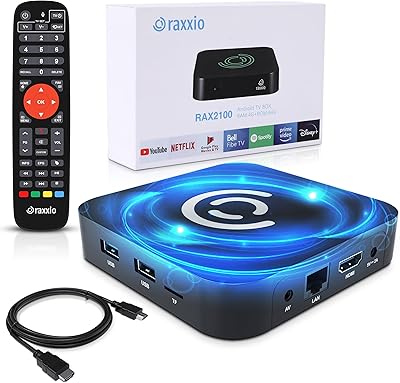
Raxxio RAX2100 Android TV Box 4K HDR 64GB
86%
88%
Streaming Quality
91%
Setup and Installation
85%
Wi-Fi and Connectivity
87%
Performance and Speed
84%
User Interface and Navigation
More

FAQ

No, it does not. The Raxxio MAG544w3 is hardware only — no subscription, no free channels, and no built-in content. You need an existing IPTV subscription from a provider that supports this model before the box can do anything useful.

No. This is a Linux-based device, not an Android TV box. There is no app store and no way to sideload applications. It is designed exclusively for IPTV portal access, so if you are looking for a general-purpose streaming device, this is not it.

You will need to contact your provider directly and ask if they have added the MAG544w3 to their list of supported devices. This is genuinely important to check before purchasing — some providers have not yet updated their compatibility lists to include this newer model, which has caused frustration for buyers who skipped this step.

It depends on your comfort level with technology. If you are familiar with entering portal URLs and configuring IPTV middleware, setup is straightforward. If this is your first time, expect a learning curve — there is no guided setup wizard, so you will need clear instructions from your IPTV provider on how to enter your portal address and credentials.

Ethernet, without question. Plugging directly into your router gives you a stable, consistent connection that handles 4K streams reliably. Wi-Fi works well if your router is nearby and on the 5 GHz band, but performance can drop off in larger homes or through walls.

For typical single-provider IPTV use, yes. Loading channels and navigating the EPG feels responsive under normal conditions. Where it starts to show limits is with very large channel lists or more demanding portal UIs — in those cases, the interface can feel a bit sluggish.

Technically yes, but the 4 GB of storage means space is limited, and switching between portals requires manually updating the portal URL in the settings. It is workable but not particularly convenient if you regularly juggle multiple services.

It is comfortable and functional for daily channel surfing, with a straightforward layout that MAG users will recognize immediately. The main limitation is that it is IR-based, meaning it needs a clear line of sight to the box. If you store the unit inside a media cabinet, you may find yourself repositioning things to get reliable response.

The hardware is fully capable of 4K HDR playback, but whether you actually see 4K content depends entirely on your IPTV provider offering 4K streams and your internet connection having enough bandwidth to handle them. The box handles its end well; the rest is up to your service and network.

Yes, meaningfully so. The newer chipset handles 4K content that older MAG hardware struggles with, the Wi-Fi is faster, and the overall UI feels more responsive. If you are already in the MAG ecosystem and your provider supports this model, it is a worthwhile hardware refresh.