Overview

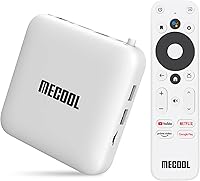
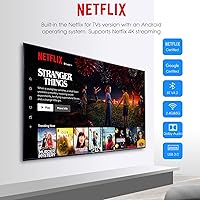
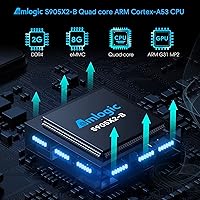
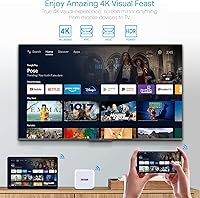
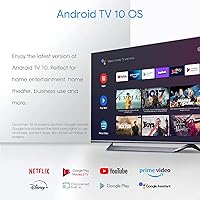
The MECOOL KM2 sits in a crowded mid-range streaming box market, but it earns attention for one specific reason: it carries both Google and Netflix certification, which most budget competitors quietly skip. That dual certification matters — it means Netflix actually recognizes this Android TV box as a verified device, unlocking proper 4K HDR streams rather than the degraded versions uncertified boxes often serve. Running Android 10.0 on an Amlogic S905X2-B quad-core processor, the hardware handles everyday streaming tasks without complaint. Storage is modest at 8GB, so heavy app hoarders will need to manage space, but as a dedicated streaming-first device, it punches well at its price tier.

Features & Benefits

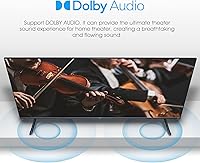
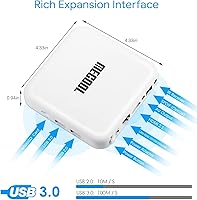
What stands out most about this Android TV box is how well it handles the streaming fundamentals. The 4K HDR output over HDMI looks sharp on compatible displays, and while the Dolby Atmos support is pass-through only — meaning your TV or soundbar does the decoding, not the box itself — it still works cleanly with the right setup. Dual-band Wi-Fi covers both 2.4GHz and 5GHz bands, and there is a wired Ethernet port if you want the most reliable connection possible. Bluetooth 4.2 handles external speakers or a wireless keyboard without fuss. The USB 3.0 port is genuinely useful for plugging in a flash drive or hard drive to expand beyond the built-in 8GB.

Best For

This streaming box makes the most sense for people who are serious about Netflix and want certified 4K streaming without complicated workarounds. If your current smart TV feels sluggish — slow app launches, unresponsive menus — this Android TV box offers a noticeably cleaner experience thanks to the proper Android TV interface rather than a generic launcher. It is also a solid fit for home theater rooms where you want Dolby Atmos audio passing through to a capable soundbar or AV receiver. Buyers already embedded in the Google ecosystem, using Chromecast or Google Assistant regularly, will find it fits naturally into their existing setup.

User Feedback

User opinions on the KM2 box split fairly predictably along the lines of what you are using it for. Setup gets consistent praise — people appreciate that it behaves like a proper smart TV platform rather than a hacked-together Android port. The clean Android TV interface is frequently mentioned as a genuine upgrade over whatever came pre-installed on older TVs. On the downside, the 2GB of RAM does show its limits when multiple apps are open, with occasional slowdowns reported. The included remote draws criticism too — it feels cheap and the button layout is not particularly intuitive. A handful of users have noted that firmware updates arrive infrequently, raising questions about long-term software support.

Pros

  • Google and Netflix dual certification ensures proper 4K HDR streams, not degraded fallback quality.
  • The Android TV interface is clean, fast to set up, and familiar to anyone with a Google account.
  • Dolby Atmos pass-through works reliably with compatible soundbars and AV receivers.
  • Dual-band Wi-Fi plus a physical Ethernet port gives real flexibility for any home network setup.
  • USB 3.0 port lets you expand storage with an external drive when the onboard 8GB runs short.
  • Chromecast built-in works consistently for casting from phones or tablets on the same network.
  • Full Google Play Store access means no sideloading or workarounds to get the apps you want.
  • Google Assistant voice search saves real time when hunting for content across multiple streaming services.
  • Compact, passively cooled design runs quietly and fits unobtrusively behind virtually any TV.

Cons

  • 2GB of RAM causes noticeable slowdowns when switching between multiple open apps.
  • The bundled remote feels cheap and requires line-of-sight due to its IR-based design.
  • 8GB of internal storage is genuinely tight once core apps and system updates are installed.
  • Firmware updates arrive infrequently, leaving the device on older software for extended stretches.
  • Dolby Atmos is pass-through only — without an external audio device, there is no spatial audio benefit.
  • 5GHz Wi-Fi performance drops off meaningfully in larger homes or through multiple walls.
  • Some Android apps lack proper remote control support and require a Bluetooth keyboard to navigate.
  • Bluetooth 4.2 occasionally shows audio sync drift when paired with wireless speakers during video playback.
  • Long-term performance degrades gradually, likely due to the RAM ceiling rather than any hardware fault.

Ratings

The MECOOL KM2 has been evaluated by our AI system after analyzing thousands of verified global user reviews, with spam, bot submissions, and incentivized feedback actively filtered out to ensure the scores reflect genuine buyer experiences. What emerges is a picture of a capable mid-range streaming box with real certification credentials, a few hardware trade-offs worth knowing about, and a surprisingly polarizing remote control. Both the highlights and the frustrations are reflected honestly in the scores below.

Streaming Performance
88%
For its target use case — running Netflix, YouTube, and Prime Video — this Android TV box delivers consistently. The Google and Netflix certification means content loads at the correct quality tier, and users report smooth 4K HDR playback without the stuttering that plagues cheaper uncertified boxes.
Performance is firmly tied to streaming tasks. Users who pushed it toward heavier workloads like local game emulation or running multiple demanding apps simultaneously found the experience less predictable, with occasional frame drops and app reload cycles.
Setup & Ease of Use
91%
Initial setup draws consistent praise across reviews. The Android TV interface guides users through account login and app installation quickly, and most buyers report being up and running within ten minutes of unboxing. The familiar Google-driven interface removes a significant learning curve.
A small but vocal group noted that locating certain settings required more digging than expected, particularly for display calibration options. A few users also flagged that the initial system update on first boot can take longer than anticipated with slower internet connections.
Picture Quality
86%
4K HDR output over HDMI looks genuinely impressive on compatible displays. Users upgrading from 1080p streaming sticks consistently noted the visual difference, particularly in HDR-mastered content on Netflix and YouTube where contrast and color depth are more pronounced.
The quality ceiling is dependent on the display and source material. On SDR content or non-HDR TVs, the advantage narrows considerably. A handful of users also reported needing to manually adjust display settings to get accurate color output right out of the box.
Audio Output
79%
21%
Dolby Atmos pass-through works as advertised for users with compatible soundbars or AV receivers. Those with a proper home theater chain reported that Atmos-encoded content passed cleanly through without manual configuration beyond initial HDMI setup.
The pass-through nature of the Atmos support trips up buyers who expect the box itself to decode spatial audio. Without an external audio device in the chain, you are not getting any Atmos benefit, and this distinction is not clearly communicated in the product listing.
Build Quality & Design
72%
28%
The compact square chassis is unobtrusive and fits easily behind most TVs or inside entertainment units. The white finish looks clean and the unit runs cool under normal streaming loads, which users appreciated during extended binge sessions.
The casing feels noticeably lightweight and plastic in hand, which does not inspire confidence about long-term durability. A few buyers reported the HDMI port feeling slightly loose after several months of use, particularly when the cable is moved frequently.
Remote Control
58%
42%
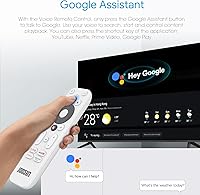
The remote includes a dedicated Google Assistant button and direct-access shortcut keys for popular apps, which does save navigation time once you are inside the interface. Voice search via the assistant button works reliably for content discovery.
The remote is widely flagged as the weakest component. Button travel feels mushy, the layout is not intuitive for new users, and the IR-based control means you need line-of-sight to the box. Several reviewers switched to a third-party Bluetooth remote within weeks of purchase.
Wi-Fi & Connectivity
83%
Dual-band Wi-Fi handled 5GHz connections well in most home environments, with users reporting stable streams even during peak household network usage. The inclusion of a physical Ethernet port is appreciated by anyone who wants a wired fallback for truly buffer-free viewing.
5GHz performance varied noticeably based on router distance and wall interference, with some users in multi-story homes reporting more dropouts than expected on Wi-Fi. In those cases, the Ethernet port became essential rather than optional.
Storage & Memory
53%
47%
The USB 3.0 port provides a practical workaround for the limited internal storage. Users who plugged in an external drive found they could expand their media library significantly without paying for a higher-tier device.
8GB of onboard storage disappears quickly once system files and a handful of apps are installed. The 2GB of RAM is the more pressing constraint — multitasking slows noticeably with more than three or four apps open, and some users reported apps reloading from scratch after switching between them.
App Ecosystem
87%
Access to the full Google Play Store via a certified Android TV interface is a genuine advantage over Fire OS or Roku alternatives. Popular streaming services, games, and utilities install and update normally, just like any standard Android TV device.
Not every phone-optimized Android app translates cleanly to the TV interface. Some apps lack proper remote control support and require a Bluetooth mouse or keyboard to navigate comfortably, which adds friction for users who want a pure lean-back experience.
Google Assistant Integration
81%
19%
Voice search works well for content discovery across apps, and the assistant handles basic smart home commands for users already embedded in the Google ecosystem. Searching across streaming services without opening each app individually saves real time.
The assistant occasionally misroutes searches to the Play Store instead of opening content directly inside the correct streaming app. This is a known Android TV limitation rather than a device-specific flaw, but it still creates friction for less tech-savvy users.
Chromecast Functionality
84%
Built-in Chromecast works reliably for casting from Android and iOS devices on the same network. Users who cast YouTube or photos from a phone to the TV found the experience responsive and consistent, with minimal lag during casting sessions.
Chromecast performance degrades on congested 2.4GHz networks. A small number of users also noted that Chromecast occasionally drops the connection when the box enters its power-saving sleep state, requiring a manual wake before casting can resume.
Value for Money
77%
23%
For buyers who specifically want Google and Netflix certification, this Android TV box represents a strong return compared to paying a premium for a branded streaming stick with similar credentials. The hardware feature set covers most streaming needs without unnecessary extras.
At its price point, competition from the Chromecast with Google TV and the Fire TV Stick 4K is real and worth acknowledging. Both alternatives offer comparable or better software polish, and budget-focused buyers will need to weigh whether the Android TV interface justifies any price difference.
Long-Term Reliability
67%
33%
Many users report the box running without major issues over twelve to eighteen months of daily use. The passive cooling design means no fan noise and no moving parts to wear out, which contributes to its general reliability as a set-and-forget streaming device.
Firmware updates arrive infrequently, which has left some users on older software versions for extended periods. A handful of reviews mention gradual performance degradation over time, likely connected to the 2GB RAM ceiling rather than any hardware failure.
Bluetooth Performance
74%
26%
Bluetooth 4.2 pairs reliably with external speakers and keyboards. Users who connected a Bluetooth game controller found it recognized and usable for casual Android games available through the Play Store without complicated configuration.
Bluetooth range is average at best, and pairing with some third-party devices required multiple attempts. A few users also noted occasional audio sync drift when streaming to Bluetooth speakers during video playback, which is a common limitation of Bluetooth 4.2 versus newer versions.

Suitable for:

The MECOOL KM2 is a strong fit for cord-cutters who have grown frustrated with the limitations of uncertified Android boxes, particularly anyone who relies on Netflix daily and wants genuine 4K HDR streams without jumping through hoops. If your current smart TV feels painfully slow to load apps or navigate menus, plugging this Android TV box into an HDMI port is one of the most affordable ways to get a clean, responsive Android TV experience on top of it. Home theater enthusiasts who already own a capable soundbar or AV receiver will appreciate the Dolby Atmos pass-through support, which means their existing audio hardware can do the heavy lifting. Buyers already invested in the Google ecosystem — using Google Assistant on other devices, casting from an Android phone, or running a Google Home setup — will find this streaming box integrates naturally without any awkward workarounds. It also works well for anyone who wants access to the full Google Play Store rather than the curated, locked-down app selections found on Roku or Fire TV devices.

Not suitable for:

Buyers who want a primary device for gaming, local media libraries, or heavy multitasking should look elsewhere before committing to the MECOOL KM2. The 2GB of RAM is a genuine ceiling that becomes apparent quickly when you switch between several apps, and the 8GB of onboard storage fills up faster than most people expect once a few streaming services and utilities are installed. Power users who stream from a large personal NAS or run complex media server setups like Plex in a demanding transcoding role may find the hardware underpowered for those workloads. If you are comparing this Android TV box directly against the Chromecast with Google TV or the Fire TV Stick 4K, both competitors offer more polished software experiences at a similar price, and that gap matters if interface refinement is a priority for you. Anyone who dislikes tinkering — adjusting display settings manually, managing storage, or potentially swapping out the bundled remote — may find the ownership experience mildly frustrating over time.

Specifications

  • Operating System: Runs Android 10.0 (Android TV), providing a certified smart TV interface with full Google Play Store access.
  • Chipset: Powered by the Amlogic S905X2-B quad-core Cortex-A53 processor, designed for stable 4K streaming workloads.
  • RAM: Equipped with 2GB of DDR4 RAM, sufficient for standard streaming but limited under heavy multitasking.
  • Storage: Includes 8GB of onboard eMMC ROM for app and system storage, expandable via USB external drives.
  • Video Output: Outputs up to 4K HDR video via HDMI 2.1, supporting HDR10 and HLG formats on compatible displays.
  • Audio Support: Supports Dolby Digital, Dolby Digital Plus, and Dolby Atmos pass-through via HDMI to external audio devices.
  • Wi-Fi: Dual-band Wi-Fi supports both 2.4GHz and 5GHz networks for flexible placement and connection stability.
  • Ethernet: Includes a 100Mbps wired Ethernet port for users who prefer a stable, latency-free wired connection.
  • Bluetooth: Bluetooth 4.2 enables wireless pairing with speakers, keyboards, game controllers, and other compatible peripherals.
  • USB Ports: Features one USB 3.0 and one USB 2.0 port for connecting external storage drives, mice, or keyboards.
  • Certifications: Holds both Google certification and Netflix certification with Widevine L1 DRM, enabling full 4K HDR streaming on those platforms.
  • Special Features: Includes Chromecast built-in and Google Assistant support accessible directly via the included infrared remote control.
  • Dimensions: Measures 4.33 x 4.33 x 0.98 inches, making it compact enough to sit discreetly behind or beside most televisions.
  • Weight: Weighs 6.6 ounces, light enough to mount behind a TV with adhesive strips if desired.
  • Color: Available in White, with a smooth matte plastic finish that blends into most home entertainment setups.
  • Remote Control: Ships with an infrared remote requiring line-of-sight operation, featuring dedicated Google Assistant and app shortcut buttons.
  • Power Input: Powered via a 5V DC power adapter included in the box, with a standard micro-USB or barrel connector input.
  • HDMI Version: HDMI 2.1 port supports 4K resolution output and is used for both video and Dolby audio pass-through simultaneously.

Related Reviews

FAQ

It genuinely does. The MECOOL KM2 carries official Netflix certification with Widevine L1 DRM, which is the key that unlocks 4K HDR streams on Netflix. Uncertified boxes are capped at lower resolutions regardless of what the specs say, so the certification here is the real differentiator.

Yes, Android TV allows sideloading APK files, though the process requires enabling unknown sources in the settings menu. That said, not every sideloaded app will have a remote-friendly TV interface, so you may need a Bluetooth mouse or keyboard to navigate some of them comfortably.

It depends on how many apps you plan to install. For a focused streaming setup with four to six major apps, 8GB is workable. If you want more, the USB 3.0 port lets you plug in an external flash drive or hard drive for additional storage, which most users end up doing within the first few weeks.

The support is real but limited to pass-through mode, which means the box sends the Atmos audio signal through HDMI to your soundbar or AV receiver — it does not decode it internally. If you do not have an Atmos-compatible external audio device, you will not hear any difference compared to standard Dolby Digital.

Both run legitimate Android TV interfaces with Google certification, so the core experience is similar. The Chromecast with Google TV tends to have slightly more polished software and a better remote. This streaming box has the edge in connectivity options, offering USB ports and Ethernet that the Chromecast lacks, which matters for users who want wired networking or external storage.

Unfortunately, no. The included remote is infrared-based, which means it requires a clear line of sight to the front of the box to work. If your entertainment unit has a closed cabinet door, it will not respond. For around-corner control, you would need to replace it with a third-party Bluetooth remote, which many users opt to do.

Yes, Bluetooth 4.2 pairs with most standard Android-compatible game controllers without needing additional software. The Google Play Store has a decent selection of controller-optimized Android games. That said, the 2GB of RAM does cap how graphically demanding those games can be before performance degrades.

Absolutely. The box detects the display capabilities automatically and adjusts the output resolution accordingly. It works fine on 1080p TVs, though you obviously will not see any 4K HDR benefit until you upgrade your display. The Android TV interface and all streaming apps function normally regardless of resolution.

In typical home environments with a modern router within reasonable range, 5GHz performs well and handles 4K streams without buffering. Users further from their router or separated by thick walls have reported more inconsistency. In those situations, the Ethernet port is worth using — a wired connection eliminates the variable entirely.

Firmware updates do arrive, but not on a predictable schedule. Some users have gone several months without an update, which has been a source of frustration for those who follow Android TV software closely. For the vast majority of streaming use cases this does not cause practical problems, but it is worth knowing if long-term software support is a priority for you.