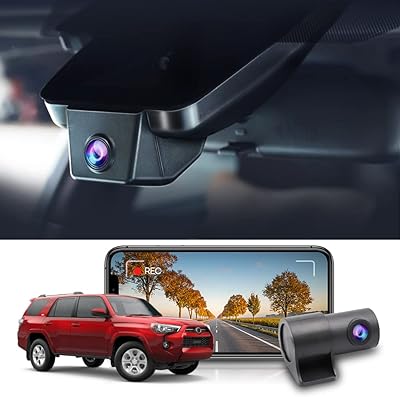
Mangoal MG-039L 4K Toyota Camry Dash Cam
Overview
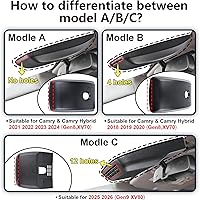
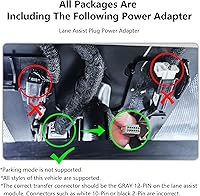
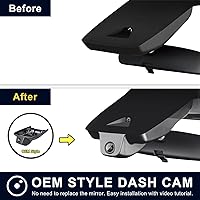
The Mangoal MG-039L 4K Toyota Camry Dash Cam was built for one specific job: disappearing into your car while doing serious work. Designed exclusively for Gen8 Camry and Camry Hybrid owners spanning model years 2021 through 2024, it tucks cleanly behind the rearview mirror without any of the cable chaos that plagues universal dash cams. Before ordering, one thing demands your attention — Model A vs Model B. Model A covers 2021–2024; Model B handles 2018–2020. The two look identical, but the internal bracket positions differ, and getting it wrong means a return. The camera ships ready to go with a 128GB card and a lane-assist plug adapter included.
Features & Benefits
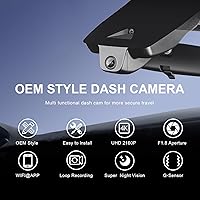
Recording quality is where this Camry-specific dash cam makes its case. The Sony IMX335 sensor paired with an f/1.8 aperture captures sharp, color-accurate footage even when light conditions drop — think early-morning commutes or dimly lit parking structures. The built-in WiFi lets you pull footage directly to your phone through the companion app, which means no fumbling for the SD card after an incident. Loop recording handles storage management automatically, and the G-sensor jumps in during a hard stop or collision, locking that clip immediately so it won't get overwritten. The built-in supercapacitor handles heat far better than cameras relying on a traditional lithium battery — a meaningful advantage if you park outside in direct sun regularly.
Best For
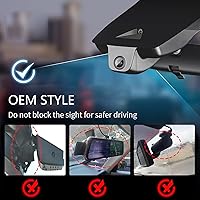
The Mangoal OEM dash cam is purpose-built for a narrow but enthusiastic audience: Camry and Camry Hybrid owners on the 2021–2024 generation who care about how their car looks from the inside out. If you've previously installed a suction-cup camera and hated the dangling wire against the headliner, this one will feel like a relief. It also suits drivers who want solid night footage without stepping up to a multi-camera system — the front-only 4K coverage is deliberate and clean. You'll get the most out of it if you're comfortable using a companion app on your phone. Buyers who value clean interior aesthetics over raw feature counts will appreciate what this camera does and, just as importantly, what it doesn't try to do.
User Feedback
Owners of this integrated dash camera tend to be vocal about two things: how clean the install looks, and how straightforward the setup was compared to generic alternatives. The app and WiFi pairing draw more mixed responses — most users get it working without drama, but a handful report occasional disconnects or firmware hiccups worth keeping in mind. On the footage side, daytime clarity earns consistent compliments; nighttime performance is generally praised, though some buyers note it isn't dramatically different from a high-quality 1080p camera in very dark conditions. The model confusion issue at purchase is a real pattern in reviews — a few buyers ordered the wrong variant and had to return it. Customer support and the 12-month warranty response appear positive overall in feedback threads.
Pros
- Tucks invisibly behind the rearview mirror with no exposed wiring and a true factory-finished look.
- Ships with a 128GB card and lane-assist adapter included — no extra purchases needed to get started.
- The Sony IMX335 sensor and wide f/1.8 aperture deliver genuinely strong footage in low-light conditions.
- Built-in supercapacitor handles cabin heat far better than cameras with traditional lithium batteries.
- WiFi and companion app let you pull clips to your phone in seconds without touching the SD card.
- G-Sensor automatically locks collision footage so it cannot be overwritten during loop recording.
- Installation is straightforward for most Camry owners with no electrical rewiring required.
- The 12-month warranty and generally responsive customer support add a reasonable layer of post-purchase confidence.
- 150-degree field of view captures wide lane coverage without significant edge distortion.
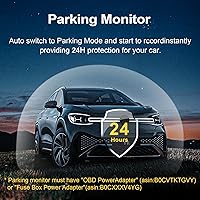
- Parking monitor and motion detection provide a basic but functional security layer when parked.
Cons
- Strict vehicle compatibility means one wrong model year selection results in a return — the Model A and Model B confusion is a documented and recurring issue.
- Front-only recording leaves the rear of your vehicle completely uncovered with no upgrade path.
- The companion app has received mixed reviews, with some users reporting WiFi pairing drops and occasional instability.
- Parking monitor functionality requires a hardwire power source beyond the included adapter for extended use — not clearly communicated upfront.
- No physical display on the camera itself means all footage review depends on your phone and app connection.
- At this price point, buyers are paying significantly for the OEM fit factor — the underlying 4K performance alone does not fully justify the premium over universal alternatives.
- Nighttime footage, while solid, is not a dramatic leap over a well-specced 1080p camera in very dark environments.
- The unit is heavier than most comparable dash cams, which may matter for long-term mount stability over time.
Ratings
The scores below reflect an AI-driven analysis of verified global buyer reviews for the Mangoal MG-039L 4K Toyota Camry Dash Cam, with spam, bot-submitted, and incentivized feedback actively filtered out before scoring. Each category captures what real owners consistently praised or complained about across thousands of purchase experiences — strengths and frustrations alike. Nothing is glossed over; the scores represent honest signal from drivers who put this camera through daily use.
OEM Fit & Integration
Video Clarity (Daytime)
Night & Low-Light Recording
Installation Experience
App & WiFi Performance
G-Sensor & Incident Lock
Loop Recording Reliability
Parking Monitor
Heat Tolerance
Build Quality & Durability
Storage & Card Management
Audio Recording
Model Compatibility Clarity
Value for Money
Suitable for:
The Mangoal MG-039L 4K Toyota Camry Dash Cam was designed for a precise audience, and if you fall within it, the value proposition is hard to argue with. It is the right call for anyone driving a Gen8 Toyota Camry or Camry Hybrid from 2021 through 2024 who has grown tired of aftermarket cameras that look stuck on as an afterthought. If you care about the interior presentation of your car — the kind of driver who keeps the cabin clean and notices when something is out of place — the factory-flush fit behind the rearview mirror will feel like it belongs there. It also suits daily commuters and rideshare drivers who need reliable footage without the hassle of managing cards manually, since the WiFi app lets you check or download clips straight from your phone. Buyers who park in exposed lots or urban areas will appreciate the parking monitor and motion detection for added peace of mind when the car is unattended.
Not suitable for:
The Mangoal MG-039L 4K Toyota Camry Dash Cam has real limitations that make it the wrong choice for a meaningful slice of buyers. Most obviously, it does nothing for anyone outside the 2021–2024 Gen8 Camry lineup — if you drive a 2025 Camry, an older generation, or any other vehicle entirely, this camera simply will not fit. Drivers who want rear-camera coverage will also need to look elsewhere, since this is a front-only system with no dual-channel option. If you rely heavily on parking mode for extended overnight monitoring, know that it requires a compatible power source beyond the lane-assist plug, so that capability is not as plug-and-play as everything else about this camera. Buyers who prefer managing footage through a physical screen on the camera itself will find the app-dependent interface less convenient. Finally, shoppers on a tight budget may find the price difficult to justify compared to a universal 4K camera that, while less elegant, costs considerably less.
Specifications
- Video Resolution: Records front-facing footage at 2160P (4K) and 30 frames per second for high-detail capture.
- Image Sensor: Uses a Sony IMX335 CMOS sensor engineered for accurate color reproduction and reliable low-light performance.
- Aperture: The f/1.8 wide aperture allows more light into the lens, which meaningfully improves footage quality in dim or nighttime conditions.
- Field of View: Covers a 150-degree wide-angle field of view across the front windshield.
- Connectivity: Built-in WiFi enables wireless pairing with a free companion app available on both iOS and Android devices.
- Storage Included: Ships with a 128GB microSD card already in the box, ready to use on first install.
- Power Source: Draws power through the vehicle lane-assist port using the included plug adapter — no hardwiring or fuse-tap required.
- Loop Recording: Continuously overwrites the oldest footage once the memory card fills, ensuring uninterrupted recording without manual management.
- G-Sensor: An integrated accelerometer detects sudden impacts or hard braking and automatically locks the current clip to prevent it from being overwritten.
- Parking Monitor: Motion detection activates recording when the vehicle is parked and movement is sensed near the car, though extended use requires a dedicated hardwire power solution.
- Power Reserve: A built-in supercapacitor replaces a traditional lithium battery, offering greater heat tolerance and longer operational lifespan in hot climates.
- Audio: Includes a built-in microphone and speaker for in-cabin audio recording with an optional mute function.
- Mounting Type: Mounts behind the rearview mirror on the windshield for a concealed, factory-integrated appearance.
- Dimensions: The camera unit measures 2.95 x 3.15 x 3.15 inches in its installed configuration.
- Weight: The complete unit weighs 1.81 pounds including the mounting bracket.
- Compatibility: Fits Toyota Camry and Camry Hybrid Gen8 (XV70) for model years 2021, 2022, 2023, and 2024 only — does not fit the 2025 Camry or any earlier generation.
- Model Variant: This listing covers Model A (2021–2024); a separate Model B variant exists for Camry years 2018–2020 and is not interchangeable.
- In-Box Contents: Package includes the dash cam unit, 128GB microSD card, lane-assist plug power adapter, crowbar tool, two straps, and a printed user manual.
- Warranty: Covered by a 12-month manufacturer warranty with technical support provided directly by Mangoal.
- Model Number: The official model identifier for this unit is MG-039L, listed as Model A on the product packaging.
Related Reviews
Mangoal UX70 4K Toyota Highlander Dash Cam
Mangoal MG-032D Ford F150 Dash Cam
Mangoal 4K Dash Cam for Dodge Charger 2015-2023
FITCAMX Tacoma OEM-Style 4K Dash Cam
Mangoal MG-018I 4K Dual Dash Cam
Fitcamx 4K Dual Dash Cam for Toyota Corolla 2020-2022
Mangoal 4K Dash Cam Model A for Ford Explorer U625 (2020–2024)
FITCAMX RAV4 2022-2025 4K Dash Cam
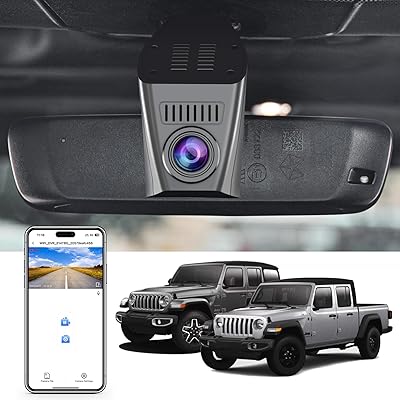
Mangoal Jeep Wrangler/Gladiator 4K Dash Cam