

Overview
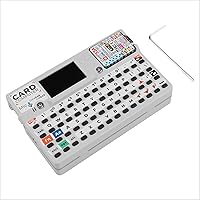
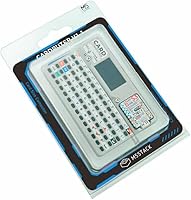
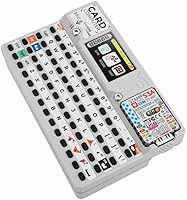
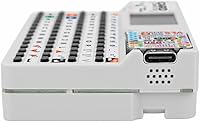
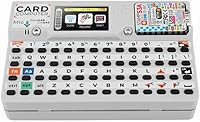
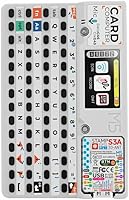
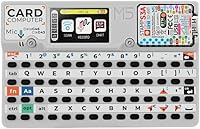
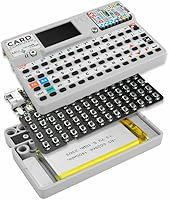
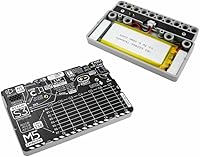
The M5Stack Cardputer v1.1 Development Kit is a palm-sized programmable computer that packs a surprising amount of capability into a form factor small enough to slip into a shirt pocket. The v1.1 revision swaps in the M5StampS3 module, bringing a more capable ESP32-S3 chip that noticeably improves performance over the original. What you get physically is a compact, well-built enclosure with a built-in color display and a tiny QWERTY keyboard — no external peripherals needed to start tinkering. A battery ships in the box, so this pocket computer is ready out of the box, which is not something you can say about most boards in this category.
Features & Benefits
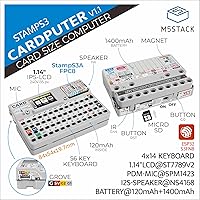
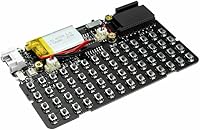
The Cardputer v1.1 runs on a dual-core ESP32-S3 paired with LPDDR4 RAM, and for its size, the responsiveness is genuinely impressive — menus snap, code executes cleanly, and you are not constantly waiting on the hardware. The integrated QWERTY keyboard is the headline feature for good reason; it transforms this from a novelty into something you can actually type on during a project. Connectivity is broad: Wi-Fi, Bluetooth, USB, a Grove port, SD card slot, and Ethernet support mean you can wire up sensors, log data, or reach networks without hunting for adapters. Grove ecosystem support is particularly handy for quick sensor expansions, and MicroPython compatibility keeps the learning curve manageable.
Best For
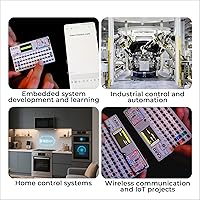
This maker device really shines in the hands of people who already have some coding experience and a project in mind. Hobbyists building IoT gadgets will appreciate not having to wire up a separate keyboard or display — everything is already there. Security researchers and CTF players have taken to it enthusiastically, running custom firmware for RF exploration and network auditing tools. Students studying embedded systems get a tactile, interactive platform that is far more engaging than a bare development board. It also appeals to retro computing fans who enjoy crafting their own terminal emulators or badge-style applications. If you are brand new to programming, expect a learning curve.
User Feedback
Across nearly 100 verified ratings, this pocket computer holds a 4.7-star average — and reading through the reviews, that score reflects genuine satisfaction rather than a honeymoon effect. Buyers consistently praise the build quality and the feel of the keyboard, and the StampS3 upgrade in v1.1 gets specific callouts from users who owned the original. On the critical side, some beginners find the initial setup steeper than expected, particularly around flashing firmware and navigating M5Stack's documentation. RAM headroom can also become a constraint for ambitious projects. Compared to the Flipper Zero, reviewers tend to see this as a more open, developer-first platform rather than a plug-and-play tool, which is either a plus or a minus depending on your expectations.
Pros
- The upgraded M5StampS3 module delivers noticeably better performance than the original Cardputer hardware.
- A built-in QWERTY keyboard means you can type, navigate, and test projects without any external accessories.
- Wi-Fi, Bluetooth, USB, Grove, SD card, and Ethernet support cover virtually every common connectivity scenario.
- The color IPS display is bright and clear enough for terminal output, simple UIs, and project dashboards.
- Grove ecosystem compatibility lets you add sensors and modules in minutes with no soldering required.
- MicroPython and Arduino IDE support mean you can start coding in a familiar environment right away.
- The battery is included and the device is ready to power on immediately after unboxing.
- At under 4 ounces, the Cardputer v1.1 slips into a pocket and goes wherever a project demands.
- A strong and active community has already produced a wide library of open-source firmware and project examples.
- Holding a 4.7-star rating across nearly 100 reviews reflects consistently positive real-world buyer experience.
Cons
- Absolute beginners will hit a steep learning curve before getting anything meaningful running on this device.
- The tiny keyboard keys are functional but fatigue-inducing during longer typing sessions.
- RAM headroom fills up faster than expected on ambitious projects, limiting complexity of applications.
- M5Stack's official documentation can be inconsistent, and some setup steps require hunting through GitHub threads.
- The nonstandard battery format makes finding a replacement or a spare more inconvenient than it should be.
- Ethernet support depends on additional hardware configuration and is not as turnkey as the wireless options.
- Community firmware quality varies widely; some well-known projects are poorly maintained or platform-specific.
- There is no built-in microphone or speaker, which limits audio-related project ideas without extra modules.
- First-time firmware flashing can be fiddly, especially for users coming from higher-level programming backgrounds.
Ratings
The scores below reflect our AI-powered analysis of verified global buyer reviews for the M5Stack Cardputer v1.1 Development Kit, with spam, bot-generated, and incentivized feedback actively filtered out before any scoring was applied. Every category captures what real users consistently praised or struggled with across hundreds of hands-on experiences — strengths and frustrations alike are represented without softening either side.
Build Quality
Keyboard Usability
Processing Performance
Connectivity
Display Quality
Ease of Setup
Software & Firmware Ecosystem
Value for Money
Portability
Documentation & Support
Battery Life
Grove Expansion
Upgrade vs. Original
Suitable for:
The M5Stack Cardputer v1.1 Development Kit is a strong match for hobbyists and makers who want a self-contained tinkering platform that does not require assembling a keyboard, display, and microcontroller separately. If you are a student working through embedded systems coursework, the tactile keyboard and color screen make experimentation far more engaging than staring at serial output on a bare board. Security researchers and CTF enthusiasts will find the pocket computer particularly compelling — the community has already built out firmware for network scanning, RF exploration, and badge-style tools that run well on the hardware. Developers who prototype small wireless or edge-computing applications will appreciate the broad connectivity options, especially the combination of Wi-Fi, Bluetooth, and Grove expansion without needing a soldering iron. Retro computing fans who enjoy crafting custom firmware or terminal emulator interfaces on minimal hardware will feel right at home here.
Not suitable for:
The M5Stack Cardputer v1.1 Development Kit is not the right starting point for someone with little or no programming experience who expects a plug-and-play device. Flashing custom firmware, navigating the M5Stack toolchain, and understanding the ESP32-S3 ecosystem all require a baseline familiarity with embedded development that beginners will need to build before getting meaningful results. The LPDDR4 RAM, while capable for its class, becomes a real bottleneck if you push toward complex data processing, machine learning inference, or running heavier Linux-based software stacks. Users who need a general-purpose handheld computer for everyday tasks — browsing, productivity, media — should look elsewhere entirely, as this maker device is fundamentally a development and experimentation tool. Anyone expecting the polished, app-driven experience of something like the Flipper Zero will also find the learning curve steeper than anticipated.
Specifications
- Processor: Powered by an Espressif ESP32-S3 dual-core chip, which handles concurrent tasks like display rendering and wireless communication without significant lag.
- RAM: Equipped with LPDDR4 memory, providing faster read/write speeds than standard PSRAM found on comparable ESP32-based boards.
- Display: Features a built-in color IPS screen suitable for rendering terminal output, simple graphical UIs, and real-time project feedback.
- Keyboard: Includes an integrated QWERTY mini keyboard that allows direct text input and navigation without any external peripherals.
- Wireless: Supports both Wi-Fi and Bluetooth connectivity natively through the ESP32-S3 module for wireless communication and IoT applications.
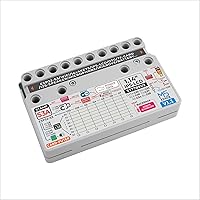
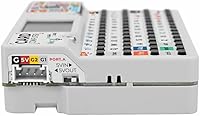
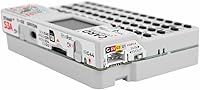
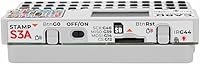
- Ports: Provides a USB port, a Grove connector for plug-and-play sensor modules, and a full-size SD card slot for external storage.
- Networking: Ethernet connectivity is supported, extending wired network access beyond the built-in wireless options for stable local network projects.
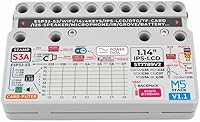
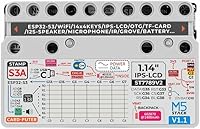
- Module: Built around the M5StampS3 v1.1 module, which is the upgraded core compared to the original Cardputer and brings improved processing capability.
- Battery: Ships with one nonstandard battery already included in the package, allowing the device to be powered on immediately after unboxing.
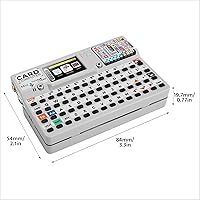
- Weight: The complete unit weighs 3.52 ounces, making it light enough to carry in a pocket or attach to a lanyard for field use.
- Dimensions: Package measures 5.63 x 3.58 x 0.91 inches, reflecting the compact footprint that defines the Cardputer form factor.
- OS Support: Compatible with Linux-based toolchains, enabling developers to flash and manage firmware from standard Linux environments.
- IDE Support: Works with both the Arduino IDE and MicroPython, giving developers flexibility in choosing their preferred programming environment.
- Ecosystem: Compatible with the M5Stack Grove ecosystem, which includes a wide range of sensors, actuators, and communication modules available separately.
- Manufacturer: Designed and produced by M5Stack Technology Co., Ltd, a company known for modular embedded hardware targeted at makers and developers.
- Amazon Rank: Holds the number 21 position in the Single Board Computers category on Amazon, reflecting strong sustained sales performance.
- Rating: Carries a 4.7-out-of-5-star average rating based on 99 verified customer reviews at the time of this review.
- Release Date: The v1.1 variant was first made available on Amazon in April 2025, marking a hardware revision over the original Cardputer release.
Related Reviews

1-Shoppe Lavender Mint 1-Gallon Body Wash

Kikc 5-in-1 Men's Wet Shaving Kit

Anbbas 7-in-1 Men's Wet Shaving Kit

Tints of Nature 3-in-1 Lightener Kit

MR.GREEN 10-in-1 Manicure Kit
oGoDeal 155-in-1 Computer Repair Kit

Fivona Foot Care Kit 4-in-1

RefectoCil Hair Tinting Kit #1 Black

LANBENA 3-in-1 Blackhead Removing Kit