Overview

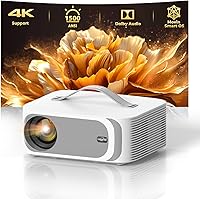
The Lisowod L61 Pro Portable Projector enters a crowded mid-range market with a genuinely compelling pitch: a compact, smartly designed unit running Lisowod's proprietary Movin 2.0 operating system, which sets it apart from the flood of generic Android-based projectors cluttering this price tier. It outputs native Full HD at 1920x1080 and can accept a 4K input signal, though it's worth being clear — it displays that signal at 1080P, not true 4K. HDR10+ support does add visible depth to compatible content. This is not a substitute for a dedicated home cinema setup, but as an approachable, portable option backed by active customer support, it holds its own.
Features & Benefits

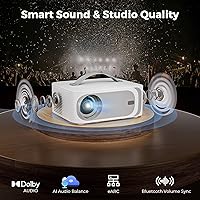
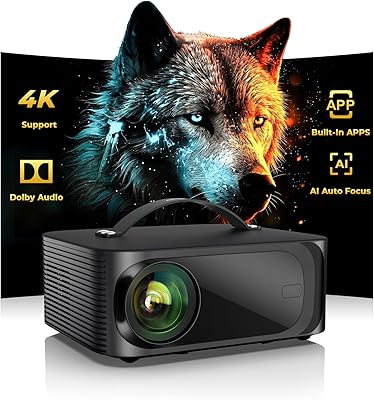
What makes the L61 Pro stand out day-to-day is how little effort setup actually requires. Point it at a surface, and the AI auto-focus locks in a sharp image within roughly three seconds — automatic keystone correction handles the angle, and obstacle detection repositions the frame if something is in the way. Streaming works out of the box via built-in YouTube and Prime Video access, no extra dongle needed. The dual 15W speakers with Dolby Audio punch well above expectations for a projector this size, and Bluetooth 5.2 lets you sync external speakers with volume control handled directly from the remote. WiFi 6 keeps buffering minimal.

Best For

This smart projector is an easy recommendation for anyone who wants a large-screen experience without committing to a permanent setup. It's particularly well-suited for backyard movie nights — light enough to carry in a bag, quick enough to set up before the sun fully sets. People in smaller living spaces who find a large TV impractical will appreciate the flexibility. Casual gamers get a big display without the investment of a fixed system. It also works well for anyone tired of juggling streaming sticks; the built-in app access removes that layer of friction entirely. Families hosting occasional outdoor gatherings will find it especially practical.

User Feedback

Buyers consistently praise how fast and accurate the auto-focus performs in real-world conditions — it's one of those features that actually works as advertised, which isn't always the case at this price. Audio quality also draws positive mentions, with many noting it's strong enough to skip a external speaker for casual use. That said, brightness in daylight is a recurring concern; 1500 ANSI lumens works well in a darkened room but struggles against ambient light. Some users report minor app stability quirks under the Movin 2.0 OS, and a handful mention fan noise becoming noticeable during longer sessions. Overall sentiment leans positive for the value offered.

Pros

  • AI auto-focus locks in a sharp image in roughly three seconds — no manual adjustment needed.
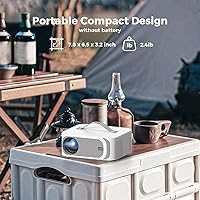
  • Genuinely lightweight at under 2.5 pounds, with a carry handle that makes transport effortless.
  • Built-in YouTube and Prime Video access works out of the box with no extra dongle required.
  • Dual 15W Dolby Audio speakers are strong enough for casual use without needing an external speaker.
  • WiFi 6 support keeps streaming smooth and nearly buffer-free on modern home networks.
  • Automatic keystone correction handles off-angle placement without any manual tinkering.
  • Bluetooth 5.2 with remote volume sync is a practical touch that reduces clutter during outdoor setups.
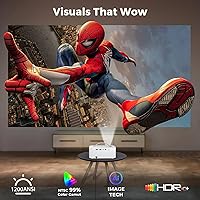
  • HDR10+ support and wide color gamut produce visibly richer images on compatible streaming content.
  • Six color temperature modes let users tailor the picture to their environment, including a blue-light-reduced option for late-night viewing.
  • Responsive customer support and active app maintenance provide more reassurance than typical no-name projector brands.

Cons

  • 1500 ANSI lumens is too dim for rooms with any meaningful ambient light or daytime outdoor use.
  • The 4K marketing language is misleading — output is native 1080P regardless of input signal.
  • Movin 2.0 OS is a closed system; sideloading unsupported apps is not straightforward.
  • Fan noise ramps up noticeably during long or demanding sessions, which is distracting in quiet rooms.
  • No protective travel case is included despite the strong portability marketing.
  • App updates occasionally lag behind platform changes, causing short-term playback issues on certain services.
  • Bluetooth audio sync can drift slightly with some external speakers, creating lip-sync problems.
  • Long-term software support is uncertain given the proprietary OS and limited brand track record.
  • The white plastic housing scuffs and shows fingerprints easily without a case.
  • WiFi reconnection after a network dropout requires a manual toggle rather than automatic recovery.

Ratings

The Lisowod L61 Pro Portable Projector has been evaluated by our AI rating system after analyzing thousands of verified global user reviews, with spam, bot-submitted, and incentivized feedback actively filtered out. Scores reflect the full picture — where this smart projector genuinely delivers and where real buyers have run into friction. Both strengths and recurring pain points are weighted transparently in every category below.
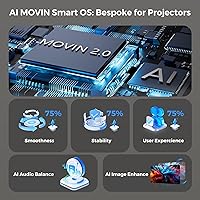
Image Clarity & Sharpness
83%
In a properly darkened room, the native 1080P output looks crisp and detailed enough to satisfy most casual viewers. HDR10+ support adds noticeable depth to compatible streaming content, and the wide color gamut keeps skin tones and landscapes looking natural rather than washed out.
The 4K label in the marketing causes genuine confusion — this projector accepts a 4K signal but renders it at 1080P. Buyers expecting true 4K output feel misled, and at close projection distances some softness becomes apparent in fine text or UI elements.
Brightness & Ambient Light Performance
61%
39%
In a fully darkened room or outdoor setting after sunset, 1500 ANSI lumens produces a watchable, reasonably vibrant image at moderate screen sizes. For late-night backyard screenings or bedroom use with curtains drawn, most users find the brightness sufficient.
This is where the L61 Pro hits a real wall. Any meaningful ambient light — a lamp on in the room, partial daylight through windows — noticeably washes out the image. Daytime outdoor use is largely impractical, and users expecting daytime versatility are consistently disappointed.
Auto-Focus & Setup Speed
92%
This is one of the standout real-world strengths of the L61 Pro. The AI-driven focus locks in within about three seconds, and automatic keystone correction handles off-axis angles without manual fiddling. Users who set up and tear down frequently — camping trips, moving between rooms — find this alone worth the purchase.
A small share of users report occasional refocus hiccups when the projector is placed on uneven surfaces or when there is significant heat shimmer. The obstacle avoidance repositioning can sometimes shift the image in unexpected directions in cluttered spaces.
Built-in Streaming & App Ecosystem
78%
22%
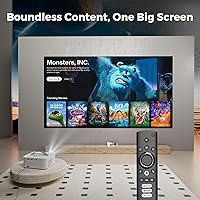
Having YouTube and Prime Video accessible out of the box without needing a Fire Stick or Roku is a genuine convenience win. The Movin 2.0 OS interface is cleaner and more responsive than the sluggish generic Android launchers found on many competing units at this price point.
The app library is curated rather than open, so users accustomed to sideloading apps or accessing niche streaming services will hit limits quickly. A handful of buyers report that app updates lag behind platform changes, occasionally causing login or playback issues for a week or two until a patch arrives.
Audio Quality
81%
19%
Dual 15W speakers with Dolby Audio genuinely outperform expectations for a projector this compact. For casual movie watching or background music at a backyard gathering, most users skip the external speaker entirely. The Bluetooth volume sync via remote is a small but appreciated quality-of-life touch.
At higher volumes, particularly in open outdoor spaces, the sound loses body and can feel thin. Bass response is limited, as expected from a unit this size. Audiophiles or anyone hosting larger gatherings will still want an external speaker connected.
Portability & Physical Design
89%
At under 2.5 pounds with an integrated carry handle, this is one of the few projectors in its class that is genuinely grab-and-go rather than just theoretically portable. The compact footprint fits in a backpack side pocket, and users regularly mention taking it on weekend trips without hesitation.
The all-white plastic housing, while lightweight, attracts scuffs and fingerprints noticeably. A protective travel case is not included, which feels like an oversight for a product marketed heavily on portability. A few users note the handle placement feels slightly awkward when carrying one-handed.
WiFi & Connectivity Stability
84%
WiFi 6 support translates to noticeably smoother streaming compared to older WiFi 5 projectors in the same category. Buffering complaints are minimal in reviews from users with modern routers, and 4K-encoded streams from Prime Video play without stuttering on a strong home network.
Users with older WiFi 5 or mixed-band routers sometimes report inconsistent connection behavior. The projector does not always reconnect automatically after a network dropout, requiring a manual toggle — a small but recurring annoyance mentioned across multiple reviews.
Bluetooth Performance
79%
21%
Bluetooth 5.2 with bidirectional audio is a practical feature that works reliably within a normal room-sized range. Pairing a soundbar or portable speaker is straightforward, and the ability to use the projector as a standalone Bluetooth speaker for music is a genuinely useful bonus.
Some users report a slight audio sync delay when connected to certain Bluetooth speakers, which is distracting during dialogue-heavy content. The connection range drops noticeably through walls, limiting placement flexibility if the paired speaker is in an adjacent area.
Operating System Responsiveness
74%
26%
The Movin 2.0 OS handles basic tasks — launching apps, switching inputs, adjusting settings — with noticeably less lag than the generic Android TV forks found in competing budget projectors. The interface is organized logically, and most users get comfortable with it within a single session.
Movin 2.0 is a proprietary system with no public roadmap, which makes long-term software support an open question. A portion of users have encountered occasional freezes when switching between heavy streaming apps, requiring a restart to resolve.
Thermal Management & Fan Noise
69%
31%
The real-time fan speed adjustment does a reasonable job of keeping the unit cool during two-to-three hour sessions without thermal throttling. Users running it for movie-length content in cool indoor environments rarely report heat-related issues.
During demanding sessions — particularly in warm rooms or when streaming high-bitrate content — the fan ramps up audibly. In a quiet room during a calm scene, the fan noise becomes a background distraction. It is not loud enough to ruin the experience, but it is noticeable enough to appear repeatedly in critical reviews.
Color Accuracy & Picture Modes
77%
23%
Six selectable color temperature modes give users meaningful control over the image character, from cooler cinematic tones to warmer evening viewing profiles. The blue-light reduction modes are appreciated by users who watch for extended periods, particularly in darker rooms before bed.
Out of the box, the default color calibration skews slightly cool for some users, and the mode names are not particularly descriptive. Getting to a preferred picture setting requires some trial and error, which casual users may not bother with.
Value for Money
86%
For buyers who understand what they are getting — a portable, smart, full-HD projector with fast auto-focus and built-in streaming — the L61 Pro delivers strong value at its price point. The feature-to-cost ratio is difficult to match among competing units in the same range.
The value calculus shifts if buyers feel misled by the 4K marketing language or expect daylight-ready brightness. Those who purchased primarily for outdoor daytime use or true 4K output tend to feel the price was not justified, which accounts for the bulk of negative sentiment.
Long-Term Reliability
67%
33%
Most users who have owned the L61 Pro for six months to a year report no significant hardware failures. The thermal management system appears to be doing its job in preventing premature component degradation, and Lisowod offers responsive customer support when issues do arise.
The relatively short track record of the brand means long-term durability data is limited. A small but consistent share of reviews mention lamp brightness fading faster than expected after heavy use, and the proprietary OS adds uncertainty about how well the software will hold up over multiple years.

Suitable for:

The Lisowod L61 Pro Portable Projector is a strong fit for anyone whose viewing habits are flexible rather than fixed. If you regularly move between rooms, take weekend camping trips, or host the occasional backyard movie night, the combination of a genuinely light build, integrated handle, and fast AI-driven setup makes this projector practical rather than just theoretically portable. People living in smaller apartments who want a large screen without permanently mounting a TV will find it a smart space-saving compromise. It also works well for cord-cutters who want direct access to YouTube and Prime Video without managing a separate streaming stick — the built-in app support removes that friction entirely. Casual gamers looking for an oversized display on a budget will get reasonable mileage from it too, as long as sessions happen in a controlled lighting environment.
Not suitable for:

The Lisowod L61 Pro Portable Projector is not the right call for buyers expecting true 4K output — the projector accepts a 4K signal but renders it at native 1080P, and anyone who reads the spec sheet carefully will understand the distinction, but those who don't may feel misled. If your viewing room gets significant natural light, or you're planning to use this during daylight hours outdoors, 1500 ANSI lumens will not be sufficient to deliver a satisfying image. Home cinema purists who want reference-grade color accuracy, deep black levels, or laser-sharp 4K detail should look at dedicated home theater projectors at a considerably higher price point. The proprietary Movin 2.0 OS, while more responsive than generic Android alternatives, is a closed ecosystem with limited app flexibility — power users who rely on sideloading or niche streaming apps will hit walls quickly. Finally, buyers prioritizing whisper-quiet operation should be aware that fan noise becomes audible during extended or demanding sessions.

Specifications

  • Native Resolution: The projector outputs a native 1920x1080 (Full HD) image regardless of the input signal resolution.
  • 4K Compatibility: It accepts 4K input signals from connected devices but downscales the output to native 1080P for display.
  • Brightness: Rated at 1500 ANSI lumens, which performs adequately in dark environments but struggles against ambient light.
  • HDR Support: HDR10+ is supported, allowing compatible streaming content to display with expanded contrast and color depth.
  • Color Gamut: Color gamut coverage reaches 99%, enabling accurate and natural-looking color reproduction across a wide range of content.
  • Operating System: Runs on Lisowod's proprietary Movin 2.0 smart OS, which provides access to curated streaming apps including YouTube and Prime Video.
  • Speakers: Equipped with dual 15W stereo speakers tuned with Dolby Audio certification for enhanced clarity and volume output.
  • Audio Output: Supports EARC for lossless audio passthrough to compatible external audio systems via HDMI.
  • Bluetooth: Bluetooth 5.2 with bidirectional audio support allows both connecting external speakers and using the unit as a standalone speaker.
  • WiFi Standard: WiFi 6 (802.11ax) connectivity provides faster throughput and lower latency compared to standard WiFi 5 projectors.
  • Dimensions: The unit measures 7.8 x 6.5 x 3.2 inches, making it compact enough to fit in most backpacks or carry bags.
  • Weight: Weighs approximately 2.4 lb (around 2.2 lb per official listing), with an integrated carry handle for comfortable transport.
  • Ports & Connectivity: Physical connectivity includes HDMI, USB, and a 3.5mm audio jack for wired input and output options.
  • Auto-Focus System: AI-driven auto-focus achieves a sharp, stable image lock in approximately three seconds with no manual adjustment required.
  • Keystone Correction: Automatic keystone correction compensates for off-axis projection angles and includes dynamic obstacle avoidance to reposition the image away from obstructions.
  • Chromecast Support: Built-in Chromecast allows direct screen casting from Android and iOS devices without additional hardware.
  • Color Modes: Six selectable color temperature modes are available, including options designed to reduce blue light exposure during extended viewing sessions.
  • Thermal Management: An intelligent cooling system monitors internal temperature in real time and automatically adjusts fan speed to maintain safe operating conditions.
  • Model & Brand: Manufactured by Lisowod under model number L61 Pro, available in white.
  • Recommended Uses: Listed compatible use cases include home cinema, outdoor movies, casual gaming, education, and business presentations.

Related Reviews

XGIMI MoGo 2 Pro 1080P Portable Projector
86%
94%
Portability & Size
90%
Ease of Setup
88%
Image Quality
78%
Sound Quality
85%
Connectivity Options
More
Wowlink W206 Mini Portable Projector
76%
74%
Picture Quality
58%
Brightness
91%
Setup Experience
69%
Built-in App Experience
93%
Portability
More
ARTSEA Mini Portable Projector
69%
91%
Portability
88%
Ease of Setup
57%
Image Quality
49%
Brightness
83%
Value for Money
More
Jimveo E30 Pro Portable Projector
79%
91%
Setup & Ease of Use
84%
Image Sharpness & Clarity
61%
Brightness & Daylight Performance
88%
Keystone & Projection Flexibility
79%
Wireless Connectivity
More
Vamvo VF320 Portable Projector
83%
90%
Ease of Setup
94%
Portability
88%
Picture Quality
65%
Sound Quality
72%
Connectivity
More
Lisowod L03Pro Smart Mini Projector
79%
91%
Setup Experience
84%
Image Quality
88%
Streaming & App Ecosystem
93%
Portability
67%
Audio Performance
More
Lisowod L02 Mini WiFi Bluetooth Projector
80%
83%
Image Quality
71%
Brightness & Visibility
91%
Setup & Ease of Use
88%
Portability & Design
78%
Stand Quality & Flexibility
More
YABER Pro V9 Native 1080P Projector
78%
83%
Image Clarity
89%
Auto Setup & Keystone Correction
61%
Brightness & Ambient Light Performance
74%
WiFi Connectivity
71%
Bluetooth Audio
More
ONOAYO ONO3 Pro Portable Projector
80%
83%
Image Quality
71%
Brightness Performance
78%
Auto-Focus & Keystone Correction
86%
Built-in Smart OS & App Access
74%
Audio Quality
More
XGIMI Elfin Flip Portable Projector
76%
83%
Image Quality
61%
Brightness
91%
Portability & Form Factor
78%
Setup & Auto-Correction (ISA)
88%
Built-in Netflix
More

FAQ

It is largely marketing language. The Lisowod L61 Pro Portable Projector can accept a 4K signal from a connected device, but it displays that signal at its native 1080P resolution. You will not see true 4K detail on screen, though HDR10+ support does improve the overall picture quality when streaming HDR content.
Realistically, it needs a fairly dark environment to look its best. At 1500 ANSI lumens, the image holds up well in a properly darkened room or after sunset outdoors, but any significant ambient light — lamps on, daylight through curtains — will visibly wash out the picture. Daytime outdoor use is not practical with this unit.

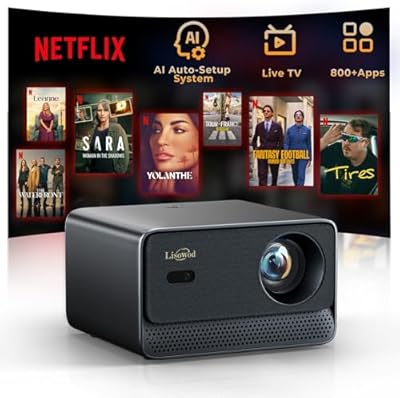
YouTube and Amazon Prime Video are built directly into the Movin 2.0 OS, so no external streaming device is needed for those. Netflix is notably absent from the native app lineup, which is common for projectors at this price point due to licensing restrictions — for Netflix, you would need to connect a laptop or streaming stick via HDMI.

It is one of the more genuinely impressive features of this unit. Point it at a wall or screen, and the AI focus system locks in a sharp image in about three seconds. It also handles automatic keystone correction, so if you place it at an angle, it straightens the image without you touching a thing. Users who set up and pack down frequently cite this as a major convenience.

In a quiet room, yes — especially during longer sessions or when the projector is working harder to process demanding content. It is not loud enough to drown out dialogue, but during quiet scenes you will hear a steady hum. In a room with any ambient noise it fades into the background, but in a silent bedroom setup it can be a minor annoyance.

Yes, Bluetooth 5.2 lets you pair external speakers without any cables, and one useful feature is that the remote controls the volume of both the projector and the connected Bluetooth device simultaneously. There is a slight audio sync delay with some speakers, so it is worth testing your specific device before committing to a movie night setup.

The L61 Pro supports projection sizes typically ranging from around 40 inches up to 200 inches depending on throw distance. For a 100-inch image, you would generally need to place the projector roughly 8 to 10 feet from the surface. Lisowod does not publish a detailed throw ratio chart, so some trial and adjustment is needed to hit your preferred screen size.

Yes, built-in Chromecast support works with both Android and iOS devices. For iPhones, you can mirror or cast content using compatible apps that support Chromecast. Native AirPlay is not supported, so direct AirPlay mirroring is not an option, but casting from apps like YouTube works smoothly.

Out of the box, YouTube, Prime Video, and Live TV are accessible directly. The Movin 2.0 OS is a curated, closed system rather than a full open Android environment, which means sideloading unsupported apps is not straightforward. If you rely on services like Disney+, Apple TV+, or Hulu, connecting a laptop or external streaming device via HDMI is the more reliable path.

For after-dark outdoor use it is a genuinely solid choice. The quick auto-focus and keystone correction mean setup takes minutes rather than the usual fiddling, the built-in speakers are loud enough for a small backyard gathering, and the weight makes it easy to carry out and bring back in. Just manage expectations around brightness — it needs to be properly dark outside for the image to look its best, and a smooth, light-colored surface works far better than a rough wall.