Overview

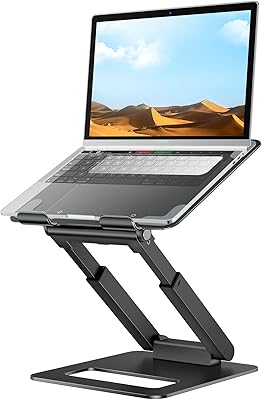
The Lifelong 360 Rotating Ergonomic Laptop Stand entered the market in early 2025 and has already climbed to a top-50 ranking among laptop stands — impressive for a product with a relatively short track record. It's built for remote workers, office professionals, and frequent travelers who care about posture and desk flexibility. The aluminum alloy frame with a reinforced metal base gives it a premium build quality that feels consistent with its price tier, though it's important to set expectations: this is a riser, not a replacement for a full monitor arm. Think of it as a practical posture fix — this rotating laptop stand is easy to set up and even easier to pack away.
Features & Benefits

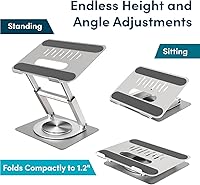
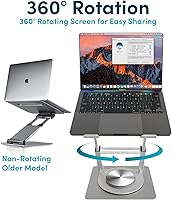
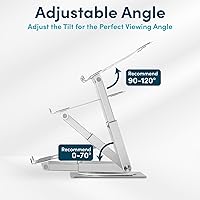
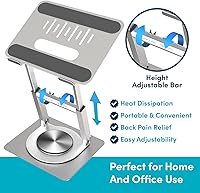
The standout feature here is the 360-degree rotation — and it's not just a gimmick. The mechanism produces a satisfying, controlled click as you swivel, giving you tactile confirmation that it's locked into position. It's genuinely useful when you need to flip your screen toward a colleague mid-meeting without shuffling the entire desk setup. Height adjustment covers a wide enough range to accommodate both seated work and standing desk use. The I-beam crossbrace underneath distributes weight evenly, keeping the stand planted during heavy typing. Silicone grip pads hold your device firmly without scratching it, and the open-frame design encourages airflow — helpful for MacBook Pro, Dell XPS, and most laptops up to 17 inches.

Best For

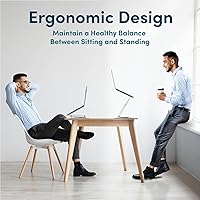
This ergonomic riser is an especially good match for people who shift between sitting and standing throughout the workday — the height range handles both positions without any awkward compromises. If you're in meetings where screen-sharing is routine, the swivel base alone is worth the purchase. It also works well in tight desk spaces since the footprint is compact and the whole thing folds flat for storage or travel. MacBook and premium laptop owners will appreciate that nothing metal ever touches their machine. Beyond the office, some users have found creative uses for it — from kitchen recipe stands to informal podiums — which speaks to its genuine versatility. It's less suited for users who need a fixed dual-monitor workstation.

User Feedback

The Lifelong stand currently holds a 4.8-star rating, which is encouraging — though it's worth noting the product only launched in early 2025, so the review pool is still building. Early buyers consistently praise the one-handed adjustment, calling it intuitive and smooth in practice. The rotation mechanism also draws genuine enthusiasm, with users describing the click feel as precise and satisfying rather than flimsy. On the critical side, a handful of reviewers note some minor wobble when the stand is pushed to its tallest setting during vigorous typing — worth keeping in mind if you're a heavy-handed keyboard user. Most agree, though, that build quality holds up well for the price, and travel portability is consistently highlighted as a real-world strength.

Pros

  • The 360-degree swivel clicks into position with satisfying precision — instantly useful for screen sharing in meetings.
  • One-handed height adjustment means you can switch between sitting and standing without interrupting your workflow.
  • Aluminum alloy construction feels genuinely solid and consistent with the mid-range price point.
  • Folds flat quickly and weighs under four pounds, making it a realistic travel companion.
  • Silicone grip pads hold laptops securely without leaving marks or scratches on premium finishes.
  • The open-frame design promotes airflow underneath, helping prevent thermal throttling during long sessions.
  • Compatible with virtually any laptop from compact 10-inch models up to large 17-inch machines.
  • Supports up to 22 lbs, which comfortably covers the vast majority of consumer and prosumer laptops.
  • Strong early sales ranking suggests real buyer traction, not just marketing noise.
  • Works well beyond the desk — practical as a recipe stand, podium, or display riser in creative contexts.

Cons

  • Minor wobble at maximum height during heavy typing has been flagged by a subset of early buyers.
  • The review pool is still relatively small given the March 2025 launch date — long-term durability is unproven.
  • Rotation, while smooth, adds some bulk to the base that purely static stand users are paying for unnecessarily.
  • No integrated cable management, which can make the workspace look cluttered when using peripherals.
  • The silver aluminum finish, while clean, is the only available color option — not ideal for every desk aesthetic.
  • Buyers wanting a wrist-level keyboard tray or built-in USB hub will need to source those accessories separately.
  • At maximum extension, the stand's center of gravity rises enough that bumping the desk edge could tip it.
  • Not well-suited for ultra-heavy gaming laptops or workstation-class machines that push toward the load limit.

Ratings

The Lifelong 360 Rotating Ergonomic Laptop Stand has been scored across twelve performance categories by our AI rating engine, which analyzed verified buyer reviews from global markets while actively filtering out incentivized, duplicate, and bot-generated submissions. Because this stand only reached shelves in early 2025, the review pool is still growing — so these scores reflect early adopter feedback weighted carefully against volume. Both the genuine strengths and the documented friction points are represented here without softening either side.
Rotation Mechanism
91%
Buyers consistently single out the 360-degree swivel as the feature that sets this riser apart from static competitors. The damping clicks give you confident, tactile feedback — users describe it as feeling engineered rather than flimsy, especially during live screen-sharing moments in open-plan offices or video calls.
A handful of users noted that the click intervals feel slightly coarser than expected, meaning fine-tuned angle positioning between detents is not possible. For most collaborative use cases this is a non-issue, but detail-oriented users working with precise display angles may find it limiting.
Build Quality
86%
The aluminum alloy frame and reinforced base feel noticeably more substantial than plastic-bodied stands in a similar price bracket. Buyers who have owned cheaper risers frequently comment that this one does not creak, flex, or feel like it will collapse under a premium laptop after a few weeks of daily use.
Because the product launched recently, there is no long-term owner feedback yet on how the hinge and adjustment mechanisms hold up after a year or more of heavy use. The early build impression is strong, but durability over time remains an open question that honest reviewers acknowledge.
Stability
74%
26%
At low-to-mid height settings, the I-beam crossbrace does its job well — the stand stays planted during normal typing and does not rock when you reach for a mouse or coffee cup. Most users working at conventional desk heights report zero stability concerns in everyday use.
At or near the maximum height setting, a subset of buyers — particularly those who type hard or use mechanical keyboards with significant force feedback — report a noticeable wobble that breaks concentration. It is not dangerous, but for power typists it can be distracting enough to warrant dropping the height a notch.
Ergonomic Impact
83%
The height range meaningfully reduces the forward head tilt that causes neck fatigue during long work sessions, and the tilt adjustment helps users fine-tune screen angle to match their seated or standing posture. Remote workers who have added an external keyboard report a genuine reduction in shoulder tension after switching to this setup.
Like any laptop riser, the ergonomic benefit depends heavily on pairing it with a separate keyboard and mouse — without those peripherals, your wrists end up elevated at an uncomfortable angle. The stand itself does not ship with any keyboard or input device guidance, which leaves newer ergonomic converts to figure that pairing out on their own.
Height Adjustability
88%
The adjustment range covers both desk-sitting and standing desk use cases without feeling like a stretch at either extreme, which is genuinely useful for users who move between postures throughout the workday. One-handed operation is consistently praised — you can reposition mid-session without putting down your phone or a drink.
The adjustment increments are fixed rather than infinitely variable, so users with very specific eye-level requirements may find themselves stuck between two positions that are each slightly off. This is a common limitation across this product category rather than a flaw unique to this stand.
Portability
89%
Travelers and hybrid workers frequently highlight how flat and light this riser packs down — it slides into a laptop bag sleeve without creating a noticeable bulge, and at under four pounds it does not tip the scales on carry-on bags. The absence of loose parts or a carrying case requirement makes packing it genuinely effortless.
Compared to ultra-minimal folding stands made from thin acrylic or polycarbonate, this ergonomic riser is still bulkier and heavier — a trade-off for its aluminum construction and load capacity. Ultralight travelers who prioritize every ounce may find lighter but less capable alternatives more practical for frequent flying.
Laptop Compatibility
93%
The 10-to-17-inch size range and generous load capacity cover virtually every consumer and prosumer laptop on the market, including oversized gaming machines and heavy workstation notebooks. Buyers with multiple laptops across brands appreciate not needing a different stand for each machine.
There is no dedicated tablet or two-in-one mode, so users who want to switch between a clamshell laptop and a standalone tablet will find the grip geometry less accommodating for thinner, lighter devices without a case adding some bulk.
Ease of Setup
94%
Out of the box, setup requires no tools, no screws, and no reading of instructions — buyers consistently note they were using it within two minutes of opening the packaging. The intuitive unfolding mechanism feels well thought out, particularly for users who are setting it up fresh each morning at a co-working space.
There is little to critique here beyond the fact that first-time users occasionally need a moment to understand the fold-lock mechanism before the stand sits fully stable. It is a minor learning curve that most buyers clear on the first try.
Grip & Device Protection
87%
The silicone pads do exactly what buyers hope — laptops sit firmly without sliding during rotation or height changes, and premium aluminum finishes like those on MacBook Pro models emerge unscratched after extended daily use. MacBook owners in particular express relief that no bare metal ever contacts their machine.
Over many months of use, silicone pads on any stand can accumulate dust and grit that — if not cleaned regularly — could eventually act as a mild abrasive. There are no replacement pads included in the box, so users who wear them down over time will need to source their own solution.
Thermal Airflow
77%
23%
The open-frame structure keeps the laptop base exposed to ambient air rather than trapping heat against a solid platform, which buyers with thermally sensitive MacBook Pro and Dell XPS models appreciate during sustained CPU-heavy tasks. It performs noticeably better in this regard than solid-platform risers.
The airflow benefit is passive only — there are no active fans or ventilation channels, so under very heavy load in a warm room, this stand alone will not prevent thermal throttling on performance laptops. Users pushing their machines hard should consider pairing it with a dedicated cooling pad for complete coverage.
Desk Space Efficiency
85%
The footprint is compact enough that buyers working on standard office desks — or even small apartment dining tables pressed into service as home offices — find it does not crowd out peripherals, notebooks, or secondary monitors. The vertical height gain reclaims horizontal desk real estate that a flat laptop would otherwise consume.
The rotating base, while a functional asset, does add slightly more horizontal footprint than a fixed-base riser of equivalent height would. In truly minimal setups — think a single narrow shelf desk — that extra inch or two of base diameter can feel significant.
Value for Money
78%
22%
Buyers who specifically needed the rotation feature find the pricing fair relative to alternatives — comparable rotating stands either cost significantly more or sacrifice build quality noticeably. For the target buyer, the feature set justifies the investment without requiring a premium-tier budget.
Users who do not need the swivel function may feel they are paying a premium for a feature they will never use, when a simpler static riser could meet their needs at a lower cost. Value perception is closely tied to whether screen rotation is genuinely part of your daily workflow.

Suitable for:

The Lifelong 360 Rotating Ergonomic Laptop Stand is a strong match for anyone who spends long hours at a desk and feels that familiar ache creeping into their neck by midday. Remote workers who switch between sitting and standing will find the wide height range genuinely practical — it adapts to both positions without forcing any awkward compromises. If you regularly present or collaborate in meetings, the full-rotation swivel is one of those features you did not know you needed until you start using it; flipping your screen toward a colleague without relocating your entire setup saves real friction throughout the workday. Frequent travelers and people working in compact spaces will also appreciate how flat and light this riser packs down. MacBook, Dell XPS, and HP Spectre owners get the added reassurance that silicone pads keep their devices scratch-free and secure throughout the day.
Not suitable for:

If your workstation relies on a multi-monitor configuration or a heavy external display, the Lifelong 360 Rotating Ergonomic Laptop Stand is simply not the right tool — it is designed for laptop elevation, not as a substitute for a proper monitor arm or dual-screen mount. Power users who type aggressively for hours on end should also be aware that some buyers report minor wobble when the stand is pushed to its maximum height, which may be distracting during intensive sessions. Anyone expecting the rock-solid immobility of a bolted desk fixture will find this category of adjustable riser a general compromise. This stand is also not built for workstation laptops or machines that push toward the upper weight limit, where long-term stability under constant load becomes harder to predict. Finally, buyers who rarely move their setup and have no need for screen rotation will likely find the swivel mechanism a feature they are paying for but never using.
Specifications

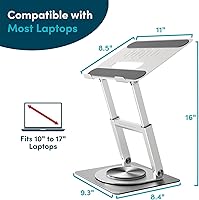
  • Max Height: The stand raises a laptop up to 16 inches above the desk surface, covering comfortable eye-level alignment for both seated and standing work positions.
  • Rotation: The base rotates a full 360 degrees with a mechanical damping mechanism that produces audible, tactile clicks to confirm each positional lock.
  • Laptop Compatibility: Fits laptops ranging from 10 to 17 inches in screen size, including MacBook Pro, MacBook Air, Dell XPS, HP Spectre, and most standard consumer laptops.
  • Load Capacity: The reinforced aluminum structure supports devices weighing up to 22 lbs (10 kg), which comfortably covers the full range of consumer and prosumer laptops.
  • Primary Material: The frame and crossbrace are constructed from aluminum alloy, while the base incorporates reinforced metal for added stability under load.
  • Structural Design: An internal I-beam crossbrace architecture distributes downward and lateral forces evenly across the base, reducing flex during use.
  • Grip System: Multiple silicone pads contact the laptop directly, preventing scratching of premium finishes and keeping the device from shifting during adjustment or typing.
  • Foldable: The stand collapses into a flat, compact form factor for transport or desk storage, with no loose components to track or reassemble.
  • Item Weight: The stand itself weighs approximately 3.96 pounds, keeping it light enough to carry in a laptop bag without adding significant bulk.
  • Packed Dimensions: When folded, the stand measures approximately 11.73 x 10.08 x 2.24 inches, fitting easily into most backpack sleeves or carry-on luggage.
  • Frame Design: The open-frame construction leaves the underside of the laptop exposed to ambient air, which helps reduce heat buildup during extended work sessions.
  • Finish: The stand is available in a silver aluminum finish that complements most MacBook, Dell, and HP laptop aesthetics.
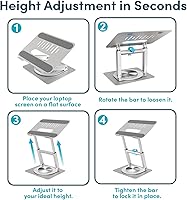
  • Adjustability: Both height and tilt angle are adjustable, allowing users to fine-tune screen positioning without needing separate tools or accessories.
  • Operation: Height and angle adjustments are designed for one-handed operation, so repositioning does not require setting down peripheral devices or interrupting a workflow.
  • Market Entry: This stand became available in March 2025 and reached a top-60 ranking in the Laptop Stands category within its first few months on the market.

Related Reviews
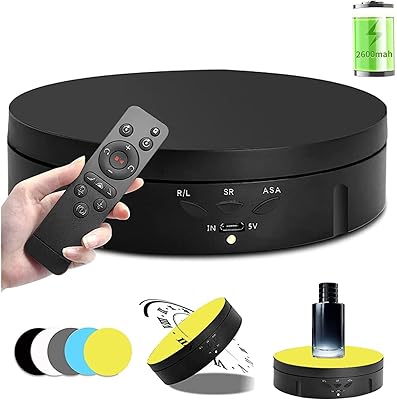
Qinmay QM-146 360-Degree Rotating Photography Turntable

78%
88%
Value for Money
76%
Rotation Smoothness
67%
Remote Control
63%
Build Quality
93%
Ease of Setup
More
Moclever Laptop Bed Stand MO653
83%
88%
Usability & Ergonomics
84%
Cooling Performance
80%
Build Quality
90%
Adjustability & Flexibility
78%
Storage Functionality
More
LINGMI Rolling Adjustable Laptop Desk
72%
83%
Adjustability Range
67%
Stability & Balance
79%
Mobility & Wheels
58%
Surface Size
63%
Build Quality
More
TigerDad QQ-111 Rolling Laptop Desk
82%
89%
Height Adjustability
84%
Tilt Function
76%
Build Quality
81%
Mobility & Casters
72%
Weight Capacity
More
LANPOWAE Motorized Rotating Display Stand
84%
88%
Performance
91%
Ease of Use
85%
Stability under Load
87%
Rotation Customization
90%
Portability/Size
More
Cididu 3-Tier 360 Rotating Makeup Organizer
78%
93%
Ease of Assembly
89%
Rotation Smoothness
74%
Build Quality
71%
Storage Capacity
88%
Aesthetic Design
More
tounee LS07 Laptop Stand
84%
92%
Height Adjustment Range
67%
Stability at Full Extension
91%
Ease of Height Adjustment
71%
Laptop Platform Grip
88%
Portability & Weight
More
Taiuloo 360 Rotating Acrylic Makeup Organizer

76%
88%
Rotation Smoothness
82%
Build Quality
84%
Clarity & Transparency
67%
Compartment Design
61%
Storage Capacity
More
Mokani 360 Rotating Makeup Organizer
88%
91%
Ease of Use
87%
Value for Money
94%
Organization & Storage Efficiency
88%
Rotation Smoothness
92%
Durability & Build Quality
More
PWR+ Adjustable Aluminum Laptop Table Stand
79%
83%
Build Quality
88%
Adjustability
67%
Cooling Performance
91%
Portability
62%
Stability
More

FAQ

For most typing styles and height settings, the stand holds steady without issue. A small number of buyers have noted some minor movement when the stand is at its tallest position and they type aggressively — so if you tend to pound the keys, it is worth keeping the height a notch below maximum for the most grounded feel.

Yes, it fits laptops up to 17 inches, so a 16-inch MacBook Pro falls comfortably within range. The silicone pads grip the machine securely, and the weight capacity is well above what any MacBook weighs, so stability is not a concern there.

The rotation has what the manufacturer describes as a damping mechanism, which in practice means it moves with controlled resistance rather than spinning freely. You feel and hear a series of clicks as you rotate, which gives you clear feedback that the stand has settled into a position — it feels deliberate and firm, not loose.

It works for both. The height range is generous enough to bring a laptop screen to a comfortable eye level whether you are seated at a desk or standing — assuming your desk height is fairly standard. It is not a full standing desk, but as a riser it covers both postures well.

It works with any laptop between 10 and 17 inches regardless of brand or operating system. Dell XPS, HP Spectre, Lenovo ThinkPad, ASUS, and Microsoft Surface models all fall within its compatibility range alongside MacBooks.

Silicone is a non-abrasive material and should not mark standard laptop surfaces, whether aluminum, plastic, or coated finishes. That said, if your laptop has a particularly delicate or painted finish, it is always a good idea to check how any grip pad interacts with it over extended use.

It folds flat in seconds with no disassembly required, and the packed dimensions are compact enough to slip into a laptop bag alongside your computer. At under four pounds, it adds minimal weight to a travel kit.

It helps more than a solid platform would. By keeping the underside of the laptop exposed rather than pressed against a flat surface, ambient air can circulate beneath the chassis. It is not a substitute for a dedicated cooling pad with active fans, but it is meaningfully better than using your laptop flat on a desk.

Honestly, if rotation is never part of your workflow, you are paying for a feature you will not use. A simpler, static riser at a lower price point might serve you just as well. That said, the height adjustability and build quality do stand on their own merits if those aspects align with what you need.

It launched in early 2025, so it is still relatively new. The 4.8-star rating is encouraging, but the review volume is still building, which means the score could shift as more buyers weigh in over time. The early feedback is positive and consistent, but it is reasonable to factor in that long-term durability data simply does not exist yet for this particular product.