Overview

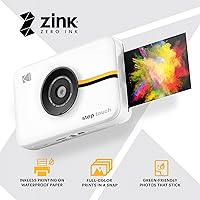
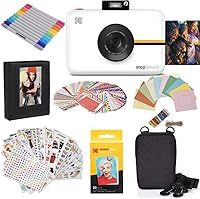
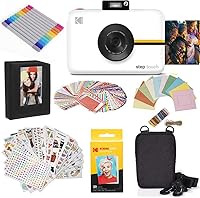
The Kodak Step Touch 13MP Instant Print Camera sits in an interesting middle ground — it's a real digital camera with a built-in printer, all wrapped in a pocket-friendly body. There's genuine nostalgia in holding a fresh print seconds after taking a shot, but the Step Touch updates that experience with a 3.5-inch touchscreen that feels far more intuitive than the fixed lenses and dials of old instant cameras. Instead of ink cartridges, it uses ZINK zero-ink technology, embedding dye crystals directly into the paper. Teens, travelers, casual shooters, and gift-buyers all tend to find something to like here.
Features & Benefits

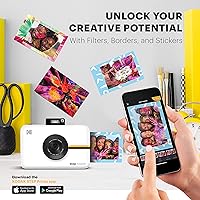
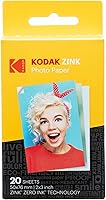
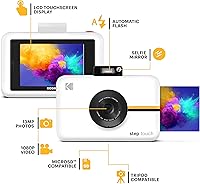
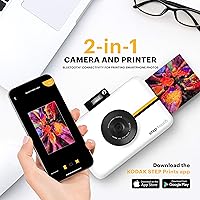
The 13MP sensor paired with 10x optical zoom gives you noticeably more reach and detail than what you'd expect from a device like this — most competing instant cameras offer fixed focal lengths with no zoom at all. Toss in 1080p HD video recording and you have something that can genuinely replace a point-and-shoot for everyday moments. Printing is handled through ZINK paper, producing 2x3-inch sticky-back prints without a drop of ink or a cartridge to replace. An onboard editing suite lets you add filters, frames, or emojis before you print, and Bluetooth pairing with the KODAK app means you can pull photos off your phone and print those too.

Best For

This instant print camera is a particularly strong match for teens and young adults who want physical photos without the hassle of going to a print shop. It's also a genuinely thoughtful gift — the kind that gets unwrapped with actual excitement rather than polite appreciation. Travelers will appreciate not needing a separate portable printer to bring home something tangible from a trip. Scrapbookers love the sticky-back prints, which peel and stick without any extra adhesive. If you're comfortable with basic digital photography and just want something fun and easy to carry, the Step Touch fits that brief well.

User Feedback

Buyers who purchase this hybrid camera-printer tend to split into two camps. The first group — often parents buying it as a gift — appreciates the print quality for casual use and the all-in-one convenience. The second group raises a consistent concern: ZINK paper refills add up quickly, and the per-print cost is something to budget for before you commit. Battery life also gets flagged regularly; heavy printing sessions drain the charge faster than you'd expect. App connectivity is another mixed point — some users pair their phones without trouble, while others find the Bluetooth link unreliable. Camera image quality is solid for casual shots, but not a substitute for a dedicated shooter.

Pros

  • Combines a camera and printer in one device, eliminating the need to carry separate gear.
  • The 10x optical zoom is a rare and practical advantage over fixed-lens instant cameras.
  • ZINK zero-ink printing means no cartridges, ribbons, or messy ink to manage.
  • Sticky-back prints are ready to peel and use immediately, with no extra adhesive needed.
  • The 3.5-inch touchscreen makes navigating menus and editing photos genuinely intuitive.
  • Built-in 1080p video recording adds everyday utility well beyond still photography.
  • Onboard filters, frames, and emojis let you customize shots before committing to a print.
  • Bluetooth pairing with the KODAK app allows printing directly from a smartphone.
  • The pop-up flash, selfie mirror, and auto-timer cover the basics for solo and group shots.
  • At roughly one pound, the Step Touch is light enough to slip into a bag without a second thought.

Cons

  • ZINK paper refills are a recurring cost that significantly raises the total price of ownership over time.
  • Battery life under heavy printing sessions is shorter than many buyers expect.
  • Bluetooth connectivity to the companion app can be inconsistent and sometimes requires repeated pairing attempts.
  • Print size is fixed at 2x3 inches, which feels small if you want anything display-worthy on a wall.
  • Camera image quality in low light is mediocre, limiting its usefulness indoors without flash.
  • The companion app experience is unpolished compared to what most smartphone users are accustomed to.
  • Prints, while durable, can look slightly washed out compared to lab-quality photo paper prints.
  • No option to print larger formats or connect to a third-party printer for bigger output.

Ratings

The scores below were generated by our AI engine after analyzing thousands of verified global buyer reviews for the Kodak Step Touch 13MP Instant Print Camera, with spam, bot-submitted, and incentivized feedback actively filtered out to ensure accuracy. Every category reflects both the genuine enthusiasm buyers feel and the recurring frustrations that show up consistently across markets. Nothing is glossed over — the pain points are reflected just as honestly as the strengths.

Print Quality
74%
26%
For casual, everyday prints, most buyers are genuinely pleased — the ZINK output looks vibrant enough for party photos, travel keepsakes, and scrapbook pages. The sticky-back format is a consistent crowd-pleaser, especially among users decorating journals or gifting personalized prints to friends.
Prints can look slightly washed out in comparison to lab-quality output, and fine details sometimes suffer at the 2x3-inch format. Users printing in humid environments have occasionally noted color inconsistency across a batch of prints.
Camera Image Quality
67%
33%
In good natural light, the 13MP sensor produces clean, sharp images that hold up well for social sharing and small-format prints. The 10x optical zoom is a genuine standout — users frequently highlight being able to capture subjects from a real distance, something competing instant cameras simply cannot do.
Low-light and indoor performance without flash is noticeably soft and grainy, which disappoints buyers expecting more from a 13MP spec. Night shots or dimly lit venue photos rarely look good enough to print, which undercuts the all-in-one pitch in real-world evening use.
Ease of Use
84%
The 3.5-inch touchscreen makes the whole experience feel intuitive from the first use — teens and first-time camera owners regularly note they were up and shooting within minutes of unboxing. Menu navigation is clean, and the onboard editing tools are accessible without any instruction manual.
A small number of older users found the touchscreen sensitivity occasionally inconsistent, requiring a firmer tap than expected. The volume of editing options can also feel slightly overwhelming to buyers who just want to point, shoot, and print without customization.
Print Speed
71%
29%
Prints emerge in roughly 30 to 60 seconds after confirming, which feels satisfying at a party or gathering when you want to hand someone a physical photo quickly. Most buyers describe the wait as acceptable given the novelty of watching a print emerge from the camera itself.
Back-to-back printing sessions slow things down noticeably, with a cool-down period required between prints to avoid paper jams or quality issues. For users expecting instant-party-level throughput across a large group, the pace can feel limiting.
Battery Life
58%
42%
For light use — a few dozen shots and five to ten prints — the built-in lithium-ion battery handles a typical outing without issue. Buyers using the Step Touch for short travel days or casual afternoon sessions generally report getting through their activity on a single charge.
Heavy printing sessions drain the battery significantly faster than the camera-only mode, and this catches many users off guard. Multiple buyers specifically recommend carrying a portable charger to any event where printing will be frequent, which partially defeats the device's all-in-one convenience promise.
App & Connectivity
53%
47%
When the Bluetooth pairing works correctly, printing from a smartphone gallery through the KODAK app is a genuinely useful feature that extends the device beyond its own camera. Android and iOS users alike appreciate being able to print travel photos stored on their phones without transferring files manually.
Connectivity reliability is the most divisive topic in buyer feedback — a meaningful portion of users report repeated pairing failures, dropped connections mid-session, or app crashes. The app itself feels underpolished, with an interface that hasn't kept pace with modern smartphone design standards.
Value for Money
62%
38%
The hardware bundle itself feels reasonably priced for a device that combines a zoom camera, video recorder, and instant printer in one unit. Gift-buyers in particular tend to rate the perceived value highly because the all-in-one pitch is compelling when you compare it against buying each component separately.
The recurring cost of ZINK paper refills significantly erodes the value proposition over time — frequent users can end up spending more on consumables than the device itself within a year. Buyers who underestimate this ongoing expense are consistently the most dissatisfied in long-term reviews.
Build & Portability
78%
22%
At just one pound, the Step Touch is light enough to carry daily without fatigue, and the included wrist strap makes it easy to keep secure at outdoor events or on hikes. The overall feel in hand is solid without being heavy, and buyers frequently describe it as more premium-feeling than the price suggests.
The dimensions — particularly the depth — make it bulkier than many buyers expect from a device marketed as pocket-friendly. It fits in a bag without trouble, but slipping it into a jacket pocket is a stretch, and some buyers note the exterior plastic feels a touch hollow when tapped.
Editing Features
76%
24%
The onboard editing suite is more capable than most buyers anticipate — filters, frames, and emoji overlays all work smoothly on the touchscreen and genuinely add a creative dimension before committing to a print. Teens especially love the ability to decorate photos without needing a phone app.
The filter and frame selection is adequate but not extensive, and advanced users will quickly exhaust the options available. There is no option to crop or resize photos beyond basic adjustments, which limits creative control for buyers who want more precision before printing.
Video Quality
72%
28%
1080p HD video is a pleasant surprise in a device positioned primarily as a photo printer, and short clips shot in decent lighting look clean and usable for social media or family memories. Buyers who hadn't noticed this spec in advance often mention it as an unexpected bonus in their reviews.
Video autofocus can hunt in lower-contrast scenes, and the audio captured by the built-in microphone sounds somewhat thin compared to smartphone video. Few buyers rely on this feature heavily, but those who do note it works best outdoors in daylight rather than in indoor or low-light settings.
Setup Experience
81%
19%
Unboxing and initial setup is genuinely straightforward — most buyers report being ready to shoot and print within five minutes of opening the box. The camera requires no complicated pairing to function as a standalone device, which makes it a stress-free gift to hand to someone.
Setting up the companion app for Bluetooth printing adds a layer of friction that some buyers find unnecessary, particularly older recipients who receive the device as a gift. A small number of users also report needing a firmware update out of the box before all features work correctly.
Flash Performance
69%
31%
The pop-up flash handles standard indoor portraits and close-range group shots reasonably well, providing enough fill light to avoid completely underexposed prints in dim rooms. Buyers using it at birthday parties or evening gatherings generally find it sufficient for the occasion.
At wider distances or in very dark environments, the flash struggles to illuminate subjects evenly, resulting in blown highlights close-up and dark backgrounds. Red-eye is also a recurring complaint in flash-heavy shooting conditions, and there is no red-eye reduction mode available.
Paper Availability
66%
34%
ZINK paper is widely available through major online retailers, and buyers rarely report difficulty sourcing refills. The sticky-back format is a clear differentiator that buyers consistently appreciate, especially those using prints for decorative purposes.
The ongoing availability and pricing of ZINK paper depends on a single proprietary format, which gives buyers no flexibility to shop for cheaper alternatives. If ZINK paper becomes harder to source in certain regions, the camera effectively becomes non-functional as a printer.
Gift Suitability
86%
As a gift, the Step Touch consistently lands well — it has visual appeal out of the box, a clear and exciting use case, and enough features to feel substantial rather than gimmicky. Parents buying for teens and partners buying for photography-curious friends rate gift satisfaction particularly highly.
The hidden cost of ZINK paper refills means gift recipients can quickly find themselves needing to spend more to keep using what felt like a complete gift. Buyers who don't include a pack or two of paper with the device risk leaving the recipient with a camera they can't immediately enjoy to its full potential.

Suitable for:

The Kodak Step Touch 13MP Instant Print Camera is a genuinely good fit for anyone who wants the fun of instant prints without sacrificing the control and flexibility of a real digital camera. Teenagers and young adults are probably the core audience — they get the tactile thrill of a physical photo plus the ability to edit and personalize shots before printing, which older instant cameras simply can't offer. It's also a strong pick for gift-givers who want something that feels special and interactive rather than another generic gadget; the all-in-one nature means the recipient doesn't need to buy anything extra just to get started. Travelers who want to come home with something more tangible than a camera roll will appreciate being able to print a keepsake on the spot. Scrapbookers and crafters who love sticky-back prints for decorating journals, planners, or walls will find the 2x3-inch format practical and easy to work with.
Not suitable for:

The Kodak Step Touch 13MP Instant Print Camera is not the right choice for buyers who prioritize image quality above all else. At this tier, the camera produces perfectly acceptable casual photos, but anyone expecting results comparable to a mirrorless or even a serious compact camera will be disappointed. Photography enthusiasts who need manual controls, RAW files, or interchangeable lenses should look elsewhere entirely. The ongoing cost of ZINK paper refills is also a real consideration — if you print frequently, that expense adds up faster than most buyers anticipate, and it's not a one-time purchase. People who rely heavily on smartphone app integrations may also find the Bluetooth connectivity less reliable than they'd like, particularly for wireless printing sessions. Finally, if battery life is critical — say, for all-day outdoor events where charging isn't an option — the Step Touch's stamina under heavy printing use can become a genuine limitation.
Specifications

  • Sensor: The camera uses a 13-megapixel sensor, which delivers enough detail for casual photography and small-format prints.
  • Optical Zoom: A 10x optical zoom lens gives users meaningful reach compared to the fixed lenses found on most instant cameras.
  • Display: A 3.5-inch LCD touchscreen serves as both the viewfinder and the main interface for navigation and editing.
  • Video Recording: The device records 1080p HD video, making it practical for short clips alongside still photography.
  • Print Technology: ZINK zero-ink technology uses heat to activate dye crystals embedded in the paper, requiring no ink cartridges, ribbons, or toners.
  • Print Size: Each print measures 2x3 inches and features a peel-and-stick backing for easy placement on surfaces without additional adhesive.
  • Shutter Speed: The shutter speed range runs from 0.0004 seconds up to 1/2000 of a second, covering most everyday shooting conditions.
  • Flash: A built-in pop-up flash provides supplemental lighting for low-light scenes and indoor shots.
  • Connectivity: Bluetooth is the primary wireless connection method, enabling the device to pair with smartphones for remote printing via the KODAK app.
  • Companion App: The KODAK app is available for both iOS and Android and allows users to print photos stored on their smartphones.
  • Battery: A built-in rechargeable lithium-ion battery powers the device, eliminating the need for disposable batteries during regular use.
  • Weight: The unit weighs approximately 1 pound, keeping it light enough for everyday carrying in a bag or large pocket.
  • Dimensions: The body measures 8.5 x 6.26 x 4.33 inches, making it noticeably larger than a credit-card-style printer but still travel-friendly.
  • Selfie Aids: A built-in selfie mirror and auto-timer function support self-portraits without requiring a second person or a tripod.
  • Onboard Editing: The editing suite includes filters, decorative frames, and emojis that can be applied to images before printing directly on the device.
  • Supported Languages: The device interface supports English, French, German, Italian, and Spanish, making it suitable for international users.
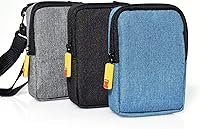
  • Included Contents: The starter bundle includes the camera body and a set of accessories; ZINK paper for printing is required separately after the included supply runs out.
  • Manufacturer: The device is manufactured by C&A Marketing Inc. under the KODAK brand license and is not discontinued as of its listing date.

Related Reviews
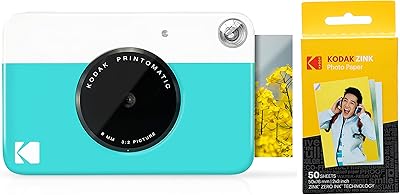
Kodak PRINTOMATIC Instant Print Camera
78%
93%
Ease of Use
61%
Print Quality
74%
Value for Money
88%
Portability & Size
63%
Build Quality & Durability
More
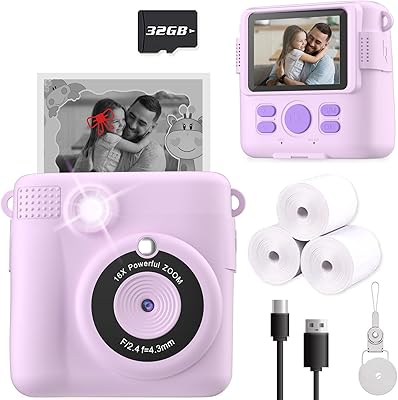
ESOXOFFORE ABS-681 Instant Print Camera for Kids
74%
88%
Instant Print Experience
61%
Print Quality
67%
Photo & Video Quality
84%
Ease of Use for Kids
72%
Build Quality & Durability
More
Ziegoal Kids Instant Print Camera
88%
91%
Ease of Use
87%
Print Quality
92%
Build Durability
89%
Battery Life
85%
Creative Features
More
JPVERLY P260 Kids Instant Print Camera
80%
91%
Ease of Use for Kids
72%
Print Quality
83%
Build Quality & Durability
77%
Instant Print Experience
68%
Battery Life
More
FKATEEN 681B Instant Print Kids Camera
74%
91%
Ease of Use
58%
Print Quality
83%
Value for Money
64%
Build & Durability
67%
Battery Life
More
Anchioo BLL2 Kids Instant Print Camera
75%
67%
Print Quality
84%
Ease of Use
79%
Value for Money
61%
Build Quality
72%
Image Quality
More
RADEKLY Instant Print Camera for Kids
83%
91%
Value for Money
88%
Ease of Use
85%
Durability/Build Quality
73%
Print Quality
82%
Battery Life
More
Yosfeng H16 Kids Instant Print Camera
74%
86%
Value for Money
58%
Print Quality
81%
Comic Print Feature
83%
Ease of Use for Kids
71%
Battery Life
More
Careenoah Instant Print Camera for Kids
81%
72%
Photo Printing Quality
89%
Ease of Use
84%
Build Quality / Durability
63%
Video Quality
75%
Battery Life
More
KODAK Step Instant Photo Printer
78%
91%
Ease of Setup
63%
Print Quality
67%
App Experience
94%
Portability
74%
Battery Life
More

FAQ

No, the Step Touch uses ZINK zero-ink technology, which means there are no cartridges, ribbons, or toners to buy. The printing happens through heat applied to special paper with dye crystals already embedded in it. You do need to purchase ZINK paper refills regularly, though, so factor that into your budget.

ZINK paper packs typically come in quantities of 20 to 50 sheets and are sold separately. The per-print cost is noticeably higher than printing at a photo lab, so if you plan to print a lot, the ongoing paper cost is worth budgeting for before you buy.

Yes, you can connect the Step Touch to your smartphone via Bluetooth and use the KODAK companion app to send photos from your phone's gallery to the camera for printing. The app is available on both iOS and Android, though some users report that the Bluetooth pairing can occasionally be finicky.

Battery life is decent for casual use, but if you plan to shoot and print heavily in a single session, you may find it drains faster than expected. Many users recommend charging it the night before any event or outing where you plan to use it heavily.

It can be, though it depends on the child. The touchscreen interface is intuitive enough for older kids and tweens, and the instant print aspect tends to be a big hit. Younger children may need some help navigating the editing and printing features. Keep in mind that the ZINK paper will need to be replenished, so the gift does come with an ongoing supply cost.

All prints come out at 2x3 inches, which is roughly the size of a standard photo booth strip. There is no option to print in a larger format directly from the device, so if you want bigger prints, you would need to transfer the photos to a computer or phone and print them elsewhere.

The starter bundle includes a small supply of ZINK paper to get you going, but it will not last long if you print frequently. Plan to order additional packs before you run out, especially if you are giving it as a gift and want the recipient to have plenty of paper on hand from day one.

You can record 1080p HD video, which is a genuine bonus for a device primarily marketed as an instant print camera. It won't replace a dedicated video camera, but it handles short clips well for everyday moments, travel footage, or social sharing.

The 13MP sensor with 10x optical zoom produces solid results in decent lighting. For casual shots, social media, and small prints, the image quality is perfectly acceptable. In low light or indoors without flash, results can be softer and grainier, so don't expect it to perform like a dedicated camera in challenging conditions.

Generally, yes. The touchscreen interface is fairly straightforward, and you don't need any photography knowledge to get good results. Most users pick it up quickly, and the onboard editing tools are simple enough that even first-time camera users can experiment with filters and frames without feeling overwhelmed.

Where to Buy