Kidamento Model P Kuromi Instant Print Camera

Kidamento Model P Kuromi Instant Print Camera — image 1
Kidamento Model P Kuromi Instant Print Camera — image 2
Kidamento Model P Kuromi Instant Print Camera — image 3

Kidamento Model P Kuromi Instant Print Camera — image 4
Kidamento Model P Kuromi Instant Print Camera — image 5
Kidamento Model P Kuromi Instant Print Camera — image 6
Kidamento Model P Kuromi Instant Print Camera — image 7
Kidamento Model P Kuromi Instant Print Camera — image 8
78%
22%

Overview

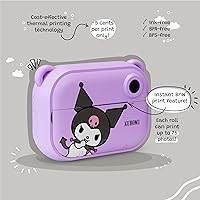
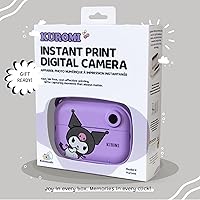
The Kidamento Model P Kuromi Instant Print Camera sits in an interesting spot in the kids' camera market — it's not a flimsy toy, but it's not trying to compete with adult photography gear either. Built by Kidamento, a Toronto-based brand focused on kid-friendly durability, this Kuromi instant camera merges the beloved Sanrio character aesthetic with genuinely functional hardware. The defining feature is its ink-free thermal printing — no cartridges, no film packs, just a built-in printer that produces physical photos within seconds. That combination of digital camera and instant printer in one compact device is what makes this kids print camera stand out at its price tier.

Features & Benefits

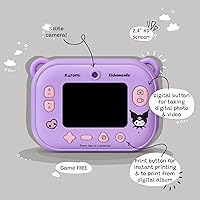
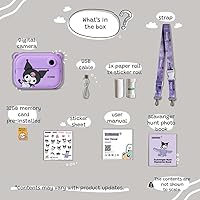
Out of the box, you get one paper roll for up to 70 black-and-white prints and one sticker roll for up to 35, with refill packs available directly from the Kidamento store. Printing takes roughly 3 seconds per photo — thermal technology means the camera uses heat rather than ink to transfer the image, keeping ongoing costs noticeably lower than Instax or similar film-based systems. The Kuromi instant camera also packs around 20 built-in filters and frames, a 2.4″ IPS screen, a selfie lens, and 32GB of onboard storage for photos and video. It charges via USB-C, weighs just half a pound, and connects to computers or MicroSD cards for easy file transfers.

Best For

This kids print camera hits a sweet spot for a fairly specific kind of buyer. If you have a child between 5 and 12 who is into Kuromi or the broader Sanrio universe, the themed design alone makes this a standout birthday gift. Tweens and teens who keep journals or scrapbooks will get real use out of it — the ability to print wallet-sized photos at home without buying ink is genuinely practical. It also works well for families who want to avoid the recurring film costs of cameras like Fujifilm Instax. Just note that no protective case is included, which is worth factoring in if the recipient is young or hard on their belongings.

User Feedback

Parents and kids tend to land in one of two camps with this Kuromi instant camera. On the positive side, ease of use is consistently praised — younger kids can figure it out quickly, and the unboxing reaction is reportedly enthusiastic, especially for Sanrio fans. The themed design adds genuine gift appeal. The more common frustration, and worth flagging before you buy: all prints are black and white. That surprises buyers who expect color output at this price point. Print quality is decent for a kids' device — clear enough to be fun, but not something you would frame on the wall. A few users also wish a protective silicone case came in the box.

Pros

  • Ink-free thermal printing produces a physical photo in roughly 3 seconds — no cartridges, no film packs needed.
  • Per-print costs are meaningfully lower than traditional instant film cameras like Fujifilm Instax.
  • The Kuromi theme is genuinely well-executed and consistently earns strong reactions at unboxing.
  • 32GB of onboard storage means kids will not run out of space for photos and video anytime soon.
  • USB-C charging and a built-in rechargeable battery remove the hassle of constantly replacing disposable batteries.
  • Around 20 built-in filters and frames give kids real creative control without needing any editing software.
  • The included sticker roll is a clever touch — printed photo stickers are a hit with younger kids and crafters.
  • Lightweight at half a pound and compact enough to fit easily in a child's bag or backpack.

Cons

  • All prints are black and white only — color output is not available at any setting, which catches many buyers off guard.
  • Print quality is modest — adequate for keepsakes and fun, but noticeably soft compared to even a basic smartphone photo.
  • No protective silicone or hard case is included, leaving the body exposed for younger or rougher users.
  • Paper and sticker rolls require reordering over time, adding a recurring supply cost parents should plan for.
  • The Kuromi-specific design limits appeal if the recipient is not already a Sanrio fan, reducing its versatility as a gift.
  • No Wi-Fi or Bluetooth connectivity means sharing photos digitally requires a physical cable or MicroSD card transfer.
  • The 2.4″ screen is functional but small, which can make framing shots slightly awkward for younger children.
  • Refill rolls are only sold through the Kidamento store, so you cannot pick them up at a local retailer in a pinch.

Ratings

The Kidamento Model P Kuromi Instant Print Camera earns strong marks as a novelty gift device, though its ratings reflect a product with genuine standout qualities alongside a few real limitations that buyers should know about before purchasing. Our AI-generated scores are produced by analyzing thousands of verified customer reviews from global marketplaces, with spam, incentivized, and bot-generated feedback actively filtered out. Both the consistent praise around ease of use and gifting appeal, and the recurring frustrations around black-and-white-only printing and the lack of an included case, are accurately reflected in every score.

Print Quality
63%
37%
Kids and parents consistently describe the prints as clear enough to recognize faces and scenes, which is all most younger users need. For scrapbook pages and bedroom wall decorations, the black-and-white output has its own retro charm that some users genuinely appreciate.
Every print comes out in black and white, full stop, and that catches a surprising number of buyers off guard given the price tier. Print sharpness is also modest — fine for casual fun, but noticeably soft if you hold it next to a smartphone photo printed elsewhere.
Ease of Use
88%
Younger kids pick this camera up and start snapping and printing with almost no instruction, which parents repeatedly flag as a genuine highlight. The menu layout is intuitive, the print button is clearly labeled, and the selfie lens makes solo photography feel natural even for five-year-olds.
A handful of younger users initially struggle with loading replacement paper rolls without adult help, so that first refill install is best done as a supervised activity. Menu navigation can also feel slightly slow to older teens used to the instant responsiveness of smartphone interfaces.
Build Quality
71%
29%
The body feels noticeably more substantial than budget toy cameras, with a construction that holds up reasonably well to everyday handling by school-age kids. Most users report the camera surviving drops from table height without visible damage, which is reassuring for the primary audience.
No protective case or silicone sleeve is included in the box, which leaves the camera body unprotected right out of the gate. Parents buying for children under age 8 or those who are particularly rough on their belongings will want to source a compatible third-party case separately.
Value for Money
74%
26%
The ink-free thermal printing eliminates the need for ink cartridges entirely, and the per-print cost works out meaningfully lower than traditional instant film cameras like Fujifilm Instax, which softens the upfront investment over time. The 32GB onboard storage, selfie lens, and video capability add genuine utility beyond just printing.
At the mid-range price point, some buyers feel the black-and-white-only output does not fully justify the cost, especially when color-printing alternatives exist in the same category. The Kuromi licensing also likely adds to the retail price without improving the core camera or print hardware.
Battery Life
73%
27%
The built-in rechargeable lithium polymer battery removes the frustration of hunting for and replacing disposable batteries, a practical advantage parents genuinely appreciate for a kid-focused device. Casual use — a mix of photo taking, some video, and moderate printing — typically gets through a full play session on a single charge.
Kidamento does not publish a specific battery life rating, so buyers go in with limited expectations. Heavy printing sessions, which draw the most power, can drain the battery noticeably faster, and the camera cannot be used while charging via USB-C if kids want to keep the session going.
Print Speed
91%
Three seconds from shutter to finished print is genuinely fast, and it is one of the features that generates the most excitement among kids using the camera for the first time. Unlike film-based instant cameras where you wait for chemical development, the print is dry, ready to handle, and ready to stick immediately.
There is a brief mandatory gap between successive prints while the thermal mechanism resets, which can create a short queue when a group of kids all want their photos printed at the same time. This is a minor inconvenience rather than a real problem, but it catches some users off guard.
Creative Features
83%
The roughly 20 built-in filters and frames give kids meaningful creative control without requiring any editing software or external apps, which works well for the 5-to-12 age group. The included sticker roll — which prints actual adhesive photo stickers — is a standout feature that younger users consistently love for decorating notebooks and gifts.
The filter selection, while fun for younger kids, feels limited and somewhat repetitive for older teens who are used to the broader creative tools available on smartphones. Sticker roll capacity tops out at 35 prints, which goes quickly if the recipient is enthusiastic, making it one of the first items parents end up reordering.
Design & Aesthetics
89%
The Kuromi character design is authentically executed rather than feeling like a generic licensed cash-in, and fans of the Sanrio universe respond strongly to it at first sight. The color palette, character detailing, and overall form factor make it feel like a premium collectible item rather than just another kids' camera.
The character-specific design is a double-edged choice — buyers whose child is not already a Kuromi or Sanrio fan will find it harder to justify the price premium over a non-themed model. The aesthetic also ages quickly as children's tastes shift, which limits the camera's long-term appeal as a hand-me-down or re-gift.
Gift Appeal
93%
Unboxing reactions for this kids print camera are consistently described as enthusiastic, with multiple parents noting it was the highlight gift at birthday and holiday celebrations. The combination of themed packaging, immediate printable results, and the satisfying novelty of producing a physical photo makes it land exceptionally well as a gift.
The strong gift appeal is somewhat tied to the Kuromi theme, meaning a child who outgrows the character or was never a Sanrio fan to begin with will find the experience less impactful. The B&W-only printing, once discovered after unwrapping, can also slightly dampen the initial excitement for children expecting color photos.
Ongoing Cost
77%
23%
Per-print thermal costs are substantially lower than traditional instant film alternatives, which makes regular day-to-day printing feel financially sustainable rather than something parents have to ration. Having both a standard paper roll and a sticker roll included in the box means the camera is genuinely ready to use from day one without additional purchases.
Replacement rolls are only available through the Kidamento store online, which means local retailer availability is essentially zero and planning ahead for refills is a necessity. Families who are heavy users — particularly tweens who go through sticker rolls quickly — will find the supply management mildly inconvenient compared to film cameras with broader retail availability.
Screen Quality
76%
24%
The 2.4″ IPS panel is a step above the low-quality LCD screens found on budget toy cameras, offering enough clarity and brightness for kids to frame shots and review their photos without difficulty. Outdoor visibility is acceptable for casual use, even in moderately bright conditions.
At 2.4 inches, the screen is on the smaller side, which can make it slightly awkward for younger children to frame shots precisely, particularly when using the selfie lens. There is also no touchscreen functionality, so all navigation is handled via physical buttons, which some tweens find less intuitive than a smartphone interface.
Photo Quality
66%
34%
For a kids' device, the camera captures scenes with enough detail and color fidelity on the digital side that photos look pleasant on screen and transfer well to a computer. Video recording adds useful variety, and the selfie lens produces recognizable, fun self-portraits that kids enjoy reviewing and sharing.
Digital photo quality, while adequate for casual use, does not come close to a modern smartphone and should not be expected to. Low-light performance is noticeably weak, and photos taken indoors without good lighting can appear grainy or flat, which limits the camera's practical versatility for everyday home use.
Connectivity
57%
43%
USB-C file transfer is reliable and works without any special software installation on most computers, making it straightforward to back up or share photos when needed. MicroSD card compatibility adds a second transfer route that more tech-savvy parents and older kids will appreciate.
The absence of Wi-Fi or Bluetooth is a real gap for a device in this price range, since there is no way to wirelessly share photos to a phone, social app, or cloud storage. In a world where kids are accustomed to instant wireless sharing from tablets and smartphones, this limitation feels noticeably dated.
Portability
87%
At half a pound, the Kidamento Model P is light enough for a child to carry comfortably in a school bag or small backpack without it becoming a burden over the course of a day. The compact body fits easily into most standard bags, and USB-C charging means one less proprietary cable to manage.
The built-in printer mechanism adds some thickness to the body compared to a standard digital camera of the same footprint, making it slightly bulkier to pocket. Without an included case, the exposed camera body also requires a bit more careful packing to avoid scratches when carried alongside other items.
Setup & First Use
84%
Getting the camera up and running is fast and approachable — the paper roll loads without tools, USB-C charging is universal, and the first print can happen within minutes of unboxing. Parents consistently describe the initial setup as low-stress, which matters when the camera is being unwrapped as a gift in front of an excited child.
The first paper roll change or menu exploration beyond basic snapping can reveal some interface quirks that require a quick read of the manual. Kids who try to load replacement paper rolls entirely on their own may need one or two attempts to get the roll seated correctly, which can occasionally cause a paper jam.

Suitable for:

The Kidamento Model P Kuromi Instant Print Camera is a strong match for Kuromi or Sanrio fans aged 5 and up who want more than just a screen-based toy — the appeal here is holding a real printed photo moments after taking it. Parents who have watched their kids burn through expensive Instax film will appreciate that thermal printing keeps per-print costs substantially lower, with no ink cartridges to replace. It is also a natural fit for tweens and teens who decorate journals, scrapbooks, or bedroom walls, since the sticker roll output adds a genuinely craft-friendly dimension. Gift-givers looking for something that feels special on unboxing — the Kuromi branding does a lot of heavy lifting there — will find this lands well for birthdays or holidays. Families who want a camera that grows with a child, from supervised snapping at age 5 through independent creative use in the tween years, will get solid mileage out of the 32GB storage and video recording features.

Not suitable for:

If you are shopping for someone who expects color photos, stop and reconsider before buying the Kidamento Model P Kuromi Instant Print Camera — every single print comes out in black and white, and that surprises more buyers than it should at this price tier. Serious young photographers who care about image quality will also be underwhelmed; the prints are fun and recognizable, but they are not sharp in the way a modern smartphone photo is, and the camera hardware is not built for precision. Anyone hoping for a drop-proof device should know upfront that no protective silicone case is included in the box, which matters if the recipient is under 8 or particularly rough on their belongings. It is also not the right pick for buyers who want to avoid ongoing supply costs entirely — while per-print costs are lower than traditional film, you will eventually need to reorder paper and sticker rolls from the brand store. Finally, if the recipient has no connection to the Sanrio or Kuromi universe, a significant part of what makes this camera worth its price is lost, and a non-branded alternative might serve them better.

Specifications

  • Brand: Kidamento, also sold under the Kiimento name, is a Toronto-based brand that specializes in kid-friendly camera hardware.
  • Model: This is the Model P in the Kuromi character edition, part of Kidamento's licensed Sanrio-themed instant print camera lineup.
  • Print Technology: The camera uses ink-free thermal printing, which applies heat to heat-sensitive paper to transfer an image without ink, dye, or film cartridges.
  • Print Speed: Each photo prints in approximately 3 seconds after the shutter is triggered.
  • Print Color: All prints are black and white only; color printing is not supported at any setting or mode.
  • Display: The camera features a 2.4″ IPS screen used for composing shots, navigating menus, and reviewing stored images.
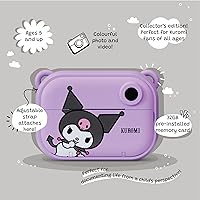
  • Storage: 32GB of onboard memory is built into the camera body, with additional storage expandable via a MicroSD card.
  • Selfie Lens: A front-facing selfie lens is included, allowing users to frame and capture self-portraits directly on the device.
  • Charging: The camera charges via USB-C, and a compatible charging cable is included in the box.
  • Battery: Power is supplied by a built-in rechargeable lithium polymer battery, which comes pre-installed and included with the unit.
  • Paper Roll: One paper roll is included in the box, rated for up to 70 black-and-white thermal prints before a refill is needed.
  • Sticker Roll: One sticker roll is included, capable of producing up to 35 adhesive photo stickers that can be peeled and applied.
  • Filters: Approximately 20 built-in filters and decorative frames are available for creative customization before capturing or printing a photo.
  • Dimensions: The camera body measures 5.3″ x 3.8″ x 1.8″, making it compact enough to fit in a child's bag.
  • Weight: The camera body weighs 0.5 lb; the complete packaged unit weighs approximately 1.15 lb.
  • Compatibility: The camera is compatible with MicroSD cards and connects to computers via USB-C for straightforward file transfers.
  • Protective Case: No silicone sleeve, hard case, or protective cover of any kind is included in the box.
  • Recommended Age: The manufacturer recommends this camera for children aged 5 years and up.
  • Box Contents: The kit includes the camera body, one paper roll, one sticker roll, a USB-C charging cable, and a sheet of decorative stickers.
  • Film Refills: Replacement paper rolls and sticker rolls are sold separately through the Kidamento brand store and are not available at general retail outlets.

Related Reviews
Kidamento Kuromi Model A Kids Digital Camera
81%
93%
Ease of Use for Kids
91%
Design & Character Appeal
78%
Build Quality & Durability
61%
Image Quality
67%
Video Performance
More
ESOXOFFORE ABS-681 Instant Print Camera for Kids
74%
88%
Instant Print Experience
61%
Print Quality
67%
Photo & Video Quality
84%
Ease of Use for Kids
72%
Build Quality & Durability
More
RADEKLY Instant Print Camera for Kids
83%
91%
Value for Money
88%
Ease of Use
85%
Durability/Build Quality
73%
Print Quality
82%
Battery Life
More
JPVERLY P260 Kids Instant Print Camera
80%
91%
Ease of Use for Kids
72%
Print Quality
83%
Build Quality & Durability
77%
Instant Print Experience
68%
Battery Life
More
Careenoah Instant Print Camera for Kids
81%
72%
Photo Printing Quality
89%
Ease of Use
84%
Build Quality / Durability
63%
Video Quality
75%
Battery Life
More
Ziegoal Kids Instant Print Camera
88%
91%
Ease of Use
87%
Print Quality
92%
Build Durability
89%
Battery Life
85%
Creative Features
More
FKATEEN 681B Instant Print Kids Camera
74%
91%
Ease of Use
58%
Print Quality
83%
Value for Money
64%
Build & Durability
67%
Battery Life
More
Yosfeng H16 Kids Instant Print Camera
74%
86%
Value for Money
58%
Print Quality
81%
Comic Print Feature
83%
Ease of Use for Kids
71%
Battery Life
More
Anchioo BLL2 Kids Instant Print Camera
75%
67%
Print Quality
84%
Ease of Use
79%
Value for Money
61%
Build Quality
72%
Image Quality
More
Liscuty P02 Kids Instant Print Camera
78%
73%
Instant Print Quality
84%
Ease of Use for Kids
88%
Value for Money
81%
Build Quality & Durability
78%
Battery Life
More

FAQ

All prints from this camera are black and white — there is no color printing option regardless of which setting you choose. This is the single most common source of buyer disappointment, so it is genuinely worth knowing before you purchase. The prints look perfectly fine for fun snapshots and keepsakes, but if your child is expecting Polaroid-style color output, this is not the right fit.

Yes, any photo saved to the camera can be reprinted as many times as you want, as long as you have paper roll remaining. The Kidamento Model P stores all captured images in its 32GB internal memory, so nothing is lost after the first print. This is actually one of the practical advantages over traditional instant film cameras, where each shot consumes one frame whether you like the result or not.

Refill packs are sold through the Kidamento brand store online. They are not typically stocked at major brick-and-mortar retailers, so it is worth ordering extras when you first buy the camera rather than scrambling when the roll runs out mid-project. Keeping a spare on hand is a simple way to avoid disappointment, especially before a holiday or birthday.

The printing method here is quite different from Instax or Polaroid. This kids print camera uses thermal printing, which means it applies controlled heat to heat-sensitive paper to form an image, with no ink, dye, or chemical film involved at any step. Instax and Polaroid use physical film packs containing light-sensitive chemicals that produce full-color images. The trade-off with thermal printing is black-and-white output only, but the cost per print is considerably lower and you never need to buy film.

No protective silicone or hard case is included in the box with the Kidamento Model P Kuromi Instant Print Camera. If the recipient is younger or tends to be rough on their things, it is worth sourcing a compatible third-party case separately, since the bare camera body has no built-in drop protection. The construction feels solid enough for typical use, but a case adds meaningful peace of mind for parents.

Kidamento recommends age 5 and up, which is reasonable for supervised use with a parent helping load the paper and navigate settings. For fully independent operation, including managing the printer, choosing filters, and keeping track of the device, somewhere around age 7 to 9 is more realistic. Tweens and teens in the 10 to 14 range tend to get the most creative use out of it, particularly if they are into journaling, scrapbooking, or Sanrio aesthetics.

There is no wireless connectivity on this camera — no Bluetooth, no Wi-Fi, and no companion app support. To move photos to another device, you will need to use a USB-C cable to connect to a computer, or remove the MicroSD card and read it with a card reader. For most kids using this primarily as a print camera, the lack of wireless sharing rarely causes a real problem in day-to-day use.

Connect the camera to a computer using the included USB-C cable, and it should appear as a removable storage device, similar to plugging in a USB flash drive — no special software is required. Alternatively, you can insert a MicroSD card into the camera, capture your photos, then remove the card and use a card reader on your computer. Either method is straightforward and works on both Windows and Mac systems.

Kidamento does not publish a specific battery life figure for this model, and real-world run time will vary depending on how frequently the print feature is used, since printing draws the most power. Based on typical lithium polymer batteries in cameras of this class, you can expect a few hours of casual use per charge. Recharging via USB-C is convenient and works with most standard phone chargers, though charge time is not officially specified.

For the target audience of kids and tweens, the roughly 20 built-in filters and frames get genuinely positive feedback and see real use. They are simple and playful rather than sophisticated, which is exactly right for a child decorating a scrapbook page or printing a photo for a friend. Adults looking for professional-grade editing tools will find them basic, but for the intended user, they add a nice creative dimension without requiring any technical skill.