Overview

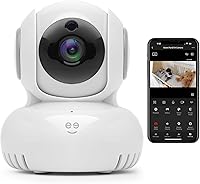
The Geeni Sentinel 1080p Indoor Security Camera is a solid entry point for anyone dipping their toes into home surveillance without spending a fortune. It has a compact dome shape that tucks neatly into corners or mounts flush against a wall, and setup is refreshingly straightforward — download the Geeni app, connect to your 2.4 GHz Wi-Fi, and you're live in minutes. No hub, no bridge, no headache. It also works with Alexa and Google Assistant, so if you're already in one of those ecosystems, asking your smart speaker to pull up the feed is genuinely convenient. Just go in knowing this is an indoor-only, plug-in camera — not something you'd put on the porch.
Features & Benefits

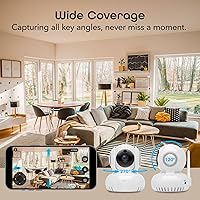
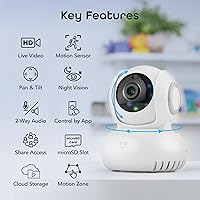
The motorized pan/tilt mechanism is where this Geeni camera earns its keep. Rather than covering one fixed angle, it sweeps the room on command or follows movement automatically — a feature you wouldn't expect at this price point. Daytime footage at 1080p is sharp enough to recognize faces and read labels clearly. The custom activity zones are a practical touch; instead of being pinged every time a car passes the window, you can draw a box around just the area that matters. Night vision is decent for a dark nursery or hallway — not studio-quality, but functional. Two-way audio rounds things out, letting you speak to a pet or kid directly through the app.

Best For

The Sentinel indoor cam makes the most sense for a specific type of buyer: someone setting up their first indoor camera who wants more coverage than a fixed lens provides. Parents who want to keep an eye on a sleeping baby — and actually talk to them when they stir — will find the combination of remote viewing and audio genuinely useful. Pet owners get the same benefit. It's also a natural fit for Alexa or Google Home households where pulling up a live feed with a voice command is part of the daily routine. If you need outdoor coverage, weatherproofing, or 5 GHz Wi-Fi compatibility, look elsewhere. But for a single indoor room on a tight budget, it covers the basics well.

User Feedback

Sitting at 4.1 stars, this pan/tilt security camera has earned a reasonably positive reputation, though the reviews tell a familiar story for budget smart home gear. Most buyers are happy with how quickly it gets up and running, and the daytime picture quality tends to surprise people in a good way. The Geeni app gets praise for being intuitive, though some users report occasional disconnects or delayed motion alerts — the kind of thing that's annoying but not a dealbreaker at this price. Night vision comes up as a mixed point: adequate for checking on a dark room, but not impressive enough to wow anyone. A handful of reviewers mention audio quality as functional rather than crisp. Overall, expectations matched to the price tend to end in satisfaction.

Pros

  • Motorized pan/tilt covers an entire room without manual repositioning — rare at this price point.
  • Daytime 1080p footage is sharp enough to clearly identify faces and read objects in frame.
  • Custom activity zones cut down on unnecessary motion alerts from busy background areas.
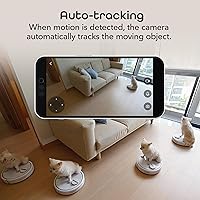
  • Auto-tracking follows movement across the frame automatically, reducing the need to manually pan.
  • Works with both Alexa and Google Assistant, making voice-activated viewing genuinely easy.
  • Setup via the Geeni app takes under ten minutes with no hub or extra hardware required.
  • Two-way audio is responsive enough for real conversations with kids, pets, or family members.
  • Compact dome design sits unobtrusively on a shelf or mounts cleanly to a wall corner.
  • Night Color infrared mode provides adequate low-light visibility for nurseries and dim bedrooms.
  • At its price tier, the feature set — pan/tilt, auto-tracking, activity zones, two-way audio — is genuinely hard to beat.

Cons

  • Limited to 2.4 GHz Wi-Fi only, which can cause drop-outs in homes with crowded or weak 2.4 GHz bands.
  • The Geeni app has reported reliability issues for some users, including delayed or missed motion notifications.
  • Night vision performance is functional but not impressive — low-contrast and soft in very dark conditions.
  • Requires a constant power outlet; there is no battery backup or wireless operation mode.
  • Strictly indoor-rated, so outdoor or semi-exposed placements are not an option.
  • Audio quality through the built-in speaker is serviceable but can sound hollow or slightly distorted.
  • Cloud storage options and subscription terms are not clearly communicated upfront in the product listing.
  • Some users report the auto-tracking feature occasionally loses its subject or moves sluggishly.
  • The Geeni ecosystem is less established than Arlo, Ring, or Wyze, which may raise long-term support concerns.
  • No local storage slot mentioned, making users dependent on app or cloud access to review recorded footage.

Ratings

The scores below reflect AI-driven analysis of verified global buyer reviews for the Geeni Sentinel 1080p Indoor Security Camera, with spam, bot-generated, and incentivized feedback actively filtered out before scoring. Each category captures both what real users praised and where frustrations surfaced, so the picture you get here is honest rather than flattering. Strengths and pain points are weighted equally, giving you a clear-eyed view of what this pan/tilt security camera actually delivers in everyday use.

Ease of Setup
88%
Getting this Geeni camera running is one of its most consistently praised traits. Most buyers report being live within ten minutes of opening the box — download the Geeni app, connect to 2.4 GHz Wi-Fi, mount the camera, and you are done. No bridge, no hub, no technical background required.
A recurring issue surfaces for users with mesh networks or routers that broadcast 2.4 GHz and 5 GHz under the same SSID — the setup process fails silently until the bands are manually separated. First-time smart home buyers may not know to troubleshoot this, leading to frustrating initial experiences.
Video Quality
79%
21%
In decent indoor lighting, the 1080p footage is genuinely sharp enough to make out faces, read labels on packages, and track what a toddler is doing across the room. Auto-focus keeps the image stable during pan/tilt movements, which is not guaranteed at this price tier.
Compression artifacts appear more frequently during live streaming than in recorded clips, making the live feed look slightly softer than the stored footage. Colors can also wash out near windows during bright afternoons, which is a common limitation of cameras in this segment.
Night Vision
61%
39%
The Night Color infrared mode adds a useful layer of context over standard black-and-white IR — you can make out general shapes, movement, and even rough color tones in a dark nursery or dimly lit hallway. For basic low-light monitoring, it gets the job done.
Detail sharpness drops off noticeably in true darkness, and faces are difficult to identify clearly beyond a few feet from the lens. Users who expected performance comparable to higher-end cameras were consistently disappointed, and the Night Color mode can look grainy in near-total darkness.
Pan/Tilt Performance
83%
The motorized pan/tilt is the standout mechanical feature of the Sentinel indoor cam, and buyers who use it for room-wide monitoring genuinely appreciate not having to reposition the camera physically. Remote directional control through the app is responsive, and the range covers most standard room sizes effectively.
At high pan speeds, the motor produces an audible whirring sound that some users find noticeable in quiet rooms — particularly relevant for baby monitoring use cases. The movement can also feel slightly jerky rather than fluid when making sharp directional changes through the app.
Auto-Tracking
74%
26%
Auto-tracking works reliably for slow to moderate movement — a pet walking across a room, a child playing, or someone moving through a hallway triggers the camera to follow with a satisfying lag-free pivot in most cases. At this price, having any auto-tracking at all is a genuine differentiator.
Fast or erratic movement — a dog sprinting, a toddler running — occasionally causes the tracking to lose the subject or overcorrect in the wrong direction. In environments with multiple moving objects, the camera can struggle to choose a target, leading to back-and-forth panning that generates more confusion than coverage.
Motion Detection & Alerts
72%
28%
Custom activity zones are a meaningful practical feature — being able to restrict alerts to just a crib corner or a front door area significantly reduces notification fatigue. When the zones are configured correctly, buyers report that the alert accuracy improves noticeably over default settings.
Alert delivery lag is a recurring complaint, with some users reporting notifications arriving 10 to 20 seconds after an event — long enough for a motion-triggered moment to be over before anyone can react. Sensitivity calibration can also be hit-or-miss, occasionally missing slow-moving subjects within the defined zone.
Two-Way Audio
68%
32%
Two-way audio works well enough for short, practical interactions — calling a pet, talking to a child, or giving quick instructions to someone at home. Latency is acceptable for casual communication, and the microphone picks up voices clearly enough in quiet room environments.
The built-in speaker produces a noticeably hollow, slightly tinny sound that becomes more apparent during longer conversations. Background noise on either end — a TV, traffic, or a crying baby — tends to muddy the audio channel and make communication harder than a standard phone call.
App Experience
66%
34%
The Geeni app has an intuitive layout that most first-time camera owners can navigate without consulting a manual. Live streaming loads quickly under stable Wi-Fi conditions, and switching between activity zone settings and alert preferences is straightforward from the main camera screen.
App stability is a known weak point — multiple buyers mention periodic crashes, failed login sessions after updates, and features that temporarily stop working without explanation. On Android in particular, background notification delivery can be inconsistent, which undermines the core promise of real-time alerts.
Wi-Fi Connectivity
58%
42%
In homes with a stable, dedicated 2.4 GHz signal and the camera positioned within reasonable range of the router, connectivity is generally reliable and stays connected without manual resets. Users in smaller apartments or homes with a single-band router rarely reported persistent issues.
The 2.4 GHz-only limitation is the source of the most consistent frustration in user feedback. In homes with congested 2.4 GHz channels, or where the router is more than a couple of rooms away, drop-outs happen with enough regularity to be genuinely disruptive to real-time monitoring.
Build Quality
69%
31%
The dome housing feels more solid than what most buyers expect from a camera at this price, with no creaking or flex in the casing. The wall-mount bracket secures the camera firmly and does not loosen with repeated pan/tilt movements over time, which is a legitimate quality concern with rotating cameras.
The plastic finish attracts fingerprints and smudges easily and can look slightly cheap up close, particularly against premium interior finishes. The cable exit point from the base is not especially tidy, and concealing the power cord during wall mounting requires additional effort.
Voice Assistant Integration
81%
19%
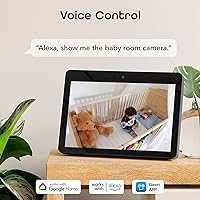
For households already invested in Alexa or Google Home, the ability to pull up a live feed hands-free is a genuine convenience — asking a smart display to show a specific room works reliably and is noticeably faster than opening the Geeni app manually.
Voice control is limited to live viewing commands; you cannot use Alexa or Google Assistant to pan the camera, trigger recordings, or adjust settings. Users expecting deeper smart home integration beyond feed display will find the current functionality fairly narrow.
Installation Flexibility
75%
25%
The lightweight dome design gives buyers several placement options — it works on a flat shelf without any mounting hardware, and wall mounting in a corner is straightforward with the included bracket. The compact footprint means it does not dominate a room visually.
Being corded limits where you can realistically place it — the camera needs to be within cable reach of a power outlet, which rules out ceiling-center placement or any spot far from a wall socket. Cord management is left entirely to the buyer, and there is no included cable clip or conduit.
Value for Money
84%
Measured against what buyers pay for cameras with pan/tilt, auto-tracking, activity zones, and voice assistant support from more established brands, this pan/tilt security camera delivers a surprisingly dense feature set at its price point. First-time buyers who calibrate their expectations accordingly tend to feel they got a strong deal.
The value equation shifts somewhat if you factor in a potential cloud storage subscription for ongoing footage access. Buyers who assumed free indefinite cloud recording came included occasionally felt misled once they discovered the storage tier limitations after setup.
Privacy & Security
57%
43%
The camera supports basic account-level password protection through the Geeni app, and the motion alert system can be toggled off quickly when you are home — a practical feature that security-conscious buyers appreciate for indoor monitoring.
Geeni is a smaller brand compared to Arlo, Ring, or Wyze, and buyers with data privacy concerns note that there is limited published transparency around cloud data handling, encryption standards, and server locations. For privacy-focused users, this lack of documentation creates a lingering unease that larger competitors partly address.

Suitable for:

The Geeni Sentinel 1080p Indoor Security Camera is a strong match for buyers who want meaningful room coverage without the complexity or cost of a premium system. Parents who've outgrown a basic audio baby monitor will appreciate being able to watch, pan across the room, and talk to their child directly from a phone — all without buying separate hardware. Pet owners working from home or traveling short distances will find the two-way audio surprisingly useful for calming an anxious dog or checking on a cat's feeding area. Renters and first-time homeowners who already use Alexa or Google Home will slot this Geeni camera into their existing setup with minimal friction, since no hub or bridge is required. If your goal is reliable daytime visibility, motion alerts for a specific zone, and the convenience of voice-activated viewing in a single indoor room, this pan/tilt security camera punches well above what its price tag suggests.
Not suitable for:

The Geeni Sentinel 1080p Indoor Security Camera has real limitations that make it the wrong tool for certain buyers, and it's worth being upfront about them. Because it is strictly an indoor camera with no weather resistance, anyone hoping to monitor a front porch, driveway, backyard, or garage entrance will need to look elsewhere. Households running a 5 GHz-only Wi-Fi network, or those with notoriously spotty 2.4 GHz signal, may run into persistent connectivity frustrations that no amount of troubleshooting will fully resolve. If you need professional-grade night vision — the kind that produces crisp, detailed footage in near-total darkness — this Sentinel indoor cam will fall short of that bar. Power users who want local storage without cloud dependency, or who need multi-camera management with advanced scheduling, will likely find the Geeni app ecosystem too limited for their needs. And because it requires a constant power outlet, it is not a discreet or flexible option for rooms where cord management is a concern.

Specifications

  • Video Resolution: Records and streams footage at up to 1080p Full HD with auto-focus for clear detail in well-lit conditions.
  • Form Factor: Dome-shaped housing designed for discreet indoor placement on a shelf, tabletop, or wall-mounted corner.
  • Pan/Tilt: Motorized pan and tilt mechanism allows remote directional control through the Geeni app without physically moving the camera.
  • Night Vision: Infrared night vision with Night Color mode provides usable low-light visibility in dimly lit indoor rooms.
  • Motion Detection: Built-in motion sensor supports custom activity zones, allowing alerts to be triggered only within user-defined areas of the frame.
  • Two-Way Audio: Integrated microphone and speaker enable real-time two-way voice communication between the camera and the Geeni app.
  • Power Source: Corded electric power supply operating at 5 volts and 7 watts; no battery option is available.
  • Connectivity: Connects exclusively via 2.4 GHz Wi-Fi; 5 GHz networks are not supported.
  • Voice Assistant: Compatible with Amazon Alexa and Google Assistant for hands-free live feed access via voice command.
  • Mounting Type: Designed for wall mounting, with hardware and a compact footprint suited for corner installation.
  • Indoor Rating: Rated for indoor use only; the unit carries an IP65 classification but is not recommended for outdoor or exposed environments.
  • Compatible Devices: Works with smartphones, tablets, and PCs via the Geeni app, available on iOS and Android platforms.
  • Video Format: Recorded footage is saved in MOV format.
  • Weight: The camera unit weighs 12.6 ounces, making it lightweight enough for straightforward wall mounting.
  • Color: Available in white with a dome-style finish that blends into standard interior walls and ceilings.
  • Voltage: Operates at 5 volts via a corded electric connection; no battery backup is included.
  • Auto-Tracking: The camera automatically pans to follow detected movement across the frame in real time.
  • Channels: Supports two-channel audio communication through the built-in microphone and speaker system.

Related Reviews

Geeni Look 1080p Indoor Security Camera
71%
78%
Video Clarity
61%
Night Vision
91%
Setup Experience
58%
App Performance
67%
Motion Detection
More
Geeni Glimpse Indoor Security Camera
81%
91%
Value for Money
96%
Ease of Installation
88%
Wi-Fi Connectivity
85%
Motion Detection
65%
Two-Way Audio Quality
More
EZVIZ C1C 1080P Indoor Security Camera
74%
84%
Video Quality
76%
Night Vision
89%
Ease of Setup
78%
Motion Detection
71%
Two-Way Audio
More
TETHYS Wireless 1080P Pan/Tilt Indoor Security Camera
70%
78%
Video Quality
67%
Night Vision Performance
83%
Pan and Tilt Functionality
58%
App Experience (MIPC)
71%
Motion Detection
More
EZVIZ C6N 1080P Pan/Tilt Indoor Security Camera
76%
91%
Ease of Setup
84%
Video Quality (Daytime)
71%
Night Vision Performance
88%
Pan/Tilt & Auto-Tracking
76%
Two-Way Audio
More
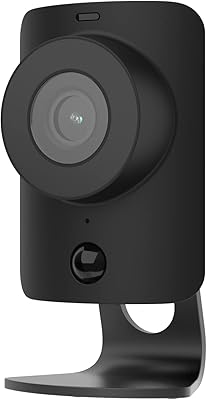
SimpliSafe SimpliCam 1080p Indoor Security Camera
79%
88%
Image Quality
83%
Night Vision Performance
94%
Privacy Shutter
76%
Two-Way Audio
73%
Motion Detection & Alerts
More
Geeni Hawk 2 Outdoor Security Camera
71%
88%
Ease of Setup
76%
Daytime Video Quality
59%
Night Vision
84%
Weather Resistance
83%
Smart Home Integration
More
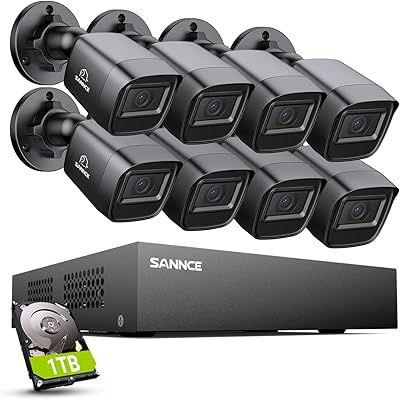
SANNCE DVR-100 1TB 8CH Security Camera System
74%
83%
Daytime Image Quality
67%
Night Vision Performance
79%
Build Quality & Weatherproofing
74%
DVR Reliability & Performance
81%
Storage & Recording
More
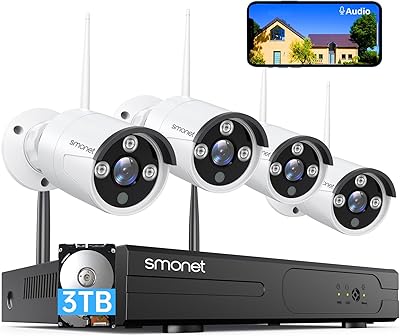
SMONET 8-Channel Wireless Security Camera System with 4pcs 1080P Cameras and 3TB HDD
85%
91%
Value for Money
96%
Ease of Setup
87%
Video Quality
90%
Night Vision Performance
85%
App Usability
More
Owltron 5MP Indoor Security Camera
85%
91%
Night Vision Performance
89%
Motion Detection Accuracy
75%
Wi-Fi Connectivity
92%
Ease of Setup
80%
Audio Quality
More

FAQ

No, this Geeni camera only supports 2.4 GHz Wi-Fi networks. If your router broadcasts both bands under the same network name, you may need to separate them in your router settings and connect the camera specifically to the 2.4 GHz band during setup.

No hub is required. The Sentinel indoor cam connects directly to your home Wi-Fi through the Geeni app, which handles everything from initial setup to live streaming and alert management.

It is not recommended for outdoor use. Despite carrying an IP65 rating in the product specs, Geeni positions this as an indoor-only camera, and using it in exposed conditions risks damage not covered under the standard warranty.

When the camera detects movement within its field of view, the motorized pan/tilt mechanism automatically repositions to follow the subject across the room. It is not perfect — fast or erratic movement can occasionally cause it to lose track — but for general monitoring of pets or children it works well enough.

The Geeni Sentinel 1080p Indoor Security Camera uses the Geeni cloud storage platform, which may require a subscription for extended recording history. Basic live viewing and motion alerts are accessible through the free app, but ongoing cloud storage of footage typically involves a paid plan.
It is adequate for checking on a sleeping baby or spotting a pet in a dark room, but do not expect sharp, detailed facial recognition in low-light conditions. The Night Color infrared mode adds some color context compared to standard black-and-white IR, though overall clarity drops noticeably once the lights go out.

Yes, as long as both your phone and the camera have an active internet connection, you can initiate two-way audio through the Geeni app from anywhere. The audio is functional and clear enough for short conversations, though some users describe the speaker quality as slightly hollow.

Activity zones let you draw a specific region within the camera frame — say, just the crib corner or the front door — so that motion outside that area does not trigger a notification. In practice, this meaningfully cuts down on alerts from curtains moving or background foot traffic, which is one of the more useful features on this pan/tilt security camera.

It is compatible with both, but you would link it to each platform separately through their respective apps. Most people use it with one or the other rather than both simultaneously, but there is no technical restriction preventing dual integration.

For parents who want more than a traditional audio baby monitor, the Sentinel indoor cam is a practical upgrade. You get live video, the ability to pan across the nursery remotely, two-way audio to soothe the baby, and motion alerts if something changes while you are in another room. Night vision is sufficient for a dark nursery, though it is softer than dedicated baby monitor cameras at higher price points.

Where to Buy