Overview

The FREETIM J02-B Electric Air Duster arrives at a moment when a lot of people are quietly questioning why they keep buying single-use canned air that runs cold, loses pressure, and ends up in the bin every few weeks. This rechargeable air blower is compact enough to slide into a desk drawer, fully cordless, and comes with a dual-battery configuration that also flips into a light vacuum mode — two features you don't always see bundled together at this price point. It won't replace a workshop compressor, but for routine desk maintenance, it handles the job reliably without the waste.
Features & Benefits

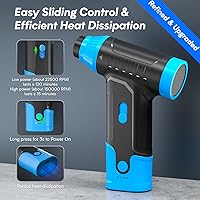
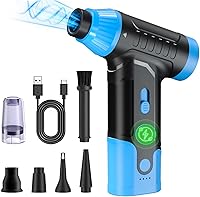
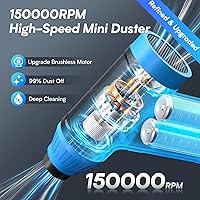
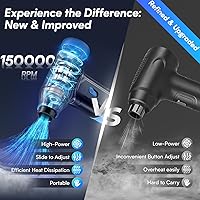
The brushless motor hitting 150,000 RPM is the core of what this electric duster does well. In practical terms, that means a steady, focused stream of air that clears dust from keyboard switches, PC heatsinks, and air vents without the awkward tilting or pressure drop you get with canned alternatives. Five nozzle attachments come in the box, covering everything from wide flat surfaces to deep narrow crevices. A built-in heat dissipation system keeps the unit from becoming uncomfortable during longer sessions. Controls stay simple: one button to power on, a speed adjustment slider, and a triple-press shortcut to flip into vacuum mode.

Best For

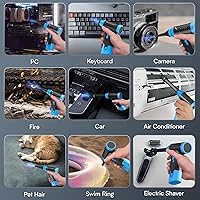
This rechargeable air blower is a natural fit for PC builders and remote workers doing regular cleanups on keyboards, tower fans, and laptop vents. Photographers will appreciate the adjustable airflow for removing dust from camera bodies and lens filters without risking damage. It also earns its keep in the car — dashboard vents, cup holders, and seat crevices are exactly the kind of tight spots where a portable cordless tool shines. If you've been trying to cut disposable cans for environmental or cost reasons, this is a practical swap. The dual-mode design also appeals to anyone wanting one tool that both blows and vacuums.

User Feedback

Most buyers respond positively to how light and easy to handle the FREETIM blower is, and the ability to switch between blowing and vacuuming without grabbing a second tool earns consistent praise. The included nozzle variety comes up often as a genuine highlight. That said, runtime is a real caveat — at full power, 15 minutes moves quickly during a thorough PC deep-clean. Some users have also flagged that the motor gets noticeably loud at maximum speed, which matters if you work in a shared space. Airflow is strong for a cordless unit, but it is not quite the same burst as a fresh pressurized can. Overall sentiment leans positive for everyday tasks, with runtime expectations set accordingly.

Pros

  • Eliminates the ongoing cost and waste of single-use compressed air cans over time.
  • Cordless design makes it easy to move between a desk, a car, and a camera bag without any hassle.
  • Five nozzle attachments cover a wide range of surfaces, from wide keyboard sweeps to tight air vents.
  • USB-C charging means one less proprietary cable cluttering your desk setup.
  • The built-in speed slider gives real control over airflow intensity for delicate electronics.
  • Dual-battery configuration extends runtime beyond most single-cell competitors in this category.
  • Switching between blow and vacuum mode without grabbing a second tool is a genuinely useful convenience.
  • At under 12 ounces, this rechargeable air blower is comfortable to use one-handed without fatigue.
  • Heat management holds up well during normal use, keeping the housing comfortable to hold throughout a session.
  • Compact enough to store in a drawer or bag and actually get used regularly rather than sitting on a shelf.

Cons

  • Fifteen minutes of max-power runtime moves fast during a thorough PC deep-clean.
  • Motor noise at full speed is noticeable enough to disrupt open-plan offices or shared living spaces.
  • A couple of nozzle attachments fit loosely and can pop off unexpectedly at high speed.
  • No meaningful battery level indicator makes it hard to know how much runtime is left mid-task.
  • Long-term battery capacity may degrade noticeably after six or more months of heavy use.
  • Airflow, while strong for a cordless unit, does not fully replicate the sharp burst of a fresh aerosol can.
  • The vacuum mode is only effective for loose surface debris — it will not pull compacted or embedded dust.
  • The triple-press vacuum toggle is not intuitive and catches first-time users off guard without the manual.
  • ABS housing shows light surface scratching over time and does not feel particularly resilient to drops.
  • No information provided on battery replacement or recycling, which is a gap for sustainability-focused buyers.

Ratings

The scores below were generated by AI after analyzing verified buyer reviews worldwide, with spam, bot-submitted, and incentivized feedback actively filtered out before any scoring was applied. Based on that analysis, the FREETIM J02-B Electric Air Duster lands as a genuinely capable mid-range tool for everyday electronics maintenance, with real strengths in portability and versatility — but also a few honest limitations that buyers should weigh before purchasing. Both the highlights and the friction points are reflected transparently in every category score.
Blowing Power
78%
22%
At maximum speed, the airflow is strong enough to clear accumulated dust from keyboard switches, CPU heatsink fins, and laptop vents in a single pass. Most users coming from canned air report a noticeable and consistent blast that doesn't taper off mid-clean the way a nearly empty aerosol can does.
It isn't a direct substitute for a fresh pressurized can at point-blank range — some users note that stubborn, compacted dust in tight GPU slots occasionally needs a second pass. Expectations calibrated to industrial compressors will not be met here.
Battery Life & Runtime
62%
38%
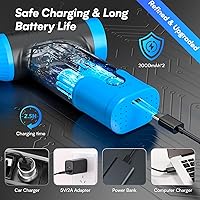
The dual-battery configuration does extend usability compared to single-cell competitors, and for quick keyboard or monitor vent cleanups the runtime feels adequate. Recharging via USB-C in roughly 2.5 hours is convenient for anyone already running a USB-C desk setup.
Fifteen minutes of maximum-power runtime is the most commonly cited frustration in user reviews. Anyone planning a thorough PC deep-clean — pulling panels, clearing multiple fans, and tackling cable dust — will likely hit the limit before finishing. It encourages working in planned, focused bursts rather than extended sessions.
Portability & Form Factor
91%
At just under 12 ounces, this rechargeable air blower is genuinely easy to handle with one hand for extended periods. Users frequently mention tossing it in a laptop bag or keeping it in a car glove box, which speaks to how naturally it fits into mobile or multi-location routines.
The compact body is a strength overall, but a small number of users with larger hands find the grip slightly narrow at sustained high speed. It is a minor ergonomic note rather than a serious complaint, but worth considering for prolonged use.
Nozzle Variety & Adaptability
86%
Five attachments cover a genuinely useful range of scenarios — from broad surface sweeps to pinpoint nozzles that reach deep between keycaps or into air conditioning slats. Car owners in particular highlight how well the narrow extensions handle dashboard vents and between seat cushions.
Nozzle fitment on a couple of the attachments has been flagged as slightly loose by some users, occasionally causing them to pop off mid-use at high speed. It is not universal feedback, but it appears often enough in reviews to be worth mentioning.
Vacuum Mode Functionality
67%
33%
The ability to switch from blowing to vacuuming with a triple-press — without needing a second tool — is a genuinely appreciated feature for users cleaning keyboards or car interiors where they want to capture debris rather than scatter it. It works well for light surface pickup.
Users are consistent that this is light-duty vacuuming at best. It handles loose crumbs and surface dust effectively, but it won't pull embedded grit from carpet fibers or deep crevices. Treating it as a supplementary feature rather than a primary vacuum function keeps expectations realistic.
Noise Level
61%
39%
At low-to-mid speed settings, the FREETIM blower operates at a tolerable volume for most home office environments. Users who stick to moderate speeds for camera gear or light keyboard cleaning rarely flag noise as a concern.
At maximum RPM the motor gets noticeably loud — several reviewers specifically mention it being disruptive in open-plan offices or shared living spaces. It is not ear-splitting, but it is the kind of sound that prompts colleagues to look up from their screens.
Heat Management
83%
The built-in heat dissipation system holds up well during continuous use within the rated runtime window. Users doing back-to-back moderate-speed sessions report the unit staying comfortable to hold, which isn't a given for brushless motors spinning at this RPM range.
A small portion of users pushing the blower at maximum speed continuously toward the end of its battery cycle report the housing warming more than expected. It stays within safe limits, but it is something to monitor if you habitually run any cordless tool until the battery is fully drained.
Build Quality & Durability
74%
26%
The ABS plastic housing feels solid for the weight class, and the overall assembly gives a reasonably confident first impression out of the box. Users who have owned this electric duster for several months generally report no structural degradation under regular use.
It does not have a premium feel compared to higher-priced competitors — the plastic finish shows light scratching over time and a few users have reported minor fit-and-finish inconsistencies on the nozzle port. For the price tier it is acceptable, but it is not built to withstand drops.
Ease of Use & Controls
88%
Two physical controls cover everything: a round power button and a sliding speed adjuster. New users consistently pick it up without reading the manual, which matters when the tool lives in a drawer and gets used infrequently. The triple-press vacuum shortcut is intuitive once you know it exists.
The triple-press vacuum toggle is not immediately discoverable — a small but consistent complaint from first-time users who didn't read the instructions. Better labeling or a dedicated mode button would eliminate the friction entirely.
Charging Convenience
87%
USB-C charging means most users can power it from the same cable they use for their phone or laptop, removing one more proprietary charger from the desk. The roughly 2.5-hour charge time is fast enough that forgetting to charge it overnight is rarely a problem.
There is no charging indicator light beyond a basic LED that some users find hard to read in bright environments. A few reviewers mention wishing for a more informative battery level display rather than guessing how much runtime remains.
Value for Money
79%
21%
Over a 12-month period, eliminating regular canned air purchases adds up to meaningful savings, and most users acknowledge this in their longer-term reviews. The bundled nozzle set, dual-battery design, and vacuum mode together justify the mid-range asking price for buyers who clean electronics regularly.
For occasional users who only clean their PC once or twice a year, the math is less compelling. The runtime limitation also means power users may find themselves wishing they had spent a bit more for a longer-running model.
Long-Term Battery Health
58%
42%
Early-ownership reviews are consistently positive about battery performance, and users in the three-to-six-month window report no significant drop in runtime. The lithium-ion cells appear well-matched to the motor demands under normal usage patterns.
Longer-term user feedback — beyond six months of heavy use — raises some concerns about capacity degradation, with a handful of reviewers noting reduced runtime compared to when the unit was new. It is not widespread enough to be alarming, but it is an open question for longevity-focused buyers.
Suitability for Camera & Delicate Gear
72%
28%
At lower speed settings, the airflow is gentle enough that photographers and hobbyists use it safely on camera bodies, lens barrels, and filter rings. The adjustable slider gives meaningful control over blast intensity, which is exactly what delicate gear requires.
It is not a substitute for a dedicated air blower puffer used directly on optical glass or image sensors — the minimum speed is still strong enough that most photographers keep it away from exposed sensor surfaces. It is best used on the external body rather than internal optics.
Environmental Impact vs Canned Air
89%
This is one of the clearest wins for this rechargeable air blower. Eliminating single-use aerosol cans — each containing propellant gases — is a straightforward environmental benefit that eco-conscious buyers actively call out in their reviews as a primary purchase motivator.
The product still relies on a lithium-ion battery that has its own end-of-life environmental footprint, and FREETIM does not prominently address recycling or battery replacement options. For the most sustainability-focused buyers, that is a gap worth noting.

Suitable for:

The FREETIM J02-B Electric Air Duster makes the most sense for people who clean their electronics regularly and are tired of the recurring cost and waste of single-use canned air. Remote workers and PC enthusiasts who do monthly keyboard cleanups, fan maintenance, or case dustings will find the cordless convenience and adjustable airflow genuinely practical for that kind of routine. Photographers and hobbyists dealing with dust on camera bodies, filter rings, or small circuit boards will appreciate how the lower speed settings let them work carefully on sensitive gear without risking damage. Car owners who want one compact tool to handle dashboard vents, center console crevices, and door pockets will also get solid mileage out of it. If you want a single device that can both blow debris out and lightly vacuum it up — without switching tools — this rechargeable air blower covers that workflow better than most options at this price tier.
Not suitable for:

The FREETIM J02-B Electric Air Duster is not the right call for anyone who needs sustained, heavy-duty cleaning power over long uninterrupted sessions. If you manage a small IT repair shop, maintain server racks, or regularly deep-clean multiple desktop towers in a single sitting, the 15-minute maximum runtime will become a recurring frustration rather than a minor inconvenience. Users who have been relying on a workshop air compressor or a high-output electric duster with a longer runtime will likely find this electric duster underwhelming by comparison — the airflow is solid for a cordless unit, but it does not replicate that kind of sustained pressure. People in shared or noise-sensitive environments should also think twice, since the motor gets genuinely loud at full speed. Finally, buyers expecting robust vacuum performance — the kind that pulls embedded debris from carpet or upholstery — will need a dedicated appliance; the vacuum mode here is best treated as a light supplementary function rather than a true cleaning mode.
Specifications

  • Brand & Model: Manufactured by FREETIM under model number J02-B.
  • Motor Type: Brushless motor rated at 150,000 RPM for consistent, sustained airflow without brush wear over time.
  • Battery Configuration: Dual built-in lithium-ion cells, each rated at 2000mAh, included in the box and non-removable.
  • Max Runtime: Delivers up to 15 minutes of continuous use at maximum power output on a full charge.
  • Charge Time: Reaches a full charge in approximately 2.5 hours from a standard USB-C power source.
  • Charging Port: USB-C port for charging, compatible with most modern cables and wall adapters.
  • Operating Modes: Switchable between blower and vacuum mode via a triple-press of the power button.
  • Speed Control: Airflow intensity is adjusted using a physical sliding button on the body of the unit.
  • Nozzle Attachments: Comes with 5 interchangeable nozzle accessories suited to different surface types and cleaning angles.
  • Weight: Unit weighs approximately 11.7 oz (around 0.33 kg), enabling comfortable one-handed operation.
  • Dimensions: Measures 4″ x 4″ x 4.72″, making it compact enough to store in a drawer or carry in a bag.
  • Housing Material: Outer shell is constructed from ABS plastic, providing a balance of light weight and moderate impact resistance.
  • Heat Management: Integrated heat dissipation system helps regulate motor temperature during extended cleaning sessions.
  • Power Button: Round button powers the unit on or off with a 3-second press and toggles vacuum mode with three quick presses.
  • Color Option: Available in blue as the standard colorway for this model variant.
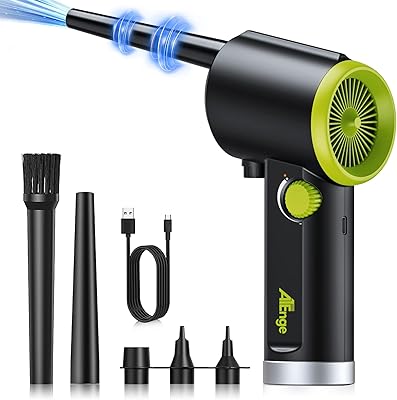
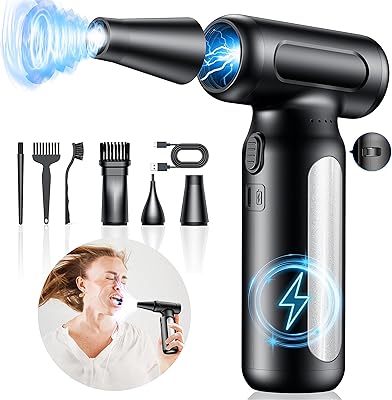
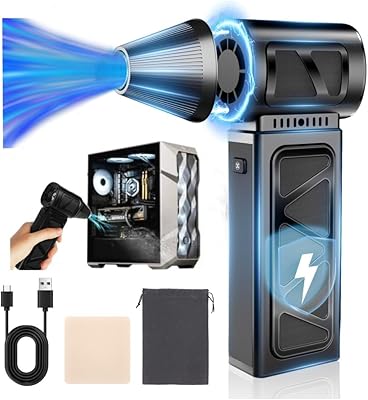
  • In-Box Contents: Package includes the blower unit, 5 nozzle attachments, and a USB-C charging cable.
  • First Available: This product was first listed for sale in June 2024, placing it among the newer entrants in the category.
  • Intended Use: Designed primarily for cleaning electronics, keyboards, cameras, car interiors, and other hard-to-reach surfaces.

Related Reviews
YUHUO 360000RPM Cordless Electric Air Duster
75%
88%
Airflow Power
79%
Battery Life
54%
Noise Level
84%
Charging Speed
63%
Build Quality
More
IT Dusters AirTec Type 3 Electric Duster
78%
83%
Airflow Performance
54%
Noise Level
71%
Nozzle Variety & Attachment Quality
78%
Build Quality & Durability
91%
Ease of Use
More
Goweto Go-AD08PL Electric Air Duster
84%
88%
Airflow Power & Cleaning Performance
92%
Ergonomics & Comfort
64%
Power Source & Convenience
86%
Versatility & Attachments
89%
Value & Cost Savings
More
WOLFBOX MF100 Electric Air Duster
82%
91%
Blowing Power
76%
Battery Life
58%
Noise Level
84%
Build Quality
88%
Nozzle & Attachment Variety
More
KONPAYDE X3001 Electric Air Duster
85%
88%
Performance
85%
Build Quality
91%
Usability
90%
Portability
80%
Noise Level
More
RapAir B02 Electric Air Duster
76%
83%
Blowing Performance
61%
Suction Capability
78%
Battery Life
86%
Charging Speed & Convenience
69%
Build Quality & Durability
More
TROIZO BC01 Electric Air Duster
78%
91%
Motor Power & Airflow
83%
Battery Life at Low Speed
58%
Max-Speed Runtime
89%
Portability & Form Factor
63%
Nozzle & Brush Attachment System
More
SAILHAPI ML300X
SAILHAPI ML300X
78%
91%
Airflow Power
84%
Battery Life
76%
Speed Control Usability
61%
Noise Level
73%
Build Quality & Durability
More
innhom 600W Electric Air Duster
87%
87%
Cleaning Performance
92%
Build Quality
88%
Ergonomics and Design
90%
Ease of Use
65%
Noise Level at High Speeds
More
TRANSWARRIOR C3 Electric Air Duster
86%
92%
Airflow Power
78%
Battery Life
94%
Portability & Size
61%
Noise Level
88%
Speed Control & Usability
More

FAQ

It is competitive with a mid-level canned air can, but it isn't quite the same as a brand-new pressurized can held at point-blank range. The advantage is consistency — this rechargeable air blower maintains steady airflow throughout the session rather than losing pressure as a can empties. For regular keyboard and vent cleaning, most users find it more than adequate.

Fifteen minutes at maximum power is the rated ceiling, and whether that feels sufficient really depends on your task. A quick keyboard cleanup or a laptop vent blast takes two to three minutes at most, so you have plenty of headroom for routine maintenance. Where it gets tight is during thorough PC deep-cleans involving multiple fans, cable runs, and heatsinks — that kind of session can push you to the limit or beyond. Charging back up takes about 2.5 hours, so planning ahead matters if you have a big job.

On the external body of a camera, lens barrel, or filter ring — yes, especially at lower speed settings. However, it is not recommended for use directly on an exposed image sensor or optical glass elements inside a lens. The minimum airflow is still strong enough to potentially dislodge internal components on very delicate gear. A manual squeeze blower is the safer choice for sensor cleaning specifically.

Press the round power button three times in quick succession and it will flip into vacuum mode. It is not immediately obvious without reading the instructions, which is a fair criticism — but once you know the shortcut, it becomes second nature. To switch back to blower mode, just do the same triple-press again.

Yes — the box includes the unit itself, five nozzle attachments for different cleaning scenarios, and a USB-C charging cable. You will need to supply your own USB-C power adapter or plug it into an existing USB-C port, but beyond that there is nothing additional to purchase before using it.

Under normal use within its rated runtime, the housing stays comfortable to hold thanks to a built-in heat dissipation system. Some users report the body warming up more noticeably if pushed continuously at maximum speed all the way to a low battery. Giving it short breaks during longer tasks is a reasonable precaution.

At low-to-mid speed settings it is manageable — roughly comparable to a small desk fan on high. At full power, the motor gets noticeably loud and will draw attention in a quiet shared workspace. If noise is a genuine concern, plan to use it at a moderate speed setting or during off-hours.

Most of them fit snugly, but a couple of the narrower attachments have been reported by some users as slightly loose at high speed. It is not a universal issue, but it is worth pressing each nozzle firmly onto the port before starting and keeping a hand nearby if you are working at maximum RPM.

It works well in a car — dashboard vents, cup holders, seat crevices, and door pockets are exactly the kind of tight, hard-to-reach spots where a compact cordless blower shines. The vacuum mode is handy for capturing loose crumbs from seat seams without spreading them around. Just keep expectations realistic: it won't replace a car vacuum for floor mats or upholstery.

Early and mid-term feedback is generally positive about battery consistency. A portion of longer-term users — those who have owned it for six months or more with frequent use — do report some reduction in runtime compared to when the unit was new, which is typical of lithium-ion cells in any rechargeable device. For occasional-to-regular use the degradation timeline should be reasonable, but heavy daily users may notice a more accelerated drop over time.