Overview

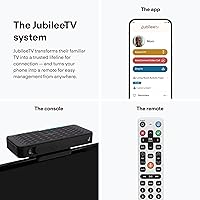
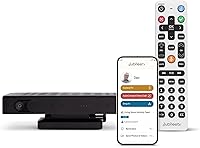
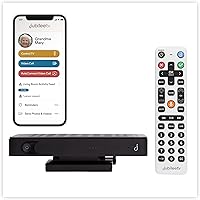
The Caavo JubileeTV Centro Senior TV Care System was built for a very specific kind of worry — the kind that hits when you live two hours away from an aging parent who spends most of their day in front of the television. This caregiver remote system doesn't replace the cable box or streaming stick already plugged in; it layers on top of what's there, adding a connection point between a family member's smartphone and the senior's TV. It sits in a mid-to-premium price tier, which means it's not an impulse buy, but it's also not marketed as a smart home platform. Think of it as a caregiving-first device — narrowly focused, purposefully simple.
Features & Benefits

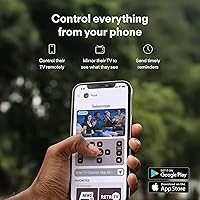
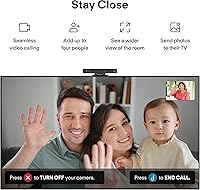
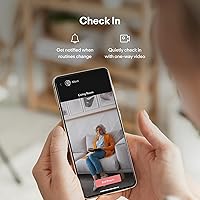
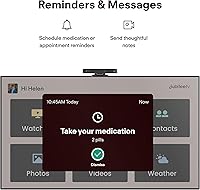
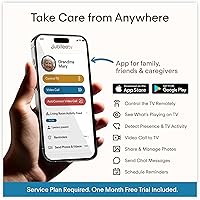
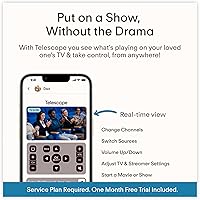
The most practical thing about the JubileeTV device is how it turns the TV into a communication hub. From the companion app on your phone, you can power the TV on or off, adjust volume, and switch inputs — handy when a parent accidentally mutes everything and can't figure out why. The direct-to-TV video calling feature earns its place quickly: calls answer automatically on the TV screen, so the senior never needs to find a phone. The Drop In option lets caregivers quietly check in via one-way video — useful, though worth discussing openly with your loved one beforehand. On-screen reminders and photo messages round out the experience with a personal touch.

Best For

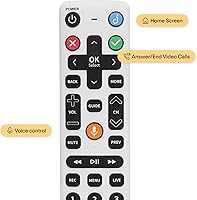
This senior TV care system is purpose-built for long-distance caregivers — adult children who can't drop by daily but want more than a phone call to know their parent is okay. It's especially well-suited to seniors already comfortable with their TV routine but who find smartphones confusing or frustrating. The large backlit voice remote makes it accessible even for those showing early signs of cognitive decline. Assisted living households also benefit, since it works within existing setups. That said, if your parent is already tech-savvy and active, this may feel like overkill — it's really designed for situations where distance, mobility, or cognitive change has made regular check-ins genuinely difficult.

User Feedback

Caregivers frequently cite easy initial setup and the peace of mind the app delivers as the system's strongest points — particularly the ability to confirm a parent is up and moving without making a phone call. Room entry detection gets consistent praise for low-effort daily reassurance. On the critical side, some users flag Wi-Fi dependency as a real weakness: if the home connection drops, so does remote access. A subscription fee beyond the hardware cost is another point worth clarifying before buying. A few buyers noted compatibility quirks with older TVs or less common cable boxes. Overall, satisfaction runs high among those who come in with realistic expectations about what this caregiver remote system is actually designed to do.

Pros

  • Works alongside existing cable, satellite, or streaming devices without replacing anything.
  • Auto-answer video calls connect directly to the TV screen — no phone required from the senior's side.
  • Large backlit buttons and voice control make the remote genuinely usable for seniors with limited dexterity.
  • Room entry and TV usage monitoring gives caregivers low-effort daily reassurance without constant calls.
  • On-screen reminders and photo messages add a personal, caring touch beyond pure monitoring.
  • Setup is widely reported as straightforward, even for caregivers who aren't especially tech-savvy.
  • Supports up to four connected devices, giving it flexibility across typical living room setups.
  • The companion app works on both iOS and Android smartphones and tablets.
  • One-way Drop In feature lets you quietly confirm all is well without interrupting your loved one.

Cons

  • Full functionality depends entirely on a stable home Wi-Fi connection — a real vulnerability for some seniors.
  • A potential monthly subscription cost on top of the hardware price may catch buyers off guard.
  • The Drop In and room-monitoring features raise legitimate privacy questions that require upfront family discussion.
  • Compatibility issues have been reported with older televisions and less common cable box configurations.
  • The device adds another piece of hardware to an already cluttered entertainment setup.
  • Caregivers managing multiple households cannot easily scale this system without significant added cost.
  • Initial onboarding can be confusing for seniors if no family member is present to guide the first-time setup.
  • The system is purpose-specific — it offers no smart home integration or broader utility beyond caregiving.

Ratings

The scores below reflect an AI-driven analysis of verified buyer reviews for the Caavo JubileeTV Centro Senior TV Care System, collected globally and filtered to remove incentivized, bot-generated, and duplicate submissions. Every category captures both what real caregivers and families praised and the friction points that genuinely frustrated them. Nothing has been smoothed over — the numbers reflect the full picture.

Ease of Setup
83%
Most caregivers who set up the device themselves report getting it running within 30 to 45 minutes, even without a technical background. The step-by-step app guidance is clear enough that adult children were able to walk through it during a single visit to their parent's home.
Remote setup — trying to guide an elderly parent through installation over the phone — is a recurring source of frustration. A handful of users ran into snags pairing the device with older TVs or specific cable box brands that required extra troubleshooting steps not covered in the manual.
Remote TV Control
88%
Being able to turn the TV on, fix an accidentally muted screen, or switch inputs from across the country is genuinely useful in everyday caregiving situations. Caregivers frequently mention using this feature multiple times a week to quietly sort out minor TV issues without needing a full phone call.
The app occasionally experiences short delays before commands register on the TV, which a segment of users found annoying during real-time use. A small number reported that input switching did not work reliably with certain third-party streaming sticks.
Video Calling Experience
91%
The auto-answer feature is the standout capability here — seniors do not need to touch anything for a call to connect, which makes it genuinely accessible for people with mobility limitations or cognitive decline. Families separated by long distances describe this as the single most emotionally valuable feature in the system.
Call quality is directly tied to the strength of both the home Wi-Fi and the caregiver's own internet connection, and some users noted choppy video during peak hours. The full-room camera view, while useful for caregivers, can feel intrusive to seniors who are not fully comfortable with the concept.
Drop In Feature
74%
26%
Caregivers who use Drop In regularly describe it as a quiet, low-stress way to confirm a parent is up and moving without triggering an unnecessary phone call. For families dealing with health anxiety around a parent living alone, the ability to do a quick visual check provides real peace of mind.
The one-way nature of Drop In — where the senior is unaware they are being viewed — creates genuine discomfort for some families and raises privacy concerns that not everyone thinks through before purchasing. Several reviewers noted they stopped using it after their parent expressed feeling uncomfortable once they learned how the feature worked.
Activity Monitoring
79%
21%
Room entry and exit detection, combined with TV usage logs, gives caregivers a surprisingly useful picture of a parent's daily routine without requiring any action from the senior. Users monitoring parents with early dementia found the routine-deviation alerts particularly helpful in spotting off days early.
The monitoring data is fairly coarse — it tells you someone entered the room, not what they did or whether they are okay. A portion of caregivers felt the activity reports lacked enough granularity to be truly actionable, describing them as a starting point for concern rather than a reliable health indicator.
On-Screen Messaging
86%
Sending a medication reminder or a family photo directly to a parent's TV screen is one of those features that sounds gimmicky but ends up being used constantly. Seniors who might ignore a phone notification or forget to check a paper note respond well to a message appearing on the screen they are already watching.
There is no confirmation mechanism that lets caregivers know whether the senior actually saw and read the message, which limits its reliability for critical reminders. Some users wished for a simple acknowledgment button on the remote so they could confirm receipt.
Senior-Friendliness of Remote
84%
The large backlit buttons are a meaningful design choice for seniors with poor eyesight or arthritis, and the voice control option adds another layer of accessibility for those who find physical buttons challenging. Families caring for parents with mild cognitive decline specifically called out the simplified button layout as reducing confusion.
Even with a simplified design, some seniors with more advanced cognitive decline struggled to adapt to a new remote, particularly if they were deeply habituated to their previous one. A few reviewers noted the remote felt slightly heavier and bulkier than expected.
App Usability for Caregivers
81%
19%
The caregiver app is well-organized and most features are accessible within one or two taps, which matters when you are checking in quickly during a work break or before bed. Cross-platform availability on both iOS and Android means most family members can participate regardless of device preference.
Some users reported occasional app crashes or delayed push notifications, which undercut confidence in time-sensitive monitoring scenarios. The app's design language feels functional rather than polished, and a few reviewers found the activity dashboard harder to read at a glance than expected.
Wi-Fi Reliability Dependence
52%
48%
Under normal home broadband conditions, the system performs consistently and the connection between the app and the device is generally stable throughout the day. Users in households with modern routers and reliable internet reported very few interruptions over extended periods of use.
This is the system's most structurally fragile aspect — if the senior's home internet goes down, every single feature stops working instantly, and there is no offline fallback. Caregivers whose parents live in areas with spotty internet or who have had their connection drop unexpectedly describe this as a serious, unresolved vulnerability.
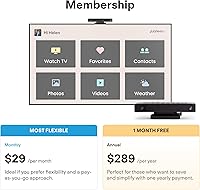
Subscription Value
61%
39%
For families who use the full feature set — video calls, monitoring, messaging, and Drop In — regularly throughout the week, the recurring cost feels justifiable given the breadth of what is unlocked. The hardware itself is solid, and buyers who treat the subscription as a running caregiving service rather than a software add-on tend to feel better about the overall spend.
The combination of a significant upfront hardware cost and an ongoing subscription fee gives many buyers pause, particularly those who expected a one-time purchase. Reviewers who found themselves using only one or two features felt the total cost did not match their actual usage, and cancellation experiences have been described as more complicated than expected.
Device Compatibility
76%
24%
Compatibility with mainstream cable boxes, popular streaming sticks like Roku and Fire TV, and most flat-screen TVs from the past decade is generally solid. The Infrared plus Bluetooth approach gives it broader reach than Wi-Fi-only devices in this category.
Edge cases with older regional cable providers or less common set-top box models do arise, and the troubleshooting process for those situations is not always well-documented. A small but vocal group of reviewers found that certain combinations of hardware in a single entertainment setup caused persistent pairing issues.
Build Quality
77%
23%
The physical hub feels sturdy and purposeful on a TV cabinet, and the remote has a weight and button response that most users described as reassuringly solid for a senior-use device. Nothing about the hardware feels cheap or disposable.
At just over four pounds, the hub is heavier than some buyers anticipated, and a few noted it takes up more shelf space than expected. There have been isolated reports of the remote's backlight dimming earlier than it should, though this appears to be a minority experience.
Privacy Transparency
66%
34%
Caavo does provide documentation around how data is stored and used, and the system does not feel designed to obscure what it is doing from a technically curious buyer. Families who had upfront conversations with their loved ones about the monitoring features generally reported positive outcomes.
The product marketing leans into the caregiver perspective heavily, and critics argue that the framing around Drop In and room monitoring underplays the consent conversation that should happen with the senior. A number of reviewers felt the default should be more explicit notification to the senior when Drop In is active.

Suitable for:

The Caavo JubileeTV Centro Senior TV Care System is genuinely well-matched for adult children or family caregivers who live far from an aging parent and need a low-friction way to stay connected day-to-day. If your parent or grandparent already has a predictable TV routine but wouldn't reliably answer a smartphone, this system turns their existing screen into a communication and check-in point without asking them to learn anything new. It's especially practical for families managing a senior with early cognitive decline, where on-screen medication reminders and routine messaging can quietly reinforce daily structure. Assisted living residents also benefit, since the system works on top of whatever cable or streaming setup is already in the room. For caregivers who want honest, low-key reassurance — not just a phone call, but a real sense of whether their loved one is up and active — this system fills that gap better than most alternatives.
Not suitable for:

The Caavo JubileeTV Centro Senior TV Care System is not a great fit for tech-resistant households that lack a reliable Wi-Fi connection, since the entire remote access and monitoring capability collapses without a stable internet link. Buyers expecting a full smart home platform or looking to replace a senior's existing cable or streaming setup will be disappointed — this is a narrow-purpose device, and it doesn't try to be more. Seniors who are already comfortable using a smartphone, tablet, or video calling app independently probably don't need the added hardware expense. It's also worth pausing if your loved one would feel uncomfortable with the Drop In or room-monitoring features — those capabilities require honest conversation and mutual consent to work ethically in practice. Finally, anyone on a tight budget should factor in whether an ongoing subscription fee applies, since the hardware purchase alone may not cover full functionality long-term.
Specifications

  • Brand: Manufactured by Caavo under the JubileeTV product line.
  • Model: The hardware unit is designated the Centro model.
  • Dimensions: The device measures 10.35 x 5.9 x 1.37 inches in its physical footprint.
  • Weight: The unit weighs 4.11 pounds, making it a modest addition to a TV cabinet.
  • Connectivity: Connects via Bluetooth, Infrared, and Wi-Fi to communicate with TVs and companion devices.
  • App Platforms: The caregiver companion app is available for both iOS and Android smartphones and tablets.
  • Supported Devices: Supports up to four connected devices simultaneously, including TVs, set-top boxes, and streaming sticks.
  • Compatible Devices: Works with televisions, set-top boxes, streaming devices, and DVD or Blu-ray players.
  • Remote Type: Includes a physical voice remote with large, backlit buttons designed for senior accessibility.
  • Batteries: The remote requires two AAA batteries, which are needed for operation but may not be included.
  • Video Calling: Supports direct-to-TV video calls with an auto-answer feature that requires no action from the senior.
  • Drop In Feature: Enables one-way audio and video welfare checks initiated by the caregiver from the app.
  • Monitoring: Tracks TV usage duration, remote control activity, and room entry and exit events.
  • Messaging: Caregivers can send on-screen reminders, text notes, photos, and video messages to the TV.
  • TV Control: Allows remote power, volume, input switching, and channel control via the smartphone app.
  • Launch Date: The product was first made available on June 30, 2023.
  • Sales Rank: Ranked in the top 600 in the Remote Controls category on Amazon at the time of review.

Related Reviews

Earpanda Pro TV Headphones Wireless for Seniors
87%
85%
Sound Quality
92%
Ease of Use
88%
Comfort
90%
Wireless Range
80%
Battery Life
More
HearSound Gold Digital Wireless Headset System for TV
86%
88%
Audio Clarity
91%
Comfort and Fit
86%
Battery Life
75%
Ease of Setup
82%
Range and Connectivity
More
MONAT IR Clinical System Hair Care Kit
85%
89%
Effectiveness in Hair Thinning
85%
Improvement in Hair Thickness
82%
Hair Fall Reduction
91%
Gentleness on Hair and Scalp
88%
Natural Ingredient Quality
More
Nioxin System 2 Scalp Care + Hair Thickening Leave-In Treatment 6.72oz
83%
88%
Effectiveness in Thickening Hair
83%
Scalp Health Improvement
85%
Hair Density Boost
90%
Scent & Refreshing Sensation
84%
Ease of Application
More
Nioxin System 1 Scalp Care + Hair Thickening Leave-In Treatment 6.8oz
86%
88%
Effectiveness for Thinning Hair
91%
Texture & Feel on Hair
78%
Fragrance & Scent
85%
Moisturizing & Hydration
90%
Volume Boosting
More
Nioxin System 3 Scalp Care Hair Thickening Leave-In Treatment 6.4oz
86%
88%
Effectiveness in Hair Thickening
92%
Lightweight Texture
75%
Hydration & Moisture
90%
Volume Boost
80%
Scent
More
Sony KLV-32W602D 32-inch Smart LED TV
73%
94%
International Compatibility
78%
Picture Quality
52%
Smart TV Platform
81%
Build Quality
83%
Value for Money
More
Alda Beauty Care Brazilian Keratin Hair Smoothing Treatment Blowout Straightening System 32 fl oz
84%
89%
Effectiveness for Frizz Control
75%
Ease of Use/Application
84%
Hydration and Moisture Restoration
91%
Shine and Smoothness
78%
Scent/Fragrance
More
MONAT Junior Gentle 3-in-1 Hair Care System (8 fl. oz./6 fl. oz.)
88%
92%
Ease of Use
89%
Effectiveness in Detangling
94%
Gentle on Sensitive Skin
85%
Ingredient Quality
93%
Tear-Free Formula
More
Bahouloer Indoor Outdoor TV Antenna
71%
72%
Signal Reception Quality
41%
Range Accuracy
91%
Ease of Installation
88%
Cable Length & Flexibility
63%
Build Quality & Durability
More

FAQ

No, that is actually one of the most practical aspects of the JubileeTV device. When you initiate a video call from the app, the TV answers automatically. Your parent just needs to be in the room — no buttons to press, no phone to find.

Yes, this caregiver remote system is designed to work alongside whatever setup is already there. It does not replace the cable box or streaming device — it connects on top of them using a combination of Infrared, Bluetooth, and Wi-Fi. Most standard setups are compatible, though a small number of older or less common cable boxes have caused issues for some users, so it is worth checking with Caavo support if you are unsure.

This is an important question to clarify before buying. The hardware has an upfront purchase price, but a recurring subscription fee is typically required to access the full range of remote monitoring, video calling, and app features. Check the current Caavo pricing page for up-to-date plan details, since subscription structures can change.

Drop In lets you open a one-way audio and video feed from the app to check that your loved one is okay — they are not notified in the moment. It is genuinely useful for quick welfare checks, but it does raise real privacy considerations. Most families handle this by discussing it openly with their loved one in advance and treating it as a care tool rather than a covert monitoring option.

Unfortunately, this is a real weak point. The remote access, video calling, and monitoring features all depend on an active Wi-Fi connection in the home. If the internet drops, you lose access through the app until the connection is restored. If your parent's home has unreliable internet, that is worth factoring into the decision.

The physical remote was specifically designed with cognitive accessibility in mind. The buttons are large, clearly labeled, and backlit, which helps in low-light conditions. There is also a voice control option for basic commands. That said, the learning curve for any new device can be a challenge for someone with cognitive decline, so having a family member present during the first few days of use makes a meaningful difference.

Yes, the Caavo JubileeTV Centro Senior TV Care System supports multiple caregivers connecting through the app, which is practical for families where several siblings share caregiving responsibilities. Check the specific plan details for any limits on the number of authorized app users, as this may vary by subscription tier.
The system uses sensors to detect movement in the room and logs that activity in the app. This gives caregivers a general sense of whether a parent has been up and active throughout the day. It is not a precise location tracker — think of it more as a quiet routine check rather than step-by-step monitoring.

Yes, sending on-screen reminders is one of the most frequently praised features of this system. From the app, you can schedule or send immediate text reminders, photos, or even short video messages that appear on the TV. For seniors who might not hear a phone alert or forget to check a note, seeing a message pop up on the screen in front of them tends to work well.

Most caregivers report that the setup process is reasonably straightforward, but it typically goes smoother when someone is physically present with the senior during the first installation. Connecting the device to the TV and configuring it through the app involves a few steps that can be tricky to walk someone through over the phone. If you cannot be there in person, arranging a video call during setup is a practical workaround.