Overview

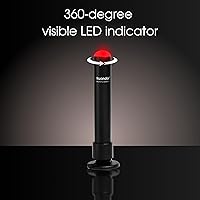
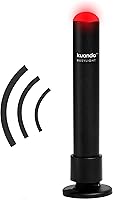
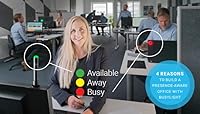
The Kuando Busylight UC Alpha Presence Indicator has been quietly solving one of remote work's most persistent annoyances since 2012: the mid-call shoulder tap. It is a slim, USB-powered LED stick — barely 4.5 inches tall and just over an ounce — that sits on your desk and broadcasts your availability status in color to anyone nearby. Green means free, red means leave me alone. Setup runs through the free kuandoHUB software, which ties the light into your communication platforms automatically. It is not flashy hardware, but it does not need to be. It just needs to work, and largely it does.
Features & Benefits

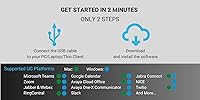
What makes this UC status indicator genuinely useful day-to-day is how it connects with the platforms people actually use. Teams, Zoom, Webex, RingCentral, and Cisco Jabber all sync automatically, changing the light color as your status shifts without any manual input. The Outlook calendar integration is a quiet standout — it can flip the light to busy the moment a meeting starts, even before you join the call. There is also a built-in ringer, which gets overlooked but matters more than you might think. If your headset is off and you step away for a coffee, those 8 ringtones can save you from a missed call. Magnetic mounting keeps placement flexible.

Best For

This desk presence light is best suited to people who live or work in shared spaces and need a low-friction way to signal unavailability. Open-plan offices, co-working setups, and home offices with kids or roommates are all natural fits. It particularly shines for Teams and Zoom-heavy workflows, where automatic status sync removes all manual effort. If you regularly step away from your desk without your headset, the ringer adds real practical value. It is less compelling for solo workers in private offices, or anyone using a niche UC platform that falls outside the supported list. For the right setup, though, it covers a genuine daily need.

User Feedback

Across its review history, the Busylight Alpha sits at a solid four stars — respected, but not universally loved. Buyers who use Teams or Zoom regularly tend to be the happiest, citing reliable status sync and the ringer as features they did not expect to rely on as much as they do. The initial software setup draws the most consistent criticism; some users find kuandoHUB's configuration steps unintuitive, especially when managing multiple platforms simultaneously. Compatibility can also be hit-or-miss on less mainstream UC tools. Nothing here is a fatal flaw, but it is worth knowing that first-time setup may require patience before things run smoothly.

Pros

  • Automatic status sync with Teams and Zoom works reliably without any manual input during the day.
  • The Outlook calendar integration flips the light to busy the moment a meeting begins, completely hands-free.
  • Built-in ringer catches incoming calls even when you are away from your desk and not wearing a headset.
  • Magnetic mounting system allows flexible placement on monitors, walls, or cubicle partitions without permanent fixtures.
  • Software brightness controls let you dial the LED intensity up or down to suit your specific workspace.
  • At under 2 ounces and 4.5 inches tall, this desk presence light takes up virtually no desk real estate.
  • Free kuandoHUB software supports multiple UC platforms simultaneously, useful for hybrid-team environments.
  • Hardware has proven long-term durability, with many users reporting reliable performance over several years of daily use.
  • LED color visibility is strong enough to be read clearly from across a room or open-plan floor.

Cons

  • Initial kuandoHUB software setup is genuinely confusing for first-time users, especially with multiple platforms.
  • Platform updates from Teams or Windows occasionally break sync behavior until a software patch is released.
  • Ringer functionality is UC-platform dependent, meaning not every supported tool will trigger it consistently.
  • The adhesive mounting plate is a one-time commitment — repositioning it risks surface damage or residue.
  • Google Calendar is not supported, leaving users outside Microsoft ecosystems without the auto-meeting feature.
  • The USB cable length is limited, which restricts placement options depending on desk and port configuration.
  • Support documentation bundled with the device is thin, pushing buyers to self-serve online for setup help.
  • Buyers on niche or regional UC platforms may find compatibility unreliable or entirely absent.
  • The software interface for managing multiple simultaneous platforms feels underdeveloped and occasionally conflicts.
  • In brightly lit or sunlit environments, LED visibility can diminish, reducing its effectiveness as a room-wide signal.

Ratings

The Kuando Busylight UC Alpha Presence Indicator has been rated across the categories below using AI analysis of verified global buyer reviews, with spam, bot activity, and incentivized feedback actively filtered out before scoring. Ratings reflect the honest consensus of real-world users — remote workers, call-center professionals, and hybrid teams — who put this UC status indicator through its paces in daily use. Both the things buyers consistently appreciate and the friction points they run into are transparently represented in every score.
UC Platform Compatibility
88%
Users working primarily in Teams or Zoom environments report that the integration just works out of the box, with the light updating status accurately and promptly throughout the day. For professionals juggling multiple platforms, the kuandoHUB software can manage several simultaneously, which buyers using both Teams and Zoom found genuinely useful.
Buyers on less common UC platforms — particularly some regional VoIP tools and older Avaya deployments — report unreliable or absent sync behavior. A handful of users noted that platform updates occasionally broke compatibility temporarily until a software patch caught up.
Software Setup Experience
61%
39%
Once configured correctly, kuandoHUB runs quietly in the background without demanding attention. Users who took time to read the documentation found that features like Outlook calendar auto-triggering worked reliably and added genuine hands-free convenience to their day.
Initial setup is the single most cited frustration across reviews. Multiple users described the kuandoHUB interface as unintuitive, particularly when configuring more than one UC platform at the same time. First-time users with limited technical confidence occasionally gave up before getting the full feature set working.
Status Visibility & Light Accuracy
84%
The LED is bright enough to be seen clearly from across a room or open-plan office floor, which is exactly the use case this desk presence light was built for. Users in shared home offices say family members quickly learned to read the colors without needing reminders.
A minority of users noted that in very brightly lit rooms or against sunlit windows, the light can wash out slightly. The color range is also partly platform-dependent, so buyers on less supported tools may only ever see green and red rather than the fuller palette.
Built-in Ringer Performance
79%
21%
Users who regularly step away from their desk without wearing a headset praised the ringer as a feature they did not expect to rely on so heavily. Having 8 tone options with software-controlled volume means it can be adjusted to suit a quiet home office or a noisier shared workspace.
Some buyers found the ringtones themselves a bit dated-sounding, and a few noted that volume calibration through software feels less immediate than a physical dial. Ringer support is also UC-platform dependent, so not every setup will trigger it consistently.
Outlook Calendar Integration
77%
23%
For Microsoft-centric workplaces, the Outlook integration is a practical highlight — the light flips to busy automatically when a calendar meeting begins, removing the need to manually update status. Users who run back-to-back meetings found this particularly useful for staying hands-free.
Setup of the Outlook integration requires additional steps within kuandoHUB that some users found confusing, and it works best in environments where Outlook is the primary calendar. Google Calendar users are left out entirely, which drew complaints from hybrid teams using mixed tools.
Build Quality & Durability
72%
28%
For a product that has been on the market since 2012, the hardware holds up well under regular desk use. Users report no LED degradation or connection issues even after years of continuous daily use, which speaks to reliable component choices despite the modest plastic construction.
The all-plastic body does not feel premium at the price point, and a few buyers noted minor cosmetic scuffs appearing sooner than expected. It is clearly a functional tool rather than a statement piece, which may disappoint buyers expecting a more refined finish.
Physical Design & Form Factor
74%
26%
At just 4.5 inches tall and under 2 ounces, this UC status indicator takes up almost no desk space and does not demand attention when it is not lit. The round, upright form means it is visible from multiple angles without needing precise placement.
The aesthetic is purely utilitarian — there is nothing distinctive or modern about the look, and buyers hoping it would complement a styled desk setup may find it underwhelming. The USB cable, while functional, is not particularly long, which limits placement flexibility somewhat.
Magnetic Mounting System
81%
19%
The adhesive-backed metal plate gives buyers real flexibility — users have mounted the light on monitor bezels, cubicle walls, and even filing cabinets, moving it between locations without leaving marks. The magnetic connection is secure enough that accidental bumps rarely dislodge it.
The adhesive plate is a one-time commitment to a surface, and a few users who repositioned it reported that residue or minor surface damage was left behind. The mounting system also means the light cannot be easily angled, which occasionally frustrated users wanting it at a specific tilt.
Ease of Daily Use
83%
Once past the initial setup hurdle, the day-to-day experience is largely hands-off. Status changes automatically, brightness and mute are managed in software, and the light simply does its job without requiring interaction — which is exactly what most buyers want from a presence tool.
Any time the software needs updating or a UC platform pushes a change, users occasionally find themselves back in configuration mode. A small number of buyers reported that the light would occasionally freeze on one color until kuandoHUB was restarted, though this was not a widespread complaint.
Value for Money
69%
31%
For Teams and Zoom users who fully exploit the platform integration, the Busylight Alpha delivers consistent utility that justifies its mid-range price. The free companion software means there are no ongoing costs, and the hardware has shown genuine longevity across multiple years of use.
Buyers who use niche platforms or primarily want a simple manual do-not-disturb light may feel the price is harder to justify against cheaper competitors. Those who struggled through setup and never got full functionality often rated the value negatively, feeling they paid for features they could not unlock.
Multi-Platform Management
75%
25%
The ability to run Teams and Zoom simultaneously through kuandoHUB — with the light reflecting whichever platform currently marks you as busy — is a real-world benefit for users who split their working day across clients with different tool preferences.
Managing more than two UC platforms at once can push kuandoHUB's interface to its usability limits, and a few power users reported occasional conflicts where the light could not reconcile competing status signals cleanly, requiring a manual override.
Software Reliability Over Time
67%
33%
Many long-term users — some going back several years — report the software has generally kept pace with major Teams and Zoom updates, which is not guaranteed for a niche peripheral product. Active maintenance from the manufacturer is something buyers explicitly appreciated.
Post-update breakages are a recurring theme in feedback, particularly after major Teams or Windows releases. While fixes typically arrive within a reasonable window, the interruption period frustrates users who depend on the light daily and suddenly find it stuck or unresponsive.
Brightness Control
78%
22%
Software-based brightness adjustment means users can dial down the intensity for evening work sessions or small home offices where a blinding LED would be disruptive. The range is wide enough to suit both dim home setups and brightly lit office environments.
Because brightness is controlled entirely through software, users who prefer a quick physical adjustment — especially when sharing a screen or in a meeting — find the process slightly cumbersome. There is no hardware shortcut, which is a minor but real inconvenience.
Setup Documentation & Support
58%
42%
Users who sought out the online knowledge base or community forums generally found enough guidance to work through configuration issues. The manufacturer has maintained support resources over the product's long lifespan, which is appreciated given how frequently UC platforms change.
The included documentation is thin, and first-time buyers who do not proactively search for help online often hit walls during setup. Support response times drew criticism from buyers who encountered platform-specific bugs and needed direct assistance to resolve them.

Suitable for:

The Kuando Busylight UC Alpha Presence Indicator is a strong fit for remote and hybrid workers who share a living or working space with others and need a reliable, hands-off way to signal unavailability. If your day runs largely through Microsoft Teams or Zoom, the automatic status sync removes any need to manually manage the light — it simply reflects what your UC platform already knows. Professionals in open-plan offices or call centers will also get real value from a visible at-a-glance status signal that eliminates the constant tap-on-the-shoulder interruption cycle. The built-in ringer is genuinely useful for anyone who routinely steps away from their desk without a headset on, since it acts as an audible call alert when your computer speakers might be muted or you are out of earshot. Add Outlook calendar integration and you have a presence tool that can run almost entirely on autopilot for a standard 9-to-5 meeting-heavy schedule.
Not suitable for:

The Kuando Busylight UC Alpha Presence Indicator is a harder sell for buyers who work solo in a private, closed office with no one nearby to benefit from the visual signal — the core premise simply does not apply. Anyone relying on a UC platform outside the supported list, such as certain regional VoIP systems or less common enterprise tools, should verify compatibility carefully before purchasing, as integration results outside the main platforms are inconsistent. Buyers who are not technically confident should also be aware that initial setup through the kuandoHUB software can be frustrating, particularly if configuring multiple platforms simultaneously — this is not a device you simply plug in and walk away from on day one. If you are primarily looking for a simple manual do-not-disturb light with no software dependency, there are cheaper and simpler alternatives worth considering. Finally, anyone expecting premium hardware aesthetics at this price point will be disappointed — the plastic build is functional, not refined.
Specifications

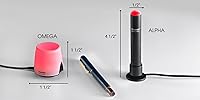
  • Dimensions: The unit measures 0.5″ in diameter and stands 4.5″ tall, making it one of the more compact presence indicators available for desk use.
  • Weight: At 1.6 ounces, the device is light enough that the magnetic mount holds it securely without any risk of the adhesive plate pulling away from a surface.
  • Power Source: The device draws power entirely over USB, requiring no external adapter or batteries — it runs directly from a computer or USB hub port.
  • Wattage: Power consumption is rated at 5 watts, which is low enough to run continuously throughout a full workday without any meaningful impact on host device power.
  • Light Type: Illumination is provided by an LED light source, which offers consistent brightness, long operational life, and low heat output during extended use.
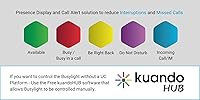
  • Light Colors: Green and red are the baseline availability colors; additional status colors (such as yellow, purple, and flashing variants) are available depending on which UC platform is connected.
  • Mounting System: The device uses a magnetic mount paired with an adhesive-backed metal plate that can be attached to a monitor bezel, cubicle wall, or flat desk surface.
  • Ringtones: Eight built-in ringtones are available for call and chat alert notifications, with volume and mute settings managed entirely through the companion software.
  • Control Method: All settings — including brightness, ringer volume, mute, and platform configuration — are managed through the free kuandoHUB desktop software, with no physical buttons on the device itself.
  • Compatible Platforms: Officially supported UC platforms include Microsoft Teams, Zoom, Webex, RingCentral, Cisco Jabber, Avaya One-X Communicator, Avaya IX Workplace, and Skype for Business, among others.
  • Calendar Integration: Via kuandoHUB, the device integrates with Microsoft Outlook to automatically trigger a busy status when a calendar-scheduled meeting begins, requiring no manual input from the user.
  • Body Material: The housing is constructed from plastic with a polished finish; it is designed for functional desk use rather than premium aesthetics.
  • Usage Environment: The device is rated for indoor use only and carries no water resistance rating, making it unsuitable for workshop, warehouse, or any moisture-prone environments.
  • Connectivity: The device connects via a fixed USB cable and is not cordless; cable length should be considered when planning desk placement relative to available USB ports.
  • Model Variant: This is the Alpha model, which features a round form factor; it is distinct from other Busylight form factors such as the Omega, which uses a flat bar design.
  • Voltage: Operating voltage is 5 volts, consistent with standard USB power delivery and compatible with any USB 2.0 or higher port.
  • Companion Software: The kuandoHUB software is free to download and required for full functionality; it handles platform authentication, multi-platform management, and all device configuration tasks.
  • Manufacturer: The device is manufactured by Plenom, a Danish company that developed the Busylight product line and has maintained it commercially since the product launched in 2012.
  • In the Box: The package includes the Busylight Alpha unit and one adhesive-backed metal plate for magnetic mounting; no printed setup guide beyond basic quick-start documentation is included.
  • Model Number: The official item model number is 15306, which can be used to verify firmware compatibility and locate the correct software version on the manufacturer support pages.

Related Reviews

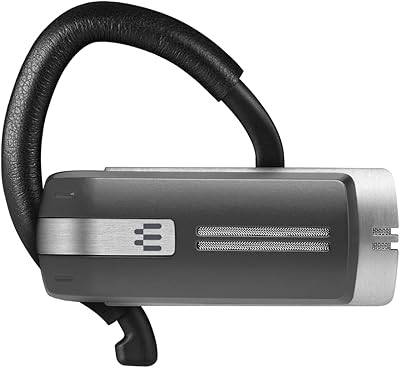
Sennheiser Presence Grey UC
82%
88%
Microphone Quality
83%
Call Clarity & Audio Output
86%
Comfort & Wearability
74%
Dual Device Connectivity
91%
Battery Life
More
GoveeLife H5127 mmWave Presence Sensor
76%
88%
Presence Detection Accuracy
81%
False Positive Rate
71%
App & Automation Depth
74%
Installation & Mounting
66%
Ecosystem Compatibility
More
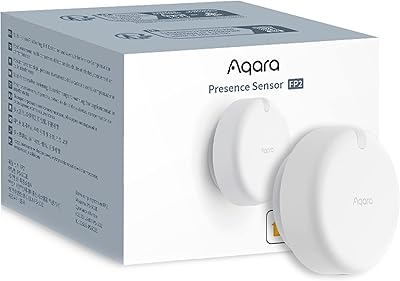
Aqara FP2 mmWave Presence Sensor
74%
91%
Presence Detection Accuracy
83%
Zone Configuration Flexibility
88%
Platform Compatibility
54%
Setup & App Experience
61%
Wi-Fi Connectivity Stability
More
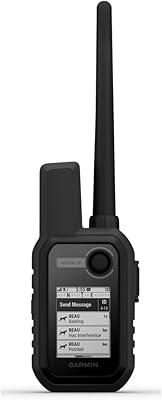
Garmin Alpha 10 Handheld
86%
93%
Tracking Accuracy
89%
Battery Life
91%
Range/Connectivity
87%
Ease of Use
85%
Build Quality/Durability
More
Aqara FP1E mmWave Presence Sensor
76%
88%
Presence Detection Accuracy
83%
False Alarm Reduction
77%
Setup & Installation
81%
Ecosystem Compatibility
52%
Hub Dependency & Total Cost
More
TUMI Alpha 3 Brief Pack
80%
93%
Build Quality
88%
Organizational Layout
91%
Laptop Protection
79%
Carry Comfort
86%
Travel Functionality
More
PSB Alpha P5
PSB Alpha P5
82%
91%
Sound Clarity & Detail
88%
Soundstage & Imaging
72%
Bass Performance
86%
Treble Quality
89%
Midrange Accuracy
More
Jabra Stealth UC Bluetooth Headset
84%
89%
Sound Quality
90%
Comfort & Fit
76%
Battery Life
85%
Noise Cancellation
80%
Voice Control Functionality
More
Sony Alpha 6700
Sony Alpha 6700
82%
93%
Autofocus Performance
91%
Video Quality
89%
Image Quality & Sensor
86%
Image Stabilization
58%
Battery Life
More
Shokz OpenComm2 UC 2025
81%
93%
All-Day Comfort
88%
Call & Mic Quality
91%
Wireless Connectivity & Dongle Stability
86%
Battery Life & Charging
67%
Bone Conduction Audio Quality
More

FAQ

It works automatically once you have installed the kuandoHUB software and connected your Teams account through it. After that, the light updates on its own as your Teams status changes — available, busy, in a meeting, do not disturb — without you touching anything.

It is honest to say that setup is the trickiest part of owning this device. You need to download the free kuandoHUB software, install it, then link your UC accounts through it. For a single platform like Teams or Zoom it is manageable, but if you want multiple platforms running together, it takes more patience. The online documentation helps, but the interface is not the most intuitive around.

Yes, kuandoHUB supports running multiple UC platforms simultaneously so the light can reflect whichever one currently marks you as busy or in a call. In practice this works well for most users, though a small number have reported occasional conflicts when both platforms are active at the same moment.

It makes actual audible sound through a small built-in speaker — there are 8 ringtone options and you can control the volume through the software. This is genuinely useful if you step away from your desk without a headset on and your computer speakers are muted, since the Busylight Alpha will ring independently when a call or chat comes in.

Webex and RingCentral are both officially supported platforms, not just Teams. The Kuando Busylight UC Alpha Presence Indicator was built from the ground up for multi-platform environments, so it is not Teams-exclusive — it just happens that Teams users represent the largest share of its user base.
You stick the small metal plate to whatever surface you want (a monitor bezel, cubicle wall, desk edge), and the light snaps magnetically onto that plate. The hold is strong enough to stay put through normal desk bumps. The main thing to know is that the adhesive plate is a one-time placement — moving it later can leave residue or minor marks on the surface.

Yes, if you enable the Outlook calendar integration through kuandoHUB, the light will flip to busy when your scheduled meeting time arrives, regardless of whether you have joined the call. It is a feature that takes a few extra steps to configure but works reliably once set up for users in Microsoft-centric environments.

Probably not, unless you frequently miss calls because your headset is off or you are away from your desk. The core value of this desk presence light is the visible signal it gives to people around you. Without anyone nearby to see it, you lose the main reason to own one.

It can, temporarily. Major UC platform updates occasionally cause the sync to stop working until kuandoHUB pushes a compatible software update on their end. This is a known and recurring frustration for some users. The manufacturer has generally kept up with patches, but there can be a window of a few days where the light behaves unexpectedly after a major platform change.

In normal indoor lighting conditions it is clearly visible from across a typical room or open-plan office floor, which is exactly the use case it is designed for. In very brightly lit spaces or next to a sunlit window, the visibility can diminish somewhat, but for most standard office and home office environments the brightness is more than adequate.

Where to Buy